buttons Seat Alhambra 2012 Owner's Manual
[x] Cancel search | Manufacturer: SEAT, Model Year: 2012, Model line: Alhambra, Model: Seat Alhambra 2012Pages: 388, PDF Size: 6.72 MB
Page 55 of 388
53
Cockpit
Operating instructions Cockpit
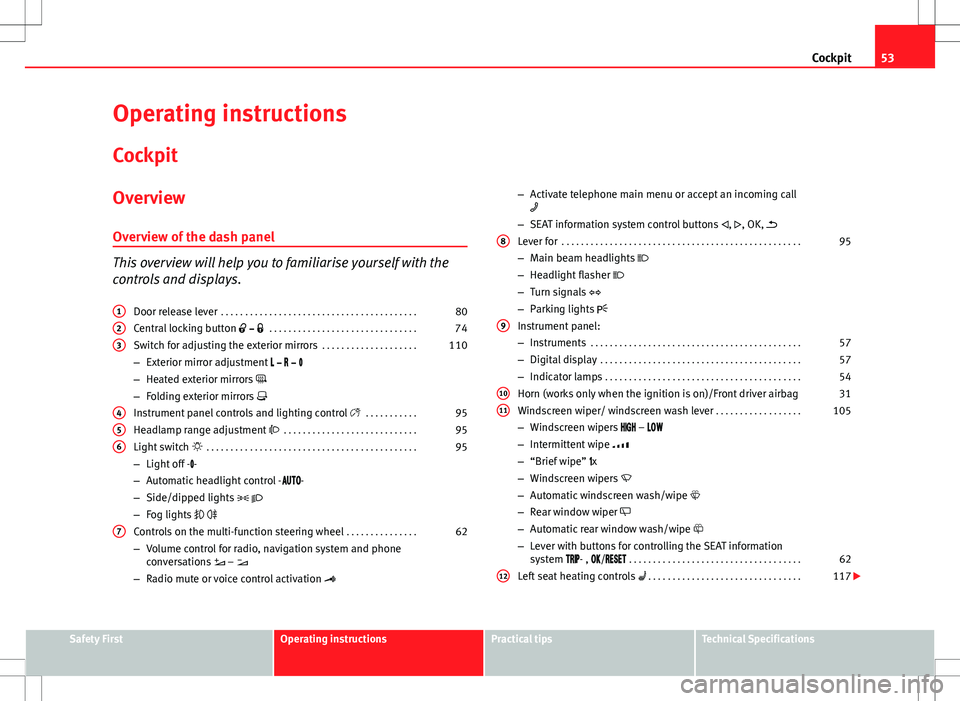
Overview Overview of the dash panel
This overview will help you to familiarise yourself with the
controls and displays. Door release lever . . . . . . . . . . . . . . . . . . . . . . . . . . . . . . . . . . . . . . . . . 80
Central locking button . . . . . . . . . . . . . . . . . . . . . . . . . . . . . . . 74
Switch for adjusting the exterior mirrors . . . . . . . . . . . . . . . . . . . .110
– Exterior mirror adjustment
– Heated exterior mirrors
– Folding exterior mirrors
Instrument panel controls and lighting control . . . . . . . . . . .95
Headlamp range adjustment . . . . . . . . . . . . . . . . . . . . . . . . . . . . 95
Light switch . . . . . . . . . . . . . . . . . . . . . . . . . . . . . . . . . . . . . . . . . . . . 95
– Light off - -
– Automatic headlight control - -
– Side/dipped lights
– Fog lights
Controls on the multi-function steering wheel . . . . . . . . . . . . . . .62
– Volume control for radio, navigation system and phone
conversations –
– Radio mute or voice control activation
1
23
456
7
–
Activate telephone main menu or accept an incoming call
– SEAT information system control buttons , , OK,
Lever for . . . . . . . . . . . . . . . . . . . . . . . . . . . . . . . . . . . . . . . . . . . . . . . . . . 95
– Main beam headlights
– Headlight flasher
– Turn signals
– Parking lights
Instrument panel:
– Instruments . . . . . . . . . . . . . . . . . . . . . . . . . . . . . . . . . . . . . . . . . . . . 57
– Digital display . . . . . . . . . . . . . . . . . . . . . . . . . . . . . . . . . . . . . . . . . . 57
– Indicator lamps . . . . . . . . . . . . . . . . . . . . . . . . . . . . . . . . . . . . . . . . . 54
Horn (works only when the ignition is on)/Front driver airbag 31
Windscreen wiper/ windscreen wash lever . . . . . . . . . . . . . . . . . .105
– Windscreen wipers –
– Intermittent wipe
– “Brief wipe” x
– Windscreen wipers
– Automatic windscreen wash/wipe
– Rear window wiper
– Automatic rear window wash/wipe
– Lever with buttons for controlling the SEAT information
system - , / . . . . . . . . . . . . . . . . . . . . . . . . . . . . . . . . . . . . 62
Left seat heating controls . . . . . . . . . . . . . . . . . . . . . . . . . . . . . . . . 117
8
9
1011
12
Safety FirstOperating instructionsPractical tipsTechnical Specifications
Page 64 of 388
62Cockpit
The service interval display is reset
If the service was not carried out by a Technical Service, the display can be
reset as follows:
In vehicles with text messages:Select the Settings menu.In the submenu Service, select the option Reset.Confirm with OK when requested to do so by the system.
In vehicles without text messages:Switch the ignition off.Press and hold the 0.0 / SET button.Switch the ignition back on.Release the 0.0 / SET button and, press for the next 20 seconds.
Do not reset the indicator to zero between two intervals, otherwise the dis-
play will be incorrect.
If, while the LongLife service is valid, the service interval display is reset to
zero, the “service will be activated by time or mileage”. The service interval
is no longer calculated individually
⇒ Booklet Maintenance Programme.
Note
● The service message disappears after a few seconds, when the engine is
started or when OK
is pressed.
● In vehicles with the LongLife system in which the battery has been dis-
connected for a long period of time, it is not possible to calculate the date
of the next service. Therefore the service interval display may not be correct.
In this case, please check the maximum permitted service intervals ⇒ Book-
let Maintenance Programme. SEAT information system
Introduction
With the ignition switched on, it is possible to read the different functions of
the display by scrolling through the menus.
In vehicles with a multifunction steering wheel, there are no buttons on the
windscreen wiper lever. The multifunction display can only be controlled
from the buttons on the multifunction steering wheel.
The number of menus displayed on the instrument panel will vary according
to the vehicle electronics and equipment.
A specialised dealer will be able to programme or modify additional func-
tions, according to the vehicle equipment. SEAT recommends visiting a
Technical Service.
Some menu options can only be read when the vehicle is at a standstill.
As long as a priority 1 warning is displayed, it will not be possible to read
the menus. To display the menus, confirm the warning by pressing OK
.
Additional information and warnings:
● Exterior mirrors ⇒ page 110
● Auxiliary heating ⇒ page 165
WARNING
Any distraction may lead to an accident, with the risk of injury.
● Do not read the instrument panel menus when driving.
Page 67 of 388
65
Cockpit
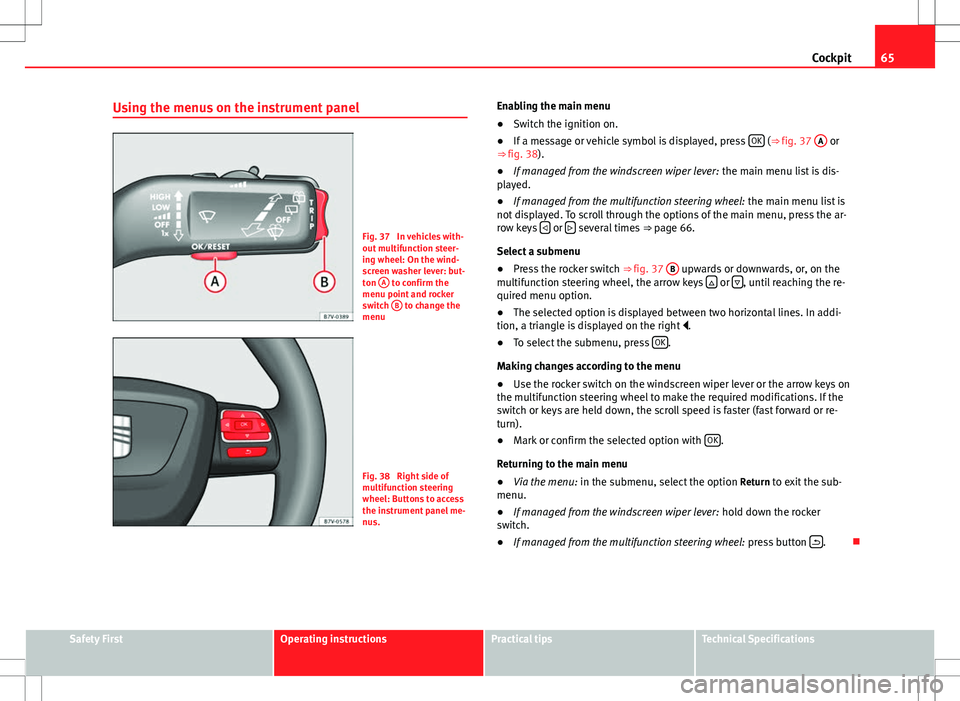
Using the menus on the instrument panel
Fig. 37 In vehicles with-
out multifunction steer-
ing wheel: On the wind-
screen washer lever: but-
ton A
to confirm the
menu point and rocker
switch B
to change the
menu
Fig. 38 Right side of
multifunction steering
wheel: Buttons to access
the instrument panel me-
nus. Enabling the main menu
●
Switch the ignition on.
● If a message or vehicle symbol is displayed, press OK
(⇒
fig. 37 A or
⇒ fig. 38).
● If managed from the windscreen wiper lever: the main menu list is dis-
played.
● If managed from the multifunction steering wheel: the main menu list is
not displayed. To scroll through the options of the main menu, press the ar-
row keys
or several times
⇒ page 66.
Select a submenu
● Press the rocker switch ⇒ fig. 37 B
upwards or downwards, or, on the
multifunction steering wheel, the arrow keys or , until reaching the re-
quired menu option.
● The selected option is displayed between two horizontal lines. In addi-
tion, a triangle is displayed on the right .
● To select the submenu, press OK
.
Making changes according to the menu
● Use the rocker switch on the windscreen wiper lever or the arrow keys on
the multifunction steering wheel to make the required modifications. If the
switch or keys are held down, the scroll speed is faster (fast forward or re-
turn).
● Mark or confirm the selected option with OK
.
Returning to the main menu
● Via the menu: in the submenu, select the option Return to exit the sub-
menu.
● If managed from the windscreen wiper lever: hold down the rocker
switch.
● If managed from the multifunction steering wheel: press button
.
Safety FirstOperating instructionsPractical tipsTechnical Specifications
Page 69 of 388
67
Cockpit
MenuFunctionAverage fuel con-
sumptionWhen the ignition is switched on, the average con-
sumption (in l/100 km or in mpg) is displayed after
the vehicle has moved approximately 100 metres
(328 feet). Otherwise horizontal lines are displayed.
The value shown is updated approximately every 5
seconds.
Distance to emptyApproximate distance in km (or miles) that can still
be travelled with the fuel remaining in the tank, as-
suming the same style of driving is maintained. This
is calculated using the current fuel consumption.
Distance coveredDistance travelled, after ignition is switched on, in
km (or miles).
Average speedAfter the ignition is switched on, the average speed
will be shown after a distance of approximately 100
metres (328 feet) has been travelled. Otherwise hori-
zontal lines are displayed. The value shown is upda-
ted approximately every 5 seconds.
Digital display of
speedCurrent speed displayed digitally.
Oil temperature digi-
tal displayUpdated engine oil temperature digital display
Speed warning to ---
km/hIf the stored speed is exceeded (between 30 -
250 km/h, or 18 - 155 mph), an audible warning is
given together with a visual warning.
Changing between display modes
● In vehicles without multifunction steering wheel: press the lever.
● Vehicles with a multifunction steering wheel: press
or .
Storing a speed for the speed warning
● Select the display Speed warning at --- km/h .
● Press OK
to store the current speed and switch off the warning. ●
In addition, set the required speed by pressing the rocker switch on the
windscreen wiper lever or buttons
or on the multifunction steering
wheel for 5 seconds. Next, press OK again or wait a few seconds. The
speed is stored and the warning activated.
● To switch off , press OK
. The stored speed is deleted.
Manually erasing memory 1 or 2
● Select the memory to be erased.
● Press and hold OK
for approximately two seconds.
Personalising the displays
It is possible to select which of the displays in the multifunction display you
wish to see on the instrument panel in the settings menu. The units of
measurement can also be modified ⇒ page 67.
Configuration Menu
Configuration MenuFunction
Multifunction
display dataConfiguration of the multifunction display data that you
wish to see on the instrument panel display ⇒ page 66.
CompassChanging the magnetic region and calibration of the com-
pass. To calibrate the compass, please follow the instruc-
tions given on the instrument panel display.
ConvenienceChanging vehicle convenience functions ⇒ page 68.Lights & visi-
bilityConfiguration of vehicle lighting ⇒ page 69.
TimeChanging the hours and minutes of the clock and the navi-
gation system. The time can be set here and the choice
can be made between the 24 hour and 12 hour display.
The S in the upper part of the display indicates that the
clock is set to summer time.
Safety FirstOperating instructionsPractical tipsTechnical Specifications
Page 78 of 388
76Unlocking and locking
Locking and unlocking the vehicle from the outside
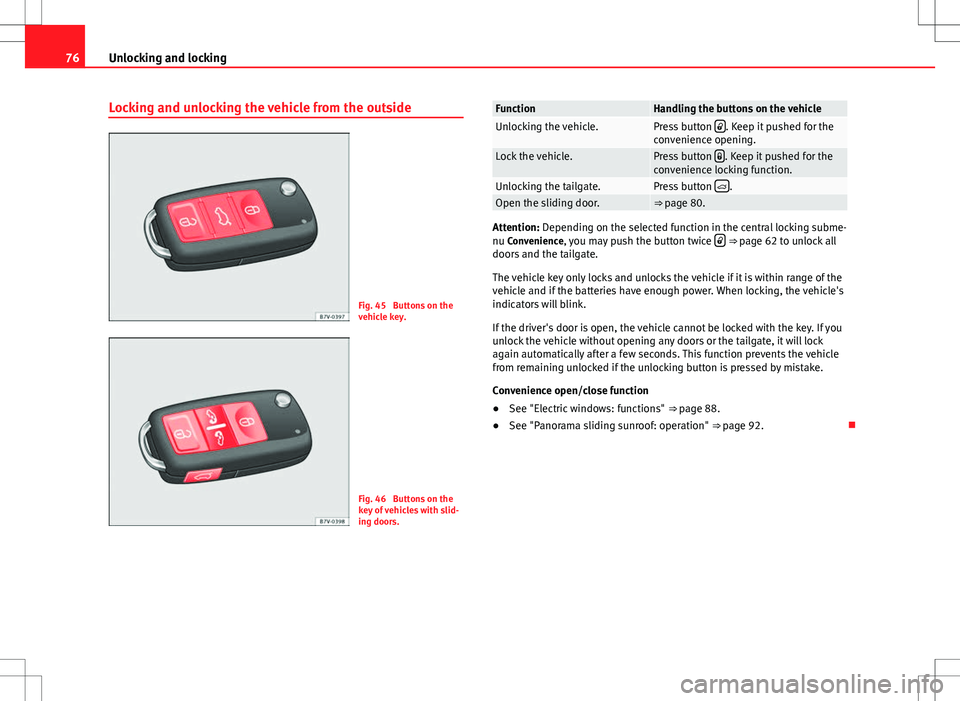
Fig. 45 Buttons on the
vehicle key.
Fig. 46 Buttons on the
key of vehicles with slid-
ing doors.
FunctionHandling the buttons on the vehicleUnlocking the vehicle.Press button . Keep it pushed for the
convenience opening.
Lock the vehicle.Press button . Keep it pushed for the
convenience locking function.
Unlocking the tailgate.Press button .Open the sliding door.⇒ page 80.
Attention: Depending on the selected function in the central locking subme-
nu Convenience, you may push the button twice ⇒
page 62 to unlock all
doors and the tailgate.
The vehicle key only locks and unlocks the vehicle if it is within range of the
vehicle and if the batteries have enough power. When locking, the vehicle's
indicators will blink.
If the driver's door is open, the vehicle cannot be locked with the key. If you
unlock the vehicle without opening any doors or the tailgate, it will lock
again automatically after a few seconds. This function prevents the vehicle
from remaining unlocked if the unlocking button is pressed by mistake.
Convenience open/close function
● See "Electric windows: functions" ⇒ page 88.
● See "Panorama sliding sunroof: operation" ⇒ page 92.
Page 85 of 388

83
Unlocking and locking
To close the sliding door without the rollback anti-trap function
● Turn off the ignition and turn it on again.
● Press and hold the
⇒
fig. 50 button. The sliding door closes with full
force.
WARNING
Closing the electric windows without the anti-trap function can cause se-
rious injury.
● Always close the sliding doors carefully.
● Nobody should ever get in the way of the electric sliding doors, espe-
cially when closing without the anti-trap function.
● The anti-trap function does not prevent fingers or other parts of the
body getting pinched against the window frame and causing injury.
Electric child safety lock
Fig. 51 In the driver
door: electric child safety
locks buttons. The electric child safety lock avoids opening and locking of the sliding door
and its electric windows from the inside so that children cannot accidentally
open the door while the vehicle is being driven. Using the left-hand side
⇒ fig. 51
1
or right-hand side 2 button, the child safety lock is activated
on the left hand side or right-hand side respectively.
Turning on and off the electric child safety
FunctionNecessary operationsTo switch system on:Press the button ⇒ fig. 51 1 o 2.The system switches
off:Press the button again.
The yellow indicator
indicates that the function is on for the correspond-
ing button.
WARNING
When the electric child safety function is activated, the sliding door can
be opened from the outside only.
● Never leave children or disabled people alone in the vehicle if the
doors are to be locked. Therefore, passengers will be locked inside the
vehicle. They could be trapped in the car in an emergency and will not be
able to get themselves to safety. Individuals locked in the vehicle can be
exposed to very high or very low temperatures.
● Depending on the time of the year, temperatures inside a locked and
closed vehicle can be extremely high or extremely low resulting in seri-
ous injuries and illness or even death, particularly for young children.
Safety FirstOperating instructionsPractical tipsTechnical Specifications
Page 89 of 388

87
Unlocking and locking
Opening the tailgate electronically
Fig. 55 Button with tail-
gate open.
Opening the tailgate
● Press and hold the
button on the vehicle key until the tailgate opens
automatically.
● ALTERNATIVELY: Press and hold the
button on the centre console for
approximately 1 second ⇒ fig. 52.
● ALTERNATIVELY: Press the ⇒ fig. 53 tailgate button (arrow).
In case of difficulty or obstruction, automatic opening of the tailgate is inter-
rupted.
Electronically opening the tailgate does not work when a trailer is electrical-
ly connected and hitched to a factory fitted trailer hitch ⇒ page 237.
The tailgate can be opened manually by applying more force. Closing the tailgate
●
Press and hold the
button on the vehicle key for approximately 1
second.
● ALTERNATIVELY: Press and hold the
button on the centre console for
approximately 1 second ⇒ fig. 52.
● ALTERNATIVELY: Press the ⇒ fig. 53 tailgate button (arrow).
● Press the button
on the open tailgate ⇒
fig. 55 ⇒ .
● Manually push the tailgate down to close it.
The tailgate will move down to the closed position to close and lock itself
automatically using the power-close feature ⇒
.
In case of difficulty or obstruction, automatic closing of the tailgate is inter-
rupted and it will open slightly.
Check why the tailgate could not close.
Attempt to close it once more.
Interrupting the opening and closing process
Tailgate opening and closing can be stopped by pressing one of the
but-
tons. Each time one of the buttons is pressed, the tailgate moves to its
initial position.
Then, it can be opened or closed by hand. To do this, apply a little more
force.
Memorising the opening angle
The tailgate must be at least half open to memorise an opening angle.
● Stop automatic opening in the opening position required ⇒ page 87.
● Hold down the button ⇒ fig. 55 with the tailgate open for at least three
seconds. The opening angle is memorised.
Memorisation is confirmed by blinking of the hazard warning lights and a
sound signal.
Safety FirstOperating instructionsPractical tipsTechnical Specifications
Page 91 of 388

89
Unlocking and locking
WARNING (Continued)
● Always take all the keys with you whenever you leave the vehicle. Af-
ter turning off the ignition, the windows can be opened and closed for a
short time using the buttons on the door as long as the driver's door or
passenger side door is not open.
● When transporting children in the rear seats, always deactivate the
rear electric windows with the child safety lock so that they cannot be
opened and closed.
Opening and closing the electric windows
Fig. 56 In the driver
door: Buttons for front
and rear electric windows
and child safety lock.
Buttons on the driver door
Legend for the fig. 56: For the front electric windows.
For the sliding door electric windows.
To lock the sliding doors and their windows.
1
23
Opening and closing the windows
FunctionNecessary operationsOpening:Press button
.Closing:Push the button .To stop the one
touch function:Press or pull on the corresponding window button.
Press the button for the electronic child safety
lock to deactivate the controls for the windows on
the sliding doors and to lock these doors ⇒ page 80.
The button will light up.
After turning off the ignition, the windows can be opened and closed for a
short time using the buttons on the door as long as the driver's door or pas-
senger side door is not open. When the key is removed from the ignition
and the driver's door is open, all of the electric windows can be opened or
closed using the corresponding button on the driver's door. After a few sec-
onds, the convenience opening or closing function will begin ⇒ page 90.
Electric windows: functions
One-touch opening and closing
The one-touch automatic opening and closing is used to open or close the
windows completely. It will not be necessary to hold the button of the corre-
sponding electric window.
For the one-touch closing function: pull up on the button for the window to
the second position.
For the one-touch opening function: Push down the button for the window
to the second position.
To stop the one touch function: Push or pull on the button of the corre-
sponding window.
Safety FirstOperating instructionsPractical tipsTechnical Specifications
Page 92 of 388
90Unlocking and locking
Restoring one-touch opening and closing
The one-touch opening and closing function is not active after the vehicle
battery has been disconnected or is flat and will have to be reset.
● Close all windows and doors.
● Pull the button of the corresponding window and hold it for one second
in this position.
● Release the button and pull upwards and hold again. The one-touch
function is now ready for operation.
The automatic one-touch electric windows can be reinitialised individually
or several at a time.
Convenience opening and closing function
The electric windows can be opened or closed from outside using the vehi-
cle key:
● Hold in the unlocking for locking button for the vehicle. All windows
which function electrically will be either opened or closed.
● To interrupt the function, release the locking or unlocking button.
During convenience closing, first the windows and then the sliding sunroof
will be closed.
In the Configuration - convenience menu, there are different settings for oper- ating the windows ⇒ page 62.
WARNING
Careless use of the electric windows can cause serious injury.
● Only operate the electric windows when nobody is in the way.
● Never leave children or disabled people alone in the vehicle if the
doors are to be locked. The windows cannot be opened in case of an
emergency.
WARNING (Continued)
● Always take all the keys with you whenever you leave the vehicle. Af-
ter turning off the ignition, the windows can be opened and closed for a
short time using the buttons on the door as long as the driver's door or
passenger side door is not open.
● When transporting children in the rear seats, always deactivate the
rear electric windows with the child safety lock so that they cannot be
opened and closed.
Note
The one-touch function and roll-back function will not work if there is a mal-
function in the electric windows. Visit a specialised workshop.
Electric Windows anti-trap function
The anti-trap function of the electric windows can reduce the risk of injury
when opening and closing the electric windows ⇒ . If a window is not
able to close because it is stiff or because of an obstruction, it will automati-
cally open again.
● Check why the window does not close.
● Attempt to close the window again.
● If you try within the following 10 seconds and the window closes with
difficulty or there is an obstruction once again, the one-touch closing will
stop working for 10 seconds.
● If the window is still obstructed, it will stop at the corresponding posi-
tion. When the button is operated within 10 seconds, the window will close
without the anti-trap function ⇒
.
Page 120 of 388
118Seats and storage compartments
FunctionAction ⇒ fig. 78To switch system on:Press button . Seat heating is switched on fully.Adjusting the heating
output:Keep pressing button until the required intensi-
ty is set.
The system switches
off:Keep pressing button until all of the lights are
switched off ⇒ fig. 78.
WARNING
People whose pain and temperature threshold has been affected by some
kind of medicine, paraplegia or chronic illness (e.g. diabetes) may sus-
tain burns to the back, buttocks and legs from use of the seat heating
that may lead to a long healing process or that may never completely
heal. Seek medical advice if you have doubts regarding your health.
● People with a limit pain and temperature threshold must never use
seat heating.
CAUTION
● To avoid damaging the heating elements of the seat heating, please do
not kneel on the seat or apply sharp pressure at a single point to the seat
cushion and backrest.
● Liquids, sharp objects and insulating materials on the seat could dam-
age the seat heating.
● In the event of smells, switch off the seat heating immediately and have
the unit inspected by a Technical Service.
For the sake of the environment
The seat heating should remain on only when needed. Otherwise, it is an
unnecessary fuel waste. Seat with position memory*
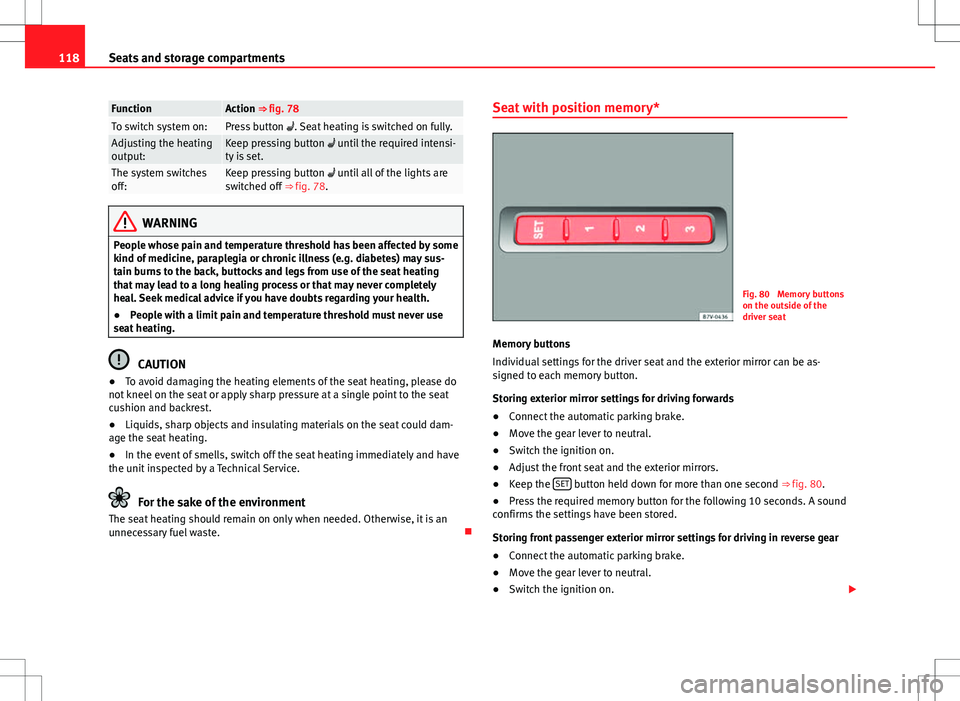
Fig. 80 Memory buttons
on the outside of the
driver seat
Memory buttons
Individual settings for the driver seat and the exterior mirror can be as-
signed to each memory button.
Storing exterior mirror settings for driving forwards
● Connect the automatic parking brake.
● Move the gear lever to neutral.
● Switch the ignition on.
● Adjust the front seat and the exterior mirrors.
● Keep the SET
button held down for more than one second ⇒ fig. 80.
● Press the required memory button for the following 10 seconds. A sound
confirms the settings have been stored.
Storing front passenger exterior mirror settings for driving in reverse gear
● Connect the automatic parking brake.
● Move the gear lever to neutral.
● Switch the ignition on.