fuel Seat Alhambra 2013 User Guide
[x] Cancel search | Manufacturer: SEAT, Model Year: 2013, Model line: Alhambra, Model: Seat Alhambra 2013Pages: 387, PDF Size: 6.13 MB
Page 65 of 387
63
Cockpit
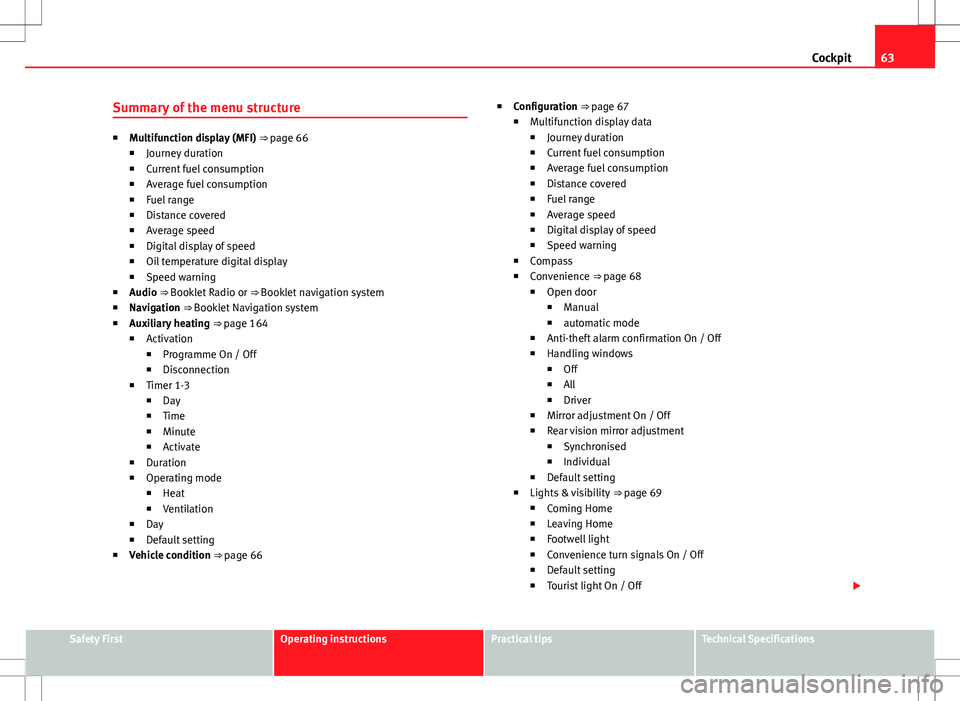
Summary of the menu structure
■ Multifunction display (MFI) ⇒ page 66
■ Journey duration
■ Current fuel consumption
■ Average fuel consumption
■ Fuel range
■ Distance covered
■ Average speed
■ Digital display of speed
■ Oil temperature digital display
■ Speed warning
■ Audio ⇒ Booklet Radio or ⇒ Booklet navigation system
■ Navigation ⇒ Booklet Navigation system
■ Auxiliary heating ⇒ page 164
■ Activation
■ Programme On / Off
■ Disconnection
■ Timer 1-3
■ Day
■ Time
■ Minute
■ Activate
■ Duration
■ Operating mode
■ Heat
■ Ventilation
■ Day
■ Default setting
■ Vehicle condition ⇒ page 66 ■
Configuration ⇒ page 67
■ Multifunction display data
■ Journey duration
■ Current fuel consumption
■ Average fuel consumption
■ Distance covered
■ Fuel range
■ Average speed
■ Digital display of speed
■ Speed warning
■ Compass
■ Convenience ⇒ page 68
■ Open door
■ Manual
■ automatic mode
■ Anti-theft alarm confirmation On / Off
■ Handling windows
■ Off
■ All
■ Driver
■ Mirror adjustment On / Off
■ Rear vision mirror adjustment
■ Synchronised
■ Individual
■ Default setting
■ Lights & visibility ⇒ page 69
■ Coming Home
■ Leaving Home
■ Footwell light
■ Convenience turn signals On / Off
■ Default setting
■ Tourist light On / Off
Safety FirstOperating instructionsPractical tipsTechnical Specifications
Page 68 of 387
66Cockpit
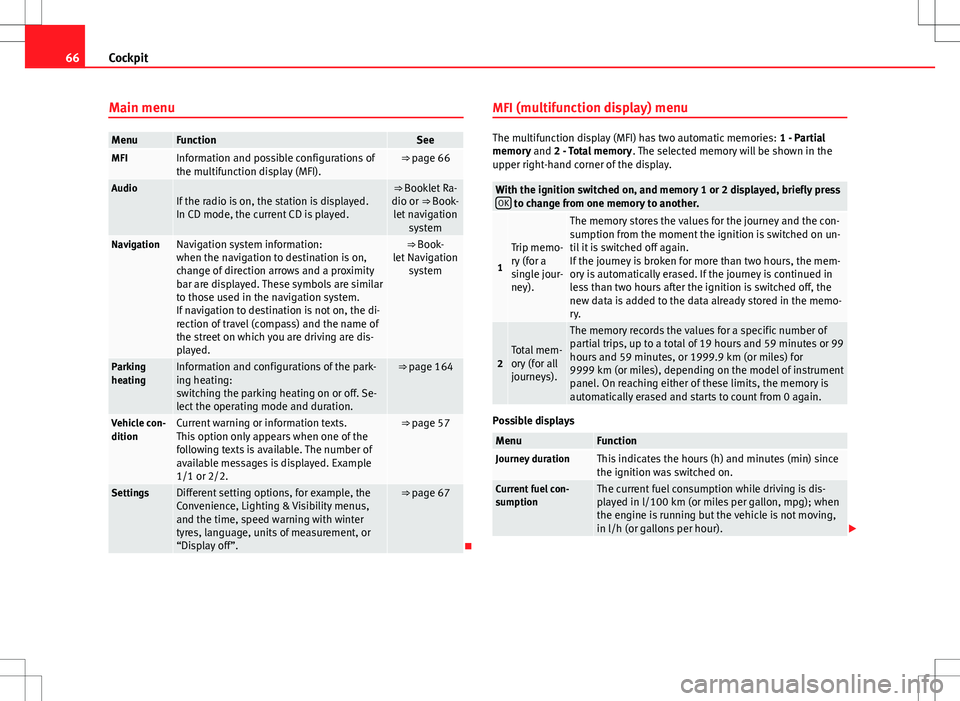
Main menu
MenuFunctionSeeMFIInformation and possible configurations of
the multifunction display (MFI).⇒ page 66
AudioIf the radio is on, the station is displayed.
In CD mode, the current CD is played.⇒ Booklet Ra-
dio or ⇒ Book- let navigation system
NavigationNavigation system information:
when the navigation to destination is on,
change of direction arrows and a proximity
bar are displayed. These symbols are similar
to those used in the navigation system.
If navigation to destination is not on, the di-
rection of travel (compass) and the name of
the street on which you are driving are dis-
played.⇒ Book-
let Navigation system
Parking
heatingInformation and configurations of the park-
ing heating:
switching the parking heating on or off. Se-
lect the operating mode and duration.⇒ page 164
Vehicle con-
ditionCurrent warning or information texts.
This option only appears when one of the
following texts is available. The number of
available messages is displayed. Example
1/1 or 2/2.⇒ page 57
SettingsDifferent setting options, for example, the
Convenience, Lighting & Visibility menus,
and the time, speed warning with winter
tyres, language, units of measurement, or
“Display off”.⇒ page 67
MFI (multifunction display) menu
The multifunction display (MFI) has two automatic memories:
1 - Partial
memory and 2 - Total memory . The selected memory will be shown in the
upper right-hand corner of the display.
With the ignition switched on, and memory 1 or 2 displayed, briefly press OK to change from one memory to another.
1
Trip memo-
ry (for a
single jour-
ney).
The memory stores the values for the journey and the con-
sumption from the moment the ignition is switched on un-
til it is switched off again.
If the journey is broken for more than two hours, the mem-
ory is automatically erased. If the journey is continued in
less than two hours after the ignition is switched off, the
new data is added to the data already stored in the memo-
ry.
2Total mem-
ory (for all
journeys).
The memory records the values for a specific number of
partial trips, up to a total of 19 hours and 59 minutes or 99
hours and 59 minutes, or 1999.9 km (or miles) for
9999 km (or miles), depending on the model of instrument
panel. On reaching either of these limits, the memory is
automatically erased and starts to count from 0 again.
Possible displays
MenuFunctionJourney durationThis indicates the hours (h) and minutes (min) since
the ignition was switched on.
Current fuel con-
sumptionThe current fuel consumption while driving is dis-
played in l/100 km (or miles per gallon, mpg); when
the engine is running but the vehicle is not moving,
in l/h (or gallons per hour).
Page 69 of 387
67
Cockpit
MenuFunctionAverage fuel con-
sumptionWhen the ignition is switched on, the average con-
sumption (in l/100 km or in mpg) is displayed after
the vehicle has moved approximately 100 metres
(328 feet). Otherwise horizontal lines are displayed.
The value shown is updated approximately every 5
seconds.
Fuel rangeApproximate distance in km (or miles) that can still
be travelled with the fuel remaining in the tank, as-
suming the same style of driving is maintained. This
is calculated using the current fuel consumption.
Distance coveredDistance travelled, after ignition is switched on, in
km (or miles).
Average speedAfter the ignition is switched on, the average speed
will be shown after a distance of approximately 100
metres (328 feet) has been travelled. Otherwise hori-
zontal lines are displayed. The value shown is upda-
ted approximately every 5 seconds.
Digital display of
speedCurrent speed displayed digitally.
Oil temperature digi-
tal displayUpdated engine oil temperature digital display
Speed warning to ---
km/hIf the stored speed is exceeded (between 30 -
250 km/h, or 18 - 155 mph), an audible warning is
given together with a visual warning.
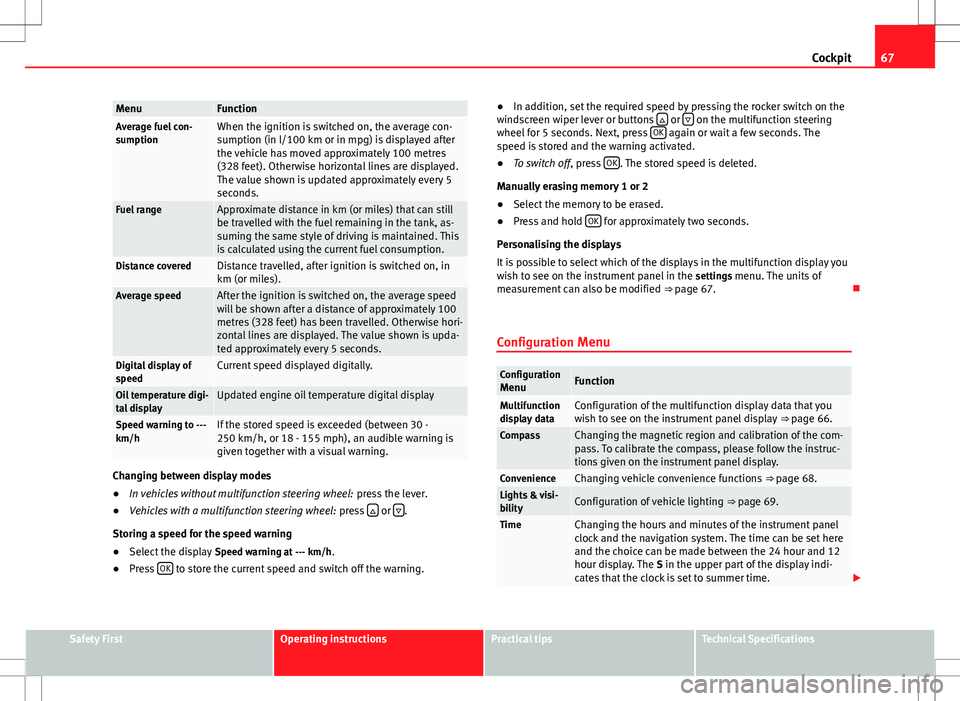
Changing between display modes
● In vehicles without multifunction steering wheel: press the lever.
● Vehicles with a multifunction steering wheel: press
or .
Storing a speed for the speed warning
● Select the display Speed warning at --- km/h.
● Press OK
to store the current speed and switch off the warning. ●
In addition, set the required speed by pressing the rocker switch on the
windscreen wiper lever or buttons
or on the multifunction steering
wheel for 5 seconds. Next, press OK again or wait a few seconds. The
speed is stored and the warning activated.
● To switch off , press OK
. The stored speed is deleted.
Manually erasing memory 1 or 2
● Select the memory to be erased.
● Press and hold OK
for approximately two seconds.
Personalising the displays
It is possible to select which of the displays in the multifunction display you
wish to see on the instrument panel in the settings menu. The units of
measurement can also be modified ⇒ page 67.
Configuration Menu
Configuration MenuFunction
Multifunction
display dataConfiguration of the multifunction display data that you
wish to see on the instrument panel display ⇒ page 66.
CompassChanging the magnetic region and calibration of the com-
pass. To calibrate the compass, please follow the instruc-
tions given on the instrument panel display.
ConvenienceChanging vehicle convenience functions ⇒ page 68.Lights & visi-
bilityConfiguration of vehicle lighting ⇒ page 69.
TimeChanging the hours and minutes of the instrument panel
clock and the navigation system. The time can be set here
and the choice can be made between the 24 hour and 12
hour display. The S in the upper part of the display indi-
cates that the clock is set to summer time.
Safety FirstOperating instructionsPractical tipsTechnical Specifications
Page 84 of 387
82Opening and closing
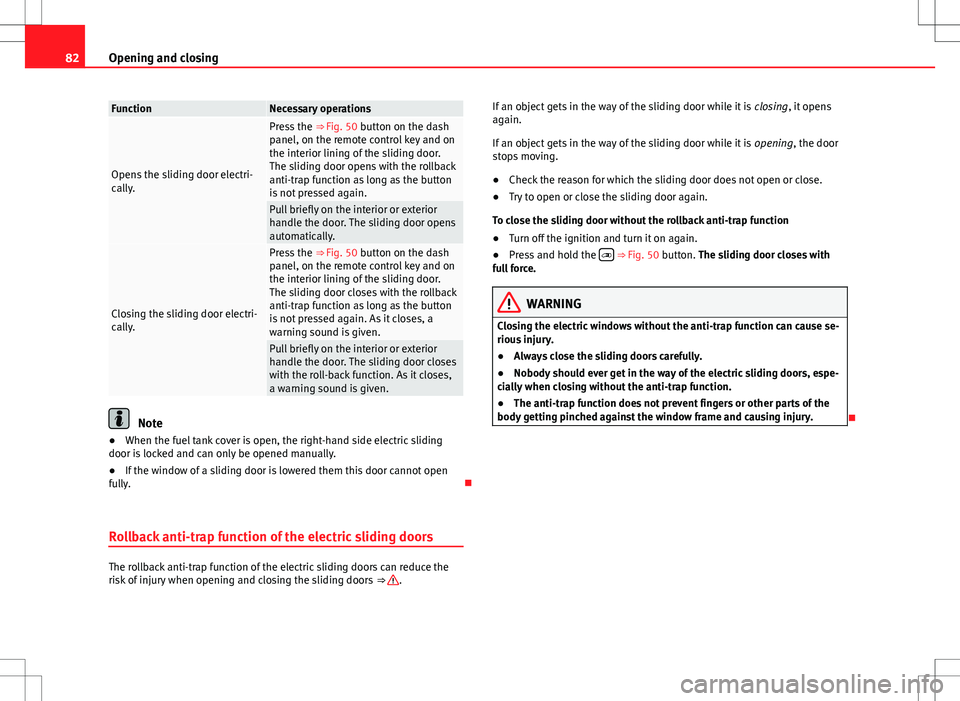
FunctionNecessary operations
Opens the sliding door electri-
cally.
Press the ⇒ Fig. 50 button on the dash
panel, on the remote control key and on
the interior lining of the sliding door.
The sliding door opens with the rollback
anti-trap function as long as the button
is not pressed again.
Pull briefly on the interior or exterior
handle the door. The sliding door opens
automatically.
Closing the sliding door electri-
cally.
Press the ⇒ Fig. 50 button on the dash
panel, on the remote control key and on
the interior lining of the sliding door.
The sliding door closes with the rollback
anti-trap function as long as the button
is not pressed again. As it closes, a
warning sound is given.
Pull briefly on the interior or exterior
handle the door. The sliding door closes
with the roll-back function. As it closes,
a warning sound is given.
Note
● When the fuel tank cover is open, the right-hand side electric sliding
door is locked and can only be opened manually.
● If the window of a sliding door is lowered them this door cannot open
fully.
Rollback anti-trap function of the electric sliding doors
The rollback anti-trap function of the electric sliding doors can reduce the
risk of injury when opening and closing the sliding doors ⇒ .If an object gets in the way of the sliding door while it is
closing, it opens
again.
If an object gets in the way of the sliding door while it is opening, the door
stops moving.
● Check the reason for which the sliding door does not open or close.
● Try to open or close the sliding door again.
To close the sliding door without the rollback anti-trap function
● Turn off the ignition and turn it on again.
● Press and hold the
⇒ Fig. 50 button. The sliding door closes with
full force.
WARNING
Closing the electric windows without the anti-trap function can cause se-
rious injury.
● Always close the sliding doors carefully.
● Nobody should ever get in the way of the electric sliding doors, espe-
cially when closing without the anti-trap function.
● The anti-trap function does not prevent fingers or other parts of the
body getting pinched against the window frame and causing injury.
Page 98 of 387
96Lights and visibility
WARNING
If the warning lamps and messages are ignored, the vehicle may stall in
traffic, or may cause accidents and severe injuries.
● Never ignore the warning lamps or text messages.
● Stop the vehicle safely as soon as possible.
● Park the vehicle at a suitable distance away from the traffic ensuring
that the exhaust system is not in contact with inflammable material, for
example, dry grass, fuel, oil, etc.
● A faulty vehicle represents a risk of accident for the driver and for oth-
er road users. If necessary, switch on the hazard warning lamps and put
out the warning triangle to advise other drivers.
CAUTION
Failure to heed the control lamps and text messages when they appear may
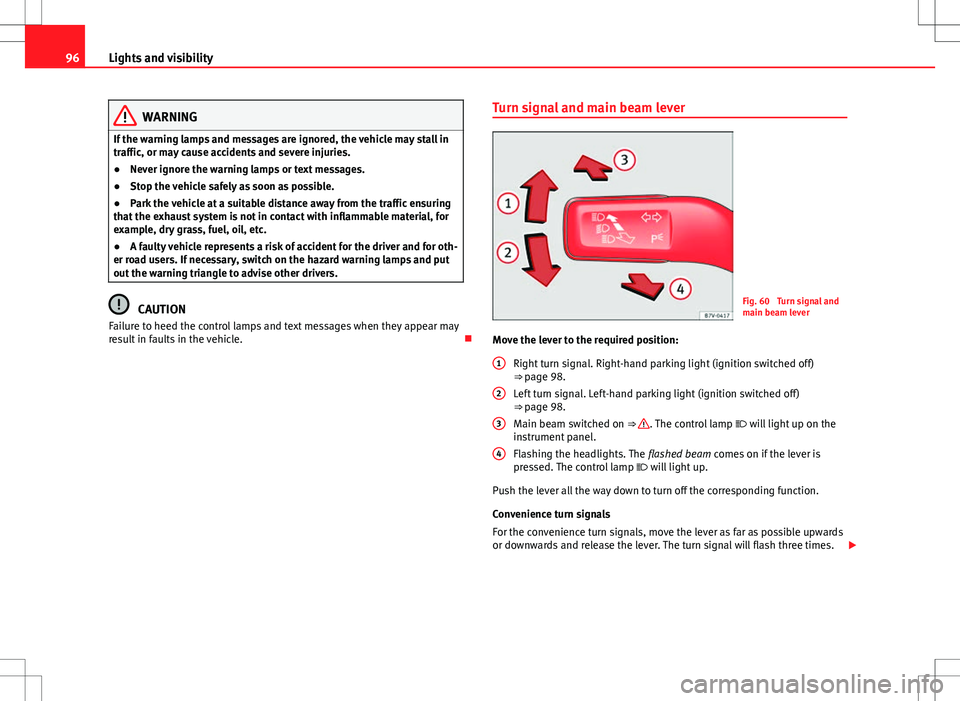
result in faults in the vehicle. Turn signal and main beam leverFig. 60 Turn signal and
main beam lever
Move the lever to the required position: Right turn signal. Right-hand parking light (ignition switched off)
⇒ page 98.
Left turn signal. Left-hand parking light (ignition switched off)
⇒ page 98.
Main beam switched on ⇒
. The control lamp will light up on the
instrument panel.
Flashing the headlights. The flashed beam comes on if the lever is
pressed. The control lamp will light up.
Push the lever all the way down to turn off the corresponding function.
Convenience turn signals
For the convenience turn signals, move the lever as far as possible upwards
or downwards and release the lever. The turn signal will flash three times.
1
2
3
4
Page 109 of 387
107
Lights and visibility
Windscreen wiper functions
Windscreen wiper performance in different situations:If the vehicle is at a stand-
still:The activated position provisionally changes
to the previous position.
During the automatic wipe:
The air conditioner comes on for approxi-
mately 30 seconds in air recirculation mode
to prevent the smell of the windscreen wash-
er fluid entering the inside the vehicle.
For the interval wipe:The intervals between wipes vary according
to the speed of the vehicle. The higher the
vehicle speed the shorter the intervals.
Heated windscreen washer jets
The heating only thaws the frozen jets, it does not thaw the water in the
washer hoses. The heated windscreen washer jets automatically adjust the
heat depending on the ambient temperature, when the ignition is switched
on.
Headlight wash/wipe system
The headlight washers/wipers clean the headlight lenses.
After the ignition is switched on, the first and every fifth time the wind-
screen washer is switched on, the headlights are also washed. Therefore,
the windscreen wiper lever should be pulled towards the steering wheel
when the dipped beam or main beam are on. Any incrusted dirt (such as in-
sects) should be cleaned regularly (e.g. when refuelling).
To ensure the headlight washers work correctly in winter, any snow which
has got into the bumper jet supports should be cleaned away. If necessary,
remove snow with an anti-icing spray.
Note
The wiper will try to wipe away any obstacles that are on the windscreen.
The wiper will stop moving if the obstacle blocks its path. Remove the ob-
stacle and switch the wiper back on again.
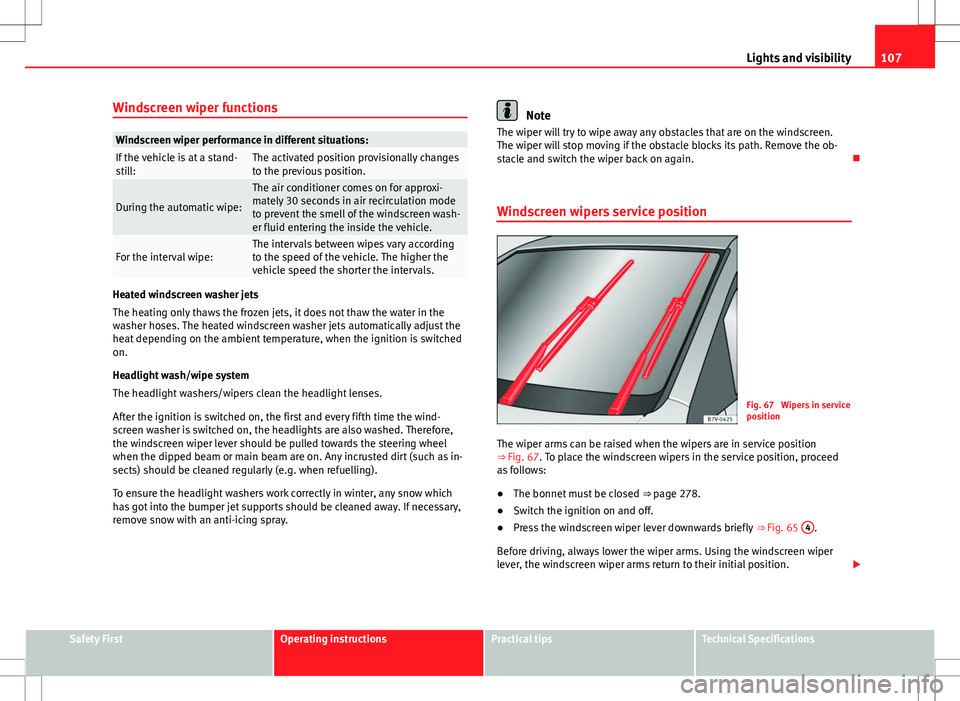
Windscreen wipers service position
Fig. 67 Wipers in service
position
The wiper arms can be raised when the wipers are in service position
⇒ Fig. 67. To place the windscreen wipers in the service position, proceed
as follows:
● The bonnet must be closed ⇒ page 278.
● Switch the ignition on and off.
● Press the windscreen wiper lever downwards briefly ⇒ Fig. 65 4
.
Before driving, always lower the wiper arms. Using the windscreen wiper
lever, the windscreen wiper arms return to their initial position.
Safety FirstOperating instructionsPractical tipsTechnical Specifications
Page 115 of 387
113
Lights and visibility
WARNING
Fold and unfold the exterior mirror, taking care to avoid injuries.
● Only fold or unfold the exterior mirror when there is no-one in the way
of the mirror.
● When moving the mirror, take care not to trap fingers between the
mirror and the mirror bracket.
WARNING
Failure to correctly estimate the distance of the vehicle behind could lead
to serious accident.
● Rear-view convex or aspheric mirrors increase the field of vision, how-
ever objects appear smaller and further away in the mirrors.
● The use of these mirrors to estimate the distance to the next vehicle
when changing lane is imprecise and could result in serious accident.
● If possible, use the rear vision mirror to estimate distances to vehi-
cles behind you or in other circumstances.
● Make sure that the rear visibility is adequate.
CAUTION
● Before entering a car wash, always ensure that the exterior mirrors are
correctly folded in.
● Electrically-folding exterior mirrors should not be folded and unfolded
mechanically as this may damage the electrical operation.
For the sake of the environment
The exterior mirror heating should be switched off when it is no longer nee-
ded. Otherwise, it is an unnecessary fuel waste.
Note
● The exterior mirror heating initially heats up with a high power, after two
minutes the heat will depend upon the ambient temperature.
● In the event of faults, the electric exterior mirrors can be adjusted man-
ually by pressing the edge of the mirror surface.
Safety FirstOperating instructionsPractical tipsTechnical Specifications
Page 120 of 387
118Seats and storage
FunctionAction ⇒ Fig. 78To switch system on:Press button . Seat heating is switched on fully.Adjusting the heating
output:Keep pressing button until the required intensi-
ty is set.
To switch system off:Keep pressing button until all of the lights are
switched off ⇒ Fig. 78.
WARNING
People whose pain and temperature threshold has been affected by some
kind of medicine, paraplegia or chronic illness (e.g. diabetes) may sus-
tain burns to the back, buttocks and legs from use of the seat heating
that may lead to a long healing process or that may never completely
heal. Seek medical advice if you have doubts regarding your health.
● People with a limit pain and temperature threshold must never use
seat heating.
CAUTION
● To avoid damaging the heating elements of the seat heating, please do
not kneel on the seat or apply sharp pressure at a single point to the seat
cushion and seat backrest.
● Liquids, sharp objects and insulating materials on the seat could dam-
age the seat heating.
● In the event of smells, switch off the seat heating immediately and have
the unit inspected by a specialised workshop.
For the sake of the environment
The seat heating should remain on only when needed. Otherwise, it is an
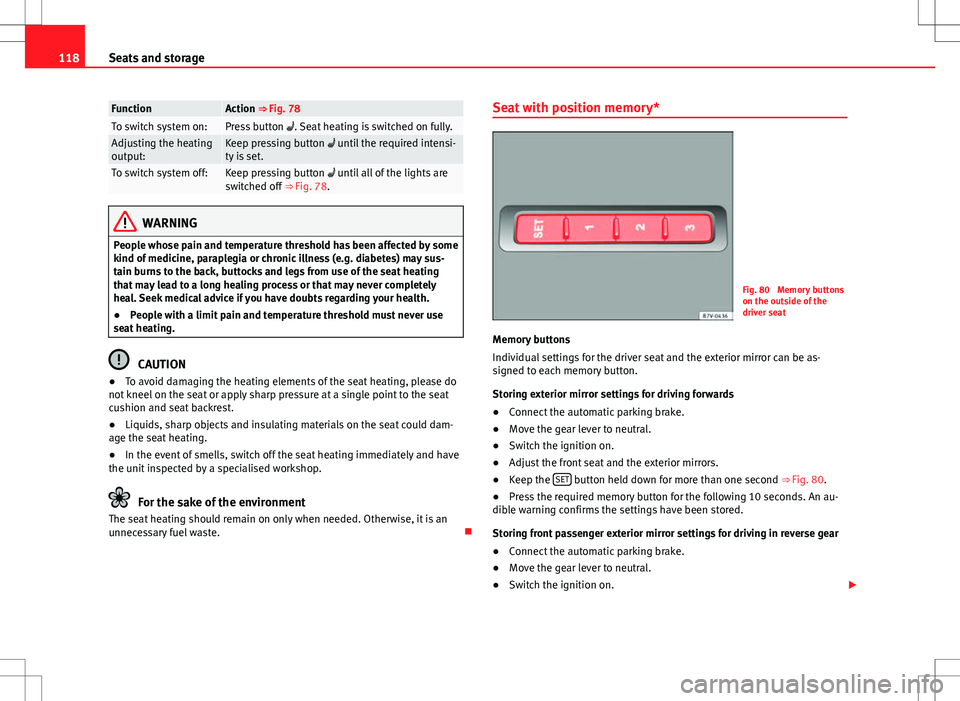
unnecessary fuel waste. Seat with position memory*
Fig. 80 Memory buttons
on the outside of the
driver seat
Memory buttons
Individual settings for the driver seat and the exterior mirror can be as-
signed to each memory button.
Storing exterior mirror settings for driving forwards
● Connect the automatic parking brake.
● Move the gear lever to neutral.
● Switch the ignition on.
● Adjust the front seat and the exterior mirrors.
● Keep the SET
button held down for more than one second
⇒ Fig. 80.
● Press the required memory button for the following 10 seconds. An au-
dible warning confirms the settings have been stored.
Storing front passenger exterior mirror settings for driving in reverse gear
● Connect the automatic parking brake.
● Move the gear lever to neutral.
● Switch the ignition on.
Page 142 of 387
140Seats and storage
● The roof antenna, the range of the panoramic sliding sunroof and the
rear lid should not be affected by the roof carrier system and the load being
transported.
● Take extra care not to let the rear lid strike the roof load when opening.
For the sake of the environment
The vehicle uses more fuel when the roof carrier system is fitted.
Securing the base supports and roof carrier system
Fig. 101 Attachment
points for the basic sup-
port and the roof carrier
system
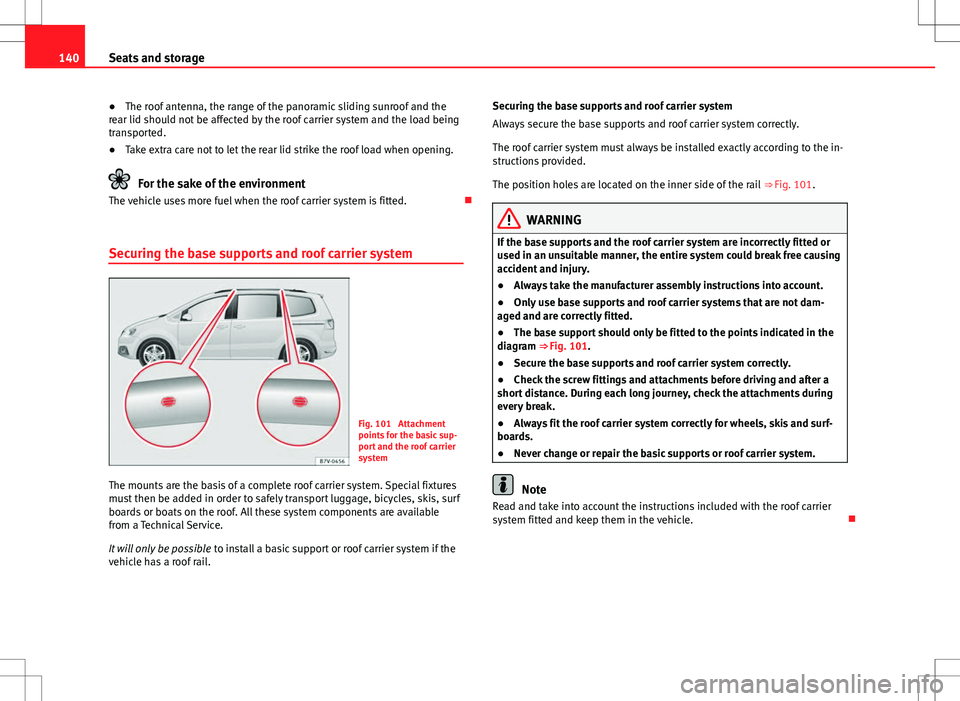
The mounts are the basis of a complete roof carrier system. Special fixtures
must then be added in order to safely transport luggage, bicycles, skis, surf
boards or boats on the roof. All these system components are available
from a Technical Service.
It will only be possible to install a basic support or roof carrier system if the
vehicle has a roof rail. Securing the base supports and roof carrier system
Always secure the base supports and roof carrier system correctly.
The roof carrier system must always be installed exactly according to the in-
structions provided.
The position holes are located on the inner side of the rail
⇒ Fig. 101.
WARNING
If the base supports and the roof carrier system are incorrectly fitted or
used in an unsuitable manner, the entire system could break free causing
accident and injury.
● Always take the manufacturer assembly instructions into account.
● Only use base supports and roof carrier systems that are not dam-
aged and are correctly fitted.
● The base support should only be fitted to the points indicated in the
diagram ⇒ Fig. 101.
● Secure the base supports and roof carrier system correctly.
● Check the screw fittings and attachments before driving and after a
short distance. During each long journey, check the attachments during
every break.
● Always fit the roof carrier system correctly for wheels, skis and surf-
boards.
● Never change or repair the basic supports or roof carrier system.
Note
Read and take into account the instructions included with the roof carrier
system fitted and keep them in the vehicle.
Page 166 of 387
164Air conditioning
Auxiliary heater* (additional heater)
Introduction
The auxiliary heater is powered by fuel from the vehicle's fuel tank and can
be used while the vehicle is in motion and at a standstill. Select the mode
required (heat or fan) ⇒ page 166 on the instrument panel.
In winter, the auxiliary heater can be used in heat mode before switching on
the ignition to remove any ice, mist or snow from the windscreen (thin lay-
ers only).
Additional information and warnings:
● SEAT information system ⇒ page 62
● Refuelling ⇒ page 267
WARNING
The auxiliary heater fumes contain carbon dioxide, an odourless and col-
ourless toxic gas. Carbon monoxide can cause people to lose conscious-
ness. It can also cause death.
● Never switch on the auxiliary heater or leave it running in places that
are enclosed or unventilated.
● Never program the independent heating system to be activated and
operated in closed, unventilated areas.
WARNING
The components of the auxiliary heater exhaust system heat up a great
deal. This could cause a fire.
● Always park your vehicle so that no part of the exhaust system can
come in contact with flammable materials (such as dried grass).
CAUTION
Never place food, medicines or other heat-sensitive objects close to the air
vents. Food, medicines and other heat-sensitive objects may be damaged
or made unsuitable for use by the air coming from the air vents.
Switching the auxiliary heater on and off
Switching the auxiliary heater on:
Manually using the instant on/off button.⇒ page 158
ONManually using the remote control.⇒ page 165
Automatically at the programmed and enabled on
time.⇒ page 166
Switching the auxiliary heater off:
Manually using the instant on/off button for the
air conditioner.⇒ page 158
OFFManually using the remote control.⇒ page 165 Automatically after the programmed time.⇒ page 166
Automatically when the light comes on (fuel re-
serve).⇒ page 267
Automatically when the battery power drops to a
very low level.⇒ page 291
Things to note
After switching the auxiliary heater off, it continues to run for a short period
to completely burn any fuel remaining in the auxiliary heater. The exhaust
gases are also extracted from the system.