wheel Seat Alhambra 2013 User Guide
[x] Cancel search | Manufacturer: SEAT, Model Year: 2013, Model line: Alhambra, Model: Seat Alhambra 2013Pages: 387, PDF Size: 6.13 MB
Page 64 of 387
62Cockpit
The service interval display is reset
If the service was not carried out by a Technical Service, the display can be
reset as follows:
In vehicles with text messages:Select the Settings menu.In the submenu Service, select the option Reset.Confirm with OK when requested to do so by the system.
In vehicles without text messages:Switch the ignition off.Press and hold the 0.0 / SET button.Switch the ignition back on.Release the 0.0 / SET button and, press for the next 20 seconds.
Do not reset the indicator to zero between two intervals, otherwise the dis-
play will be incorrect.
If, while the LongLife service is valid, the service interval display is reset to
zero, the “service will be activated by time or mileage”. The service interval
is no longer calculated individually
⇒ Booklet Maintenance Programme.
Note
● The service message disappears after a few seconds, when the engine is
started or when OK
is pressed.
● In vehicles with the LongLife system in which the battery has been dis-
connected for a long period of time, it is not possible to calculate the date
of the next service. Therefore the service interval display may not be correct.
In this case, please check the maximum permitted service intervals ⇒ Book-
let Maintenance Programme. SEAT information system
Introduction
With the ignition switched on, it is possible to read the different functions of
the display by scrolling through the menus.
In vehicles with a multifunction steering wheel, there are no buttons on the
windscreen wiper lever. The multifunction display can only be controlled
from the buttons on the multifunction steering wheel.
The number of menus displayed on the instrument panel will vary according
to the vehicle electronics and equipment.
A specialised dealer will be able to programme or modify additional func-
tions, according to the vehicle equipment. SEAT recommends visiting a
Technical Service.
Some menu options can only be read when the vehicle is at a standstill.
As long as a priority 1 warning is displayed, it will not be possible to read
the menus. To display the menus, confirm the warning by pressing OK
.
Additional information and warnings:
● Exterior mirrors ⇒ page 110
● Auxiliary heating ⇒ page 164
WARNING
Any distraction may lead to an accident, with the risk of injury.
● Do not read the instrument panel menus when driving.
Page 67 of 387
65
Cockpit
Using the menus on the instrument panel
Fig. 37 In vehicles with-
out multifunction steer-
ing wheel: On the wind-
screen washer lever: but-
ton A
to confirm the
menu point and rocker
switch B
to change the
menu
Fig. 38 Right side of
multifunction steering
wheel: Buttons to access
the instrument panel me-
nus
Enabling the main menu
● Switch the ignition on.
● If a message or vehicle symbol is displayed, press OK
(⇒
Fig. 37 A or
⇒ Fig. 38). ●
If managed from the windscreen wiper lever: the main menu list is dis-
played.
● If managed from the multifunction steering wheel: the main menu list is
not displayed. To scroll through the options of the main menu, press the ar-
row keys
or several times
⇒ page 66.
Select a submenu
● Press the rocker switch ⇒ Fig. 37 B
upwards or downwards, or, on the
multifunction steering wheel, the arrow keys or , until reaching the re-
quired menu option.
● The selected option is displayed between two horizontal lines. In addi-
tion, a triangle is displayed on the right .
● To select the submenu, press OK
.
Making changes according to the menu
● Use the rocker switch on the windscreen wiper lever or the arrow keys on
the multifunction steering wheel to make the required modifications. If the
switch or keys are held down, the scroll speed is faster (fast forward or re-
turn).
● Mark or confirm the selected option with OK
.
Returning to the main menu
● Via the menu: in the submenu, select the option Return to exit the sub-
menu.
● If managed from the windscreen wiper lever: hold down the rocker
switch.
● If managed from the multifunction steering wheel: press button
.
Safety FirstOperating instructionsPractical tipsTechnical Specifications
Page 69 of 387
67
Cockpit
MenuFunctionAverage fuel con-
sumptionWhen the ignition is switched on, the average con-
sumption (in l/100 km or in mpg) is displayed after
the vehicle has moved approximately 100 metres
(328 feet). Otherwise horizontal lines are displayed.
The value shown is updated approximately every 5
seconds.
Fuel rangeApproximate distance in km (or miles) that can still
be travelled with the fuel remaining in the tank, as-
suming the same style of driving is maintained. This
is calculated using the current fuel consumption.
Distance coveredDistance travelled, after ignition is switched on, in
km (or miles).
Average speedAfter the ignition is switched on, the average speed
will be shown after a distance of approximately 100
metres (328 feet) has been travelled. Otherwise hori-
zontal lines are displayed. The value shown is upda-
ted approximately every 5 seconds.
Digital display of
speedCurrent speed displayed digitally.
Oil temperature digi-
tal displayUpdated engine oil temperature digital display
Speed warning to ---
km/hIf the stored speed is exceeded (between 30 -
250 km/h, or 18 - 155 mph), an audible warning is
given together with a visual warning.
Changing between display modes
● In vehicles without multifunction steering wheel: press the lever.
● Vehicles with a multifunction steering wheel: press
or .
Storing a speed for the speed warning
● Select the display Speed warning at --- km/h.
● Press OK
to store the current speed and switch off the warning. ●
In addition, set the required speed by pressing the rocker switch on the
windscreen wiper lever or buttons
or on the multifunction steering
wheel for 5 seconds. Next, press OK again or wait a few seconds. The
speed is stored and the warning activated.
● To switch off , press OK
. The stored speed is deleted.
Manually erasing memory 1 or 2
● Select the memory to be erased.
● Press and hold OK
for approximately two seconds.
Personalising the displays
It is possible to select which of the displays in the multifunction display you
wish to see on the instrument panel in the settings menu. The units of
measurement can also be modified ⇒ page 67.
Configuration Menu
Configuration MenuFunction
Multifunction
display dataConfiguration of the multifunction display data that you
wish to see on the instrument panel display ⇒ page 66.
CompassChanging the magnetic region and calibration of the com-
pass. To calibrate the compass, please follow the instruc-
tions given on the instrument panel display.
ConvenienceChanging vehicle convenience functions ⇒ page 68.Lights & visi-
bilityConfiguration of vehicle lighting ⇒ page 69.
TimeChanging the hours and minutes of the instrument panel
clock and the navigation system. The time can be set here
and the choice can be made between the 24 hour and 12
hour display. The S in the upper part of the display indi-
cates that the clock is set to summer time.
Safety FirstOperating instructionsPractical tipsTechnical Specifications
Page 73 of 387
71
Opening and closing
Opening and closing Vehicle key set
Introduction
Additional information and warnings:
● Adjustments to the SEAT information system ⇒ page 62
● Central locking and locking system ⇒ page 74
● Start and stop the engine ⇒ page 171
● Notes for the user ⇒ page 258
● Emergency locking and unlocking ⇒ page 317
WARNING
Careless or incorrect use of vehicle keys may result in severe injury and
accident.
● Always take all the keys with you whenever you leave the vehicle.
Children and unauthorised individuals could lock the doors or the rear
lid, start the engine or turn the ignition on activating electrical systems,
for example: the electric windows.
● Never leave children or disabled people alone in the car. They could
be trapped in the car in an emergency and will not be able to get them-
selves to safety. For example, depending on the time of the year, temper-
atures inside a locked and closed vehicle can be extremely high or ex-
tremely low resulting in serious injuries and illness or even death, partic-
ularly for young children.
● Never remove the key from the ignition if the vehicle is in motion. The
steering may lock and it will not be possible to turn the steering wheel.
Vehicle key
Fig. 39 Vehicle keys
Fig. 40 Vehicle key for
vehicles with electric
sliding doors
Safety FirstOperating instructionsPractical tipsTechnical Specifications
Page 99 of 387
97
Lights and visibility
The control turn signals are switched on and off from the menu Lights & Visi-
bility on the instrument panel display ⇒ page 62. This function can be dis-
connected at a specialised workshop for those vehicles which do not have
the menu Lights & Visibility .
WARNING
Incorrect use of the headlights may cause accidents and serious injury,
as the main beam may distract or dazzle other drivers.
Note
● The turn signal only works when the ignition is switched on. The hazard
warning lights also work when the ignition is switched off ⇒ page 315.
● If a turn signal on the vehicle or trailer is faulty, the warning lamp flash-
es twice as fast as usual.
● The main beam headlights can only be switched on if the dipped beam
headlights are already on.
Turning lights on and off
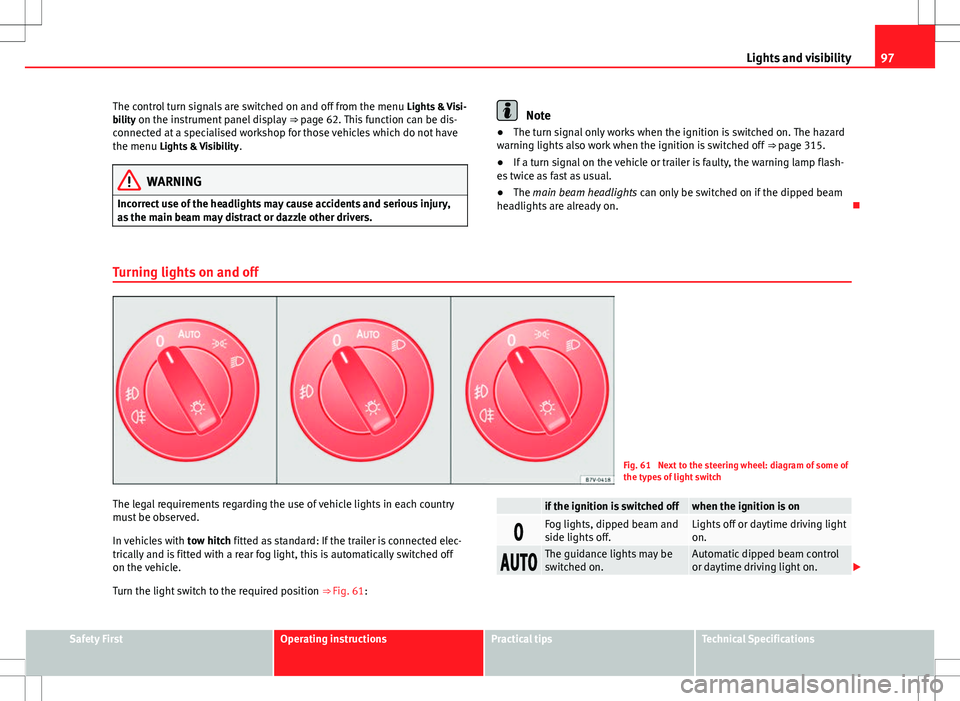
Fig. 61 Next to the steering wheel: diagram of some of
the types of light switch
The legal requirements regarding the use of vehicle lights in each country
must be observed.
In vehicles with tow hitch fitted as standard: If the trailer is connected elec-
trically and is fitted with a rear fog light, this is automatically switched off
on the vehicle.
Turn the light switch to the required position ⇒ Fig. 61:
if the ignition is switched offwhen the ignition is on
Fog lights, dipped beam and
side lights off.Lights off or daytime driving light
on.
The guidance lights may be
switched on.Automatic dipped beam control
or daytime driving light on.
Safety FirstOperating instructionsPractical tipsTechnical Specifications
Page 103 of 387
101
Lights and visibility
“Leaving home”Necessary operationsTo switch sys-
tem on:– Unlock the vehicle when the light switch is in position
and the photo sensor detects darkness.
To switch sys-
tem off:– Automatically, at the end of the delay period.
– When the vehicle is locked.
– When the light switch is turned to position .
– When the ignition is switched on.
Lighting around the exterior mirrors
The lighting around the exterior mirrors illuminates the door area on enter-
ing and leaving the vehicles. It comes on when the vehicle is unlocked,
when the vehicle door is opened and when the “Coming home” or “Leaving
home” function is switched on. If the equipment includes the light sensor,
the lighting around the exterior mirrors only comes when it is dark.
Note
● The time taken for the headlights to go off can be changed in the Lights
& Visibility menu and the function can be switched on or off ⇒ page 62.
● When the “Coming home” function is on, if the vehicle door is opened
there is no audible warning signal to advise that the light is still on. Headlight range control, instrument and switch lighting
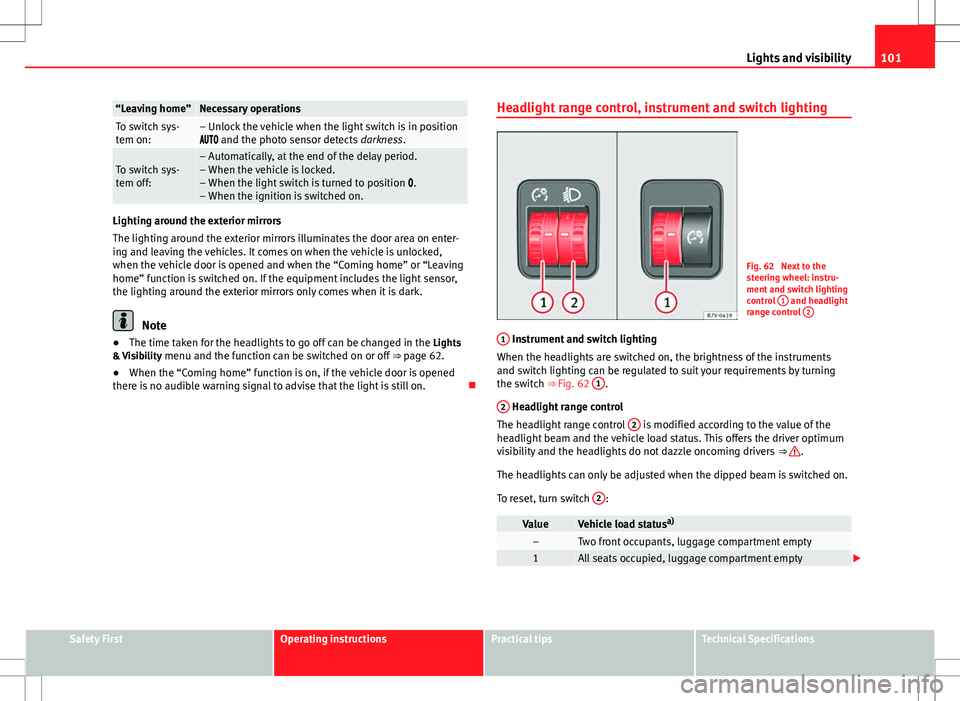
Fig. 62 Next to the
steering wheel: instru-
ment and switch lighting
control
1
and headlight
range control 2
1 Instrument and switch lighting
When the headlights are switched on, the brightness of the instruments
and switch lighting can be regulated to suit your requirements by turning
the switch ⇒ Fig. 62 1
.
2
Headlight range control
The headlight range control 2 is modified according to the value of the
headlight beam and the vehicle load status. This offers the driver optimum
visibility and the headlights do not dazzle oncoming drivers ⇒
.
The headlights can only be adjusted when the dipped beam is switched on.
To reset, turn switch 2
:
ValueVehicle load statusa)–Two front occupants, luggage compartment empty1All seats occupied, luggage compartment empty
Safety FirstOperating instructionsPractical tipsTechnical Specifications
Page 109 of 387
107
Lights and visibility
Windscreen wiper functions
Windscreen wiper performance in different situations:If the vehicle is at a stand-
still:The activated position provisionally changes
to the previous position.
During the automatic wipe:
The air conditioner comes on for approxi-
mately 30 seconds in air recirculation mode
to prevent the smell of the windscreen wash-
er fluid entering the inside the vehicle.
For the interval wipe:The intervals between wipes vary according
to the speed of the vehicle. The higher the
vehicle speed the shorter the intervals.
Heated windscreen washer jets
The heating only thaws the frozen jets, it does not thaw the water in the
washer hoses. The heated windscreen washer jets automatically adjust the
heat depending on the ambient temperature, when the ignition is switched
on.
Headlight wash/wipe system
The headlight washers/wipers clean the headlight lenses.
After the ignition is switched on, the first and every fifth time the wind-
screen washer is switched on, the headlights are also washed. Therefore,
the windscreen wiper lever should be pulled towards the steering wheel
when the dipped beam or main beam are on. Any incrusted dirt (such as in-
sects) should be cleaned regularly (e.g. when refuelling).
To ensure the headlight washers work correctly in winter, any snow which
has got into the bumper jet supports should be cleaned away. If necessary,
remove snow with an anti-icing spray.
Note
The wiper will try to wipe away any obstacles that are on the windscreen.
The wiper will stop moving if the obstacle blocks its path. Remove the ob-
stacle and switch the wiper back on again.
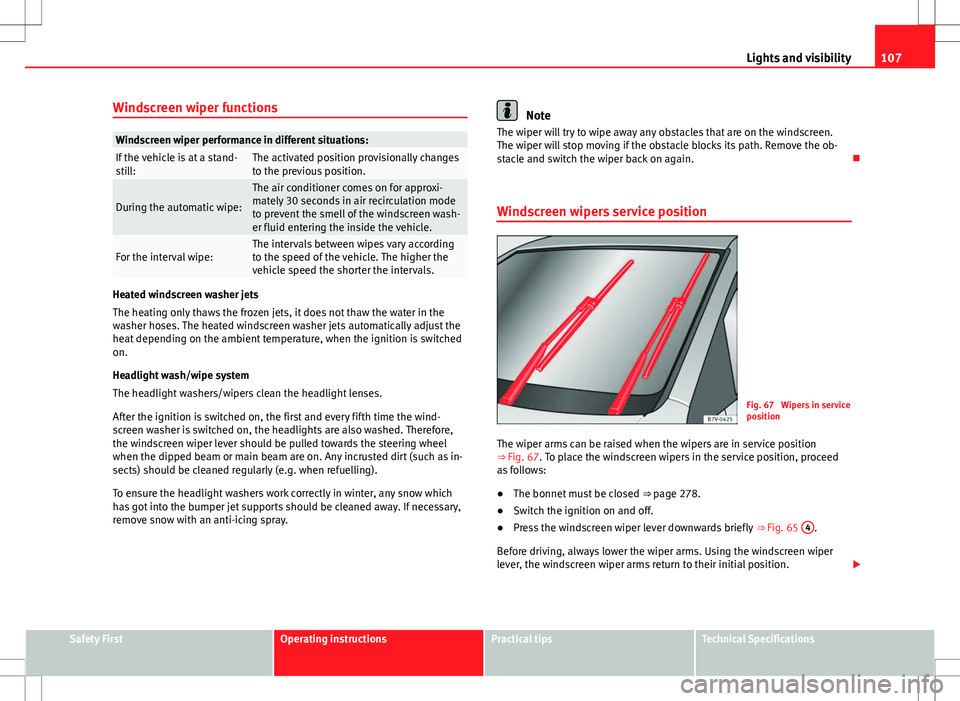
Windscreen wipers service position
Fig. 67 Wipers in service
position
The wiper arms can be raised when the wipers are in service position
⇒ Fig. 67. To place the windscreen wipers in the service position, proceed
as follows:
● The bonnet must be closed ⇒ page 278.
● Switch the ignition on and off.
● Press the windscreen wiper lever downwards briefly ⇒ Fig. 65 4
.
Before driving, always lower the wiper arms. Using the windscreen wiper
lever, the windscreen wiper arms return to their initial position.
Safety FirstOperating instructionsPractical tipsTechnical Specifications
Page 116 of 387
114Seats and storage
Seats and storage
Seat adjustment
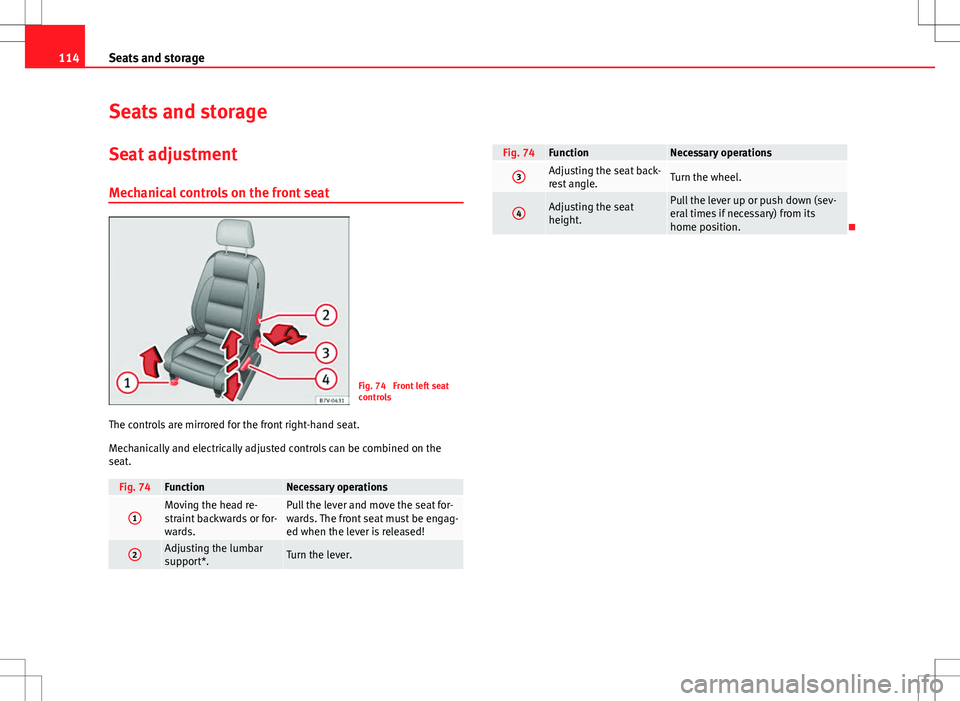
Mechanical controls on the front seat
Fig. 74 Front left seat
controls
The controls are mirrored for the front right-hand seat.
Mechanically and electrically adjusted controls can be combined on the
seat.
Fig. 74FunctionNecessary operations
1Moving the head re-
straint backwards or for-
wards.Pull the lever and move the seat for-
wards. The front seat must be engag-
ed when the lever is released!
2Adjusting the lumbar
support*.Turn the lever.
Fig. 74FunctionNecessary operations
3Adjusting the seat back-
rest angle.Turn the wheel.
4Adjusting the seat
height.Pull the lever up or push down (sev-
eral times if necessary) from its
home position.
Page 128 of 387
126Seats and storage
WARNING
Travelling with the head restraints removed or improperly adjusted in-
creases the risk of severe or fatal injuries in the event of accidents and
sudden braking or manoeuvres.
● Always fit and adjust the head restraint properly whenever a person
is occupying a seat.
● Refit any removed head restraints immediately so that passengers
are properly protected.
CAUTION
On removing and fitting the head restraint, make sure the head restraint
does not hit the interior roof of the vehicle or the seat backrest of the front
seat. This could damage the interior roof and other parts of the vehicle.
Centre armrest
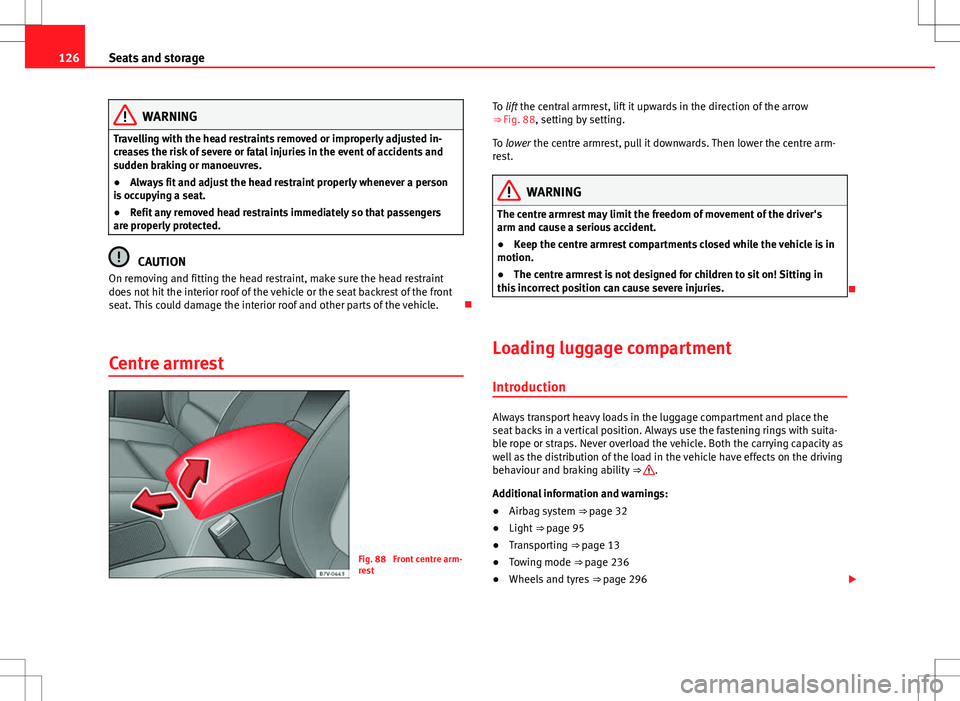
Fig. 88 Front centre arm-
rest To lift the central armrest, lift it upwards in the direction of the arrow
⇒ Fig. 88, setting by setting.
To lower the centre armrest, pull it downwards. Then lower the centre arm-
rest.
WARNING
The centre armrest may limit the freedom of movement of the driver's
arm and cause a serious accident.
● Keep the centre armrest compartments closed while the vehicle is in
motion.
● The centre armrest is not designed for children to sit on! Sitting in
this incorrect position can cause severe injuries.
Loading luggage compartment Introduction
Always transport heavy loads in the luggage compartment and place the
seat backs in a vertical position. Always use the fastening rings with suita-
ble rope or straps. Never overload the vehicle. Both the carrying capacity as
well as the distribution of the load in the vehicle have effects on the driving
behaviour and braking ability ⇒
.
Additional information and warnings:
● Airbag system ⇒ page 32
● Light ⇒ page 95
● Transporting ⇒ page 13
● Towing mode ⇒ page 236
● Wheels and tyres ⇒ page 296
Page 141 of 387
139
Seats and storage
Hooking the baggage net into the luggage compartment floor
● Hook the baggage net into the fastening rings ⇒ Fig. 100 1
and 2.
Releasing the baggage net
The secured baggage net is taut ⇒
.
● Carefully unhook the baggage net hooks from the fastening rings 1
.
● Carefully unhook the baggage net hooks from the fastening rings 2.
WARNING
The elastic baggage net stretches when it is secured to the luggage com-
partment fastening rings. The secured baggage net is taut. The hooks on
the baggage net can cause injury if the net is incorrectly hooked or un-
hooked.
● Always ensure that the hooks do not suddenly release from the fas-
tening rings when hooking or un-hooking.
● Always keep your face and eyes protected at a safe distance to avoid
injury should a hook slip while hooking or unhooking.
● Always engage the hooks in the order given. If a baggage net hook
springs back this can cause injury.
Roof carrier system* Introduction
The vehicle roof has been designed to optimise aerodynamics. For this rea-
son, conventional roof carrier systems cannot be secured to the roof rails.
Given that the water drains have been incorporated into the roof for aerody-
namic reasons, only the SEAT approved basic supports and roof carrier sys-
tems can be used. When should the roof carrier system be removed?
●
When it is not being used.
● When the vehicle is being washed in a car wash.
● When the vehicle height exceeds the maximum height (for example, in a
garage).
Additional information and warnings:
● Light ⇒ page 95
● Transporting ⇒ page 13
● Ecological driving ⇒ page 228
● Wheels and tyres ⇒ page 296
● Accessories, parts replacement, repairs and modifications ⇒ page 260
WARNING
The risk of an accident is increased by transporting heavy or bulky loads
on the roof, which affects the car's handling by shifting the centre of
gravity and increasing susceptibility to cross winds.
● Always secure loads correctly with suitable and undamaged attach-
ment rope or straps.
● Large, heavy, wide and flat loads negatively affect the vehicle aerody-
namics, centre of gravity and handling.
● Avoid brusque manoeuvres and sudden braking.
● Adjust your speed and driving style to visibility, road, traffic and
weather conditions.
CAUTION
● Always remove the roof carrier system from the roof before entering a car
wash.
● The height of your vehicle is changed by the installation of the roof carri-
er and the load secured on it. Compare the vehicle height with the passage
height, for example in underground car parks or entering garage doors.
Safety FirstOperating instructionsPractical tipsTechnical Specifications