remote control Seat Alhambra 2013 Owner's Manual
[x] Cancel search | Manufacturer: SEAT, Model Year: 2013, Model line: Alhambra, Model: Seat Alhambra 2013Pages: 387, PDF Size: 6.13 MB
Page 41 of 387
39
Airbag system
WARNING (Continued)
● Vehicle occupants of the front and outer rear seats must never carry
any other people, pets or objects in the deployment space between them
and the airbags.
● The built-in coat hooks should be used only for lightweight clothing.
Do not leave any heavy or sharp-edged objects in the pockets.
● Do not mount accessories on the doors.
● Do not fit curtains to the windows other than those expressly ap-
proved for use in the vehicle.
● Only turn the sun blinds towards the windows if there is no object,
e.g. pens or garage remote controls, secured to the sun blind.
Knee airbag
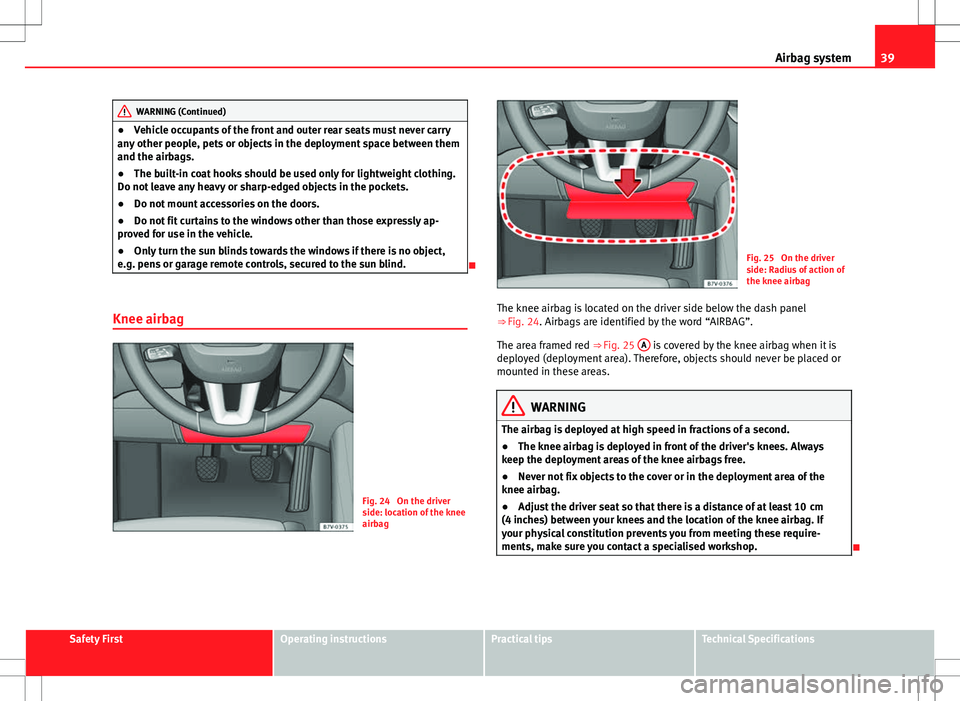
Fig. 24 On the driver
side: location of the knee
airbag
Fig. 25 On the driver
side: Radius of action of
the knee airbag
The knee airbag is located on the driver side below the dash panel
⇒ Fig. 24. Airbags are identified by the word “AIRBAG”.
The area framed red ⇒ Fig. 25 A
is covered by the knee airbag when it is
deployed (deployment area). Therefore, objects should never be placed or
mounted in these areas.
WARNING
The airbag is deployed at high speed in fractions of a second.
● The knee airbag is deployed in front of the driver's knees. Always
keep the deployment areas of the knee airbags free.
● Never not fix objects to the cover or in the deployment area of the
knee airbag.
● Adjust the driver seat so that there is a distance of at least 10 cm
(4 inches) between your knees and the location of the knee airbag. If
your physical constitution prevents you from meeting these require-
ments, make sure you contact a specialised workshop.
Safety FirstOperating instructionsPractical tipsTechnical Specifications
Page 71 of 387
69
Cockpit
Convenience menuFunctionRear vision mirror adjustmentTilts passenger mirror downwards when reverse gear is engaged. This enables the driver to see the edge of the pavement,
for example ⇒ page 110.
Exterior mirror adjust.If synchronised adjustment is selected, when the driver side exterior mirror is adjusted, the passenger exterior mirror is also
moved.
Factory settingsSome functions of the Convenience submenu will be reset to the factory value.BackThe Configuration menu is displayed again.
Lights & visibility submenu
Lights & visi-
bility menuFunction
Coming HomeThis permits the adjustment of the time the headlamps
stay on after locking or unlocking the vehicle, the function
can also be connected or disconnected here ⇒ page 100.Leaving Home
Footwell lightThis permits the adjustment of the brightness of the foot-
well lighting when the doors are open, the function can al-
so be connected or disconnected here
Convenience
turn signalsSwitching convenience turn signals on and off When the
convenience turn signals are connected, when the turn
signal is switched on, these flash at least three times
⇒ page 95.
Factory set-
tingsAll the configurations in the submenu Lights & visibility are
reset to the predefined factory values.
Tourist lightHeadlamp adjustment for countries in which vehicles are
driven on the other side of the road. When the mark is acti-
vated, the headlamps of a left-hand drive vehicle are ad-
justed for driving on the left. This function must only be
used for a short period.
BackThe Configuration menu is displayed again. Personal convenience settings
When two people use a vehicle, SEAT recommends that each person always
uses “their” own remote control key. When the ignition is switched off, or
the vehicle is locked, the personal convenience settings are stored and au-
tomatically allocated to the vehicle key
⇒ page 62.
The values of the personalised convenience settings of the following menu
options are allocated to the vehicle key: ■ Parking heating menu
■ Configuration Menu
■ Time
■ Language
■ Units
■ Convenience settings menu
■ Door unlock (individual opening, Auto Lock)
■ Convenience handling of windows
■ Rear vision mirror adjustment
■ Lights & visibility settings menu
■ Coming home and Leaving home
■ Footwell light
■ Convenience turn signals
Safety FirstOperating instructionsPractical tipsTechnical Specifications
Page 74 of 387
72Opening and closing
Vehicle keys
With the vehicle key ⇒ Fig. 39 or ⇒ Fig. 40 the vehicle may be locked or un-
locked remotely.
The vehicle key includes an emitter and batteries. The receiver is in the inte-
rior of the vehicle. The range of the vehicle key with remote control and new
batteries is several metres around the vehicle.
If it is not possible to open or close the vehicle using the remote control key,
this should be re-synchronised ⇒ page 74 or the battery changed
⇒ page 73.
Different keys belonging to the vehicle may be used.
Folding the key shaft in and out
When the button is pressed, the key shaft is released and unfolds.
To fold it press the button and fold the key shaft in until it locks in place.
Duplicate keys
To obtain a spare key and other vehicle keys, the vehicle chassis number is
required.
Each new key must contain a microchip and be coded with the data from the
vehicle electronic immobiliser. A vehicle key will not work if it does not con-
tain microchip or the microchip has not been encoded. This is also true for
keys cut for the vehicle.
The vehicle keys or new spare keys can be obtained from a Technical Serv-
ice, a specialised workshop or approved key service qualified to create this
kind of key.
New keys or spare keys must be synchronised before use ⇒ page 74.
CAUTION
All of the vehicle keys contain electronic components. Protect the vehicle
keys from damage, impacts and humidity.
Note
● Only use the key button when you require the corresponding function.
Pushing the button unnecessarily could accidentally unlock the vehicle or
trigger the alarm. It is also possible even when you are outside the radius of
action.
● Key operation can be greatly influenced by overlapping radio signals
around the vehicle working in the same range of frequencies (for example,
radio transmitters, mobile telephones).
● Obstacles between the remote control and the vehicle, bad weather con-
ditions and discharged batteries can considerably reduce the range of the
remote control.
Page 81 of 387
79
Opening and closing
Interior monitoring system and anti-tow system*
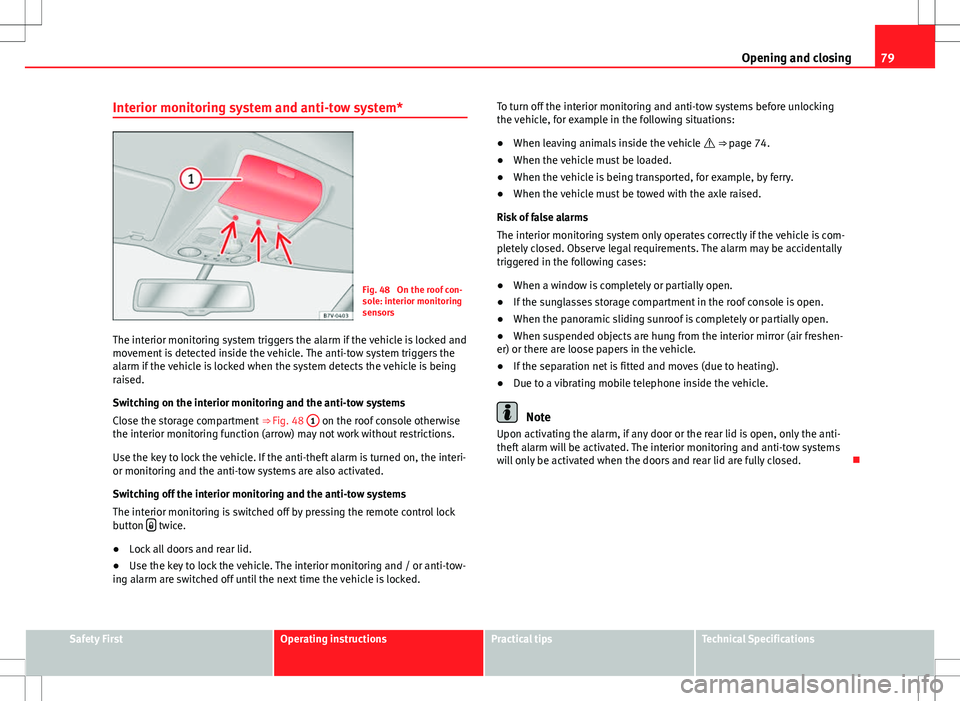
Fig. 48 On the roof con-
sole: interior monitoring
sensors
The interior monitoring system triggers the alarm if the vehicle is locked and
movement is detected inside the vehicle. The anti-tow system triggers the
alarm if the vehicle is locked when the system detects the vehicle is being
raised.
Switching on the interior monitoring and the anti-tow systems
Close the storage compartment ⇒ Fig. 48 1
on the roof console otherwise
the interior monitoring function (arrow) may not work without restrictions.
Use the key to lock the vehicle. If the anti-theft alarm is turned on, the interi-
or monitoring and the anti-tow systems are also activated.
Switching off the interior monitoring and the anti-tow systems
The interior monitoring is switched off by pressing the remote control lock
button
twice.
● Lock all doors and rear lid.
● Use the key to lock the vehicle. The interior monitoring and / or anti-tow-
ing alarm are switched off until the next time the vehicle is locked. To turn off the interior monitoring and anti-tow systems before unlocking
the vehicle, for example in the following situations:
●
When leaving animals inside the vehicle ⇒ page 74.
● When the vehicle must be loaded.
● When the vehicle is being transported, for example, by ferry.
● When the vehicle must be towed with the axle raised.
Risk of false alarms
The interior monitoring system only operates correctly if the vehicle is com-
pletely closed. Observe legal requirements. The alarm may be accidentally
triggered in the following cases:
● When a window is completely or partially open.
● If the sunglasses storage compartment in the roof console is open.
● When the panoramic sliding sunroof is completely or partially open.
● When suspended objects are hung from the interior mirror (air freshen-
er) or there are loose papers in the vehicle.
● If the separation net is fitted and moves (due to heating).
● Due to a vibrating mobile telephone inside the vehicle.
Note
Upon activating the alarm, if any door or the rear lid is open, only the anti-
theft alarm will be activated. The interior monitoring and anti-tow systems
will only be activated when the doors and rear lid are fully closed.
Safety FirstOperating instructionsPractical tipsTechnical Specifications
Page 83 of 387
81
Opening and closing
WARNING
If a sliding door is not fully open, it could close unexpectedly and cause
serious injuries.
● Always open the sliding door fully.
WARNING
Opening sliding doors while driving is dangerous. The sliding door could
be pushed open or closed when the vehicle accelerates and brakes caus-
ing serious injuries.
● Never open the sliding doors when the vehicle is in movement.
Manually opening and closing the sliding door
Fig. 49 On the sliding
door. door handle 1
FunctionNecessary operations
Open the sliding door from the
inside.When the sliding door is released, open
the door fully by pulling on the outside
handle.
Opening the sliding door from
the inside.When the sliding door is released, open
the door fully by pulling on its interior
handle ⇒ Fig. 49 1
.
Closing the sliding door.
Pull on the inside or outside door handle
and close the sliding door by pushing
gently. Make sure that the sliding door is
closed properly.
Opening and closing the sliding door electrically*
Fig. 50 On the dash pan-
el, on the remote control
key and on the interior
lining of the sliding door:
Button for opening and
closing the electric slid-
ing door
All of the electric sliding doors can be opened and closed manually using
more force.
Safety FirstOperating instructionsPractical tipsTechnical Specifications
Page 84 of 387
82Opening and closing
FunctionNecessary operations
Opens the sliding door electri-
cally.
Press the ⇒ Fig. 50 button on the dash
panel, on the remote control key and on
the interior lining of the sliding door.
The sliding door opens with the rollback
anti-trap function as long as the button
is not pressed again.
Pull briefly on the interior or exterior
handle the door. The sliding door opens
automatically.
Closing the sliding door electri-
cally.
Press the ⇒ Fig. 50 button on the dash
panel, on the remote control key and on
the interior lining of the sliding door.
The sliding door closes with the rollback
anti-trap function as long as the button
is not pressed again. As it closes, a
warning sound is given.
Pull briefly on the interior or exterior
handle the door. The sliding door closes
with the roll-back function. As it closes,
a warning sound is given.
Note
● When the fuel tank cover is open, the right-hand side electric sliding
door is locked and can only be opened manually.
● If the window of a sliding door is lowered them this door cannot open
fully.
Rollback anti-trap function of the electric sliding doors
The rollback anti-trap function of the electric sliding doors can reduce the
risk of injury when opening and closing the sliding doors ⇒ .If an object gets in the way of the sliding door while it is
closing, it opens
again.
If an object gets in the way of the sliding door while it is opening, the door
stops moving.
● Check the reason for which the sliding door does not open or close.
● Try to open or close the sliding door again.
To close the sliding door without the rollback anti-trap function
● Turn off the ignition and turn it on again.
● Press and hold the
⇒ Fig. 50 button. The sliding door closes with
full force.
WARNING
Closing the electric windows without the anti-trap function can cause se-
rious injury.
● Always close the sliding doors carefully.
● Nobody should ever get in the way of the electric sliding doors, espe-
cially when closing without the anti-trap function.
● The anti-trap function does not prevent fingers or other parts of the
body getting pinched against the window frame and causing injury.
Page 166 of 387
164Air conditioning
Auxiliary heater* (additional heater)
Introduction
The auxiliary heater is powered by fuel from the vehicle's fuel tank and can
be used while the vehicle is in motion and at a standstill. Select the mode
required (heat or fan) ⇒ page 166 on the instrument panel.
In winter, the auxiliary heater can be used in heat mode before switching on
the ignition to remove any ice, mist or snow from the windscreen (thin lay-
ers only).
Additional information and warnings:
● SEAT information system ⇒ page 62
● Refuelling ⇒ page 267
WARNING
The auxiliary heater fumes contain carbon dioxide, an odourless and col-
ourless toxic gas. Carbon monoxide can cause people to lose conscious-
ness. It can also cause death.
● Never switch on the auxiliary heater or leave it running in places that
are enclosed or unventilated.
● Never program the independent heating system to be activated and
operated in closed, unventilated areas.
WARNING
The components of the auxiliary heater exhaust system heat up a great
deal. This could cause a fire.
● Always park your vehicle so that no part of the exhaust system can
come in contact with flammable materials (such as dried grass).
CAUTION
Never place food, medicines or other heat-sensitive objects close to the air
vents. Food, medicines and other heat-sensitive objects may be damaged
or made unsuitable for use by the air coming from the air vents.
Switching the auxiliary heater on and off
Switching the auxiliary heater on:
Manually using the instant on/off button.⇒ page 158
ONManually using the remote control.⇒ page 165
Automatically at the programmed and enabled on
time.⇒ page 166
Switching the auxiliary heater off:
Manually using the instant on/off button for the
air conditioner.⇒ page 158
OFFManually using the remote control.⇒ page 165 Automatically after the programmed time.⇒ page 166
Automatically when the light comes on (fuel re-
serve).⇒ page 267
Automatically when the battery power drops to a
very low level.⇒ page 291
Things to note
After switching the auxiliary heater off, it continues to run for a short period
to completely burn any fuel remaining in the auxiliary heater. The exhaust
gases are also extracted from the system.
Page 167 of 387
165
Air conditioning
Remote control
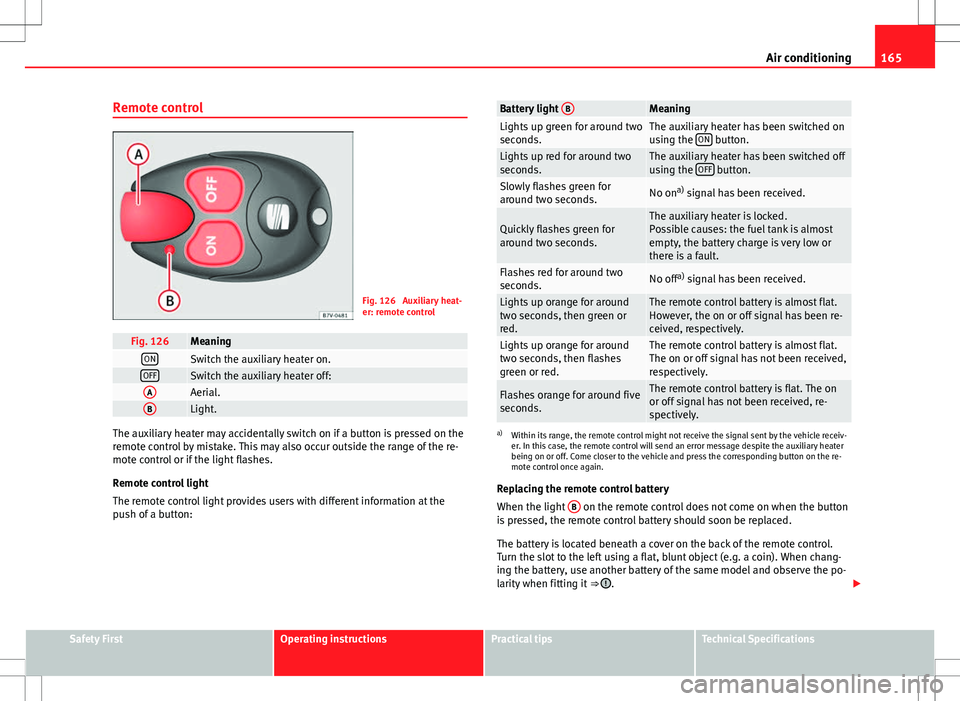
Fig. 126 Auxiliary heat-
er: remote control
Fig. 126MeaningONSwitch the auxiliary heater on.OFFSwitch the auxiliary heater off:AAerial.BLight.
The auxiliary heater may accidentally switch on if a button is pressed on the
remote control by mistake. This may also occur outside the range of the re-
mote control or if the light flashes.
Remote control light
The remote control light provides users with different information at the
push of a button:
Battery light BMeaningLights up green for around two
seconds.The auxiliary heater has been switched on
using the ON button.Lights up red for around two
seconds.The auxiliary heater has been switched off
using the OFF button.Slowly flashes green for
around two seconds.No ona)
signal has been received.
Quickly flashes green for
around two seconds.The auxiliary heater is locked.
Possible causes: the fuel tank is almost
empty, the battery charge is very low or
there is a fault.
Flashes red for around two
seconds.No off a)
signal has been received.
Lights up orange for around
two seconds, then green or
red.The remote control battery is almost flat.
However, the on or off signal has been re-
ceived, respectively.
Lights up orange for around
two seconds, then flashes
green or red.The remote control battery is almost flat.
The on or off signal has not been received,
respectively.
Flashes orange for around five
seconds.The remote control battery is flat. The on
or off signal has not been received, re-
spectively.
a) Within its range, the remote control might not receive the signal sent by the vehicle receiv-
er. In this case, the remote control will send an error message despite the auxiliary heater
being on or off. Come closer to the vehicle and press the corresponding button on the re-
mote control once again.
Replacing the remote control battery
When the light B
on the remote control does not come on when the button
is pressed, the remote control battery should soon be replaced.
The battery is located beneath a cover on the back of the remote control.
Turn the slot to the left using a flat, blunt object (e.g. a coin). When chang-
ing the battery, use another battery of the same model and observe the po-
larity when fitting it ⇒
.
Safety FirstOperating instructionsPractical tipsTechnical Specifications
Page 168 of 387
166Air conditioning
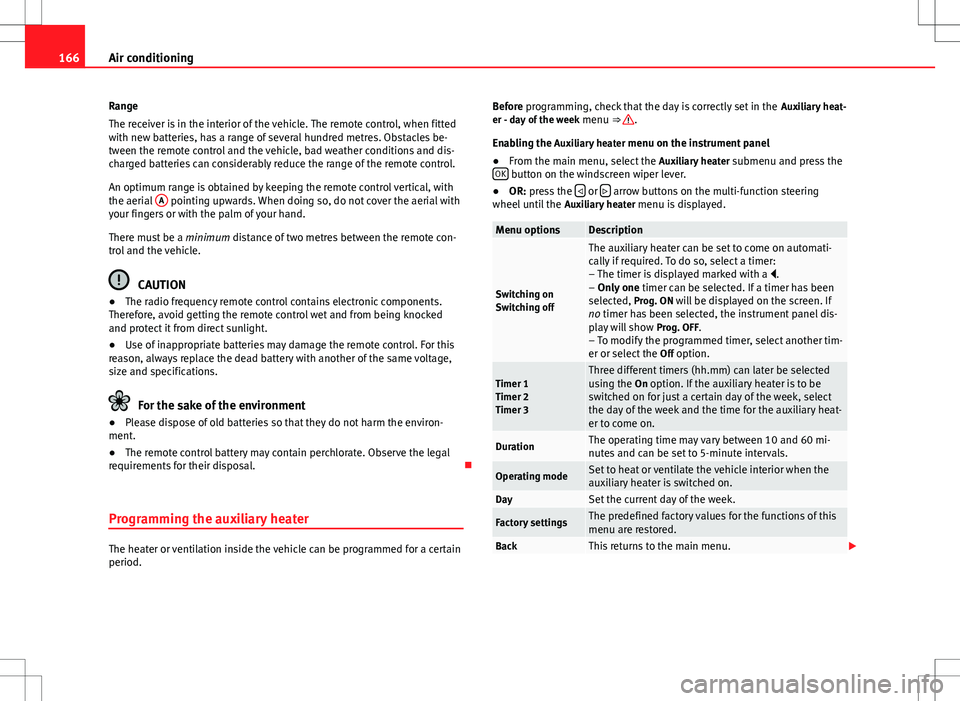
Range
The receiver is in the interior of the vehicle. The remote control, when fitted
with new batteries, has a range of several hundred metres. Obstacles be-
tween the remote control and the vehicle, bad weather conditions and dis-
charged batteries can considerably reduce the range of the remote control.
An optimum range is obtained by keeping the remote control vertical, with
the aerial A
pointing upwards. When doing so, do not cover the aerial with
your fingers or with the palm of your hand.
There must be a minimum distance of two metres between the remote con-
trol and the vehicle.
CAUTION
● The radio frequency remote control contains electronic components.
Therefore, avoid getting the remote control wet and from being knocked
and protect it from direct sunlight.
● Use of inappropriate batteries may damage the remote control. For this
reason, always replace the dead battery with another of the same voltage,
size and specifications.
For the sake of the environment
● Please dispose of old batteries so that they do not harm the environ-
ment.
● The remote control battery may contain perchlorate. Observe the legal
requirements for their disposal.
Programming the auxiliary heater
The heater or ventilation inside the vehicle can be programmed for a certain
period. Before programming, check that the day is correctly set in the
Auxiliary heat-
er - day of the week menu ⇒
.
Enabling the Auxiliary heater menu on the instrument panel
● From the main menu, select the Auxiliary heater submenu and press the
OK
button on the windscreen wiper lever.
● OR: press the or arrow buttons on the multi-function steering
wheel until the Auxiliary heater menu is displayed.
Menu optionsDescription
Switching on
Switching off
The auxiliary heater can be set to come on automati-
cally if required. To do so, select a timer:
– The timer is displayed marked with a .
– Only one timer can be selected. If a timer has been
selected, Prog. ON will be displayed on the screen. If
no timer has been selected, the instrument panel dis-
play will show Prog. OFF.
– To modify the programmed timer, select another tim-
er or select the Off option.
Timer 1
Timer 2
Timer 3Three different timers (hh.mm) can later be selected
using the On option. If the auxiliary heater is to be
switched on for just a certain day of the week, select
the day of the week and the time for the auxiliary heat-
er to come on.
DurationThe operating time may vary between 10 and 60 mi-
nutes and can be set to 5-minute intervals.
Operating modeSet to heat or ventilate the vehicle interior when the
auxiliary heater is switched on.
DaySet the current day of the week.
Factory settingsThe predefined factory values for the functions of this
menu are restored.
BackThis returns to the main menu.
Page 370 of 387
Anti-theft bolts . . . . . . . . . . . . . . . . . . . . . . . . . 324
Anti-theft locking bolts . . . . . . . . . . . . . . . . . . 309
Anti-theft wheel locking bolts . . . . . . . . . . . . . 310
Anti-tow system . . . . . . . . . . . . . . . . . . . . . . . . . 79
Anti-trap functionElectric windows . . . . . . . . . . . . . . . . . . . . . . 90
Panoramic sliding sunroof . . . . . . . . . . . . . . 94
Sun blind . . . . . . . . . . . . . . . . . . . . . . . . . . . 94
Antifreeze . . . . . . . . . . . . . . . . . . . . . . . . . . . . . 288
Armrests . . . . . . . . . . . . . . . . . . . . . . . . . . . . . . 126
Ashtray . . . . . . . . . . . . . . . . . . . . . . . . . . . . . . . 151
ASR See "Brake assist systems" . . . . . . . . . . . . 192
See "Brake assist" . . . . . . . . . . . . . . . . . . . 191
Turning on and off . . . . . . . . . . . . . . . . . . . 192
Assistance systems . . . . . . . . . . . . . . . . . . . . . 213 Cruise control . . . . . . . . . . . . . . . . . . . . . . . 213
Electronic differential lock system (EDL andXDS) . . . . . . . . . . . . . . . . . . . . . . . . . . . . . 191
Electronic Stability Control (ESC) . . . . . . . 190
Assist systems Anti-lock brake system (ABS) . . . . . . . . . . 190
Auto Hold . . . . . . . . . . . . . . . . . . . . . . . . . . 195
Braking assist . . . . . . . . . . . . . . . . . . . . . . . 190
Lane Assist . . . . . . . . . . . . . . . . . . . . . . . . . 216
Lane Assist system . . . . . . . . . . . . . . . . . . . 216
Optical parking system . . . . . . . . . . . . . . . 201
Park Assist . . . . . . . . . . . . . . . . . . . . . . . . . 203
Park Assist system . . . . . . . . . . . . . . . . . . . 203
Parking aid . . . . . . . . . . . . . . . . . . . . . . . . . 200
Parking sensor system . . . . . . . . . . . . . . . . 200
Rear Assist . . . . . . . . . . . . . . . . . . . . . . . . . 208 Rear assist system . . . . . . . . . . . . . . . . . . . 208
Sign Assist . . . . . . . . . . . . . . . . . . . . . . . . . 219
Start-Stop . . . . . . . . . . . . . . . . . . . . . . . . . . 197
Start assist . . . . . . . . . . . . . . . . . . . . . . . . . 195
Traction control system (ASR) . . . . . . . . . . 192
Traction control when accelerating (ASR) . 191
Tyre monitoring indicator . . . . . . . . . . . . . . 226
Auto Hold . . . . . . . . . . . . . . . . . . . . . . . . . . . . . 195
Automatic belt retainer . . . . . . . . . . . . . . . . . . . 27
Automatic car wash . . . . . . . . . . . . . . . . . . . . . 246 Switching Auto Hold off . . . . . . . . . . . . . . . 196
Switching the start assist off . . . . . . . . . . . 196
Automatic consumer disconnection . . . . . . . . 294
Automatic dipped beam control . . . . . . . . . . . . 98
Automatic gearbox . . . . . . . . . . . . . . . . . . . . . . 175 Changing gear . . . . . . . . . . . . . . . . . . . . . . 179
Driving . . . . . . . . . . . . . . . . . . . . . . . . . . . . . 181
DSG automatic gearbox . . . . . . . . . . . . . . . 181
Ignition key lock . . . . . . . . . . . . . . . . . . . . . 173
Kickdown system . . . . . . . . . . . . . . . . . . . . 181
Launch-Control programme . . . . . . . . . . . . 181
Malfunction . . . . . . . . . . . . . . . . . . . . . . . . 182
Manually unlocking the gear selector lever . .322
Please also see "Changing gears" . . . . . . 175
See "Automatic gearbox" . . . . . . . . . . . . . . 175
Towing . . . . . . . . . . . . . . . . . . . . . . . . . . . . . 344
AUX-IN connection . . . . . . . . . . . . . . . . . . . . . . 141
Auxiliary heater . . . . . . . . . . . . . . . . . . . . 164, 272 Automatic off . . . . . . . . . . . . . . . . . . . . . . . 268
Operating instructions . . . . . . . . . . . . . . . . 167
Programming . . . . . . . . . . . . . . . . . . . . . . . 166
Remote control . . . . . . . . . . . . . . . . . . . . . . 165
Remote control range . . . . . . . . . . . . . . . . . 166 Remote control: Replacing the battery . . . 165
Switching off . . . . . . . . . . . . . . . . . . . . . . . . 164
Switching on . . . . . . . . . . . . . . . . . . . . . . . . 164
Things to note . . . . . . . . . . . . . . . . . . . 164, 167
Auxiliary heater remote control Replacing the battery . . . . . . . . . . . . . . . . . 165
Axle loads . . . . . . . . . . . . . . . . . . . . . . . . . . . . . . 15
B
BAS See "Brake assist systems" . . . . . . . . . . . . 190
Battery Discharge . . . . . . . . . . . . . . . . . . . . . . . . . . 167
Discharging . . . . . . . . . . . . . . . . . . . . . . . . 316
See Vehicle battery . . . . . . . . . . . . . . . . . . 291
Battery acid . . . . . . . . . . . . . . . . . . . . . . . . . . . . 293
Before starting out . . . . . . . . . . . . . . . . . . . . . . . . 7
Belt height adjustment . . . . . . . . . . . . . . . . . . . 26
Belt tensioner . . . . . . . . . . . . . . . . . . . . . . . . . . . 27 Disposal . . . . . . . . . . . . . . . . . . . . . . . . . . . . 27
Service and disposal . . . . . . . . . . . . . . . . . . 27
Belt tension limiter . . . . . . . . . . . . . . . . . . . . . . . 27
Bicycle carrier Installing a bicycle carrier . . . . . . . . . . . . . 238
Maximum load . . . . . . . . . . . . . . . . . . . . . . 238
Biodiesel . . . . . . . . . . . . . . . . . . . . . . . . . . . . . . 273
Bonnet Closing . . . . . . . . . . . . . . . . . . . . . . . . . . . . 281
Opening . . . . . . . . . . . . . . . . . . . . . . . . . . . 281
Bottle holders . . . . . . . . . . . . . . . . . . . . . . . . . . 149
368 Index