technical specifications Seat Alhambra 2014 Owner's Manual
[x] Cancel search | Manufacturer: SEAT, Model Year: 2014, Model line: Alhambra, Model: Seat Alhambra 2014Pages: 381, PDF Size: 5.75 MB
Page 203 of 381
201
Driving
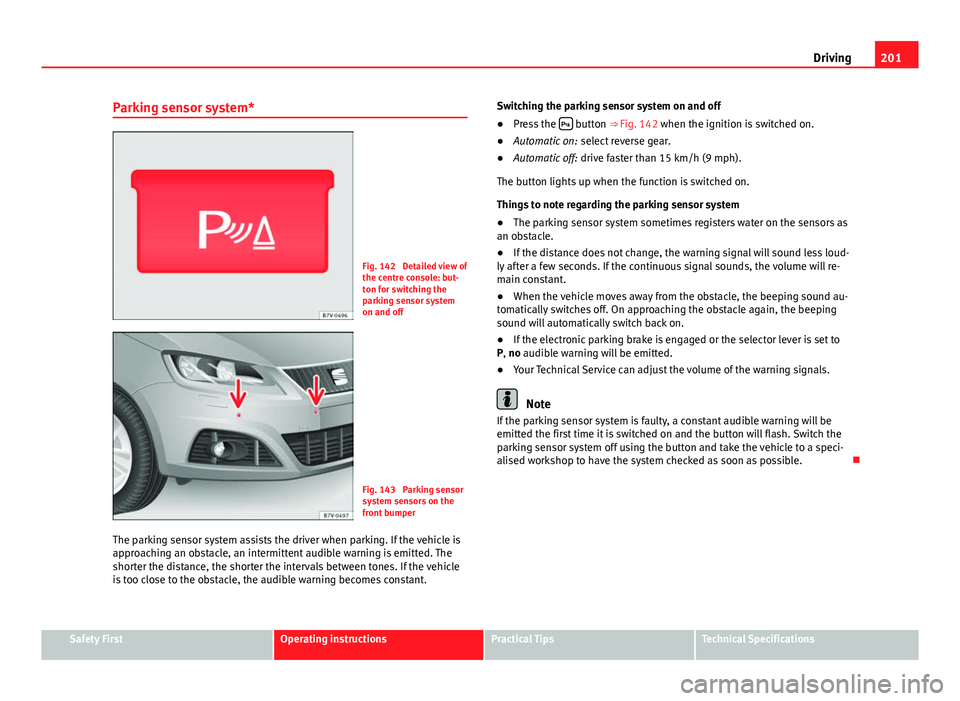
Parking sensor system*
Fig. 142 Detailed view of
the centre console: but-
ton for switching the
parking sensor system
on and off
Fig. 143 Parking sensor
system sensors on the
front bumper
The parking sensor system assists the driver when parking. If the vehicle is
approaching an obstacle, an intermittent audible warning is emitted. The
shorter the distance, the shorter the intervals between tones. If the vehicle
is too close to the obstacle, the audible warning becomes constant. Switching the parking sensor system on and off
●
Press the
button ⇒
Fig. 142 when the ignition is switched on.
● Automatic on: select reverse gear.
● Automatic off: drive faster than 15 km/h (9 mph).
The button lights up when the function is switched on.
Things to note regarding the parking sensor system
● The parking sensor system sometimes registers water on the sensors as
an obstacle.
● If the distance does not change, the warning signal will sound less loud-
ly after a few seconds. If the continuous signal sounds, the volume will re-
main constant.
● When the vehicle moves away from the obstacle, the beeping sound au-
tomatically switches off. On approaching the obstacle again, the beeping
sound will automatically switch back on.
● If the electronic parking brake is engaged or the selector lever is set to
P, no audible warning will be emitted.
● Your Technical Service can adjust the volume of the warning signals.
Note
If the parking sensor system is faulty, a constant audible warning will be
emitted the first time it is switched on and the button will flash. Switch the
parking sensor system off using the button and take the vehicle to a speci-
alised workshop to have the system checked as soon as possible.
Safety FirstOperating instructionsPractical TipsTechnical Specifications
Page 205 of 381
203
Driving
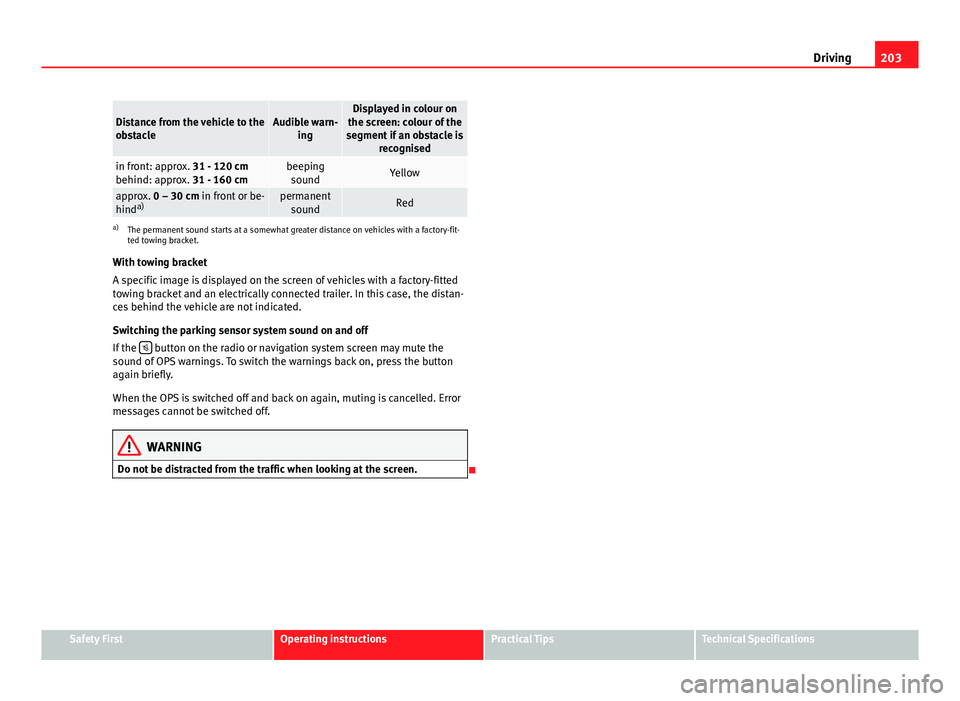
Distance from the vehicle to the
obstacleAudible warn-
ingDisplayed in colour on
the screen: colour of the
segment if an obstacle is recognised
in front: approx. 31 - 120 cm
behind: approx. 31 - 160 cmbeepingsoundYellow
approx. 0 – 30 cm in front or be-
hind a)permanent
soundRed
a) The permanent sound starts at a somewhat greater distance on vehicles with a factory-fit-
ted towing bracket.
With towing bracket
A specific image is displayed on the screen of vehicles with a factory-fitted
towing bracket and an electrically connected trailer. In this case, the distan-
ces behind the vehicle are not indicated.
Switching the parking sensor system sound on and off
If the
button on the radio or navigation system screen may mute the
sound of OPS warnings. To switch the warnings back on, press the button
again briefly.
When the OPS is switched off and back on again, muting is cancelled. Error
messages cannot be switched off.
WARNING
Do not be distracted from the traffic when looking at the screen.
Safety FirstOperating instructionsPractical TipsTechnical Specifications
Page 207 of 381
205
Driving
● To ensure that the system works properly, the bumper sensors must be
kept clean, free of ice and snow and uncovered.
● The bumper sensors may become damaged or misaligned, for example,
when parking.
● When cleaning the sensors with high-pressure or steam cleaning equip-
ment, spray the sensors briefly at a distance of no less than 10 cm.
Note
Contact a specialised workshop with any system faults. SEAT recommends
visiting a Technical Service.
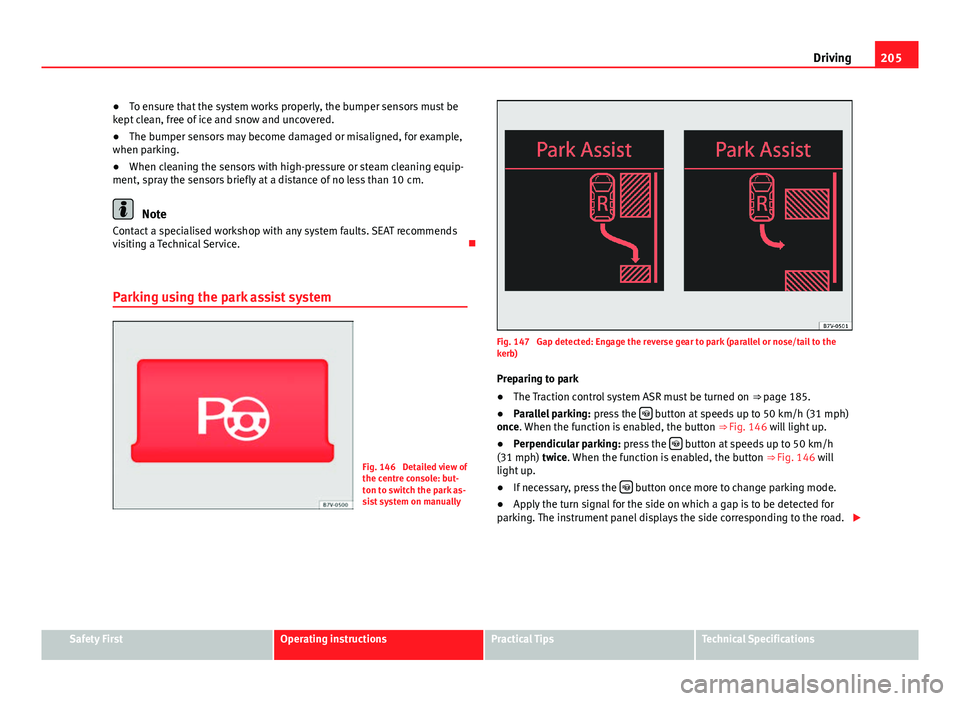
Parking using the park assist system
Fig. 146 Detailed view of
the centre console: but-
ton to switch the park as-
sist system on manually
Fig. 147 Gap detected: Engage the reverse gear to park (parallel or nose/tail to the
kerb) Preparing to park
● The Traction control system ASR must be turned on ⇒ page 185.
● Parallel parking: press the
button at speeds up to 50 km/h (31 mph)
once. When the function is enabled, the button ⇒ Fig. 146 will light up.
● Perpendicular parking: press the
button at speeds up to 50 km/h
(31 mph) twice. When the function is enabled, the button ⇒ Fig. 146 will
light up.
● If necessary, press the
button once more to change parking mode.
● Apply the turn signal for the side on which a gap is to be detected for
parking. The instrument panel displays the side corresponding to the road.
Safety FirstOperating instructionsPractical TipsTechnical Specifications
Page 209 of 381
207
Driving
● A suitable parking space length is at least 1.1 m greater than the length
of the vehicle.
● If the results of the park assist system are not as good after changing
the wheels, the system must memorise the perimeter of the new wheels.
This process is performed automatically while the vehicle is in motion. To
help this process, turn slowly (at less than 20 km/h (12 mph)), e.g. in an
empty car park.
Leaving a parking space using the Park Assist system
Driving off
● Switch on the engine.
● Press button
. When the function is enabled, the button
⇒ Fig. 146
will light up.
● Apply the turn signal for the side on which you want to leave the parking
space.
● Select reverse gear.
● Follow the instructions given by the park assist system.
● When the next indication appears, release the steering wheel ⇒
in
Parking using the park assist system on page 206: The system will move the
steering wheel! Observe the surrounding area.
● Observe the surrounding area and accelerate carefully at a maximum of
up to 7 km/h (4 mph).
● The park assist system is only responsible for moving the steering wheel
during the manoeuvre. The driver applies the accelerator, the clutch, the
gears and the brake.
● When it is possible to leave the parking space, the Park Assist system
will stop. Take control of the steering and when traffic conditions permit,
leave the parking space. Automatic stoppage of the manoeuvre
The park assist system stops the manoeuvre in the event of one of the fol-
lowing:
●
When driving faster than 7 km/h (4 mph).
● The driver moves the steering wheel.
● A sliding door is opened. To restart the manoeuvre, close the sliding
door and press the button
again.
● There is a system malfunction (system temporarily unavailable).
● The ASR system is switched off or the ASR or ESC is working.
WARNING
The steering wheel turns quickly automatically when leaving a parking
space using the park assist system. Placing your hand between the steer-
ing wheel spokes could lead to injuries.
Park Assist brake operation
The Park Assist system helps the driver by braking automatically. Automatic
braking does not relieve the driver of responsibility for controlling the accel-
erator, brake and clutch ⇒
.
Braking to avoid damage at excess speed
It is possible that the system operates the brakes to reduce excess speed.
The parking manoeuvre can then continue. The brakes will intervene during
each parking process.
Braking to minimise damage
When approaching an obstacle, the vehicle may brake automatically. In cer-
tain circumstances (for example, storm, detection of ultrasounds, vehicle
status, load, inclination), the Park Assist system may stop the vehicle com-
pletely before an object.
Safety FirstOperating instructionsPractical TipsTechnical Specifications
Page 211 of 381
209
Driving
Rear Assist system*
Introduction
The camera fitted to the rear lid helps drivers during parking or reversing
manoeuvres. The camera image and certain orientation points generated by
the system are indicated on the factory-fitted radio or navigation system
screen.
Two types of location point (modes) can be selected:
● Mode 1: reverse parking perpendicular to the road (e.g. in a car park).
● Mode 2: reverse parking parallel to the curb.
The mode can be changed by pressing the button on the radio or navigation
system screen. Only the mode to which the points can be changed will be
displayed.
Additional information and warnings:
● Accessories, parts replacement, repairs and modifications ⇒ page 261
WARNING
Use of the camera to calculate the distance from obstacles (people, vehi-
cles, etc.) is inaccurate and may cause accidents and severe injuries.
● The camera lens expands and distorts the field of vision and displays
the objects on the screen in a different, vague manner.
● Some objects may not be displayed or may not be very clear (e.g. very
thin posts or fences), due to the resolution of the monitor or if the light is
dim.
● The camera has blind spots in which obstacles and people are not
registered.
● Keep the camera lens clean and clear of snow and ice. Do not cover it.
WARNING
The intelligent technology in the rear assist system cannot change the
limits imposed by the laws of physics and by the system itself. Careless
or uncontrolled use of the rear assist system may result in severe injuries
and accidents. The system is not a replacement for driver awareness.
● Adjust your speed and driving style to visibility, road, traffic and
weather conditions.
● Always keep a close eye on the area around the vehicle and always
look towards where you are parking. The display shows the path of the
rear end of the vehicle using the current steering angle. The front of the
vehicle turns more in comparison with the rear.
● Do not be distracted from the traffic when looking at the screen.
● Always observe the area around the vehicle, as the cameras do not al-
ways detect children, animals or objects.
● The system might not show all areas clearly.
● Only use the rear assist system when the rear lid is completely
closed.
CAUTION
● The camera only displays 2D images on the screen. Due to the lack of
depth, it might be difficult or impossible to recognise protruding objects or
cracks in the road.
● The cameras may not always be able to detect objects such as thin rails,
fences, posts and trees, etc. This could result in damage to your car.
Safety FirstOperating instructionsPractical TipsTechnical Specifications
Page 213 of 381
211
Driving
Things to note
1) Do not use the rear assist system in the following cases:– If there is a fault in the dynamic chassis control (DCC).– If the image displayed is not very clear or reliable (low visibility or dirty
lens).
– If the space behind the vehicle cannot be clearly or completely recog-
nised.
– If the vehicle has been overloaded at the rear.– If the driver is not familiar with the system.– If the rear lid is open.– If the position and installation angle of the camera have been changed,
e.g. in a rear-end collision. Have a specialised workshop check the system.
2) Optical illusions of the camera (examples)The rear assist camera produces two-dimensional images. Any cracks in or
objects protruding from the ground or from other vehicles are more diffi-
cult to spot or cannot be seen due to a lack of depth in the image dis-
played.
Objects or other vehicles may seem to be closer or further away than what
they really are:
– On changing from a flat surface to a slope or gradient.– On changing from a slope or gradient to a flat surface.– If the vehicle has been overloaded at the rear.– On approaching protruding objects. These objects may be outside the
angle of vision of the camera when reversing.
Cleaning the camera lens
Keep the camera lens clean and clear of snow and ice:
● Moisten the lens using a commercially available, alcohol-based glass
cleaning agent and clean the lens with a dry cloth ⇒
.
● Remove snow using a small brush.
● Use de-icing spray to remove any ice ⇒
.
CAUTION
● Never use abrasive cleaners to clean the camera lens.
● Never remove snow or ice from the camera lens using warm or hot water.
This could damage the lens.
Note
● SEAT recommends that you practise parking with the rear assist system
in a quiet location or in a car park to become familiar with the system, in-
cluding the orientation lines and their function.
● The orientation lines will not be displayed on the screen if the rear lid is
open or the factory-fitted towing bracket is electrically connected to a trailer.
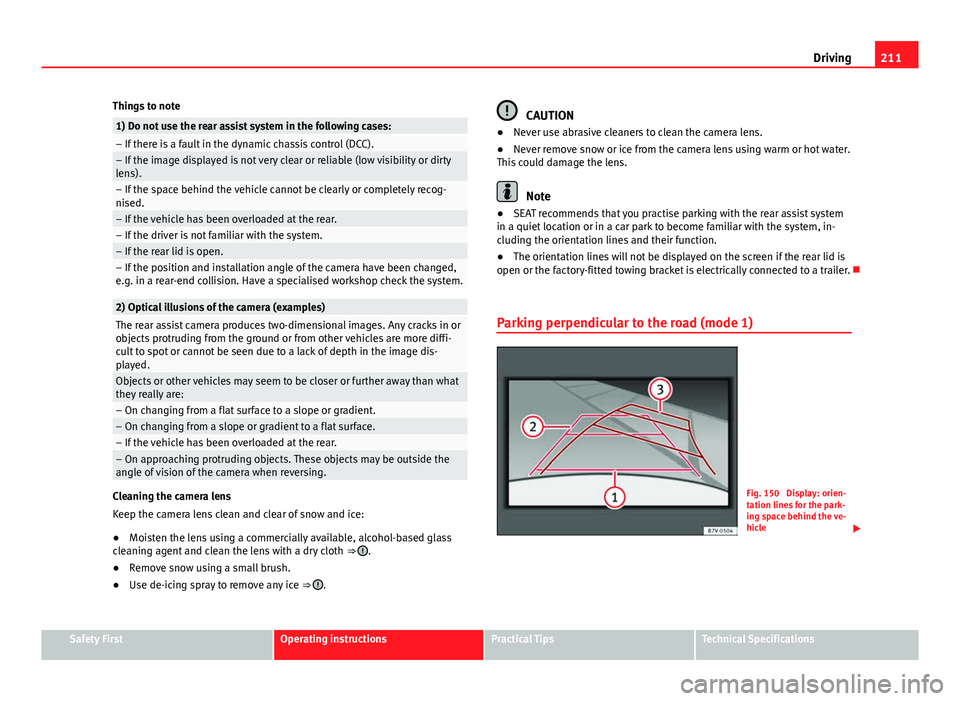
Parking perpendicular to the road (mode 1)
Fig. 150 Display: orien-
tation lines for the park-
ing space behind the ve-
hicle
Safety FirstOperating instructionsPractical TipsTechnical Specifications
Page 215 of 381
213
Driving
Parking
● Stop the vehicle 1 m away parallel to the parking space and select re-
verse gear.
● Switch on mode 2 on the navigation system screen for parallel parking.
● Slowly reverse and turn the steering wheel so that the surface displayed
yellow on the screen stops in front of any obstacles 5
(e.g. another vehi-
cle).
● Turn the steering wheel fully towards the space and reverse slowly.
● When the yellow line 3
touches the side limit of the space, e.g. the bor-
der or curb (magnifying glass), turn the steering wheel fully in the opposite
direction.
● Continue reversing until the vehicle is inside the space, parallel to the
road. Correct the position if necessary.
Safety FirstOperating instructionsPractical TipsTechnical Specifications
Page 217 of 381
215
Driving
CCS temporarily switched off. The set speed is displayed in small fig-
ures.
System error. Contact a specialised workshop.
CCS switched on. The speed memory is empty.
The CCS is switched on. The set speed is displayed in large figures.
WARNING
If the warning lamps and messages are ignored, the vehicle may stall in
traffic, or may cause accidents and severe injuries.
● Never ignore the warning lamps or text messages.
● Stop the vehicle safely as soon as possible.
CAUTION
Failure to heed the control lamps and text messages when they appear may
result in faults in the vehicle.
A
BCD
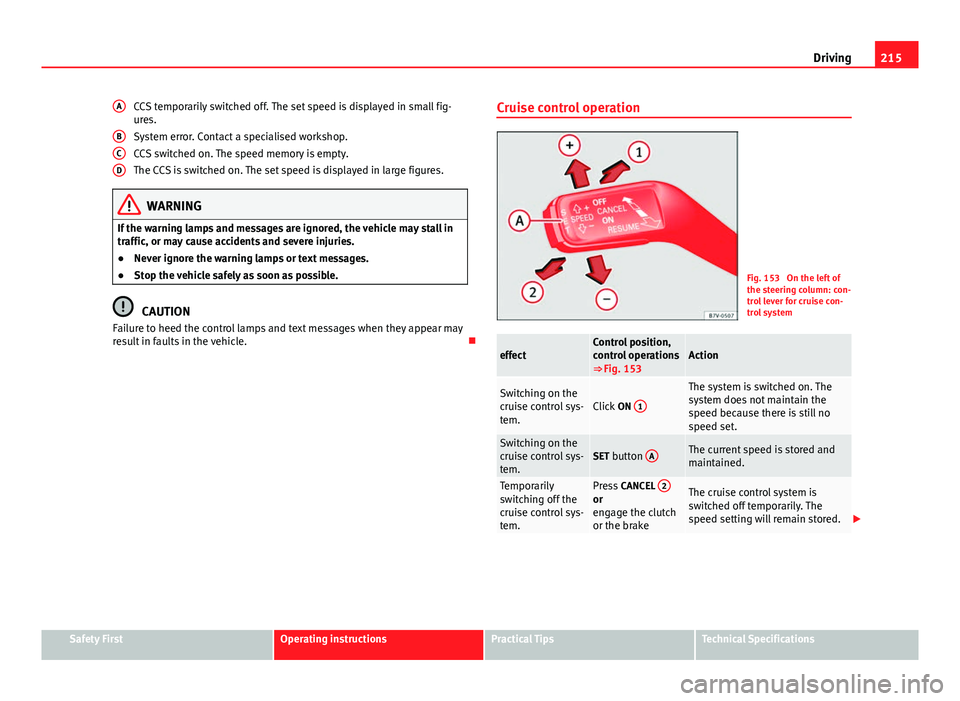
Cruise control operation
Fig. 153 On the left of
the steering column: con-
trol lever for cruise con-
trol system
effectControl position,
control operations
⇒ Fig. 153Action
Switching on the
cruise control sys-
tem.Click
ON 1
The system is switched on. The
system does not maintain the
speed because there is still no
speed set.
Switching on the
cruise control sys-
tem.SET button AThe current speed is stored and
maintained.
Temporarily
switching off the
cruise control sys-
tem.Press
CANCEL 2or
engage the clutch
or the brakeThe cruise control system is
switched off temporarily. The
speed setting will remain stored.
Safety FirstOperating instructionsPractical TipsTechnical Specifications
Page 219 of 381
217
Driving
Lane Assist system* Introduction
Additional information and warnings:
● SEAT information system ⇒ page 62
● Accessories, parts replacement, repairs and modifications ⇒ page 261
WARNING
The intelligent technology in the lane assist system cannot change the
limits imposed by the laws of physics and by the system itself. Careless
or uncontrolled use of the Lane Assist system may cause accidents and
injury. The system is not a replacement for driver awareness.
● Always adapt your speed and the distance to the vehicles ahead in
line with visibility, weather conditions, the condition of the road and the
traffic situation.
● Always keep your hands on the steering wheel so you can turn it at
any time.
● The lane assist system does not detect all road markings. In some cir-
cumstances, the poor state of the road, structures located on it or certain
objects may be mistakenly recognised as road markings by the lane as-
sist system. In such situations, switch the lane assist system off immedi-
ately.
● Pay attention to the instructions on the instrument panel display and
act accordingly to its requests.
● Always pay attention to the vehicle's surroundings.
Note
The lane assist system has been exclusively developed for driving on as-
phalted roads.
Note
If the lane assist system does not work as described in this chapter, do not
use it and contact a specialised workshop.
Note
If you observe any system malfunction, have the system checked by a speci-
alised workshop.
Safety FirstOperating instructionsPractical TipsTechnical Specifications
Page 221 of 381
219
Driving
Switching the lane assist system on or off
● Select the corresponding menu option using the button for the driver as-
sist systems ⇒ page 62.
● OR: Activate or deactivate the system in the menu Settings, sub-menu
Assist systems , menu Lane Assist ⇒ page 62. The “confirmation sign” indi-
cates that the driver assist system is switched on.
Automatic deactivation: the lane assist system can be deactivated automat-
ically if there is a system malfunction. Control lamp switches off.
The lane assist system is inactive (control lamp lit in yellow)
● When the speed of travel drops to below approx. 65 km/h (40 mph).
● When the Lane Assist system does not detect the dividing lines of the
road. For example, in the event of road works, and snow, dirt, moisture or
reflections.
● When the radius of a curve is too small.
● When there is no dividing line.
● When the distance to the next dividing line is excessive.
● When there are more than two lane markings per lane.
● When the ASR is switched off.
● When the system does not detect any active rotation of the steering
wheel by the driver during a prolonged period.
● Temporarily, in the event of very dynamic driving.
● When the turn signal is connected.
Note
Before starting travel, verify that the camera's field of vision is not covered
⇒ Fig. 154.
Note
Keep the camera window clean. Disconnect the lane assist system in the following
situations
Due to the limits of the lane assist system, disconnect it in the following sit-
uations:
●
When more attention is required of the driver
● For very sporty driving
● In very unfavourable weather conditions
● In very unfavourable road conditions
● In areas of road works
Safety FirstOperating instructionsPractical TipsTechnical Specifications