ignition Seat Alhambra 2014 Service Manual
[x] Cancel search | Manufacturer: SEAT, Model Year: 2014, Model line: Alhambra, Model: Seat Alhambra 2014Pages: 381, PDF Size: 5.75 MB
Page 105 of 381
103
Lights and visibility
ValueVehicle load status a)
2All seats occupied, luggage compartment full With trailer
and minimum drawbar load
3Driver only, luggage compartment full With trailer and
maximum drawbar load
a)
If the vehicle load does not correspond to those shown in the table, it is possible to select
intermediary positions.
Dynamic headlight range control
The control 2
is not mounted in vehicles with dynamic headlight range
control. The headlight range is automatically adjusted according to the ve-
hicle load status when the headlights are switched on.
WARNING
Heavy objects in the vehicle may mean that the headlights dazzle and
distract other drivers. This could result in a serious accident.
● Adjust the light beam to the vehicle load status so that it does not
blind other drivers.
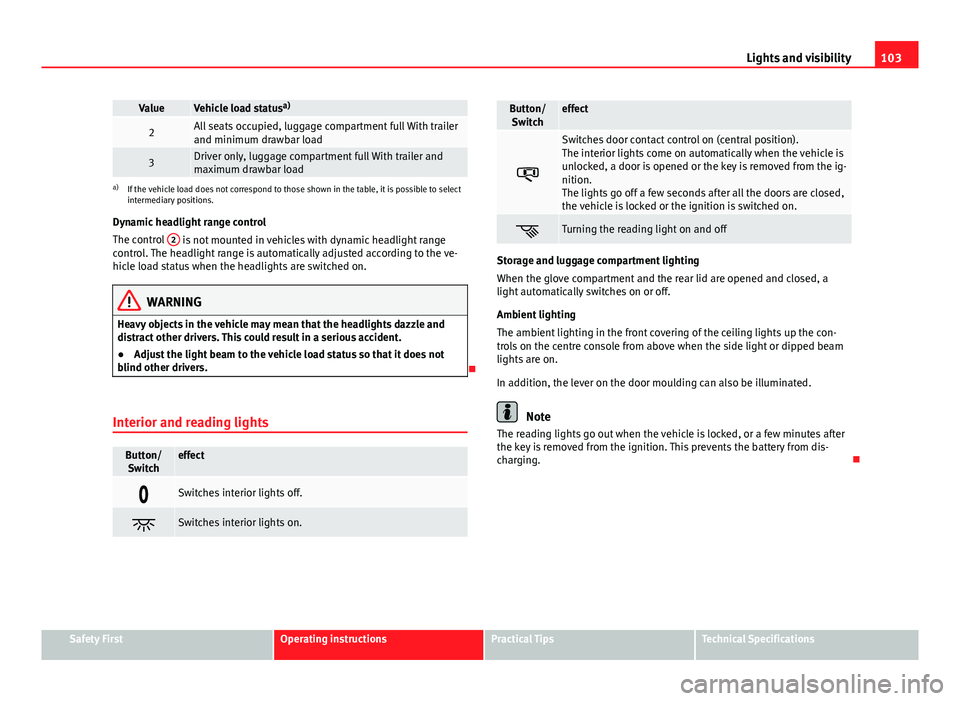
Interior and reading lights
Button/ Switcheffect
Switches interior lights off.
Switches interior lights on.
Button/Switcheffect
Switches door contact control on (central position).
The interior lights come on automatically when the vehicle is
unlocked, a door is opened or the key is removed from the ig-
nition.
The lights go off a few seconds after all the doors are closed,
the vehicle is locked or the ignition is switched on.
Turning the reading light on and off
Storage and luggage compartment lighting
When the glove compartment and the rear lid are opened and closed, a
light automatically switches on or off.
Ambient lighting
The ambient lighting in the front covering of the ceiling lights up the con-
trols on the centre console from above when the side light or dipped beam
lights are on.
In addition, the lever on the door moulding can also be illuminated.
Note
The reading lights go out when the vehicle is locked, or a few minutes after
the key is removed from the ignition. This prevents the battery from dis-
charging.
Safety FirstOperating instructionsPractical TipsTechnical Specifications
Page 108 of 381
106Lights and visibility
Windscreen wiper and washer
Introduction
Additional information and warnings:
● Recirculation of air conditioner air ⇒ page 157
● Working in the engine compartment ⇒ page 279
● Caring for and cleaning the vehicle exterior ⇒ page 246
WARNING
Water from the windscreen washer water bottle may freeze on the wind-
screen if it does not contain enough anti-freeze, reducing forward visibili-
ty.
● In winter, ensure the windscreen washer contains enough anti-freeze.
● In cold conditions, you should not use the wash/wipe system unless
you have warmed the windscreen with the ventilation system. The anti-
freeze could freeze on the windscreen and reduce visibility.
WARNING
Worn or dirty wiper blades reduce visibility and increase the risk of acci-
dent and serious injury.
● Always replace damaged or worn blades or blades which do not clean
the windscreen correctly.
CAUTION
In icy conditions, always check that the wiper blades are not frozen to the
glass before using the wipers for the first time. In cold weather, it may help
to leave the vehicle parked with the wipers in service position ⇒ page 108. Control lamp
lights upPossible causeSolution
Windscreen wiper fluid level
too lowTop up the windscreen wiper
reservoir as soon as possible
⇒ page 110.
Several warning and control lamps should light up for a few seconds when
the ignition is switched on, signalling that the function is being verified.
They will switch off after a few seconds.
CAUTION
Failure to heed the control lamps and text messages when they appear may
result in faults in the vehicle.
Page 109 of 381
107
Lights and visibility
Window wiper lever
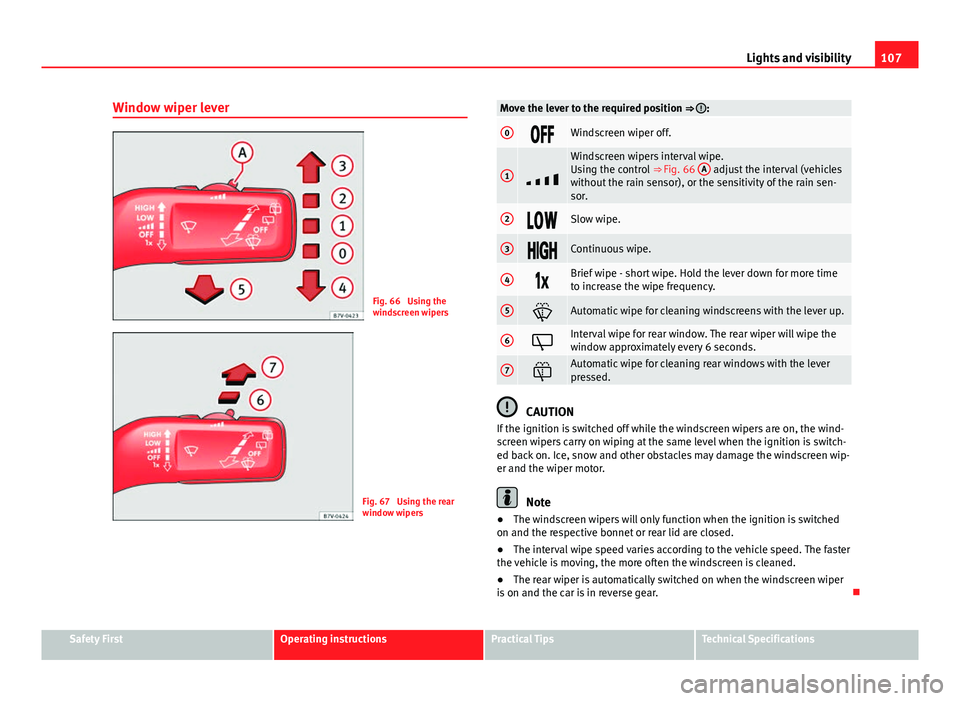
Fig. 66 Using the
windscreen wipers
Fig. 67 Using the rear
window wipers
Move the lever to the required position ⇒ :
0Windscreen wiper off.
1
Windscreen wipers interval wipe.
Using the control ⇒ Fig. 66 A adjust the interval (vehicles
without the rain sensor), or the sensitivity of the rain sen-
sor.
2Slow wipe.
3Continuous wipe.
4Brief wipe - short wipe. Hold the lever down for more time
to increase the wipe frequency.
5Automatic wipe for cleaning windscreens with the lever up.
6Interval wipe for rear window. The rear wiper will wipe the
window approximately every 6 seconds.
7Automatic wipe for cleaning rear windows with the lever
pressed.
CAUTION
If the ignition is switched off while the windscreen wipers are on, the wind-
screen wipers carry on wiping at the same level when the ignition is switch-
ed back on. Ice, snow and other obstacles may damage the windscreen wip-
er and the wiper motor.
Note
● The windscreen wipers will only function when the ignition is switched
on and the respective bonnet or rear lid are closed.
● The interval wipe speed varies according to the vehicle speed. The faster
the vehicle is moving, the more often the windscreen is cleaned.
● The rear wiper is automatically switched on when the windscreen wiper
is on and the car is in reverse gear.
Safety FirstOperating instructionsPractical TipsTechnical Specifications
Page 110 of 381
108Lights and visibility
Windscreen wiper functions
Windscreen wiper performance in different situations:If the vehicle is at a stand-
still:The activated position provisionally changes
to the previous position.
During the automatic wipe:
The air conditioner comes on for approxi-
mately 30 seconds in air recirculation mode
to prevent the smell of the windscreen wash-
er fluid entering the inside the vehicle.
For the interval wipe:The intervals between wipes vary according
to the speed of the vehicle. The higher the
vehicle speed the shorter the intervals.
Heated windscreen washer jets
The heating only thaws the frozen jets, it does not thaw the water in the
washer hoses. The heated windscreen washer jets automatically adjust the
heat depending on the ambient temperature, when the ignition is switched
on.
Headlight wash/wipe system
The headlight washers/wipers clean the headlight lenses.
After the ignition is switched on, the first and every fifth time the wind-
screen washer is switched on, the headlights are also washed. Therefore,
the windscreen wiper lever should be pulled towards the steering wheel
when the dipped beam or main beam are on. Any incrusted dirt (such as in-
sects) should be cleaned regularly (e.g. when refuelling).
To ensure the headlight washers work correctly in winter, any snow which
has got into the bumper jet supports should be cleaned away. If necessary,
remove snow with an anti-icing spray.
Note
The wiper will try to wipe away any obstacles that are on the windscreen.
The wiper will stop moving if the obstacle blocks its path. Remove the ob-
stacle and switch the wiper back on again.
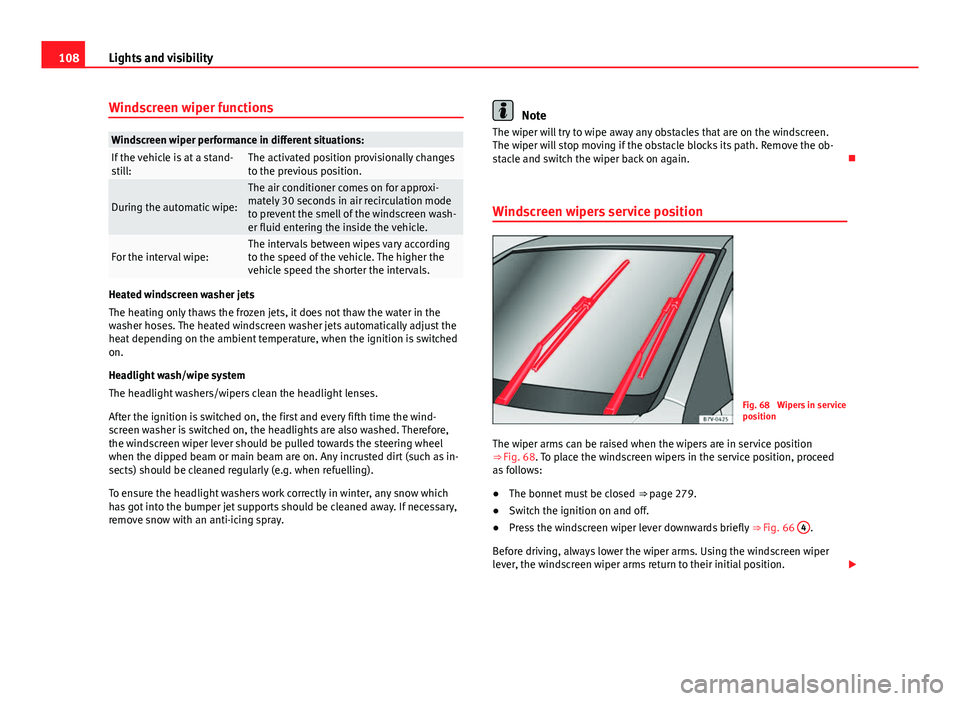
Windscreen wipers service position
Fig. 68 Wipers in service
position
The wiper arms can be raised when the wipers are in service position
⇒ Fig. 68. To place the windscreen wipers in the service position, proceed
as follows:
● The bonnet must be closed ⇒ page 279.
● Switch the ignition on and off.
● Press the windscreen wiper lever downwards briefly ⇒ Fig. 66 4
.
Before driving, always lower the wiper arms. Using the windscreen wiper
lever, the windscreen wiper arms return to their initial position.
Page 111 of 381
109
Lights and visibility
Lifting and returning windscreen wiper arms
● Place the wiper arms in the service position ⇒
.
● Only hold the wiper arms at the point where the blade is fixed.
CAUTION
● To prevent damage to the bonnet and the wiper arms, only leave them in
the service position.
● Before driving, always lower the wiper arms.
Rain sensor*
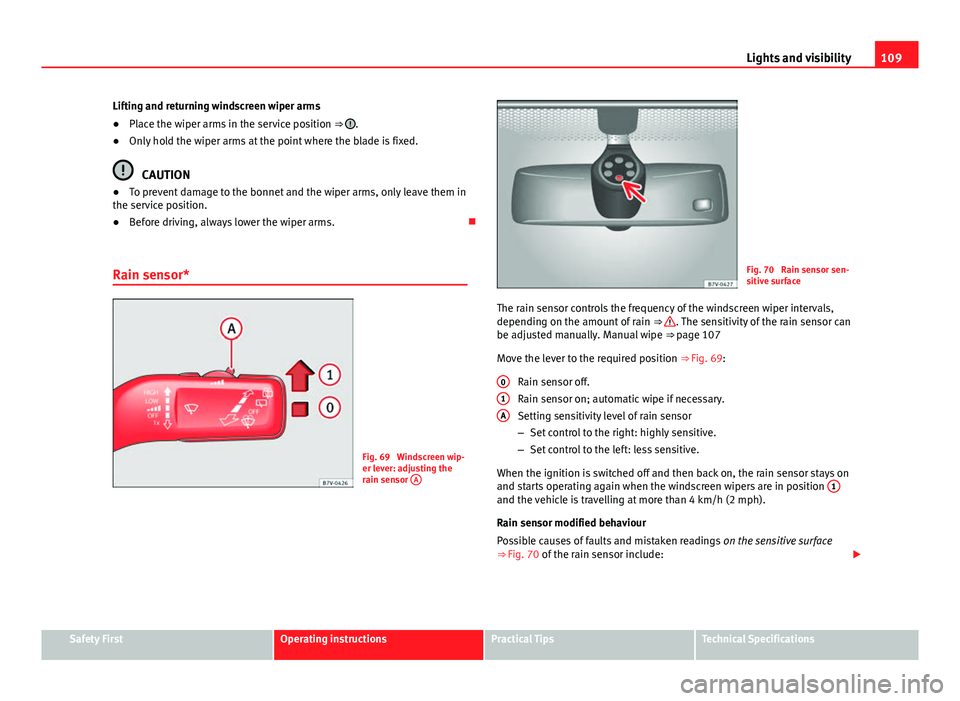
Fig. 69 Windscreen wip-
er lever: adjusting the
rain sensor A
Fig. 70 Rain sensor sen-
sitive surface
The rain sensor controls the frequency of the windscreen wiper intervals,
depending on the amount of rain ⇒
. The sensitivity of the rain sensor can
be adjusted manually. Manual wipe ⇒ page 107
Move the lever to the required position ⇒ Fig. 69:
Rain sensor off.
Rain sensor on; automatic wipe if necessary.
Setting sensitivity level of rain sensor
– Set control to the right: highly sensitive.
– Set control to the left: less sensitive.
When the ignition is switched off and then back on, the rain sensor stays on
and starts operating again when the windscreen wipers are in position 1
and the vehicle is travelling at more than 4 km/h (2 mph).
Rain sensor modified behaviour
Possible causes of faults and mistaken readings
on the sensitive surface
⇒ Fig. 70 of the rain sensor include:
0
1A
Safety FirstOperating instructionsPractical TipsTechnical Specifications
Page 114 of 381

112Lights and visibility
Rear vision mirror
Fig. 72 Manual anti-daz-
zle function for rear vi-
sion mirror
Fig. 73 Automatic anti-
dazzle function for rear
vision mirror
The driver should always adjust the rear vision mirror to permit adequate
visibility through the rear window. Manual anti-dazzle function for interior rear vision mirror
●
Basic position: point the lever at the bottom of the mirror forwards.
● Pull the lever to the back to select the anti-dazzle function ⇒ Fig. 72.
Automatic anti-dazzle function for interior mirror
Legend for the Fig. 73:
control lamp
Control
Light incidence sensor
This function can be activated and deactivated by pressing the rear vision
mirror switch ⇒ Fig. 73 2
. When it is activated, the warning lamp lights up
1.
When the ignition is on, the sensor 3
automatically moves the rear vision
mirror to the anti-dazzle position depending upon the incidence of the light
from behind.
The automatic anti-dazzle function is deactivated when reverse gear is en-
gaged or the interior or reading lights are on.
Note
If the incidence of the light on the sensor is obstructed or prevented, e.g. by
the sun blinds, the rear vision mirror with automatic anti-dazzle function will
not operate correctly.
1
23
Page 115 of 381
113
Lights and visibility
Exterior mirrors
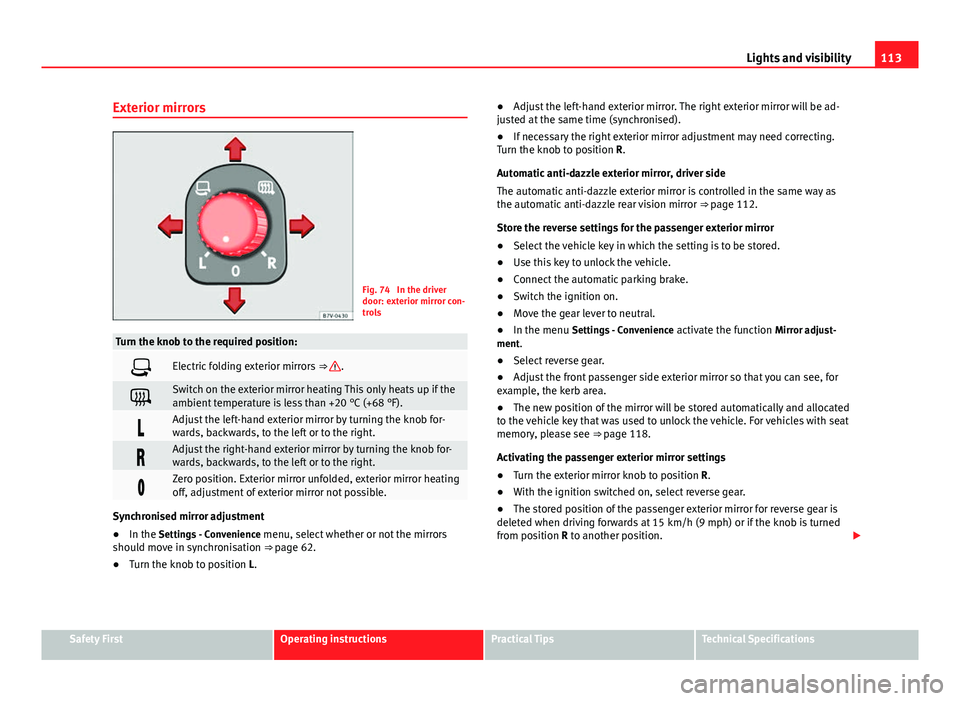
Fig. 74 In the driver
door: exterior mirror con-
trols
Turn the knob to the required position:
Electric folding exterior mirrors ⇒ .
Switch on the exterior mirror heating This only heats up if the
ambient temperature is less than +20 °C (+68 °F).
Adjust the left-hand exterior mirror by turning the knob for-
wards, backwards, to the left or to the right.
Adjust the right-hand exterior mirror by turning the knob for-
wards, backwards, to the left or to the right.
Zero position. Exterior mirror unfolded, exterior mirror heating
off, adjustment of exterior mirror not possible.
Synchronised mirror adjustment
●In the Settings - Convenience menu, select whether or not the mirrors
should move in synchronisation ⇒ page 62.
● Turn the knob to position L. ●
Adjust the left-hand exterior mirror. The right exterior mirror will be ad-
justed at the same time (synchronised).
● If necessary the right exterior mirror adjustment may need correcting.
Turn the knob to position R.
Automatic anti-dazzle exterior mirror, driver side
The automatic anti-dazzle exterior mirror is controlled in the same way as
the automatic anti-dazzle rear vision mirror ⇒ page 112.
Store the reverse settings for the passenger exterior mirror
● Select the vehicle key in which the setting is to be stored.
● Use this key to unlock the vehicle.
● Connect the automatic parking brake.
● Switch the ignition on.
● Move the gear lever to neutral.
● In the menu Settings - Convenience activate the function Mirror adjust-
ment.
● Select reverse gear.
● Adjust the front passenger side exterior mirror so that you can see, for
example, the kerb area.
● The new position of the mirror will be stored automatically and allocated
to the vehicle key that was used to unlock the vehicle. For vehicles with seat
memory, please see ⇒ page 118.
Activating the passenger exterior mirror settings
● Turn the exterior mirror knob to position R.
● With the ignition switched on, select reverse gear.
● The stored position of the passenger exterior mirror for reverse gear is
deleted when driving forwards at 15 km/h (9 mph) or if the knob is turned
from position R to another position.
Safety FirstOperating instructionsPractical TipsTechnical Specifications
Page 118 of 381

116Seats and storage
Electrical controls on the front seat*
Fig. 76 Adjusting the
front left seat forwards or
backwards, the height,
the seat angle and the
front seat backrest
Fig. 77 Adjusting the
lumbar support
The controls are mirrored for the front right-hand seat.
Mechanically and electrically adjusted controls can be combined on the
seat.
Fig. 76 Press the control in the direction of the arrow:
A1Move the seat backwards or forwards.2 and 3Raise or lower the seat.2 or 3Adjust the seat angle.
BForwards or
backwards.Adjust the seat backrest angle.
Fig. 77 Press the corresponding area of the switch:1 or 2Adjust the curve of the lumbar support.3 or 4Adjust the height of the lumbar support.
WARNING
Using the front electric seats in a careless or uncontrolled manner may
lead to severe injuries.
● The front seats can also be electrically adjusted when the ignition is
switched off. Never leave children or disabled people alone in the vehicle.
● In the event of an emergency, stop electrical adjustment by pressing
any button.
CAUTION
So as not the damage the electrical components of the front seats, do not
kneel on the seats or apply specific pressure to one point of the seat or seat
backrest.
Note
● It may not be possible to electrically adjust the seat if the vehicle battery
is very low.
● Seat adjustment is stopped when the engine is started.
Page 120 of 381

118Seats and storage
Seat functions
Introduction
Additional information and warnings
● Adjust the seat position ⇒ page 10
● Seat belts ⇒ page 21
● Airbag system ⇒ page 31
● Child seats (accessories) ⇒ page 39
● Integrated child seats ⇒ page 45
● Exterior mirrors ⇒ page 111
● Luggage compartment ⇒ page 127
WARNING
Inappropriate use of the seat functions can cause severe injuries.
● Assume the proper sitting position before your trip and remain in it
throughout. This also applies to the other occupants.
● Only adjust the seat position memory when the vehicle is stationary.
● Only switch the lumbar massage function on and off when the vehicle
is stationary.
● Keep hands, fingers, feet and other limbs away from the seat operat-
ing and adjustment radius.
Seat heating*
Fig. 79 Detailed view of
the centre console: front
seat heating controls,
here with the second
temperature level set
Fig. 80 Detailed view of
the centre console: con-
trols for the front seat
heating in vehicles
equipped with Climatron-
ic
The seat cushions can be heated electrically when the ignition is switched
on. The backrest is also heated in some versions.
Switch off seat heating if there is nobody in the seat.
Page 121 of 381
119
Seats and storage
effectAction ⇒ Fig. 79, ⇒ Fig. 80To switch system on:Press button . Seat heating is switched on fully.Adjusting the heating
output:Keep pressing button until the required intensi-
ty is set.
To switch system off:Keep pressing button until all of the lights are
switched off ⇒ Fig. 79, ⇒ Fig. 80.
WARNING
People whose pain and temperature threshold has been affected by some
kind of medicine, paraplegia or chronic illness (e.g. diabetes) may sus-
tain burns to the back, buttocks and legs from use of the seat heating
that may lead to a long healing process or that may never completely
heal. Seek medical advice if you have doubts regarding your health.
● People with a limit pain and temperature threshold must never use
seat heating.
CAUTION
● To avoid damaging the heating elements of the seat heating, please do
not kneel on the seat or apply sharp pressure at a single point to the seat
cushion and backrest.
● Liquids, sharp objects and insulating materials on the seat could dam-
age the seat heating.
● In the event of smells, switch off the seat heating immediately and have
the unit inspected by a specialised workshop.
For the sake of the environment
The seat heating should remain on only when needed. Otherwise, it is an
unnecessary fuel waste. Seat with position memory*
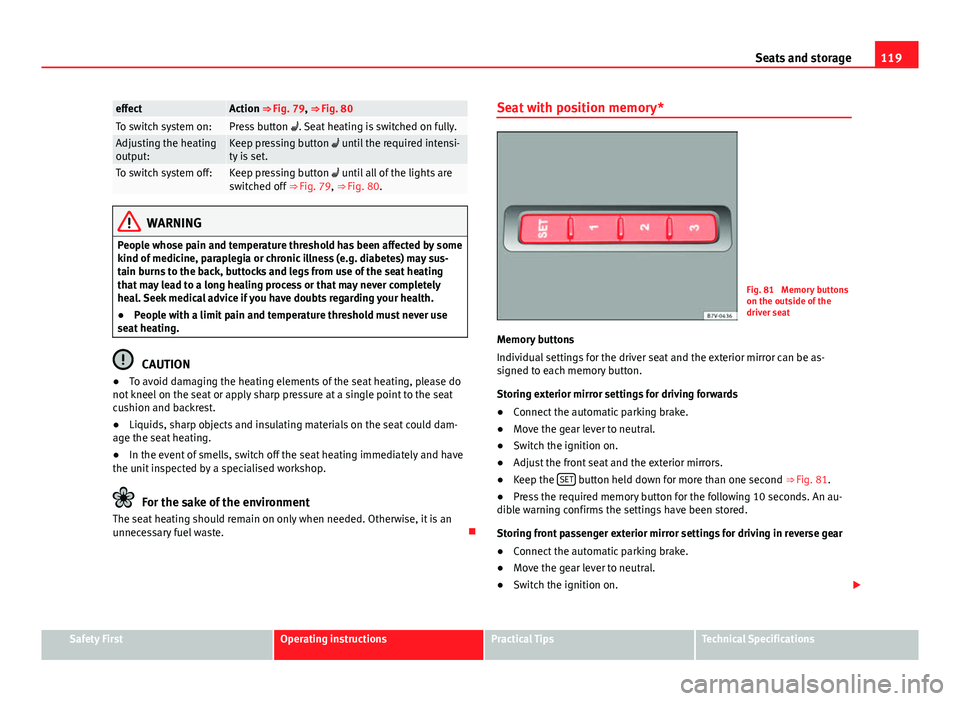
Fig. 81 Memory buttons
on the outside of the
driver seat
Memory buttons
Individual settings for the driver seat and the exterior mirror can be as-
signed to each memory button.
Storing exterior mirror settings for driving forwards
● Connect the automatic parking brake.
● Move the gear lever to neutral.
● Switch the ignition on.
● Adjust the front seat and the exterior mirrors.
● Keep the SET
button held down for more than one second
⇒ Fig. 81.
● Press the required memory button for the following 10 seconds. An au-
dible warning confirms the settings have been stored.
Storing front passenger exterior mirror settings for driving in reverse gear
● Connect the automatic parking brake.
● Move the gear lever to neutral.
● Switch the ignition on.
Safety FirstOperating instructionsPractical TipsTechnical Specifications