light Seat Alhambra 2014 Workshop Manual
[x] Cancel search | Manufacturer: SEAT, Model Year: 2014, Model line: Alhambra, Model: Seat Alhambra 2014Pages: 381, PDF Size: 5.75 MB
Page 142 of 381

140Seats and storage
Hooking the baggage net into the luggage compartment floor
● Hook the baggage net into the fastening rings ⇒ Fig. 101 1
and 2.
Releasing the baggage net
The secured baggage net is taut ⇒
.
● Carefully unhook the baggage net hooks from the fastening rings
⇒ Fig. 101 1
.
● Carefully unhook the baggage net hooks from the fastening rings
⇒ Fig. 101 2
.
WARNING
The elastic baggage net stretches when it is secured to the luggage com-
partment fastening rings. The secured baggage net is taut. The hooks on
the baggage net can cause injury if the net is incorrectly hooked or un-
hooked.
● Always ensure that the hooks do not suddenly release from the fas-
tening rings when hooking or un-hooking.
● Always keep your face and eyes protected at a safe distance to avoid
injury should a hook slip while hooking or unhooking.
● Always engage the hooks in the order given. If a baggage net hook
springs back this can cause injury.
Roof carrier system* Introduction
The vehicle roof has been designed to optimise aerodynamics. For this rea-
son, conventional roof carrier systems cannot be secured to the roof rails. Given that the water drains have been incorporated into the roof for aerody-
namic reasons, only the SEAT approved basic supports and roof carrier sys-
tems can be used.
When should the roof carrier system be removed?
●
When it is not being used.
● When the vehicle is being washed in a car wash.
● When the vehicle height exceeds the maximum height (for example, in a
garage).
Additional information and warnings:
● Light ⇒ page 96
● Transporting ⇒ page 13
● Ecological driving ⇒ page 229
● Wheels and tyres ⇒ page 297
● Accessories, parts replacement, repairs and modifications ⇒ page 261
WARNING
The risk of an accident is increased by transporting heavy or bulky loads
on the roof, which affects the car's handling by shifting the centre of
gravity and increasing susceptibility to cross winds.
● Always secure loads correctly with suitable and undamaged attach-
ment rope or straps.
● Large, heavy, wide and flat loads negatively affect the vehicle aerody-
namics, centre of gravity and handling.
● Avoid brusque manoeuvres and sudden braking.
● Adjust your speed and driving style to visibility, road, traffic and
weather conditions.
Page 144 of 381

142Seats and storage
Note
Read and take into account the instructions included with the roof carrier
system fitted and keep them in the vehicle.
Loading the roof carrier system
Loads can only be correctly secured when the roof carrier system is correctly
fitted ⇒ .
Maximum authorised roof load
The maximum authorised roof load is 100 kg (about 220 lbs). The roof load
includes the roof carrier system and the load being transported ⇒
.
Always check the roof carrier system weight and the weight of the load to be
transported and, if necessary, weigh them. Never exceed the maximum au-
thorised roof load.
If you are using a roof carrier with a lower weight rating, you cannot trans-
port the maximum roof load. Do not exceed the maximum weight limit for
the roof carrier given in the fitting instructions.
Distributing a load
Uniformly distribute loads and secure them correctly ⇒
.
Check attachments
After fitting the base supports and the roof carrier system, always check the
attachments after a short trip or at regular intervals.
WARNING
Exceeding the maximum authorised roof load can result in accidents
and/or vehicle damage.
● Always respect the maximum authorised weight for the roof, the max-
imum authorised weight on the axles and the total maximum authorised
weight of the vehicle.
● Never exceed the capacity of the roof carrier system even if this is
less than the maximum authorised roof load.
● Secure heavy objects towards the front and distribute the load even-
ly.
WARNING
Loose and incorrectly secured loads can fall from the roof carrier system
causing accidents and injury.
● Always use suitable ropes and straps in good condition.
● Always secure loads correctly.
Storage compartments Introduction
Storage compartments must only be used to store light or small objects.
The front central armrest compartment houses the factory-fitted AUX-IN or
multimedia (MEDIA-IN) connection sockets.
The factory-fitted CD changer is located in the left-hand storage compart-
ment of the luggage compartment.
Page 145 of 381

143
Seats and storage
Additional information and warnings:
● Child seats (accessories) ⇒ page 39
● Luggage compartment ⇒ page 127
● Care and cleaning of the vehicle interior ⇒ page 253
● ⇒ Booklet Radio or ⇒ Booklet navigation system
WARNING
In the event of sudden braking movements or turns, loose objects may be
thrown around the vehicle interior. This could cause serious injuries to
passengers and cause the driver to lose control of the vehicle.
● Do not transport animals or place hard, heavy or sharp objects inside
the vehicle in: open storage compartments, dash panel, rear shelf, items
of clothing or bags.
● While driving, always keep object compartments closed.
WARNING
Objects falling into the driver's footwell could prevent use of the pedals.
This could lead the driver to lose control of the vehicle, increasing the
risk of a serious accident.
● Make sure the pedals can be used at all times, with no objects rolling
underneath them.
● The floor mat should always be secured to the floor.
● Never place other mats or rugs on top of the original mat supplied by
the factory.
● Make sure that no objects can fall into the driver's footwell while the
vehicle is in motion.
CAUTION
● Objects on the shelf could chafe against the wires of the heating ele-
ment in the heated rear window and cause damage.
● Do not keep heat-sensitive objects, food or medicines inside the vehi-
cle. Heat and cold could damage them or render them useless.
● Light-transparent objects placed inside the vehicle, such as lenses,
magnifying glasses or transparent suction caps on the windows, could con-
centrate the sun's rays and cause damage to the vehicle.
Note
The ventilating slits between the heated rear window and the shelf must not
be covered so that used air can escape from the vehicle.
Spectacle case in the roof console
Fig. 103 On the roof
console: Sunglasses stor-
age compartment
To open, press and release the button ⇒ Fig. 103 (arrow).
To close, press the cover upwards until it clicks into place.
Safety FirstOperating instructionsPractical TipsTechnical Specifications
Page 152 of 381
150Seats and storage
can be located in the storage compartment 1
.. The cover of the compart-
ment 1 can be used to safely store the covers of the rear shelf supports.
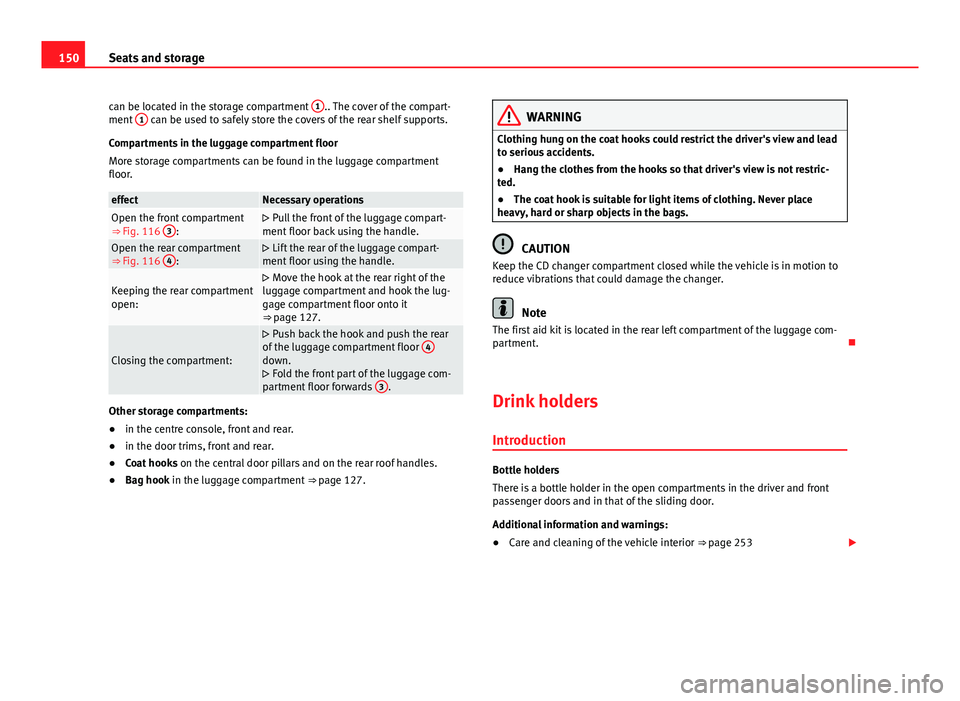
Compartments in the luggage compartment floor
More storage compartments can be found in the luggage compartment
floor.
effectNecessary operationsOpen the front compartment
⇒ Fig. 116 3:
Pull the front of the luggage compart-
ment floor back using the handle.
Open the rear compartment
⇒ Fig. 116 4:
Lift the rear of the luggage compart-
ment floor using the handle.
Keeping the rear compartment
open: Move the hook at the rear right of the
luggage compartment and hook the lug-
gage compartment floor onto it
⇒ page 127.
Closing the compartment:
Push back the hook and push the rear
of the luggage compartment floor 4
down.
Fold the front part of the luggage com-
partment floor forwards 3
.
Other storage compartments:
●
in the centre console, front and rear.
● in the door trims, front and rear.
● Coat hooks on the central door pillars and on the rear roof handles.
● Bag hook in the luggage compartment ⇒ page 127.
WARNING
Clothing hung on the coat hooks could restrict the driver's view and lead
to serious accidents.
● Hang the clothes from the hooks so that driver's view is not restric-
ted.
● The coat hook is suitable for light items of clothing. Never place
heavy, hard or sharp objects in the bags.
CAUTION
Keep the CD changer compartment closed while the vehicle is in motion to
reduce vibrations that could damage the changer.
Note
The first aid kit is located in the rear left compartment of the luggage com-
partment.
Drink holders Introduction
Bottle holders
There is a bottle holder in the open compartments in the driver and front
passenger doors and in that of the sliding door.
Additional information and warnings:
● Care and cleaning of the vehicle interior ⇒ page 253
Page 154 of 381
152Seats and storage
Drink holders, rear*
Fig. 118 Centre console,
rear section: folding out
the drink holder
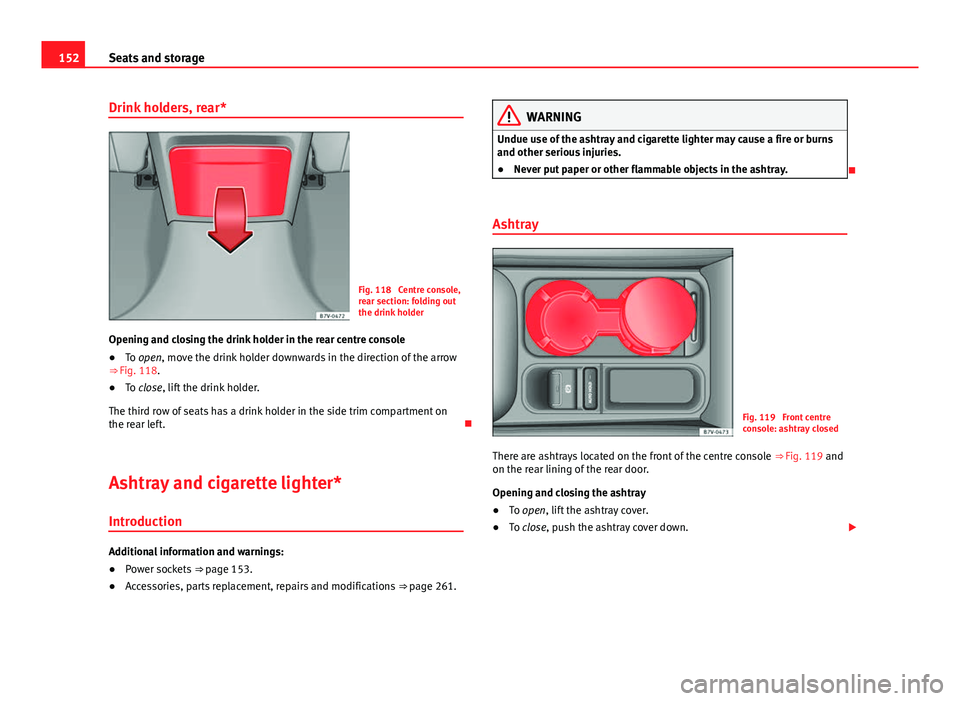
Opening and closing the drink holder in the rear centre console
● To open, move the drink holder downwards in the direction of the arrow
⇒ Fig. 118.
● To close, lift the drink holder.
The third row of seats has a drink holder in the side trim compartment on
the rear left.
Ashtray and cigarette lighter*
Introduction
Additional information and warnings:
● Power sockets
⇒ page 153.
● Accessories, parts replacement, repairs and modifications
⇒ page 261.
WARNING
Undue use of the ashtray and cigarette lighter may cause a fire or burns
and other serious injuries.
● Never put paper or other flammable objects in the ashtray.
Ashtray
Fig. 119 Front centre
console: ashtray closed
There are ashtrays located on the front of the centre console ⇒ Fig. 119 and
on the rear lining of the rear door.
Opening and closing the ashtray
● To open, lift the ashtray cover.
● To close, push the ashtray cover down.
Page 155 of 381
153
Seats and storage
Emptying the ashtray
● Remove the ashtray from the drink holder or lining of the door by pulling
it upwards.
● After emptying the ashtray, insert it from above into the drink holder or
door lining.
Cigarette lighter
Fig. 120 Front centre
console: lighter
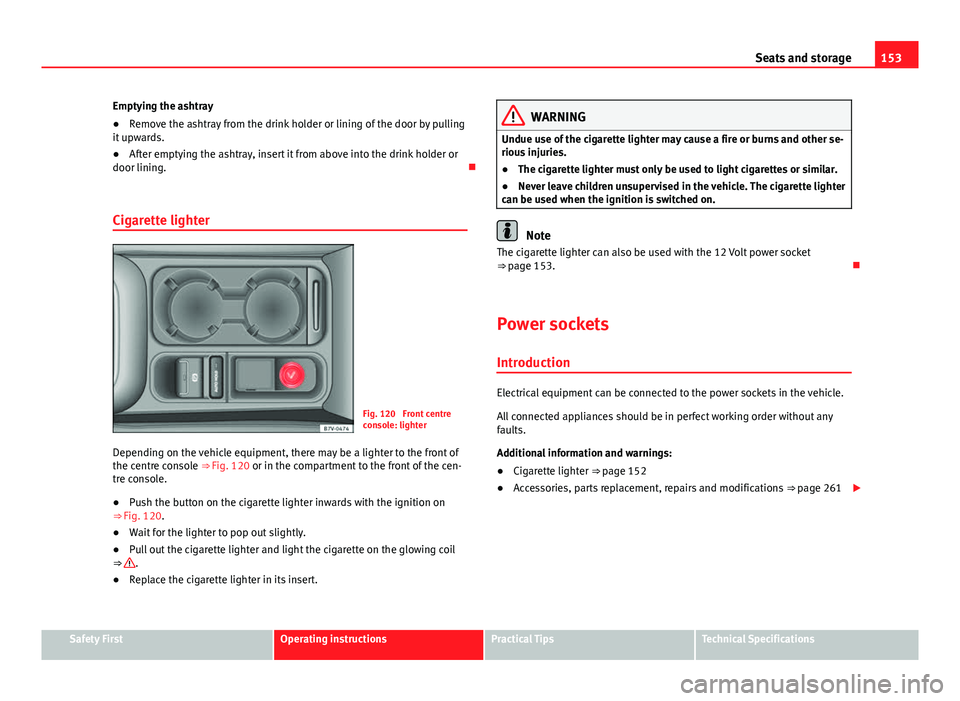
Depending on the vehicle equipment, there may be a lighter to the front of
the centre console ⇒ Fig. 120 or in the compartment to the front of the cen-
tre console.
● Push the button on the cigarette lighter inwards with the ignition on
⇒ Fig. 120.
● Wait for the lighter to pop out slightly.
● Pull out the cigarette lighter and light the cigarette on the glowing coil
⇒
.
● Replace the cigarette lighter in its insert.
WARNING
Undue use of the cigarette lighter may cause a fire or burns and other se-
rious injuries.
● The cigarette lighter must only be used to light cigarettes or similar.
● Never leave children unsupervised in the vehicle. The cigarette lighter
can be used when the ignition is switched on.
Note
The cigarette lighter can also be used with the 12 Volt power socket
⇒ page 153.
Power sockets Introduction
Electrical equipment can be connected to the power sockets in the vehicle.
All connected appliances should be in perfect working order without any
faults.
Additional information and warnings:
● Cigarette lighter
⇒ page 152
● Accessories, parts replacement, repairs and modifications
⇒ page 261
Safety FirstOperating instructionsPractical TipsTechnical Specifications
Page 158 of 381
156Seats and storage
LED on the power socket ⇒ Fig. 122Steady green light:The childproof lock is unlocked. The power
socket can now be used.
Flashing red light:There is some kind of fault (e.g. discon-
nection due to excess current or tempera-
ture).
Heat protection
The 230 Volt Euro power connector converter switches off automatically
when a certain temperature is exceeded. This disconnect prevents overheat-
ing in the event of an increase in power consumption of the connected ap-
pliance and where the atmospheric temperature is too high. The inverter
will switch on again automatically after it has cooled down. Appliances that
are switched on and connected to the power socket will start up again.
Therefore, switch off all electrical appliances connected to the power socket
when the current converter switches off due to overheating.
WARNING
High voltage in the electrical installation!
● Liquids must not be spilt over the power socket.
● Do not plug adapters or extension cords into the 230 Volt Euro power
connector. Otherwise, the built-in child safety device will switch off and
the connector will become live.
● Do not plug current conductors such as a knitting needle into the 230
Volt Euro power connector.
CAUTION
● Always follow the operating instructions for the appliances to be con-
nected!
● Never exceed the maximum power rating as this could damage the vehi-
cle's general electrical system. ●
12 volt power socket:
– Only use accessories with approved electromagnetic compatibility ac-
cording to current regulations.
– Never power the socket.
● 230 Volt Euro power socket:
– Do not hang appliances or plugs that are too heavy (e.g. a transform-
er) from the power socket.
– Do not connect lamps which contain a neon tube.
– Only plug appliances with a voltage that matches the power socket
voltage into the power socket.
– In the event of consumers with a high start-up current, surge protec-
tion prevents them from switching on. In this case, unplug the consumer
and try plugging it back in after around 10 seconds.
Note
● Some appliances may not work properly in the 230 Volt Euro power con-
nector due to a lack of power (Watts).
● The 230 Watt Euro power connector can be modified for 115 Watt appli-
ances and vice versa. Consult a specialist shop for advice on accessories to
adapt the connector. SEAT recommends visiting a Technical Service.
Page 160 of 381
158Air conditioning
Note
● When the cooling system is turned off, air coming from the outside will
not be dried. To avoid fogging up the windows, SEAT recommends leaving
the cooler (compressor) on. To do this, press the AC
button. The button
lamp should light up.
● If the humidity and temperature outside the vehicle are high, condensa-
tion can drip off the evaporator in the cooling system and form a pool un-
derneath the vehicle, this is completely normal and there is no need to sus-
pect a leak.
● Keep the air intake slots in front of the windscreen free of snow, ice and
leaves to ensure heating and cooling are not impaired, and to prevent the
windows from misting over.
Page 161 of 381
159
Air conditioning
Controls
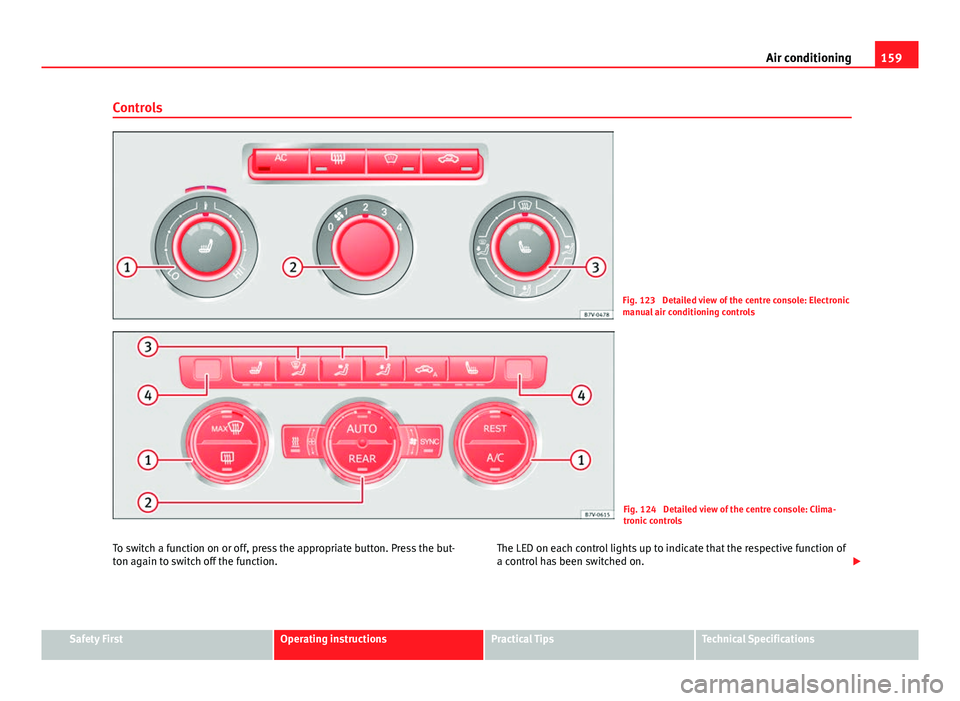
Fig. 123 Detailed view of the centre console: Electronic
manual air conditioning controls
Fig. 124 Detailed view of the centre console: Clima-
tronic controls
To switch a function on or off, press the appropriate button. Press the but-
ton again to switch off the function. The LED on each control lights up to indicate that the respective function of
a control has been switched on.
Safety FirstOperating instructionsPractical TipsTechnical Specifications
Page 163 of 381
161
Air conditioning
Control but-
tonAdditional information. Electronic manual air conditioning
⇒ Fig. 123; Climatronic ⇒ Fig. 124.
Climatronic: Accept the temperature selection for the driver
and front passenger sides: When the SYNC button light is lit,
the temperature settings on the driver side also apply to the
passenger side. Press the button or adjust the temperature
control for the passenger side in order to set a different tem-
perature. No lamp lights up on the button.
Climatronic: Automatic temperature, fan, and air distribution
control. Press the button to switch on the function. The con-
trol lamp lights up on the AUTO
button.
Climatronic: Press the button REAR to adjust the air condi-
tioner for the rear seats from the front seats. A lamp is lit in
the REAR
button if the function is activated. The settings for
the rear seats will be displayed. Press the button again to
switch the function off or do not touch any other button for
around 10 seconds.
Climatronic: Press the button REST to use the heat that the
engine radiates. When the engine is still warm but the igni-
tion switched off, the heat given off by the engine can be
used to keep the vehicle interior warm. The REST
button will
light up when the function is switched on. The function will
switch off after around 30 minutes and if the battery level is
low.
a)
Switch off.
Electronic manual air conditioning : Turn the fan switch to
setting 0.
Climatronic: Press the button OFF
or manually set the fan to
0. When the device is switched off the OFF button will light
up.
a) Depending on the version of the model.
WARNING
Never turn off the air fan for a long time or the air in the vehicle interior
will not be refreshed.
● Stuffy or used air will increase fatigue and reduce driver and passen-
ger concentration possibly resulting in a serious accident.
Note
● Not all Climatronic buttons are operational in REAR mode.
● The REAR
button is locked in defrost mode.
Rear operation
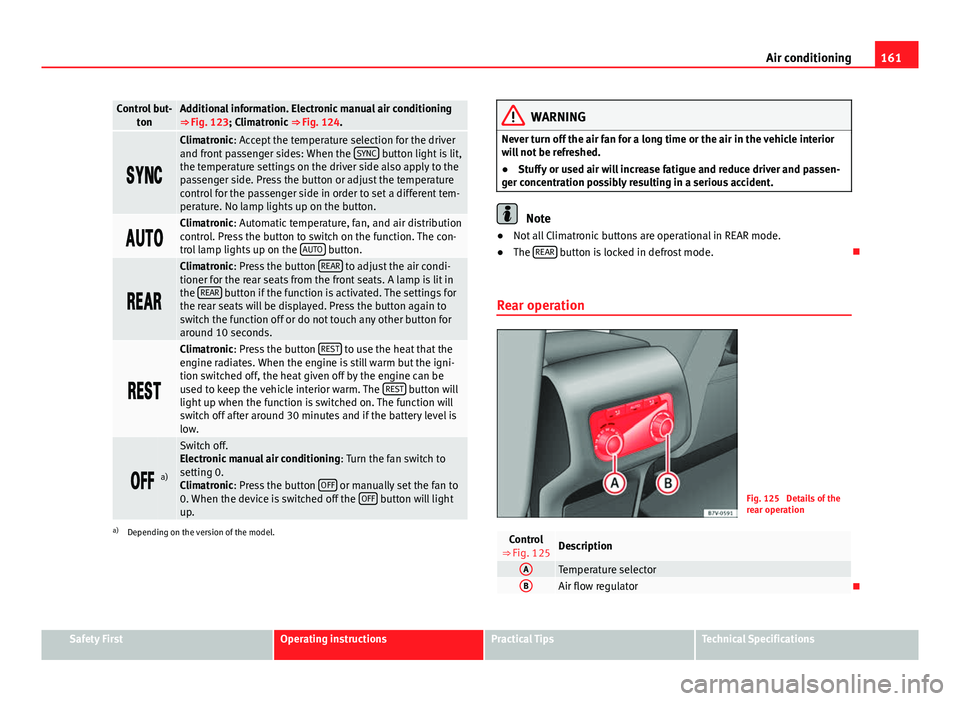
Fig. 125 Details of the
rear operation
Control
⇒ Fig. 125Description
ATemperature selectorBAir flow regulator
Safety FirstOperating instructionsPractical TipsTechnical Specifications