change time Seat Alhambra 2015 User Guide
[x] Cancel search | Manufacturer: SEAT, Model Year: 2015, Model line: Alhambra, Model: Seat Alhambra 2015Pages: 305, PDF Size: 5.46 MB
Page 81 of 305
Lights and visibilityLeaving home: necessary operations
To switch sys-
tem off:
– Automatically, at the end of the delay
period.
– When the vehicle is locked.
– When the light switch is turned to po-
sition
.
– When the ignition is switched on. Lighting around the exterior mirrors
The lighting around the exterior mirrors illu-
minates the door area on entering and leav-
ing the vehicles. It comes on when the vehi-
cle is unlocked, when the vehicle door is
opened and when the “Coming home” or
“Leaving home” function is switched on. If
the equipment includes the light sensor, the
lighting around the exterior mirrors only
comes when it is dark.
Note
● The time taken for the headlights to go off
can be changed in the Lights & Visibility menu
and the f u
nction can be switched on or off
››› page 47.
● When the “Comin
g home” function is on, if
the vehicle door is opened there is no audible
warning signal to advise that the light is still
on. Adhesive strips for headlights or
adjusting headlights
In those countries where vehicles drive on
the other side of the road to the home coun-
try, the asymmetric dipped beam may dazzle
drivers of oncoming vehicles. Therefore,
when driving abroad, adhesive strips should
be attached to the headlights or the head-
lights should be adjusted accordingly.
The direction of the headlights can be adjus-
ted from the instrument panel, in the
Tourist
light submenu of the Configuration menu
››› page 51
.
F or tho
se vehicles in which it is not possible
to adjust the headlights from the menu, ad-
hesive strips are used to cover certain parts
of the headlamp cover or the headlights may
be adjusted at a specialised workshop. For
further information, please refer to a special-
ised workshop. SEAT recommends visiting a
technical service. Note
Use of the Tourist light option and the adhe-
sives on the headlights is only allowed if they
are to be used for a short period of time. To
modify the direction of the headlights perma-
nently, please take the vehicle to a special-
ised workshop. SEAT recommends visiting a
technical service centre. Headlight range control, instrument
and switch lighting
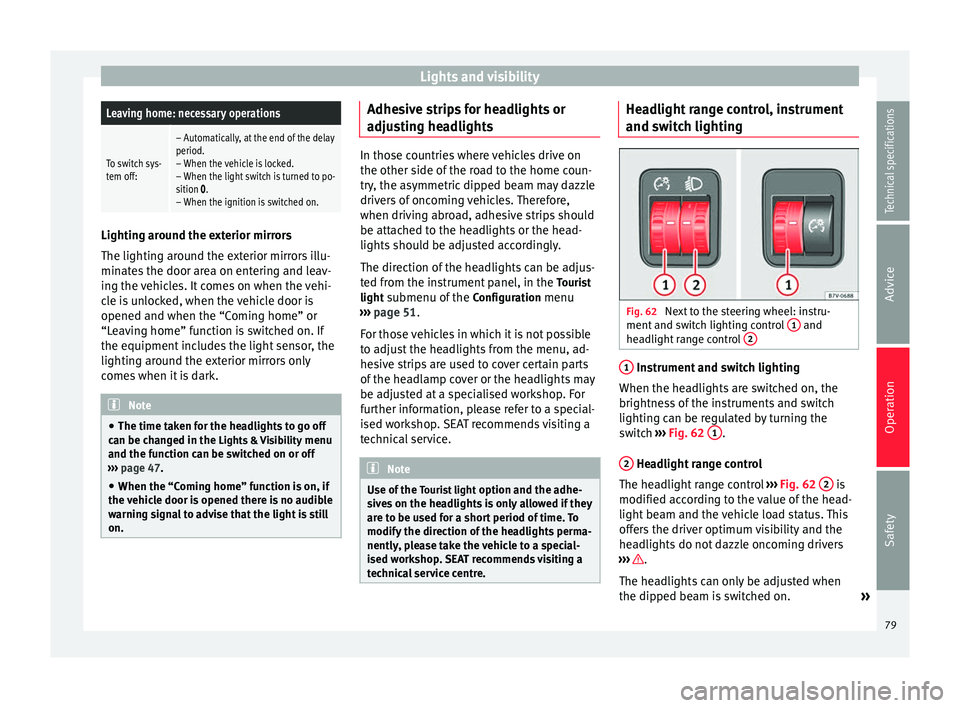
Fig. 62
Next to the steering wheel: instru-
ment and switch lighting control 1 and
headlight range control 2 1
Instrument and switch lighting
When the headlights are switched on, the
brightness of the instruments and switch
lighting can be regulated by turning the
switch ››› Fig. 62 1 .
2 Headlight range control
The headlight range control ››› Fig. 62 2 is
modified according to the value of the head-
light beam and the vehicle load status. This
offers the driver optimum visibility and the
headlights do not dazzle oncoming drivers
››› .
The headlights can only be adjusted when
the dipped beam is switched on. »
79
Technical specifications
Advice
Operation
Safety
Page 85 of 305
Lights and visibility
Windscreen wiper functionsWindscreen wiper performance in different sit-
uations
If the vehicle
is at a stand-
stillThe activated position provisionally
changes to the previous position.
During auto-
matic wipe
The air conditioner comes on for ap-
proximately 30 seconds in air recircula-
tion mode to prevent the smell of the
windscreen washer fluid entering the
inside the vehicle.
For the inter-
val wipeIntervals between wipes depend on the
vehicle's speed. The higher the vehicle
speed the shorter the intervals. Heated windscreen washer jets
The heating only thaws the frozen jets, it
does not thaw the water in the washer hoses.
The heated windscreen washer jets automati-
cally adjust the heat depending on the ambi-
ent temperature, when the ignition is switch-
ed on.
Headlight wash/wipe system
The headlight washers/wipers clean the
headlight lenses.
After the ignition is switched on, the first and
every fifth time the windscreen washer is
switched on, the headlights are also washed.
Therefore, the windscreen wiper lever should
be pulled towards the steering wheel when the dipped beam or main beam are on. Any
incrusted dirt (such as insects) should be
cleaned regularly (e.g. when refuelling).
To ensure the headlight washers work cor-
rectly in winter, any snow which has got into
the bumper jet supports should be cleaned
away. If necessary, remove snow with an anti-
icing spray.
Note
The wiper will try to wipe away any obstacles
that are on the windscreen. The wiper will
stop moving if the obstacle blocks its path.
Remove the obstacle and switch the wiper
back on again. Windscreen wipers service position
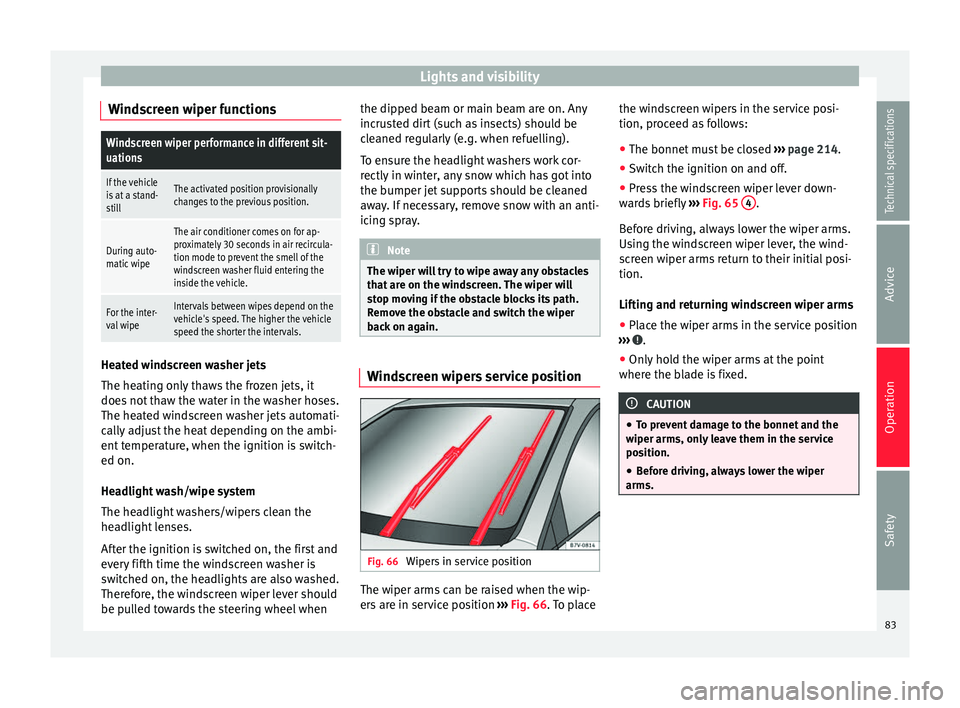
Fig. 66
Wipers in service position The wiper arms can be raised when the wip-
ers are in service position
››› Fig. 66 . To place the w
ind
screen wipers in the service posi-
tion, proceed as follows:
● The bonnet must be closed ››› page 214.
● Switch the ignition on and off.
● Press the windscreen wiper lever down-
wards briefly ››› Fig. 65 4 .
Before driving, always lower the wiper arms.
Using the windscreen wiper lever, the wind-
screen wiper arms return to their initial posi-
tion.
Lifting and returning windscreen wiper arms
● Place the wiper arms in the service position
››› .
● Only hold the wiper arms at the point
where the blade is fixed. CAUTION
● To prevent damage to the bonnet and the
wiper arms, only leave them in the service
position.
● Before driving, always lower the wiper
arms. 83
Technical specifications
Advice
Operation
Safety
Page 114 of 305
Operation
Storage compartments Introduction Storage compartments must only be used to
store light or small objects.
The front central armrest compartment hous-
es the factory-fitted
AUX-IN or multimedia
(MEDIA-IN) connection sockets.
The factory-fitted
CD changer is located in the
left-hand storage compartment of the boot. WARNING
In the event of sudden braking movements or
turns, loose objects may be thrown around
the vehicle interior. This could cause serious
injuries to passengers and cause the driver to
lose control of the vehicle.
● Do not transport animals or place hard,
heavy or sharp objects inside the vehicle in:
open storage compartments, dash panel, rear
shelf, items of clothing or bags.
● While driving, always keep object compart-
ments closed. WARNING
Objects falling into the driver's footwell could
prevent use of the pedals. This could lead the
driver to lose control of the vehicle, increas-
ing the risk of a serious accident. ●
Make sure the pedals can be used at all
times, with no objects rolling underneath
them.
● The floor mat should always be secured to
the floor.
● Never place other mats or rugs on top of
the original mat supplied by the factory.
● Make sure that no objects can fall into the
driver's footwell while the vehicle is in mo-
tion. CAUTION
● Objects on the shelf could chafe against
the wires of the heating element in the heat-
ed rear window and cause damage.
● Do not keep heat-sensitive objects, food or
medicines inside the vehicle. Heat and cold
could damage them or render them useless.
● Light-transparent objects placed inside the
vehicle, such as lenses, magnifying glasses
or transparent suction caps on the windows,
may concentrate the sun's rays and cause
damage to the vehicle. Note
The ventilating slits between the heated rear
window and the shelf must not be covered so
that used air can escape from the vehicle. Spectacle case in the roof console
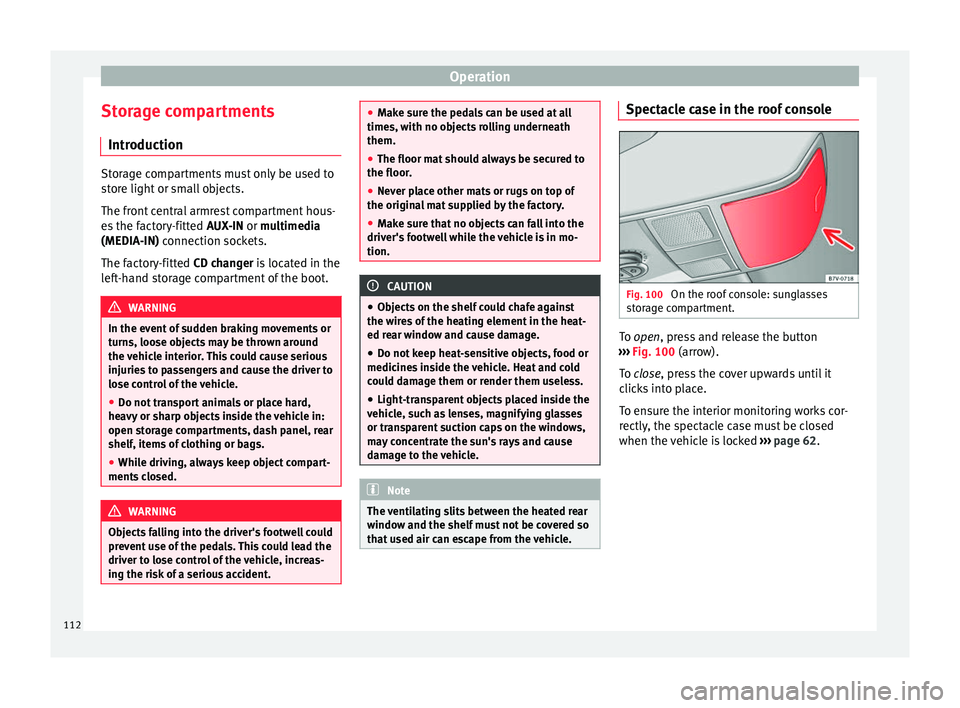
Fig. 100
On the roof console: sunglasses
storage compartment. To
open
, press and release the button
›
›› Fig. 100 (arrow).
To
close, press the cover upwards until it
clicks into place.
To ensure the interior monitoring works cor-
rectly, the spectacle case must be closed
when the vehicle is locked ››› page 62.
112
Page 144 of 305
Operation
frequently, or if rust has formed on the discs,
SEAT recommends cleaning the pads and
discs by braking firmly a few times at a mod-
erately high speed. Only do this without en-
dangering vehicles behind you or any other
road users ››› .
Faults in the brake system
During braking, if you notice that the vehicle
does not react as usual (that the braking dis-
tance has increased suddenly) it may be pos-
sible that there is a fault in the braking sys-
tem. The warning lamp lights up and a
text message displayed. Take the vehicle to a
specialised workshop immediately and have
the fault repaired. Drive at a moderate speed
and be prepared to use more pressure on the
brake pedal, and allow for longer stopping
distances.
Brake servo
The brake servo only operates when the en-
gine is running and the pressure applied by
the driver on the brake pedal increases.
If the brake servo does not operate or the ve-
hicle must be towed, then the brake pedal
will have to be pressed with more force given
that the braking distance will be increased
when the brake servo does not operate ››› . WARNING
New brake pads do not brake to full efficien-
cy.
● For the first 320 km, new brake pads have
not yet reached their maximum braking ca-
pacity, and need to be “run in” first. For this,
to compensate for reduced braking efficiency
the brake pedal will have to be pressed with
more force.
● To avoid losing control of the vehicle and
causing serious accidents, always take great
care when driving with new brake pads.
● When running in new brake pads, always
respect the safety distances between you and
other vehicles and do not cause situations re-
quiring extreme braking performance. WARNING
When brakes overheat, braking is less effi-
cient and braking distances increase.
● When driving on slopes, brakes can be
overloaded and overheat quickly.
● Reduce speed or change down a gear when
faced with steep and long slopes. This allows
you to use the engine braking effect and to
reduce the strain on the brake system.
● Non-standard or damaged front spoilers
could restrict the airflow to the brakes and
cause them to overheat. WARNING
Wet, frozen or salt-covered brakes take lon-
ger to engage and this increases braking dis-
tances.
● Test the brakes carefully.
● Dry the brakes, free them of ice and salt by
braking gently several times, when weather,
road and traffic conditions permit. WARNING
Driving without the brake servo may signifi-
cantly increase the braking distance and re-
sult in a severe accident.
● Never allow the vehicle to move forwards
when the engine is switched off.
● If the brake servo does not operate or the
vehicle must be towed, then the brake pedal
will have to be pressed with more force given
that the braking distance will be increased
when the brake servo does not operate. CAUTION
● Never make the brakes “slip” by pressing
the pedal gently, if it is not really necessary
to brake. Continuously pressing on the brake
pedal will heat the brakes. This could signifi-
cantly reduce braking power, increase brak-
ing distance or even result in the total failure
of the brake system.
● Reduce speed or change down a gear when
faced with steep and long slopes. This allows
you to use the engine braking effect and to 142
Page 145 of 305
Driving
reduce the strain on the brake system. Other-
wise, the brakes may overheat and fail. Only
use the brakes to reduce speed or to stop.
Note
When checking the front brake pads, take the
time to also check the rear brake pads. The
thickness of the brake pads should be
checked visually and regularly, by looking
through the openings in the wheel rims or
from underneath the vehicle. If necessary, re-
move the wheels to check them thoroughly.
SEAT recommends taking your car in for tech-
nical service. Changing gear
Introduction When reverse gear is engaged and the
ignition is switched on the following takes
place:
● Reverse lights light up.
● When reversing, the air conditioner auto-
matically changes to air recirculation mode.
● The rear window heater switches on when
the windscreen wiper is activated.
● Also, the parking sensor system, the opti-
cal parking sensor and the camera for the re-
verse assist system are connected. WARNING
Rapid acceleration can cause loss of traction
and skidding, especially on slippery ground.
This could cause loss of control of the vehicle
resulting in an accident and considerable
damage.
● Only use the kick-down function or rapid
acceleration if visibility, weather, road and
traffic conditions so permit. WARNING
Do not allow the brakes to “rub” for a pro-
longed period of time, or brake frequently or
for long periods of time. Continuous braking
heats up the brakes. This could significantly
reduce braking power, increase braking dis-
tance or even result in the total failure of the
brake system. Warning and control lampsIt lights
upPossible causeSolution
(red)Brake pedal not
pressed!Press brake pedal to
the floor.
(green)Brake pedal not
pressed.
To select a range of
gears, press the
brake pedal.
Please also see "Elec-
tronic parking brake"
››› page 137.
FlashesPossible causeSolution
(green)
The selector lever
locking button
has not engaged.
The vehicle does
not start to move.Engage the selector
lever lock
››› page 145. Several warning and control lamps light up
for a few seconds when the ignition is switch-
ed on, signalling that the function is being
verified. They will switch off after a few sec-
onds.
WARNING
Observe the safety warnings ››› in Control
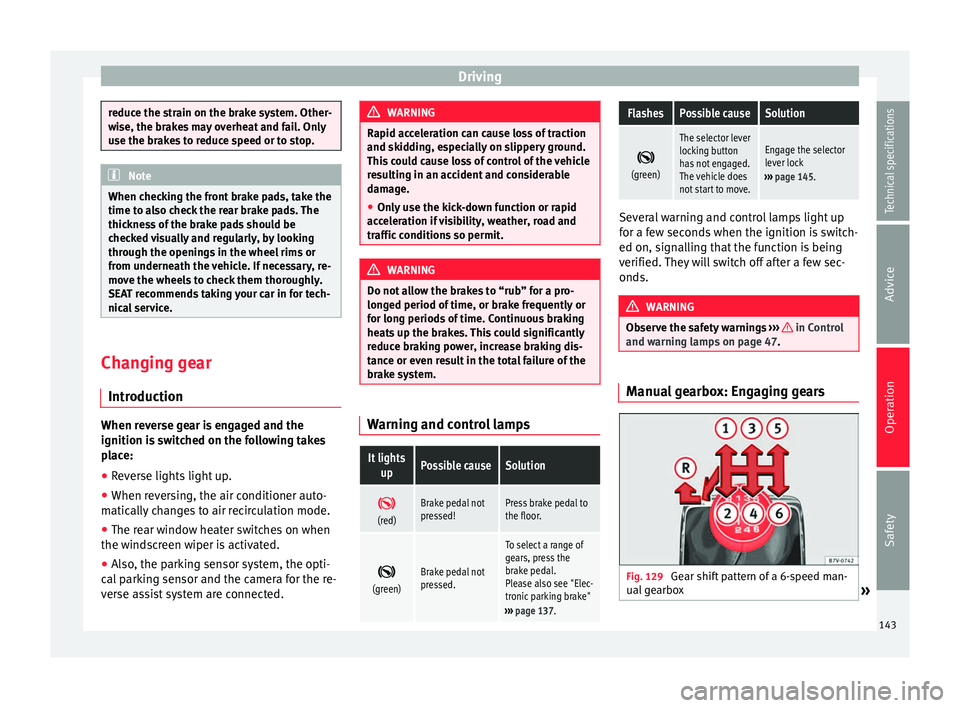
and warning lamps on page 47. Manual gearbox: Engaging gears
Fig. 129
Gear shift pattern of a 6-speed man-
ual gearbox » 143
Technical specifications
Advice
Operation
Safety
Page 148 of 305
Operation
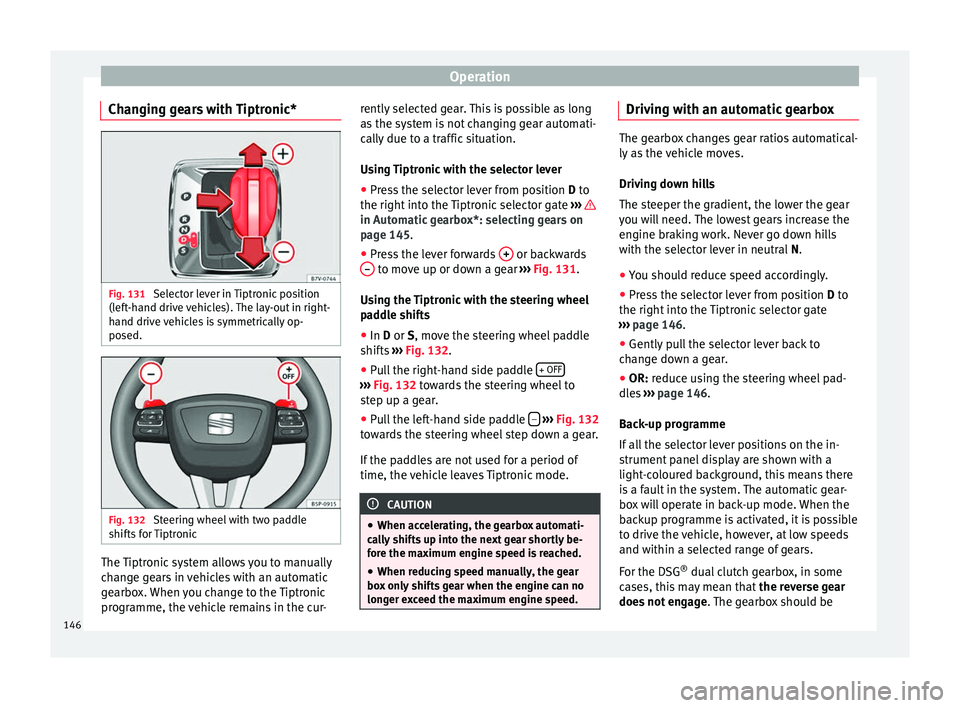
Changing gears with Tiptronic* Fig. 131
Selector lever in Tiptronic position
(left-hand drive vehicles). The lay-out in right-
hand drive vehicles is symmetrically op-
posed. Fig. 132
Steering wheel with two paddle
shifts for Tiptronic The Tiptronic system allows you to manually
change gears in vehicles with an automatic
gearbox. When you change to the Tiptronic
programme, the vehicle remains in the cur- rently selected gear. This is possible as long
as the system is not changing gear automati-
cally due to a traffic situation.
Using Tiptronic with the selector lever
● Press the selector lever from position D to
the right int
o the Tiptronic selector gate ››› in Automatic gearbox*: selecting gears on
page 145
.
● Pr e
ss the lever forwards + or backwards
– to move up or down a gear
››› Fig. 131 .
U s
ing the Tiptronic with the steering wheel
paddle shifts
● In
D or S, move the steering wheel paddle
shifts ››› Fig. 132.
● Pu
ll the right-hand side paddle + OFF ›››
Fig. 132 towards the steering wheel to
s t
ep up a gear.
● Pull the left-hand side paddle –
››› Fig. 132
towards the steering wheel step down a gear.
If the paddles are not used for a period of
time, the vehicle leaves Tiptronic mode. CAUTION
● When accelerating, the gearbox automati-
cally shifts up into the next gear shortly be-
fore the maximum engine speed is reached.
● When reducing speed manually, the gear
box only shifts gear when the engine can no
longer exceed the maximum engine speed. Driving with an automatic gearbox
The gearbox changes gear ratios automatical-
ly as the vehicle moves.
Driving down hills
The steeper the gradient, the lower the gear
you will need. The lowest gears increase the
engine braking work. Never go down hills
with the selector lever in neutral
N.
● You shou
ld reduce speed accordingly.
● Press the selector lever from position D to
the right int
o the Tiptronic selector gate
››› page 146
.
● Gently pull the selector lever back to
change down a gear.
● OR:
reduce using the steering wheel pad-
dles ›››
page 146.
Bac
k-up programme
If all the selector lever positions on the in-
strument panel display are shown with a
light-coloured background, this means there
is a fault in the system. The automatic gear-
box will operate in back-up mode. When the
backup programme is activated, it is possible
to drive the vehicle, however, at low speeds
and within a selected range of gears.
For the DSG ®
dual clutch gearbox, in some
cases, this may mean that the reverse gear
does not engage . The gearbox should be
146
Page 151 of 305
Driving
● Use of CFC-free coolants.
Ban on heavy metals, with the exceptions
dictated by law (Annex II of ELV Directive
2000/53/EC): cadmium, lead, mercury, hexa-
v al
ent chromium.
Manufacturing methods ● Reduction of the quantity of thinner in the
protective wax for cavities.
● Use of plastic film as protection during ve-
hicle transport.
● Use of solvent-free adhesives.
● Use of CFC-free coolants in cooling sys-
tems.
● Recycling and energy recovery from resi-
dues (RDF).
● Improvement in the quality of waste water.
● Use of systems for the recovery of residual
heat (thermal recovery, enthalpy wheels,
etc.).
● The use of water-soluble paints. Correct economical and ecological
driving
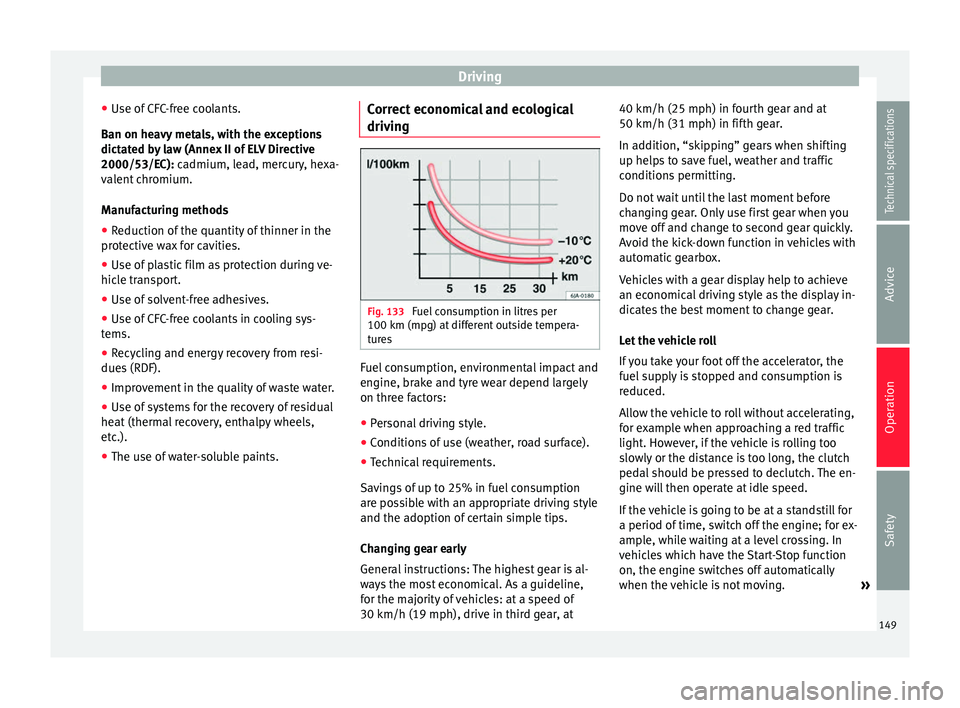
Fig. 133
Fuel consumption in litres per
100 km (mpg) at different outside tempera-
tures Fuel consumption, environmental impact and
engine, brake and tyre wear depend largely
on three factors:
● Personal driving style.
● Conditions of use (weather, road surface).
● Technical requirements.
Savings of up to 25% in fuel consumption
are possible with an appropriate driving style
and the adoption of certain simple tips.
Changing gear early
General instructions: The highest gear is al-
ways the most economical. As a guideline,
for the majority of vehicles: at a speed of
30 km/h (19 mph), drive in third gear, at 40 km/h (25 mph) in fourth gear and at
50 km/h (31 mph) in fifth gear.
In addition, “skipping” gears when shifting
up helps to save fuel, weather and traffic
conditions permitting.
Do not wait until the last moment before
changing gear. Only use first gear when you
move off and change to second gear quickly.
Avoid the kick-down function in vehicles with
automatic gearbox.
Vehicles with a gear display help to achieve
an economical driving style as the display in-
dicates the best moment to change gear.
Let the vehicle roll
If you take your foot off the accelerator, the
fuel supply is stopped and consumption is
reduced.
Allow the vehicle to roll without accelerating,
for example when approaching a red traffic
light. However, if the vehicle is rolling too
slowly or the distance is too long, the clutch
pedal should be pressed to declutch. The en-
gine will then operate at idle speed.
If the vehicle is going to be at a standstill for
a period of time, switch off the engine; for ex-
ample, while waiting at a level crossing. In
vehicles which have the Start-Stop function
on, the engine switches off automatically
when the vehicle is not moving.
»
149
Technical specifications
Advice
Operation
Safety
Page 159 of 305
Driver assistance systems
The Auto Hold function automatically pre-
vents the vehicle from rolling away acciden-
tally when at a standstill, without the driver
having to keep his/her foot on the brake ped-
al.
When the system that detects that the vehi-
cle has stopped, the Auto Hold keeps the ve-
hicle at a standstill. The brake pedal can be
released.
If the driver presses the brake pedal briefly or
the accelerator to start off, the Auto Hold
function releases the brake once more. The
vehicle moves according to the gradient.
If any of the conditions necessary for the Au-
to Hold function change while the vehicle
stopped, the system is turned off as is the in-
dicator on the button ››› Fig. 135 . The elec-
tr onic
parking brake engages where necessa-
ry to park the vehicle safely ››› .
Conditions for keeping the vehicle at a
standstill with Auto Hold:
● The driver door must be closed.
● The driver seat belt must be buckled.
● The engine must be running.
● The ASR system is switched on
››› page 137 . Sw
it
ching Auto Hold on and off manually
Press the AUTO HOLD button
››› . The control
lamp on the button switches off when the Au-
to Hold function is switched off.
Permanent Auto Hold connection
The Auto Hold function must be switched on
every time the engine is started. However, to
switch the Auto Hold function on permanent-
ly, the mark must be switched on in the
Set
-
tin
gs menu, “Autohold” submenu ››› page 47.
Auto Hold works automatically under the
following conditions:
All points must be fulfilled simultaneously
››› :
Manual gearboxAutomatic gearbox
1.If the vehicle is stopped using the brake pedal on a
flat or slope.
2.The engine must be “running smoothly”.
3.On a slope, the 1st gear
is engaged uphill or the
reverse gear is engaged
for a downhill. The
clutch must be held
down.A gear for driving is se-
lected from R, D or S.
Upon accelerating and
pressing in the clutch
simultaneously, the
brake releases gradual-
ly.Upon accelerating, the
brake releases gradual-
ly. Auto Hold turns off automatically under the
following conditions:
Manual gearboxAutomatic gearbox
1.If one of the conditions mentioned in
table on
page 157 changes.
2.If the engine is “not running regularly” or if there is a malfunction.
3.When changing to idle
speed.If the selector lever is
placed in neutral (N).
4.If the engine is turned
off or stalls.If the engine is switch-
ed off.
5.If the driver accelerates
while pressing the
clutch in.If the vehicle is acceler-
ated.
6. When one of the wheels
has minimal contact
with the ground (e.g. on
uneven ground). WARNING
The Auto Hold technology is limited by the
laws of physics. The improved comfort provi-
ded by Auto Hold should never prompt you to
take risks.
● Never leave the vehicle running and with
the Auto Hold function switched on.
● Auto Hold cannot always stop the vehicle
uphill and downhill (e.g. if the ground is slip-
pery or frozen). » 157
Technical specifications
Advice
Operation
Safety
Page 162 of 305
Operation
show it. Therefore, it will not warn you of
these objects. Ignoring the warnings of the
parking sensor system could cause consider-
able damage to the vehicle.
● The bumper sensors may become damaged
or misaligned, for example, when parking.
● To ensure that the system works properly,
the bumper sensors must be kept clean, free
of ice and snow and uncovered.
● When cleaning the sensors with high-pres-
sure or steam cleaning equipment, spray the
sensors briefly at a distance of no less than
10 cm (4 inches). Note
Acoustic sources may lead to erroneous warn-
ings on the parking sensor system, e.g.
rough tarmac, cobbles or the noise of other
vehicles. Parking sensor system*
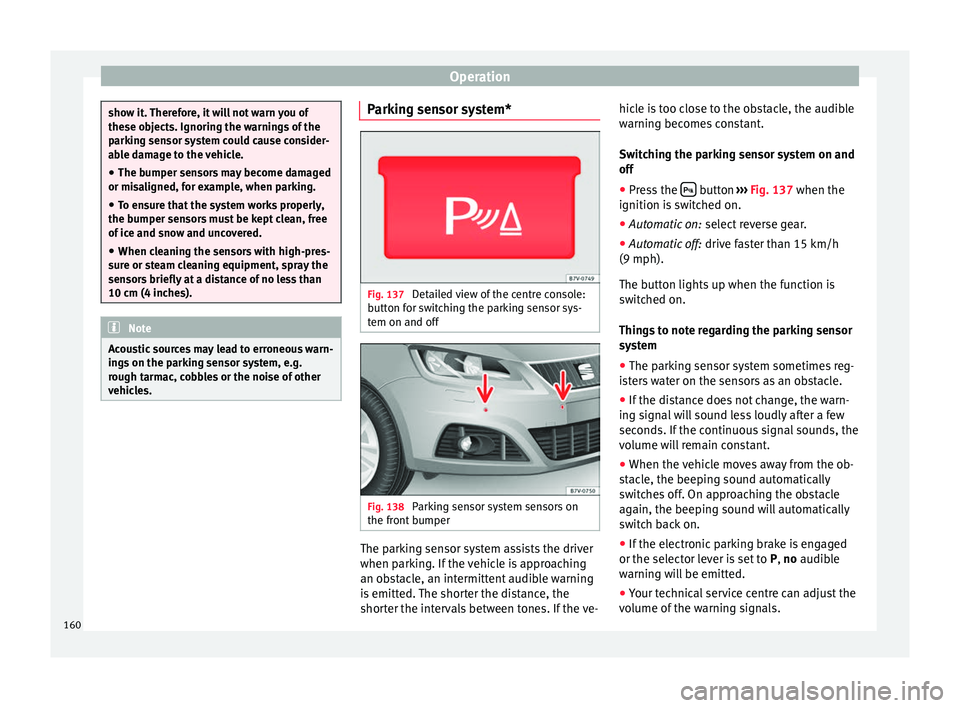
Fig. 137
Detailed view of the centre console:
button for switching the parking sensor sys-
tem on and off Fig. 138
Parking sensor system sensors on
the front bumper The parking sensor system assists the driver
when parking. If the vehicle is approaching
an obstacle, an intermittent audible warning
is emitted. The shorter the distance, the
shorter the intervals between tones. If the ve-hicle is too close to the obstacle, the audible
warning becomes constant.
Switching the parking sensor system on and
off
● Press the button
››› Fig. 137 when the
ignition i s
switched on.
● Automatic on: select reverse gear.
● Automatic off: drive faster than 15 km/h
(9 mph).
The button lights up when the function is
switched on.
Things to note regarding the parking sensor
system
● The parking sensor system sometimes reg-
isters water on the sensors as an obstacle.
● If the distance does not change, the warn-
ing signal will sound less loudly after a few
seconds. If the continuous signal sounds, the
volume will remain constant.
● When the vehicle moves away from the ob-
stacle, the beeping sound automatically
switches off. On approaching the obstacle
again, the beeping sound will automatically
switch back on.
● If the electronic parking brake is engaged
or the selector lever is set to P, no
audible
warning will be emitted.
● Your technical service centre can adjust the
volume of the warning signals.
160
Page 163 of 305
Driver assistance systems
Note
If the parking sensor system is faulty, a con-
stant audible warning will be emitted the first
time it is switched on and the button will
flash. Switch the parking sensor system off
using the button and take the vehicle to a
specialised workshop to have the system
checked as soon as possible. Optical parking system* (OPS)
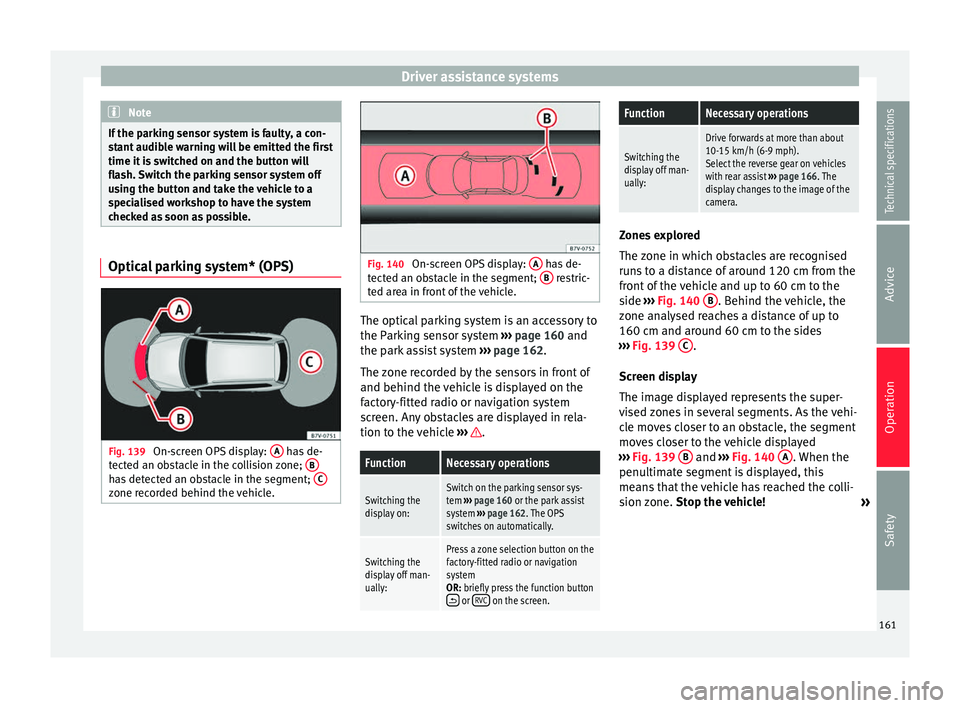
Fig. 139
On-screen OPS display: A has de-
tected an obstacle in the collision zone; Bhas detected an obstacle in the segment;
Czone recorded behind the vehicle. Fig. 140
On-screen OPS display: A has de-
tected an obstacle in the segment; B restric-
ted area in front of the vehicle. The optical parking system is an accessory to
the Parking sensor system
››› page 160 and
the park assist system ››› page 162.
The zone recorded by the sensors in front of
and behind the vehicle is displayed on the
factory-fitted radio or navigation system
screen. Any obstacles are displayed in rela-
tion to the vehicle ››› .FunctionNecessary operations
Switching the
display on:Switch on the parking sensor sys-
tem
››› page 160 or the park assist
system ››› page 162. The OPS
switches on automatically.
Switching the
display off man-
ually:Press a zone selection button on the
factory-fitted radio or navigation
system
OR: briefly press the function button
or RVC on the screen.
FunctionNecessary operations
Switching the
display off man-
ually:
Drive forwards at more than about
10-15 km/h (6-9 mph).
Select the reverse gear on vehicles
with rear assist ››› page 166. The
display changes to the image of the
camera. Zones explored
The zone in which obstacles are recognised
runs to a distance of around 120 cm from the
front of the vehicle and up to 60 cm to the
side
›››
Fig. 140 B . Behind the vehicle, the
zone analysed reaches a distance of up to
160 cm and around 60 cm to the sides
››› Fig. 139 C .
Screen display
The image displayed represents the super-
vised zones in several segments. As the vehi-
cle moves closer to an obstacle, the segment
moves closer to the vehicle displayed
››› Fig. 139 B and
›››
Fig. 140 A . When the
penultimate segment is displayed, this
means that the vehicle has reached the colli-
sion zone. Stop the vehicle!
»
161
Technical specifications
Advice
Operation
Safety