heating Seat Alhambra 2015 User Guide
[x] Cancel search | Manufacturer: SEAT, Model Year: 2015, Model line: Alhambra, Model: Seat Alhambra 2015Pages: 305, PDF Size: 5.46 MB
Page 95 of 305
Seats and head restraints
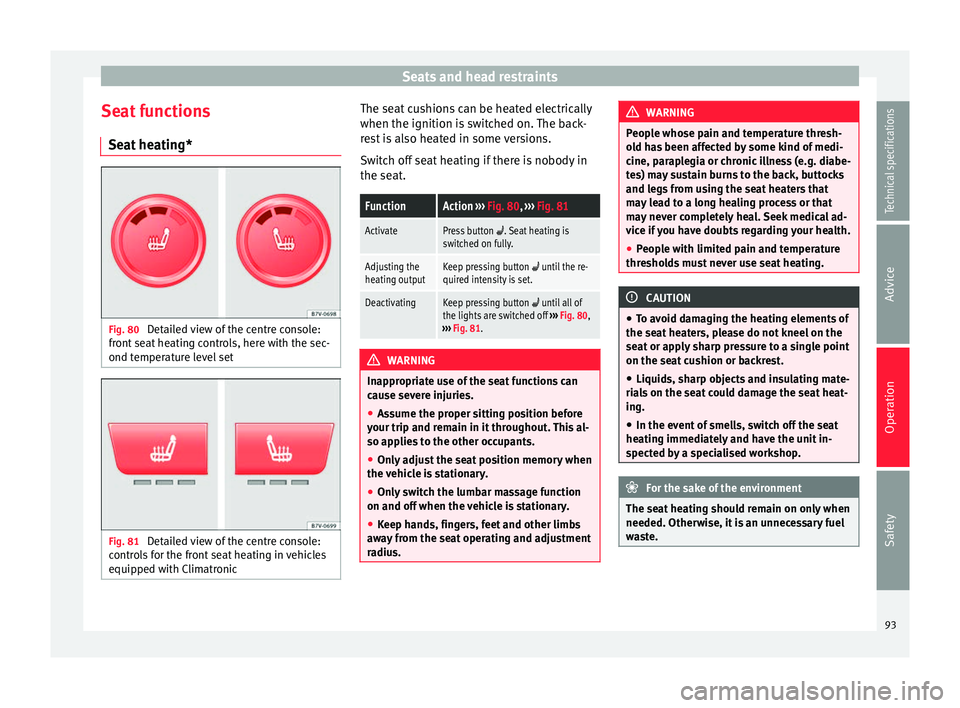
Seat functions Seat heating* Fig. 80
Detailed view of the centre console:
front seat heating controls, here with the sec-
ond temperature level set Fig. 81
Detailed view of the centre console:
controls for the front seat heating in vehicles
equipped with Climatronic The seat cushions can be heated electrically
when the ignition is switched on. The back-
rest is also heated in some versions.
Switch off seat heating if there is nobody in
the seat.FunctionAction
››› Fig. 80, ››› Fig. 81
ActivatePress button . Seat heating is
switched on fully.
Adjusting the
heating outputKeep pressing button until the re-
quired intensity is set.
DeactivatingKeep pressing button until all of
the lights are switched off ››› Fig. 80,
››› Fig. 81. WARNING
Inappropriate use of the seat functions can
cause severe injuries.
● Assume the proper sitting position before
your trip and remain in it throughout. This al-
so applies to the other occupants.
● Only adjust the seat position memory when
the vehicle is stationary.
● Only switch the lumbar massage function
on and off when the vehicle is stationary.
● Keep hands, fingers, feet and other limbs
away from the seat operating and adjustment
radius. WARNING
People whose pain and temperature thresh-
old has been affected by some kind of medi-
cine, paraplegia or chronic illness (e.g. diabe-
tes) may sustain burns to the back, buttocks
and legs from using the seat heaters that
may lead to a long healing process or that
may never completely heal. Seek medical ad-
vice if you have doubts regarding your health.
● People with limited pain and temperature
thresholds must never use seat heating. CAUTION
● To avoid damaging the heating elements of
the seat heaters, please do not kneel on the
seat or apply sharp pressure to a single point
on the seat cushion or backrest.
● Liquids, sharp objects and insulating mate-
rials on the seat could damage the seat heat-
ing.
● In the event of smells, switch off the seat
heating immediately and have the unit in-
spected by a specialised workshop. For the sake of the environment
The seat heating should remain on only when
needed. Otherwise, it is an unnecessary fuel
waste. 93
Technical specifications
Advice
Operation
Safety
Page 101 of 305
Transport and practical equipment
Transporting a load Secure all objects in the vehicle
● Distribute the load throughout the vehicle,
on the roof and in a trailer as uniformly as
possible.
● Transport heavy objects as far forward as
possible in the luggage compartment and
lock the seat backs in the vertical position.
● Secure luggage in the luggage compart-
ment with suitable straps on the fastening
rings ››› page 100
.
● Chec k
the headlight adjustment
››› page 74
.
● Use the suitable tyre pressure according to
the load being transported. Read the tire in-
flation information label ›››
page 231.
● For vehicles with a tire pressure indicator,
change the vehicle load status ›››
page 177. CAUTION
Objects on the shelf could chafe against the
wires of the heating element in the heated
rear window and cause damage. Note
Please note the information about loading a
trailer ››› page 179 and the roof carrier sys-
t em ›
›› page 110. Driving with the rear lid open
Driving with the rear lid open creates an addi-
tional risk. Secure all objects and secure the
rear lid correctly and take all measures possi-
ble to reduce toxic gases from entering the
vehicle.
WARNING
Driving with the rear lid unlocked or open
could cause serious injuries.
● Always drive with the rear lid closed.
● Secure all objects in the vehicle. Loose
items could fall out of the vehicle and injure
other road users or damage other vehicles.
● Drive particularly carefully and think
ahead.
● Avoid sudden manoeuvres and braking giv-
en that this could cause an uncontrolled
movement of the open rear lid.
● When transporting objects that protrude
out of the luggage compartment, indicate
them suitably. Observe legal requirements.
● If objects must project out of the luggage
compartment, the rear lid must never be used
to “secure” or “attach” objects.
● If a baggage rack is fitted on the rear lid, it
should be removed before travelling with the
rear lid open. WARNING
Toxic gases may enter the vehicle interior
when the rear lid is open. This could cause
loss of consciousness, carbon monoxide poi-
soning, serious injury and accidents.
● To avoid toxic gases entering the vehicle al-
ways drive with the rear lid closed.
● In exceptional circumstances, if you must
drive with the rear lid open, observe the fol-
lowing to reduce the entry of toxic gases in-
side the vehicle:
– Close all windows and the sliding sun-
roof.
– Turn off the air recirculation for the heat-
ing and air conditioner.
– Open all of the air outlets in the dash
panel.
– Turn the heating fan and heater to the
highest level. CAUTION
An open boot hatch changes the length and
height of the vehicle. Driving a loaded vehicle
For the best handling when driving a loaded
vehicle, note the following:
● Secure all objects ›››
page 99 .
● Ac
celerate gently and carefully. »
99
Technical specifications
Advice
Operation
Safety
Page 102 of 305
Operation
● Avoid sudden braking and manoeuvres.
● Brake early.
● If necessary, read the instructions for driv-
ing with a trailer ››› page 179.
● If necessary, read the instructions for driv-
ing with a roof carrier system ››› page 110. WARNING
A sliding load could considerably affect the
stability and safety of the vehicle resulting in
an accident with serious consequences.
● Secure loads correctly so they do not move.
● When transporting heavy objects, use suit-
able ropes or straps.
● Lock the seat backs in vertical position. Loading luggage compartment
Introduction Always transport heavy loads in the luggage
compartment and place the seat backs in a
vertical position. Always use the fastening
rings with suitable rope or straps. Never over-
load the vehicle. Both the carrying capacity
as well as the distribution of the load in the
vehicle have effects on the driving behaviour
and braking ability
››› . WARNING
When the vehicle is not in use or being
watched, always lock the doors and the rear
lid to reduce the risk of serious injury or
death.
● Do not leave children unwatched, especial-
ly when the boot is open. Children could
climb into the luggage compartment, close
the rear lid from inside and be unable to es-
cape themselves. This could lead to serious
injury or death.
● Never allow children to play in or around
the vehicle.
● Never transport people in the luggage com-
partment. WARNING
Unsecured or incorrectly secured objects can
cause serious injury in case of a sudden ma-
noeuvring or breaking or in case of an acci-
dent. This is especially true when objects are
struck by a detonating airbag and fired
through the vehicle interior. To reduce the
risks, please note the following:
● Secure all objects in the vehicle. Always
place equipment and heavy objects in the
boot.
● Always secure objects with suitable ropes
or straps so that they cannot be pushed in-
side the cabin and move around the areas
around the front or side airbags in the event
of sudden braking or an accident. ●
While driving, always keep object compart-
ments closed.
● Do not place hard, heavy or sharp objects
inside the vehicle interior, in open storage
compartments, the rear shelf or on the dash
panel.
● Remove hard, heavy and sharp objects from
clothes and pockets inside the vehicle and
store securely. WARNING
The transport of heavy object changes vehi-
cle handling and increases braking distance.
Heavy loads that have not been stored or se-
cured correctly could cause loss of control
and result in serious injury.
● Vehicle handling changes when transport-
ing heavy objects due to a change in the cen-
tre of gravity.
● Distribute the load as uniformly and as low
down on the vehicle as possible.
● Store heavy objects in the luggage com-
partment as far from the rear axle as possi-
ble. CAUTION
● Hard objects on the rear shelf could chafe
the wires of the heating element and antenna
of the rear window and cause damage.
● The side window antenna could be dam-
aged due to chafing from objects. 100
Page 114 of 305
Operation
Storage compartments Introduction Storage compartments must only be used to
store light or small objects.
The front central armrest compartment hous-
es the factory-fitted
AUX-IN or multimedia
(MEDIA-IN) connection sockets.
The factory-fitted
CD changer is located in the
left-hand storage compartment of the boot. WARNING
In the event of sudden braking movements or
turns, loose objects may be thrown around
the vehicle interior. This could cause serious
injuries to passengers and cause the driver to
lose control of the vehicle.
● Do not transport animals or place hard,
heavy or sharp objects inside the vehicle in:
open storage compartments, dash panel, rear
shelf, items of clothing or bags.
● While driving, always keep object compart-
ments closed. WARNING
Objects falling into the driver's footwell could
prevent use of the pedals. This could lead the
driver to lose control of the vehicle, increas-
ing the risk of a serious accident. ●
Make sure the pedals can be used at all
times, with no objects rolling underneath
them.
● The floor mat should always be secured to
the floor.
● Never place other mats or rugs on top of
the original mat supplied by the factory.
● Make sure that no objects can fall into the
driver's footwell while the vehicle is in mo-
tion. CAUTION
● Objects on the shelf could chafe against
the wires of the heating element in the heat-
ed rear window and cause damage.
● Do not keep heat-sensitive objects, food or
medicines inside the vehicle. Heat and cold
could damage them or render them useless.
● Light-transparent objects placed inside the
vehicle, such as lenses, magnifying glasses
or transparent suction caps on the windows,
may concentrate the sun's rays and cause
damage to the vehicle. Note
The ventilating slits between the heated rear
window and the shelf must not be covered so
that used air can escape from the vehicle. Spectacle case in the roof console
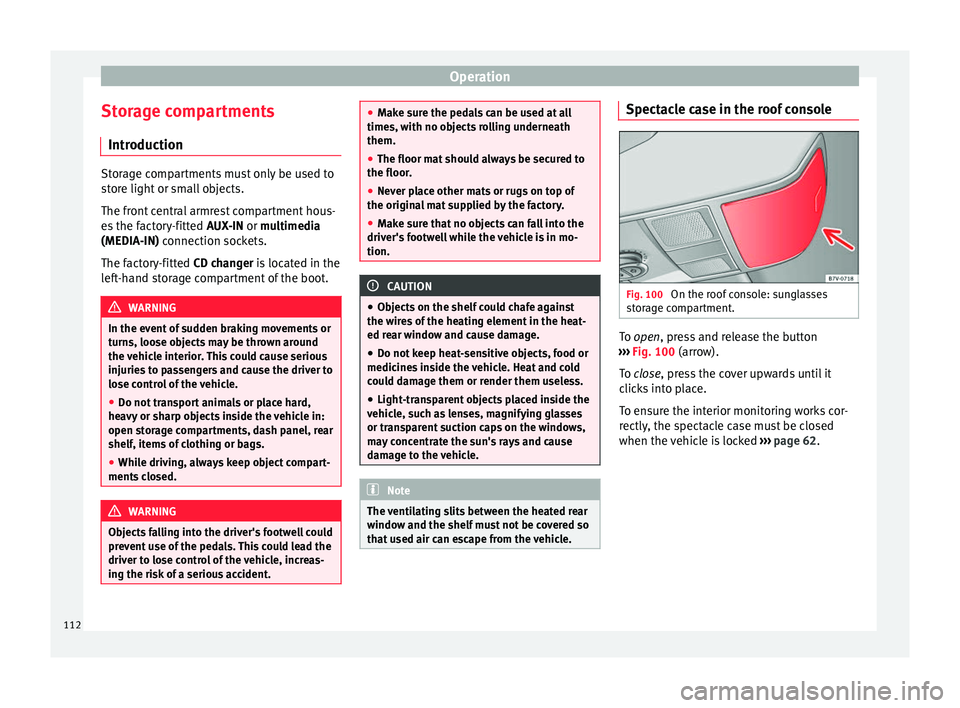
Fig. 100
On the roof console: sunglasses
storage compartment. To
open
, press and release the button
›
›› Fig. 100 (arrow).
To
close, press the cover upwards until it
clicks into place.
To ensure the interior monitoring works cor-
rectly, the spectacle case must be closed
when the vehicle is locked ››› page 62.
112
Page 123 of 305
Transport and practical equipment
current only flows when the childproof lock is
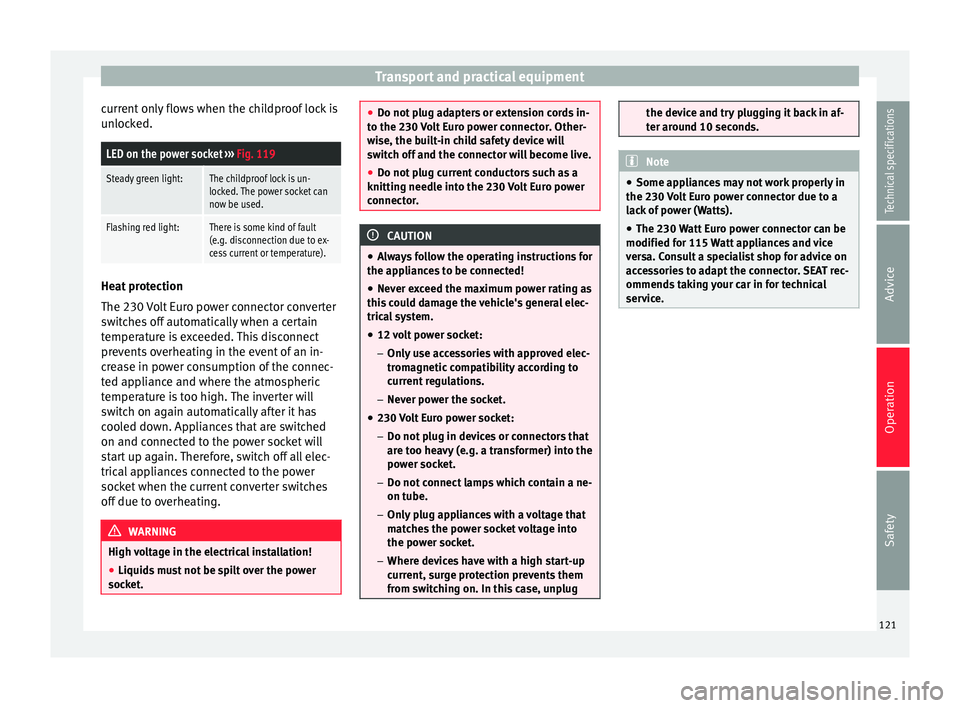
unlocked.LED on the power socket ››› Fig. 119
Steady green light:The childproof lock is un-
locked. The power socket can
now be used.
Flashing red light:There is some kind of fault
(e.g. disconnection due to ex-
cess current or temperature). Heat protection
The 230 Volt Euro power connector converter
switches off automatically when a certain
temperature is exceeded. This disconnect
prevents overheating in the event of an in-
crease in power consumption of the connec-
ted appliance and where the atmospheric
temperature is too high. The inverter will
switch on again automatically after it has
cooled down. Appliances that are switched
on and connected to the power socket will
start up again. Therefore, switch off all elec-
trical appliances connected to the power
socket when the current converter switches
off due to overheating.
WARNING
High voltage in the electrical installation!
● Liquids must not be spilt over the power
socket. ●
Do not plug adapters or extension cords in-
to the 230 Volt Euro power connector. Other-
wise, the built-in child safety device will
switch off and the connector will become live.
● Do not plug current conductors such as a
knitting needle into the 230 Volt Euro power
connector. CAUTION
● Always follow the operating instructions for
the appliances to be connected!
● Never exceed the maximum power rating as
this could damage the vehicle's general elec-
trical system.
● 12 volt power socket:
– Only use accessories with approved elec-
tromagnetic compatibility according to
current regulations.
– Never power the socket.
● 230 Volt Euro power socket:
– Do not plug in devices or connectors that
are too heavy (e.g. a transformer) into the
power socket.
– Do not connect lamps which contain a ne-
on tube.
– Only plug appliances with a voltage that
matches the power socket voltage into
the power socket.
– Where devices have with a high start-up
current, surge protection prevents them
from switching on. In this case, unplug the device and try plugging it back in af-
ter around 10 seconds.
Note
● Some appliances may not work properly in
the 230 Volt Euro power connector due to a
lack of power (Watts).
● The 230 Watt Euro power connector can be
modified for 115 Watt appliances and vice
versa. Consult a specialist shop for advice on
accessories to adapt the connector. SEAT rec-
ommends taking your car in for technical
service. 121Technical specifications
Advice
Operation
Safety
Page 124 of 305
Operation
Air conditioning
Air conditioner Introduction Viewing Climatronic information
The factory-fitted radio or navigation system
screen briefly displays information relating to
Climatronic.
The units of temperature measurement is dis-
played on the factory-installed radio or navi-
gation system and, depending on the vehicle
equipment, can be set using the
Configura-
tion menu on the instrument panel. WARNING
Reduced visibility through the windows in-
creases the risk of serious accidents.
● Ensure that all windows are free of ice and
snow and that they are not fogged up pre-
venting a clear view of everything outside.
● The maximum heat output required to de-
frost windows quickly is only available when
the engine has reached its normal running
temperature. Only drive when you have good
visibility. ●
Always ensure that you use the air condi-
tioner and heated rear window to maintain
good visibility.
● Never leave the air recirculation on for a
long period of time. If the cooling system is
switched off and air recirculation mode
switched on, the windows can mist over very
quickly, considerably limiting visibility.
● Switch air recirculation mode off when it is
not required. WARNING
Stuffy or used air will increase fatigue and re-
duce driver concentration possibly resulting
in a serious accident.
● Never leave the fresh air fan turned off or
use the air recirculation for long periods of
time; the air in the vehicle interior will not be
refreshed. CAUTION
● Switch the air conditioner off if you think it
may be broken. This will avoid additional
damage. Have the air conditioner checked by
a specialised workshop.
● Repairs to the air conditioner require spe-
cialist knowledge and special tools. SEAT rec-
ommends taking your car in for technical
service. ●
Do not smoke when air recirculation is
switched on in vehicles with an air condition-
er. The smoke taken in could lie on the cool-
ing system vaporiser and on the activated
charcoal cartridge of the dust and pollen fil-
ter, leading to a permanently unpleasant
smell. Note
● When the cooling system is turned off, air
coming from the outside will not be dried. To
avoid fogging up the windows, SEAT recom-
mends leaving the cooler (compressor) on. To
do this, press the A/C button. The button
lamp should light up.
● If the humidity and temperature outside the
vehicle are high, condensation can drip off
the evaporator in the cooling system and
form a pool underneath the vehicle, this is
completely normal and there is no need to
suspect a leak.
● Keep the air intake slots in front of the
windscreen free of snow, ice and leaves to en-
sure heating and cooling are not impaired,
and to prevent the windows from misting
over. 122
Page 126 of 305
OperationCon-
trol
buttonAdditional information. Electronic
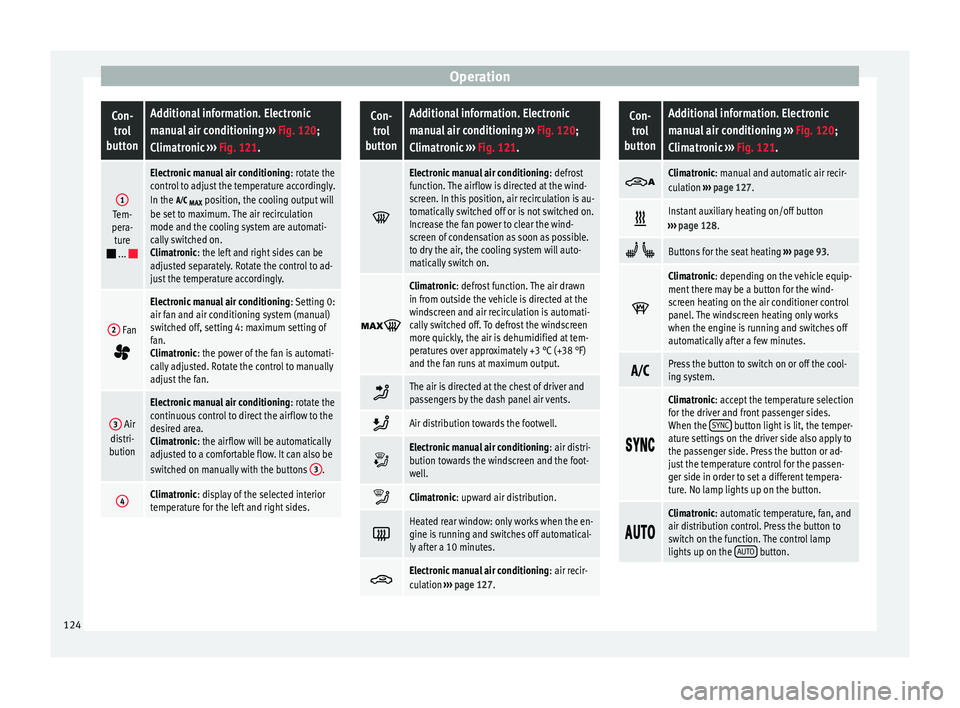
manual air conditioning ››› Fig. 120;
Climatronic ››› Fig. 121.
1Tem-
pera- ture
...
Electronic manual air conditioning : rotate the
control to adjust the temperature accordingly.
In the
MAX position, the cooling output will
be set to maximum. The air recirculation
mode and the cooling system are automati-
cally switched on.
Climatronic: the left and right sides can be
adjusted separately. Rotate the control to ad-
just the temperature accordingly.
2 Fan
Electronic manual air conditioning : Setting 0:
air fan and air conditioning system (manual)
switched off, setting 4: maximum setting of
fan.
Climatronic: the power of the fan is automati-
cally adjusted. Rotate the control to manually
adjust the fan.
3 Air
distri-
bution
Electronic manual air conditioning : rotate the
continuous control to direct the airflow to the
desired area.
Climatronic: the airflow will be automatically
adjusted to a comfortable flow. It can also be
switched on manually with the buttons 3
.
4Climatronic: display of the selected interior
temperature for the left and right sides.
Con-
trol
buttonAdditional information. Electronic
manual air conditioning ››› Fig. 120;
Climatronic ››› Fig. 121.
Electronic manual air conditioning
: defrost
function. The airflow is directed at the wind-
screen. In this position, air recirculation is au-
tomatically switched off or is not switched on.
Increase the fan power to clear the wind-
screen of condensation as soon as possible.
to dry the air, the cooling system will auto-
matically switch on.
Climatronic: defrost function. The air drawn
in from outside the vehicle is directed at the
windscreen and air recirculation is automati-
cally switched off. To defrost the windscreen
more quickly, the air is dehumidified at tem-
peratures over approximately +3 °C (+38 °F)
and the fan runs at maximum output.
The air is directed at the chest of driver and
passengers by the dash panel air vents.
Air distribution towards the footwell.
Electronic manual air conditioning
: air distri-
bution towards the windscreen and the foot-
well.
Climatronic: upward air distribution.
Heated rear window: only works when the en-
gine is running and switches off automatical-
ly after a 10 minutes.
Electronic manual air conditioning
: air recir-
culation ››› page 127.
Con-
trol
buttonAdditional information. Electronic
manual air conditioning ››› Fig. 120;
Climatronic ››› Fig. 121.
Climatronic: manual and automatic air recir-
culation
››› page 127.
Instant auxiliary heating on/off button
››› page 128.
Buttons for the seat heating ››› page 93.
Climatronic: depending on the vehicle equip-
ment there may be a button for the wind-
screen heating on the air conditioner control
panel. The windscreen heating only works
when the engine is running and switches off
automatically after a few minutes.
Press the button to switch on or off the cool-
ing system.
Climatronic: accept the temperature selection
for the driver and front passenger sides.
When the
SYNC
button light is lit, the temper-
ature settings on the driver side also apply to
the passenger side. Press the button or ad-
just the temperature control for the passen-
ger side in order to set a different tempera-
ture. No lamp lights up on the button.
Climatronic: automatic temperature, fan, and
air distribution control. Press the button to
switch on the function. The control lamp
lights up on the
AUTO
button.124
Page 128 of 305
Operation
the navigation system is carried out in the
menu on the instrument panel ››› page 51.
The cooling system does not switch on
If the air conditioning system cannot be
switched on, this may be caused by the fol-
lowing:
● The engine is not running.
● The fan is switched off.
● The air conditioning fuse is blown. ●
The outside temperature is lower than ap-
proximately +3 °C (+38 °F).
● The air conditioner compressor has been
temporarily switched off because the engine
coolant temperature is too high.
● Another fault in the vehicle. Have the air
conditioner checked by a specialised work-
shop.
Things to note
If the humidity and temperature outside the
vehicle are high, condensation
can drip off the vaporiser in the cooling system and form
a pool underneath the vehicle. This is normal
and does not indicate a leak! Note
After starting the engine, any residual humid-
ity in the air conditioner could mist over the
windscreen. Switch on the defrost function as
soon as possible to clear the windscreen of
condensation. Air vents
Fig. 123
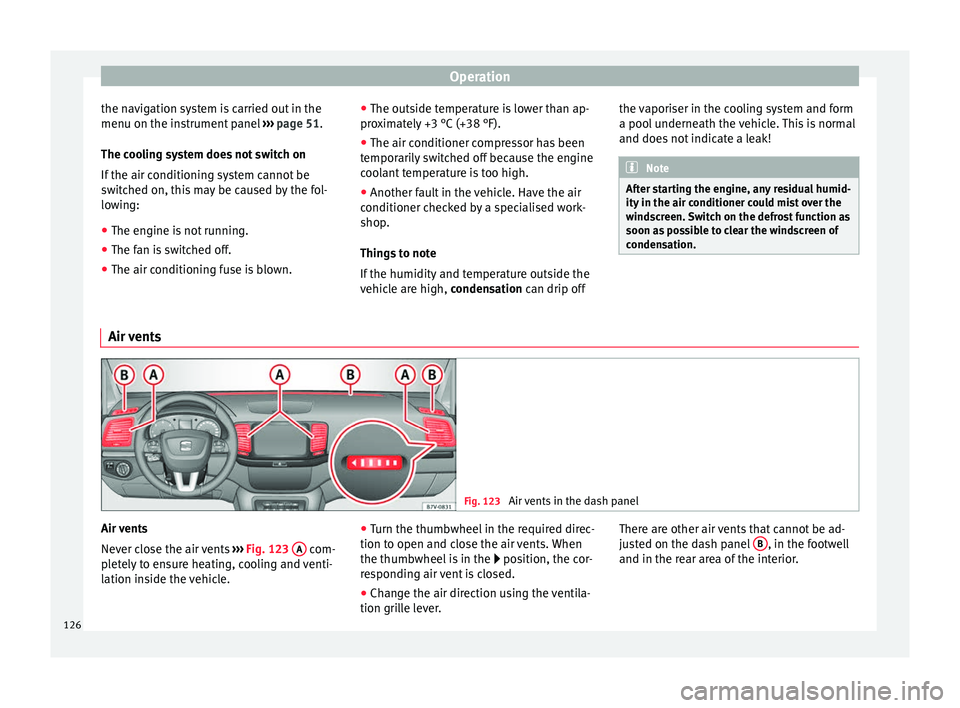
Air vents in the dash panel Air vents
Never close the air vents
››› Fig. 123 A com-
pletely to ensure heating, cooling and venti-
lation inside the vehicle. ●
Turn the thumbwheel in the required direc-
tion to open and close the air vents. When
the thumbwheel is in the position, the cor-
r e
sponding air vent is closed.
● Change the air direction using the ventila-
tion grille lever. There are other air vents that cannot be ad-
justed on the dash panel
B , in the footwell
and in the rear area of the interior.
126
Page 130 of 305
Operation
CAUTION
Do not smoke when air recirculation is
switched on in vehicles with an air condition-
er. The smoke taken in could lie on the cool-
ing system vaporiser and on the activated
charcoal cartridge of the dust and pollen fil-
ter, leading to a permanently unpleasant
smell. Note
Climatronic: air recirculation mode switches
on to prevent exhaust gas from entering the
vehicle interior when it is in reverse and
while the automatic windscreen wipers are
working. Auxiliary heater* (additional
heater)
Introduction The auxiliary heater is powered by fuel from
the vehicle's fuel tank and can be used while
the vehicle is in motion and at a standstill.
Select the mode required (
heat
or fan
)
››› page 130 on the dash panel.
In w int
er, the auxiliary heater can be used in
heat mode before switching on the ignition to
remove any ice, mist or snow from the wind-
screen (thin layers only). WARNING
The auxiliary heater fumes contain carbon di-
oxide, an odourless and colourless toxic gas.
Carbon monoxide can cause people to lose
consciousness. It can also cause death.
● Never switch on the auxiliary heater or
leave it running in places that are enclosed or
unventilated.
● Never program the independent heating
system to be activated and operated in
closed, unventilated areas. WARNING
The components of the auxiliary heater ex-
haust system heat up a great deal. This could
cause a fire.
● Always park your vehicle so that no part of
the exhaust system can come in contact with
flammable materials (such as dried grass). CAUTION
Never place food, medicines or other heat-
sensitive objects close to the air vents. Food,
medicines and other heat-sensitive objects
may be damaged or made unsuitable for use
by the air coming from the air vents. Switching the auxiliary heater on and
off
Switching the auxiliary heater on:
Manually using the instant on/off
button.›››
page
123
ONManually using the remote control.››› page
129
Automatically at the programmed
and enabled on time.››› page
130
Switching the auxiliary heater off:
Manually using the instant on/off
button for the air conditioner.›››
page
123
OFFManually using the remote control.››› page
129
Automatically after the programmed
time.››› page
130
Automatically when the light comes
on (fuel reserve).››› page
206
Automatically when the battery pow-
er drops to a very low level.››› page
227 Things to note
After switching the auxiliary heater off, it con-
tinues to run for a short period to completely
128
Page 132 of 305
Operation
An optimum range is obtained by keeping
the remote control vertical, with the aerial
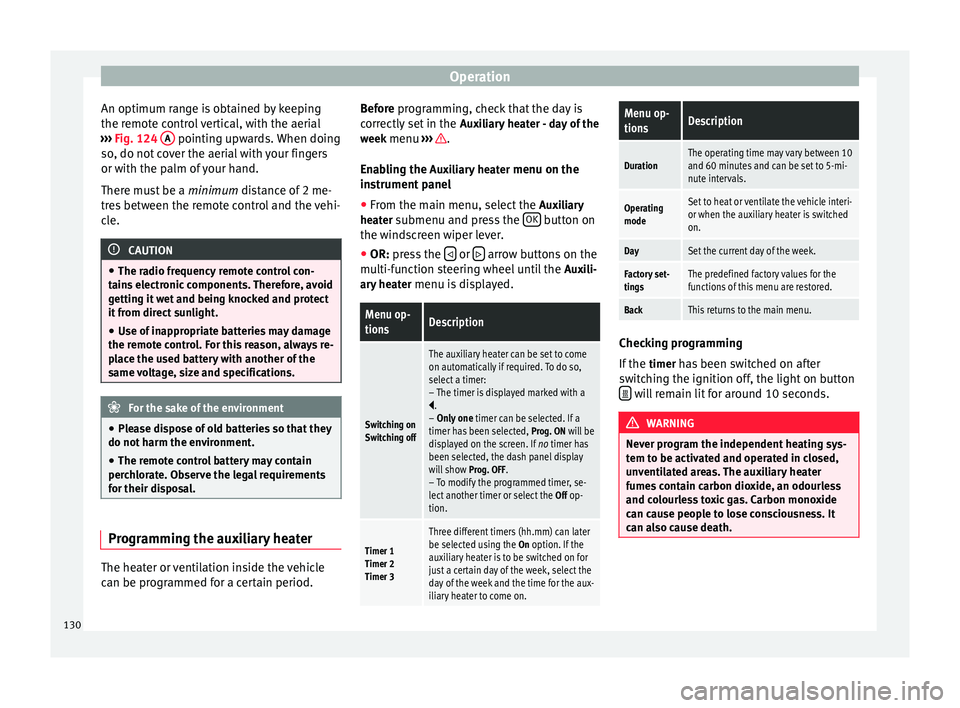
››› Fig. 124 A pointing upwards. When doing
so, do not cover the aerial with your fingers
or with the palm of your hand.
There must be a minimum distance of 2 me-
tr e
s between the remote control and the vehi-
cle. CAUTION
● The radio frequency remote control con-
tains electronic components. Therefore, avoid
getting it wet and being knocked and protect
it from direct sunlight.
● Use of inappropriate batteries may damage
the remote control. For this reason, always re-
place the used battery with another of the
same voltage, size and specifications. For the sake of the environment
● Please dispose of old batteries so that they
do not harm the environment.
● The remote control battery may contain
perchlorate. Observe the legal requirements
for their disposal. Programming the auxiliary heater
The heater or ventilation inside the vehicle
can be programmed for a certain period. Before programming, check that the day is
correctly set in the
Auxiliary heater - day of the
week menu ››› .
Enabling the Auxiliary heater
menu on the
in s
trument panel
● From the main menu, select the Auxiliary
heater submenu and press the OK button on
the windscreen wiper lever.
● OR: press the or
arrow buttons on the
multi-function steering wheel until the Auxili-
ary heater menu is displayed.
Menu op-
tionsDescription
Switching on
Switching off
The auxiliary heater can be set to come
on automatically if required. To do so,
select a timer:
– The timer is displayed marked with a
.
– Only one timer can be selected. If a
timer has been selected, Prog. ON will be
displayed on the screen. If no timer has
been selected, the dash panel display
will show Prog. OFF.
– To modify the programmed timer, se-
lect another timer or select the Off op-
tion.
Timer 1
Timer 2
Timer 3
Three different timers (hh.mm) can later
be selected using the On option. If the
auxiliary heater is to be switched on for
just a certain day of the week, select the
day of the week and the time for the aux-
iliary heater to come on.
Menu op-
tionsDescription
DurationThe operating time may vary between 10
and 60 minutes and can be set to 5-mi-
nute intervals.
Operating
modeSet to heat or ventilate the vehicle interi-
or when the auxiliary heater is switched
on.
DaySet the current day of the week.
Factory set-
tingsThe predefined factory values for the
functions of this menu are restored.
BackThis returns to the main menu. Checking programming
If the
timer has been switched on after
switching the ignition off, the light on button will remain lit for around 10 seconds.
WARNING
Never program the independent heating sys-
tem to be activated and operated in closed,
unventilated areas. The auxiliary heater
fumes contain carbon dioxide, an odourless
and colourless toxic gas. Carbon monoxide
can cause people to lose consciousness. It
can also cause death. 130