ignition Seat Alhambra 2015 User Guide
[x] Cancel search | Manufacturer: SEAT, Model Year: 2015, Model line: Alhambra, Model: Seat Alhambra 2015Pages: 305, PDF Size: 5.46 MB
Page 46 of 305
Operation
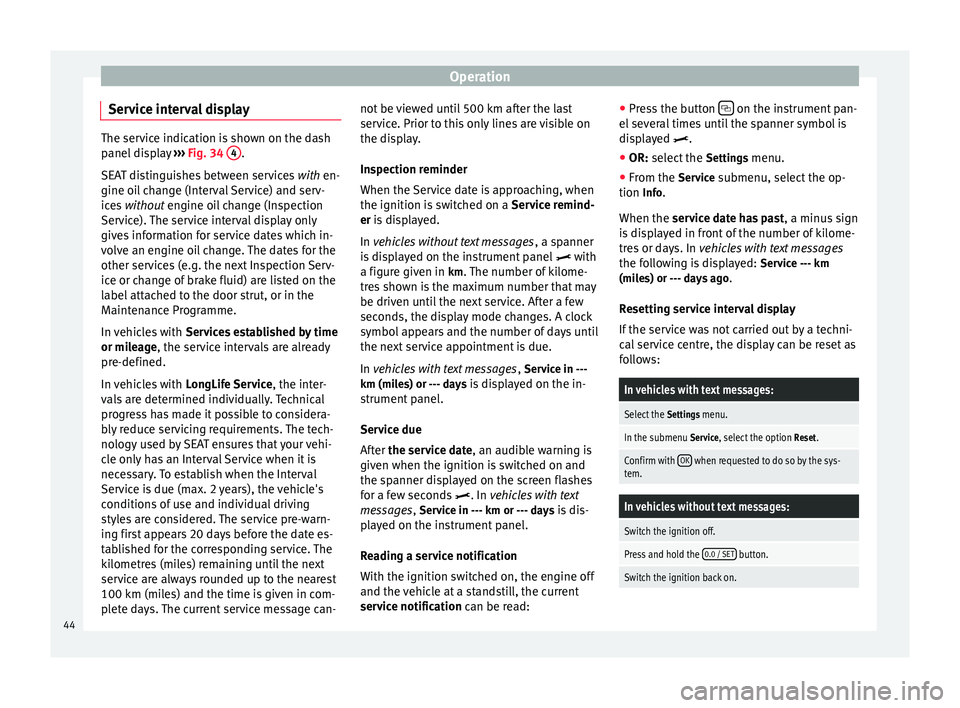
Service interval display The service indication is shown on the dash
panel display
››› Fig. 34 4 .
SEAT distinguishes between services with en-
gine oi l
change (Interval Service) and serv-
ices without
engine oil change (Inspection
Service). The service interval display only
gives information for service dates which in-
volve an engine oil change. The dates for the
other services (e.g. the next Inspection Serv-
ice or change of brake fluid) are listed on the
label attached to the door strut, or in the
Maintenance Programme.
In vehicles with Services established by time
or mileage, the service intervals are already
pr e-defined.
In
vehicles with LongLife Service , the inter-
vals are determined individually. Technical
progress has made it possible to considera-
bly reduce servicing requirements. The tech-
nology used by SEAT ensures that your vehi-
cle only has an Interval Service when it is
necessary. To establish when the Interval
Service is due (max. 2 years), the vehicle's
conditions of use and individual driving
styles are considered. The service pre-warn-
ing first appears 20 days before the date es-
tablished for the corresponding service. The
kilometres (miles) remaining until the next
service are always rounded up to the nearest
100 km (miles) and the time is given in com-
plete days. The current service message can- not be viewed until 500 km after the last
service. Prior to this only lines are visible on
the display.
Inspection reminder
When the Service date is approaching, when
the ignition is switched on a
Service remind-
er
is displayed.
In
vehicles without text messages , a spanner
is displayed on the instrument panel with
a figure given in km. The number of kilome- tre
s shown is the maximum number that may
be driven until the next service. After a few
seconds, the display mode changes. A clock
symbol appears and the number of days until
the next service appointment is due.
In vehicles with text messages , Serv
ice in ---
km (miles) or --- days is displayed on the in- strument panel.
Service due
After the service date, an audible warning is
giv
en when the ignition is switched on and
the spanner displayed on the screen flashes
for a few seconds . In
vehicles with text
messages, Service in --- km or --- days is dis-
played on the instrument panel.
Reading a service notification
With the ignition switched on, the engine off
and the vehicle at a standstill, the current
service notification
can be read: ●
Press the button on the instrument pan-
el several times until the spanner symbol is
displayed
.
● OR:
select the Setting
s menu.
● From the
Service submenu, select the op-
tion Info.
When the service date has past , a minus
sign
is displayed in front of the number of kilome-
tres or days. In vehicles with text messages
the following is displayed: Service --- km
(miles) or --- days ago .
Resetting service interval display
If the service was not carried out by a techni-
cal service centre, the display can be reset as
follows:
In vehicles with text messages:
Select the Settings menu.
In the submenu Service, select the option Reset.
Confirm with OK when requested to do so by the sys-
tem.
In vehicles without text messages:
Switch the ignition off.
Press and hold the 0.0 / SET button.
Switch the ignition back on.44
Page 47 of 305
CockpitIn vehicles without text messages:
Release the
0.0 / SET button and, press for the next
20 seconds. Do not
reset the indicator to zero between
tw
o intervals, otherwise the display will be
incorrect.
If, while the LongLife service is valid, the
service interval display is reset to zero, the
“service will be activated by time or mile-
age”. The service interval is no longer calcu-
lated individually ›››
Booklet Maintenance
Programme. Note
● The service message disappears after a few
seconds, when the engine is started or when OK is pressed.
● In vehicles with the LongLife system in
which the battery has been disconnected for
a long period of time, it is not possible to cal-
culate the date of the next service. Therefore
the service interval display may not be cor-
rect. In this case, bear in mind the maximum
service intervals permitted in the ››› Book-
let Maintenance Programme. Control lamps
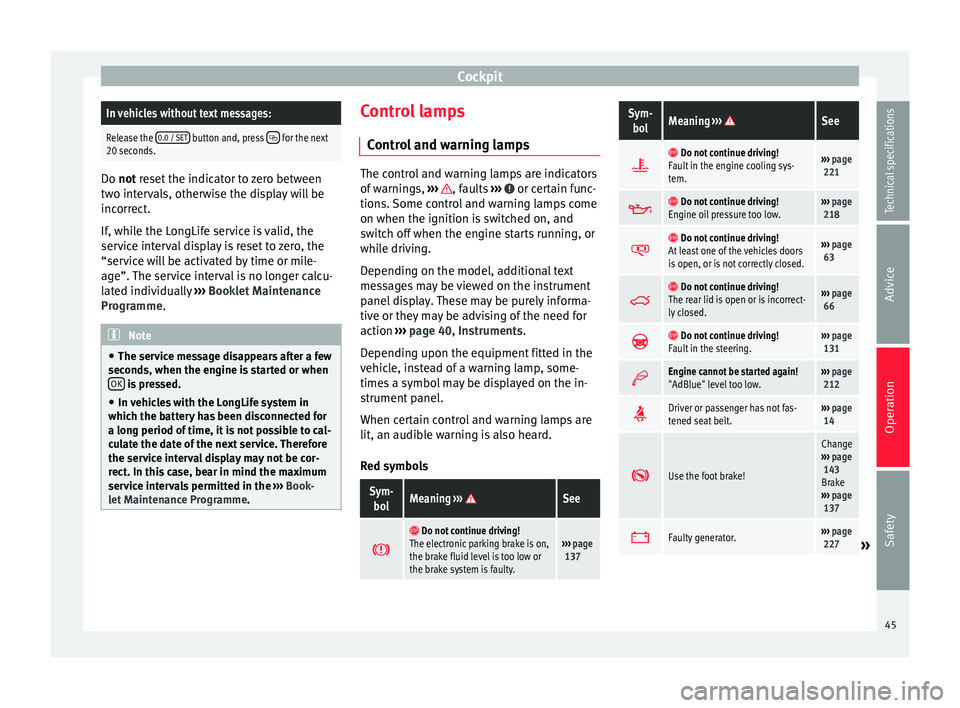
Control and warning lamps The control and warning lamps are indicators
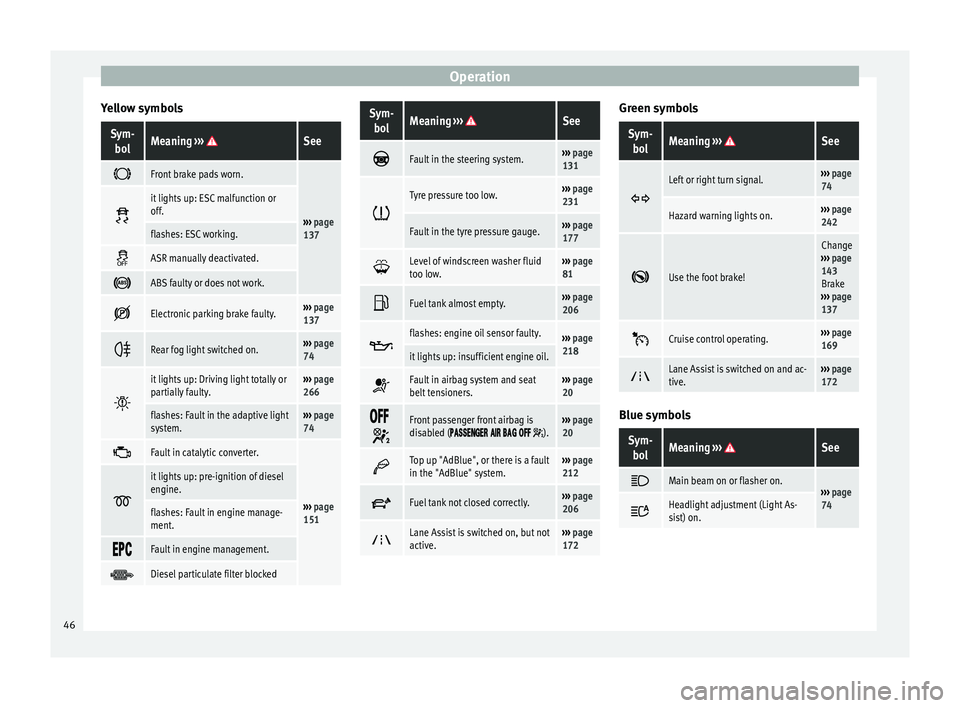
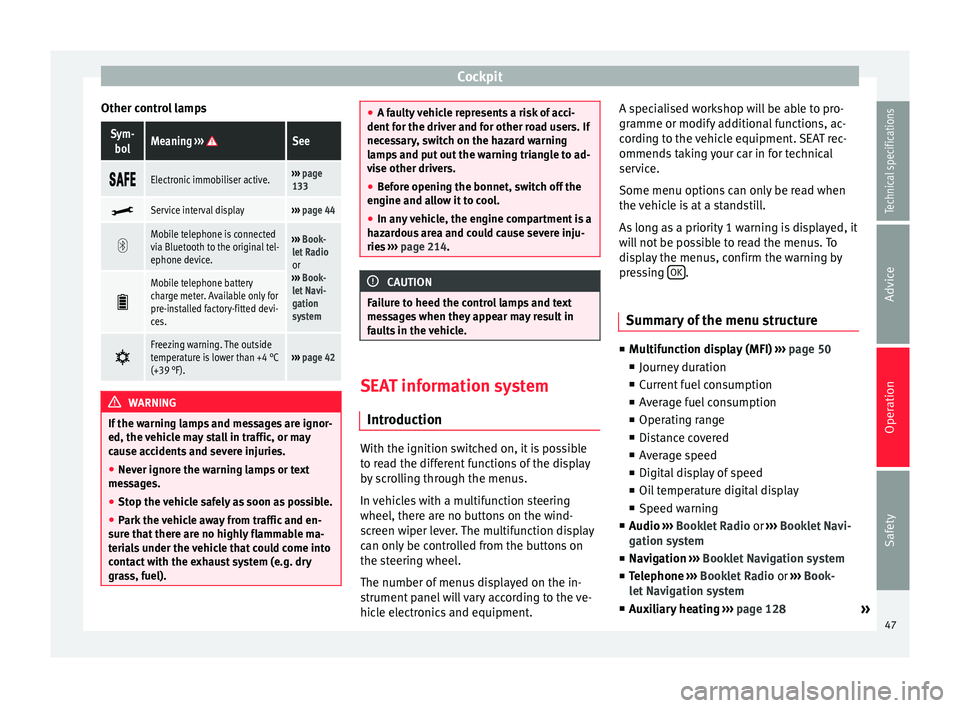
of warnings,
››› , faults
››› or certain func-
tions. Some control and warning lamps come
on when the ignition is switched on, and
switch off when the engine starts running, or
while driving.
Depending on the model, additional text
messages may be viewed on the instrument
panel display. These may be purely informa-
tive or they may be advising of the need for
action ›››
page 40, Instruments .
D ependin
g upon the equipment fitted in the
vehicle, instead of a warning lamp, some-
times a symbol may be displayed on the in-
strument panel.
When certain control and warning lamps are
lit, an audible warning is also heard.
Red symbols
Sym- bolMeaning ››› See
Do not continue driving!
The electronic parking brake is on,
the brake fluid level is too low or
the brake system is faulty.››› page
137
Sym-
bolMeaning ››› See
Do not continue driving!
Fault in the engine cooling sys-
tem.››› page
221
Do not continue driving!
Engine oil pressure too low.››› page
218
Do not continue driving!
At least one of the vehicles doors
is open, or is not correctly closed.››› page
63
Do not continue driving!
The rear lid is open or is incorrect-
ly closed.››› page
66
Do not continue driving!
Fault in the steering.››› page
131
Engine cannot be started again!
"AdBlue" level too low.›››
page
212
Driver or passenger has not fas-
tened seat belt.›››
page
14
Use the foot brake!
Change
››› page
143
Brake
››› page
137
Faulty generator.›››
page
227» 45
Technical specifications
Advice
Operation
Safety
Page 48 of 305
Operation
Yellow symbolsSym- bolMeaning ››› See
Front brake pads worn.
›››
page
137
it lights up: ESC malfunction or
off.
flashes: ESC working.
ASR manually deactivated.
ABS faulty or does not work.
Electronic parking brake faulty.›››
page
137
Rear fog light switched on.›››
page
74
it lights up: Driving light totally or
partially faulty.›››
page
266
flashes: Fault in the adaptive light
system.››› page
74
Fault in catalytic converter.
›››
page
151
it lights up: pre-ignition of diesel
engine.
flashes: Fault in engine manage-
ment.
Fault in engine management.
Diesel particulate filter blocked
Sym-
bolMeaning ››› See
Fault in the steering system.›››
page
131
Tyre pressure too low.›››
page
231
Fault in the tyre pressure gauge.››› page
177
Level of windscreen washer fluid
too low.›››
page
81
Fuel tank almost empty.›››
page
206
flashes: engine oil sensor faulty.›››
page
218
it lights up: insufficient engine oil.
Fault in airbag system and seat
belt tensioners.›››
page
20
Front passenger front airbag is
disabled ( ).››› page
20
Top up "AdBlue", or there is a fault
in the "AdBlue" system.›››
page
212
Fuel tank not closed correctly.›››
page
206
Lane Assist is switched on, but not
active.›››
page
172 Green symbols
Sym-
bolMeaning ››› See
Left or right turn signal.›››
page
74
Hazard warning lights on.››› page
242
Use the foot brake!
Change
››› page
143
Brake
››› page
137
Cruise control operating.›››
page
169
Lane Assist is switched on and ac-
tive.›››
page
172 Blue symbols
Sym-
bolMeaning ››› See
Main beam on or flasher on.›››
page
74 Headlight adjustment (Light As-
sist) on.
46
Page 49 of 305
Cockpit
Other control lampsSym- bolMeaning ››› See
Electronic immobiliser active.›››
page
133
Service interval display›››
page 44
Mobile telephone is connected
via Bluetooth to the original tel-
ephone device.›››
Book-
let Radio
or
››› Book-
let Navi-
gation
system
Mobile telephone battery
charge meter. Available only for
pre-installed factory-fitted devi-
ces.
Freezing warning. The outside
temperature is lower than +4 °C
(+39 °F).›››
page 42 WARNING
If the warning lamps and messages are ignor-
ed, the vehicle may stall in traffic, or may
cause accidents and severe injuries.
● Never ignore the warning lamps or text
messages.
● Stop the vehicle safely as soon as possible.
● Park the vehicle away from traffic and en-
sure that there are no highly flammable ma-
terials under the vehicle that could come into
contact with the exhaust system (e.g. dry
grass, fuel). ●
A faulty vehicle represents a risk of acci-
dent for the driver and for other road users. If
necessary, switch on the hazard warning
lamps and put out the warning triangle to ad-
vise other drivers.
● Before opening the bonnet, switch off the
engine and allow it to cool.
● In any vehicle, the engine compartment is a
hazardous area and could cause severe inju-
ries ››› page 214. CAUTION
Failure to heed the control lamps and text
messages when they appear may result in
faults in the vehicle. SEAT information system
Introduction With the ignition switched on, it is possible
to read the different functions of the display
by scrolling through the menus.
In vehicles with a multifunction steering
wheel, there are no buttons on the wind-
screen wiper lever. The multifunction display
can only be controlled from the buttons on
the steering wheel.
The number of menus displayed on the in-
strument panel will vary according to the ve-
hicle electronics and equipment.A specialised workshop will be able to pro-
gramme or modify additional functions, ac-
cording to the vehicle equipment. SEAT rec-
ommends taking your car in for technical
service.
Some menu options can only be read when
the vehicle is at a standstill.
As long as a priority 1 warning is displayed, it
will not be possible to read the menus. To
display the menus, confirm the warning by
pressing
OK .
Summary of the menu structure ■
Multifunction display (MFI) ››› page 50
■ Journey duration
■ Current fuel consumption
■ Average fuel consumption
■ Operating range
■ Distance covered
■ Average speed
■ Digital display of speed
■ Oil temperature digital display
■ Speed warning
■ Audio ›
›
›
Booklet Radio or ›››
Booklet Navi-
gation system
■ Navigation ››
›
Booklet Navigation system
■ Telephone ›››
Booklet Radio or ›››
Book-
let Navigation system
■ Auxiliary heating ››› page 128
»
47
Technical specifications
Advice
Operation
Safety
Page 51 of 305
Cockpit
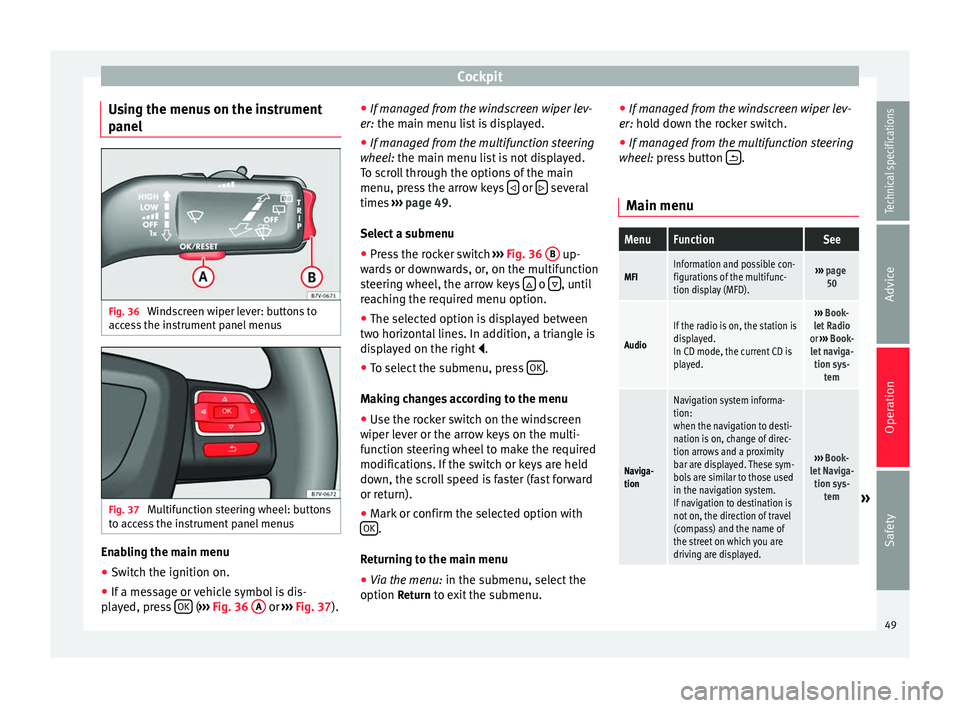
Using the menus on the instrument
panel Fig. 36
Windscreen wiper lever: buttons to
access the instrument panel menus Fig. 37
Multifunction steering wheel: buttons
to access the instrument panel menus Enabling the main menu
● Switch the ignition on.
● If a message or vehicle symbol is dis-
played, press OK (
››› Fig. 36 A or
››› Fig. 37 ).●
If mana ge d from the windscreen wiper lev-
er: the main menu list is displayed.
● If manage
d from the multifunction steering
wheel: the main menu list is not displayed.
To s
croll through the options of the main
menu, press the arrow keys or
several
times ››› page 49 .
Sel ect
a submenu
● Press the rocker switch ››› Fig. 36
B up-
wards or downwards, or, on the multifunction
steering wheel, the arrow keys o
, until
reaching the required menu option.
● The selected option is displayed between
two horizontal lines. In addition, a triangle is
displayed on the right .
● To select the submenu, press OK .
Making changes according to the menu ● Use the rocker switch on the windscreen
wiper lever or the arrow keys on the multi-
function steering wheel to make the required
modifications. If the switch or keys are held
down, the scroll speed is faster (fast forward
or return).
● Mark or confirm the selected option with
OK .
Returning to the main menu
● Via the menu: in the submenu, select the
option Return to exit the submenu. ●
If managed from the windscreen wiper lev-
er: hold down the rocker switch.
● If mana ge
d from the multifunction steering
wheel: press button .
Main menu
MenuFunctionSee
MFIInformation and possible con-
figurations of the multifunc-
tion display (MFD).››› page
50
Audio
If the radio is on, the station is
displayed.
In CD mode, the current CD is
played.››› Book-
let Radio
or ››› Book-
let naviga- tion sys- tem
Naviga-
tion
Navigation system informa-
tion:
when the navigation to desti-
nation is on, change of direc-
tion arrows and a proximity
bar are displayed. These sym-
bols are similar to those used
in the navigation system.
If navigation to destination is
not on, the direction of travel
(compass) and the name of
the street on which you are
driving are displayed.
››› Book-
let Naviga- tion sys- tem
» 49
Technical specifications
Advice
Operation
Safety
Page 52 of 305
OperationMenuFunctionSee
Tele-
phoneMobile telephone pre-installa-
tion set up information and
options
›››
Book-
let Radio
or ››› Book-
let Naviga- tion sys- tem
Parking
heating
Information and configura-
tions of the parking heating:
switching the parking heating
on or off. Select the operating
mode and duration.
››› page
128
Vehicle
condition
Current warning or informa-
tion texts.
This option only appears
when one of the following
texts is available. The number
of available messages is dis-
played. Example 1/1 or 2/2.
››› page 40
Configu-
ration
Different setting options, for
example, the Convenience,
Lighting & Visibility menus,
and the time, speed warning
with winter tyres, language,
units of measurement, or “Dis-
play off”.
››› page
51 MFI
(multifunction display) menu The multifunction display (MFI) has two auto-
matic memories:
1 - Partial memory and 2 -
T ot
al memory . The selected memory will be shown in the upper right-hand corner of the
display.
With the ignition switched on, and memory 1 or
2 displayed, briefly press
OK to change from
one memory to another.
1
Trip
memory
(for a
single
jour-
ney).
The memory stores the values for the
journey and the consumption from the
moment the ignition is switched on until
it is switched off again.
If the journey is broken for more than 2
hours, the memory is automatically
erased. If the journey is continued in less
than 2 hours after the ignition is switch-
ed off, the new data is added to the data
already stored in the memory.
2
Total
memory
(for all
jour-
neys).
The memory records the values for a spe-
cific number of partial trips, up to a total
of 19 hours and 59 minutes or 99 hours
and 59 minutes, or 1999.9 km (or miles)
for 9999 km (or miles), depending on the
model of instrument panel. On reaching
either of these limits, the memory is au-
tomatically erased and starts to count
from 0 again. Possible displays
MenuFunction
Journey dura-
tionThis indicates the hours (h) and mi-
nutes (min) since the ignition was
switched on.
MenuFunction
Current fuel
consumption
The current fuel consumption while
driving is displayed in l/100 km (or
miles per gallon, mpg); when the en-
gine is running but the vehicle is not
moving, in l/h (or gallons per hour).
Average fuel
consumption
When the ignition is switched on, the
average consumption (in l/100 km or in mpg) is displayed after the vehicle
has moved approximately 100 metres
(328 feet). Otherwise horizontal lines
are displayed. The value shown is up-
dated approximately every 5 seconds.
Operating
range
Approximate distance in km (or miles)
that can still be travelled with the fuel
remaining in the tank, assuming the
same style of driving is maintained.
This is calculated using the current fuel
consumption.
Distance cov-
eredDistance travelled, after ignition is
switched on, in km (or miles).
Average speed
After the ignition is switched on, the
average speed will be shown after a
distance of approximately 100 metres
(328 feet) has been travelled. Other-
wise horizontal lines are displayed. The
value shown is updated approximately
every 5 seconds.
Digital display
of speedCurrent speed displayed digitally.
Oil tempera-
ture digital
displayUpdated engine oil temperature digital
display 50
Page 54 of 305
Operation
Submenu ConvenienceConven-
ience
menuFunction
Central
locking
››› page
57
Auto. lock (Auto Lock): automatic locking of
all doors and boot when reaching a speed
of approximately 15 km/h (10 mph). In or-
der to unlock the vehicle when it is stop-
ped, push the central locking button, pull
the door handle or remove the key from the
ignition lock if the Auto unlock function is
enabled.
Auto unlock (Auto Lock): Unlocking all doors and the boot by removing the ignition lock
key.
Door unlock: when unlocking the vehicle
with the key, the following doors unlock
based on the setting:
– All: all of the doors are unlocked.
– One door: when unlocking the vehicle with the key, only the driver's door unlocks.
Pressing the button
again unlocks all
doors and the boot.
– Vehicle side: the doors on the driver's side
unlock.
On vehicles fitted with the Keyless Access
››› page 57 system, when using the corre-
sponding handle, all doors unlock on the
side of the vehicle where the key is.
Handling
windows
Adjusting the electric windows: this ena-
bles the windows to be opened or closed
when the vehicle is unlocked or locked re-
spectively. The open function can only be
activated from the driver door ››› page 70.
Conven-
ience
menuFunction
Rear vi-
sion mir-
ror ad-
justmentTilts passenger mirror downwards when re-
verse gear is engaged. This enables the
driver to see the edge of the pavement, for
example ››› page 85.
Exterior
mirror ad-
just.If synchronised adjustment is selected,
when the driver side exterior mirror is ad-
justed, the passenger exterior mirror is also
moved.
Factory
settingsSome functions of the Convenience subme-
nu will be reset to the factory value.
BackThe Configuration menu is displayed again. Lights & visibility
submenu
Lights &
visibility
menuFunction
Coming
HomeThis permits the adjustment of the time the
headlamps stay on after locking or unlock-
ing the vehicle, the function can also be
connected or disconnected here
››› page 78.
Leaving
Home
Footwell
lightThis permits the adjustment of the bright-
ness of the footwell lighting when the doors
are open, the function can also be connec-
ted or disconnected here
Lights &
visibility
menuFunction
Conven-
ience turn
signalsSwitching convenience turn signals on and
off When the convenience turn signals are
connected,, these flash at least three times
when the turn signal is switched on
››› page 74.
Factory
settingsAll the configurations in the submenu
Lights & visibility are reset to the prede-
fined factory values.
Tourist
light
Headlamp adjustment for countries in
which vehicles are driven on the other side
of the road. When the mark is activated, the
headlamps of a left-hand drive vehicle are
adjusted for driving on the left. This func-
tion must only be used for a short period.
BackThe Configuration menu is displayed again. Personal convenience settings
When two people use a vehicle, SEAT recom-
mends that each person always uses “their”
own remote control key. When the ignition is
switched off, or the vehicle is locked, the per-
sonal convenience settings are stored and
automatically allocated to the vehicle key
››› page 47 .
The v
alues of the personalised convenience
settings of the following menu options are al-
located to the vehicle key:
52
Page 55 of 305
Cockpit
■ Parking heating menu
■ Configuration Menu
■ Time
■ Language
■ Units
■ Convenience settings menu
■ Door unlock (individual opening, Auto
Lock)
■ Convenience handling of windows
■ Rear vision mirror adjustment
■ Lights & visibility settings menu
■ Coming home and leaving home
■ Footwell light
■ Convenience turn signals
The stored settings are automatically activa-
ted, at the latest when the ignition is switch-
ed on. Please refer to the information and
tips relating to the seat memory
››› page 93 . Thr
ee b utton unit in headliner
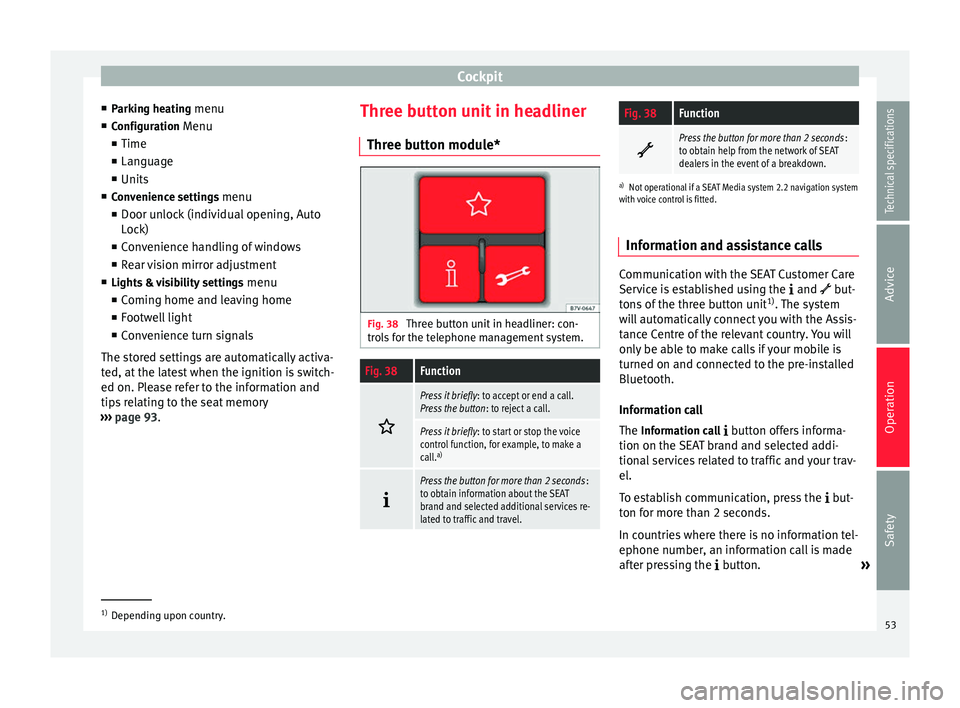
Three button module* Fig. 38
Three button unit in headliner: con-
trols for the telephone management system.
Fig. 38Function
Press it briefly
: to accept or end a call.
Press the button : to reject a call.
Press it briefly: to start or stop the voice
control function, for example, to make a
call. a)
Press the button for more than 2 seconds
:
to obtain information about the SEAT
brand and selected additional services re-
lated to traffic and travel.
Fig. 38Function
Press the button for more than 2 seconds
:
to obtain help from the network of SEAT
dealers in the event of a breakdown.
a) Not operational if a SEAT Media system 2.2 navigation system
with voice control is fitted.
Information and assistance calls Communication with the SEAT Customer Care
Service is established using the
and but-
tons of the three button unit 1)
. The system
will automatically connect you with the Assis-
tance Centre of the relevant country. You will
only be able to make calls if your mobile is
turned on and connected to the pre-installed
Bluetooth.
Information call
The Information call
button offers informa-
tion on the SEAT brand and selected addi-
tional services related to traffic and your trav-
el.
To establish communication, press the but-
ton for more than 2 seconds.
In countries where there is no information tel-
ephone number, an information call is made
after pressing the button. »1)
Depending upon country.
53
Technical specifications
Advice
Operation
Safety
Page 57 of 305
Opening and closing
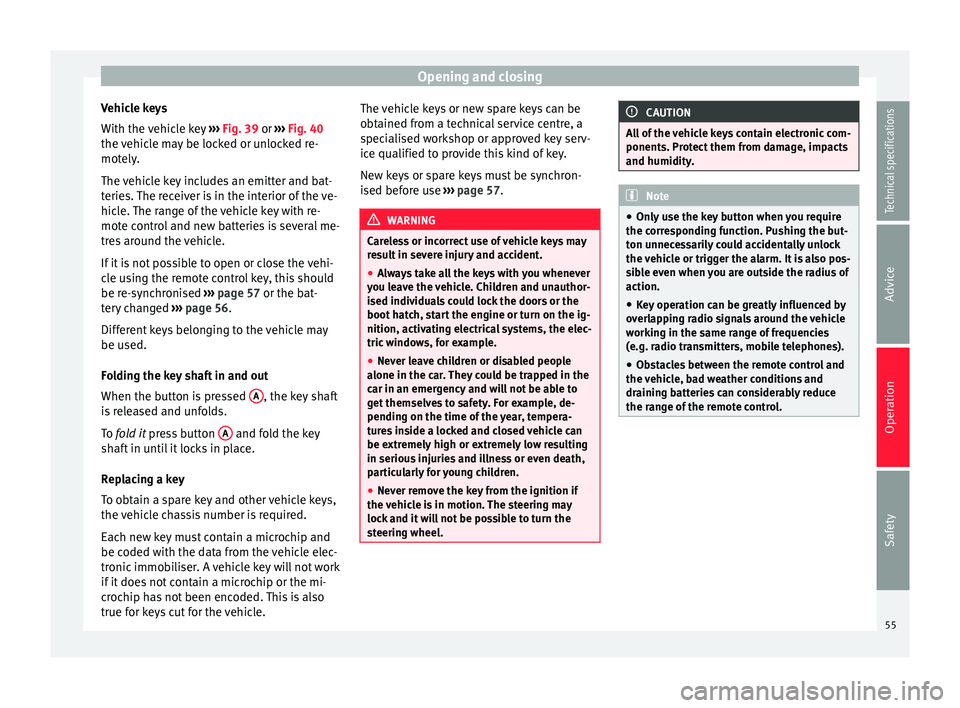
Vehicle keys
With the vehicle key ››› Fig. 39 or
›
›› Fig. 40
the
vehicle may be locked or unlocked re-
motely.
The vehicle key includes an emitter and bat-
teries. The receiver is in the interior of the ve-
hicle. The range of the vehicle key with re-
mote control and new batteries is several me-
tres around the vehicle.
If it is not possible to open or close the vehi-
cle using the remote control key, this should
be re-synchronised ››› page 57 or the bat-
tery changed ››› page 56.
Differ
ent keys belonging to the vehicle may
be used.
Folding the key shaft in and out
When the button is pressed A , the key shaft
is released and unfolds.
To fold it
press button A and fold the key
shaft in until it locks in place.
Replacing a key
To obtain a spare key and other vehicle keys,
the vehicle chassis number is required.
Each new key must contain a microchip and
be coded with the data from the vehicle elec-
tronic immobiliser. A vehicle key will not work
if it does not contain a microchip or the mi-
crochip has not been encoded. This is also
true for keys cut for the vehicle. The vehicle keys or new spare keys can be
obtained from a technical service centre, a
specialised workshop or approved key serv-
ice qualified to provide this kind of key.
New keys or spare keys must be synchron-
ised before use
››› page 57. WARNING
Careless or incorrect use of vehicle keys may
result in severe injury and accident.
● Always take all the keys with you whenever
you leave the vehicle. Children and unauthor-
ised individuals could lock the doors or the
boot hatch, start the engine or turn on the ig-
nition, activating electrical systems, the elec-
tric windows, for example.
● Never leave children or disabled people
alone in the car. They could be trapped in the
car in an emergency and will not be able to
get themselves to safety. For example, de-
pending on the time of the year, tempera-
tures inside a locked and closed vehicle can
be extremely high or extremely low resulting
in serious injuries and illness or even death,
particularly for young children.
● Never remove the key from the ignition if
the vehicle is in motion. The steering may
lock and it will not be possible to turn the
steering wheel. CAUTION
All of the vehicle keys contain electronic com-
ponents. Protect them from damage, impacts
and humidity. Note
● Only use the key button when you require
the corresponding function. Pushing the but-
ton unnecessarily could accidentally unlock
the vehicle or trigger the alarm. It is also pos-
sible even when you are outside the radius of
action.
● Key operation can be greatly influenced by
overlapping radio signals around the vehicle
working in the same range of frequencies
(e.g. radio transmitters, mobile telephones).
● Obstacles between the remote control and
the vehicle, bad weather conditions and
draining batteries can considerably reduce
the range of the remote control. 55
Technical specifications
Advice
Operation
Safety
Page 59 of 305
Opening and closing
Synchronising the vehicle key If the button
is pressed frequently outside
of the vehicle range, it is possible that the ve-
hicle can no longer be locked or unlocked us-
ing the key. In this case, the vehicle key must
be synchronised once more as follows:
● Unfold the vehicle key shaft ››› page 55.
● Remove the cover from the driver door han-
dle ››› page 259.
● Pr e
ss the button on the vehicle key. For
this, it must remain with the vehicle.
● Open the vehicle within one minute using
the key shaft.
● Turn on the ignition using the vehicle key.
The key has been synchronised.
● Replace the driver door handle cover.
Central locking and locking
system Introduction Central locking functions correctly when all
the doors and the rear lid are correctly shut.
If the driver door is open, the vehicle
cannot
be locked with the key.
If the vehicle has the Keyless Access closing
and ignition system, it may only be locked with the ignition off and the driver's door
closed.
The battery of an unlocked vehicle parked for
a long period (e.g. in a private garage) may
run down and fail to start the motor.
WARNING
The incorrect use of the central locking sys-
tem may cause serious injuries.
● The central locking system will lock all
doors. A vehicle locked from the inside can
prevent any non-authorised individual from
opening the doors and accessing the vehicle.
Nevertheless, in case of emergency or acci-
dent, locked doors will complicate access to
the vehicle interior to help the passengers.
● Never leave children or disabled people
alone in the vehicle. The central locking but-
ton can be used to lock all the doors from
within. Therefore, passengers will be locked
inside the vehicle. Individuals locked in the
vehicle can be exposed to very high or very
low temperatures.
● Depending on the time of the year, temper-
atures inside a locked and closed vehicle can
be extremely high or extremely low resulting
in serious injuries and illness or even death,
particularly for young children.
● Never leave individuals locked in a closed
and locked vehicle. In case of emergency,
they may not be able to exit the vehicle by
themselves or get help. Description of the central locking
system
The central locking system allows all doors
and the rear lid to be locked and unlocked
centrally.
● From outside, using the vehicle key.
● From outside with the Keyless Access sys-
tem ››› page 59,
● From in
side, by pushing the central locking
button ››› page 59
.
In the submenu Convenience in the Configura- tion menu, or by visiting a specialised work- shop, special functions of the central locking
system can be switched on or off ››› page 47.
In case of a vehicle key fault or central lock-
ing system fault, all doors can be locked or
unlocked manually.
Automatic locking (Auto Lock)
In this instance, the vehicle locks automati-
cally when moving at speeds above approx.
15 km/h (10 mph) ›››
page 47. When the ve-
hicle is locked, the control lamp of the cen-
tral locking button ›››
Fig. 45 lights up in yel-
lo w
.
Automatic unlocking (Auto Unlock)
When the key is removed from the ignition
slot, here the vehicle unlocks all doors and
the boot automatically ››› page 47.
»
57
Technical specifications
Advice
Operation
Safety