seat adjustment Seat Alhambra 2015 User Guide
[x] Cancel search | Manufacturer: SEAT, Model Year: 2015, Model line: Alhambra, Model: Seat Alhambra 2015Pages: 305, PDF Size: 5.46 MB
Page 54 of 305
Operation
Submenu ConvenienceConven-
ience
menuFunction
Central
locking
››› page
57
Auto. lock (Auto Lock): automatic locking of
all doors and boot when reaching a speed
of approximately 15 km/h (10 mph). In or-
der to unlock the vehicle when it is stop-
ped, push the central locking button, pull
the door handle or remove the key from the
ignition lock if the Auto unlock function is
enabled.
Auto unlock (Auto Lock): Unlocking all doors and the boot by removing the ignition lock
key.
Door unlock: when unlocking the vehicle
with the key, the following doors unlock
based on the setting:
– All: all of the doors are unlocked.
– One door: when unlocking the vehicle with the key, only the driver's door unlocks.
Pressing the button
again unlocks all
doors and the boot.
– Vehicle side: the doors on the driver's side
unlock.
On vehicles fitted with the Keyless Access
››› page 57 system, when using the corre-
sponding handle, all doors unlock on the
side of the vehicle where the key is.
Handling
windows
Adjusting the electric windows: this ena-
bles the windows to be opened or closed
when the vehicle is unlocked or locked re-
spectively. The open function can only be
activated from the driver door ››› page 70.
Conven-
ience
menuFunction
Rear vi-
sion mir-
ror ad-
justmentTilts passenger mirror downwards when re-
verse gear is engaged. This enables the
driver to see the edge of the pavement, for
example ››› page 85.
Exterior
mirror ad-
just.If synchronised adjustment is selected,
when the driver side exterior mirror is ad-
justed, the passenger exterior mirror is also
moved.
Factory
settingsSome functions of the Convenience subme-
nu will be reset to the factory value.
BackThe Configuration menu is displayed again. Lights & visibility
submenu
Lights &
visibility
menuFunction
Coming
HomeThis permits the adjustment of the time the
headlamps stay on after locking or unlock-
ing the vehicle, the function can also be
connected or disconnected here
››› page 78.
Leaving
Home
Footwell
lightThis permits the adjustment of the bright-
ness of the footwell lighting when the doors
are open, the function can also be connec-
ted or disconnected here
Lights &
visibility
menuFunction
Conven-
ience turn
signalsSwitching convenience turn signals on and
off When the convenience turn signals are
connected,, these flash at least three times
when the turn signal is switched on
››› page 74.
Factory
settingsAll the configurations in the submenu
Lights & visibility are reset to the prede-
fined factory values.
Tourist
light
Headlamp adjustment for countries in
which vehicles are driven on the other side
of the road. When the mark is activated, the
headlamps of a left-hand drive vehicle are
adjusted for driving on the left. This func-
tion must only be used for a short period.
BackThe Configuration menu is displayed again. Personal convenience settings
When two people use a vehicle, SEAT recom-
mends that each person always uses “their”
own remote control key. When the ignition is
switched off, or the vehicle is locked, the per-
sonal convenience settings are stored and
automatically allocated to the vehicle key
››› page 47 .
The v
alues of the personalised convenience
settings of the following menu options are al-
located to the vehicle key:
52
Page 55 of 305
Cockpit
■ Parking heating menu
■ Configuration Menu
■ Time
■ Language
■ Units
■ Convenience settings menu
■ Door unlock (individual opening, Auto
Lock)
■ Convenience handling of windows
■ Rear vision mirror adjustment
■ Lights & visibility settings menu
■ Coming home and leaving home
■ Footwell light
■ Convenience turn signals
The stored settings are automatically activa-
ted, at the latest when the ignition is switch-
ed on. Please refer to the information and
tips relating to the seat memory
››› page 93 . Thr
ee b utton unit in headliner
Three button module* Fig. 38
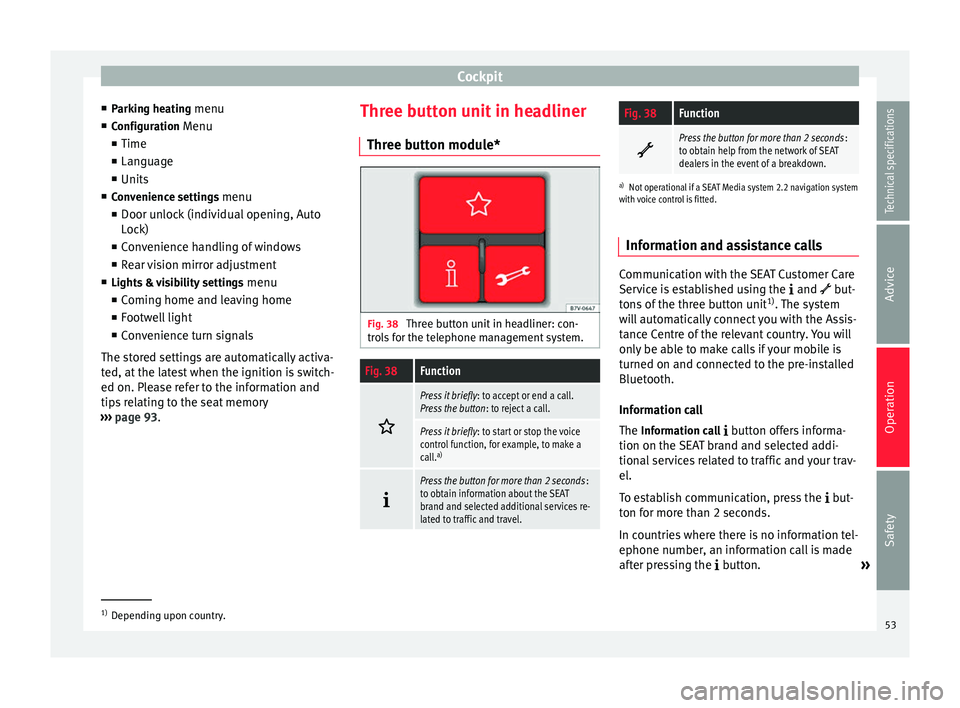
Three button unit in headliner: con-
trols for the telephone management system.
Fig. 38Function
Press it briefly
: to accept or end a call.
Press the button : to reject a call.
Press it briefly: to start or stop the voice
control function, for example, to make a
call. a)
Press the button for more than 2 seconds
:
to obtain information about the SEAT
brand and selected additional services re-
lated to traffic and travel.
Fig. 38Function
Press the button for more than 2 seconds
:
to obtain help from the network of SEAT
dealers in the event of a breakdown.
a) Not operational if a SEAT Media system 2.2 navigation system
with voice control is fitted.
Information and assistance calls Communication with the SEAT Customer Care
Service is established using the
and but-
tons of the three button unit 1)
. The system
will automatically connect you with the Assis-
tance Centre of the relevant country. You will
only be able to make calls if your mobile is
turned on and connected to the pre-installed
Bluetooth.
Information call
The Information call
button offers informa-
tion on the SEAT brand and selected addi-
tional services related to traffic and your trav-
el.
To establish communication, press the but-
ton for more than 2 seconds.
In countries where there is no information tel-
ephone number, an information call is made
after pressing the button. »1)
Depending upon country.
53
Technical specifications
Advice
Operation
Safety
Page 91 of 305
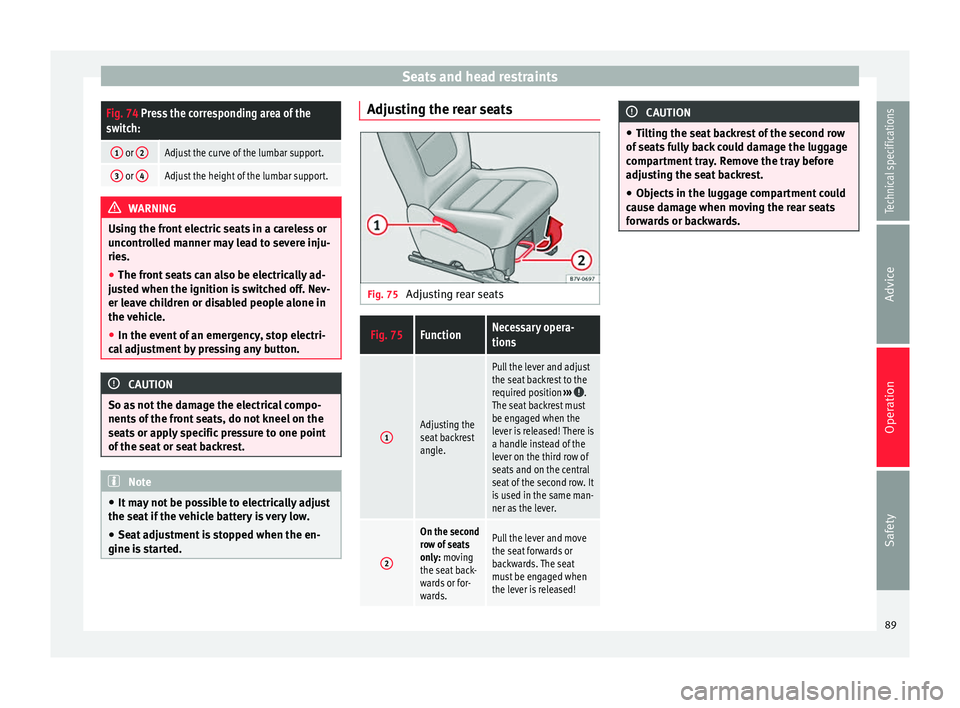
Seats and head restraintsFig. 74 Press the corresponding area of the
switch:
1 or
2Adjust the curve of the lumbar support.
3 or 4Adjust the height of the lumbar support. WARNING
Using the front electric seats in a careless or
uncontrolled manner may lead to severe inju-
ries.
● The front seats can also be electrically ad-
justed when the ignition is switched off. Nev-
er leave children or disabled people alone in
the vehicle.
● In the event of an emergency, stop electri-
cal adjustment by pressing any button. CAUTION
So as not the damage the electrical compo-
nents of the front seats, do not kneel on the
seats or apply specific pressure to one point
of the seat or seat backrest. Note
● It may not be possible to electrically adjust
the seat if the vehicle battery is very low.
● Seat adjustment is stopped when the en-
gine is started. Adjusting the rear seats
Fig. 75
Adjusting rear seats
Fig. 75FunctionNecessary opera-
tions
1Adjusting the
seat backrest
angle.
Pull the lever and adjust
the seat backrest to the
required position ›››
.
The seat backrest must
be engaged when the
lever is released! There is
a handle instead of the
lever on the third row of
seats and on the central
seat of the second row. It
is used in the same man-
ner as the lever.
2
On the second
row of seats
only: moving
the seat back-
wards or for-
wards.Pull the lever and move
the seat forwards or
backwards. The seat
must be engaged when
the lever is released! CAUTION
● Tilting the seat backrest of the second row
of seats fully back could damage the luggage
compartment tray. Remove the tray before
adjusting the seat backrest.
● Objects in the luggage compartment could
cause damage when moving the rear seats
forwards or backwards. 89
Technical specifications
Advice
Operation
Safety
Page 92 of 305
Operation
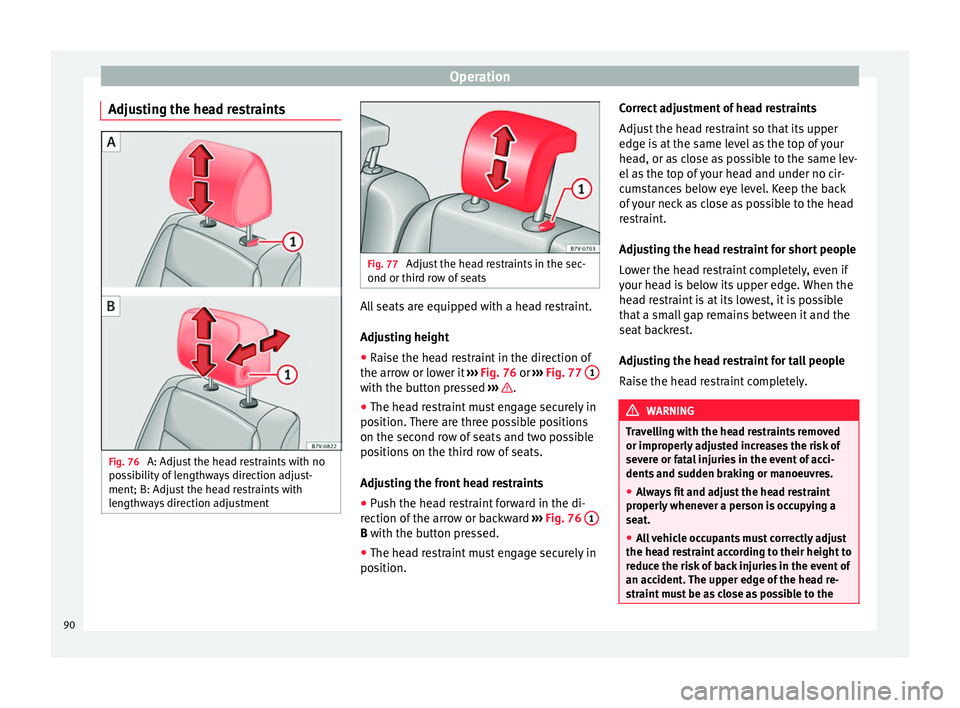
Adjusting the head restraints Fig. 76
A: Adjust the head restraints with no
possibility of lengthways direction adjust-
ment; B: Adjust the head restraints with
lengthways direction adjustment Fig. 77
Adjust the head restraints in the sec-
ond or third row of seats All seats are equipped with a head restraint.
Adjusting height
● Raise the head restraint in the direction of
the arrow or lower it ››› Fig. 76 or
›
›› Fig. 77 1 with the button pressed
››› .
● The head restraint must engage securely in
position. There are three possible positions
on the second row of seats and two possible
positions on the third row of seats.
Adjusting the front head restraints
● Push the head restraint forward in the di-
rection of the arrow or backward ››› Fig. 76 1 B
with the button pressed.
● The he a
d restraint must engage securely in
position. Correct adjustment of head restraints
Adjust the head restraint so that its upper
edge is at the same level as the top of your
head, or as close as possible to the same lev-
el as the top of your head and under no cir-
cumstances below eye level. Keep the back
of your neck as close as possible to the head
restraint.
Adjusting the head restraint for short people
Lower the head restraint completely, even if
your head is below its upper edge. When the
head restraint is at its lowest, it is possible
that a small gap remains between it and the
seat backrest.
Adjusting the head restraint for tall people
Raise the head restraint completely.
WARNING
Travelling with the head restraints removed
or improperly adjusted increases the risk of
severe or fatal injuries in the event of acci-
dents and sudden braking or manoeuvres.
● Always fit and adjust the head restraint
properly whenever a person is occupying a
seat.
● All vehicle occupants must correctly adjust
the head restraint according to their height to
reduce the risk of back injuries in the event of
an accident. The upper edge of the head re-
straint must be as close as possible to the 90
Page 93 of 305
Seats and head restraints
same level as the top of your head and under
no circumstances below eye level. Keep the
back of your neck as close as possible to the
head restraint.
●
Never adjust the head restraint while the
vehicle is in motion. Removing and fitting the head
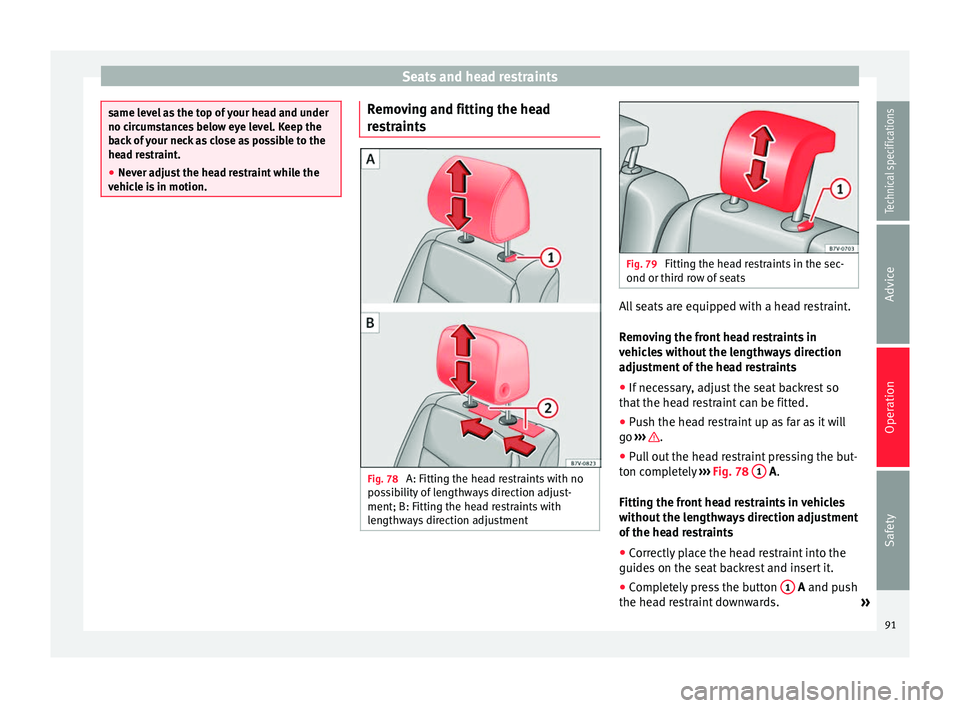
restraints
Fig. 78
A: Fitting the head restraints with no
possibility of lengthways direction adjust-
ment; B: Fitting the head restraints with
lengthways direction adjustment Fig. 79
Fitting the head restraints in the sec-
ond or third row of seats All seats are equipped with a head restraint.
Removing the front head restraints in
vehicles without the lengthways direction
adjustment of the head restraints
● If necessary, adjust the seat backrest so
that the head restraint can be fitted.
● Push the head restraint up as far as it will
go ››› .
● Pull out the head restraint pressing the but-
ton completely ››› Fig. 78 1
A
.
Fittin
g the front head restraints in vehicles
without the lengthways direction adjustment
of the head restraints
● Correctly place the head restraint into the
guides on the seat backrest and insert it.
● Completely press the button 1 A
and push
the he a
d restraint downwards. »
91
Technical specifications
Advice
Operation
Safety
Page 94 of 305
Operation
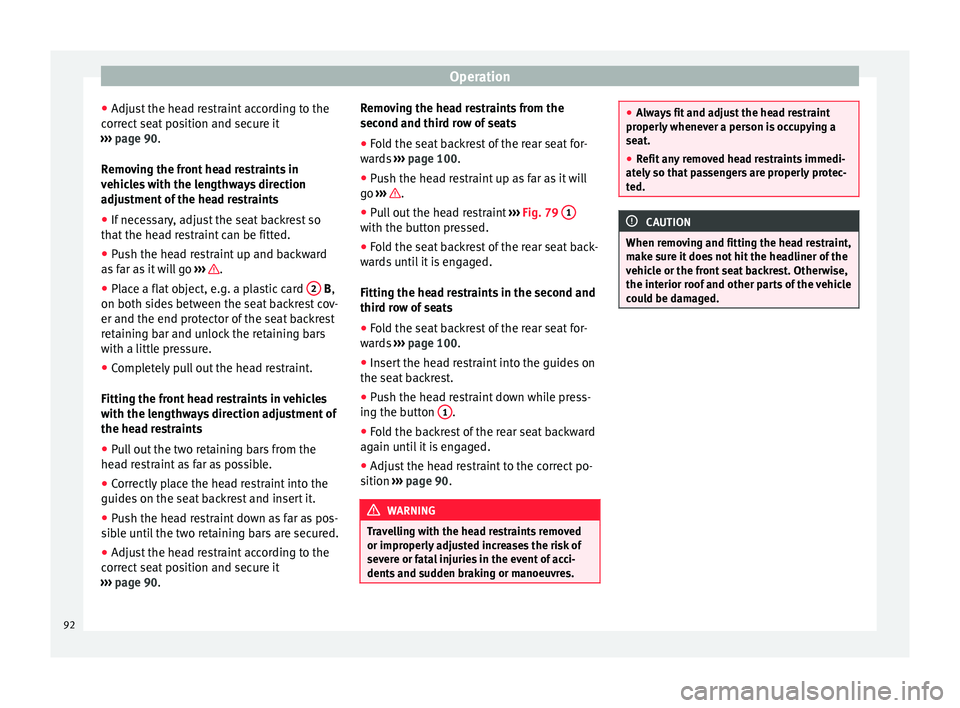
● Adjust the head restraint according to the
correct seat position and secure it
››› page 90 .
R emo
ving the front head restraints in
vehicles with the lengthways direction
adjustment of the head restraints
● If necessary, adjust the seat backrest so
that the head restraint can be fitted.
● Push the head restraint up and backward
as far as it will go ››› .
● Place a flat object, e.g. a plastic card 2
B
,
on both s
ides between the seat backrest cov-
er and the end protector of the seat backrest
retaining bar and unlock the retaining bars
with a little pressure.
● Completely pull out the head restraint.
Fitting the front head restraints in vehicles
with the lengthways direction adjustment of
the head restraints
● Pull out the two retaining bars from the
head restraint as far as possible.
● Correctly place the head restraint into the
guides on the seat backrest and insert it.
● Push the head restraint down as far as pos-
sible until the two retaining bars are secured.
● Adjust the head restraint according to the
correct seat position and secure it
››› page 90. Remo
ving the head restraints from the
second and third row of seats
● Fold the seat backrest of the rear seat for-
wards ››› page 100
.
● Push the head restraint up as far as it will
go ››› .
● Pull out the head restraint ››› Fig. 79 1 with the button pressed.
●
Fold the seat backrest of the rear seat back-
wards until it is engaged.
Fitting the head restraints in the second and
third row of seats
● Fold the seat backrest of the rear seat for-
wards ››› page 100 .
● Inser
t the head restraint into the guides on
the seat backrest.
● Push the head restraint down while press-
ing the button 1 .
● Fold the backrest of the rear seat backward
again until it is engaged.
● Adjust the head restraint to the correct po-
sition ››› page 90 . WARNING
Travelling with the head restraints removed
or improperly adjusted increases the risk of
severe or fatal injuries in the event of acci-
dents and sudden braking or manoeuvres. ●
Always fit and adjust the head restraint
properly whenever a person is occupying a
seat.
● Refit any removed head restraints immedi-
ately so that passengers are properly protec-
ted. CAUTION
When removing and fitting the head restraint,
make sure it does not hit the headliner of the
vehicle or the front seat backrest. Otherwise,
the interior roof and other parts of the vehicle
could be damaged. 92
Page 95 of 305
Seats and head restraints
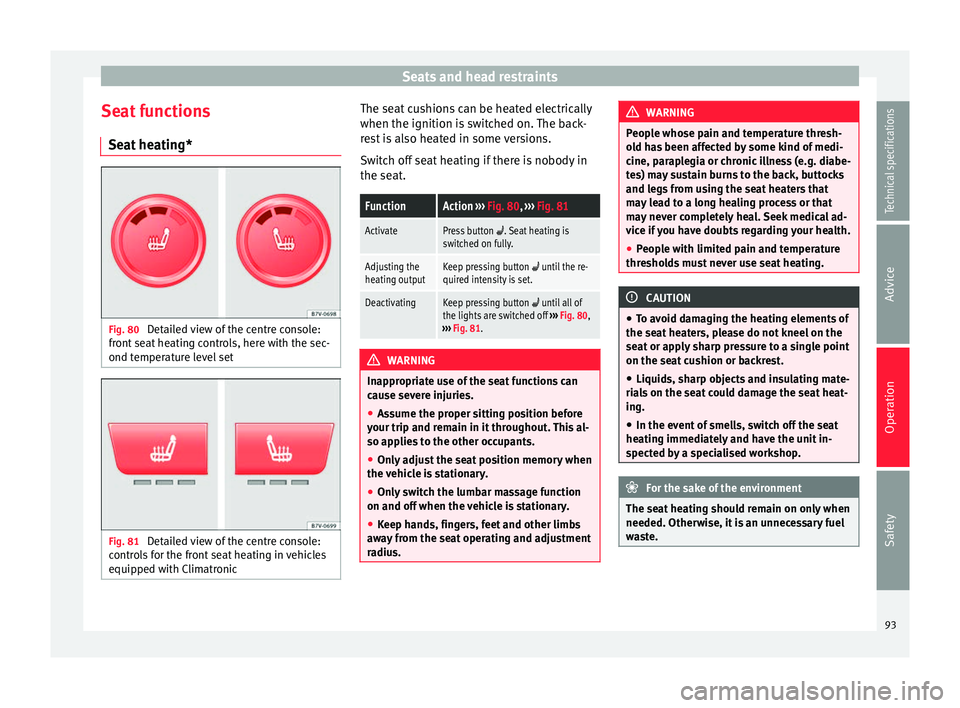
Seat functions Seat heating* Fig. 80
Detailed view of the centre console:
front seat heating controls, here with the sec-
ond temperature level set Fig. 81
Detailed view of the centre console:
controls for the front seat heating in vehicles
equipped with Climatronic The seat cushions can be heated electrically
when the ignition is switched on. The back-
rest is also heated in some versions.
Switch off seat heating if there is nobody in
the seat.FunctionAction
››› Fig. 80, ››› Fig. 81
ActivatePress button . Seat heating is
switched on fully.
Adjusting the
heating outputKeep pressing button until the re-
quired intensity is set.
DeactivatingKeep pressing button until all of
the lights are switched off ››› Fig. 80,
››› Fig. 81. WARNING
Inappropriate use of the seat functions can
cause severe injuries.
● Assume the proper sitting position before
your trip and remain in it throughout. This al-
so applies to the other occupants.
● Only adjust the seat position memory when
the vehicle is stationary.
● Only switch the lumbar massage function
on and off when the vehicle is stationary.
● Keep hands, fingers, feet and other limbs
away from the seat operating and adjustment
radius. WARNING
People whose pain and temperature thresh-
old has been affected by some kind of medi-
cine, paraplegia or chronic illness (e.g. diabe-
tes) may sustain burns to the back, buttocks
and legs from using the seat heaters that
may lead to a long healing process or that
may never completely heal. Seek medical ad-
vice if you have doubts regarding your health.
● People with limited pain and temperature
thresholds must never use seat heating. CAUTION
● To avoid damaging the heating elements of
the seat heaters, please do not kneel on the
seat or apply sharp pressure to a single point
on the seat cushion or backrest.
● Liquids, sharp objects and insulating mate-
rials on the seat could damage the seat heat-
ing.
● In the event of smells, switch off the seat
heating immediately and have the unit in-
spected by a specialised workshop. For the sake of the environment
The seat heating should remain on only when
needed. Otherwise, it is an unnecessary fuel
waste. 93
Technical specifications
Advice
Operation
Safety
Page 101 of 305
Transport and practical equipment
Transporting a load Secure all objects in the vehicle
● Distribute the load throughout the vehicle,
on the roof and in a trailer as uniformly as
possible.
● Transport heavy objects as far forward as
possible in the luggage compartment and
lock the seat backs in the vertical position.
● Secure luggage in the luggage compart-
ment with suitable straps on the fastening
rings ››› page 100
.
● Chec k
the headlight adjustment
››› page 74
.
● Use the suitable tyre pressure according to
the load being transported. Read the tire in-
flation information label ›››
page 231.
● For vehicles with a tire pressure indicator,
change the vehicle load status ›››
page 177. CAUTION
Objects on the shelf could chafe against the
wires of the heating element in the heated
rear window and cause damage. Note
Please note the information about loading a
trailer ››› page 179 and the roof carrier sys-
t em ›
›› page 110. Driving with the rear lid open
Driving with the rear lid open creates an addi-
tional risk. Secure all objects and secure the
rear lid correctly and take all measures possi-
ble to reduce toxic gases from entering the
vehicle.
WARNING
Driving with the rear lid unlocked or open
could cause serious injuries.
● Always drive with the rear lid closed.
● Secure all objects in the vehicle. Loose
items could fall out of the vehicle and injure
other road users or damage other vehicles.
● Drive particularly carefully and think
ahead.
● Avoid sudden manoeuvres and braking giv-
en that this could cause an uncontrolled
movement of the open rear lid.
● When transporting objects that protrude
out of the luggage compartment, indicate
them suitably. Observe legal requirements.
● If objects must project out of the luggage
compartment, the rear lid must never be used
to “secure” or “attach” objects.
● If a baggage rack is fitted on the rear lid, it
should be removed before travelling with the
rear lid open. WARNING
Toxic gases may enter the vehicle interior
when the rear lid is open. This could cause
loss of consciousness, carbon monoxide poi-
soning, serious injury and accidents.
● To avoid toxic gases entering the vehicle al-
ways drive with the rear lid closed.
● In exceptional circumstances, if you must
drive with the rear lid open, observe the fol-
lowing to reduce the entry of toxic gases in-
side the vehicle:
– Close all windows and the sliding sun-
roof.
– Turn off the air recirculation for the heat-
ing and air conditioner.
– Open all of the air outlets in the dash
panel.
– Turn the heating fan and heater to the
highest level. CAUTION
An open boot hatch changes the length and
height of the vehicle. Driving a loaded vehicle
For the best handling when driving a loaded
vehicle, note the following:
● Secure all objects ›››
page 99 .
● Ac
celerate gently and carefully. »
99
Technical specifications
Advice
Operation
Safety
Page 179 of 305
Driver assistance systems
● when a sporty driving style is employed,
● in the event of a major distraction for the
driver,
The tiredness detection function switches off
when the ignition is switched off or when the
driver unbuckles their seat belt and opens
the door. If driving for a long time under 65
km/h (40 mph), the system ceases to assess
tiredness automatically. If driving speed is
then increased, the behaviour at the wheel
will again be evaluated.
Tyre monitoring systems
Introduction The tyre monitor indicator monitors the tyre
pressure of each wheel during driving using
the ABS sensors. The ABS sensors monitor
the tyre tread perimeter and vibrations of
each tire. The tyre monitor indicator warns
the driver if it detects a considerable drop in
tyre pressure of one or several tyres while
driving. Loss of tyre pressure will be indica-
ted by the indicator
as well as an audible
warning and sometimes a text message on
the dash panel display. When you open the
driver door, you will find a label indicating
the tyre pressure recommended by the manu-
facturer for the maximum vehicle load for
each tyre approved for the vehicle in ques-
tion. By pressing the adjustment button on the tyre monitoring indicator, you may
change the reference pressure for the tyres
so that the tyre pressure coincides with ac-
tual pressure
››› page 179 .
S uit
able use of the adjustment button
››› page 179. WARNING
Unsuitable handling of the wheels and tyres
may lead to sudden tyre pressure losses, to
tread separation or even to a blow-out.
● Check tyre pressures regularly and ensure
they are maintained at the pressures indica-
ted. If the tyre pressure is too low, the tyres
could overheat, resulting in tread detachment
or even burst tyres.
● Tyre pressure should be that indicated on
the label when the tyres are cold at all times
››› page 235.
● Re
gularly check the cold inflation pressure
of the tyres. If necessary, change the tyre
pressure of the vehicle tyres while they are
cold.
● Regularly check your tyres for damage and
wear.
● Never exceed the maximum permitted
speed or loads specified for the type of tyre
fitted on your vehicle. WARNING
Incorrect use of the tyre monitoring indicator
button could result in the indicator giving er- roneous messages or prevented from indicat-
ing the danger caused by a defective tyre
››› page 179. CAUTION
● The tyre valves may be damaged if the cap
is not in place. Check that the caps are identi-
cal to the standard caps and have been cor-
rectly tightened. Do not use metal caps
››› page 179.
● Do not damage the valves when changing
the tyres ››› page 179
. For the sake of the environment
Under-inflated tyres lead to increased fuel
consumption and tyre wear. Note
● Do not only rely on the tyre monitoring sys-
tem. Regularly check your tyres to ensure
that the tyre pressure is correct and that the
tyres are not damaged due to puncture, cuts,
tears and impacts/dents. Remove objects
from the tyres only when the tyres have not
been pierced by these.
● The tyre monitoring system is set to the
tyre pressure recommended by the manufac-
turer and indicated on the label ››› Fig. 175. 177
Technical specifications
Advice
Operation
Safety
Page 187 of 305
Towing bracket device
●
With the engine running, the electrical
equipment on the trailer will be supplied with
power. Loading the trailer
Trailer weight / drawbar load
The trailer weight is the load that the vehicle
can pull
››› . The drawbar load is the vertical
weight of the tow hitch on the tow hitch ball
››› page 188.
The figur e
s for trailer weights and drawbar
load weights given on the data plate of the
tow hitch are for values of this model only.
The correct figures for your specific vehicle,
which may be lower than these figures for the
t o
w hitch, are given in the vehicle documen-
tation. The instructions in the official vehicle
documents take precedence.
For the sake of road safety, SEAT recom-
mends using the maximum allowed drawbar
load
. The handling of the combined vehicle
and trailer will be poor if the drawbar load is
too low.
The drawbar load increases the weight on the
rear axle, reducing the vehicle carrying ca-
pacity.
Gross combination weight
This figure refers to the combined weight of
the loaded vehicle and loaded trailer. Loading the trailer
The combined vehicle and trailer must be
balanced. Use the maximum drawbar load
authorised and do not overload the front or
the rear of the trailer:
●
Distribute loads in the trailer so that heavy
objects are as near to the axle as possible or
above it.
● Correctly secure the trailer load.
Tyre pressure
Inflate the trailer tyres according to the man-
ufacturer's instructions.
Inflate the towing vehicles tyres to the maxi-
mum ››› page 231. WARNING
Exceeding the maximum authorised axle
load, drawbar load or the gross combination
weight of the towing vehicle and trailer could
cause a serious accident with severe conse-
quences.
● Never exceed the specifications.
● With the actual load on the front and rear
axles, the maximum axle load should never
be exceeded. The weight on the front and rear
should never exceed the gross vehicle
weight. WARNING
If the load moves, the stability and safety of
the vehicle and trailer combination will be se-
riously affected and this could result in a seri-
ous accident.
● Always correctly load the trailer.
● Always secure loads correctly with suitable
and undamaged attachment rope or straps. Driving with a trailer
Adjusting the headlights
When towing a trailer, the front of the vehicle
may rise and so the dipped beam headlights
may blind other drivers. Use the headlight
range control to lower the cone of light. If you
do not have headlight range control, have
the headlights adjusted by a specialised
workshop. Vehicles with high-intensity dis-
charge lamps adapt automatically and do not
require adjustment.
Details of driving with a trailer
● If the trailer has an overrun brake, apply
the brakes gently at first and then, firmly.
This will prevent the jerking that can be
caused by the trailer wheels locking.
● As of the combined vehicle and trailer
mass, braking distances will be greater.
● Select a low gear before driving down a
steep hill to use the engine braking effect to »
185
Technical specifications
Advice
Operation
Safety