ESP Seat Alhambra 2016 Workshop Manual
[x] Cancel search | Manufacturer: SEAT, Model Year: 2016, Model line: Alhambra, Model: Seat Alhambra 2016Pages: 324, PDF Size: 5.93 MB
Page 180 of 324
Operation
● Another f au
lt
in the vehicle. Have the air
conditioner checked by a specialised work-
shop.
Special features
If the humidity and temperature outside the
vehicle are high, condensation can drip off the vaporiser in the cooling system and form
a pool u
nderneath the vehicle. This is normal
and does not indicate a leak! Note
After starting the engine, any residual humid-
ity in the air c onditioner c
ould mist over the
windscreen. Switch on the defrost function as soon as possible to clear the windscreen of
conden
s
ation. Air vents
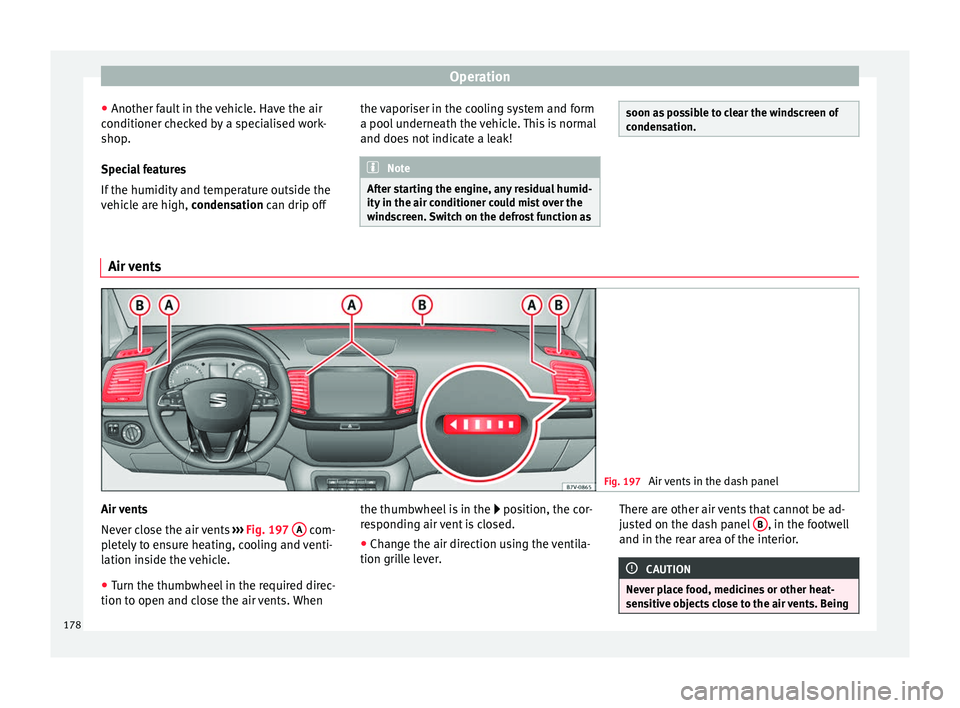
Fig. 197
Air vents in the dash panel Air vents
Nev
er clo
se the air vents ››› Fig. 197 A com-
p let
ely to ensure heating, cooling and venti-
lation inside the vehicle.
● Turn the thumbwheel in the required direc-
tion to open and clo
se the air vents. When the thumbwheel is in the
position, the c
or-
responding air vent is closed.
● Change the air direction using the ventila-
tion grill
e lever. There are other air vents that cannot be ad-
just
ed on the dash panel B , in the footwell
and in the r ear ar
ea of the interior. CAUTION
Never place food, medicines or other heat-
sens itiv
e objects close to the air vents. Being178
Page 183 of 324
Air conditioning
burn any fuel remaining in the auxiliary heat-
er .
The e
xhaust gases are also extracted from
the system.
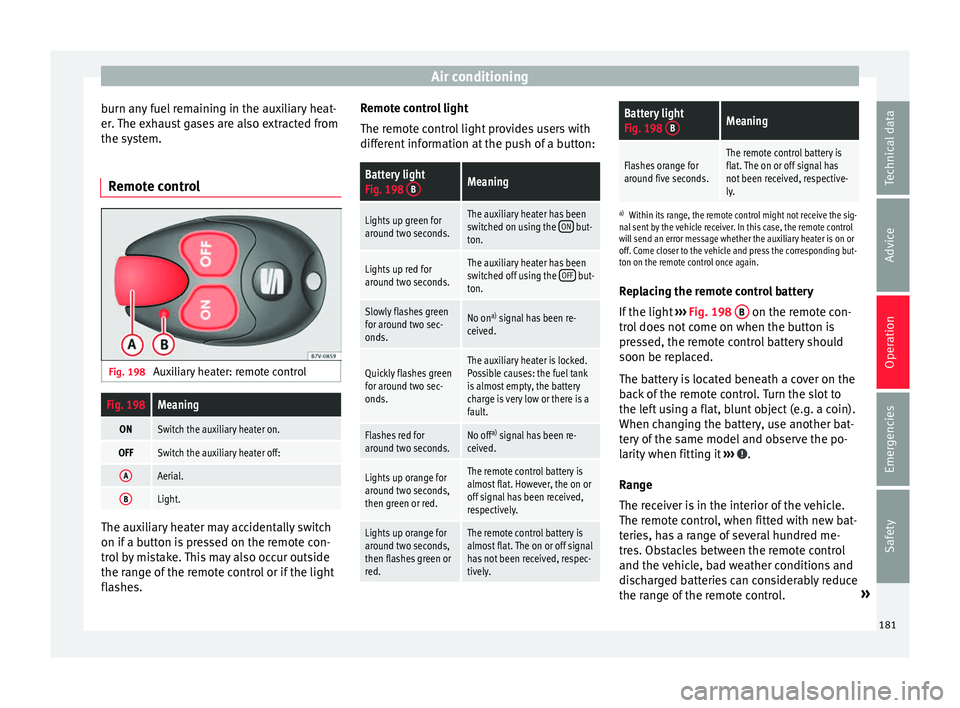
Remote control Fig. 198
Auxiliary heater: remote control
Fig. 198Meaning
ONSwitch the auxiliary heater on.
OFFSwitch the auxiliary heater off:
AAerial.
BLight. The auxiliary heater may accidentally switch
on if
a b
utt
on is pressed on the remote con-
trol by mistake. This may also occur outside
the range of the remote control or if the light
flashes. Remote control light
The remote c
ontrol light provides users with
different information at the push of a button:
Battery light
Fig. 198 BMeaning
Lights up green for
around two seconds.The auxiliary heater has been
switched on using the ON but-
ton.
Lights up red for
around two seconds.The auxiliary heater has been
switched off using the OFF but-
ton.
Slowly flashes green
for around two sec-
onds.No on a)
signal has been re-
ceived.
Quickly flashes green
for around two sec-
onds.The auxiliary heater is locked.
Possible causes: the fuel tank
is almost empty, the battery
charge is very low or there is a
fault.
Flashes red for
around two seconds.No off a)
signal has been re-
ceived.
Lights up orange for
around two seconds,
then green or red.The remote control battery is
almost flat. However, the on or
off signal has been received,
respectively.
Lights up orange for
around two seconds,
then flashes green or
red.The remote control battery is
almost flat. The on or off signal
has not been received, respec-
tively.
Battery light
Fig. 198 BMeaning
Flashes orange for
around five seconds.The remote control battery is
flat. The on or off signal has
not been received, respective-
ly.
a)
Within its range, the remote control might not receive the sig-
nal sent by the vehicle receiver. In this case, the remote control
will send an error message whether the auxiliary heater is on or
off. Come closer to the vehicle and press the corresponding but-
ton on the remote control once again.
Replacing the remote control battery
If the light ›››
Fig. 198 B on the remote con-
tr o
l
does not come on when the button is
pressed, the remote control battery should
soon be replaced.
The battery is located beneath a cover on the
back of the remote control. Turn the slot to
the left using a flat, blunt object (e.g. a coin).
When changing the battery, use another bat-
tery of the same model and observe the po-
larity when fitting it ››› .
R an
g
e
The receiver is in the interior of the vehicle.
The remote control, when fitted with new bat-
teries, has a range of several hundred me-
tres. Obstacles between the remote control
and the vehicle, bad weather conditions and
discharged batteries can considerably reduce
the range of the remote control. »
181
Technical data
Advice
Operation
Emergencies
Safety
Page 190 of 324
Operation Vehicles without
Keyless AccessVehicles with
Keyless Access
6.
If the engine does not
start, stop and wait for around 1 minute to try again.If the engine does not
start, stop and wait for around 1 minute to try again. If necessary,
perform an emergency start ››› page 187.
7.Disconnect the electronic parking brake when you
are about to start driving ››› page 189. WARNING
Never leave the vehicle unattended if the en-
gine is ru
nning. The vehicle could move off
suddenly, especially if it is in gear, resulting
in an accident and serious injury. WARNING
Cold start sprays could explode or cause a
sud den inc
rease in the engine speed.
● Never use start boosters. CAUTION
● An attempt t
o start the engine while driving
or starting the engine immediately after turn-
ing it off can cause damage to the engine or
starter motor.
● When the engine is cold, avoid high revs
and heavy ac
celeration and do not make the
engine work hard. ●
Do not p u
sh or tow start the engine. Un-
burnt fuel could damage the catalytic con-
verter. For the sake of the environment
Do not warm the engine at idle speed; start
driv ing immedi
ately if the visibility is OK.
This helps the engine reach operating tem-
perature faster and reduces emissions. Note
● For e x
ample, if the key battery is very worn
or flat, the engine cannot be started with the
starter button. In this case, remove the igni-
tion button from the lock and insert the key.
● Electrical devices with a high power con-
sumption are sw
itched off temporarily when
the engine starts.
● When the engine is started cold, there may
be stron
g vibrations for a few moments for
technical reasons. This is quite normal, and
no cause for concern.
● At temperatures below +5°C (+41°F),
smoke ma
y be given off below the vehicle
when the additional heater is connected. Stopping the engine
Complete operations only in the sequence
giv
en:
Vehicles without
Keyless AccessVehicles with
Keyless Access
1.Bring the vehicle to a full stop ››› .
2.Press and hold the brake pedal until the step 4 is
performed.
3.If the vehicle has an automatic gearbox, place theselector lever in position P.
4.Connect the electronic parking brake ››› page 189.
5.Turn the vehicle key in
the ignition lock to po-
sition ››› Fig. 199 1
.
Briefly press the start-
up button
››› Fig. 200. If
the engine fails to
switch off, perform an
emergency disconnect
››› page 187.
6.If the vehicle is equipped with a manual gearbox,
put it into 1st or reverse. WARNING
Never switch off the engine while the vehicle
is mo
ving. You may lose control of the vehicle
and there is a risk of serious accident.
● The airbags and belt tensioners do not
work when the ignition i
s switched off.
● The brake servo does not work with the en-
gine off. T
o stop, the brake pedal must be
pressed with more force.
● As the power steering does not work if the
engine is
not running, you will need more
strength to steer than normally. 188
Page 194 of 324
Operation
● The c ontr
o
l lamps on the button and
on the instrument panel go out.
Automatic release of the electronic parking
brake on starting the engine
The electronic parking brake is automatically
released when the vehicle starts moving, if
the driver door is closed and the driver is
wearing his/her seat belt. In addition, in ve-
hicles with a manual gearbox the clutch ped-
al should also be pressed to the floor before
starting the engine so that the system recog-
nises that the parking brake should be re-
leased.
Emergency braking function
Only use the emergency braking function if
the vehicle cannot be stopped with the brake
pedal ››› !
● Pull button h
ard to stop the vehicle. The
w arnin
g display will be accompanied by the
corresponding audible warning.
● To stop the braking process, release the
button or pr
ess the accelerator. WARNING
The incorrect use of the electronic parking
brak e m
ay result in serious accident.
● Never use the electronic parking brake to
brake the
vehicle except in an emergency.
The braking distance is considerably longer, because braking is only applied to the rear
wheels. A
lw
ays use the foot brake.
● Never accelerate from the engine compart-
ment with the en
gine running and a gear or a
gear range engaged. The vehicle could move,
even if the parking brake is applied. Note
● In vehic
les with a manual gearbox: when
the clutch pedal is released and the accelera-
tor pressed at the same time, the electronic
parking brake is automatically released.
● If the vehicle battery is flat, it will not be
poss
ible to disconnect the electronic parking
brake. Use the jump-start ›››
page 51.
● When the electronic parking brake is ap-
plied or rel
eased, noises may be heard.
● If the electronic parking brake has not been
used for a lon
g while, the system sometimes
performs automatic and audible checks while
the vehicle is at a standstill. Parking
When parking your vehicle, all legal require-
ments
shou
l
d be observed.
To park the vehicle
Complete operations only in the sequence
given. ● Park the vehicle on a suitable surface ›››
.●
Pr e
s
s and hold the brake pedal until the ve-
hicle comes to a standstill.
● Connect the electronic parking brake
›››
page 191.
● For an automatic gearbox, move the selec-
tor lev
er to position P.
● Switch off the engine and release the brake
pedal.
● R
emove the key from the ignition.
● If necessary, turn the steering wheel slight-
ly to loc
k the steering.
● With a manual gearbox, engage 1st gear on
flat gr
ound and slopes, or even reverse gear
on hills, and release the clutch pedal.
● Ensure that all passengers leave the vehi-
cle, e
specially children.
● When leaving the vehicle, take all keys with
you.
● Loc
k the vehicle.
Additiona
l information for steep slopes and
hills
Before switching off the engine, rotate the
steering wheel so that if the vehicle should
move, it will be held by the kerb.
● On slopes, turn the front wheels so that
they are ag
ainst the edge of the kerb.
● Uphill, turn the wheels towards the centre
of the r o
ad.
192
Page 197 of 324
Driving
WARNING
Rapid acceleration can cause loss of traction
and skid din
g, especially on slippery ground.
This could cause loss of control of the vehicle
resulting in an accident and considerable
damage.
● Only use the kick-down function or rapid
accel
eration if visibility, weather, road and
traffic conditions so permit. WARNING
Do not allow the brakes to “rub” for a pro-
long ed period of
time, or brake frequently or
for long periods of time. Continuous braking
heats up the brakes. This could significantly
reduce braking power, increase braking dis-
tance or even result in the total failure of the
brake system. Control and warning lamps
It lights up red
Brake pedal not
pressed!Press brake pedal to the floor.
It lights up green
Brake pedal not
pressed.To select a range of gears, press
the brake pedal.
Please also see "Electronic park-
ing brake"
››› page 189.
Flashes green
The selector lever
locking button has
not engaged. The
vehicle does not
start to move.
Engage the selector lever lock
››› page 196. Several warning and indication lamps light
up for a f
ew sec
onds when the ignition is
switched on, signalling that the function is
being verified. They will switch off after a few
seconds. WARNING
Observe the safety warnings ›››
in Warning
and indication l amp
s on page 105. Manual gear change
Read the additional information carefully
› ›
›
page 34
In some countries, it is necessary to press the
clutch pedal to the floor to start the engine.
Selecting reverse gear
Engage reverse gear only when the vehicle is
stopped. WARNING
When the engine is running, the vehicle will
st ar
t to move as soon as a gear is engaged and the clutch released. This is also the case
with the el
ectr
onic parking brake on.
● Never engage the reverse gear when a vehi-
cle i
s moving forward. CAUTION
To prevent damage and avoid premature
w ear
, please observe the following:
● While driving, do not leave your hand rest-
ing on the ge
ar stick. The pressure applied by
your hand is transmitted to the gearbox se-
lector forks.
● Always ensure that the vehicle is complete-
ly st
opped before engaging the reverse gear.
● When changing gear, always make sure the
clutc
h pedal is pushed right to the floor.
● Never hold the vehicle “on the clutch” on
hill
s with the engine on. 195
Technical data
Advice
Operation
Emergencies
Safety
Page 201 of 324
Driving
WARNING
Rapid acceleration can cause loss of traction
and skid din
g, especially on slippery ground.
This could cause loss of control of the vehicle
resulting in an accident and considerable
damage.
● Only use kick-down and rapid acceleration
when weather c
onditions, surface conditions
and traffic conditions permit; accelerate and
drive in a manner that does not endanger
other road users.
● Please remember that the driven wheels
can slip and the
vehicle can skid if the ASR is
turned off, especially on slippery ground.
● Turn on the ASR after accelerating! CAUTION
● If y
ou stop on a hill with a gear range en-
gaged, do not try to prevent the vehicle from
rolling back by pressing on the accelerator.
This could cause overheating and damage the
automatic gearbox.
● Never allow the vehicle to move with the
gear sel
ector lever in N, especially with the
engine turned off. The automatic gearbox will
not be lubricated and could be damaged. Recommended gear display
In some vehicles, the recommended gear for
r
educ
in
g fuel consumption is displayed on
the instrument panel:
DisplayMeaning
Optimum gear.
Recommendation to change up a gear.
Recommendation to change down a
gear.
Information for “cleaning” the diesel partic-
ul
at
e filter
The exhaust gas system control recognises
when the diesel particulate filter is blocked,
and helps to clean it by recommending a spe-
cific gear for driving. It may therefore be nec-
essary to drive with the engine at an excep-
tionally high speed ›››
page 202. WARNING
The recommended gear display is intended as
a guideline only; it shou
ld never replace the
driver's attention to driving carefully.
● Responsibility for selecting the correct gear
for eac
h situation continues to lie with the
driver, for example when overtaking, climb-
ing a hill or towing a trailer. For the sake of the environment
Selecting the most appropriate gear for the
sit uation w
ill help you to save fuel. Note
The recommended gear display is switched
off when the c lut
ch pedal is pressed. Run-in and economical driving
Ru nnin
g in Please observe the instructions for running-in
new components.
R u
nning-in the engine
The engine needs to be run-in over the first
1500 km (1000 miles). During its first few
hours of running, the internal friction in the
engine is greater than later on when all the
moving parts have bedded down.
How the vehicle is driven for the first
1500 km (1000 miles) influences the future
engine performance. Throughout the life of
the vehicle, it should be driven at a moderate
speed – especially when the engine is cold –
this will reduce engine wear and increase its
useful life. Never drive at extremely low en-
gine speeds. Always engage a lower gear
when the engine works “irregularly”. For the
first 1000 km or 600 miles, please note:
● Do not use full throttle.
● Do not force the engine above two thirds of
its m ax
imum speed. »
199
Technical data
Advice
Operation
Emergencies
Safety
Page 204 of 324
Operation
The engine takes a long time to warm up
when it i
s
idling. Mechanical wear and pollu-
tant emissions are also especially high dur-
ing this initial warm-up phase. It is therefore
best to drive off immediately after starting
the engine. Avoid running the engine at high
speed.
Adjusting type pressures.
Having the correct pressure in your tyres
helps to reduce rolling resistance and, as a
result reduces fuel consumption. Increasing
the tyre pressure slightly (+0.2 bar
[2.9 psi/20 kPa]) can help to save fuel.
If you are prepared to accept a slight reduc-
tion in comfort, the tyres may be filled to the
pressures recommended for a fully-loaded
vehicle. This is also valid when driving alone
without luggage.
When you buy new tyres, make sure they are
optimised for minimum rolling resistance.
Avoid carrying unnecessary loads
The lighter the vehicle, the more economical
and ecological the driving style. For example,
an additional weight of 100 kg will increase
fuel consumption up to 0.3 l/100 km.
Remove any unnecessary objects or loads
from the vehicle. Remove optional equipment and unnecessa-
ry ac
cessories
The more aerodynamic the vehicle, the lower
the fuel consumption. Optional equipment
and accessories (such as roof racks or bike
carriers) reduce the aerodynamic benefits of
the vehicle.
Therefore, we recommend you remove all op-
tional and unnecessary equipment and racks,
especially if you intend to drive at high
speeds.
Other factors which increase fuel consump-
tion (examples):
● Fault in engine management.
● Driving on hills.
● Trailer towing. WARNING
Always adapt your speed and the distance to
the v ehic
les ahead in line with visibility,
weather conditions, the condition of the road
and the traffic situation. Engine management and ex-
h
au
s
t gas purification system
Introduction WARNING
The components of the exhaust system reach
ver y
high temperatures. This could cause a
fire.
● Always park your vehicle so that no part of
the exhau
st system can come in contact with
flammable materials (such as dried grass).
● Do not apply additional underseal or anti-
corro
sion coatings to the exhaust pipes, cata-
lytic converter, heat shields or the diesel par-
ticulate filter. Control lamps
It lights up
Fault in engine
management (Elec-
tronic Power Con-
trol).Take the vehicle to a specialised
workshop as soon as possible
and have the engine checked.
It lights up
Pre-heating a diesel
engine before start-
ing the engine.›››
page 185 202
Page 205 of 324
Driving
Flashes
Fault in the engine
management (die-
sel engines).Take the vehicle to a specialised
workshop as soon as possible
and have the engine checked.
It lights up
Fault in catalytic
converter.
You should reduce speed accord-
ingly. Drive carefully until you
reach the next specialised work-
shop. Have the engine checked
there.
Flashes
Combustion fault
which could dam-
age the catalytic
converter.You should reduce speed accord-
ingly. Drive carefully until you
reach the next specialised work-
shop. Have the engine checked
there.
It lights up
Diesel particulate
filter blocked›››
page 204 Several warning and indication lamps light
up f
or a f
ew sec
onds when the ignition is
switched on, signalling that the function is
being verified. They will switch off after a few
seconds. WARNING
Observe traffic regulations when cleaning the
diesel p
articulate filter while driving. ●
Only c
arry on driving if visibility, weather,
road and traffic conditions so permit.
● Never endanger your safety or that of other
roa
d users. CAUTION
Always pay attention to any lit control lamps
and t o the c orr
esponding descriptions and in-
structions to avoid damage to the vehicle. Note
While the indicators , or remain lit,
ther
e may be engine problems, fuel consump-
tion may be greater and the engine may lose
power. Catalytic converter
The catalytic converter permits the subse-
quent
tr
e
atment of the exhaust gases thus
reducing contaminating gas emissions. To
ensure a longer working life for the exhaust
system and catalytic converter in a petrol en-
gine:
● Always use unleaded petrol.
● Never run the fuel tank completely dry.
● Do not top up with too much engine oil
›››
page 276.
● Do not tow-start the vehicle; use the starter
cabl
es ›››
page 51. If you should notice misfiring, uneven run-
ning or los
s of power when the car is moving,
reduce speed immediately. Have the car in-
spected by a specialised workshop. If this
happens, unburnt fuel can enter the exhaust
system and escape into the atmosphere. The
catalytic converter can also be damaged by
overheating. For the sake of the environment
Even when the emission control system is
work in
g perfectly, there may be a smell of
sulphur under certain conditions. This de-
pends on the sulphur content of the fuel be-
ing used. Diesel particulate filter
The diesel particulate filter removes soot par-
tic
u
l
ates from the exhaust gas, retains and
burns them. To assist the combustion proc-
ess, SEAT recommends you avoid frequent
short trips.
● Always use diesel with a low sulphur con-
tent ›
›› page 267.
● Never use petrol or fuel oil.
● Never use biodiesel. However, a blend pre-
pared b
y the diesel manufacturer containing
biodiesel within the limits established by the
EN 590 standard may be used ›››
page 267.
● Never run the fuel tank completely dry. »
203
Technical data
Advice
Operation
Emergencies
Safety
Page 216 of 324
Operation
Switching the parking sensor system sound
on and off
If the button on the radio or navigation
sy s
t
em screen may mute the sound of OPS
warnings. To switch the warnings back on,
press the button again briefly.
When the OPS is switched off and back on
again, muting is cancelled. Error messages
cannot be switched off. WARNING
Do not be distracted from the traffic when
lookin g at
the screen. Park Assist system* (Park As-
s
i
s
t)
Introduction The Park Assist system helps the driver to
find a s
uit
ab
le place to park, to insert the ve-
hicle into parallel and perpendicular parking
places and to leave parallel parking places.
The Park Assist system is limited to the sys-
tem abilities and requires that the driver is
especially attentive ››› .
The p ark
in
g sensor system is a component of
the Park Assist system that helps to park the
vehicle. For vehicles with the optical parking system
(OPS), the ra
dio navigation systems screen
displays the detected zones in front of and
behind the vehicle, indicating - within the
limits of the system - the position of obsta-
cles in relation to the vehicle.
The park assist system cannot be switched
on if the factory-fitted towing bracket is elec-
trically connected to a trailer. WARNING
Despite the assistance provided by the park
as s
ist system, do not run any risks when
parking. The system is not a replacement for
driver awareness.
● Unintentional movements of the vehicle
coul
d cause serious injury.
● Adjust your speed and driving style to visi-
bility
, road, traffic and weather conditions.
● The surface of certain objects and items of
clothing and e
xternal sound sources may
have a negative affect on the park assist sig-
nals or on the system sensors or may not re-
flect its signals.
● The sensors have blind spots in which ob-
stac
les and people are not registered.
● Always observe the area around the vehi-
cle, a
s the sensors do not always detect
small children, animals or objects. CAUTION
● The park a
ssist system aims exclusively at
other parked vehicles, without taking curbs
or other circumstances into account. Make
sure you do not damage the tyres and wheel
rims when parking. Where necessary, stop
manoeuvring to avoid damaging the vehicle.
● The sensors may not always be able to de-
tect o
bjects such as trailer draw bars, thin
rails, fences, posts and trees, etc. This could
result in damage to your car.
● Although the parking distance warning sys-
tem detect
s and warns of the presence of an
obstacle, the obstacle could disappear from
the angle of measurement of the sensors if it
is too high or low and the system would no
longer show it. Therefore, it will not warn you
of these objects. Ignoring the warnings of the
parking sensor system could cause consider-
able damage to the vehicle. This is also valid
when using the park assist (e.g. to park be-
hind a truck or motorcycle). Therefore, always
keep a close watch on the area in front of and
behind the vehicle while parking, and inter-
vene promptly if necessary.
● To ensure that the system works properly,
the bumper sensor
s must be kept clean, free
of ice and snow and uncovered.
● The bumper sensors may become damaged
or misa
ligned, for example, when parking.
● When cleaning the sensors with high-pres-
sure or s
team cleaning equipment, spray the
sensors briefly at a distance of no less than
10 cm. 214
Page 217 of 324
Driver assistance systems
Note
Contact a specialised workshop with any sys-
tem f au
lts. SEAT recommends taking your car
in for technical service. Parking using the park assist system
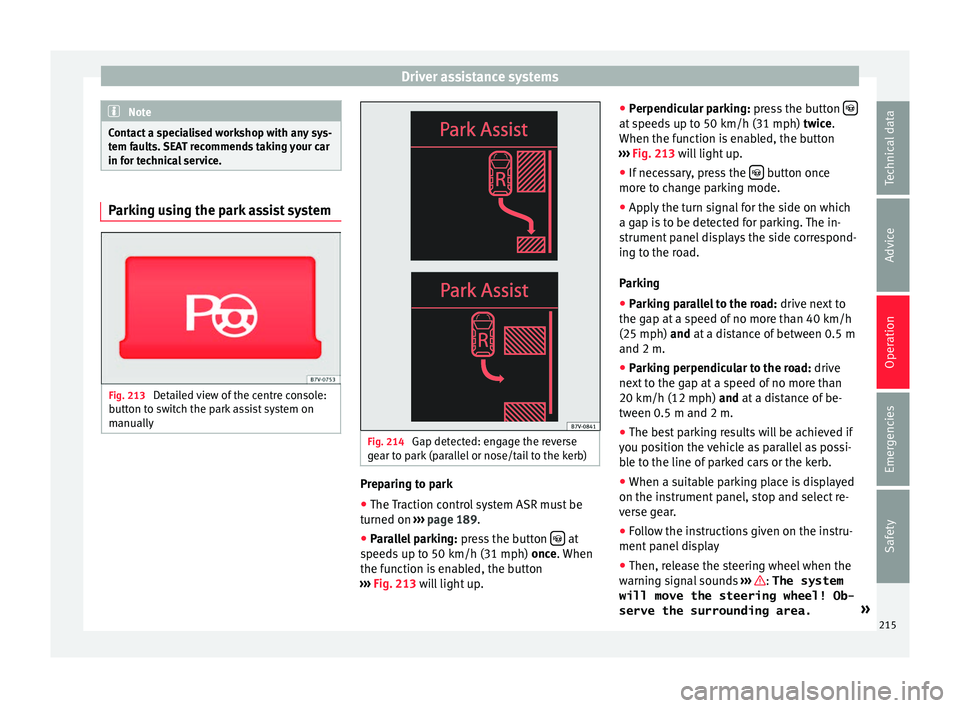
Fig. 213
Detailed view of the centre console:
b utt
on t
o switch the park assist system on
manually Fig. 214
Gap detected: engage the reverse
g e
ar t
o park (parallel or nose/tail to the kerb) Preparing to park
● The Traction control system ASR must be
t urned on ›
›
› page 189.
● Parallel parking: pres
s the button at
s peed
s
up to 50 km/h (31 mph) once. When
the function is enabled, the button
››› Fig. 213 will light up. ●
Perpendicu
lar parking: press the button at speeds up to 50 km/h (31 mph) tw
ic
e .
When the function is enabled, the button
››› Fig. 213 will light up.
● If necessary, press the button once
mor e t
o c
hange parking mode.
● Apply the turn signal for the side on which
a gap is
to be detected for parking. The in-
strument panel displays the side correspond-
ing to the road.
Parking
● Parking parallel to the road: drive next
to
the gap at a speed of no more than 40 km/h
(25 mph) and at a distance of between 0.5 m
and 2 m.
● Parking perpendicular to the road: drive
next
to the gap at a speed of no more than
20 km/h (12 mph) and at a distance of be-
tween 0.5 m and 2 m.
● The best parking results will be achieved if
you pos
ition the vehicle as parallel as possi-
ble to the line of parked cars or the kerb.
● When a suitable parking place is displayed
on the instrument
panel, stop and select re-
verse gear.
● Follow the instructions given on the instru-
ment panel
display
● Then, release the steering wheel when the
warning s
ignal sounds ››› : The system
will move the steering wheel! Ob-
serve the surrounding area. »
215
Technical data
Advice
Operation
Emergencies
Safety