buttons Seat Alhambra 2016 Owner's Manual
[x] Cancel search | Manufacturer: SEAT, Model Year: 2016, Model line: Alhambra, Model: Seat Alhambra 2016Pages: 324, PDF Size: 5.93 MB
Page 10 of 324
The essentials
How it works
Un loc
k
ing and locking
Doors Fig. 1
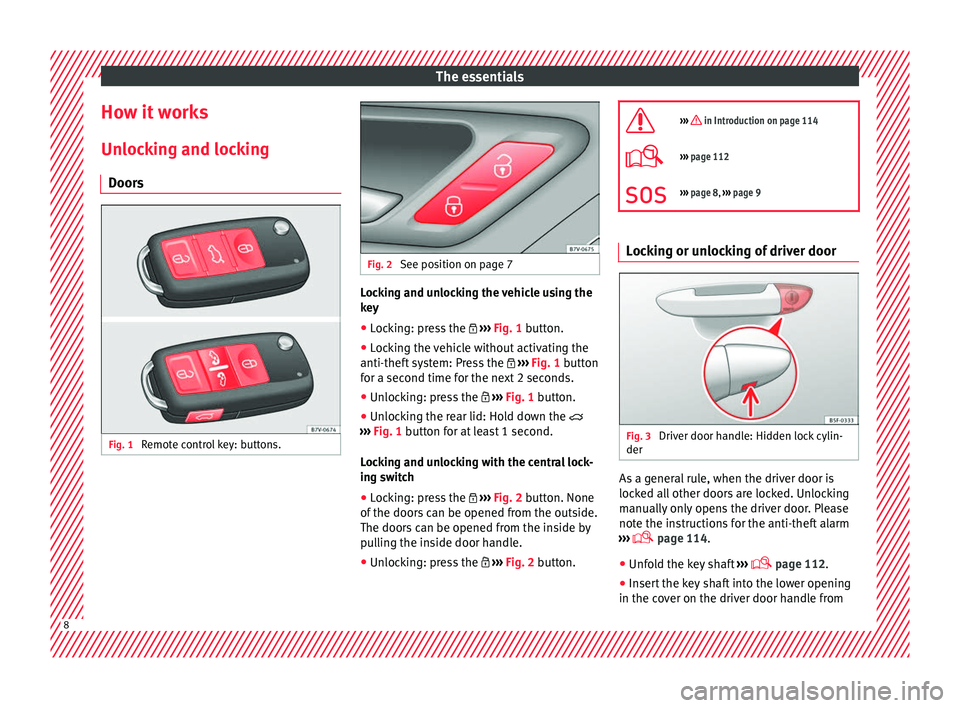
Remote control key: buttons. Fig. 2
See position on page 7 Locking and unlocking the vehicle using the
k
ey
● Loc
king: press the ›››
Fig. 1 button.
● Locking the vehicle without activating the
anti-theft sy
stem: Press the ››› Fig. 1 button
for a second time for the next 2 seconds.
● Unlocking: press the ›››
Fig. 1 button.
● Unlocking the rear lid: Hold down the
›››
Fig. 1 button for at least 1 second.
Locking and unlocking with the central lock-
ing switch
● Locking: press the ›››
Fig. 2 button. None
of the doors can be opened from the outside.
The doors can be opened from the inside by
pulling the inside door handle.
● Unlocking: press the ›››
Fig. 2 button.
››› in Introduction on page 114
›››
page 112
››› page 8, ››› page 9 Locking or unlocking of driver door
Fig. 3
Driver door handle: Hidden lock cylin-
der As a general rule, when the driver door is
loc
k
ed al
l other doors are locked. Unlocking
manually only opens the driver door. Please
note the instructions for the anti-theft alarm
››› page 114.
● Unfold the key shaft ›››
page 112.
● Insert the key shaft into the lower opening
in the cov
er on the driver door handle from8
Page 13 of 324
The essentials
● Pu
sh the r
elease lever ››› Fig. 9 A in the di-
r ection of
the arr
ow to unlock the boot.
● Manually open the rear lid.
››› in Introduction on page 90 Bonnet
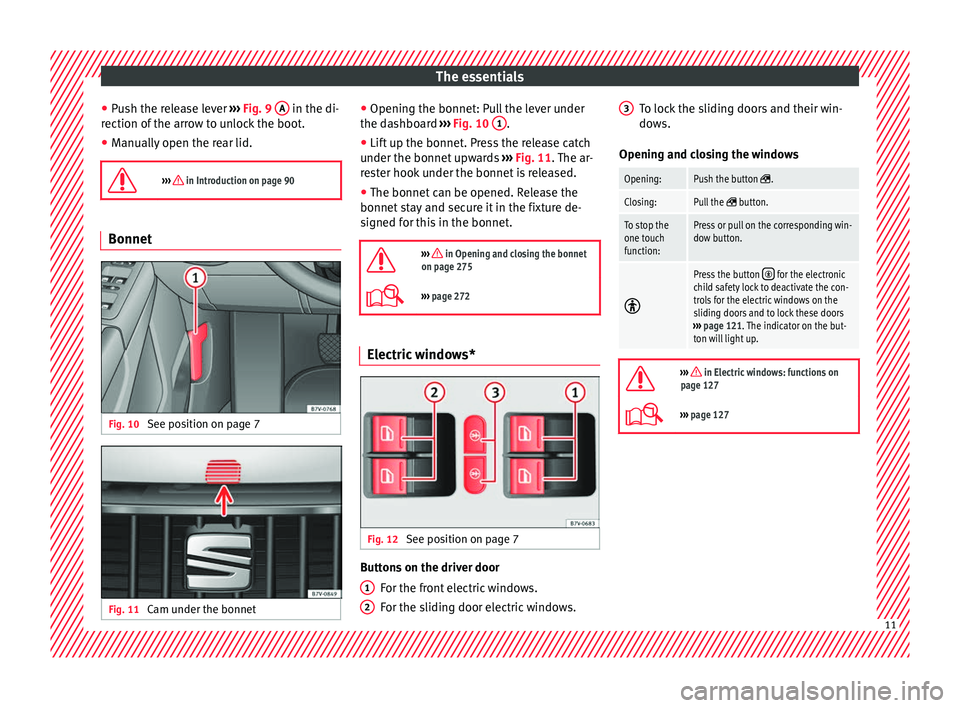
Fig. 10
See position on page 7 Fig. 11
Cam under the bonnet ●
Openin g the bonnet: P
u
ll the lever under
the dashboard ››› Fig. 10 1 .
● Lift up the bonnet. Press the release catch
u nder the bonnet
up
wards ››› Fig. 11. The ar-
rester hook under the bonnet is released.
● The bonnet can be opened. Release the
bonnet st
ay and secure it in the fixture de-
signed for this in the bonnet.
››› in Opening and closing the bonnet
on page 275
››› page 272 Electric windows*
Fig. 12
See position on page 7 Buttons on the driver door
For the fr
ont
electric windows.
For the sliding door electric windows.
1 2 To lock the sliding doors and their win-
do
w
s.
Openin
g and closing the windows
Opening:Push the button .
Closing:Pull the button.
To stop the
one touch
function:Press or pull on the corresponding win-
dow button.
Press the button for the electronic
child safety lock to deactivate the con-
trols for the electric windows on the
sliding doors and to lock these doors
››› page 121. The indicator on the but-
ton will light up.
››› in Electric windows: functions on
page 127
››› page 127 3
11
Page 28 of 324
The essentials
Windscreen wipers and window wiper
b l
a
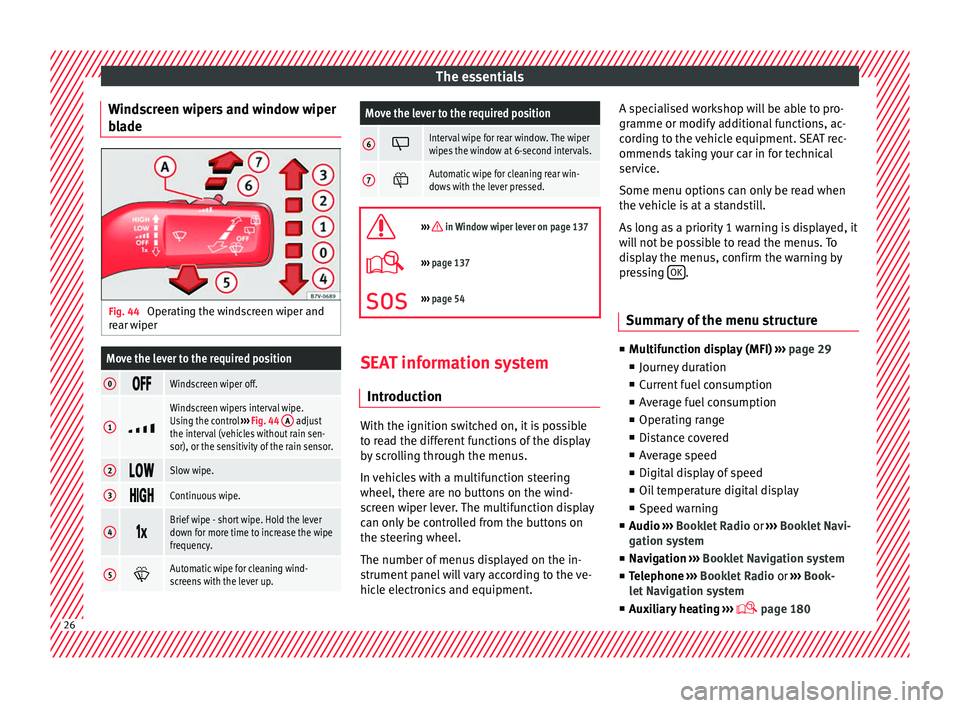
de Fig. 44
Operating the windscreen wiper and
r e
ar w
iper
Move the lever to the required position
0 Windscreen wiper off.
1
Windscreen wipers interval wipe.
Using the control
››› Fig. 44 A adjust
the interval (vehicles without rain sen-
sor), or the sensitivity of the rain sensor.
2 Slow wipe.
3
Continuous wipe.
4
Brief wipe - short wipe. Hold the lever
down for more time to increase the wipe
frequency.
5
Automatic wipe for cleaning wind-
screens with the lever up.
Move the lever to the required position
6 Interval wipe for rear window. The wiper
wipes the window at 6-second intervals.
7
Automatic wipe for cleaning rear win-
dows with the lever pressed.
››› in Window wiper lever on page 137
›››
page 137
››› page 54 SEAT information system
Intr oduction With the ignition switched on, it is possible
t
o r
e
ad the different functions of the display
by scrolling through the menus.
In vehicles with a multifunction steering
wheel, there are no buttons on the wind-
screen wiper lever. The multifunction display
can only be controlled from the buttons on
the steering wheel.
The number of menus displayed on the in-
strument panel will vary according to the ve-
hicle electronics and equipment. A specialised workshop will be able to pro-
gramme or modify
additional functions, ac-
cording to the vehicle equipment. SEAT rec-
ommends taking your car in for technical
service.
Some menu options can only be read when
the vehicle is at a standstill.
As long as a priority 1 warning is displayed, it
will not be possible to read the menus. To
display the menus, confirm the warning by
pressing OK .
Summary of the menu structure ■
Mu ltif
unction display (MFI) ››› page 29
■ Journey duration
■ Current fuel consumption
■ Average fuel consumption
■ Operating range
■ Distance covered
■ Average speed
■ Digital display of speed
■ Oil temperature digital display
■ Speed warning
■ Audio ›››
Booklet Radio or ›››
Booklet Navi-
gation system
■ Navigation ›››
Booklet Navigation system
■ Telephone ›››
Booklet Radio or ›››
Book-
let Navigation system
■ Auxiliary heating ›››
page 18026
Page 30 of 324
The essentials
Using the menus on the instrument
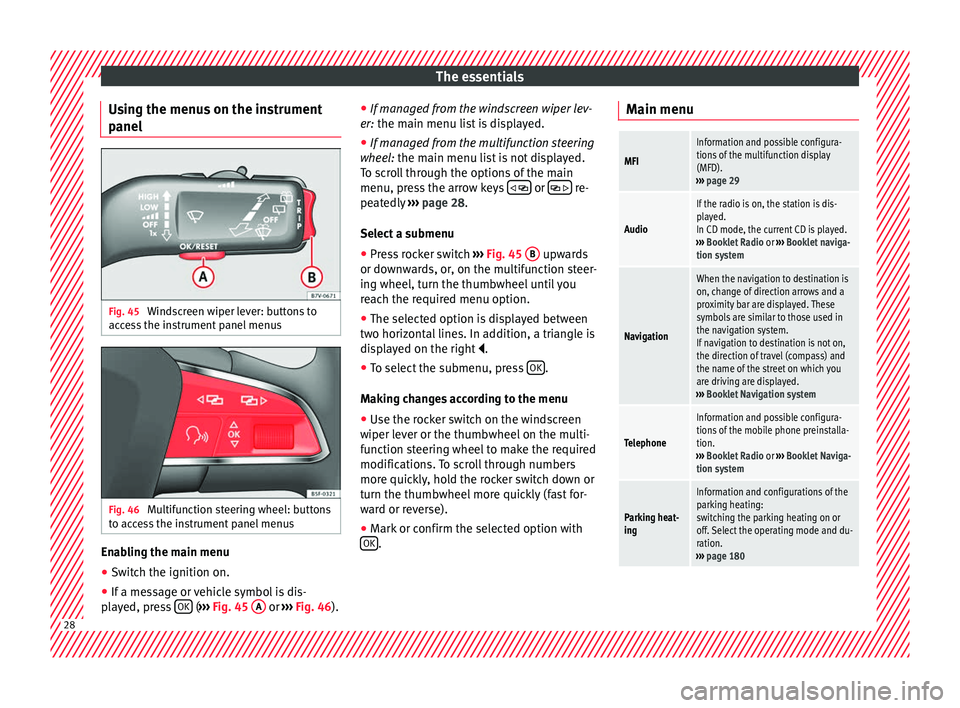
p anel Fig. 45
Windscreen wiper lever: buttons to
ac c
e
ss the instrument panel menus Fig. 46
Multifunction steering wheel: buttons
t o ac
c
ess the instrument panel menus Enabling the main menu
● Switch the ignition on.
● If a message or vehicle symbol is dis-
p l
a
yed, press OK (
››
› Fig. 45 A or
››
› Fig. 46 ).●
If managed fr
om the windscreen wiper lev-
er: the main menu list is displayed.
● If managed from the multifunction steering
wheel:
the main menu list is not displayed.
To scroll through the options of the main
menu, press the arrow keys or
re-
pe at
edly
››› page 28.
Select a submenu ● Press rocker switch ›››
Fig. 45 B upwards
or do wn
w
ards, or, on the multifunction steer-
ing wheel, turn the thumbwheel until you
reach the required menu option.
● The selected option is displayed between
two horizont
al lines. In addition, a triangle is
displayed on the right .
● To select the submenu, press OK .
M ak
in
g changes according to the menu
● Use the rocker switch on the windscreen
wiper lev
er or the thumbwheel on the multi-
function steering wheel to make the required
modifications. To scroll through numbers
more quickly, hold the rocker switch down or
turn the thumbwheel more quickly (fast for-
ward or reverse).
● Mark or confirm the selected option with
OK .Main menu
MFI
Information and possible configura-
tions of the multifunction display
(MFD).
››› page 29
Audio
If the radio is on, the station is dis-
played.
In CD mode, the current CD is played.
››› Booklet Radio or ››› Booklet naviga-
tion system
Navigation
When the navigation to destination is
on, change of direction arrows and a
proximity bar are displayed. These
symbols are similar to those used in
the navigation system.
If navigation to destination is not on,
the direction of travel (compass) and
the name of the street on which you
are driving are displayed.
››› Booklet Navigation system
Telephone
Information and possible configura-
tions of the mobile phone preinstalla-
tion.
››› Booklet Radio or ››› Booklet Naviga-
tion system
Parking heat-
ing
Information and configurations of the
parking heating:
switching the parking heating on or
off. Select the operating mode and du-
ration.
››› page 180 28
Page 31 of 324
The essentialsVehicle condi-
tion
Current warning or information texts.
This option only appears when one of
the following texts is available. The
number of available messages is dis-
played. Example 1/1 or 2/2.
››› page 100
Configuration
Different setting options, for example,
the Convenience, Lighting & Visibility
menus, and the time, speed warning
with winter tyres, language, units of
measurement, or “Display off”.
››› page 30 MFI menu
(multif
u
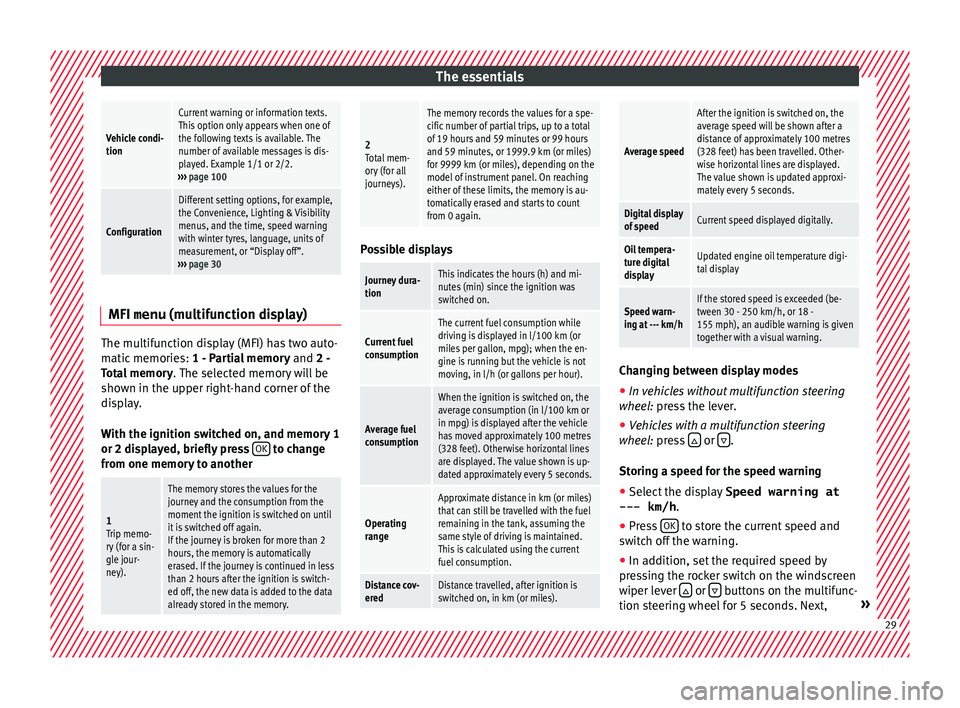
nction display)The multifunction display (MFI) has two auto-
m
atic
memorie
s: 1 - Partial memory and 2 -
Total memory . The selected memory will be
shown in the upper right-hand corner of the
display.
With the ignition switched on, and memory 1
or 2 displayed, briefly press OK to change
fr om one memor
y
to another
1
Trip memo-
ry (for a sin-
gle jour-
ney).
The memory stores the values for the
journey and the consumption from the
moment the ignition is switched on until
it is switched off again.
If the journey is broken for more than 2
hours, the memory is automatically
erased. If the journey is continued in less
than 2 hours after the ignition is switch-
ed off, the new data is added to the data
already stored in the memory.
2 Total mem-
ory (for all
journeys).
The memory records the values for a spe-
cific number of partial trips, up to a total
of 19 hours and 59 minutes or 99 hours
and 59 minutes, or 1999.9 km (or miles)
for 9999 km (or miles), depending on the
model of instrument panel. On reaching
either of these limits, the memory is au-
tomatically erased and starts to count
from 0 again. Possible displays
Journey dura-
tionThis indicates the hours (h) and mi-
nutes (min) since the ignition was
switched on.
Current fuel
consumption
The current fuel consumption while
driving is displayed in l/100 km (or
miles per gallon, mpg); when the en-
gine is running but the vehicle is not
moving, in l/h (or gallons per hour).
Average fuel
consumption
When the ignition is switched on, the
average consumption (in l/100 km or
in mpg) is displayed after the vehicle
has moved approximately 100 metres
(328 feet). Otherwise horizontal lines
are displayed. The value shown is up-
dated approximately every 5 seconds.
Operating
range
Approximate distance in km (or miles)
that can still be travelled with the fuel
remaining in the tank, assuming the
same style of driving is maintained.
This is calculated using the current
fuel consumption.
Distance cov-
eredDistance travelled, after ignition is
switched on, in km (or miles).
Average speed
After the ignition is switched on, the
average speed will be shown after a
distance of approximately 100 metres
(328 feet) has been travelled. Other-
wise horizontal lines are displayed.
The value shown is updated approxi-
mately every 5 seconds.
Digital display
of speedCurrent speed displayed digitally.
Oil tempera-
ture digital
displayUpdated engine oil temperature digi-
tal display
Speed warn-
ing at --- km/hIf the stored speed is exceeded (be-
tween 30 - 250 km/h, or 18 -
155 mph), an audible warning is given
together with a visual warning.
Changing between display modes
● In vehicles without multifunction steering
whe e
l:
press the lever.
● Vehicles with a multifunction steering
wheel:
press or
.
St orin
g a s
peed for the speed warning
● Select the display Speed warning at
--- km/h .
● Pre
ss OK to store the current speed and
sw it
c
h off the warning.
● In addition, set the required speed by
pres
sing the rocker switch on the windscreen
wiper lever or
buttons on the multifunc-
tion s t
eerin
g wheel for 5 seconds. Next, » 29
Page 39 of 324
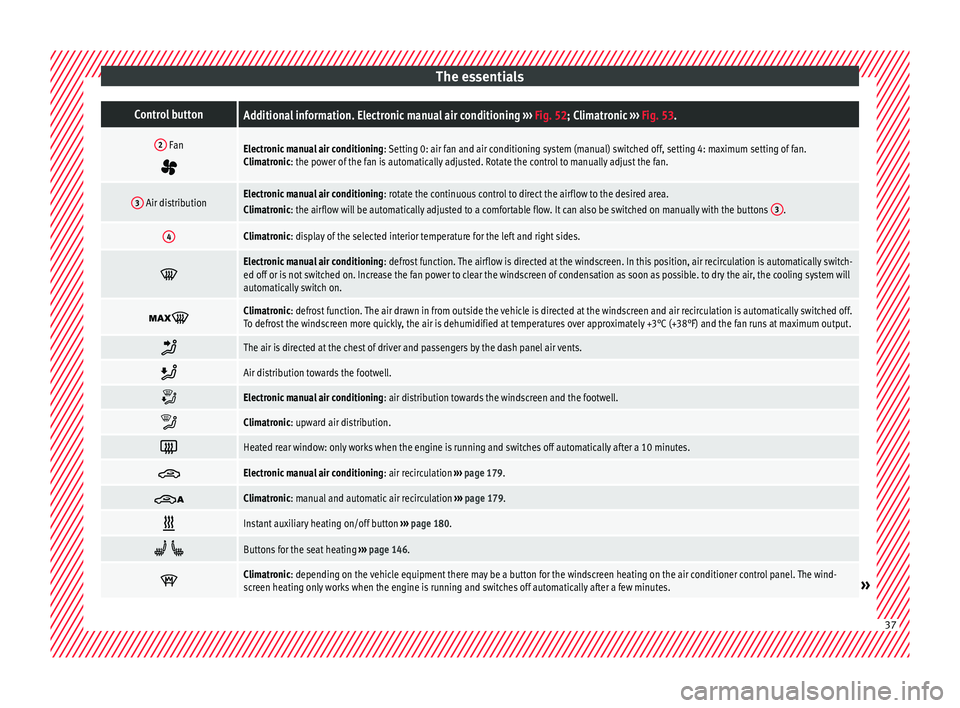
The essentialsControl buttonAdditional information. Electronic manual air conditioning
››› Fig. 52; Climatronic ››› Fig. 53.
2 Fan
Electronic manual air conditioning : Setting 0: air fan and air conditioning system (manual) switched off, setting 4: maximum setting of fan.
Climatronic: the power of the fan is automatically adjusted. Rotate the control to manually adjust the fan.
3 Air distributionElectronic manual air conditioning : rotate the continuous control to direct the airflow to the desired area.
Climatronic: the airflow will be automatically adjusted to a comfortable flow. It can also be switched on manually with the buttons 3.
4Climatronic: display of the selected interior temperature for the left and right sides.
Electronic manual air conditioning
: defrost function. The airflow is directed at the windscreen. In this position, air recirculation is automatically switch-
ed off or is not switched on. Increase the fan power to clear the windscreen of condensation as soon as possible. to dry the air, the cooling system will
automatically switch on.
Climatronic: defrost function. The air drawn in from outside the vehicle is directed at the windscreen and air recirculation is automatically switched off.
To defrost the windscreen more quickly, the air is dehumidified at temperatures over approximately +3°C (+38°F) and the fan runs at maximum output.
The air is directed at the chest of driver and passengers by the dash panel air vents.
Air distribution towards the footwell.
Electronic manual air conditioning
: air distribution towards the windscreen and the footwell.
Climatronic: upward air distribution.
Heated rear window: only works when the engine is running and switches off automatically after a 10 minutes.
Electronic manual air conditioning
: air recirculation ››› page 179.
Climatronic: manual and automatic air recirculation
››› page 179.
Instant auxiliary heating on/off button
››› page 180.
Buttons for the seat heating
››› page 146.
Climatronic: depending on the vehicle equipment there may be a button for the windscreen heating on the air conditioner control panel. The wind-
screen heating only works when the engine is running and switches off automatically after a few minutes.»
37
Page 101 of 324
General instrument panel
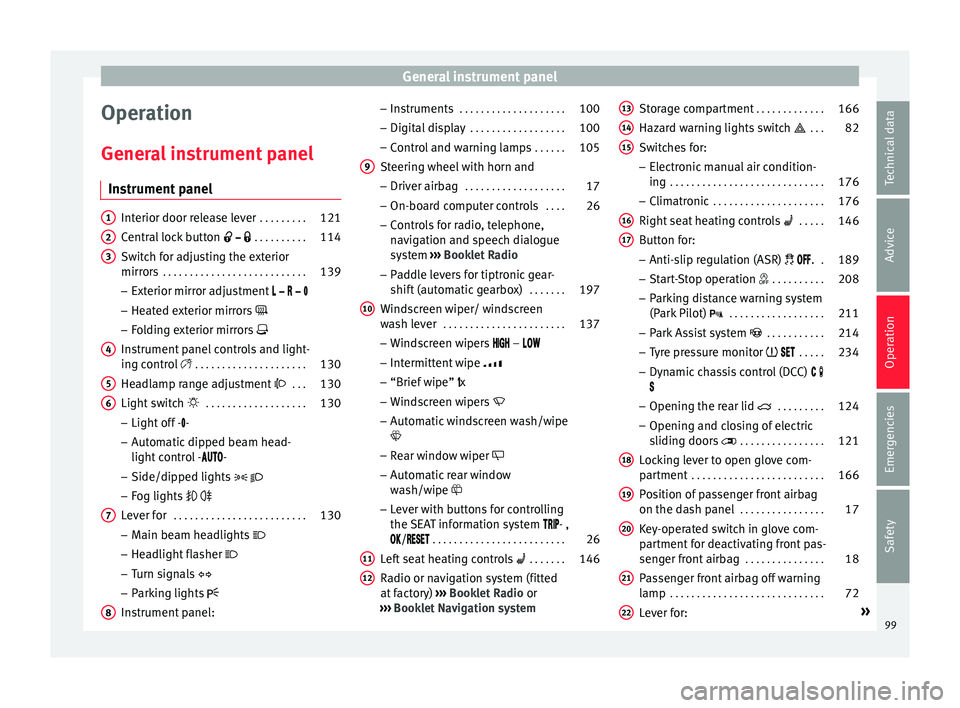
Operation
Gener a
l
instrument panel
Instrument panel Interior door release lever
. . . . . . . . .121
Central lock button . . . . . . . . . . 114
Switch for adjusting the exterior
mirror s . . . . . . . . . . . . . . . . . . . . . . . . . . . 139
– Exterior mirr or a
djustment
– Heated exterior mirrors
– Folding exterior mirrors
Instrument panel controls and light-
ing control . . . . . . . . . . . . . . . . . . . . . 130
Headlamp range adjustment . . . 130
Light switch . . . . . . . . . . . . . . . . . . . 130
– Light off - -
– Aut
omatic dipped beam head-
light control - -
– Side/dipped lights
– Fog lights
Lever for . . . . . . . . . . . . . . . . . . . . . . . . . 130
– Main beam he
adlights
– Headlight flasher
– Turn signals
– Parking lights
Instrument panel:
1 2
3
4
5
6
7
8 –
Ins
truments . . . . . . . . . . . . . . . . . . . . 100
– Digit
al di
splay . . . . . . . . . . . . . . . . . . 100
– Contro
l and warning lamps . . . . . .105
Steering wheel with horn and
– Driver airbag . . . . . . . . . . . . . . . . . . . 17
– On-bo
ard c
omputer controls . . . .26
– Contro
ls for radio, telephone,
navigation and speech dialogue
system ››› Booklet Radio
– Paddle levers for tiptronic gear-
shift (automatic gearbox) . . . . . . .197
Windscreen wiper/ windscreen
wash l
ever . . . . . . . . . . . . . . . . . . . . . . . 137
– Wind s
creen wipers –
– Intermittent wipe
– “Brief wipe” x
– Windscreen wipers
– Automatic windscreen wash/wipe
– Rear window wiper
– Automatic rear window
wash/wipe
– Lever with buttons for controlling
the SEAT information system - ,
/ . . . . . . . . . . . . . . . . . . . . . . . . . 26
Left seat heating controls . . . . . . . 146
Radio or navigation system (fitted
at fact
ory) ››› Booklet Radio or
››› Booklet Navigation system
9
10
11
12 Storage compartment
. . . . . . . . . . . . .166
Hazard warning lights switch . . . 82
Switches for:
– Electr
onic
manual air condition-
ing . . . . . . . . . . . . . . . . . . . . . . . . . . . . . 176
– Climatr
onic . . . . . . . . . . . . . . . . . . . . . 176
Right seat heating controls . . . . . 146
Button for:
– Anti-slip r
egulation (ASR) . .189
– Start
-Stop operation . . . . . . . . . .208
– Park in
g distance warning system
(Park Pilot) . . . . . . . . . . . . . . . . . . 211
– Park As
sist system . . . . . . . . . . . 214
– Tyr
e pressure monitor . . . . .234
– Dyn
amic chassis control (DCC)
– Opening the rear lid . . . . . . . . .124
– Opening and clo
sing of electric
sliding doors . . . . . . . . . . . . . . . . 121
Locking lever to open glove com-
par tment . . . . . . . . . . . . . . . . . . . . . . . . . 166
P
osition of passenger front airbag
on the dash p
anel . . . . . . . . . . . . . . . . 17
Key-operated switch in glove com-
partment
for deactivating front pas-
senger front airbag . . . . . . . . . . . . . . .18
Passenger front airbag off warning
lamp . . . . . . . . . . . . . . . . . . . . . . . . . . . . . 72
L ev
er for: »
13 14
15
16
17
18
19
20
21
22
99
Technical data
Advice
Operation
Emergencies
Safety
Page 117 of 324
Opening and closing
Description of the central locking sys-
t em The central locking system allows all doors
and the re
ar lid t
o be locked and unlocked
centrally.
● From outside, using the vehicle key.
● From outside with the Keyless Access sys-
tem ››
› page 117,
● From inside, by pushing the central locking
button ›
›› page 116.
In the submenu Convenience in the Con-
figuration menu, or by visiting a special-
ised workshop, special functions of the cen-
tral locking system can be switched on or off
››› page 26.
In case of a vehicle key fault or central lock-
ing system fault, all doors can be locked or
unlocked manually.
Automatic locking (Auto Lock)
In this instance, the vehicle locks automati-
cally when moving at speeds above approx.
15 km/h (10 mph) ›››
page 26. When the
vehicle is locked, the control lamp of the
central locking button ›››
Fig. 131 lights up in
yellow. Automatic unlocking (Auto Unlock)
When the key
i
s removed from the ignition
slot, here the vehicle unlocks all doors and
the boot automatically ›››
page 26.
Locking the vehicle after the airbags have
been deployed
If the airbags are deployed due to an acci-
dent, the vehicle will be automatically and
completely unlocked. Depending on the
amount of damage, it can be locked follow-
ing an accident in the following ways:
FunctionAction
Lock the vehicle
by pushing the
central locking
button:– Switch off the ignition.
– Open a door of the vehicle and
close it again.
– Push the central locking button
.
Lock the vehicle
with the vehicle
key:– Disconnect the ignition button.
OR: remove the key from the igni-
tion.
– Open a door once.
– Lock the vehicle with the key. Note
If the vehicle key buttons are pressed
›› ›
Fig. 130 or one of the central locking but-
tons is pressed ››› Fig. 131 several times in
quick succession, the central locking feature
is disabled briefly to protect from overload-
ing. The vehicle will then remain unlocked for
around 30 seconds. If no door nor the boot is opened during this time, the vehicle will then
autom
atic
ally unlock. Unlocking and locking the vehicle
from out
s
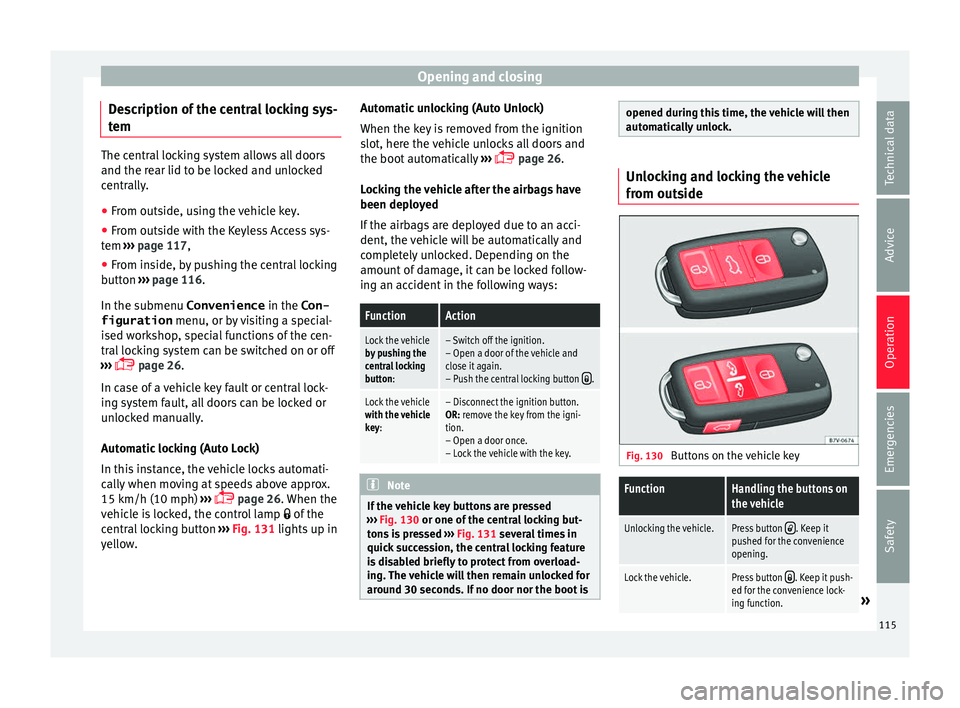
ide Fig. 130
Buttons on the vehicle key
FunctionHandling the buttons on
the vehicle
Unlocking the vehicle.Press button . Keep it
pushed for the convenience
opening.
Lock the vehicle.Press button . Keep it push-
ed for the convenience lock-
ing function.
» 115
Technical data
Advice
Operation
Emergencies
Safety
Page 118 of 324
OperationFunctionHandling the buttons on
the vehicle
Unlocking the rear lid.Press button .
Open the sliding door.›››
page 121. Please note: depending on the sel
ect
ed func-
tion in the central locking submenu Conven-
ience , you may push the button twice ›››
page 26 to unlock all doors and the
boot h
atch.
The vehicle key only locks and unlocks the
vehicle if it is within range of the vehicle and
if the batteries have enough power. When
locking, the vehicle's turn signals will blink.
If the driver door is open, the vehicle cannot
be locked with the key. If you unlock the vehi-
cle without opening any doors or the rear lid,
it will lock again automatically after a few
seconds. This function prevents the vehicle
from remaining unlocked if the unlocking
button is pressed by mistake.
Convenience open/close function
● See "Electric windows: functions"
›› ›
page 127.
● See "Panoramic sliding sunroof: operation"
›››
page 128. Unlocking and locking the vehicle
from ins
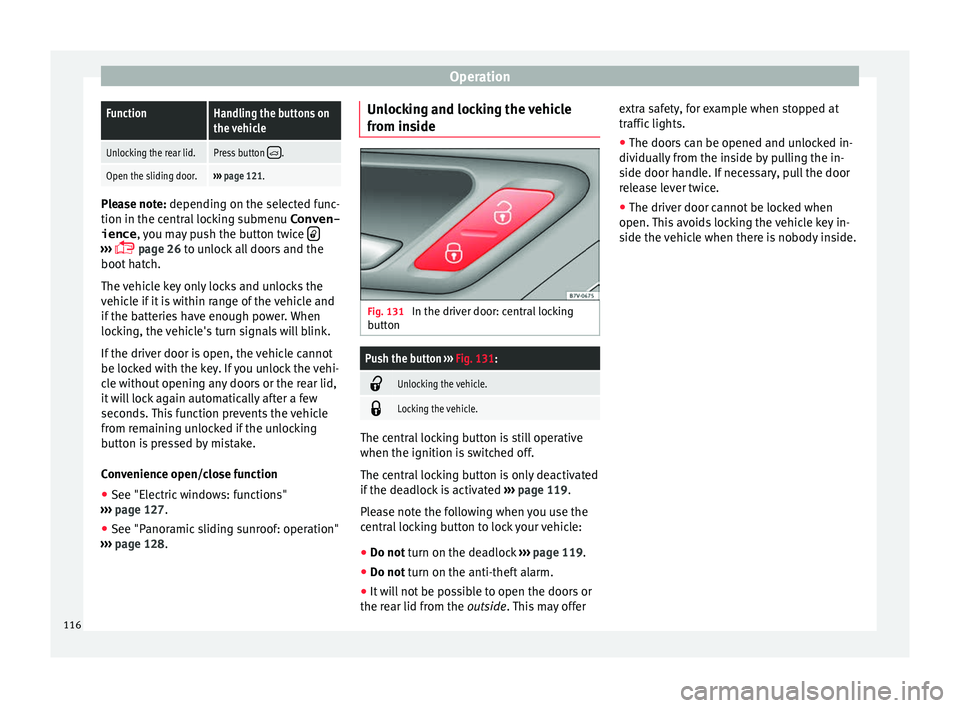
ide Fig. 131
In the driver door: central locking
b utt
on
Push the button ››› Fig. 131:
Unlocking the vehicle.
Locking the vehicle.
The central locking button is still operative
when the ignition i
s
sw
itched off.
The central locking button is only deactivated
if the deadlock is activated ››› page 119.
Please note the following when you use the
central locking button to lock your vehicle:
● Do not turn on the deadlock ››
› page 119.
● Do not turn on the anti-theft alarm.
● It w
ill not be possible to open the doors or
the re ar lid fr
om the outside. This may offer extra safety, for example when stopped at
traffic lights.
●
The door
s can be opened and unlocked in-
dividually
from the inside by pulling the in-
side door handle. If necessary, pull the door
release lever twice.
● The driver door cannot be locked when
open. This
avoids locking the vehicle key in-
side the vehicle when there is nobody inside.
116
Page 125 of 324
Opening and closing
Rollback anti-trap function of the elec-
tric s
lidin
g doorsThe rollback anti-trap function of the electric
slidin
g door
s can reduce the risk of injury
when opening and closing the sliding doors
››› .
If an o b
ject gets in the way of the sliding
door while it is closing, it will open again.
If an object gets in the way of the sliding
door while it is opening, the door will be im-
mobilised at this point.
● Check the reason for which the sliding door
does not
open or close.
● Try to open or close the sliding door again.
To clo
se the sliding door without the rollback
anti-trap function
● Turn off the ignition and turn it on again.
● Press and hold the
› ›
›
Fig. 136 button.
The sliding door closes with full force. WARNING
Closing the electric windows without the an-
ti-trap f u
nction can cause serious injury.
● Always close the sliding doors carefully.
● Nobody should ever get in the way of the
electric s
liding doors, especially when clos-
ing without the anti-trap function. ●
The anti-trap f u
nction does not prevent fin-
gers or other parts of the body getting
pinched against the window frame and caus-
ing injury. Electric child safety lock
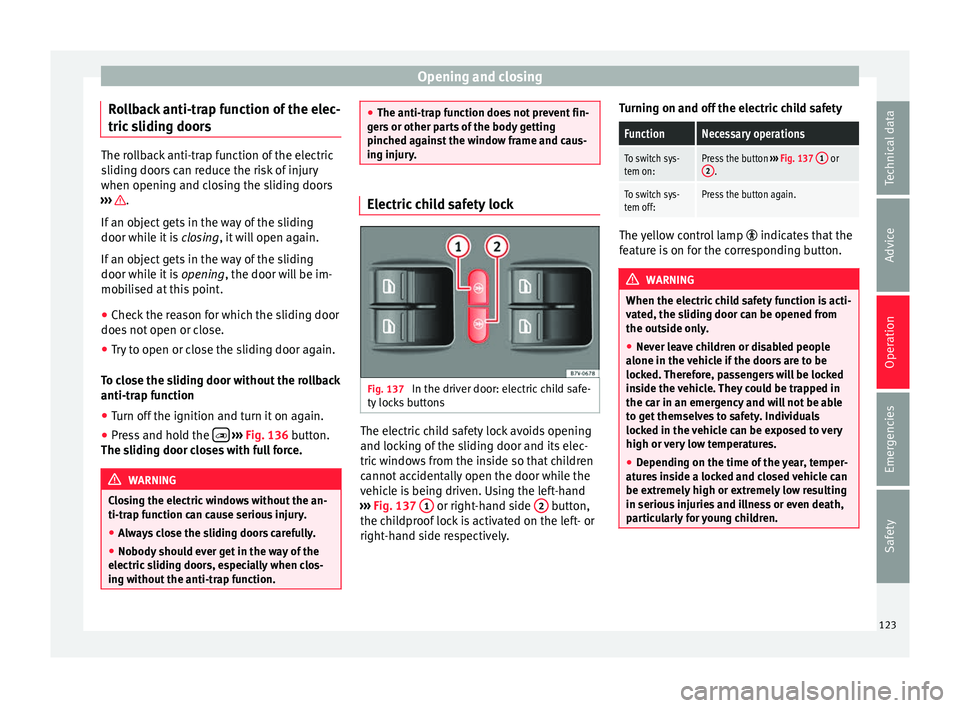
Fig. 137
In the driver door: electric child safe-
ty loc
k
s buttons The electric child safety lock avoids opening
and loc
k
in
g of the sliding door and its elec-
tric windows from the inside so that children
cannot accidentally open the door while the
vehicle is being driven. Using the left-hand
››› Fig. 137 1 or right-hand side
2 button,
the c hi
l
dproof lock is activated on the left- or
right-hand side respectively. Turning on and off the electric child safety
FunctionNecessary operations
To switch sys-
tem on:Press the button
››› Fig. 137 1 or
2.
To switch sys-
tem off:Press the button again. The yellow control lamp
indicate
s that the
feature is on for the corresponding button. WARNING
When the electric child safety function is acti-
vat ed, the s
liding door can be opened from
the outside only.
● Never leave children or disabled people
alone in the v
ehicle if the doors are to be
locked. Therefore, passengers will be locked
inside the vehicle. They could be trapped in
the car in an emergency and will not be able
to get themselves to safety. Individuals
locked in the vehicle can be exposed to very
high or very low temperatures.
● Depending on the time of the year, temper-
ature
s inside a locked and closed vehicle can
be extremely high or extremely low resulting
in serious injuries and illness or even death,
particularly for young children. 123
Technical data
Advice
Operation
Emergencies
Safety