fuel consumption Seat Alhambra 2016 Owner's Manual
[x] Cancel search | Manufacturer: SEAT, Model Year: 2016, Model line: Alhambra, Model: Seat Alhambra 2016Pages: 324, PDF Size: 5.93 MB
Page 28 of 324
The essentials
Windscreen wipers and window wiper
b l
a
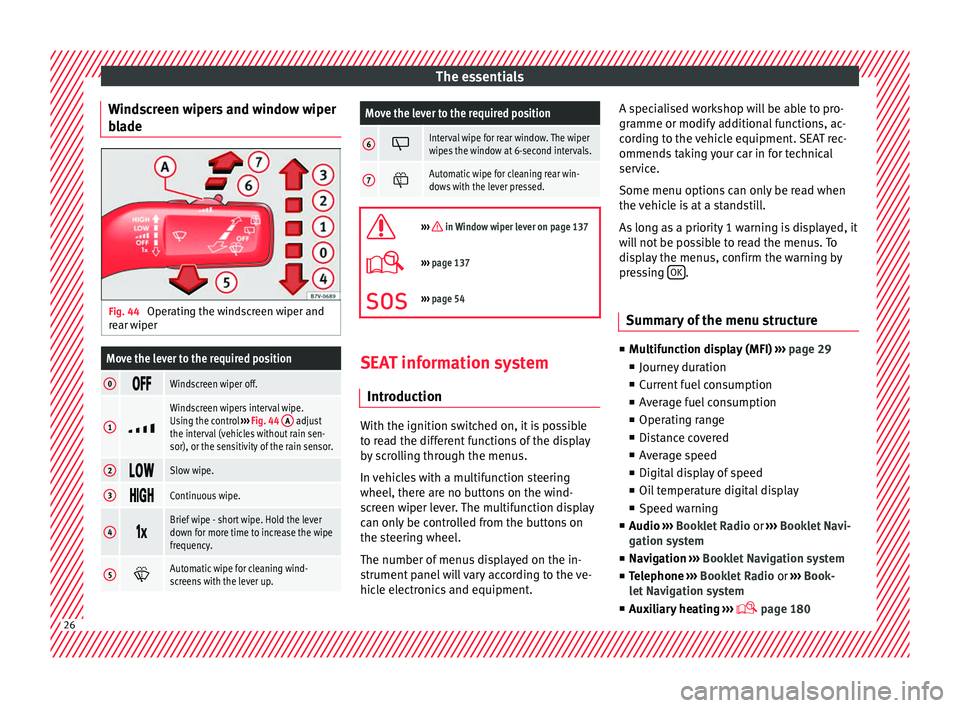
de Fig. 44
Operating the windscreen wiper and
r e
ar w
iper
Move the lever to the required position
0 Windscreen wiper off.
1
Windscreen wipers interval wipe.
Using the control
››› Fig. 44 A adjust
the interval (vehicles without rain sen-
sor), or the sensitivity of the rain sensor.
2 Slow wipe.
3
Continuous wipe.
4
Brief wipe - short wipe. Hold the lever
down for more time to increase the wipe
frequency.
5
Automatic wipe for cleaning wind-
screens with the lever up.
Move the lever to the required position
6 Interval wipe for rear window. The wiper
wipes the window at 6-second intervals.
7
Automatic wipe for cleaning rear win-
dows with the lever pressed.
››› in Window wiper lever on page 137
›››
page 137
››› page 54 SEAT information system
Intr oduction With the ignition switched on, it is possible
t
o r
e
ad the different functions of the display
by scrolling through the menus.
In vehicles with a multifunction steering
wheel, there are no buttons on the wind-
screen wiper lever. The multifunction display
can only be controlled from the buttons on
the steering wheel.
The number of menus displayed on the in-
strument panel will vary according to the ve-
hicle electronics and equipment. A specialised workshop will be able to pro-
gramme or modify
additional functions, ac-
cording to the vehicle equipment. SEAT rec-
ommends taking your car in for technical
service.
Some menu options can only be read when
the vehicle is at a standstill.
As long as a priority 1 warning is displayed, it
will not be possible to read the menus. To
display the menus, confirm the warning by
pressing OK .
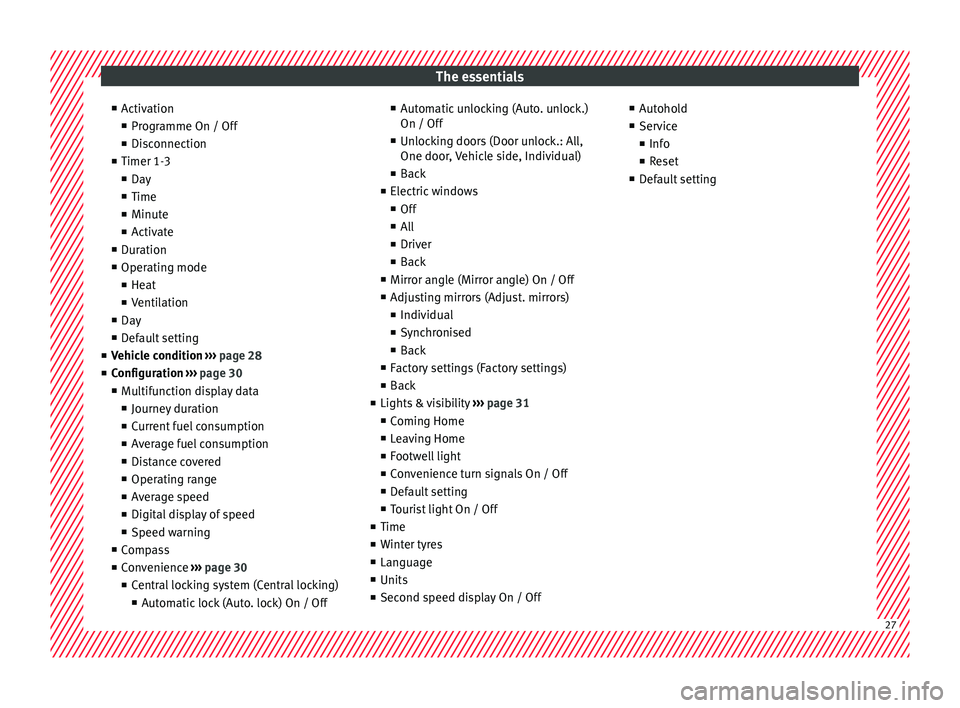
Summary of the menu structure ■
Mu ltif
unction display (MFI) ››› page 29
■ Journey duration
■ Current fuel consumption
■ Average fuel consumption
■ Operating range
■ Distance covered
■ Average speed
■ Digital display of speed
■ Oil temperature digital display
■ Speed warning
■ Audio ›››
Booklet Radio or ›››
Booklet Navi-
gation system
■ Navigation ›››
Booklet Navigation system
■ Telephone ›››
Booklet Radio or ›››
Book-
let Navigation system
■ Auxiliary heating ›››
page 18026
Page 29 of 324
The essentials
■ Activ
ation
■ Pr
ogramme On / Off
■ Disconnection
■ Timer 1-3
■ Day
■ Time
■ Minute
■ Activate
■ Duration
■ Operating mode
■ Heat
■ Ventilation
■ Day
■ Default setting
■ Vehicle condition ››› page 28
■ Configuration ››› page 30
■ Multifunction display data
■ Journey duration
■ Current fuel consumption
■ Average fuel consumption
■ Distance covered
■ Operating range
■ Average speed
■ Digital display of speed
■ Speed warning
■ Compass
■ Convenience ››› page 30
■ Central locking system (Central locking)
■Automatic lock (Auto. lock) On / Off ■
Automatic unlocking (Auto. unlock.)
On / Off
■ Unlocking doors (Door unlock.: All,
One door, Vehicle side, Individual)
■ Back
■ Electric windows
■ Off
■ All
■ Driver
■ Back
■ Mirror angle (Mirror angle) On / Off
■ Adjusting mirrors (Adjust. mirrors)
■ Individual
■ Synchronised
■ Back
■ Factory settings (Factory settings)
■ Back
■ Lights & visibility ››› page 31
■ Coming Home
■ Leaving Home
■ Footwell light
■ Convenience turn signals On / Off
■ Default setting
■ Tourist light On / Off
■ Time
■ Winter tyres
■ Language
■ Units
■ Second speed display On / Off ■
Autohol d
■ Service
■ Info
■ Reset
■ Default setting 27
Page 31 of 324
The essentialsVehicle condi-
tion
Current warning or information texts.
This option only appears when one of
the following texts is available. The
number of available messages is dis-
played. Example 1/1 or 2/2.
››› page 100
Configuration
Different setting options, for example,
the Convenience, Lighting & Visibility
menus, and the time, speed warning
with winter tyres, language, units of
measurement, or “Display off”.
››› page 30 MFI menu
(multif
u
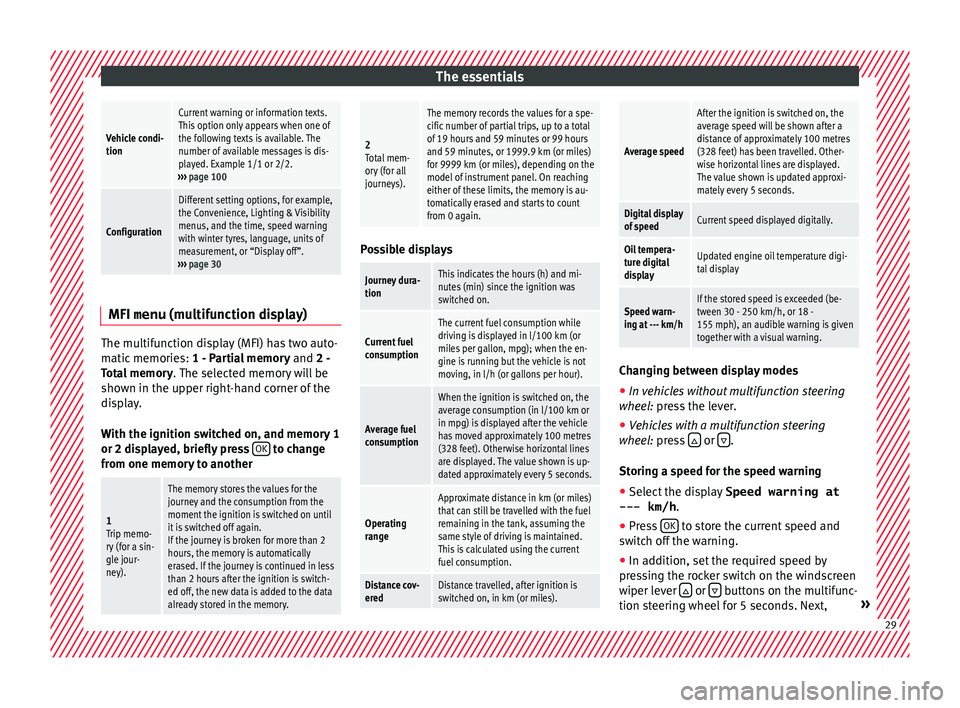
nction display)The multifunction display (MFI) has two auto-
m
atic
memorie
s: 1 - Partial memory and 2 -
Total memory . The selected memory will be
shown in the upper right-hand corner of the
display.
With the ignition switched on, and memory 1
or 2 displayed, briefly press OK to change
fr om one memor
y
to another
1
Trip memo-
ry (for a sin-
gle jour-
ney).
The memory stores the values for the
journey and the consumption from the
moment the ignition is switched on until
it is switched off again.
If the journey is broken for more than 2
hours, the memory is automatically
erased. If the journey is continued in less
than 2 hours after the ignition is switch-
ed off, the new data is added to the data
already stored in the memory.
2 Total mem-
ory (for all
journeys).
The memory records the values for a spe-
cific number of partial trips, up to a total
of 19 hours and 59 minutes or 99 hours
and 59 minutes, or 1999.9 km (or miles)
for 9999 km (or miles), depending on the
model of instrument panel. On reaching
either of these limits, the memory is au-
tomatically erased and starts to count
from 0 again. Possible displays
Journey dura-
tionThis indicates the hours (h) and mi-
nutes (min) since the ignition was
switched on.
Current fuel
consumption
The current fuel consumption while
driving is displayed in l/100 km (or
miles per gallon, mpg); when the en-
gine is running but the vehicle is not
moving, in l/h (or gallons per hour).
Average fuel
consumption
When the ignition is switched on, the
average consumption (in l/100 km or
in mpg) is displayed after the vehicle
has moved approximately 100 metres
(328 feet). Otherwise horizontal lines
are displayed. The value shown is up-
dated approximately every 5 seconds.
Operating
range
Approximate distance in km (or miles)
that can still be travelled with the fuel
remaining in the tank, assuming the
same style of driving is maintained.
This is calculated using the current
fuel consumption.
Distance cov-
eredDistance travelled, after ignition is
switched on, in km (or miles).
Average speed
After the ignition is switched on, the
average speed will be shown after a
distance of approximately 100 metres
(328 feet) has been travelled. Other-
wise horizontal lines are displayed.
The value shown is updated approxi-
mately every 5 seconds.
Digital display
of speedCurrent speed displayed digitally.
Oil tempera-
ture digital
displayUpdated engine oil temperature digi-
tal display
Speed warn-
ing at --- km/hIf the stored speed is exceeded (be-
tween 30 - 250 km/h, or 18 -
155 mph), an audible warning is given
together with a visual warning.
Changing between display modes
● In vehicles without multifunction steering
whe e
l:
press the lever.
● Vehicles with a multifunction steering
wheel:
press or
.
St orin
g a s
peed for the speed warning
● Select the display Speed warning at
--- km/h .
● Pre
ss OK to store the current speed and
sw it
c
h off the warning.
● In addition, set the required speed by
pres
sing the rocker switch on the windscreen
wiper lever or
buttons on the multifunc-
tion s t
eerin
g wheel for 5 seconds. Next, » 29
Page 201 of 324
Driving
WARNING
Rapid acceleration can cause loss of traction
and skid din
g, especially on slippery ground.
This could cause loss of control of the vehicle
resulting in an accident and considerable
damage.
● Only use kick-down and rapid acceleration
when weather c
onditions, surface conditions
and traffic conditions permit; accelerate and
drive in a manner that does not endanger
other road users.
● Please remember that the driven wheels
can slip and the
vehicle can skid if the ASR is
turned off, especially on slippery ground.
● Turn on the ASR after accelerating! CAUTION
● If y
ou stop on a hill with a gear range en-
gaged, do not try to prevent the vehicle from
rolling back by pressing on the accelerator.
This could cause overheating and damage the
automatic gearbox.
● Never allow the vehicle to move with the
gear sel
ector lever in N, especially with the
engine turned off. The automatic gearbox will
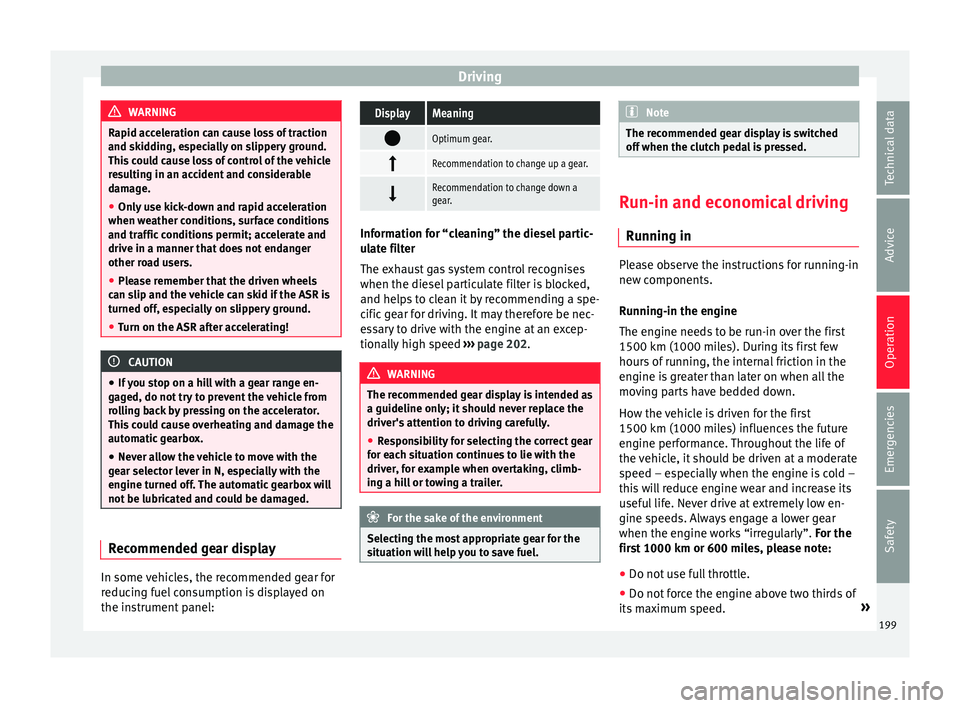
not be lubricated and could be damaged. Recommended gear display
In some vehicles, the recommended gear for
r
educ
in
g fuel consumption is displayed on
the instrument panel:
DisplayMeaning
Optimum gear.
Recommendation to change up a gear.
Recommendation to change down a
gear.
Information for “cleaning” the diesel partic-
ul
at
e filter
The exhaust gas system control recognises
when the diesel particulate filter is blocked,
and helps to clean it by recommending a spe-
cific gear for driving. It may therefore be nec-
essary to drive with the engine at an excep-
tionally high speed ›››
page 202. WARNING
The recommended gear display is intended as
a guideline only; it shou
ld never replace the
driver's attention to driving carefully.
● Responsibility for selecting the correct gear
for eac
h situation continues to lie with the
driver, for example when overtaking, climb-
ing a hill or towing a trailer. For the sake of the environment
Selecting the most appropriate gear for the
sit uation w
ill help you to save fuel. Note
The recommended gear display is switched
off when the c lut
ch pedal is pressed. Run-in and economical driving
Ru nnin
g in Please observe the instructions for running-in
new components.
R u
nning-in the engine
The engine needs to be run-in over the first
1500 km (1000 miles). During its first few
hours of running, the internal friction in the
engine is greater than later on when all the
moving parts have bedded down.
How the vehicle is driven for the first
1500 km (1000 miles) influences the future
engine performance. Throughout the life of
the vehicle, it should be driven at a moderate
speed – especially when the engine is cold –
this will reduce engine wear and increase its
useful life. Never drive at extremely low en-
gine speeds. Always engage a lower gear
when the engine works “irregularly”. For the
first 1000 km or 600 miles, please note:
● Do not use full throttle.
● Do not force the engine above two thirds of
its m ax
imum speed. »
199
Technical data
Advice
Operation
Emergencies
Safety
Page 202 of 324
Operation
● Do not t
o
w a trailer.
Between 1000 and 1500 kilometres (600 to
1000 miles), gradually increase power until
reaching the maximum speed and high en-
gine speeds.
Running in new tyres and brake pads ● Replacement of wheel rims and new tyres
›››
page 288
● Notes on the brakes ›››
page 193 For the sake of the environment
If the engine is run in gently, the life of the
engine w i
ll be increased and the engine oil
consumption reduced. Environmental compatibility
Environmental protection is a top priority in
the de
s
ign, c
hoice of materials and manufac-
ture of your new SEAT.
Constructive measures to encourage recy-
cling
● Joints and connections designed for easy
dismantlin
g
● Modular construction to facilitate disman-
tling
● Incr
eased use of single-grade materials. ●
Plas
tic parts and elastomers are marked in
accordance with ISO 1043, ISO 11469 and
ISO 1629.
Choice of materials
● Use of recycled materials.
● Use of compatible plastics in the same part
if its c
omponents are not easily separated.
● Use of recycled materials and/or materials
originating fr
om renewable sources.
● Reduction of volatile components, includ-
ing odour, in p
lastic materials.
● Use of CFC-free coolants.
Ban on heavy
metals, with the exceptions
dictated by law (Annex II of ELV Directive
2000/53/EC): cadmium, lead, mercury, hexa-
valent chromium.
Manufacturing methods
● Reduction of the quantity of thinner in the
protectiv
e wax for cavities.
● Use of plastic film as protection during ve-
hicle tr
ansport.
● Use of solvent-free adhesives.
● Use of CFC-free coolants in cooling sys-
tems.
● Recy
cling and energy recovery from resi-
dues (RDF).
● Impr
ovement in the quality of waste water. ●
Use of sy
stems for the recovery of residual
heat (thermal recovery, enthalpy wheels,
etc.).
● The use of water-soluble paints.
Economical and environmentally
friendly drivin
g Fuel consumption, environmental impact and
engine, br
ak
e and tyre wear depend largely
on three factors:
● Personal driving style.
● Conditions of use (weather, road surface).
● Technical requirements.
Savin g
s of up to 25% in fuel consumption
are possible with an appropriate driving style
and the adoption of certain simple tips.
Changing gear early
General instructions: The highest gear is al-
ways the most economical. As a guideline,
for the majority of vehicles: at a speed of
30 km/h (19 mph), drive in third gear, at
40 km/h (25 mph) in fourth gear and at
50 km/h (31 mph) in fifth gear.
In addition, “skipping” gears when shifting
up helps to save fuel, weather and traffic
conditions permitting.
200
Page 203 of 324
Driving
Do not wait until the last moment before
c h
an
ging gear. Only use first gear when you
move off and change to second gear quickly.
Avoid the kick-down function in vehicles with
automatic gearbox.
Vehicles with a gear display help to achieve
an economical driving style as the display in-
dicates the best moment to change gear.
Let the vehicle roll
If you take your foot off the accelerator, the
fuel supply is stopped and consumption is
reduced.
Allow the vehicle to roll without accelerating,
for example when approaching a red traffic
light. However, if the vehicle is rolling too
slowly or the distance is too long, the clutch
pedal should be pressed to declutch. The en-
gine will then operate at idle speed.
If the vehicle is going to be at a standstill for
a period of time, switch off the engine; for ex-
ample, while waiting at a level crossing. In
vehicles which have the Start-Stop function
on, the engine switches off automatically
when the vehicle is not moving.
Think ahead and “flow” with the traffic
Frequent acceleration and braking considera-
bly increase fuel consumption. If you think
ahead as you drive and keep a safe distance
from the vehicle in front, it is possible to slow
down by simply lifting your foot off the accel- erator. This eliminates the need for constant
brakin
g and acceleration.
Calm and steady driving
Constancy is more important than speed: The
more you drive at a constant speed, the lower
the fuel consumption.
When driving on the motorway, it is more effi-
cient to drive at a constant and more moder-
ate speed than to be continuously accelerat-
ing and braking. As a general rule, you will
reach your destination just as quickly when
you drive at a constant speed.
The cruise control function helps you to ach-
ieve a constant style of driving.
Moderate use of additional devices
It is important to travel in comfort, but con-
venience systems should be used ecological-
ly.
Some equipment, when connected, increase
fuel consumption considerably, for example:
● Air conditioning cooling system: If the air
conditioning sy
stem is required to cool to
significantly lower temperatures than the true
outside temperature, it will require a large
amount of energy from the engine. Therefore,
we recommend that the selected temperature
for the vehicle is not too different to the out-
side temperature. It is a good idea to air the
vehicle before starting your journey and to drive a short distance with all the windows
open. Only then shou
ld you close all the win-
dows and switch on the air conditioning.
Keep windows closed when travelling at high
speeds. Driving with the windows open in-
creases fuel consumption.
● Switch off the seat heating when the seats
have w
armed up.
● Switch off the heated rear window and the
winds
creen heating when the windows have
demisted and are free of ice.
● Do not leave the auxiliary heater switched
on when the vehic
le is moving ››› page 180.
Avoid short journeys
Fuel consumption is much higher when the
engine is cold, immediately after it has been
started. It takes a few kilometres of driving
for the engine to warm up and to normalise
consumption.
The engine and catalytic converter need to
reach their proper working temperature in or-
der to minimise fuel consumption and emis-
sions. The ambient temperature has a deci-
sive influence.
Therefore, unnecessary short journeys
should be avoided. Try to combine trips.
The vehicle uses more fuel in winter than in
summer, even when other conditions are the
same. »
201
Technical data
Advice
Operation
Emergencies
Safety
Page 204 of 324
Operation
The engine takes a long time to warm up
when it i
s
idling. Mechanical wear and pollu-
tant emissions are also especially high dur-
ing this initial warm-up phase. It is therefore
best to drive off immediately after starting
the engine. Avoid running the engine at high
speed.
Adjusting type pressures.
Having the correct pressure in your tyres
helps to reduce rolling resistance and, as a
result reduces fuel consumption. Increasing
the tyre pressure slightly (+0.2 bar
[2.9 psi/20 kPa]) can help to save fuel.
If you are prepared to accept a slight reduc-
tion in comfort, the tyres may be filled to the
pressures recommended for a fully-loaded
vehicle. This is also valid when driving alone
without luggage.
When you buy new tyres, make sure they are
optimised for minimum rolling resistance.
Avoid carrying unnecessary loads
The lighter the vehicle, the more economical
and ecological the driving style. For example,
an additional weight of 100 kg will increase
fuel consumption up to 0.3 l/100 km.
Remove any unnecessary objects or loads
from the vehicle. Remove optional equipment and unnecessa-
ry ac
cessories
The more aerodynamic the vehicle, the lower
the fuel consumption. Optional equipment
and accessories (such as roof racks or bike
carriers) reduce the aerodynamic benefits of
the vehicle.
Therefore, we recommend you remove all op-
tional and unnecessary equipment and racks,
especially if you intend to drive at high
speeds.
Other factors which increase fuel consump-
tion (examples):
● Fault in engine management.
● Driving on hills.
● Trailer towing. WARNING
Always adapt your speed and the distance to
the v ehic
les ahead in line with visibility,
weather conditions, the condition of the road
and the traffic situation. Engine management and ex-
h
au
s
t gas purification system
Introduction WARNING
The components of the exhaust system reach
ver y
high temperatures. This could cause a
fire.
● Always park your vehicle so that no part of
the exhau
st system can come in contact with
flammable materials (such as dried grass).
● Do not apply additional underseal or anti-
corro
sion coatings to the exhaust pipes, cata-
lytic converter, heat shields or the diesel par-
ticulate filter. Control lamps
It lights up
Fault in engine
management (Elec-
tronic Power Con-
trol).Take the vehicle to a specialised
workshop as soon as possible
and have the engine checked.
It lights up
Pre-heating a diesel
engine before start-
ing the engine.›››
page 185 202
Page 269 of 324
Checking and refilling levels
● Do not c
ontinue t
o refuel if it is turned off!
Otherwise, this will fill the expansion cham-
ber and fuel may leak out if the ambient con-
ditions are warm. WARNING
Do not continue refilling once the fuel nozzle
ha s
switched itself off. The fuel tank may be
filled too much. As a result, fuel may spurt
out and spill. This could lead to a fire, explo-
sion and severe injuries. CAUTION
● Alw a
ys remove any fuel spilled on the vehi-
cle paintwork immediately to avoid damage
to the wheel housing, the tyre and vehicle
paintwork. For the sake of the environment
Spilt fuel can contaminate the environment. Fuel
Intr oduction You will find a factory-fitted sticker containing
inf
orm
ation on the type of
fuel for your vehi-
cle on the inside of the fuel tank flap. WARNING
Refuelling or handling fuel carelessly can
cau se an e
xplosion or fire resulting in serious
burns and injuries.
● Fuel is a highly explosive, easily flammable
subs
tance.
● Observe current safety instructions and lo-
cal
regulations concerning the handling of
fuel. Types of fuel
The type of fuel to use when refilling will de-
pend on the
v
ehic
le's engine. You will find a
factory-fitted sticker containing information
on the type of fuel for your vehicle on the in-
side of the fuel tank flap.
SEAT recommends the use of sulphur-free or
low sulphur fuel to reduce consumption and
prevent engine damage.
Possible types of fuel
91 a)
RONNormal petrol, normal unleaded
petrol ››› page 267
95 a)
RONPremium unleaded petrol (95 RON)
››› page 267
98 a)
RONPremium unleaded petrol 98
››› page 267
Possible types of fuel
Diesel››› page 268
a)
RON = Regulation Octane Number
Petrol Petrol types
Vehic
l
es with petrol engines must refuel us-
ing unleaded petrol according to European
norm EN 228 ››› .
P etr
o
l types are categorised according to
their octane number (e.g. 91, 95, 98 or 99
RON (RON = “Research Octane Number”).
You may use petrol with a high octane num-
ber than the one recommended for your en-
gine. However, this has no advantage in
terms of fuel consumption and engine power.
SEAT recommends refuelling with a low sul-
phur content or sulphur-free petrol to reduce
fuel consumption for petrol engines.
Petrol additives
The quality of the fuel influences the behav-
iour, power and service life of the engine.
This is why the petrol you use should carry
suitable additives already included by the
petrol industry, free of metals. These addi-
tives will help to prevent corrosion, keep the
fuel system clean and prevent deposits from
building up in the engine. »
267
Technical data
Advice
Operation
Emergencies
Safety
Page 271 of 324
Checking and refilling levels
Auxiliary heater
V ehic
l
es with a diesel engine may be fitted
with an auxiliary heater. The heater runs off
the fuel from the fuel tank. On doing so,
smells and steam may be noticed outside the
vehicle for a short period. This is normal and
it is not an indication of a fault in the vehicle.
Whenever there is little fuel in the tank (re-
serve), the auxiliary heater automatically
switches off. WARNING
Never use start boosters. An aerosol start
boos t
er could explode or cause a sudden rise
in engine speed leading to engine damage
and serious injury. CAUTION
● The v ehic
le is not prepared for the use of
biodiesel. Never, under any circumstances re-
fuel with biodiesel. It could damage the fuel
system and subsequently lead to engine
faults!
● The addition of biodiesel to diesel by the
diesel pr
oducer according to Standard EN 590
or other equivalent (DIN 51628 in Germany,
for example) is authorised and causes no
type of damage to the engine or the fuel sys-
tem.
● The diesel engine has been designed for to
use diesel
fuel exclusively. Therefore, never
use petrol, fuel oil or other unsuitable fuels. The composition of these fuels may signifi-
cantly
d
amage the fuel system and the en-
gine.
● The use of diesel fuels with a high sulphur
percent
age could considerably reduce the
service life of the diesel particulate filter.
Your technical service centre will be able to
tell you which countries have diesel with a
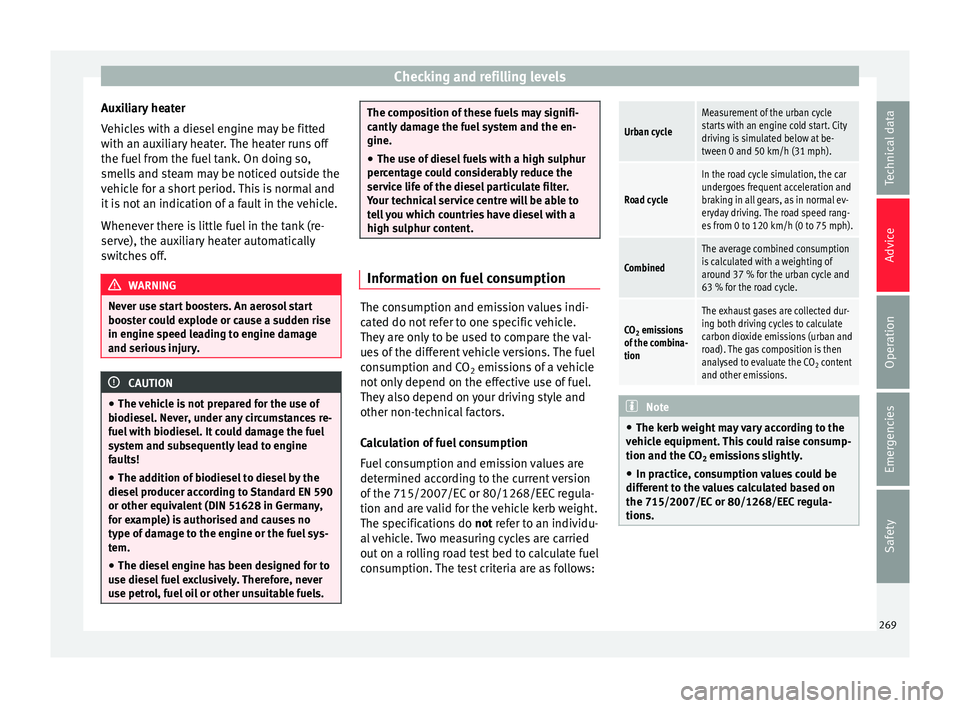
high sulphur content. Information on fuel consumption
The consumption and emission values indi-
c
at
ed do not
refer to one specific vehicle.
They are only to be used to compare the val-
ues of the different vehicle versions. The fuel
consumption and CO 2 emissions of a vehicle
not only depend on the effective use of fuel.
They also depend on your driving style and
other non-technical factors.
Calculation of fuel consumption
Fuel consumption and emission values are
determined according to the current version
of the 715/2007/EC or 80/1268/EEC regula-
tion and are valid for the vehicle kerb weight.
The specifications do not refer to an individu-
al vehicle. Two measuring cycles are carried
out on a rolling road test bed to calculate fuel
consumption. The test criteria are as follows:
Urban cycle
Measurement of the urban cycle
starts with an engine cold start. City
driving is simulated below at be-
tween 0 and 50 km/h (31 mph).
Road cycle
In the road cycle simulation, the car
undergoes frequent acceleration and
braking in all gears, as in normal ev-
eryday driving. The road speed rang-
es from 0 to 120 km/h (0 to 75 mph).
Combined
The average combined consumption
is calculated with a weighting of
around 37 % for the urban cycle and
63 % for the road cycle.
CO 2 emissions
of the combina-
tion
The exhaust gases are collected dur-
ing both driving cycles to calculate
carbon dioxide emissions (urban and
road). The gas composition is then
analysed to evaluate the CO 2 content
and other emissions. Note
● The kerb w eight
may vary according to the
vehicle equipment. This could raise consump-
tion and the CO 2 emissions slightly.
● In practice, consumption values could be
different
to the values calculated based on
the 715/2007/EC or 80/1268/EEC regula-
tions. 269
Technical data
Advice
Operation
Emergencies
Safety
Page 299 of 324
Wheels and tyres
● On ly
u
se winter tyres of the size authorised
for the vehicle.
● Only use radial winter tyres of the same
type, size (r
olling circumference) and tread
pattern.
● Adjust speeds to within the limits indicated
(code lett
er on tyre) ››› .
S peed limit
A c ode l
etter indicating the speed limit is
stamped on all winter tyres ››› page 296.
In some vehicles, it is possible to set a speed
warning in the MFA (multifunction
display) menu on the instrument panel
››› page 26.
If you use V-rated tyres the speed limits and
tyre pressure will be determined by engine
size. Please ask your technical service centre
for further information on the maximum per-
mitted speed and the required pressures for
the tyres.
All-wheel drive*
Thanks to its all-wheel drive, your car will
have plenty of traction in winter conditions,
even with the standard tyres. Nevertheless,
SEAT still recommend that winter tyres or all-
season tyres should be fitted on all four
wheels when winter road conditions are ex-
pected, mainly because this will give a better
braking response. Please observe all instructions and warnings
when usin
g snow chains ›››
page 49. WARNING
Although winter tyres help to make driving
saf er in the w
inter, you should not take un-
necessary risks.
● Adjust your speed and driving style to visi-
bility
, road, traffic and weather conditions.
● Never exceed the maximum permitted
speed or loa
ds specified for the type of winter
tyre fitted on your vehicle. For the sake of the environment
When winter is over, change back to summer
tyr e
s when you have the time. In tempera-
tures above +7°C (+45°F), performance will
be improved if summer tyres are used. Fuel
consumption, wear and noises while driving
will all be reduced. Note
● If the v
ehicle is fitted with a tyre control
system, this should be “reprogrammed”
whenever a tyre is changed ››› page 236.
● Please ask at a technical service centre for
information about
the permitted sizes for
winter tyres. 297
Technical data
Advice
Operation
Emergencies
Safety