Wiper Seat Alhambra 2017 User Guide
[x] Cancel search | Manufacturer: SEAT, Model Year: 2017, Model line: Alhambra, Model: Seat Alhambra 2017Pages: 320, PDF Size: 6.88 MB
Page 137 of 320

Lights and visibility
Rear side window sun blinds Fig. 143
On the rear right-hand window: sun
b lind The sun blinds for the vehicle interior are fit-
t
ed in the s
ide p
anels of the windows.
● Pull the sun blind by the handle ›››
Fig. 143
A up to the top.
● Hook both rings of the fastening rod in the
s p
ac
es provided B . Check that the sun blind
i s
sec
urely hooked into the spaces provided
when it has been lowered B .
● To put the sun blind away, unhook it at the
t op and lo
w
er by hand ››› .
CAUTION
To prevent damage to the blind or the interior
trim, do not lo w
er the sun blind “quickly”. Windscreen wiper and window
w
iper sy
s
tems
Control lamp
It lights up
Windscreen wip-
er fluid level too
lowTop up the windscreen wiper reser-
voir as soon as possible
››› page 280. Several warning and control lamps light up
for a f
ew sec
onds when the ignition is switch-
ed on, signalling that the function is being
verified. They will switch off after a few sec-
onds.
Window wiper lever Read the additional information carefully
› ›
›
page 26 WARNING
Water from the windscreen washer water bot-
tle m a
y freeze on the windscreen if it does
not contain enough anti-freeze, reducing for-
ward visibility.
● In winter, ensure the windscreen washer
contain
s enough anti-freeze.
● In cold conditions, you should not use the
wash/w
ipe system unless you have warmed
the windscreen with the ventilation system. The antifreeze could freeze on the windscreen
and reduc
e
visibility. WARNING
Worn or dirty wiper blades reduce visibility
and inc re
ase the risk of accident and serious
injury.
● Always replace damaged or worn blades or
bla
des which do not clean the windscreen
correctly. CAUTION
In icy conditions, always check that the wiper
bl a
des are not frozen to the glass before us-
ing the wipers for the first time. In cold
weather, it may help to leave the vehicle
parked with the wipers in service position
››› page 54. CAUTION
If the ignition is switched off while the wind-
sc r
een wipers are on, the windscreen wipers
carry on wiping at the same level when the
ignition is switched back on. Ice, snow and
other obstacles may damage the windscreen
wiper and the respective motor. Note
● The wind s
creen wipers will only function
when the ignition is switched on and the re-
spective bonnet or rear lid are closed. » 135
Technical data
Advice
Operation
Emergencies
Safety
Page 138 of 320
Operation
●
The inter v
al wipe speed varies according to
the vehicle speed. The faster the vehicle is
moving, the more often the windscreen is
cleaned.
● The rear wiper is automatically switched on
when the winds
creen wiper is on and the car
is in reverse gear. Windscreen wiper functions
Windscreen wiper performance in different sit-
uations
If the vehicle
is at a stand-
stillThe activated position provisionally
changes to the previous position.
During auto-
matic wipe
The air conditioner comes on for ap-
proximately 30 seconds in air recircula-
tion mode to prevent the smell of the
windscreen washer fluid entering the
inside the vehicle.
For the inter-
val wipeIntervals between wipes depend on the
vehicle's speed. The higher the vehicle
speed the shorter the intervals.
Heated windscreen washer jets
The he
atin
g on
ly thaws the frozen jets, it
does not thaw the water in the washer hoses.
The heated windscreen washer jets automati-
cally adjust the heat depending on the ambi-
ent temperature when the ignition is switch-
ed on. Headlight wash/wipe system
The headlight
washers/wipers clean the
headlight lenses.
After the ignition is switched on, the first and
every fifth time the windscreen washer is
switched on, the headlights are also washed.
Therefore, the windscreen wiper lever should
be pulled towards the steering wheel when
the dipped beam or main beam are on. Any
incrusted dirt (such as insects) should be
cleaned regularly (e.g. when refuelling).
To ensure the headlight washers work cor-
rectly in winter, any snow which has got into
the bumper jet supports should be cleaned
away. If necessary, remove snow with an anti-
icing spray. Note
The wiper will try to wipe away any obstacles
that ar
e on the windscreen. The wiper will
stop moving if the obstacle blocks its path.
Remove the obstacle and switch the wiper
back on again. Rain sensor*
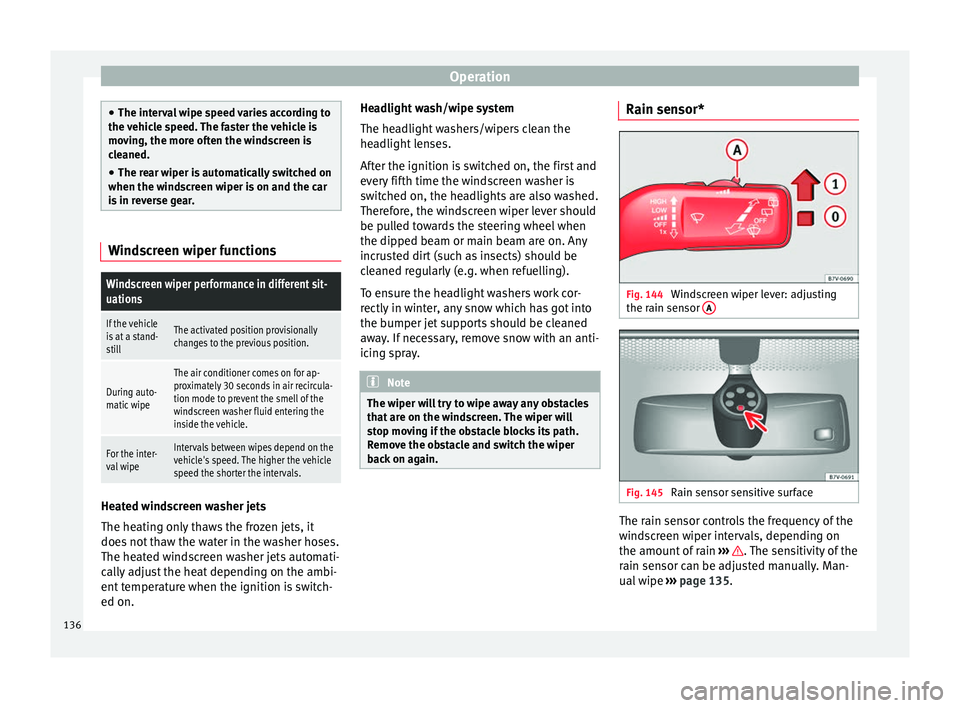
Fig. 144
Windscreen wiper lever: adjusting
the r ain sen
sor A Fig. 145
Rain sensor sensitive surface The rain sensor controls the frequency of the
w
ind
s
creen wiper intervals, depending on
the amount of rain ››› . The sensitivity of the
r ain sen
sor c
an be adjusted manually. Man-
ual wipe ››› page 135.
136
Page 139 of 320

Lights and visibility
Move the lever to the required position
› ›
›
Fig. 144:
Rain sensor off.
Rain sensor on; automatic wipe if neces-
sary.
Setting sensitivity level of rain sensor
– Set control to the right: highly sensi-
tive.
– Set control to the left: less sensitive.
When the ignition is switched off and then
back on, the rain sensor stays on and starts
operating again when the windscreen wipers
are in position 1 and the vehicle is travel-
lin g at
mor
e than 4 km/h (2 mph).
Rain sensor modified behaviour
Possible causes of faults and mistaken read-
ings on the sensitive surface ››› Fig. 145 of
the rain sensor include:
● Damaged blades: a film of water on the
damag
ed blades may lengthen the activation
time, reduce the washing intervals or result
in a fast and continuous wipe.
● Insects: insects on the sensor may trigger
the winds
creen wiper.
● Salt on roads: in winter, salt spread in the
roa
ds may cause an extra long wipe when the
windscreen is almost dry.
● Dirt: dry dust, wax, coating on glass (Lotus
effect) or trac
es of detergent (car wash) may
0 1
A reduce the effectiveness of the rain sensor or
m
ak
e it
react more slowly, later or not at all.
● Cracked windscreen: the impact of a stone
wil
l trigger a single wipe cycle with the rain
sensor on. Next the rain sensor detects the
reduction in the sensitive surface area and
adapts accordingly. The behaviour of the sen-
sor will vary with the size of the damage
caused by the stone. WARNING
The rain sensor may not detect enough rain
to sw it
ch on the wipers.
● If necessary, switch on the wipers manually
when water on the w
indscreen obstructs visi-
bility. Note
● Cle
an the sensitive surface of the rain sen-
sor regularly and check the blades for dam-
age ››› Fig. 145 (arrow).
● To remove wax and coatings, we recom-
mend a window c
leaner containing alcohol. Rear vision mirror
Intr oduction WARNING
The automatic anti-dazzle rear vision mirror
cont ain
s an electrolytic fluid which may leak
if the mirror is broken. This could cause irrita-
tion to the skin, eyes and respiratory organs.
● The electrolytic fluid may cause irritation to
the skin, eye
s and respiratory organs, partic-
ularly in individuals suffering from asthma or
other illnesses. Make sure that adequate
quantities of fresh air enter and leave the ve-
hicle if it is not possible to open all the doors
and windows.
● If the electrolytic fluid comes into contact
with eye
s or skin, wash the area for at least
15 minutes with plenty of water, and seek
medical advice.
● If the electrolytic fluid comes into contact
with shoes
or clothing, wash the area for at
least 15 minutes with plenty of water. Wash
shoes and clothing before wearing them
again.
● If the electrolytic fluid is swallowed, wash
your mouth with p
lenty of water for at least
15 minutes. Do not try to provoke vomiting
unless recommended by a Doctor. Seek medi-
cal advice immediately. » 137
Technical data
Advice
Operation
Emergencies
Safety
Page 179 of 320
Air conditioning
Switching off: pr e
s s the button until the
lamp on the button switches off.
Switching the recirculation mode on and off
manually on the Climatronic
Switching on: press the button until the
lamp on the button lights up.
Switching off: press the button until the
lamp on the button switches off.
Automatic air recirculation mode
Fresh air enters the vehicle interior in posi-
tion . If the system detects a high con-
centration of hazardous substances in the
ambient air, air recirculation mode is switch-
ed on automatically. When the level of impur-
ities drops to within a normal range, recircu-
lation mode is switched off.
The system is unable to detect unpleasant
smells.
With the following outside temperatures and
conditions the air recirculation does not
switch on automatically:
● The cooling system is switched on (the ACbutton is lit up) and the outside temperature
i
s
belo
w +3°C (+38°F).
● The cooling system and the windscreen
wipers
are switched off and the outside tem-
perature is below +10°C (+50°F). ●
The coolin
g system is switched off and the
outside temperature is below +15°C (+59°F).
The windscreen wiper is switched on.
Switching the automatic air recirculation
mode on and off
Switching on: press the button until the
right lamp on the button lights up.
Switching off: press the button until all
the lamps on the button are switched off.
Switching the automatic air recirculation
mode off temporarily
● Press the button onc
e to temporarily
switch to manual air recirculation mode in
the event of unpleasant smells from outside.
The left indicator lamp turns on.
● After more than two seconds, press the
button ag
ain to restart automatic air recircu-
lation. The right indicator lamp turns on. WARNING
Observe the safety warnings ›››
in Intro-
duction on pag e 173
.
● If the cooling system is switched off and air
recir
culation mode switched on, the windows
can mist over very quickly, considerably limit-
ing visibility.
● Switch air recirculation mode off when it is
not requir
ed. CAUTION
Do not smoke when air recirculation is
swit c
hed on in vehicles with an air condition-
er. The smoke taken in could lie on the cool-
ing system vaporiser and on the activated
charcoal cartridge of the dust and pollen fil-
ter, leading to a permanently unpleasant
smell. Note
Climatronic: air recirculation mode switches
on to pr ev
ent exhaust gas from entering the
vehicle interior when it is in reverse and
while the automatic windscreen wipers are
working. Auxiliary heater* (additional
he
at
er)
Intr
oduction The auxiliary heater is powered by fuel from
the
v
ehic
le's fuel tank and can be used while
the vehicle is in motion and at a standstill.
Select the mode required ( heat or fan )
››› page 179 on the dash panel.
In winter, the auxiliary heater can be used in
heat mode before switching on the ignition
to remove any ice, mist or snow from the
windscreen (thin layers only). »
177
Technical data
Advice
Operation
Emergencies
Safety
Page 182 of 320
Operation
Before pr ogramming, check that the day is
c orr
ectly set in the Auxiliary heater -
day of the week menu ››› .
En ab
lin
g the Auxiliary heater menu on
the instrument panel
● From the main menu, select the Auxili-
ary heater submenu and pre
ss the OK button on the windscreen wiper lever.
● OR: pr ess the or
arrow buttons on the
mu ltif
u
nction steering wheel until the Aux-
iliary heater menu is displayed.
Menu op-
tionsDescription
Switching
on
Switching
off
The auxiliary heater can be set to come
on automatically if required. To do so,
select a timer:
– The timer is displayed marked with a
.
– Only one timer can be selected. If a
timer has been selected, Prog. ON
will be displayed on the screen. If no
timer has been selected, the dash
panel display will show Prog. OFF.
– To modify the programmed timer, se-
lect another timer or select the Off
option.
Timer 1
Timer 2
Timer 3
Three different timers (hh.mm) can lat-
er be selected using the On option. If
the auxiliary heater is to be switched
on for just a certain day of the week,
select the day of the week and the
time for the auxiliary heater to come
on.
Menu op-
tionsDescription
DurationThe operating time may vary between
10 and 60 minutes and can be set to
5-minute intervals.
Operating
modeSet to heat or ventilate the vehicle in-
terior when the auxiliary heater is
switched on.
DaySet the current day of the week.
Factory
settingsThe predefined factory values for the
functions of this menu are restored.
BackThis returns to the main menu. Checking programming
If
the
timer h
a
s been switched on after
switching the ignition off, the light on button will remain lit for around 10 seconds.
WARNING
Never program the independent heating sys-
tem t o be activ
ated and operated in closed,
unventilated areas. The auxiliary heater
fumes contain carbon dioxide, an odourless
and colourless toxic gas. Carbon monoxide
can cause people to lose consciousness. It
can also cause death. Operating instructions
The auxiliary heater exhaust system located
below the
v
ehicle must be kept clear of snow,
mud and other objects. The exhaust gases
must not be obstructed in any way. The ex-
haust gases generated by the auxiliary heater
are removed via an exhaust pipe fitted under-
neath the vehicle.
On heating the vehicle interior, depending on
the outside temperature the warm air is first
directed at the windscreen and then to the
rest of the vehicle interior through the air
vents. If the air vents are turned towards the
windows, for example, the form of air distri-
bution may be affected.
Depending on the outside temperature, the
temperature at which the auxiliary heater
warms the vehicle interior may be somewhat
higher if the heating or air conditioner tem-
perature control is set to maximum before
switching the heating on.
Depending on the engine, vehicles with aux-
iliary heater may be fitted with a second bat-
tery in the luggage compartment that is re-
sponsible for powering the auxiliary heater.
When will the auxiliary heater will not switch
on?
● The auxiliary heater requires about as
much po w
er as the dipped beam headlights.
180
Page 194 of 320
Operation
WARNING
Wet, frozen or salt-covered brakes take lon-
ger t o en
gage and this increases braking dis-
tances.
● Test the brakes carefully.
● Dry the brakes, free them of ice and salt by
brakin
g gently several times, when weather,
road and traffic conditions permit. WARNING
Driving without the brake servo may signifi-
cantly inc
rease the braking distance and re-
sult in a severe accident.
● Never allow the vehicle to move forwards
when the engine is
switched off.
● If the brake servo does not operate or the
vehicl
e must be towed, then the brake pedal
will have to be pressed with more force given
that the braking distance will be increased
when the brake servo does not operate. CAUTION
● Never m ak
e the brakes “slip” by pressing
the pedal gently, if it is not really necessary
to brake. Continuously pressing on the brake
pedal will heat the brakes. This could signifi-
cantly reduce braking power, increase brak-
ing distance or even result in the total failure
of the brake system.
● Reduce speed or change down a gear when
faced w
ith steep and long slopes. This allows
you to use the engine braking effect and to reduce the strain on the brake system. Other-
wi
se, the br
akes may overheat and fail. Only
use the brakes to reduce speed or to stop. Note
When checking the front brake pads, take the
time t o al
so check the rear brake pads. The
thickness of the brake pads should be
checked visually and regularly, by looking
through the openings in the wheel rims or
from underneath the vehicle. If necessary, re-
move the wheels to check them thoroughly.
SEAT recommends taking your car in for tech-
nical service. Gearbox
Intr oduction When reverse gear is engaged and the igni-
tion i
s
sw
itched on the following takes place:
● Reverse lights light up.
● When reversing, the air conditioner auto-
matical
ly changes to air recirculation mode.
● The rear window heater switches on when
the winds
creen wiper is activated.
● Also, the parking sensor system, the opti-
cal p
arking sensor and the camera for the re-
verse assist system are connected. WARNING
Rapid acceleration can cause loss of traction
and skid din
g, especially on slippery ground.
This could cause loss of control of the vehicle
resulting in an accident and considerable
damage.
● Only use the kick-down function or rapid
accel
eration if visibility, weather, road and
traffic conditions so permit. WARNING
Do not allow the brakes to “rub” for a pro-
long ed period of
time, or brake frequently or
for long periods of time. Continuous braking
heats up the brakes. This could significantly
reduce braking power, increase braking dis-
tance or even result in the total failure of the
brake system. Control and warning lamps
It lights up red
Brake pedal not
pressed!Press brake pedal to the floor.
It lights up green
Brake pedal not
pressed.To select a range of gears, press
the brake pedal.
Please also see "Electronic park-
ing brake"
››› page 187. 192
Page 232 of 320
Operation
Note
● The tiredne s
s detection function has only
been designed for driving on motorways and
wide roads.
● If there is a fault in the system, refer to a
Speci
alised workshop to have the system in-
spected. Function and operation
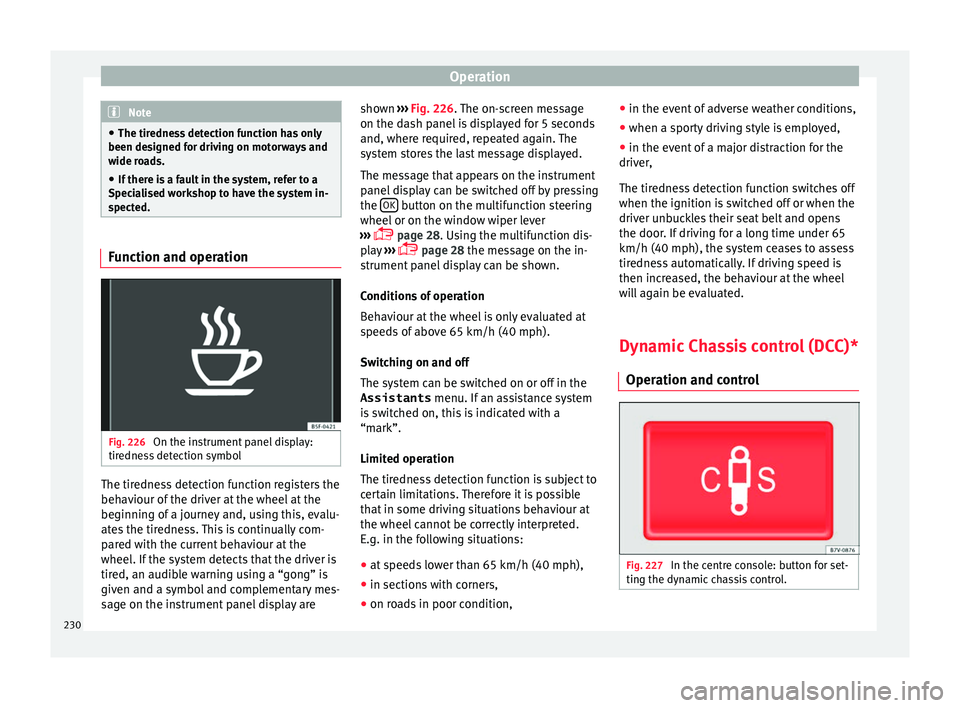
Fig. 226
On the instrument panel display:
tir edne
s
s detection symbol The tiredness detection function registers the
beh
av
iour of
the driver at the wheel at the
beginning of a journey and, using this, evalu-
ates the tiredness. This is continually com-
pared with the current behaviour at the
wheel. If the system detects that the driver is
tired, an audible warning using a “gong” is
given and a symbol and complementary mes-
sage on the instrument panel display are shown
››› Fig. 226.
The on-screen message
on the dash panel is displayed for 5 seconds
and, where required, repeated again. The
system stores the last message displayed.
The message that appears on the instrument
panel display can be switched off by pressing
the OK button on the multifunction steering
wheel or on the w
indo
w wiper lever
››› page 28. Using the multifunction dis-
play ›››
page 28 the message on the in-
strument panel display can be shown.
Conditions of operation
Behaviour at the wheel is only evaluated at
speeds of above 65 km/h (40 mph).
Switching on and off
The system can be switched on or off in the
Assistants menu. If an assistance system
is switched on, this is indicated with a
“mark”.
Limited operation
The tiredness detection function is subject to
certain limitations. Therefore it is possible
that in some driving situations behaviour at
the wheel cannot be correctly interpreted.
E.g. in the following situations:
● at speeds lower than 65 km/h (40 mph),
● in sections with corners,
● on roads in poor condition, ●
in the event of
adverse weather conditions,
● when a sporty driving style is employed,
● in the event of a major distraction for the
driver,
The tir
edness detection function switches off
when the ignition is switched off or when the
driver unbuckles their seat belt and opens
the door. If driving for a long time under 65
km/h (40 mph), the system ceases to assess
tiredness automatically. If driving speed is
then increased, the behaviour at the wheel
will again be evaluated.
Dynamic Chassis control (DCC)*
Operation and contr
ol Fig. 227
In the centre console: button for set-
tin g the dy
n
amic chassis control.230
Page 253 of 320
Care and maintenance
Automatic car washes
A lw
a
ys observe the instructions provided at
the automatic car wash. The standard pre-
cautionary measures prior to entering the car
wash should be taken to avoid damage to
the vehicle (close all windows, fold in exterior
mirrors). If the vehicle is fitted with additional
components (spoiler, roof-rack, aerial, etc.),
check with the car wash supervisor whether
these can enter the car wash ››› .
The v
ehic
le paintwork is so durable that the
vehicle can normally be washed without
problems in an automatic car wash tunnel.
However, wear and damage to the paintwork
will depend on the type of car wash used.
SEAT recommends the use of car washes
without brushes.
To remove traces of wax on windows and to
prevent wiper blades from scratching, please
observe the following ››› page 252, Cleaning
windows and exterior mirrors .
Washing the car by hand
When washing the car by hand, use plenty of
water to soften the dirt first, and rinse off as
well as possible.
Then clean the vehicle with a soft sponge,
glove or brush using only slight pressure.
Start at the roof and work downwards. Spe-
cial car shampoo should only be used for
very persistent dirt. Rinse the sponge or glove thoroughly and of-
ten.
Wheels, s
ills and similar should be cleaned
last. Use a second sponge for this. WARNING
Sharp components on the vehicle may cause
injury .
● Pr
otect arms and hands from sharp edges
when cle
aning the vehicle undercarriage or
the interior of the wheel hubs. WARNING
After the vehicle has been washed, the brak-
ing eff ect
will be reduced (and the braking
distance increased) due to moisture (and ice
in winter) on the brakes.
● “Dry the brakes and remove ice” by braking
caref
ully. Ensure that you are not endanger-
ing other road-users or breaking traffic regu-
lations in the process. CAUTION
● The temper at
ure of the water must not ex-
ceed +60°C (+140°F).
● To avoid damage to the paintwork, do not
wash the
vehicle in full sun.
● Do not use rough sponges or similar which
coul
d damage the surface to clean away the
traces of insects. ●
Never w ipe the he
adlights with a dry cloth
or sponge, always moisten first. It is best to
use soapy water.
● Washing the vehicle in low temperatures:
When washin
g the vehicle with a hose, do
not direct water into the lock cylinders or the
gaps around the doors or roof. Locks and
seals could freeze! CAUTION
To avoid any risk of damage to the vehicle,
p le
ase check the following points before us-
ing an automatic car wash:
● Compare the distance between the vehicle
wheels and the di
stance between the guide-
rails of the car wash to prevent damage to the
wheels and tyres!
● Switch off the rain sensor and the Au-
to Hol
d function before entering a car wash.
● Compare the height and width of your vehi-
cle w
ith the available height and width when
entering and driving through the car wash.
● Fold in exterior mirrors Electrically retracta-
ble e
xterior mirrors must not be folded in or
out by hand. Always use the electrical power
control.
● To avoid damaging the bonnet paintwork,
res
t the wipers on the windscreen after dry-
ing them. Do not let them fall!
● Lock the rear lid to prevent it from opening
unexpect
edly while inside the car wash. 251
Technical data
Advice
Operation
Emergencies
Safety
Page 255 of 320
Care and maintenance
Removing wax residue
Aut om
atic
car washes and certain car care
products may leave wax deposits on the win-
dows. These deposits can only be removed
with a special product or cleaning cloths.
Wax deposits on the windscreen could cause
the wiper blades to judder. SEAT recom-
mends you wipe the wax deposits off the
windscreen with a soft cloth each time after
you have washed the vehicle.
A window cleaning detergent which helps to
dissolve the wax may be added to the wind-
screen washer fluid to prevent the wiper
blades from scratching the windscreen.
Please ensure you add the cleaning product
in the correct proportions. Products for re-
moving grease do not eliminate the wax de-
posits ››› .
S pec
i
al cleaning products or window cloths
are available at any technical service. To re-
move wax deposits, SEAT recommends the
following products:
● For the hottest time of the year: the
G 052 184 A1 window c
leaner for summer
use. Proportion 1:100 (1 part detergent,
100 parts water) in the windscreen washer
reservoir.
● All year round: the window cleaner
G 052 164 A2; proportion 1:2 in w
indscreen
washer bottle (1 part concentrate, 2 parts wa-
ter) in winter, down to -18°C (-0.4°F), or 1:4,
during the rest of the year. ●
Window c
loths G 052 522 A1 for all win-
dows and exterior mirrors.
Removing snow
Use a small brush to remove snow from the
windows and exterior mirrors.
Removing ice
If possible, use a de-icing spray to remove
ice. If you use an ice scraper, push it in one
direction only without swinging it. If you pull
the scraper backwards, the dirt may scratch
the window. WARNING
Dirty or misted windows reduce visibility in
al l
directions and increase the risk of acci-
dent and serious injury.
● Do not drive unless you have good visibility
through al
l windows!
● Remove ice and snow from the windows
and demist
inside and out. CAUTION
● Never mi x
our cleaning products with other
products not recommended by SEAT in the
windscreen washer reservoir. This could lead
to flocculation and may block the windscreen
washer jets.
● Do not use hot or warm water to remove ice
or snow fr
om the windows and exterior mir-
rors. The glass could crack! ●
The heatin g el
ement for the rear window is
located on the inner side of the window. Do
not stick adhesive labels over the heating el-
ements and never clean the inside of the rear
window with corrosive or acid products or
other similar chemical cleaning products.
● Aerials on the inside of windows may be
damag
ed if knocked or if cleaned with corro-
sive or acid cleaning products. Do not stick
adhesive labels over the heating elements
and never clean the inside of the rear window
with corrosive or acid products or other simi-
lar chemical cleaning products. Caring for and polishing the vehicle
p
aintw
ork Waxing
R
e
gu
lar waxing protects the paintwork. It is
time to apply a good coat of wax when water
no longer forms droplets and rolls off the
clean paintwork.
Even if a wax solution is used regularly in the
automatic car wash, SEAT recommends pro-
tecting the paint with a hard wax coating at
least twice a year.
Polishing
Polishing is only necessary if the paint has
lost its shine, and the gloss cannot be
brought back by applying wax. »
253
Technical data
Advice
Operation
Emergencies
Safety
Page 272 of 320
Advice
●
If it i
s necessary to work on the fuel system
or the electrical system, please follow the in-
structions below:
–Always disconnect the vehicle battery.
When disconnecting the battery, ensure
that the vehicle is unlocked otherwise
the anti-theft alarm will be triggered.
– Never work close to heaters, heat sources
or places exposed to flames or sparks.
● Always keep a recently serviced and per-
fectly w
orking fire extinguisher close by.
● Never cover the engine with additional in-
sul
ating materials such as a blanket. Risk of
fire! CAUTION
When refilling or changing service liquids,
ens ur
e that you put the liquids into the right
tank. Making a mistake when refilling could
cause serious malfunctions and damage the
engine! For the sake of the environment
Service fluids leaks are harmful to the envi-
ronment . F
or this reason you should make
regular checks on the ground underneath
your vehicle. Take the vehicle to a specialised
workshop to be checked if you see stains, oil
or other fluids on the ground. Collect any
spilt service fluids and allow a professional to
dispose of them. Opening and closing the bonnet
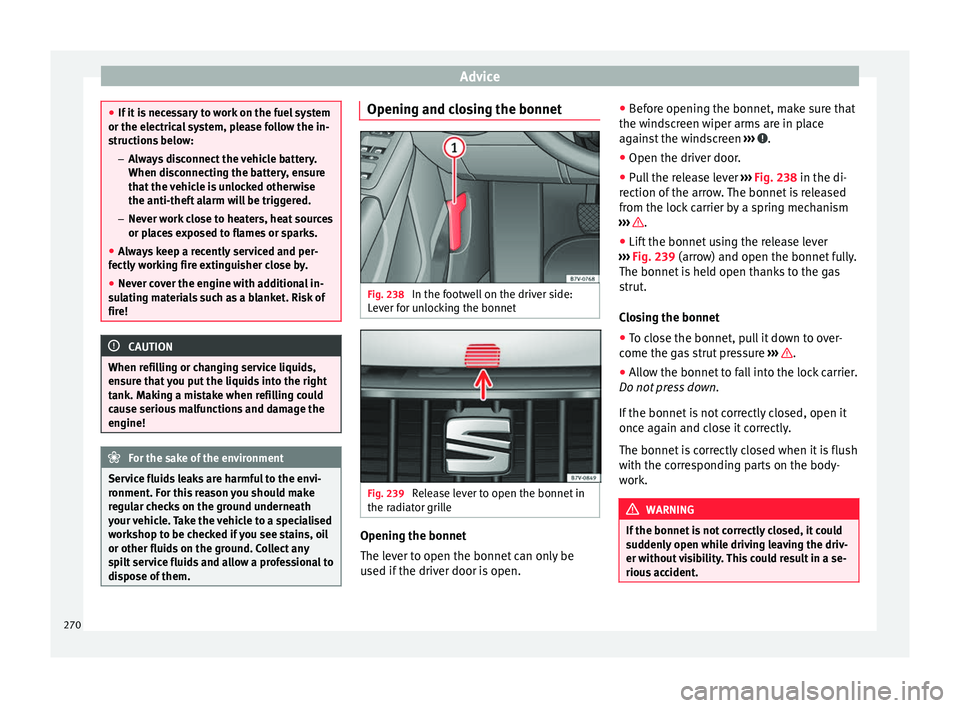
Fig. 238
In the footwell on the driver side:
L ev
er f
or unlocking the bonnet Fig. 239
Release lever to open the bonnet in
the r a
di
ator grille Opening the bonnet
The l
ev
er t
o open the bonnet can only be
used if the driver door is open. ●
Befor
e opening the bonnet, make sure that
the windscreen wiper arms are in place
against the windscreen ››› .
● Open the driver door.
● Pull the release lever ››
›
Fig. 238 in the di-
rection of the arrow. The bonnet is released
from the lock carrier by a spring mechanism
››› .
● Lift the bonnet using the release lever
› ›
›
Fig. 239 (arrow) and open the bonnet fully.
The bonnet is held open thanks to the gas
strut.
Closing the bonnet
● To close the bonnet, pull it down to over-
come the ga
s strut pressure ››› .
● Allow the bonnet to fall into the lock carrier.
Do not pr
e
ss down.
If the bonnet is not correctly closed, open it
once again and close it correctly.
The bonnet is correctly closed when it is flush
with the corresponding parts on the body-
work. WARNING
If the bonnet is not correctly closed, it could
sud den
ly open while driving leaving the driv-
er without visibility. This could result in a se-
rious accident. 270