Wiper Seat Alhambra 2017 Owner's Manual
[x] Cancel search | Manufacturer: SEAT, Model Year: 2017, Model line: Alhambra, Model: Seat Alhambra 2017Pages: 320, PDF Size: 6.88 MB
Page 5 of 320
Table of Contents
Table of Contents
The e s
senti
als . . . . . . . . . . . . . . . . . . . . . . . . 5
Exterior view . . . . . . . . . . . . . . . . . . . . . . . . . . . . 5
Exterior view . . . . . . . . . . . . . . . . . . . . . . . . . . . . 6
Interior view (left-hand drive) . . . . . . . . . . . . . . 7
How it works . . . . . . . . . . . . . . . . . . . . . . . . . . . . 8
Unlocking and locking . . . . . . . . . . . . . . . . . . . . 8
Before driving . . . . . . . . . . . . . . . . . . . . . . . . . . . 13
Airbags . . . . . . . . . . . . . . . . . . . . . . . . . . . . . . . . 17
Child seats . . . . . . . . . . . . . . . . . . . . . . . . . . . . . 21
Starting the vehicle . . . . . . . . . . . . . . . . . . . . . . 24
Lights and visibility . . . . . . . . . . . . . . . . . . . . . . 24
SEAT information system . . . . . . . . . . . . . . . . . . 26
Cruise control . . . . . . . . . . . . . . . . . . . . . . . . . . . 32
Warning lamps . . . . . . . . . . . . . . . . . . . . . . . . . . 32
Gearbox lever . . . . . . . . . . . . . . . . . . . . . . . . . . . 34
Air conditioning . . . . . . . . . . . . . . . . . . . . . . . . . 36
Fluid Level control . . . . . . . . . . . . . . . . . . . . . . . 39
Emergencies . . . . . . . . . . . . . . . . . . . . . . . . . . . . 42
Fuses . . . . . . . . . . . . . . . . . . . . . . . . . . . . . . . . . . 42
Bulbs . . . . . . . . . . . . . . . . . . . . . . . . . . . . . . . . . . 43
Action in the event of a puncture . . . . . . . . . . . 44
Changing a wheel . . . . . . . . . . . . . . . . . . . . . . . 45
Snow chains . . . . . . . . . . . . . . . . . . . . . . . . . . . . 49
Emergency towing of the vehicle . . . . . . . . . . . 50
How to jump start . . . . . . . . . . . . . . . . . . . . . . . . 51
Changing windscreen wipers . . . . . . . . . . . . . . 54
Safety . . . . . . . . . . . . . . . . . . . . . . . . . . . . . . . . 56
Safe driving . . . . . . . . . . . . . . . . . . . . . . . . . . . . 56
Safety first! . . . . . . . . . . . . . . . . . . . . . . . . . . . . . 56
Advice about driving . . . . . . . . . . . . . . . . . . . . . 56
Correct position of the vehicle occupants . . . . 57
Pedal area . . . . . . . . . . . . . . . . . . . . . . . . . . . . . . 60 Seat belts
. . . . . . . . . . . . . . . . . . . . . . . . . . . . . . 61
Why wear a seat belt? . . . . . . . . . . . . . . . . . . . . 61
How to properly adjust your seatbelt . . . . . . . . 64
Seat belt tensioners . . . . . . . . . . . . . . . . . . . . . . 67
Airbag system . . . . . . . . . . . . . . . . . . . . . . . . . . 68
Brief introduction . . . . . . . . . . . . . . . . . . . . . . . . 68
Airbag safety instructions . . . . . . . . . . . . . . . . . 71
Deactivating airbags . . . . . . . . . . . . . . . . . . . . . 72
Transporting children safely . . . . . . . . . . . . . . . 74
Safety for children . . . . . . . . . . . . . . . . . . . . . . . 74
Child seats . . . . . . . . . . . . . . . . . . . . . . . . . . . . . 75
Integrated child seat . . . . . . . . . . . . . . . . . . . . . 78
Emergencies . . . . . . . . . . . . . . . . . . . . . . . . . . 82
Self-help . . . . . . . . . . . . . . . . . . . . . . . . . . . . . . . 82
In case of emergency . . . . . . . . . . . . . . . . . . . . . 82
Vehicle tool kit* . . . . . . . . . . . . . . . . . . . . . . . . . 82
Changing a wheel* . . . . . . . . . . . . . . . . . . . . . . . 84
Tyre repair . . . . . . . . . . . . . . . . . . . . . . . . . . . . . . 85
Changing the windscreen wiper blades . . . . . . 87
Tow-starting and towing . . . . . . . . . . . . . . . . . . 87
Emergency locking and unlocking . . . . . . . . . . 89
Fuses and bulbs . . . . . . . . . . . . . . . . . . . . . . . . . 90
Fuses . . . . . . . . . . . . . . . . . . . . . . . . . . . . . . . . . . 90
Changing bulbs . . . . . . . . . . . . . . . . . . . . . . . . . 91
Operation . . . . . . . . . . . . . . . . . . . . . . . . . . . . . 99
General instrument panel . . . . . . . . . . . . . . . . . 99
Instrument panel . . . . . . . . . . . . . . . . . . . . . . . . 98
Instruments . . . . . . . . . . . . . . . . . . . . . . . . . . . . 100
Control lamps . . . . . . . . . . . . . . . . . . . . . . . . . . . 105
Communications and multimedia . . . . . . . . . . . 106
Steering wheel controls* . . . . . . . . . . . . . . . . . . 106
Multimedia . . . . . . . . . . . . . . . . . . . . . . . . . . . . . 108
Three button unit in headliner . . . . . . . . . . . . . . 108
Opening and closing . . . . . . . . . . . . . . . . . . . . . 110
Vehicle key set . . . . . . . . . . . . . . . . . . . . . . . . . . 110
Central locking and locking system . . . . . . . . . 112 Doors . . . . . . . . . . . . . . . . . . . . . . . . . . . . . . . . . . 119
Sliding doors . . . . . . . . . . . . . . . . . . . . . . . . . . . 119
Rear lid . . . . . . . . . . . . . . . . . . . . . . . . . . . . . . . . 122
Electric windows . . . . . . . . . . . . . . . . . . . . . . . . . 125
Panoramic sliding sunroof* . . . . . . . . . . . . . . . . 126
Lights and visibility
. . . . . . . . . . . . . . . . . . . . . . 128
Lights . . . . . . . . . . . . . . . . . . . . . . . . . . . . . . . . . 128
Visibility . . . . . . . . . . . . . . . . . . . . . . . . . . . . . . . 134
Windscreen wiper and window wiper sys-
tems . . . . . . . . . . . . . . . . . . . . . . . . . . . . . . . . . . 135
R
ear vision mirror . . . . . . . . . . . . . . . . . . . . . . . . 137
Seats and head restraints . . . . . . . . . . . . . . . . . 140
Adjusting the seats and head restraints . . . . . . 140
Seat functions . . . . . . . . . . . . . . . . . . . . . . . . . . 144
Transport and practical equipment . . . . . . . . . 150
Transporting objects . . . . . . . . . . . . . . . . . . . . . 150
Luggage compartment . . . . . . . . . . . . . . . . . . . . 152
Roof carrier* . . . . . . . . . . . . . . . . . . . . . . . . . . . . 161
Storage compartments . . . . . . . . . . . . . . . . . . . 163
Drink holders . . . . . . . . . . . . . . . . . . . . . . . . . . . 168
Ashtray and cigarette lighter* . . . . . . . . . . . . . . 170
Power sockets . . . . . . . . . . . . . . . . . . . . . . . . . . . 170
Air conditioning . . . . . . . . . . . . . . . . . . . . . . . . . 173
Air conditioning . . . . . . . . . . . . . . . . . . . . . . . . . 173
Auxiliary heater* (additional heater) . . . . . . . . 177
Driving . . . . . . . . . . . . . . . . . . . . . . . . . . . . . . . . 181
Address . . . . . . . . . . . . . . . . . . . . . . . . . . . . . . . . 181
Stopping and starting the engine . . . . . . . . . . . 182
Braking and parking . . . . . . . . . . . . . . . . . . . . . 187
Gearbox . . . . . . . . . . . . . . . . . . . . . . . . . . . . . . . . 192
Run-in and economical driving . . . . . . . . . . . . . 197
Engine management and exhaust gas purifica-
tion syst
em . . . . . . . . . . . . . . . . . . . . . . . . . . . . . 200
Driving tips . . . . . . . . . . . . . . . . . . . . . . . . . . . . . 202
Driver assistance systems . . . . . . . . . . . . . . . . . 203
Braking and stability systems . . . . . . . . . . . . . . 203
Start assist systems . . . . . . . . . . . . . . . . . . . . . . 205
Parking distance warning system* . . . . . . . . . . 208 3
Page 28 of 320
The essentials
Interior lightsButton/Position: Function
Switches interior lights off.
Switches interior lights on.
Switches door contact control on (central
position).
The interior lights come on automatically
when the vehicle is unlocked, a door is
opened or the key is removed from the igni-
tion.
The lights go off a few seconds after all the
doors are closed, the vehicle is locked or
the ignition is switched on.
Turning the reading light on and off
Ambient light: in the door panel, it changes
c
o
lour (whit
e or red) depending on the driv-
ing mode.
››› page 134 Windscreen wipers and window wiper
b
l
a
de Fig. 43
Operating the windscreen wiper and
r e
ar w
iper
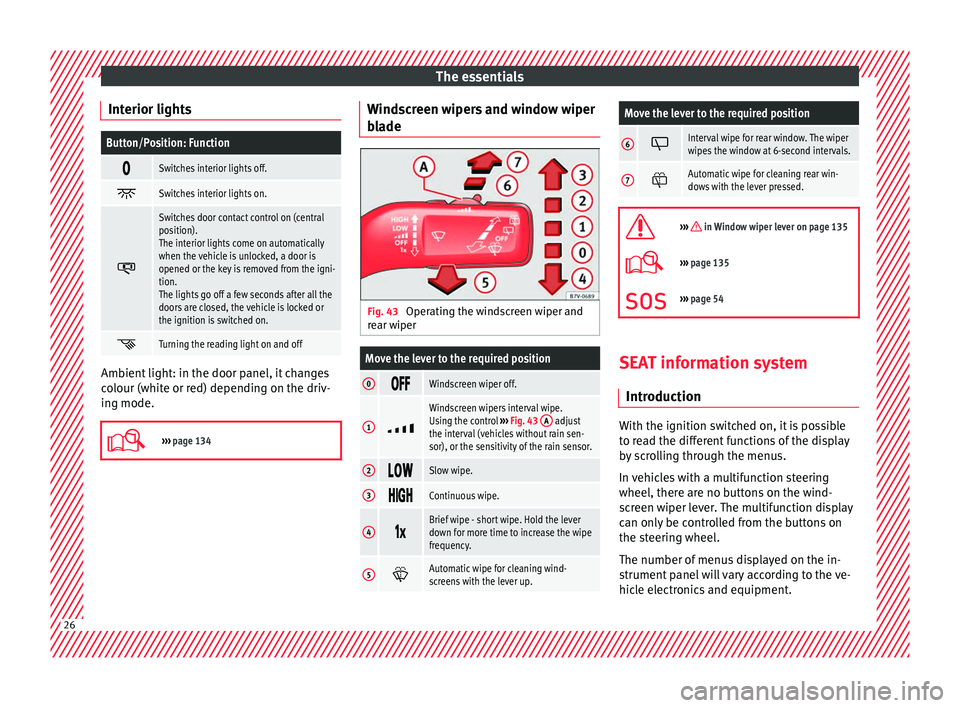
Move the lever to the required position
0 Windscreen wiper off.
1
Windscreen wipers interval wipe.
Using the control
››› Fig. 43 A adjust
the interval (vehicles without rain sen-
sor), or the sensitivity of the rain sensor.
2 Slow wipe.
3
Continuous wipe.
4
Brief wipe - short wipe. Hold the lever
down for more time to increase the wipe
frequency.
5
Automatic wipe for cleaning wind-
screens with the lever up.
Move the lever to the required position
6 Interval wipe for rear window. The wiper
wipes the window at 6-second intervals.
7
Automatic wipe for cleaning rear win-
dows with the lever pressed.
››› in Window wiper lever on page 135
›››
page 135
››› page 54 SEAT information system
Intr oduction With the ignition switched on, it is possible
t
o r
e
ad the different functions of the display
by scrolling through the menus.
In vehicles with a multifunction steering
wheel, there are no buttons on the wind-
screen wiper lever. The multifunction display
can only be controlled from the buttons on
the steering wheel.
The number of menus displayed on the in-
strument panel will vary according to the ve-
hicle electronics and equipment. 26
Page 30 of 320
The essentials
■ Aut oho
l
d
■ Service
■ Info
■ Reset
■ Default setting
Using the menus on the instrument
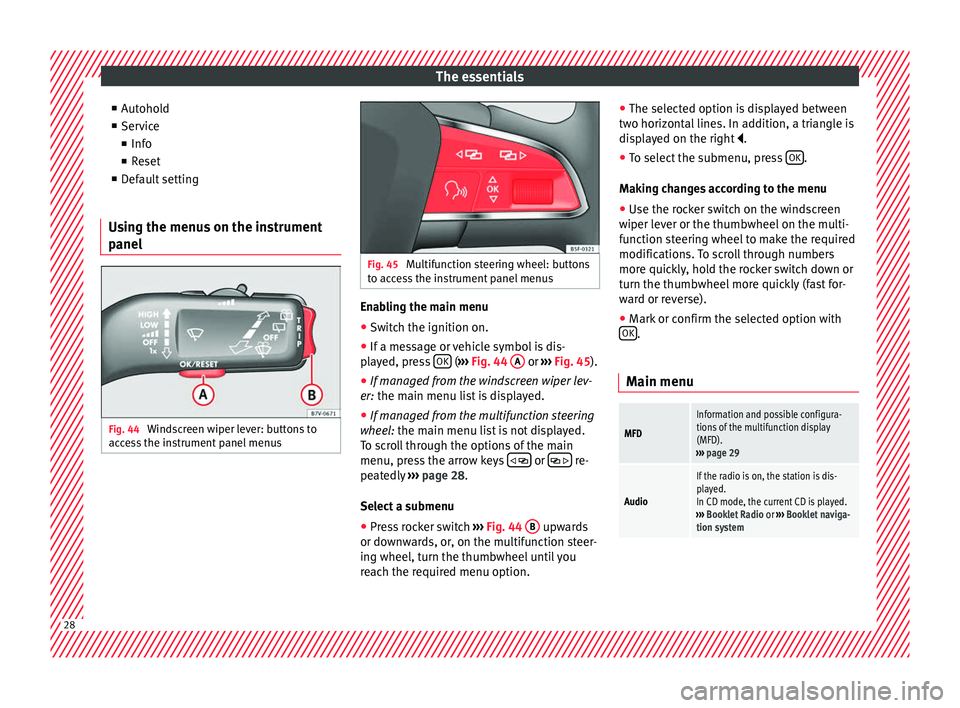
panel Fig. 44
Windscreen wiper lever: buttons to
ac c
e
ss the instrument panel menus Fig. 45
Multifunction steering wheel: buttons
to ac c
ess the instrument panel menus Enabling the main menu
● Switch the ignition on.
● If a message or vehicle symbol is dis-
p l
a
yed, press OK (
››
› Fig. 44 A or
››
› Fig. 45 ).
● If managed from the windscreen wiper lev-
er: the main menu lis
t is displayed.
● If managed from the multifunction steering
wheel:
the main menu list is not displayed.
To scroll through the options of the main
menu, press the arrow keys or
re-
pe at
edly
››› page 28.
Select a submenu ● Press rocker switch ›››
Fig. 44 B upwards
or do wn
w
ards, or, on the multifunction steer-
ing wheel, turn the thumbwheel until you
reach the required menu option. ●
The selected option i
s displayed between
two horizontal lines. In addition, a triangle is
displayed on the right .
● To select the submenu, press OK .
M ak
in
g changes according to the menu
● Use the rocker switch on the windscreen
wiper lev
er or the thumbwheel on the multi-
function steering wheel to make the required
modifications. To scroll through numbers
more quickly, hold the rocker switch down or
turn the thumbwheel more quickly (fast for-
ward or reverse).
● Mark or confirm the selected option with
OK .
Main menu
MFD
Information and possible configura-
tions of the multifunction display
(MFD).
››› page 29
Audio
If the radio is on, the station is dis-
played.
In CD mode, the current CD is played.
››› Booklet Radio or ››› Booklet naviga-
tion system 28
Page 32 of 320
The essentialsSpeed warn-
ing at --- km/hIf the stored speed is exceeded (be-
tween 30 - 250 km/h, or 18 -
155 mph), an audible warning is given
together with a visual warning.
Changing between display modes
● In vehicles without multifunction steering
whee l:
press the lever.
● Vehicles with a multifunction steering
wheel:
press or
.
Storin g a s
peed for the speed warning
● Select the display Speed warning at
--- km/h .
● Pr e
ss OK to store the current speed and
sw it
c
h off the warning.
● In addition, set the required speed by
pres
sing the rocker switch on the windscreen
wiper lever or
buttons on the multifunc-
tion s t
eerin
g wheel for 5 seconds. Next,
press OK again or wait a few seconds. The
s peed i
s
stored and the warning activated.
● To switch off , pres
s OK . The stored speed is
del et
ed.
M
anually erasing memory 1 or 2
● Select the memory that you wish to erase.
● Hold down OK for approximately 2 sec-
ond s. P
er
sonalising the displays
It is
possible to select which of the displays
in the multifunction display you wish to see
on the instrument panel in the settings
menu. The units of measurement can also be
modified ››› page 30.
Configuration Menu
Multifunc-
tion display
dataConfiguration of the multifunction dis-
play data that you wish to see on the in-
strument panel display ››› page 29.
Compass
Changing the magnetic region and cali-
bration of the compass. To calibrate the
compass, please follow the instructions
given on the instrument panel display.
ConvenienceChanging vehicle convenience functions
››› page 31.
Lights & vis-
ibilityConfiguration of vehicle lighting
››› page 31.
Time
Changing the hours and minutes of the
instrument panel clock and the naviga-
tion system. The time can be set here
and the choice can be made between
the 24-hour and 12-hour display. The S
in the upper part of the display indicates
that the clock is set to summer time.
Winter tyres
Changing the visual and audible speed
warnings. This function should only be
used when the vehicle is fitted with win-
ter tyres, which are not designed for
travel at high speeds.
LanguageChanging the language of the display
texts and the navigation system.
UnitsChanging the units of measurement for
the temperature, consumption and dis-
tance.
Second
speedSwitching second speed display on and
off.
ServiceCheck the service notifications or reset
the service intervals to zero.
Factory set-
tingsSome functions of the Configuration
menu will be reset to the factory value.
BackThe main menu is displayed again. 30
Page 56 of 320
The essentials
on battery). Failure to comply could result in
an exp
lo
sion.
● Never use jump leads when one of the bat-
teries
is frozen. Danger of explosion! Even af-
ter the battery has thawed, battery acid could
leak and cause chemical burns. If a battery
freezes, it should be replaced.
● Keep sparks, flames and lighted cigarettes
awa
y from batteries, danger of explosion.
Failure to comply could result in an explo-
sion.
● Observe the instructions provided by the
manufact
urer of the jump leads.
● Do not connect the negative cable from the
other vehic
le directly to the negative terminal
of the flat battery. The gas emitted from the
battery could be ignited by sparks. Danger of
explosion.
● Do not attach the negative cable from the
other vehic
le to parts of the fuel system or to
the brake line.
● The non-insulated parts of the battery
clamp
s must not be allowed to touch. The
jump lead attached to the positive battery
terminal must not touch metal parts of the ve-
hicle, this can cause a short circuit.
● Position the leads in such a way that they
cannot c
ome into contact with any moving
parts in the engine compartment.
● Do not lean on the batteries. This could re-
sult
in chemical burns. Note
The vehicles must not touch each other, oth-
erw i
se electricity could flow as soon as the
positive terminals are connected. Changing windscreen wipers
Wind s
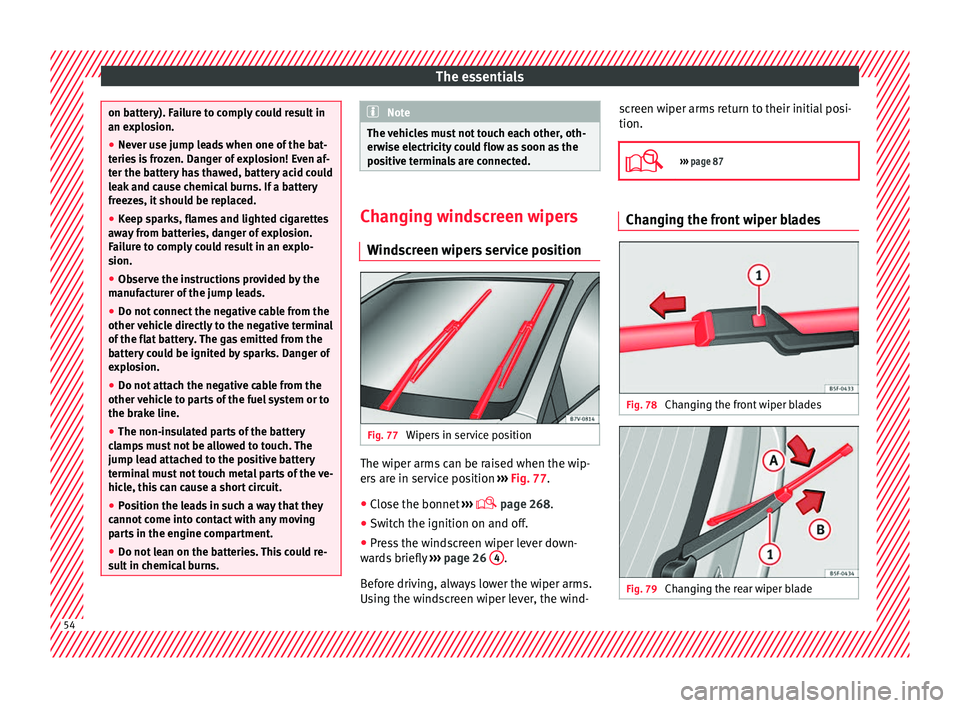
creen wipers service position Fig. 77
Wipers in service position The wiper arms can be raised when the wip-
er
s
ar
e in service position ››› Fig. 77.
● Close the bonnet ›››
page 268.
● Switch the ignition on and off.
● Press the windscreen wiper lever down-
ward
s briefly ››› page 26 4 .
B ef
or
e driving, always lower the wiper arms.
Using the windscreen wiper lever, the wind- screen wiper arms return to their initial posi-
tion.
››› page 87 Changing the front wiper blades
Fig. 78
Changing the front wiper blades Fig. 79
Changing the rear wiper blade54
Page 57 of 320
The essentials
Cleaning windscreen wiper blades
● Lifting and unfolding the wiper arms.
● Use a soft cloth to remove dust and dirt
fr om the w
iper b
lades.
● If the blades are very dirty, a sponge or
damp cloth m
ay be used ››› in Changing
the w ind
s
creen and rear window wiper
blades on page 87.
Change the windscreen wiper blades
● Lifting and unfolding the wiper arms.
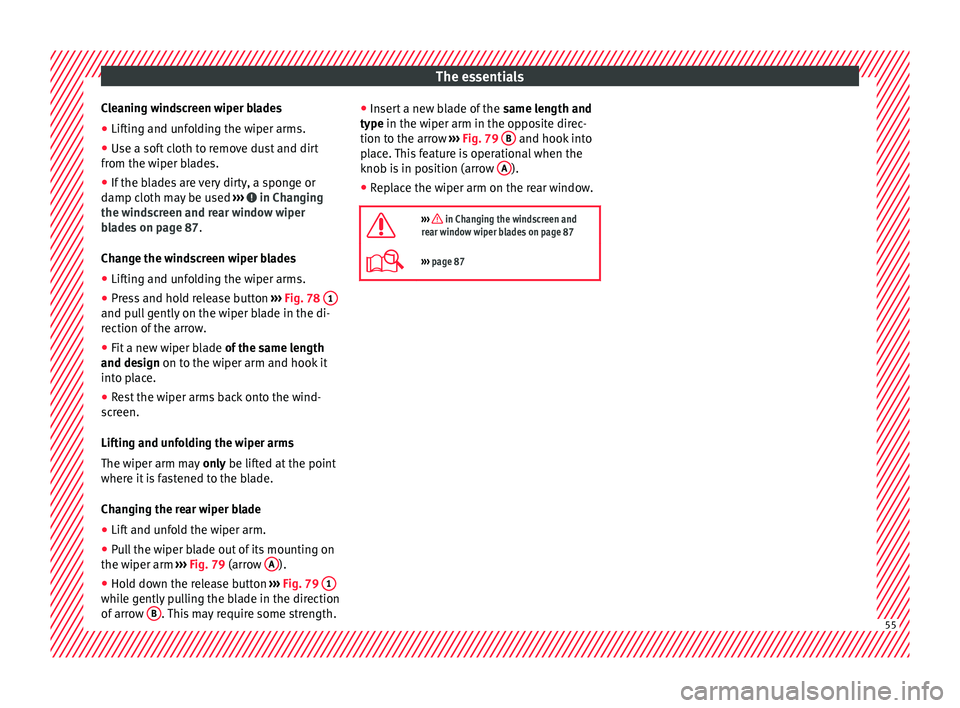
● Press and hold release button ›››
Fig. 78 1 and pull gently on the wiper blade in the di-
r
ection of
the arr
ow.
● Fit a new wiper blade of the same l
ength
and design on to the wiper arm and hook it
into place.
● Rest the wiper arms back onto the wind-
scr
een.
Lifting and unfolding the wiper arms
The wiper arm may only be lifted at the point
where it is fastened to the blade.
Changing the rear wiper blade
● Lift and unfold the wiper arm.
● Pull the wiper blade out of its mounting on
the wiper arm ››
› Fig. 79 (arrow A ).
● Hold down the release button ›
››
Fig. 79 1 while gently pulling the blade in the direction
of
arr
o
w B . This may require some strength. ●
Inser
t
a new blade of the same length and
type in the wiper arm in the opposite direc-
tion to the arrow ››› Fig. 79 B and hook into
p l
ac
e. This feature is operational when the
knob is in position (arrow A ).
● Replace the wiper arm on the rear window.
››› in Changing the windscreen and
rear window wiper blades on page 87
››› page 87 55
Page 89 of 320

Self-help
Changing the windscreen wiper
b l
a
des
Changing the windscreen and rear
window wiper blades Read the additional information carefully
›› ›
page 54.
The windscreen wiper blades are supplied as
standard with a layer of graphite. This layer is
responsible for ensuring that the wipe is si-
lent. If the graphite layer is damaged, the
noise of the water as it is wiped across the
windscreen will be louder.
Check the condition of the wiper blades regu-
larly. If the wipers scrape across the glass
they should be changed if they are damaged,
or cleaned if they are dirty ››› .
Dam ag
ed w
iper blades should be replaced
immediately. These are available from quali-
fied workshops. WARNING
Worn or dirty wiper blades reduce visibility
and incr e
ase the risk of accident and serious
injury.
● Always replace damaged or worn blades or
bla
des which do not clean the windscreen
correctly. CAUTION
● Damag ed or dir
ty windscreen wipers could
scratch the glass.
● If products containing solvents, rough
spong
es or sharp objects are used to clean
the blades, the graphite layer will be dam-
aged.
● Never use fuel, nail varnish remover, paint
thinner or simil
ar products to clean the win-
dows.
● In icy conditions, always check that the
wiper bl
ades are not frozen to the glass be-
fore using the wipers. In cold weather, it may
help to leave the vehicle parked with the wip-
ers in service position ›››
page 54.
● To prevent damage to the bonnet and the
wiper arms, only
leave them in the service
position.
● Before driving, always lower the wiper
arms. Tow-starting and towing
Intr oduction Read the additional information carefully
› ›
›
page 50
When towing, always respect legal require-
ments.
For technical reasons, it is not possible to
tow a vehicle if the battery is flat. If the vehicle comes with the Keyless Access
syst
em, towing is only allowed with the igni-
tion on!
The vehicle battery drains if the vehicle is
towed with the engine switched off and the
ignition connected. Depending on the battery
charge status, the drop in voltage may be so
large, even after just a few minutes, that no
electrical device in the vehicle may work e.g.
the hazard warning lights. In vehicles with
the Keyless Access system, the steering
wheel could lock ››› .
WARNING
A vehicle with a flat battery should never be
to w
ed.
● Never remove the key from the ignition
lock. Otherw
ise, the steering wheel lock
could suddenly lock. The vehicle would not
be controlled and a serious accident could
ensue. WARNING
When towing the vehicle, the handling and
brak in
g efficiency change considerably.
Please observe the following instructions to
minimise the risk of serious accidents and in-
jury:
● As the driver of the vehicle being towed:
– The brake mu
st be depressed must hard-
er as the brake servo does not operate. » 87
Technical data
Advice
Operation
Emergencies
Safety
Page 91 of 320
Self-help
Note the instructions for towing
› ›
›
page 50.
Fitting the towline anchorage to the rear for
vehicles without factory fitted tow hitch
● Take the towline anchorage from the vehi-
cle t
ool kit in the luggage compartment
››› page 82.
● Press on the upper cover and carefully re-
move it
back. This may require some
strength. Allow the cover to hang.
● Screw in the towline anchorage into its po-
sition antic
lockwise as far as it will go ››› .
U se a s
uit
able tool to firmly tighten the tow-
line anchorage in its location.
● After towing, remove the towline anchorage
by t
urning it clockwise and put the cover
back in place. CAUTION
● The to wline anc
horage must always be
completely and firmly tightened. Otherwise,
it could be released while towing and tow-
starting.
● Vehicles with a factory fitted towing brack-
et, can only
be used for towing with a tow
bar, specially designed to fit on a tow hitch
ball. Otherwise, the tow hitch ball and the ve-
hicle may be damaged. Otherwise, a tow rope
should be used. Towing advice
Towing requires some expertise and experi-
ence, e
s
pecially when using a tow rope. Both
drivers should be familiar with the technique
required for towing. For this reason, inexper-
ienced drivers should abstain.
While driving, avoid excessive traction forces
and jerking. When towing on an unpaved
road, there is always a risk of overloading
and damaging the anchorage points.
If the vehicle is towed, with the hazard warn-
ing lights on and the ignition switched on,
the turn signal may be used to indicate
changes of direction. Simply operate the turn
signal lever as usual. Meanwhile, the hazard
warning lights will go off. When the turn sig-
nal lever is returned to the rest position, the
hazard warning lights will be turned on auto-
matically.
Notes for the driver of the towed vehicle
● Leave the ignition on to avoid locking the
st eerin
g wheel, to release the electronic
parking brake and to activate the turn sig-
nals, the horn as well as the window wipers
and window washers.
● As the power assisted steering does not
work if
the engine is not running, you will
need more strength to steer than normally. ●
The brake mu
st be depressed must harder
as the brake servo does not operate. Avoid
hitting the towing vehicle.
● Note the instructions and information con-
tained in the Ins
truction Manual for the vehi-
cle to be towed.
Notes for the driver of the towing vehicle
● Accelerate gently and carefully. Avoid sud-
den manoeuvr
es.
● Brake well in advance than usual and brake
gently.
● Not
e the instructions and information con-
tained in the Ins
truction Manual for the vehi-
cle to be towed.
Emergency locking and unlock-
ing
Introduction Read the additional information carefully
› ›
›
page 8,
›››
page 10,
››› page 13
The doors, rear lid and panoramic sliding
sunroof can be locked manually and partially
opened, for example if the key or the central
locking is damaged. »
89
Technical data
Advice
Operation
Emergencies
Safety
Page 101 of 320

General instrument panel
Operation
Gener a
l
instrument panel
Instrument panel Interior door release lever
. . . . . . . . .119
Central lock button . . . . . . . . . . 112
Switch for adjusting the exterior
mirror s . . . . . . . . . . . . . . . . . . . . . . . . . . . 137
– Exterior mirr or a
djustment
– Heated exterior mirrors
– Folding exterior mirrors
Instrument panel controls and light-
ing control . . . . . . . . . . . . . . . . . . . . . 128
Headlamp range adjustment . . . 128
Light switch . . . . . . . . . . . . . . . . . . . 128
– Light off - -
– Aut
omatic dipped beam head-
light control - -
– Side/dipped lights
– Fog lights
Lever for . . . . . . . . . . . . . . . . . . . . . . . . . 128
– Main beam he
adlights
– Headlight flasher
– Turn signals
– Parking lights
Instrument panel:
1 2
3
4
5
6
7
8 –
Ins
truments . . . . . . . . . . . . . . . . . . . . 100
– Digit
al di
splay . . . . . . . . . . . . . . . . . . 100
– Warning and indic
ation lamps . . .105
Steering wheel with horn and – Driver airbag . . . . . . . . . . . . . . . . . . . 17
– On-bo
ard c
omputer controls . . . .26
– Contro
ls for radio, telephone,
navigation and speech dialogue
system ››› Booklet Radio
– Paddle levers for tiptronic gear-
shift (automatic gearbox) . . . . . . .195
Windscreen wiper/ windscreen
wash l
ever . . . . . . . . . . . . . . . . . . . . . . . 135
– Wind s
creen wipers –
– Intermittent wipe
– “Brief wipe” x
– Windscreen wipers
– Automatic windscreen wash/wipe
– Rear window wiper
– Automatic rear window
wash/wipe
– Lever with buttons for controlling
the SEAT information system - ,
/ . . . . . . . . . . . . . . . . . . . . . . . . . 26
Left seat heating controls . . . . . . . 144
Radio or navigation system (fitted
at fact
ory) ››› Booklet Radio or
››› Booklet Navigation system
9
10
11
12 Storage compartment
. . . . . . . . . . . . .163
Hazard warning lights switch . . . 82
Switches for:
– Electr
onic
manual air condition-
ing . . . . . . . . . . . . . . . . . . . . . . . . . . . . . 173
– Climatr
onic . . . . . . . . . . . . . . . . . . . . . 173
Right seat heating controls . . . . . 144
Button for:
– Anti-slip r
egulation (ASR) . .187
– Start
-Stop operation . . . . . . . . . .205
– Park in
g distance warning system
(Park Pilot) . . . . . . . . . . . . . . . . . . 208
– Park As
sist system . . . . . . . . . . . 211
– Tyr
e pressure monitor . . . . .231
– Dyn
amic chassis control (DCC)
– Opening the rear lid . . . . . . . . .122
– Opening and clo
sing of electric
sliding doors . . . . . . . . . . . . . . . . 119
Locking lever to open glove com-
par tment . . . . . . . . . . . . . . . . . . . . . . . . . 163
P
osition of passenger front airbag
on the dash p
anel . . . . . . . . . . . . . . . . 17
Key-operated switch in glove com-
partment
for deactivating front pas-
senger front airbag . . . . . . . . . . . . . . .18
Passenger front airbag off warning
lamp . . . . . . . . . . . . . . . . . . . . . . . . . . . . . 72
L ev
er for: »
13 14
15
16
17
18
19
20
21
22
99
Technical data
Advice
Operation
Emergencies
Safety
Page 132 of 320
Operation
When the light switch is in position
, a
phot o sen
sor automatically turns the instru-
ment and switch lighting on and off.
Automatic dipped beam control
The automatic dipped beam control is merely
intended as an aid and is not able to recog-
nise all driving situations.
When the light switch is in position , the
vehicle lights and the instrument panel and
switch lighting switch on and off automatical-
ly in the following situations ››› :
Automatic switching
onAutomatic switching
off or switch to day-
time running lighting
The photo sensor detects
darkness, for example,
when driving through a
tunnel.When adequate lighting is
detected.
The rain sensor detects
rain and activates the
windscreen wipers.When the windscreen wip-
er has been inactive for a
few minutes.
Adaptive headlights (AFS)
The a
d
aptiv
e headlights only operate when
the dipped beam is on and at speeds of over
10 km/h (6 mph). On bends, the adaptive
headlights automatically improve lighting on
the road ahead.
The adaptive headlights can be switched on
and off from the infotainment system. Static cornering lights
When turning s
lowly to change direction or
going round a tight bend, the static cornering
lights automatically come on. The static cor-
nering lights only work at speeds of less than
40 km/h (25 mph).
The static cornering lights may be incorpora-
ted into the fog lights or the front headlights,
depending upon the equipment. WARNING
If the road is not well lit and other road users
cannot see the
vehicle well enough or at all,
accidents may occur.
● The automatic dipped beam control ( )
only sw
itches on the dipped beam when
there are no changes in brightness, and not,
for example when it is foggy.
● Never drive with daytime lights if the road
is not
well lit due to weather or lighting con-
ditions. Daytime lights do not provide
enough light to illuminate the road properly
or be seen by other road users.
● The rear lights do not come on with the
daytime driv
ing light. A vehicle which does
not have the rear lights on may not be visible
to other drivers in the darkness, if it is rain-
ing or in conditions of poor visibility. Headlight adjustment
Headlight adjustment (Light Assist)
The hea
dlight
adjustment automatically con-
nects and disconnects these lights depend-
ing on the environmental and traffic condi-
tions and on the speed, within the limitations
of the system ››› . This is monitored by a
sensor loc at
ed on the inside of the wind-
screen, above the interior rear vision mirror.
The automatic headlight adjustment auto-
matically switches on the lights depending
on the vehicles travelling in front and in the
opposite direction, and on other environmen-
tal and traffic conditions from an approxi-
mate speed of 60 km/h (37 mph) and turns
them off again at speeds below approximate-
ly 30 km/h (18 mph).
Switching on and off
Action
Switch-
ing on:– With the ignition on, turn the lights control
to the position and put the turn signal
and main beam lever in the main beam posi-
tion ››› page 129. When the headlight adjust-
ment (automatic lights also) is activated, the
warning lamp lights up in the dash panel
display
. 130