change time Seat Alhambra 2017 User Guide
[x] Cancel search | Manufacturer: SEAT, Model Year: 2017, Model line: Alhambra, Model: Seat Alhambra 2017Pages: 320, PDF Size: 6.88 MB
Page 112 of 320
Operation
Opening and closing V ehic
l
e key set
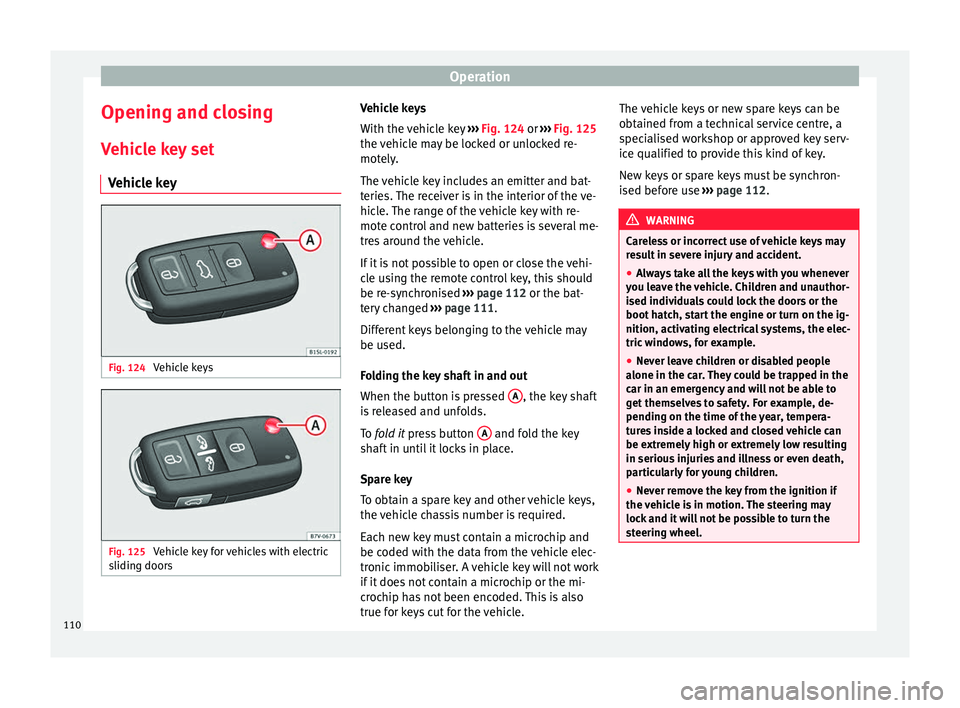
Vehicle key Fig. 124
Vehicle keys Fig. 125
Vehicle key for vehicles with electric
s lidin
g door
s Vehicle keys
W
ith the v
ehicle key ››› Fig. 124 or ››› Fig. 125
the vehicle may be locked or unlocked re-
motely.
The vehicle key includes an emitter and bat-
teries. The receiver is in the interior of the ve-
hicle. The range of the vehicle key with re-
mote control and new batteries is several me-
tres around the vehicle.
If it is not possible to open or close the vehi-
cle using the remote control key, this should
be re-synchronised ››› page 112 or the bat-
tery changed ››› page 111.
Different keys belonging to the vehicle may
be used.
Folding the key shaft in and out
When the button is pressed A , the key shaft
i s
r
eleased and unfolds.
To fold it press button A and fold the key
sh af
t
in until it locks in place.
Spare key
To obtain a spare key and other vehicle keys,
the vehicle chassis number is required.
Each new key must contain a microchip and
be coded with the data from the vehicle elec-
tronic immobiliser. A vehicle key will not work
if it does not contain a microchip or the mi-
crochip has not been encoded. This is also
true for keys cut for the vehicle. The vehicle keys or new spare keys can be
obtained fr
om a technical service centre, a
specialised workshop or approved key serv-
ice qualified to provide this kind of key.
New keys or spare keys must be synchron-
ised before use ››› page 112. WARNING
Careless or incorrect use of vehicle keys may
re s
ult in severe injury and accident.
● Always take all the keys with you whenever
you le
ave the vehicle. Children and unauthor-
ised individuals could lock the doors or the
boot hatch, start the engine or turn on the ig-
nition, activating electrical systems, the elec-
tric windows, for example.
● Never leave children or disabled people
alone in the car
. They could be trapped in the
car in an emergency and will not be able to
get themselves to safety. For example, de-
pending on the time of the year, tempera-
tures inside a locked and closed vehicle can
be extremely high or extremely low resulting
in serious injuries and illness or even death,
particularly for young children.
● Never remove the key from the ignition if
the vehic
le is in motion. The steering may
lock and it will not be possible to turn the
steering wheel. 110
Page 113 of 320
Opening and closing
CAUTION
All of the vehicle keys contain electronic com-
ponents. Pr ot
ect them from damage, impacts
and humidity. Note
● Only u
se the key button when you require
the corresponding function. Pushing the but-
ton unnecessarily could accidentally unlock
the vehicle or trigger the alarm. It is also pos-
sible even when you are outside the radius of
action.
● Key operation can be greatly influenced by
overl
apping radio signals around the vehicle
working in the same range of frequencies
(e.g. radio transmitters, mobile telephones).
● Obstacles between the remote control and
the vehic
le, bad weather conditions and
draining batteries can considerably reduce
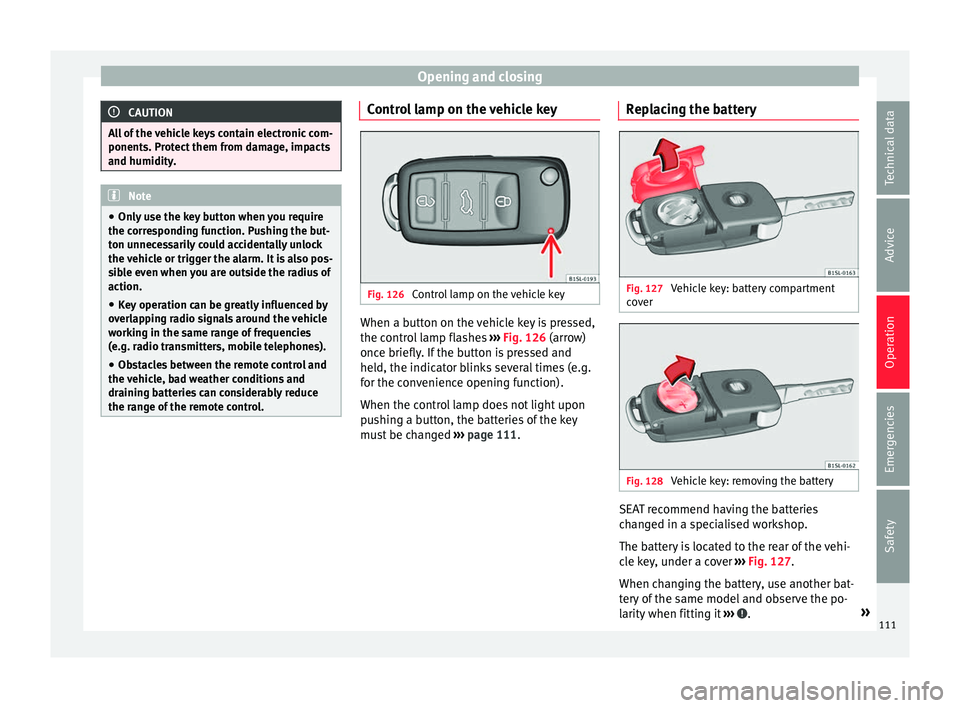
the range of the remote control. Control lamp on the vehicle key
Fig. 126
Control lamp on the vehicle key When a button on the vehicle key is pressed,
the c ontr
o
l lamp flashes ››› Fig. 126 (arrow)
once briefly. If the button is pressed and
held, the indicator blinks several times (e.g.
for the convenience opening function).
When the control lamp does not light upon
pushing a button, the batteries of the key
must be changed ››› page 111. Replacing the battery Fig. 127
Vehicle key: battery compartment
c o
v
er Fig. 128
Vehicle key: removing the battery SEAT recommend having the batteries
c
h
an
ged in a specialised workshop.
The battery is located to the rear of the vehi-
cle key, under a cover ››› Fig. 127.
When changing the battery, use another bat-
tery of the same model and observe the po-
larity when fitting it ››› .
»
111
Technical data
Advice
Operation
Emergencies
Safety
Page 114 of 320
Operation
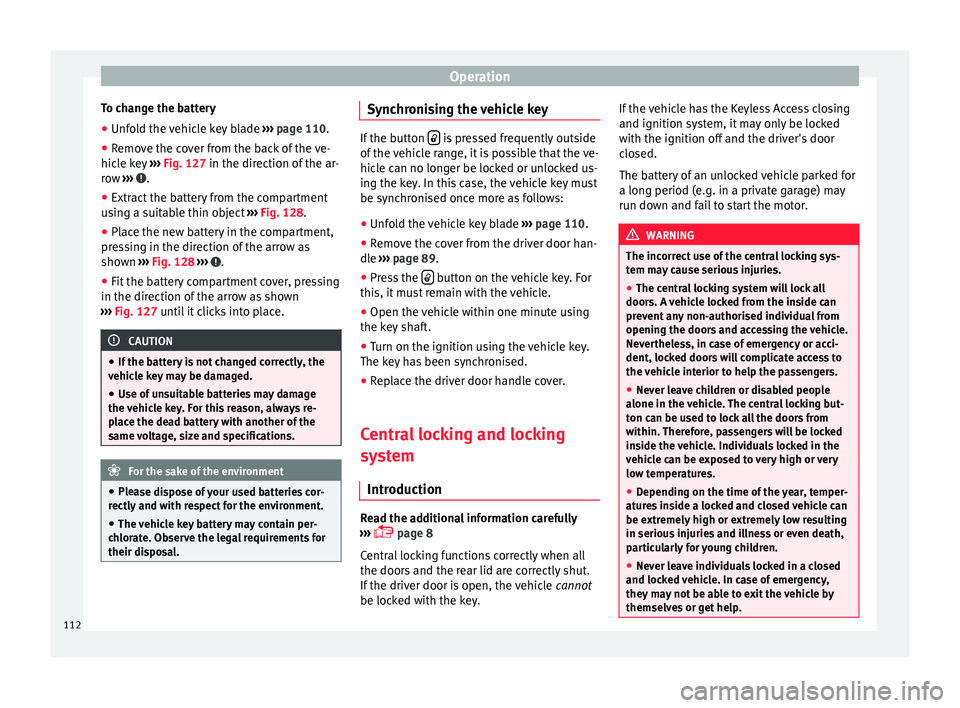
To change the battery
● Unfold the vehicle key blade ››
› page 110.
● Remove the cover from the back of the ve-
hicle k
ey ››› Fig. 127 in the direction of the ar-
row ››› .
● Extract the battery from the compartment
u s
in
g a suitable thin object ››› Fig. 128.
● Place the new battery in the compartment,
pres
sing in the direction of the arrow as
shown ››› Fig. 128 ››› .
● Fit the battery compartment cover, pressing
in the dir ection of
the arr
ow as shown
››› Fig. 127 until it clicks into place. CAUTION
● If the b att
ery is not changed correctly, the
vehicle key may be damaged.
● Use of unsuitable batteries may damage
the vehic
le key. For this reason, always re-
place the dead battery with another of the
same voltage, size and specifications. For the sake of the environment
● Ple a
se dispose of your used batteries cor-
rectly and with respect for the environment.
● The vehicle key battery may contain per-
chlor
ate. Observe the legal requirements for
their disposal. Synchronising the vehicle key
If the button
is pressed frequently outside
of the v
ehicle range, it is possible that the ve-
hicle can no longer be locked or unlocked us-
ing the key. In this case, the vehicle key must
be synchronised once more as follows:
● Unfold the vehicle key blade ›››
page 110.
● Remove the cover from the driver door han-
dle ››
› page 89.
● Press the button on the vehicle key. For
this, it mu
st remain with the vehicle.
● Open the vehicle within one minute using
the key sh
aft.
● Turn on the ignition using the vehicle key.
The key h
as been synchronised.
● Replace the driver door handle cover.
Central locking and locking
syst
em
Introduction Read the additional information carefully
› ›
›
page 8
Central locking functions correctly when all
the doors and the rear lid are correctly shut.
If the driver door is open, the vehicle cannot
be locked with the key. If the vehicle has the Keyless Access closing
and ignition syst
em, it may only be locked
with the ignition off and the driver's door
closed.
The battery of an unlocked vehicle parked for
a long period (e.g. in a private garage) may
run down and fail to start the motor. WARNING
The incorrect use of the central locking sys-
tem m a
y cause serious injuries.
● The central locking system will lock all
doors. A v
ehicle locked from the inside can
prevent any non-authorised individual from
opening the doors and accessing the vehicle.
Nevertheless, in case of emergency or acci-
dent, locked doors will complicate access to
the vehicle interior to help the passengers.
● Never leave children or disabled people
alone in the v
ehicle. The central locking but-
ton can be used to lock all the doors from
within. Therefore, passengers will be locked
inside the vehicle. Individuals locked in the
vehicle can be exposed to very high or very
low temperatures.
● Depending on the time of the year, temper-
ature
s inside a locked and closed vehicle can
be extremely high or extremely low resulting
in serious injuries and illness or even death,
particularly for young children.
● Never leave individuals locked in a closed
and locked
vehicle. In case of emergency,
they may not be able to exit the vehicle by
themselves or get help. 112
Page 132 of 320
Operation
When the light switch is in position
, a
phot o sen
sor automatically turns the instru-
ment and switch lighting on and off.
Automatic dipped beam control
The automatic dipped beam control is merely
intended as an aid and is not able to recog-
nise all driving situations.
When the light switch is in position , the
vehicle lights and the instrument panel and
switch lighting switch on and off automatical-
ly in the following situations ››› :
Automatic switching
onAutomatic switching
off or switch to day-
time running lighting
The photo sensor detects
darkness, for example,
when driving through a
tunnel.When adequate lighting is
detected.
The rain sensor detects
rain and activates the
windscreen wipers.When the windscreen wip-
er has been inactive for a
few minutes.
Adaptive headlights (AFS)
The a
d
aptiv
e headlights only operate when
the dipped beam is on and at speeds of over
10 km/h (6 mph). On bends, the adaptive
headlights automatically improve lighting on
the road ahead.
The adaptive headlights can be switched on
and off from the infotainment system. Static cornering lights
When turning s
lowly to change direction or
going round a tight bend, the static cornering
lights automatically come on. The static cor-
nering lights only work at speeds of less than
40 km/h (25 mph).
The static cornering lights may be incorpora-
ted into the fog lights or the front headlights,
depending upon the equipment. WARNING
If the road is not well lit and other road users
cannot see the
vehicle well enough or at all,
accidents may occur.
● The automatic dipped beam control ( )
only sw
itches on the dipped beam when
there are no changes in brightness, and not,
for example when it is foggy.
● Never drive with daytime lights if the road
is not
well lit due to weather or lighting con-
ditions. Daytime lights do not provide
enough light to illuminate the road properly
or be seen by other road users.
● The rear lights do not come on with the
daytime driv
ing light. A vehicle which does
not have the rear lights on may not be visible
to other drivers in the darkness, if it is rain-
ing or in conditions of poor visibility. Headlight adjustment
Headlight adjustment (Light Assist)
The hea
dlight
adjustment automatically con-
nects and disconnects these lights depend-
ing on the environmental and traffic condi-
tions and on the speed, within the limitations
of the system ››› . This is monitored by a
sensor loc at
ed on the inside of the wind-
screen, above the interior rear vision mirror.
The automatic headlight adjustment auto-
matically switches on the lights depending
on the vehicles travelling in front and in the
opposite direction, and on other environmen-
tal and traffic conditions from an approxi-
mate speed of 60 km/h (37 mph) and turns
them off again at speeds below approximate-
ly 30 km/h (18 mph).
Switching on and off
Action
Switch-
ing on:– With the ignition on, turn the lights control
to the position and put the turn signal
and main beam lever in the main beam posi-
tion ››› page 129. When the headlight adjust-
ment (automatic lights also) is activated, the
warning lamp lights up in the dash panel
display
. 130
Page 134 of 320
Operation
opened and when the “Coming home” or
“L e
av
ing home” function is switched on. If
the equipment includes the light sensor, the
lighting around the exterior mirrors only
comes when it is dark. Note
● The time tak en f
or the headlights to go off
can be changed in the Lights & Visibil- ity menu and the function can be switched
on or off ›››
page 26.
● When the “Coming home” function is on, if
the vehic
le door is opened there is no audible
warning signal to advise that the light is still
on. Hazard warning lights
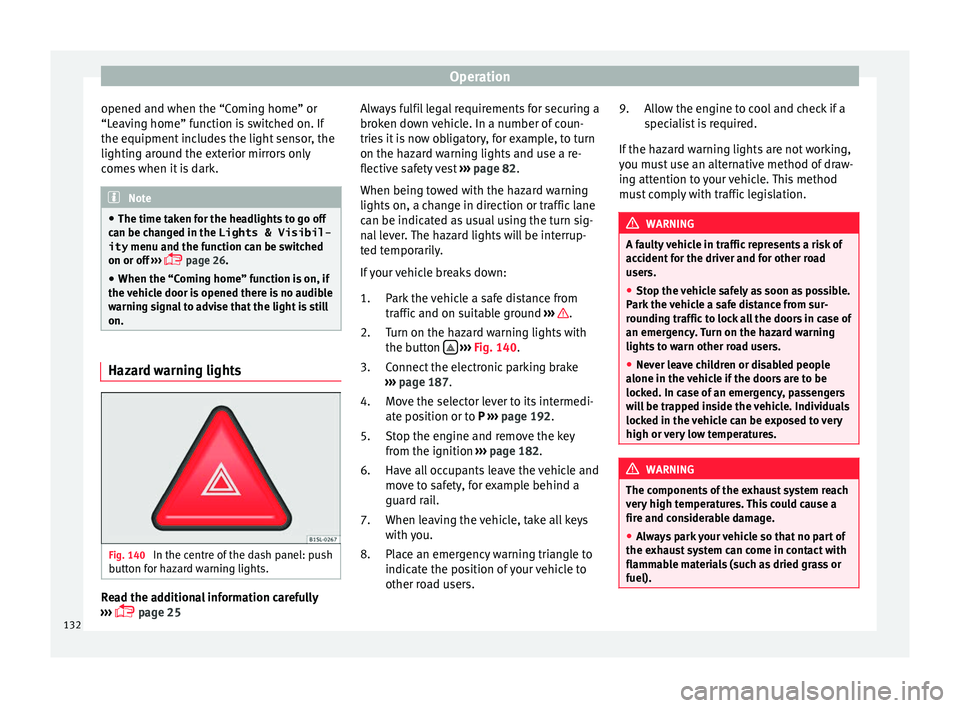
Fig. 140
In the centre of the dash panel: push
b utt
on f
or hazard warning lights. Read the additional information carefully
› ›
›
page 25 Always fulfil legal requirements for securing a
broken do
wn vehicle. In a number of coun-
tries it is now obligatory, for example, to turn
on the hazard warning lights and use a re-
flective safety vest ››› page 82.
When being towed with the hazard warning
lights on, a change in direction or traffic lane
can be indicated as usual using the turn sig-
nal lever. The hazard lights will be interrup-
ted temporarily.
If your vehicle breaks down:
Park the vehicle a safe distance from
traffic and on suitable ground ››› .
T urn on the h
az
ard warning lights with
the button
› ›
› Fig. 140
.
Connect the electronic parking brake
››› page 187.
Move the selector lever to its intermedi-
ate position or to P ››› page 192.
Stop the engine and remove the key
from the ignition ››› page 182.
Have all occupants leave the vehicle and
move to safety, for example behind a
guard rail.
When leaving the vehicle, take all keys
with you.
Place an emergency warning triangle to
indicate the position of your vehicle to
other road users.
1.
2.
3.
4.
5.
6.
7.
8. Allow the engine to cool and check if a
speci
alist is required.
If the hazard warning lights are not working,
you must use an alternative method of draw-
ing attention to your vehicle. This method
must comply with traffic legislation. WARNING
A faulty vehicle in traffic represents a risk of
acc ident
for the driver and for other road
users.
● Stop the vehicle safely as soon as possible.
Park the
vehicle a safe distance from sur-
rounding traffic to lock all the doors in case of
an emergency. Turn on the hazard warning
lights to warn other road users.
● Never leave children or disabled people
alone in the v
ehicle if the doors are to be
locked. In case of an emergency, passengers
will be trapped inside the vehicle. Individuals
locked in the vehicle can be exposed to very
high or very low temperatures. WARNING
The components of the exhaust system reach
ver y
high temperatures. This could cause a
fire and considerable damage.
● Always park your vehicle so that no part of
the exhau
st system can come in contact with
flammable materials (such as dried grass or
fuel). 9.
132
Page 138 of 320
Operation
●
The inter v
al wipe speed varies according to
the vehicle speed. The faster the vehicle is
moving, the more often the windscreen is
cleaned.
● The rear wiper is automatically switched on
when the winds
creen wiper is on and the car
is in reverse gear. Windscreen wiper functions
Windscreen wiper performance in different sit-
uations
If the vehicle
is at a stand-
stillThe activated position provisionally
changes to the previous position.
During auto-
matic wipe
The air conditioner comes on for ap-
proximately 30 seconds in air recircula-
tion mode to prevent the smell of the
windscreen washer fluid entering the
inside the vehicle.
For the inter-
val wipeIntervals between wipes depend on the
vehicle's speed. The higher the vehicle
speed the shorter the intervals.
Heated windscreen washer jets
The he
atin
g on
ly thaws the frozen jets, it
does not thaw the water in the washer hoses.
The heated windscreen washer jets automati-
cally adjust the heat depending on the ambi-
ent temperature when the ignition is switch-
ed on. Headlight wash/wipe system
The headlight
washers/wipers clean the
headlight lenses.
After the ignition is switched on, the first and
every fifth time the windscreen washer is
switched on, the headlights are also washed.
Therefore, the windscreen wiper lever should
be pulled towards the steering wheel when
the dipped beam or main beam are on. Any
incrusted dirt (such as insects) should be
cleaned regularly (e.g. when refuelling).
To ensure the headlight washers work cor-
rectly in winter, any snow which has got into
the bumper jet supports should be cleaned
away. If necessary, remove snow with an anti-
icing spray. Note
The wiper will try to wipe away any obstacles
that ar
e on the windscreen. The wiper will
stop moving if the obstacle blocks its path.
Remove the obstacle and switch the wiper
back on again. Rain sensor*
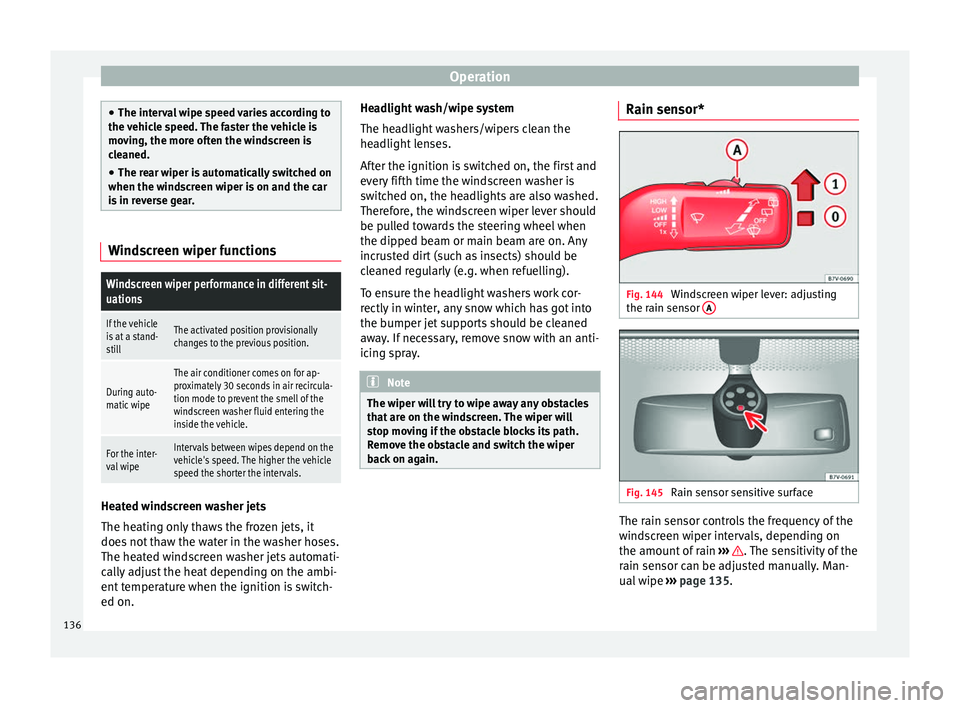
Fig. 144
Windscreen wiper lever: adjusting
the r ain sen
sor A Fig. 145
Rain sensor sensitive surface The rain sensor controls the frequency of the
w
ind
s
creen wiper intervals, depending on
the amount of rain ››› . The sensitivity of the
r ain sen
sor c
an be adjusted manually. Man-
ual wipe ››› page 135.
136
Page 165 of 320
Transport and practical equipment
Distributing a load
Unif orm
ly
distribute loads and secure them
correctly ››› .
Chec k
att
achments
After fitting the base supports and the roof
carrier system, always check the attachments
after a short trip and at regular intervals. WARNING
Exceeding the maximum authorised roof load
can r e
sult in accidents and/or vehicle dam-
age.
● Never surpass the maximum authorised
weight f
or the roof, the maximum authorised
weight on the axles and the total maximum
authorised weight of the vehicle.
● Never exceed the capacity of the roof carri-
er syst
em even if this is less than the maxi-
mum authorised roof load.
● Secure heavy items as far forward as possi-
ble and, in g
eneral, distribute the vehicle
load uniformly. WARNING
Loose and incorrectly secured loads can fall
from the r oof
carrier system causing acci-
dents and injury.
● Always use suitable ropes and straps in
good condition.
● A
lways secure loads correctly. Storage compartments
Intr oduction Storage compartments must only be used to
st
or
e light or small objects.
In the front centre armrest compartment the
following factory-fitted connections are avail-
able: USB/AUX-IN.
The factory-fitted CD changer is located in the
left-hand storage compartment of the boot. WARNING
In the event of sudden braking movements or
turn s, loo
se objects may be thrown around
the vehicle interior. This could cause serious
injuries to passengers and cause the driver to
lose control of the vehicle.
● Do not transport animals or place hard,
heavy or sh
arp objects inside the vehicle in:
open storage compartments, dash panel, rear
shelf, items of clothing or bags.
● While driving, always keep object compart-
ments c
losed. WARNING
Objects falling into the driver's footwell could
prev ent
use of the pedals. This could lead the
driver to lose control of the vehicle, increas-
ing the risk of a serious accident. ●
Mak e s
ure the pedals can be used at all
times, with no objects rolling underneath
them.
● The floor mat should always be secured to
the floor.
● Never p
lace other mats or rugs on top of
the original
mat supplied by the factory.
● Make sure that no objects can fall into the
driver's f
ootwell while the vehicle is in mo-
tion. CAUTION
● Obj
ects on the shelf could chafe against
the wires of the heating element in the heat-
ed rear window and cause damage.
● Do not keep heat-sensitive objects, food or
medicines
inside the vehicle. Heat and cold
could damage them or render them useless.
● Light-transparent objects placed inside the
vehicl
e, such as lenses, magnifying glasses
or transparent suction caps on the windows,
may concentrate the sun's rays and cause
damage to the vehicle. Note
The ventilating slits between the heated rear
windo w and the shelf
must not be covered so
that used air can escape from the vehicle. 163
Technical data
Advice
Operation
Emergencies
Safety
Page 193 of 320
Driving
emergency braking distance is larger then
when the br ak
e p
ads have been run in. While
running in, avoid full power braking or situa-
tions requiring braking performance. For ex-
ample, in heavy traffic.
The rate of wear of the brake pads depends
to a great extent on the conditions in which
the vehicle is used and the way the vehicle is
driven. If the vehicle is used frequently in city
traffic or for short trips or driven sport style,
visit a specialised workshop regularly, more
frequently than advised in the Maintenance
Programme, to have the brake pads checked.
If you drive with wet brakes, for example, af-
ter crossing areas of water, in heavy rainfall
or even after washing the car, the effect of
the brakes is lessened as the brake discs are
wet or even frozen (in winter). At higher
speed, “dry” the brakes as quickly as possi-
ble by braking gently several times. Only do
this without endangering vehicles behind
you or any other road users ››› .
A l a
y
er of salt on the discs and brake pads
will reduce the effectiveness of the brakes
and increase braking distance. If you drive for
a prolonged period on salted roads without
braking then brake carefully several times to
eliminate the layer of salt on the brakes ››› .
If the
v
ehicle remains parked for considera-
ble lengths of time, is used little, or if the
brakes are not used, there may be corrosion
on the brake discs and a build up of dirt onthe brake pads. If the brakes are not used fre-
quently, or if ru
st has formed on the discs,
SEAT recommends cleaning the pads and
discs by braking firmly a few times at a mod-
erately high speed. Only do this without en-
dangering vehicles behind you or any other
road users ››› .
F au
lt
s in the brake system
During braking, if you notice that the vehicle
does not react as usual (that the braking dis-
tance has increased suddenly) it may be pos-
sible that there is a fault in the braking sys-
tem. The warning lamp lights up and a
text message displayed. Take the vehicle to a
specialised workshop immediately and have
the fault repaired. Drive at a moderate speed
and be prepared to use more pressure on the
brake pedal, and allow for longer stopping
distances.
Brake servo
The brake servo only operates when the en-
gine is running and the pressure applied by
the driver on the brake pedal increases.
If the brake servo does not operate or the ve-
hicle must be towed, then the brake pedal
will have to be pressed with more force given
that the braking distance will be increased
when the brake servo does not operate ››› . WARNING
New brake pads do not brake to full efficien-
cy.
● For the fir
st 320 km (200 miles), new brake
pad
s have not yet reached their maximum
braking capacity, and need to be “run in”
first. For this, to compensate for reduced
braking efficiency the brake pedal will have
to be pressed with more force.
● To avoid losing control of the vehicle and
caus
ing serious accidents, always take great
care when driving with new brake pads.
● When running in new brake pads, always
res
pect the safety distances between you and
other vehicles and do not cause situations re-
quiring extreme braking performance. WARNING
When brakes overheat, braking is less effi-
cient and br
aking distances increase.
● When driving on slopes, brakes can be
overlo
aded and overheat quickly.
● Reduce speed or change down a gear when
faced w
ith steep and long slopes. This allows
you to use the engine braking effect and to
reduce the strain on the brake system.
● Non-standard or damaged front spoilers
coul
d restrict the airflow to the brakes and
cause them to overheat. » 191
Technical data
Advice
Operation
Emergencies
Safety
Page 194 of 320
Operation
WARNING
Wet, frozen or salt-covered brakes take lon-
ger t o en
gage and this increases braking dis-
tances.
● Test the brakes carefully.
● Dry the brakes, free them of ice and salt by
brakin
g gently several times, when weather,
road and traffic conditions permit. WARNING
Driving without the brake servo may signifi-
cantly inc
rease the braking distance and re-
sult in a severe accident.
● Never allow the vehicle to move forwards
when the engine is
switched off.
● If the brake servo does not operate or the
vehicl
e must be towed, then the brake pedal
will have to be pressed with more force given
that the braking distance will be increased
when the brake servo does not operate. CAUTION
● Never m ak
e the brakes “slip” by pressing
the pedal gently, if it is not really necessary
to brake. Continuously pressing on the brake
pedal will heat the brakes. This could signifi-
cantly reduce braking power, increase brak-
ing distance or even result in the total failure
of the brake system.
● Reduce speed or change down a gear when
faced w
ith steep and long slopes. This allows
you to use the engine braking effect and to reduce the strain on the brake system. Other-
wi
se, the br
akes may overheat and fail. Only
use the brakes to reduce speed or to stop. Note
When checking the front brake pads, take the
time t o al
so check the rear brake pads. The
thickness of the brake pads should be
checked visually and regularly, by looking
through the openings in the wheel rims or
from underneath the vehicle. If necessary, re-
move the wheels to check them thoroughly.
SEAT recommends taking your car in for tech-
nical service. Gearbox
Intr oduction When reverse gear is engaged and the igni-
tion i
s
sw
itched on the following takes place:
● Reverse lights light up.
● When reversing, the air conditioner auto-
matical
ly changes to air recirculation mode.
● The rear window heater switches on when
the winds
creen wiper is activated.
● Also, the parking sensor system, the opti-
cal p
arking sensor and the camera for the re-
verse assist system are connected. WARNING
Rapid acceleration can cause loss of traction
and skid din
g, especially on slippery ground.
This could cause loss of control of the vehicle
resulting in an accident and considerable
damage.
● Only use the kick-down function or rapid
accel
eration if visibility, weather, road and
traffic conditions so permit. WARNING
Do not allow the brakes to “rub” for a pro-
long ed period of
time, or brake frequently or
for long periods of time. Continuous braking
heats up the brakes. This could significantly
reduce braking power, increase braking dis-
tance or even result in the total failure of the
brake system. Control and warning lamps
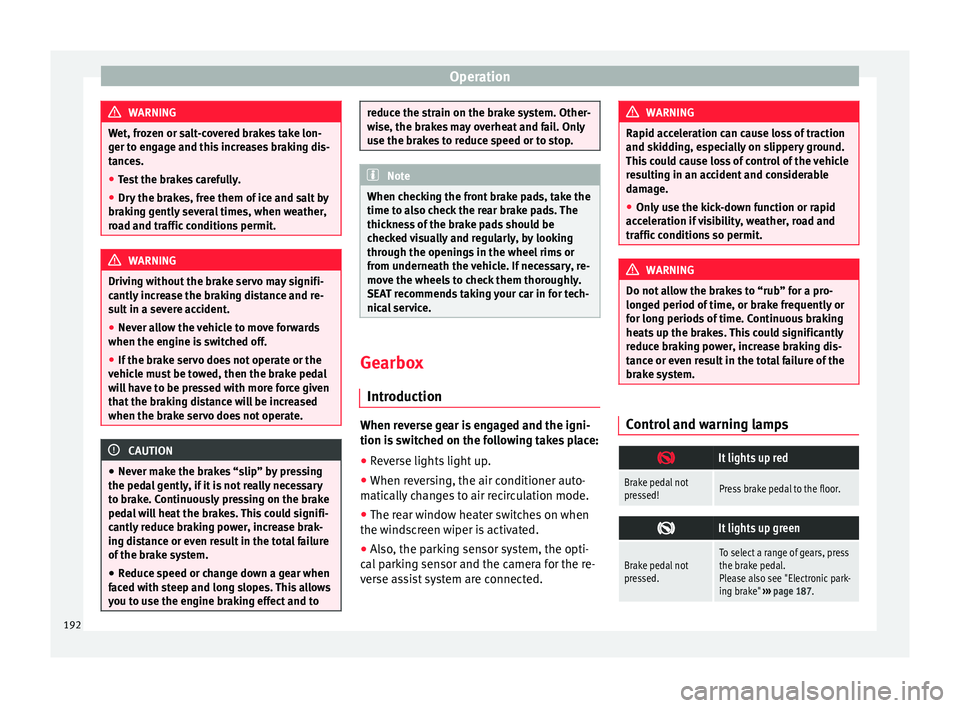
It lights up red
Brake pedal not
pressed!Press brake pedal to the floor.
It lights up green
Brake pedal not
pressed.To select a range of gears, press
the brake pedal.
Please also see "Electronic park-
ing brake"
››› page 187. 192
Page 197 of 320
Driving
CAUTION
If, when the vehicle is at a standstill, the
electr onic
parking brake is not applied and
the brake pedal is released while in position
P, the vehicle may move a few centimetres
forwards or backwards. Note
If, while driving, the selector lever is acciden-
ta l
ly placed in position N, lift your foot off the
accelerator. Wait until the engine is running
at idle speed before selecting a new gear
range. Gear change with Tiptronic*
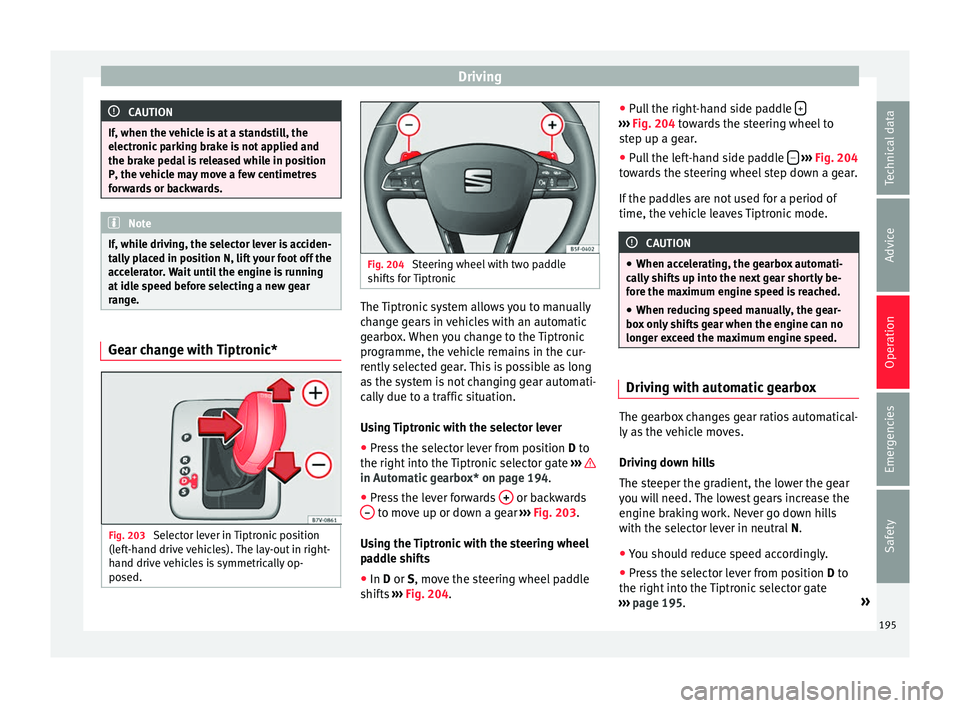
Fig. 203
Selector lever in Tiptronic position
(l ef t
-hand drive vehicles). The lay-out in right-
hand drive vehicles is symmetrically op-
posed. Fig. 204
Steering wheel with two paddle
shifts f
or Tiptronic The Tiptronic system allows you to manually
c
h
an
ge gears in vehicles with an automatic
gearbox. When you change to the Tiptronic
programme, the vehicle remains in the cur-
rently selected gear. This is possible as long
as the system is not changing gear automati-
cally due to a traffic situation.
Using Tiptronic with the selector lever
● Press the selector lever from position D to
the right int
o the Tiptronic selector gate ››› in Automatic gearbox* on page 194.
●
Press the lever forwards + or backwards
– to move up or down a gear
››
›
Fig. 203.
Using the Tiptronic with the steering wheel
paddle shifts
● In D or S, move the s
teering wheel paddle
shifts ››› Fig. 204. ●
Pul
l the right-hand side paddle + ›››
Fig. 204 t o
w ards the steering wheel to
step up a gear.
● Pull the left-hand side paddle –
› ››
Fig. 204
t o
wards the steering wheel step down a gear.
If the paddles are not used for a period of
time, the vehicle leaves Tiptronic mode. CAUTION
● When acc el
erating, the gearbox automati-
cally shifts up into the next gear shortly be-
fore the maximum engine speed is reached.
● When reducing speed manually, the gear-
box on
ly shifts gear when the engine can no
longer exceed the maximum engine speed. Driving with automatic gearbox
The gearbox changes gear ratios automatical-
ly
a
s
the vehicle moves.
Driving down hills
The steeper the gradient, the lower the gear
you will need. The lowest gears increase the
engine braking work. Never go down hills
with the selector lever in neutral N.
● You should reduce speed accordingly.
● Press the selector lever from position D to
the right int
o the Tiptronic selector gate
››› page 195. »
195
Technical data
Advice
Operation
Emergencies
Safety