navigation system Seat Alhambra 2017 User Guide
[x] Cancel search | Manufacturer: SEAT, Model Year: 2017, Model line: Alhambra, Model: Seat Alhambra 2017Pages: 320, PDF Size: 6.88 MB
Page 204 of 320
Operation
WARNING
● Alw a
ys drive according to the road weather
conditions, the terrain and traffic. Driving rec-
ommendations should never lead to illegal
manoeuvres in surrounding traffic. For the sake of the environment
Even when the emission control system is
work in
g perfectly, there may be a smell of
sulphur under certain conditions. This de-
pends on the sulphur content of the fuel be-
ing used. Driving tips
Driv ing abr
oadIn some countries, certain safety regulations
and r
equir
ements
are in force relating to ex-
haust gas emissions, which differ from the
technical characteristics of the vehicle. Be-
fore travelling abroad, SEAT recommends you
consult a technical service about the legal re-
quirements and the following points:
● Does the vehicle need technical modifica-
tions f
or driving abroad, for example, adjust-
ment of the headlamps?
● Does the vehicle have all the tools, diag-
nostic
s equipment and spare parts required
for inspections and repairs? ●
Are there an
y SEAT dealers in the destina-
tion country?
● For petrol vehicles: Is unleaded petrol avail-
able at
the right octane rating?
● For diesel engines: Is diesel fuel available
with a low s
ulphur content?
● Are a suitable engine oil ( ›››
page 271) and
other engine fluids complying with SEAT
specifications available in the destination
country?
● Will the navigation system fitted at the fac-
tory
operate correctly in the destination coun-
try with the available navigation data?
● Are special tyres required in the destination
countr
y? CAUTION
SEAT does not accept liability for any damage
to the v
ehicle due to the use of a lower quali-
ty fuel, an inadequate service or the non-
availability of genuine spare parts. Driving along flooded roadways
To prevent damage to the vehicle when driv-
in
g thr
ough w
ater, for example, along a floo-
ded road, please observe the following:
● Check the depth of the water before enter-
ing the flooded z
one. The water should never
come above the lower edge of the bodywork
››› .●
Do not driv
e f
aster than a pedestrian.
● Do not stop in the water, use reverse gear
or switc
h off the engine.
● Oncoming traffic will cause waves which
raise the l
evel of the water, making it difficult
to cross the water.
The Start/Stop system must be deactivated
when driving through flooded areas WARNING
When driving through water, mud, melted
sno w
, etc., please remember that due to
damp or frozen brake discs and shoes in win-
ter, the braking effect may be delayed, there-
fore the required braking distance is greater.
● “Dry the brakes and remove ice” by braking
caref
ully. Ensure that you are not endanger-
ing other road-users or breaking traffic regu-
lations in the process.
● After driving through water, avoid sudden
sharp manoeu
vres. CAUTION
● Drivin g thr
ough flooded areas may severely
damage vehicle components such as the en-
gine, transmission, drive train or electrical
system.
● Never drive through salt water as salt cau-
ses c
orrosion. Always rinse any parts of the
vehicle which have been in contact with salt
water. 202
Page 212 of 320
Operation
tones. If the vehicle is too close to the obsta-
c l
e, the audib
le warning becomes constant.
Switching the parking distance warning sys-
tem on and off
● Press the button
›››
Fig. 208
when the
ignition i
s switched on.
● Automatic on: select r
everse gear.
● Automatic off: drive fa
ster than 15 km/h
(9 mph).
The button lights up when the function is
switched on.
Things to note on the parking distance warn-
ing system
● The parking distance warning system
sometimes r
egisters water on the sensors as
an obstacle.
● If the distance does not change, the warn-
ing sign
al will sound less loudly after a few
seconds. If the continuous signal sounds, the
volume will remain constant.
● When the vehicle moves away from the ob-
stac
le, the beeping sound automatically
switches off. On approaching the obstacle
again, the beeping sound will automatically
switch back on.
● If the electronic parking brake is engaged
or the selector l
ever is set to P, no audible
warning will be emitted. ●
Your tec
hnical service centre can adjust the
volume of the warning signals. Note
If the parking distance warning system is
fau lty
, a constant audible warning will be
emitted the first time it is switched on and
the button will flash. Switch the parking dis-
tance warning system off using the button
and take the vehicle to a specialised work-
shop to have the system checked as soon as
possible. Optical parking system* (OPS)
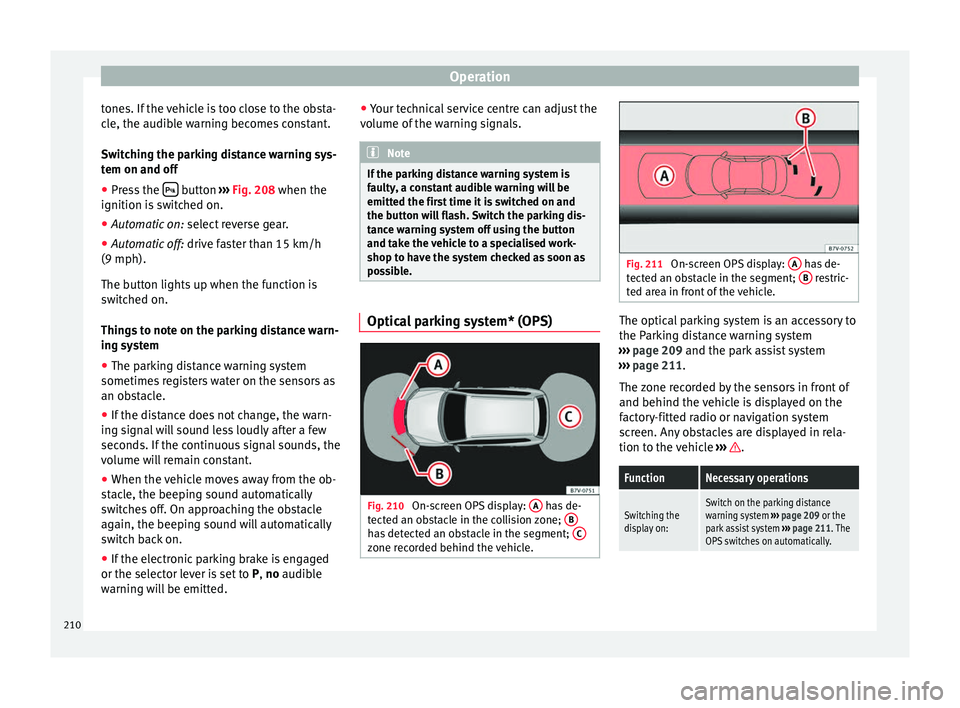
Fig. 210
On-screen OPS display: A has de-
t ect
ed an o
bstacle in the collision zone; B has detected an obstacle in the segment;
C zone recorded behind the vehicle. Fig. 211
On-screen OPS display: A has de-
tect ed an o
bstacle in the segment; B restric-
ted ar e
a in front of the vehicle. The optical parking system is an accessory to
the P
ark
in
g distance warning system
››› page 209 and the park assist system
››› page 211.
The zone recorded by the sensors in front of
and behind the vehicle is displayed on the
factory-fitted radio or navigation system
screen. Any obstacles are displayed in rela-
tion to the vehicle ››› .
FunctionNecessary operations
Switching the
display on:Switch on the parking distance
warning system
››› page 209 or the
park assist system ››› page 211. The
OPS switches on automatically. 210
Page 213 of 320
Driver assistance systemsFunctionNecessary operations
Switching the
display off man-
ually:Press a zone selection button on the
factory-fitted radio or navigation
system
OR: briefly press the function button
or
RVC on the screen.
Switching the
display off man-
ually:
Drive forwards at more than about
10-15 km/h (6-9 mph).
Select the reverse gear on vehicles
with rear assist
››› page 215. The
display changes to the image of the
camera. Zones explored
The
z
one in whic
h obstacles are recognised
runs to a distance of around 120 cm from the
front of the vehicle and up to 60 cm to the
side ›››
Fig. 211 B . Behind the vehicle, the
z one an
aly
sed reaches a distance of up to
160 cm and around 60 cm to the sides
››› Fig. 210 C .
Sc r
een di
splay
The image displayed represents the super-
vised zones in several segments. As the vehi-
cle moves closer to an obstacle, the segment
moves closer to the vehicle displayed
››› Fig. 210 B and
››
›
Fig. 211 A . When the
penu ltim
at
e segment is displayed, this
means that the vehicle has reached the colli-
sion zone. Stop the vehicle!
Distance from the
vehicle to the ob-
stacleAudible
warn- ing
Displayed in
colour on the
screen: colour
of the segment if an obstacleis recognised
Front: approx. 31 -120 cm
Behind: approx. 31 -
160 cmBeeping soundYellow
Approximately 0 –
30 cm in front or be-
hind a)Perma-
nent
soundRed
a) The permanent sound starts at a somewhat greater distance
on vehicles with a factory-fitted towing bracket.
With towing bracket
A specific image is displayed on the screen of
vehicles with a factory-fitted towing bracket
and an electrically connected trailer. In this
case, the distances behind the vehicle are
not indicated.
Switching the parking sensor system sound
on and off
If the button on the radio or navigation
sy s
t
em screen may mute the sound of OPS
warnings. To switch the warnings back on,
press the button again briefly.
When the OPS is switched off and back on
again, muting is cancelled. Error messages
cannot be switched off. WARNING
Do not be distracted from the traffic when
lookin g at
the screen. Park Assist system* (Park As-
si
s
t)
Introduction
›› ›
table on page 2
The Park Assist system helps the driver to
find a suitable place to park, to insert the ve-
hicle into parallel and perpendicular parking
places and to leave parallel parking places.
The Park Assist system is limited to the sys-
tem abilities and requires that the driver is
especially attentive ››› .
The p ark
in
g sensor system is a component of
the Park Assist system that helps to park the
vehicle.
For vehicles with the optical parking system
(OPS), the radio navigation systems screen
displays the detected zones in front of and
behind the vehicle, indicating - within the
limits of the system - the position of obsta-
cles in relation to the vehicle.
The park assist system cannot be switched
on if the factory-fitted towing bracket is elec-
trically connected to a trailer. »
211
Technical data
Advice
Operation
Emergencies
Safety
Page 217 of 320
Driver assistance systems
WARNING
The steering wheel turns quickly automatical-
ly when l e
aving a parking space using the
park assist system. Placing your hand be-
tween the steering wheel spokes could lead
to injuries. Park Assist brake operation
The Park Assist system helps the driver by
brak
in
g automatically. Automatic braking
does not relieve the driver of responsibility
for controlling the accelerator, brake and
clutch ››› .
Br ak
in
g to avoid damage at excess speed
It is possible that the system operates the
brakes to reduce excess speed. The parking
manoeuvre can then continue. The brakes
will intervene during each parking process.
Braking to minimise damage
When approaching an obstacle, the vehicle
may brake automatically. In certain circum-
stances (e.g. storm, detection of ultrasounds,
vehicle status, load, inclination), the Park As-
sist system may stop the vehicle completely
before an object.
● Press the foot brake ››
›
!Following the intervention of the brakes, the
P
ark
As
sist will stop. WARNING
Despite the assistance provided by the park
as s
ist system, do not run any risks when
parking. The system is not a replacement for
driver awareness.
● Always be ready to brake.
● Automatic brake intervention will end after
1.5 seconds
approximately. Following auto-
matic intervention of the brakes, stop the ve-
hicle yourself. Rear assist* (Rear View Cam-
er
a)
Intr oduction The camera fitted to the rear lid helps drivers
durin
g p
ark
ing or reversing manoeuvres. The
camera image and certain orientation points
generated by the system are indicated on the
factory-fitted radio or navigation system
screen.
Two types of location point (modes) can be
selected:
● Mode 1: reverse parking perpendicular to
the ro
ad (e.g. in a car park). ●
Mode 2: rever
se parking parallel to the
curb.
The mode can be changed by pressing the
button on the radio or navigation system
screen. Only the mode to which the points
can be changed will be displayed. WARNING
Use of the camera to calculate the distance
from o b
stacles (people, vehicles, etc.) is inac-
curate and may cause accidents and severe
injuries.
● The camera lens expands and distorts the
field of
vision and displays the objects on the
screen in a different, vague manner.
● Some objects may not be displayed or may
not be v
ery clear (e.g. very thin posts or fen-
ces), due to the resolution of the monitor or if
the light is dim.
● The camera has blind spots in which obsta-
cle
s and people are not detected.
● Keep the camera lens clean and clear of
snow and ic
e. Do not cover it. WARNING
The intelligent technology in the rear assist
sys t
em cannot change the limits imposed by
the laws of physics and by the system itself.
Careless or uncontrolled use of the rear assist
system may result in severe injuries and acci-
dents. The system is not a replacement for
driver awareness. » 215
Technical data
Advice
Operation
Emergencies
Safety
Page 218 of 320
Operation
●
Adjus t
your speed and driving style to visi-
bility, road, traffic and weather conditions.
● Always keep a close eye on the area around
the vehic
le and always look towards where
you are parking. The display shows the path
of the rear end of the vehicle using the cur-
rent steering angle. The front of the vehicle
turns more in comparison with the rear.
● Do not be distracted from the traffic when
looking at
the screen.
● Always observe the area around the vehi-
cle, a
s the cameras do not always detect chil-
dren, animals or objects.
● The system might not show all areas clear-
ly.
● Only
use the rear assist system when the
boot hat
ch is completely closed. CAUTION
● The camer a on
ly displays 2D images on the
screen. Due to the lack of depth, it might be
difficult or impossible to recognise protrud-
ing objects or cracks in the road.
● The cameras may not always be able to de-
tect o
bjects such as thin rails, fences, posts
and trees, etc. This could result in damage to
your car. Instructions for use
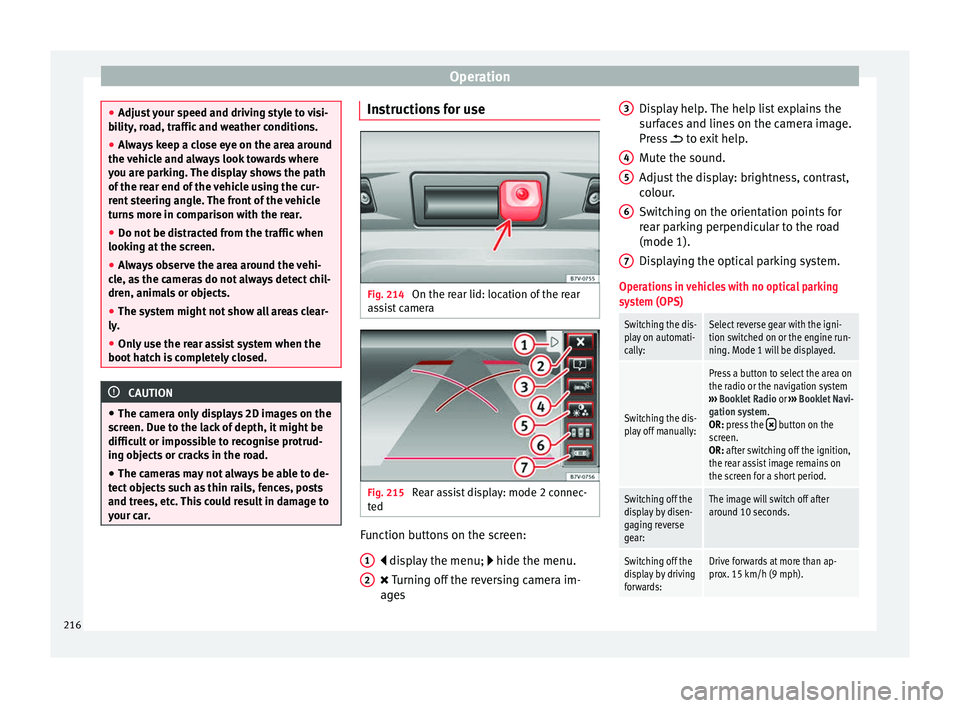
Fig. 214
On the rear lid: location of the rear
a s
s
ist camera Fig. 215
Rear assist display: mode 2 connec-
t ed Function buttons on the screen:
di s
p
lay the menu; hide the menu.
Turning off the reversing camera im-
ages
1 2 Display help. The help list explains the
s
ur
f
aces and lines on the camera image.
Press to exit help.
Mute the sound.
Adjust the display: brightness, contrast,
colour.
Switching on the orientation points for
rear parking perpendicular to the road
(mode 1).
Displaying the optical parking system.
Operations in vehicles with no optical parking
system (OPS)
Switching the dis-
play on automati-
cally:Select reverse gear with the igni-
tion switched on or the engine run-
ning. Mode 1 will be displayed.
Switching the dis-
play off manually:
Press a button to select the area on
the radio or the navigation system
››› Booklet Radio or ››› Booklet Navi-
gation system.
OR: press the
button on the
screen.
OR: after switching off the ignition,
the rear assist image remains on
the screen for a short period.
Switching off the
display by disen-
gaging reverse
gear:The image will switch off after
around 10 seconds.
Switching off the
display by driving
forwards:Drive forwards at more than ap-
prox. 15 km/h (9 mph). 3
4
5
6
7
216
Page 219 of 320
Driver assistance systemsOperations in vehicles with the optical parking
system (OPS)
Switching the dis-
play on automati-
cally:Select reverse gear with the igni-
tion switched on or the engine run-
ning. Mode 1 will be displayed.
Switching the dis-
play off manually:
Press a button to select the area on
the radio or the navigation system
››› Booklet Radio or ››› Booklet Navi-
gation system.
OR: press the
button on the
screen.
OR: after switching off the ignition,
the rear assist image remains on
the screen for a short period.
Press button .
Switching off the
display by disen-
gaging reverse
gear:The OPS display will immediately
be shown.
Switching off the
display by driving
forwards:Drive forwards at more than ap-
prox. 10 km/h (6 mph). Things to note
1) Do not use the rear assist system in the fol-
lowing cases:
– If there is a fault in the dynamic chassis control (DCC).
– If the image displayed is not very clear or reliable (low
visibility or dirty lens).
– If the space behind the vehicle cannot be clearly or
completely recognised.
1) Do not use the rear assist system in the fol-
lowing cases:
– If the vehicle has been overloaded at the rear.
– If the driver is not familiar with the system.
– If the rear lid is open.
– If the position and installation angle of the camera
have been changed, e.g. in a rear-end collision. Have a
specialised workshop check the system.
2) Optical illusions of the camera (examples)
The rear assist camera produces two-dimensional im-
ages. Any cracks in or objects protruding from the
ground or from other vehicles are more difficult to spot
or cannot be seen due to a lack of depth in the image
displayed.
Objects or other vehicles may seem to be closer or fur-
ther away than what they really are:
– On changing from a flat surface to a slope or gradient.
– On changing from a slope or gradient to a flat surface.
– If the vehicle has been overloaded at the rear.
– On approaching protruding objects. These objects
may be outside the angle of vision of the camera when
reversing.
Cleaning the camera lens
K
eep the c
amer
a lens clean and clear of snow
and ice:
● Moisten the lens using a commercially
avail
able, alcohol-based glass cleaning agent and clean the lens with a dry cloth
›››
.
● Remove snow using a small brush.
● Use de-icing spray to remove any ice ››
›
.
CAUTION
● Never u se abr
asive cleaners to clean the
camera lens.
● Never remove snow or ice from the camera
lens
using warm or hot water. This could
damage the lens. Note
● SEA T r
ecommends that you practise park-
ing with the rear assist system in a quiet lo-
cation or in a car park to become familiar with
the system, including the orientation lines
and their function.
● The orientation lines will not be displayed
on the scr
een if the rear lid is open or the fac-
tory-fitted towing bracket is electrically con-
nected to a trailer. 217
Technical data
Advice
Operation
Emergencies
Safety
Page 220 of 320
Operation
Parking perpendicular to the road
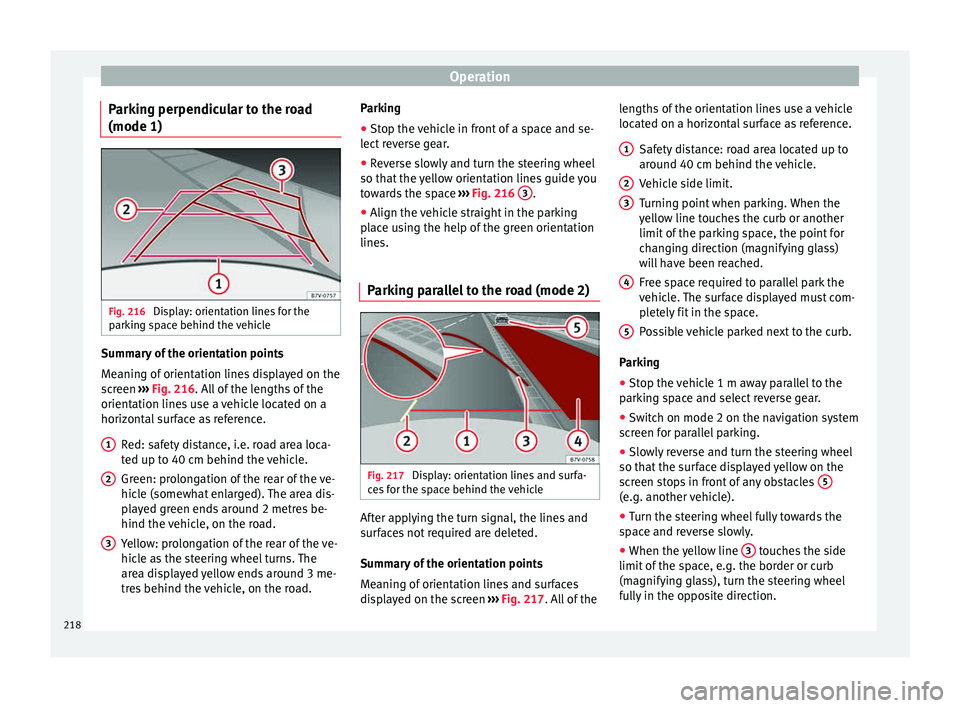
(mode 1) Fig. 216
Display: orientation lines for the
p ark
in
g space behind the vehicle Summary of the orientation points
M
e
anin
g of orientation lines displayed on the
screen ››› Fig. 216. All of the lengths of the
orientation lines use a vehicle located on a
horizontal surface as reference.
Red: safety distance, i.e. road area loca-
ted up to 40 cm behind the vehicle.
Green: prolongation of the rear of the ve-
hicle (somewhat enlarged). The area dis-
played green ends around 2 metres be-
hind the vehicle, on the road.
Yellow: prolongation of the rear of the ve-
hicle as the steering wheel turns. The
area displayed yellow ends around 3 me-
tres behind the vehicle, on the road.
1 2
3 Parking
●
Stop the vehicle in front of a space and se-
l ect
r
everse gear.
● Reverse slowly and turn the steering wheel
so that the
yellow orientation lines guide you
towards the space ››› Fig. 216 3 .
● Align the vehicle straight in the parking
p l
ac
e using the help of the green orientation
lines.
Parking parallel to the road (mode 2) Fig. 217
Display: orientation lines and surfa-
c e
s
for the space behind the vehicle After applying the turn signal, the lines and
s
ur
f
aces not required are deleted.
Summary of the orientation points
Meaning of orientation lines and surfaces
displayed on the screen ››› Fig. 217. All of the lengths of the orientation lines use a vehicle
located on a horiz
ontal surface as reference.
Safety distance: road area located up to
around 40 cm behind the vehicle.
Vehicle side limit.
Turning point when parking. When the
yellow line touches the curb or another
limit of the parking space, the point for
changing direction (magnifying glass)
will have been reached.
Free space required to parallel park the
vehicle. The surface displayed must com-
pletely fit in the space.
Possible vehicle parked next to the curb.
Parking ● Stop the vehicle 1 m away parallel to the
parkin
g space and select reverse gear.
● Switch on mode 2 on the navigation system
scr
een for parallel parking.
● Slowly reverse and turn the steering wheel
so that the s
urface displayed yellow on the
screen stops in front of any obstacles 5 (e.g. another vehicle).
●
Turn the steering wheel fully towards the
s p
ac
e and reverse slowly.
● When the yellow line 3 touches the side
limit of
the s
pace, e.g. the border or curb
(magnifying glass), turn the steering wheel
fully in the opposite direction. 1 2
3
4
5
218
Page 230 of 320
Operation
CAUTION
● If o l
d mapping data is used in the naviga-
tion system, this may cause the traffic signs
to be shown incorrectly.
● In the route points mode (navigation by
route point
s) of the navigation system, Sign
Assist is only partly available. Indication on display
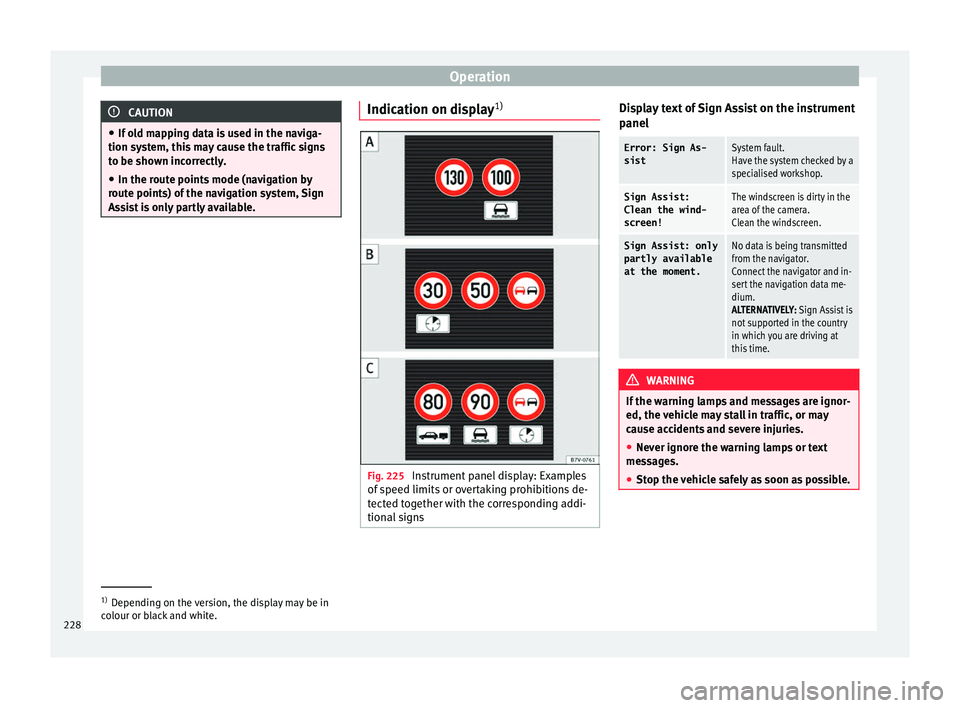
1) Fig. 225
Instrument panel display: Examples
of s
peed limits
or overtaking prohibitions de-
tected together with the corresponding addi-
tional signs Display text of Sign Assist on the instrument
p
anel
Error: Sign As-
sistSystem fault.
Have the system checked by a
specialised workshop.
Sign Assist:
Clean the wind-
screen!The windscreen is dirty in the
area of the camera.
Clean the windscreen.
Sign Assist: only
partly available
at the moment.No data is being transmitted
from the navigator.
Connect the navigator and in-
sert the navigation data me-
dium.
ALTERNATIVELY: Sign Assist is
not supported in the country
in which you are driving at
this time. WARNING
If the warning lamps and messages are ignor-
ed, the v ehic
le may stall in traffic, or may
cause accidents and severe injuries.
● Never ignore the warning lamps or text
mess
ages.
● Stop the vehicle safely as soon as possible. 1)
Depending on the version, the display may be in
co lour or b
lack and white.
228
Page 231 of 320
Driver assistance systems
CAUTION
Failure to heed the control lamps and text
mes s
ages when they appear may result in ve-
hicle faults. Operation mode
Sign Assist does not work in all countries.
This
mu
st be taken into account when travel-
ling abroad.
Display of traffic signs
Speed limits or overtaking prohibitions to-
gether with the corresponding additional
signs are shown on the instrument panel dis-
play ›››
Fig. 225. Depending on the naviga-
tion system installed in the vehicle, traffic
signs will be shown as above and also in the
navigation system's map display.
When Sign Assist is connected, the vehicle
records the traffic signs with a camera in the
base of the interior rear vision mirror. After
checking and evaluating the information
from the camera, the navigation system and
the current vehicle data, up to three valid
traffic signs are displayed in conjunction with
the corresponding additional signs. The traf-
fic sign that is currently valid for the driver is
shown first, in the left side of the screen. A
traffic sign of only limited validity,
e.g. 90 km/h (56 mph) is shown second, to-
gether with the additional sign “if the road is wet”. If the vehicle's rain sensor detects rain
during tr
av
el, the traffic sign valid at this mo-
ment will move to the first position along the
additional sign “if the road is wet”.
The permanent display on the instrument
panel screen is shown as you pass the real
traffic signs. The signs for entering and leav-
ing towns activate the display of the usual
speed limits for that country on roads in
populated areas and national highways, even
if the speed is not limited by an actual traffic
sign.
The end of a prohibition or limitation is not
displayed. If you exceed the speed limits
shown, a warning will not appear. The system
does not detect areas with little traffic. The
current legal provisions apply.
Connection and disconnection
● Connect or disconnect the assist system in
the Settings menu in the SEA
T information
system ›››
page 26.
● OR: press the button for the driver assist
sys
tems on the main beam lever.
Trailer
Connect or disconnect the secondary display
for speed limits and overtaking bans that ap-
ply to trailers (trailer mode) in the Settings
menu in the SEAT information system
››› page 26. Tiredness detection (recom-
mendation to t
ake a break)
Introduction WARNING
Do not let the extra convenience afforded by
the tiredne s
s detection function tempt you
into taking any risks when driving. When
making long trips, conveniently long breaks
must be taken.
● The driver is responsible for determining
their capac
ity to drive.
● Never drive when tired.
● The system does not always detect the
tirednes
s of the driver. Please read the infor-
mation provided in the section ››› page 230,
Limited operation.
● In some situations the system may incor-
rectly int
erpret an intended manoeuvre as a
sign of tiredness of the driver.
● In the event of the an episode called “mi-
cro
sleep” at the wheel, a strong warning is
not in place!
● Observe the indications on the display of
the instrument
panel and act in accordance
with them. » 229
Technical data
Advice
Operation
Emergencies
Safety
Page 262 of 320
Advice
vehicle in question by SEAT. Seat belts which
hav
e been w
orn in an accident and stretched
must be replaced by a specialised workshop.
Renewal may be necessary even if there is no
apparent damage. The belt anchorage should
also be checked. Notes for the user
Labels and p
latesSome parts in the engine compartment come
fr
om the f
act
ory with certificates of safety, la-
bels or plates containing important informa-
tion regarding the operation of the vehicle,
for example, on the fuel tank flap, on the pas-
senger's sun visor, on the driver door strut, or
on the floor of the boot.
● Never remove these certificates of safety,
labels
or plates, and ensure they are kept in
good condition and are legible.
● If a vehicle part, bearing a certificate of
safety
, label or plate, is replaced, the special-
ised workshop should attach the information
back in the same place.
Certificate of safety
A certificate of safety on the door strut states
that all the safety standards and regulations
established by the national traffic authorities
responsible for road safety were met at the time of manufacture. It may also give the
month and ye
ar of manufacture, together
with the chassis number.
Warning of high voltage label*
There is a label close to the bonnet lock
which warns of high voltage in the vehicle's
electrical system. The vehicle ignition system
complies with several standards, including
the Canadian standard, ICES-002.
Using your vehicle in other countries
and continents The vehicle is manufactured at the factory for
u
se in a p
ar
ticular country in accordance with
the national legislation in force at the time of
manufacture.
If the vehicle is sold in another country or
used in another country for an extended peri-
od of time, the applicable legislation of that
country should be observed.
It may be necessary to fit or remove certain
pieces of equipment or to deactivate certain
functions. Service work may also be affected.
This is particularly true if the vehicle is used
in a different climate for an extended period
of time.
As there are different types of frequency
bands around the world, you may find that the radio or navigation system supplied at
the factor
y does not work in another country. CAUTION
● SEA T doe
s not accept liability for any dam-
age to the vehicle due to the use of a lower
quality fuel, an inadequate service or the
non-availability of genuine spare parts.
● SEAT does not accept liability if the vehicle
does not
comply in part or in full with the le-
gal requirements of other countries or conti-
nents. Radio and antenna reception
The aerial of radio and navigation systems
fitt
ed at
the f
actory may be mounted in differ-
ent parts of the vehicle:
● On the inside of the rear window, next to
the rear w
indow heating,
● on the inside of the rear side windows,
● on the inside of the windscreen,
● on the roof of the vehicle.
Aerials
mounted on the inside of a window
can be recognised by the fine wires. CAUTION
Aerials on the inside of windows may be dam-
aged if knoc
ked or if cleaned with corrosive or
acid cleaning products. Do not stick adhesive 260