change wheel Seat Alhambra 2017 Owner's Manual
[x] Cancel search | Manufacturer: SEAT, Model Year: 2017, Model line: Alhambra, Model: Seat Alhambra 2017Pages: 320, PDF Size: 6.88 MB
Page 28 of 320
The essentials
Interior lightsButton/Position: Function
Switches interior lights off.
Switches interior lights on.
Switches door contact control on (central
position).
The interior lights come on automatically
when the vehicle is unlocked, a door is
opened or the key is removed from the igni-
tion.
The lights go off a few seconds after all the
doors are closed, the vehicle is locked or
the ignition is switched on.
Turning the reading light on and off
Ambient light: in the door panel, it changes
c
o
lour (whit
e or red) depending on the driv-
ing mode.
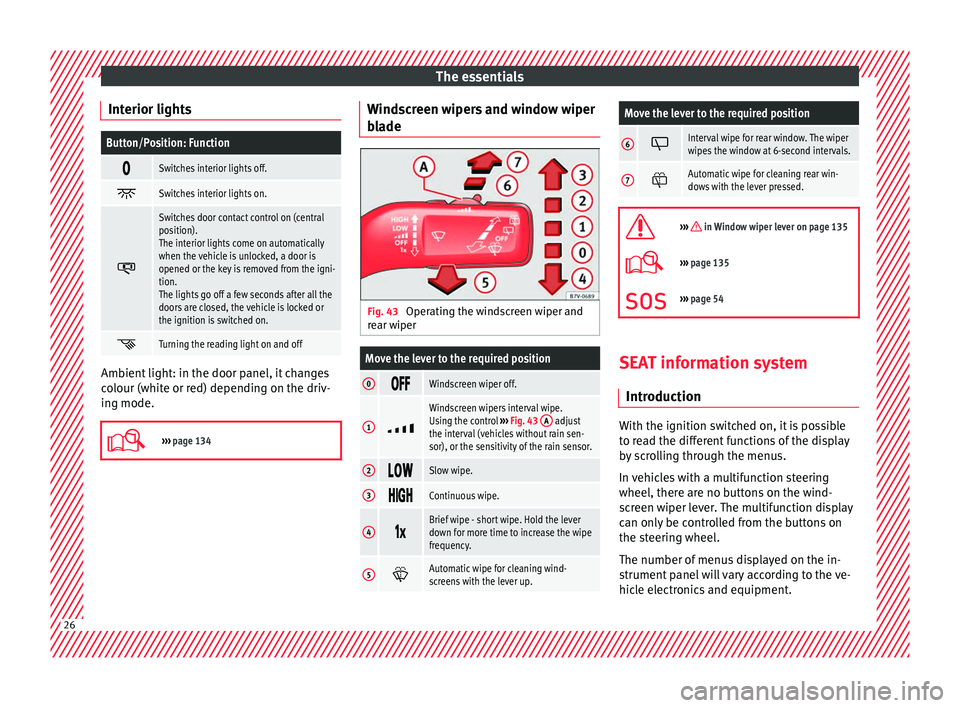
››› page 134 Windscreen wipers and window wiper
b
l
a
de Fig. 43
Operating the windscreen wiper and
r e
ar w
iper
Move the lever to the required position
0 Windscreen wiper off.
1
Windscreen wipers interval wipe.
Using the control
››› Fig. 43 A adjust
the interval (vehicles without rain sen-
sor), or the sensitivity of the rain sensor.
2 Slow wipe.
3
Continuous wipe.
4
Brief wipe - short wipe. Hold the lever
down for more time to increase the wipe
frequency.
5
Automatic wipe for cleaning wind-
screens with the lever up.
Move the lever to the required position
6 Interval wipe for rear window. The wiper
wipes the window at 6-second intervals.
7
Automatic wipe for cleaning rear win-
dows with the lever pressed.
››› in Window wiper lever on page 135
›››
page 135
››› page 54 SEAT information system
Intr oduction With the ignition switched on, it is possible
t
o r
e
ad the different functions of the display
by scrolling through the menus.
In vehicles with a multifunction steering
wheel, there are no buttons on the wind-
screen wiper lever. The multifunction display
can only be controlled from the buttons on
the steering wheel.
The number of menus displayed on the in-
strument panel will vary according to the ve-
hicle electronics and equipment. 26
Page 30 of 320
The essentials
■ Aut oho
l
d
■ Service
■ Info
■ Reset
■ Default setting
Using the menus on the instrument
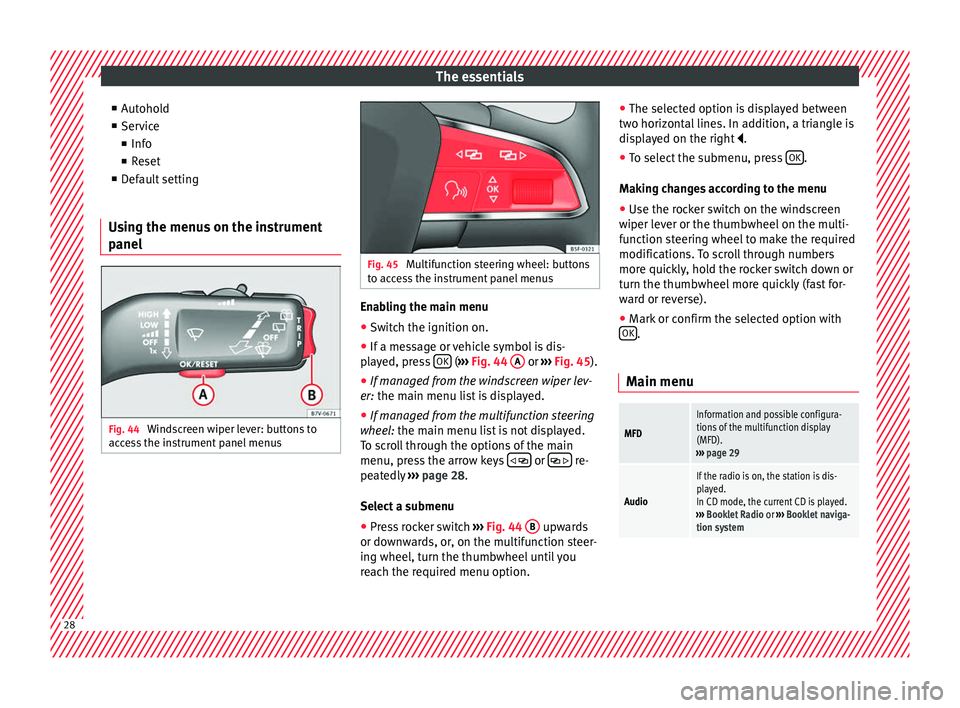
panel Fig. 44
Windscreen wiper lever: buttons to
ac c
e
ss the instrument panel menus Fig. 45
Multifunction steering wheel: buttons
to ac c
ess the instrument panel menus Enabling the main menu
● Switch the ignition on.
● If a message or vehicle symbol is dis-
p l
a
yed, press OK (
››
› Fig. 44 A or
››
› Fig. 45 ).
● If managed from the windscreen wiper lev-
er: the main menu lis
t is displayed.
● If managed from the multifunction steering
wheel:
the main menu list is not displayed.
To scroll through the options of the main
menu, press the arrow keys or
re-
pe at
edly
››› page 28.
Select a submenu ● Press rocker switch ›››
Fig. 44 B upwards
or do wn
w
ards, or, on the multifunction steer-
ing wheel, turn the thumbwheel until you
reach the required menu option. ●
The selected option i
s displayed between
two horizontal lines. In addition, a triangle is
displayed on the right .
● To select the submenu, press OK .
M ak
in
g changes according to the menu
● Use the rocker switch on the windscreen
wiper lev
er or the thumbwheel on the multi-
function steering wheel to make the required
modifications. To scroll through numbers
more quickly, hold the rocker switch down or
turn the thumbwheel more quickly (fast for-
ward or reverse).
● Mark or confirm the selected option with
OK .
Main menu
MFD
Information and possible configura-
tions of the multifunction display
(MFD).
››› page 29
Audio
If the radio is on, the station is dis-
played.
In CD mode, the current CD is played.
››› Booklet Radio or ››› Booklet naviga-
tion system 28
Page 46 of 320
The essentials
Action in the event of a punc-
t ur
e
Wh
at to do first ●
Park the vehicle on a horizontal surface
and in a saf e p
lace as far away from traffic as
possible.
● Apply the handbrake.
● Switch on the hazard warning lights.
● Manual gearbox: select the 1s
t gear.
● Automatic gearbox: Move the sel
ector lever
to position P.
● If you are towing a trailer, unhitch it from
your v
ehicle.
● Keep the vehicle tool kit ready*
›››
page 82.
● Observe the applicable legislation for each
countr
y (reflective vest, warning triangles,
etc.).
● All occupants should leave the vehicle and
wait in a s
afe place (for instance behind the
roadside crash barrier). WARNING
● Alw a
ys observe the above steps and pro-
tect yourself and other road users.
● If you change the wheel on a slope, block
the wheel on the oppo
site side of the car with
a stone or similar to prevent the vehicle from
moving. Repairing a tyre with the anti-punc-
t
ur
e k
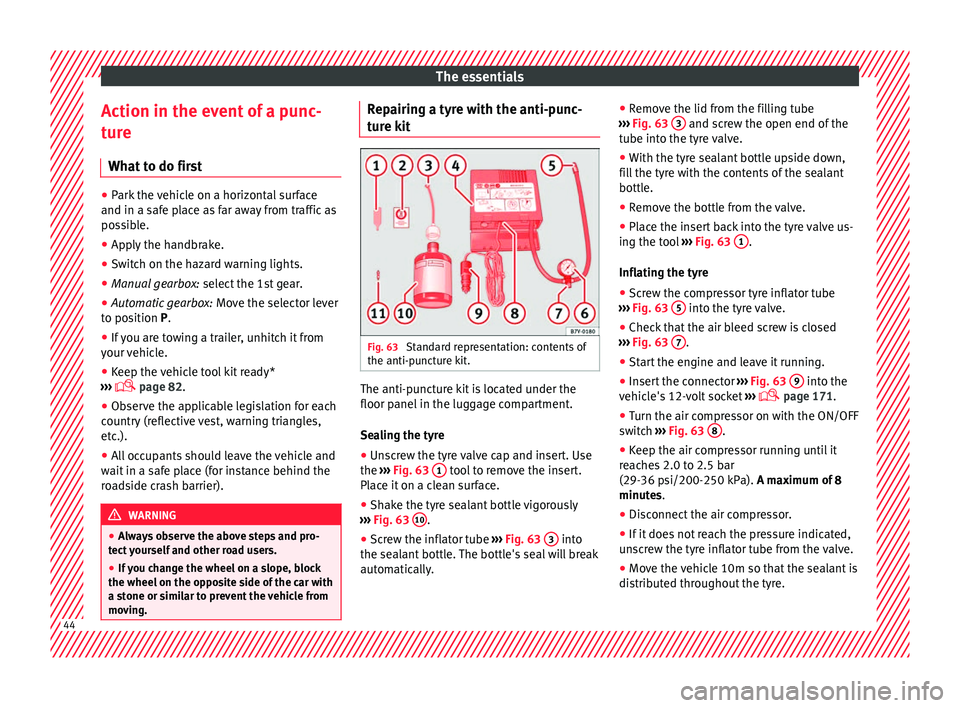
it Fig. 63
Standard representation: contents of
the anti-p u
nct
ure kit. The anti-puncture kit is located under the
floor p
anel
in the lug
gage compartment.
Sealing the tyre
● Unscrew the tyre valve cap and insert. Use
the ›››
Fig. 63 1 tool to remove the insert.
Pl ac
e it
on a clean surface.
● Shake the tyre sealant bottle vigorously
›››
Fig. 63 10 .
● Screw the inflator tube ››
›
Fig. 63 3 into
the se al
ant
bottle. The bottle's seal will break
automatically. ●
Remov
e the lid from the filling tube
››› Fig. 63 3 and screw the open end of the
t ube int
o the ty
re valve.
● With the tyre sealant bottle upside down,
fill
the tyre with the contents of the sealant
bottle.
● Remove the bottle from the valve.
● Place the insert back into the tyre valve us-
ing the too
l ››› Fig. 63 1 .
Infl atin
g the ty
re
● Screw the compressor tyre inflator tube
›››
Fig. 63 5 into the tyre valve.
● Check that the air bleed screw is closed
› ›
›
Fig. 63 7 .
● Start the engine and leave it running.
● Insert the connector ››
›
Fig. 63 9 into the
v ehic
l
e's 12-volt socket ›››
page 171.
● Turn the air compressor on with the ON/OFF
switc
h ››› Fig. 63 8 .
● Keep the air compressor running until it
r e
ac
hes 2.0 to 2.5 bar
(29-36 psi/200-250 kPa). A maximum of 8
minutes.
● Disconnect the air compressor.
● If it does not reach the pressure indicated,
uns
crew the tyre inflator tube from the valve.
● Move the vehicle 10m so that the sealant is
dis trib
uted throughout the tyre.44
Page 50 of 320
The essentials
The jack may be applied only at the jacking
points sho
wn (m
arks on chassis) ››› Fig. 69.
The mark indicates the jacking points below
the vehicle. The jacking points are on the ribs
behind the front edges ››› Fig. 70. Always the
relevant jacking point for the wheel to be
changed ››› .
R ai
se the
vehicle using only the designated
jacking points.
For your own safety and that of other passen-
gers, the following points should be ob-
served in the order given:
Select a suitable flat and firm surface for
raising the vehicle.
Switch off the engine, engage a gear
(manual gearbox) or place the selector
lever in position P ›››
page 192 and
turn on the electronic parking brake
››› page 187.
Block the wheel diagonally opposite the
wheel being changed with folding wheel
chocks* or other suitable objects.
When towing a trailer: unhook the trailer
from the towing vehicle and park it cor-
rectly.
Loosen the wheel bolts on the wheel to
be changed ››› page 46.
Look below the vehicle for the jacking
point ››› Fig. 69 closest to the tyre which
has to be changed.
1.
2.
3.
4.
5.
6. Raise the jack with the handle until it
can be inser
ted below the jacking point.
Ensure that the foot of the jack is firmly
on the ground and that it is placed im-
mediately below the lifting point on the
vehicle ››› Fig. 70.
Straighten the jack and continue raising
it using the handle until the claw holds
the vertical reinforcement beneath the
vehicle ››› Fig. 70.
Raise the vehicle until the wheel is clear
of the ground. WARNING
If the vehicle is not correctly raised, it could
fa l
l off the jack causing serious injury. Please
observe the following rules to minimise the
risk of injury:
● You should only use a jack approved by
SEAT f
or your vehicle. Other jacks, even those
approved for other SEAT models, might slip
out of place.
● The ground should be firm and flat. If the
ground i
s sloped or soft then the vehicle
could slip and fall off the jack. If necessary,
support the jack on a wide solid base.
● If the ground is slippery, such as tiles,
plac
e a non-slip surface (a floor mat, for in-
stance) beneath the jack to avoid slipping.
● Only fit the jack at the prescribed jacking
points. The c
law of the jack should grip the
reinforcement nerve on the underbody
››› Fig. 70. 7.
8.
9.
10.
●
You shou l
d never place a body limb such as
an arm or leg under a raised vehicle that is
solely supported by the jack.
● If you have to work underneath the vehicle,
you mus
t use suitable stands additionally to
support the vehicle, there is a risk of acci-
dent!.
● Never raise the vehicle if it is tilting to one
side or the engine i
s running.
● Never start the engine when the vehicle is
raised.
The vehicle may come loose from the
jack due to the engine vibrations. Removing and fitting the wheel
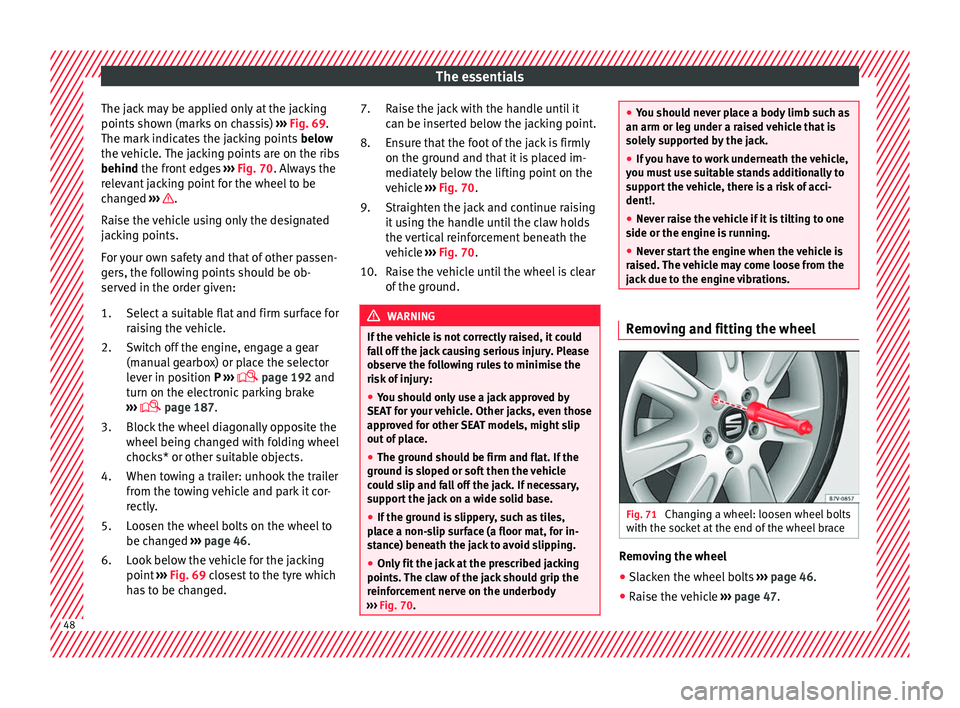
Fig. 71
Changing a wheel: loosen wheel bolts
w ith the soc
k
et at the end of the wheel brace Removing the wheel
● Slacken the wheel bolts ››
›
page 46.
● Raise the vehicle ›››
page 47. 48
Page 51 of 320
The essentials
● Us
in
g the hexagonal socket in the wheel
brace ››› Fig. 71, unscrew the slackened
wheel bolts and place them on a clean sur-
face.
● Take off the wheel.
Putting on the s
pare wheel
Check the direction of rotation of the tyre
››› page 49.
● Fit the wheel.
● Screw on the anti-theft locking bolt with
the adapt
er in position ››› Fig. 68 2 or
3 clockwise and tighten gently.
●
Replace the other wheel bolts and tighten
s ligh
tl
y using the hexagonal socket on the
end of the wheel brace.
● Lower the car with the jack.
● Tighten all of the wheel bolts clockwise
›››
. Tighten the bolts in diagonal pairs (not
in a c ir
c
le).
● Put the caps, trim or full hubcap back on
›››
page 45. WARNING
If the wheel bolts are not treated suitably or
not tight ened t
o the correct torque then this
could lead to loss of vehicle control and to a
serious accident.
● All the wheel bolts and hub threads should
be cle
an and free of oil and grease. The wheel bolts should be easily tightened to the cor-
rect
t
orque.
● The hexagonal socket in the wheel brace
should be u
sed for turning wheel bolts only.
Do not use it to loosen or tighten the wheel
bolts. Tyres with directional tread pattern
Tyres with directional tread pattern have
been des
igned t
o operate best when rotating
in only one direction. An arrow on the tyre
sidewall indicates the direction of rotation on
tyres with directional tread ›››
page 291.
Always observe the indicated direction of ro-
tation in order to guarantee optimum grip
and help avoid aquaplaning, excessive noise
and wear.
If the tyre is mounted in the opposite direc-
tion of rotation, drive with extreme caution,
as the tyre is no longer being used correctly.
This is of particular importance when the
road surface is wet. Change the tyre as soon
as possible or remount it with the correct di-
rection of rotation.
Subsequent work ●
On alloy wheels: repl
ace the wheel bolt
caps.
● On plate wheels: rep l
ace the wheel hubcap. ●
Return al
l tools to their proper storing loca-
tion ›››
page 82.
● Check the tyre pressure of the newly moun-
ted tyr
e as soon as possible.
● If the vehicle is fitted with a tyre monitoring
syst
em, this should be “reprogrammed” if
necessary whenever a tyre is changed
››› page 231.
● Have the tightening torque of the wheel
bolts c
hecked as soon as possible with a tor-
que wrench ››› page 47. Meanwhile, drive
carefully.
Snow chains
Use When using snow chains, applicable local
l
e
gi
slation and maximum permitted speed
limits must be observed.
In winter weather, snow chains not only help
to improve grip but also improve the braking
capacity.
Snow chains must only be mounted on the
front wheels , even on all-wheel drive vehi-
cles, and only with the tyre and rim combina-
tions listed below:
Tyre sizeWheel rim
205/60 R166 1/2 J x 16 ET 33» 49
Page 60 of 320
Safety
The correct sitting positions for the driver and
p a
s
sengers are shown below.
If your physical constitution prevents you
from maintaining the correct sitting position,
contact a specialised workshop for help with
any special devices. The seat belt and airbag
can only provide optimum protection if a cor-
rect sitting position is adopted. SEAT recom-
mends taking your car in for technical serv-
ice.
For your own safety and to reduce the risk of
injury in the event of an accident or sudden
braking or manoeuvre, SEAT recommend the
following positions:
Valid for all vehicle occupants:
● Adjust the head restraint so that its upper
edge is
at the same level as the top of your
head, or as close as possible to the same lev-
el as the top of your head and under no cir-
cumstances below eye level. Keep the back
of your neck as close as possible to the head
restraint ››› Fig. 80 and ››› Fig. 81.
● Short people must lower the head restraint
compl
etely, even if your head is below its up-
per edge.
● Tall people must raise the head restraint
compl
etely.
● Adjust the seat backrest to an upright posi-
tion so that
your back rests completely
against it. ●
Alwa
ys keep your feet in the footwell while
the vehicle is in motion.
● Adjust and fasten your seat belt correctly
›››
page 64.
Also valid for the driver:
● Adjust the steering wheel so that there is a
dist
ance of at least 25 cm (10 inches) be-
tween it and your chest ››› Fig. 80 and so that
you can hold the steering wheel with both
hands on the outside of the ring at the 9
o'clock and 3 o'clock positions with your
arms slightly bent.
● The adjusted steering wheel must face your
ches
t and not your face.
● Adjust the driver seat forwards or back-
ward
s so that you are able to press the accel-
erator, brake and clutch pedals to the floor
with your knees slightly angled and the dis-
tance between your knees and the dash pan-
el is at least 10 cm (4 inches) ››› Fig. 80.
● Adjust the height of the driver seat so that
you can e
asily reach the top of the steering
wheel.
● Keep both feet in the footwell so that you
have the
vehicle under control at all times.
Also valid for the front passenger:
● Move the front passenger seat back as far
as po
ssible for optimum protection should
the airbag deploy. Adjusting the steering wheel position Read the additional information carefully
›› ›
page 16. WARNING
Incorrect use of the steering wheel adjust-
ment f u
nction and an incorrect adjustment of
the steering wheel can result in severe or fa-
tal injury.
● After adjusting the steering column, push
the lever ›
›› Fig. 24
1 firmly upwards to
ens ur
e the steering wheel does not acciden-
tally change position while driving.
● Never adjust the steering wheel while the
vehicl
e is in motion. If you need to adjust the
steering wheel while the vehicle is in motion,
stop safely and make the proper adjustment.
● The adjusted steering wheel should be fac-
ing y
our chest and not your face so as not to
hinder the driver's front airbag protection in
the event of an accident.
● When driving, always hold the steering
wheel with both h
ands on the outside of the
ring at the 9 o'clock and 3 o'clock positions
to reduce injuries when the driver's front air-
bag deploys.
● Never hold the steering wheel at the 12
o'clock
position or in any other manner (e.g.
in the centre of the steering wheel). In such
cases, if the driver's airbag deploys, you may
sustain injuries to your arms, hands and
head. 58
Page 85 of 320
Self-help
especially in accidents causing serious in-
jury
.
● M
ake sure that the vehicle tools are stored
safely
in the luggage compartment. WARNING
Unsuitable or damaged vehicle tools can
c au se injur
y or accidents.
● Never work with inappropriate or damaged
tool
s. Note
After use, return the jack to its initial position
us in
g the handle in order to securely store it
in the vehicle. Components
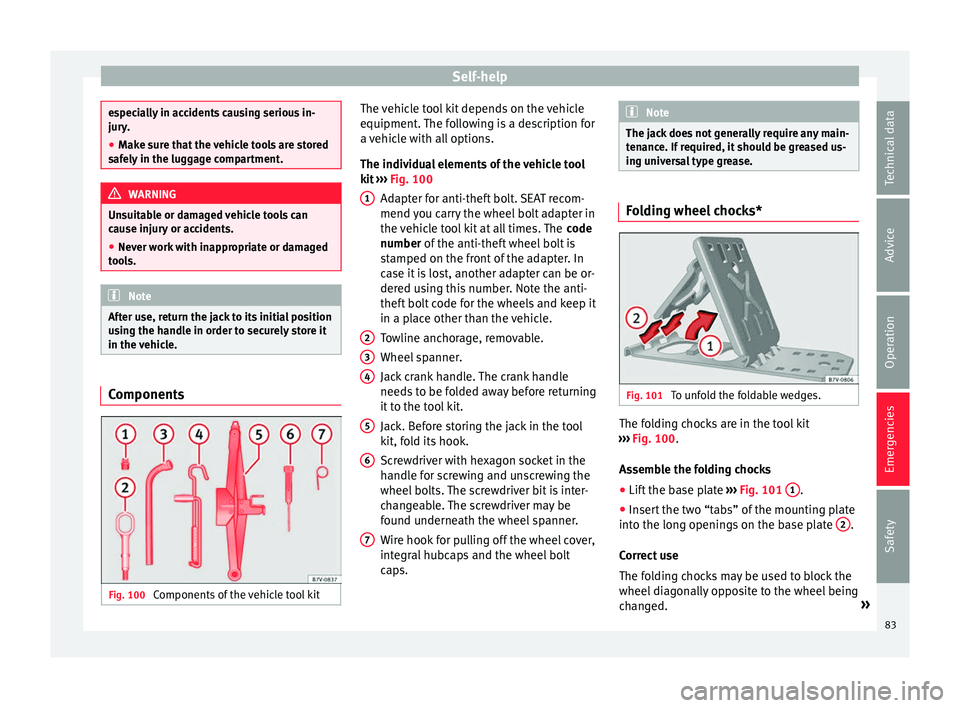
Fig. 100
Components of the vehicle tool kit The vehicle tool kit depends on the vehicle
equipment
.
The f
ollowing is a description for
a vehicle with all options.
The individual elements of the vehicle tool
kit ››› Fig. 100
Adapter for anti-theft bolt. SEAT recom-
mend you carry the wheel bolt adapter in
the vehicle tool kit at all times. The code
number of the anti-theft wheel bolt is
stamped on the front of the adapter. In
case it is lost, another adapter can be or-
dered using this number. Note the anti-
theft bolt code for the wheels and keep it
in a place other than the vehicle.
Towline anchorage, removable.
Wheel spanner.
Jack crank handle. The crank handle
needs to be folded away before returning
it to the tool kit.
Jack. Before storing the jack in the tool
kit, fold its hook.
Screwdriver with hexagon socket in the
handle for screwing and unscrewing the
wheel bolts. The screwdriver bit is inter-
changeable. The screwdriver may be
found underneath the wheel spanner.
Wire hook for pulling off the wheel cover,
integral hubcaps and the wheel bolt
caps.
1
2
3
4
5
6
7 Note
The jack does not generally require any main-
ten anc
e. If required, it should be greased us-
ing universal type grease. Folding wheel chocks*
Fig. 101
To unfold the foldable wedges. The folding chocks are in the tool kit
› ›
›
Fig. 100.
Assemble the folding chocks
● Lift the base plate ›››
Fig. 101 1 .
● Insert the two “tabs” of the mounting plate
int o the lon
g openin
gs on the base plate 2 .
C orr
ect
use
The folding chocks may be used to block the
wheel diagonally opposite to the wheel being
changed. »
83
Technical data
Advice
Operation
Emergencies
Safety
Page 86 of 320
Emergencies
The chocks should be placed directly in front
and behind the wheel and on
ly
be used on
firm ground. WARNING
If the folding chocks are assembled or used
incorr ectly
, an accident may occur and seri-
ous injury caused.
● Never use damaged chocks.
● Never use chocks to immobilize the vehicle
on a slope. Changing a wheel*
Intr oduction Read the additional information carefully
› ›
›
page 45
All Alhambra models have TMS (Tyre Mobility
System).
If a tyre needs to be changed the tools neces-
sary are available at spare parts dealers:
● Jack,
● box spanner for wheel bolts,
● tool to remove wheel bolt caps
The tyre
s mounted on the vehicle are anti-
puncture. The wheels should only be
changed when switching from summer to
winter tyres or vice-versa. See ›››
page 290 The vehicle only comes with the necessary
tool
s for changing wheels if factory supplied
with winter tyres. If this is not the case, you
need to go to a specialised workshop to get
the wheels changed.
You should only change the wheels yourself if
the vehicle is parked in a safe place, you are
familiar with the procedure and safety stand-
ards and you have all the necessary tools!
Otherwise, you should seek professional as-
sistance. WARNING
Changing a wheel can be dangerous, espe-
ci a
lly on the hard shoulder. Please observe
the following rules to minimise the risk of in-
jury:
● Stop the vehicle safely as soon as possible.
Park at
a safe distance from surrounding traf-
fic to change a wheel.
● When changing a wheel, keep all passen-
gers, and p
articularly children, a safe dis-
tance away from the work area.
● Turn on the hazard warning lights to warn
other roa
d users.
● Ensure the ground on which you park is flat
and solid. If nec
essary, support the jack on a
wide solid base.
● If you are changing a wheel yourself, you
should be f
amiliar with the required proce-
dure. Otherwise, you should seek professio-
nal assistance. ●
Only u
se suitable tools that are not dam-
aged when changing a wheel.
● Always stop the engine, turn on the elec-
tronic p
arking brake and place the gear selec-
tor lever in position P, for an automatic gear-
box, or engage a gear for a manual gearbox to
reduce the risk of the vehicle moving acciden-
tally.
● Have the tightening torque of the wheel
bolts
checked as soon as possible with a reli-
able torque wrench. WARNING
If the wheel trims are not appropriate or not
fitted c orr
ectly, they could cause major acci-
dents or damage.
● Incorrectly mounted wheel trims may come
off whil
e driving and endanger other road
users.
● Damaged trims must never be mounted on
the wheels.
● Alw
ays ensure that the brake ventilation
and coolin
g is not cut off or blocked. This is
also valid if hubcaps are fitted later. If there
is not enough air, you may require signifi-
cantly longer braking distances. CAUTION
Remove and remount wheel trims taking care
to av oid d
amage to the vehicle.84
Page 89 of 320

Self-help
Changing the windscreen wiper
b l
a
des
Changing the windscreen and rear
window wiper blades Read the additional information carefully
›› ›
page 54.
The windscreen wiper blades are supplied as
standard with a layer of graphite. This layer is
responsible for ensuring that the wipe is si-
lent. If the graphite layer is damaged, the
noise of the water as it is wiped across the
windscreen will be louder.
Check the condition of the wiper blades regu-
larly. If the wipers scrape across the glass
they should be changed if they are damaged,
or cleaned if they are dirty ››› .
Dam ag
ed w
iper blades should be replaced
immediately. These are available from quali-
fied workshops. WARNING
Worn or dirty wiper blades reduce visibility
and incr e
ase the risk of accident and serious
injury.
● Always replace damaged or worn blades or
bla
des which do not clean the windscreen
correctly. CAUTION
● Damag ed or dir
ty windscreen wipers could
scratch the glass.
● If products containing solvents, rough
spong
es or sharp objects are used to clean
the blades, the graphite layer will be dam-
aged.
● Never use fuel, nail varnish remover, paint
thinner or simil
ar products to clean the win-
dows.
● In icy conditions, always check that the
wiper bl
ades are not frozen to the glass be-
fore using the wipers. In cold weather, it may
help to leave the vehicle parked with the wip-
ers in service position ›››
page 54.
● To prevent damage to the bonnet and the
wiper arms, only
leave them in the service
position.
● Before driving, always lower the wiper
arms. Tow-starting and towing
Intr oduction Read the additional information carefully
› ›
›
page 50
When towing, always respect legal require-
ments.
For technical reasons, it is not possible to
tow a vehicle if the battery is flat. If the vehicle comes with the Keyless Access
syst
em, towing is only allowed with the igni-
tion on!
The vehicle battery drains if the vehicle is
towed with the engine switched off and the
ignition connected. Depending on the battery
charge status, the drop in voltage may be so
large, even after just a few minutes, that no
electrical device in the vehicle may work e.g.
the hazard warning lights. In vehicles with
the Keyless Access system, the steering
wheel could lock ››› .
WARNING
A vehicle with a flat battery should never be
to w
ed.
● Never remove the key from the ignition
lock. Otherw
ise, the steering wheel lock
could suddenly lock. The vehicle would not
be controlled and a serious accident could
ensue. WARNING
When towing the vehicle, the handling and
brak in
g efficiency change considerably.
Please observe the following instructions to
minimise the risk of serious accidents and in-
jury:
● As the driver of the vehicle being towed:
– The brake mu
st be depressed must hard-
er as the brake servo does not operate. » 87
Technical data
Advice
Operation
Emergencies
Safety
Page 91 of 320
Self-help
Note the instructions for towing
› ›
›
page 50.
Fitting the towline anchorage to the rear for
vehicles without factory fitted tow hitch
● Take the towline anchorage from the vehi-
cle t
ool kit in the luggage compartment
››› page 82.
● Press on the upper cover and carefully re-
move it
back. This may require some
strength. Allow the cover to hang.
● Screw in the towline anchorage into its po-
sition antic
lockwise as far as it will go ››› .
U se a s
uit
able tool to firmly tighten the tow-
line anchorage in its location.
● After towing, remove the towline anchorage
by t
urning it clockwise and put the cover
back in place. CAUTION
● The to wline anc
horage must always be
completely and firmly tightened. Otherwise,
it could be released while towing and tow-
starting.
● Vehicles with a factory fitted towing brack-
et, can only
be used for towing with a tow
bar, specially designed to fit on a tow hitch
ball. Otherwise, the tow hitch ball and the ve-
hicle may be damaged. Otherwise, a tow rope
should be used. Towing advice
Towing requires some expertise and experi-
ence, e
s
pecially when using a tow rope. Both
drivers should be familiar with the technique
required for towing. For this reason, inexper-
ienced drivers should abstain.
While driving, avoid excessive traction forces
and jerking. When towing on an unpaved
road, there is always a risk of overloading
and damaging the anchorage points.
If the vehicle is towed, with the hazard warn-
ing lights on and the ignition switched on,
the turn signal may be used to indicate
changes of direction. Simply operate the turn
signal lever as usual. Meanwhile, the hazard
warning lights will go off. When the turn sig-
nal lever is returned to the rest position, the
hazard warning lights will be turned on auto-
matically.
Notes for the driver of the towed vehicle
● Leave the ignition on to avoid locking the
st eerin
g wheel, to release the electronic
parking brake and to activate the turn sig-
nals, the horn as well as the window wipers
and window washers.
● As the power assisted steering does not
work if
the engine is not running, you will
need more strength to steer than normally. ●
The brake mu
st be depressed must harder
as the brake servo does not operate. Avoid
hitting the towing vehicle.
● Note the instructions and information con-
tained in the Ins
truction Manual for the vehi-
cle to be towed.
Notes for the driver of the towing vehicle
● Accelerate gently and carefully. Avoid sud-
den manoeuvr
es.
● Brake well in advance than usual and brake
gently.
● Not
e the instructions and information con-
tained in the Ins
truction Manual for the vehi-
cle to be towed.
Emergency locking and unlock-
ing
Introduction Read the additional information carefully
› ›
›
page 8,
›››
page 10,
››› page 13
The doors, rear lid and panoramic sliding
sunroof can be locked manually and partially
opened, for example if the key or the central
locking is damaged. »
89
Technical data
Advice
Operation
Emergencies
Safety