ESP Seat Alhambra 2017 Owner's Guide
[x] Cancel search | Manufacturer: SEAT, Model Year: 2017, Model line: Alhambra, Model: Seat Alhambra 2017Pages: 320, PDF Size: 6.88 MB
Page 86 of 320
Emergencies
The chocks should be placed directly in front
and behind the wheel and on
ly
be used on
firm ground. WARNING
If the folding chocks are assembled or used
incorr ectly
, an accident may occur and seri-
ous injury caused.
● Never use damaged chocks.
● Never use chocks to immobilize the vehicle
on a slope. Changing a wheel*
Intr oduction Read the additional information carefully
› ›
›
page 45
All Alhambra models have TMS (Tyre Mobility
System).
If a tyre needs to be changed the tools neces-
sary are available at spare parts dealers:
● Jack,
● box spanner for wheel bolts,
● tool to remove wheel bolt caps
The tyre
s mounted on the vehicle are anti-
puncture. The wheels should only be
changed when switching from summer to
winter tyres or vice-versa. See ›››
page 290 The vehicle only comes with the necessary
tool
s for changing wheels if factory supplied
with winter tyres. If this is not the case, you
need to go to a specialised workshop to get
the wheels changed.
You should only change the wheels yourself if
the vehicle is parked in a safe place, you are
familiar with the procedure and safety stand-
ards and you have all the necessary tools!
Otherwise, you should seek professional as-
sistance. WARNING
Changing a wheel can be dangerous, espe-
ci a
lly on the hard shoulder. Please observe
the following rules to minimise the risk of in-
jury:
● Stop the vehicle safely as soon as possible.
Park at
a safe distance from surrounding traf-
fic to change a wheel.
● When changing a wheel, keep all passen-
gers, and p
articularly children, a safe dis-
tance away from the work area.
● Turn on the hazard warning lights to warn
other roa
d users.
● Ensure the ground on which you park is flat
and solid. If nec
essary, support the jack on a
wide solid base.
● If you are changing a wheel yourself, you
should be f
amiliar with the required proce-
dure. Otherwise, you should seek professio-
nal assistance. ●
Only u
se suitable tools that are not dam-
aged when changing a wheel.
● Always stop the engine, turn on the elec-
tronic p
arking brake and place the gear selec-
tor lever in position P, for an automatic gear-
box, or engage a gear for a manual gearbox to
reduce the risk of the vehicle moving acciden-
tally.
● Have the tightening torque of the wheel
bolts
checked as soon as possible with a reli-
able torque wrench. WARNING
If the wheel trims are not appropriate or not
fitted c orr
ectly, they could cause major acci-
dents or damage.
● Incorrectly mounted wheel trims may come
off whil
e driving and endanger other road
users.
● Damaged trims must never be mounted on
the wheels.
● Alw
ays ensure that the brake ventilation
and coolin
g is not cut off or blocked. This is
also valid if hubcaps are fitted later. If there
is not enough air, you may require signifi-
cantly longer braking distances. CAUTION
Remove and remount wheel trims taking care
to av oid d
amage to the vehicle.84
Page 87 of 320
Self-help
Tyre repair TM S
(T
yre Mobility System)* Read the additional information carefully
›› ›
page 44
The Anti-puncture kit* (Tyre Mobility System)
will reliably seal punctures caused by the
penetration of a foreign body of up to about
4 mm in diameter. Do not remove foreign ob-
jects, e.g. screws or nails, from the tyre.
Once the sealant is in the tyre, make sure to
check the pressure after 10 minutes driving.
If the vehicle has more than one damaged
tyre, seek professional assistance. The tyre
mobility system is designed for filling one
tyre.
Only use the tyre mobility system if the vehi-
cle is properly parked, you know how to do it
and the necessary safety measures, and if
you have the right kit! Otherwise, you should
seek professional assistance.
The tyre sealant should not be used in the
following cases:
● If the wheel is damaged.
● The outside temperature is lower than
-20°C (-4°F).
● If the t
ear or puncture on the tyre is over 4
mm wide. ●
If y
ou have driven with very low pressure or
a flat tyre.
● If the expiry date on the bottle of tyre seal-
ant ha
s passed. WARNING
Using the tyre mobility system can be dan-
ger ou
s, especially when filling the tyre at the
roadside. Please observe the following rules
to minimise the risk of injury:
● Stop the vehicle safely as soon as possible.
Park it
at a safe distance from surrounding
traffic to fill the tyre.
● Ensure the ground is flat and firm.
● All occupants, and especially children,
should a
lways be at a safe distance outside
the work area.
● Turn on the hazard warning lights to warn
other roa
d users.
● Use the tyre mobility system only if you are
famili
ar with the necessary procedures. Oth-
erwise, you should seek professional assis-
tance.
● Only use the tyre mobility system in the
event of
an emergency to get to the nearest
workshop.
● Replace the repaired tyre with the tyre mo-
bility
set as soon as possible.
● The sealant is hazardous for your health
and if it t
ouches your skin, it must be imme-
diately washed off. ●
Keep c hi
ldren away from the tyre mobility
system.
● Never use a jack even if it is approved for
the vehic
le.
● To reduce the risk of the vehicle possibly
movin
g on its own, always turn off the en-
gine, set the electronic parking brake and put
the selector lever in position P or put into
gear if the gearbox is a manual. WARNING
A tyre filled with sealant does not have the
s ame per f
ormance properties as a conven-
tional tyre.
● Never drive faster than 80 km/h (50 mph).
● Avoid heavy acceleration, hard braking and
fas
t cornering.
● Drive for only 10 minutes at a maximum
speed of 80
km/h (50 mph) and then check
the tyre. For the sake of the environment
Once used or expired, dispose of the sealant
acc or
ding to legal provisions. Note
● Sea l
ant bottles can be purchased from
SEAT dealers.
● Observe the usage instructions provided by
the snow c
hain manufacturer. 85
Technical data
Advice
Operation
Emergencies
Safety
Page 89 of 320

Self-help
Changing the windscreen wiper
b l
a
des
Changing the windscreen and rear
window wiper blades Read the additional information carefully
›› ›
page 54.
The windscreen wiper blades are supplied as
standard with a layer of graphite. This layer is
responsible for ensuring that the wipe is si-
lent. If the graphite layer is damaged, the
noise of the water as it is wiped across the
windscreen will be louder.
Check the condition of the wiper blades regu-
larly. If the wipers scrape across the glass
they should be changed if they are damaged,
or cleaned if they are dirty ››› .
Dam ag
ed w
iper blades should be replaced
immediately. These are available from quali-
fied workshops. WARNING
Worn or dirty wiper blades reduce visibility
and incr e
ase the risk of accident and serious
injury.
● Always replace damaged or worn blades or
bla
des which do not clean the windscreen
correctly. CAUTION
● Damag ed or dir
ty windscreen wipers could
scratch the glass.
● If products containing solvents, rough
spong
es or sharp objects are used to clean
the blades, the graphite layer will be dam-
aged.
● Never use fuel, nail varnish remover, paint
thinner or simil
ar products to clean the win-
dows.
● In icy conditions, always check that the
wiper bl
ades are not frozen to the glass be-
fore using the wipers. In cold weather, it may
help to leave the vehicle parked with the wip-
ers in service position ›››
page 54.
● To prevent damage to the bonnet and the
wiper arms, only
leave them in the service
position.
● Before driving, always lower the wiper
arms. Tow-starting and towing
Intr oduction Read the additional information carefully
› ›
›
page 50
When towing, always respect legal require-
ments.
For technical reasons, it is not possible to
tow a vehicle if the battery is flat. If the vehicle comes with the Keyless Access
syst
em, towing is only allowed with the igni-
tion on!
The vehicle battery drains if the vehicle is
towed with the engine switched off and the
ignition connected. Depending on the battery
charge status, the drop in voltage may be so
large, even after just a few minutes, that no
electrical device in the vehicle may work e.g.
the hazard warning lights. In vehicles with
the Keyless Access system, the steering
wheel could lock ››› .
WARNING
A vehicle with a flat battery should never be
to w
ed.
● Never remove the key from the ignition
lock. Otherw
ise, the steering wheel lock
could suddenly lock. The vehicle would not
be controlled and a serious accident could
ensue. WARNING
When towing the vehicle, the handling and
brak in
g efficiency change considerably.
Please observe the following instructions to
minimise the risk of serious accidents and in-
jury:
● As the driver of the vehicle being towed:
– The brake mu
st be depressed must hard-
er as the brake servo does not operate. » 87
Technical data
Advice
Operation
Emergencies
Safety
Page 93 of 320
Fuses and bulbs
●
Prot ect
the fuse boxes when open to avoid
the entry of dust or humidity. Dirt and humid-
ity inside fuse boxes can cause damage to
the electrical system. Note
● In the vehic
le, there are more fuses than
those indicated in this chapter. These should
only be changed by a specialised workshop.
● One component may have more than one
fuse.
● Sev
eral components may run on a single
fuse. Changing bulbs
Intr oduction Changing bulbs requires a certain amount of
m
anual
sk
ill. If you are unsure, SEAT recom-
mends that you consult a technical service or
request assistance from a specialist. In gen-
eral, a specialist is required if other vehicle
components must be removed or if the dis-
charge bulbs must be replaced.
You should store spare light bulbs in the ve-
hicle for safety-relevant lights. Spare bulbs
may be obtained from the technical services.
In some countries, it is a legal requirement to
carry spare bulbs in the vehicle. Driving with faults and blown bulbs on the
vehicl
e exterior lighting is against the law.
Additional bulb specifications
The specifications of some headlamp bulbs
and bulbs for the rear lamps fitted at the fac-
tory may be different to those of conventional
bulbs. Bulb information is displayed on the
bulb socket or on the bulb itself. WARNING
If the road is not well-lit and the vehicle is
not c l
early visible to other drivers, there is a
risk of accident. WARNING
Failure to replace bulbs correctly may cause
serious ac
cidents.
● Before carrying out any work in the engine
compar
tment please read and observe the
warnings ››› page 268. In any vehicle, the en-
gine compartment is a hazardous area and
could cause severe injury.
● Discharge lamps work with high-voltage
and can cau
se serious or fatal injury if han-
dled incorrectly.
● H7 and discharge bulbs are highly pressur-
ised and cou
ld explode when being changed.
● Only replace the bulbs concerned when
they hav
e cooled.
● Never replace bulbs alone if you are not fa-
miliar w
ith the operations necessary. If you are not sure about procedures then visit a
spec
i
alised workshop to carry out the neces-
sary work.
● Never touch the bulb glass directly. Finger-
prints w
ill be evaporated by the heat of the
operating bulb thus “fogging” up the reflec-
tor.
● The headlamp frameworks in the engine
compar
tment and the rear lamps contain
sharp elements. Always protect your hands
when changing bulbs. CAUTION
● Aft er c
hanging a bulb, if the rubber covers
are not replaced correctly on the headlamp
framework, the electrical installation may be
damaged, especially if water is allowed to en-
ter.
● Remove the ignition key before working on
the electric sy
stem. Otherwise, a short circuit
could occur.
● Switch off the lights and the parking light
before c
hanging a bulb.
● Take good care to avoid damaging any com-
ponents. 91
Technical data
Advice
Operation
Emergencies
Safety
Page 102 of 320
Operation
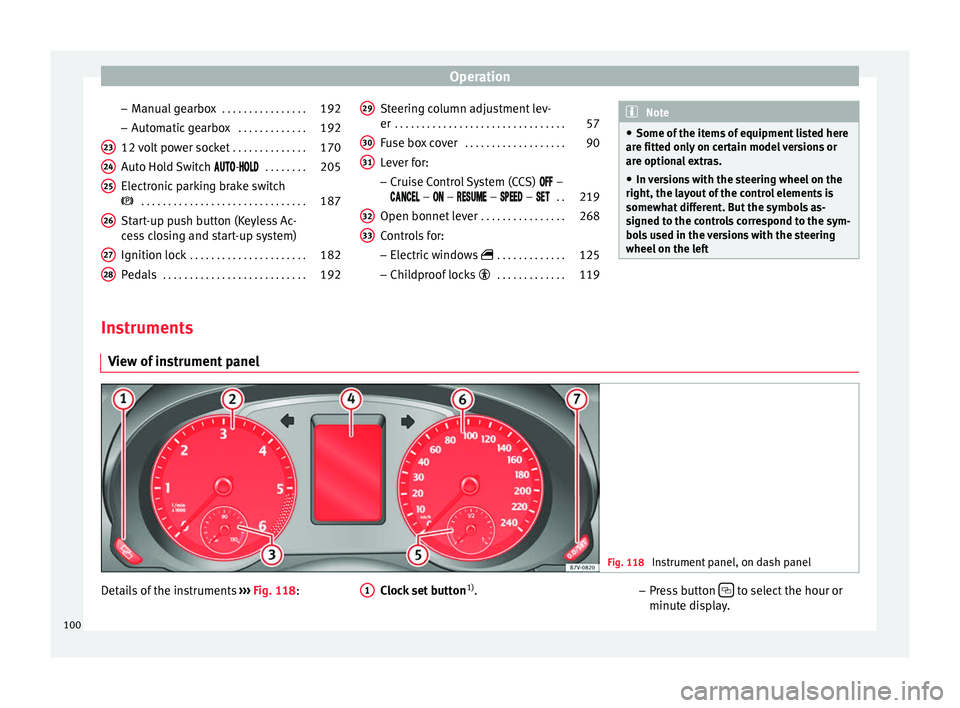
– Manual
g
earbox . . . . . . . . . . . . . . . . 192
– Automatic
gearbox . . . . . . . . . . . . . 192
12 volt power socket . . . . . . . . . . . . . .170
Auto Hold Switch -
. . . . . . . . 205
Electronic parking brake switch
. . . . . . . . . . . . . . . . . . . . . . . . . . . . . . . 187
Start-up push button (Keyless Ac-
ces
s closing and start-up system)
Ignition lock . . . . . . . . . . . . . . . . . . . . . . 182
Pedals . . . . . . . . . . . . . . . . . . . . . . . . . . . 192
23 24
25
26
27
28 Steering column adjustment lev-
er
. . . . . . . . . . . . . . . . . . . . . . . . . . . . . . . . 57
Fuse box cover . . . . . . . . . . . . . . . . . . . 90
Lever for:
– Crui
se C
ontrol System (CCS) –
– – – – . .219
Open bonnet lever . . . . . . . . . . . . . . . . 268
Controls for: – Electric w
indows . . . . . . . . . . . . . 125
– Child
proof locks . . . . . . . . . . . . . 119
29 30
31
32
33 Note
● Some of the it ems
of equipment listed here
are fitted only on certain model versions or
are optional extras.
● In versions with the steering wheel on the
right, the lay
out of the control elements is
somewhat different. But the symbols as-
signed to the controls correspond to the sym-
bols used in the versions with the steering
wheel on the left Instruments
V iew of
in
strument panel Fig. 118
Instrument panel, on dash panel Details of the instruments
››
›
Fig. 118: Clock set button1)
.
1 –
Pr e
s
s button to select the hour or
minut e di
s
play.
100
Page 104 of 320

OperationPriority 1 warning (red symbols)
Symbol flashing or lit; partly combined with audible
warnings.
Stop the vehicle!
It is dangerous ››› in Control and
warning lamps on page 105 !
Check the function that is faulty and repair it. If necessa-
ry, request assistance from specialised personnel.
Priority 2 warning (yellow symbols)
Symbol flashing or lit; partly combined with audible
warnings.
A function fault, or fluids which are below the correct
levels may cause damage to the vehicle ›››
in Control
and warning lamps on page 105 !
Check the faulty operation as soon as possible. If neces-
sary, request assistance from specialised personnel.
Informative text
Information relating to different vehicle processes. Mileage
The odomet
er
r
egisters the total distance
travelled by the car.
The odometer (trip ) shows the distance
travelled since the last odometer reset. The
last digit of the trip recorder indicates distan-
ces of 100 metres or one tenths of a mile.
Outside temperature display
When the outside temperature is below +4°C
(+39°F), the symbol “ice crystal” (warning of
risk of freezing) is also displayed next to the temperature. At first this symbol flashes and
then it rem
ains lit until the outside tempera-
ture rises above +6°C (+43°F) ››› .
When the v
ehic
le is at a standstill, with the
auxiliary heating on ( ››› page 177), or when
travelling at very low speeds, the tempera-
ture displayed may be higher than the true
outside temperature, as a result of the heat
produced by the engine.
The temperatures measured range from
-40°C to +50°C (-40°F to +122°F).
Compass
With the ignition on and the navigation sys-
tem on, the cardinal point corresponding to
the vehicle's direction of travel is displayed
on the instrument panel ››› page 103.
Selector lever positions
The range of engaged gears of the selector
lever is shown on the side of the lever, and
on the instrument panel display. In positions
D and S, and with the Tiptronic, the corre-
sponding gear is also displayed.
Recommended gear (manual gearbox)
The recommended gear in order to save fuel
is displayed on the instrument panel while
you are driving ›››
page 192. Second speed display (mph or km/h)
In addition t
o the speedometer, the speed
can also be displayed in a different unit of
measurement (in miles or in km per hour). To
change the units, in the Settings menu, se-
lect the option Second speed
››› page 26.
Vehicles without menu display on the instru-
ment panel
● Switch on the engine.
● Press button three times. The odometer
di s
p
lay flashes on the instrument panel dis-
play.
● Press button 0.0 / SET once. “mph”
or “km/h” i s
di
splayed briefly instead of the
odometer.
● This activates the second speed display. To
switc
h it off, repeat the procedure.
This option cannot be deactivated in models
destined for countries in which the second
speed must always be visible.
Start-Stop operating display.
Updated information relating to the status is
displayed on the instrument panel
››› page 205. WARNING
Observe the safety warnings ›››
in Control
and warnin g l
amps on page 105. 102
Page 105 of 320

General instrument panel
WARNING
Even though outside temperatures are above
freez in
g, some roads and bridges may be icy.
● At outside temperatures above +4°C
(+39°F), even when the “ice c
rystal symbol”
is not visible, there may still be patches of ice
on the road.
● Do not rely on the outside temperature in-
dicator! Note
● Differ ent
versions of the instrument panel
are available and therefore the versions and
instructions on the display may vary. In the
case of displays without warning or informa-
tion texts, faults are indicated exclusively by
the warning lamps.
● When several warnings are active at the
same time, the symbol
s are shown succes-
sively for a few seconds and will stay on until
the fault is rectified. Compass*
Fig. 119
Magnetic zones The compass does not require calibration in
v
ehic
l
es for which the navigation system was
mounted at the factory. The option compass
disappears.
The compass in vehicles in which the naviga-
tion system was not mounted at the factory,
is permanently and automatically calibrated.
If electronic or metal accessories (mobile
phone, television) are subsequently mounted
in the vehicle, the compass should be recali-
brated manually.
Adjusting the magnetic zone
● Switch the ignition on.
● Select the Settings menu fol
lowed by the
option Compass and Zone.
● Select the magnetic zone corresponding to
the position of
the vehicle ››› Fig. 119. ●
Adjust
and confirm the magnetic zone
(1-15 ).
Calibrating compass
To calibrate the compass you must be in one
of the valid magnetic zones with sufficient
space to be able to trace a circumference
with the vehicle.
● Switch the ignition on.
● Select the Settings menu fol
lowed by the
option Compass and Calibrate .
● Confirm the message Describe a com-
plete circumference to calibrate
the compass with OK and then trace a
c omp
l
ete circumference driving at approxi-
mately 10 km/h (6 mph).
When the corresponding cardinal point is dis-
played, the calibration is complete.
Service interval display The service indication is shown on the dash
p
anel
di
splay ›››
Fig. 118 4 .
S EA
T di
stinguishes between services with en-
gine oil change (Interval Service) and serv-
ices without engine oil change (Inspection
Service). The service interval display only
gives information for service dates which in-
volve an engine oil change. The dates for the »
103
Technical data
Advice
Operation
Emergencies
Safety
Page 106 of 320
Operation
other services (e.g. the next Inspection Serv-
ic e or c
h
ange of brake fluid) are listed on the
label attached to the door strut, or in the
Maintenance Programme.
In vehicles with Services established by time
or mileage, the service intervals are already
pre-defined.
In vehicles with LongLife Service , the inter-
vals are determined individually. Technical
progress has made it possible to considera-
bly reduce servicing requirements. The tech-
nology used by SEAT ensures that your vehi-
cle only has an Interval Service when it is
necessary. To establish when the Interval
Service is due (max. 2 years), the vehicle's
conditions of use and individual driving
styles are considered. The service pre-warn-
ing first appears 20 days before the date es-
tablished for the corresponding service. The
kilometres (miles) remaining until the next
service are always rounded up to the nearest
100 km (miles) and the time is given in com-
plete days. The current service message can-
not be viewed until 500 km after the last
service. Prior to this only lines are visible on
the display.
Inspection reminder
When the Service date is approaching, when
the ignition is switched on a Service remind-
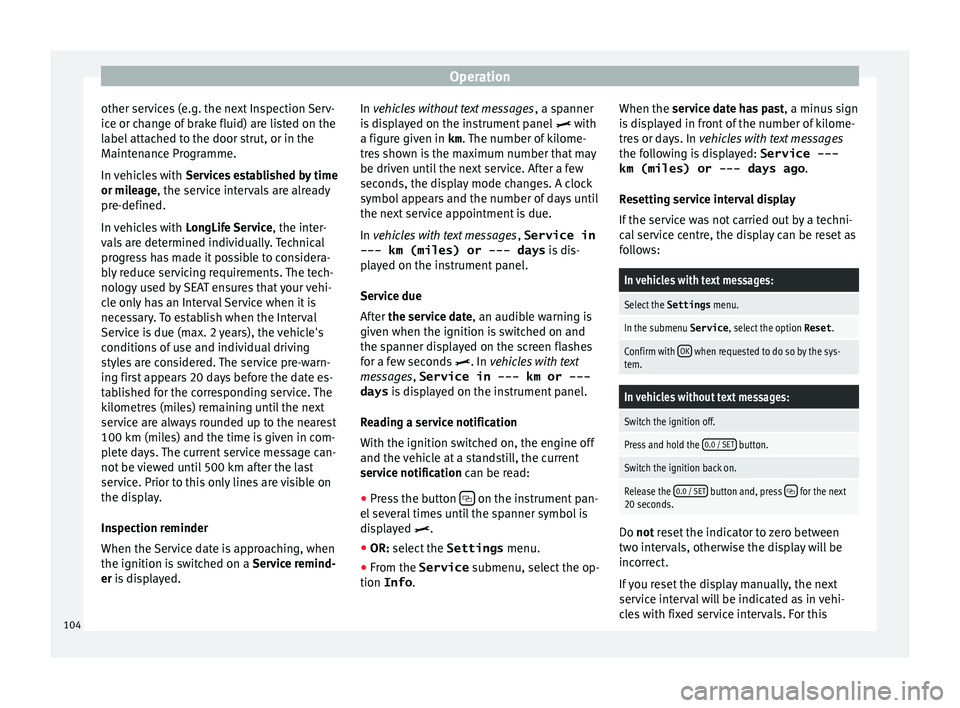
er is displayed. In vehicles without text messages
, a sp anner
is displayed on the instrument panel with
a figure given in km . The number of kilome-
tres shown is the maximum number that may
be driven until the next service. After a few
seconds, the display mode changes. A clock
symbol appears and the number of days until
the next service appointment is due.
In vehicles with text messages , Service in
--- km (miles) or --- days is dis-
played on the instrument panel.
Service due
After the service date, an audible warning is
given when the ignition is switched on and
the spanner displayed on the screen flashes
for a few seconds . In vehicles with text
messages, Service in --- km or --- days is displayed on the instrument panel.
Reading a service notification
With the ignition switched on, the engine off
and the vehicle at a standstill, the current
service notification can be read: ● Press the button on the instrument pan-
el sev
er
al times until the spanner symbol is
displayed .
● OR: select the Settings menu.
● From the
Service submenu, sel ect
the op-
tion Info . When the serv
ic
e date has past, a minus sign
is displayed in front of the number of kilome-
tres or days. In vehicles with text messages
the following is displayed: Service ---
km (miles) or --- days ago .
Resetting service interval display
If the service was not carried out by a techni-
cal service centre, the display can be reset as
follows:
In vehicles with text messages:
Select the Settings menu.
In the submenu Service , select the option Reset.
Confirm with OK when requested to do so by the sys-
tem.
In vehicles without text messages:
Switch the ignition off.
Press and hold the 0.0 / SET button.
Switch the ignition back on.
Release the 0.0 / SET button and, press for the next
20 seconds. Do not r
eset the indicator to zero between
tw o int
ervals, otherwise the display will be
incorrect.
If you reset the display manually, the next
service interval will be indicated as in vehi-
cles with fixed service intervals. For this
104
Page 113 of 320
Opening and closing
CAUTION
All of the vehicle keys contain electronic com-
ponents. Pr ot
ect them from damage, impacts
and humidity. Note
● Only u
se the key button when you require
the corresponding function. Pushing the but-
ton unnecessarily could accidentally unlock
the vehicle or trigger the alarm. It is also pos-
sible even when you are outside the radius of
action.
● Key operation can be greatly influenced by
overl
apping radio signals around the vehicle
working in the same range of frequencies
(e.g. radio transmitters, mobile telephones).
● Obstacles between the remote control and
the vehic
le, bad weather conditions and
draining batteries can considerably reduce
the range of the remote control. Control lamp on the vehicle key
Fig. 126
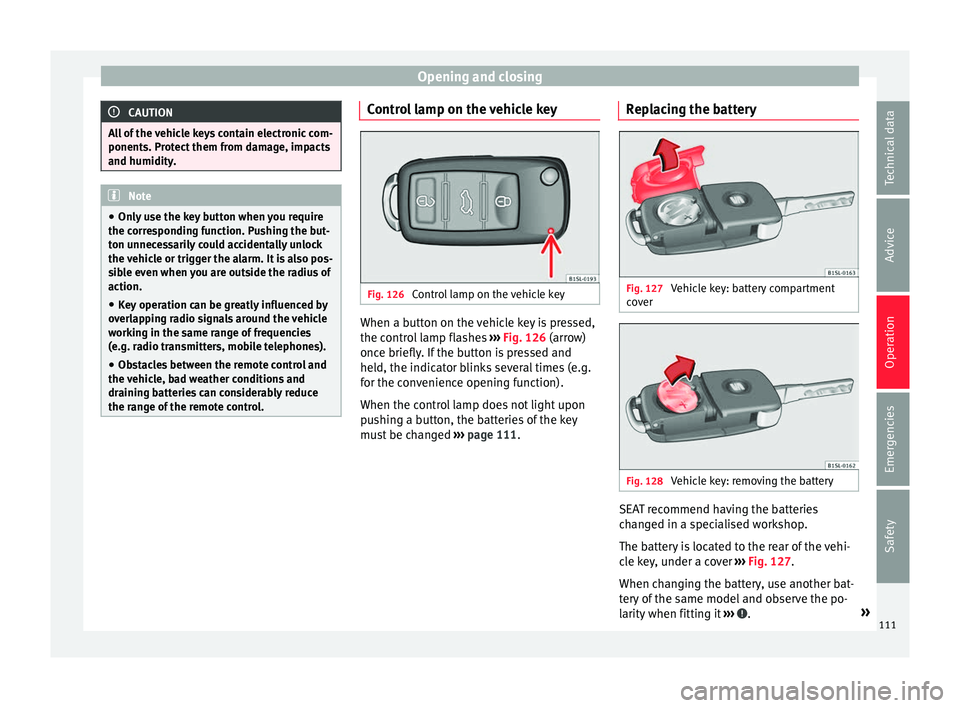
Control lamp on the vehicle key When a button on the vehicle key is pressed,
the c ontr
o
l lamp flashes ››› Fig. 126 (arrow)
once briefly. If the button is pressed and
held, the indicator blinks several times (e.g.
for the convenience opening function).
When the control lamp does not light upon
pushing a button, the batteries of the key
must be changed ››› page 111. Replacing the battery Fig. 127
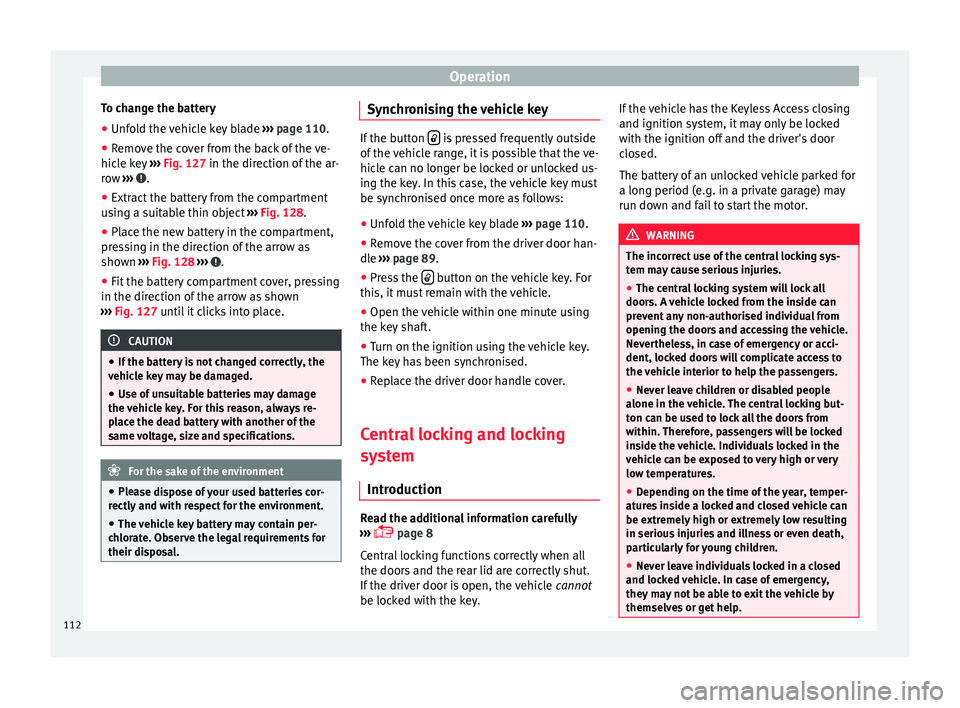
Vehicle key: battery compartment
c o
v
er Fig. 128
Vehicle key: removing the battery SEAT recommend having the batteries
c
h
an
ged in a specialised workshop.
The battery is located to the rear of the vehi-
cle key, under a cover ››› Fig. 127.
When changing the battery, use another bat-
tery of the same model and observe the po-
larity when fitting it ››› .
»
111
Technical data
Advice
Operation
Emergencies
Safety
Page 114 of 320
Operation
To change the battery
● Unfold the vehicle key blade ››
› page 110.
● Remove the cover from the back of the ve-
hicle k
ey ››› Fig. 127 in the direction of the ar-
row ››› .
● Extract the battery from the compartment
u s
in
g a suitable thin object ››› Fig. 128.
● Place the new battery in the compartment,
pres
sing in the direction of the arrow as
shown ››› Fig. 128 ››› .
● Fit the battery compartment cover, pressing
in the dir ection of
the arr
ow as shown
››› Fig. 127 until it clicks into place. CAUTION
● If the b att
ery is not changed correctly, the
vehicle key may be damaged.
● Use of unsuitable batteries may damage
the vehic
le key. For this reason, always re-
place the dead battery with another of the
same voltage, size and specifications. For the sake of the environment
● Ple a
se dispose of your used batteries cor-
rectly and with respect for the environment.
● The vehicle key battery may contain per-
chlor
ate. Observe the legal requirements for
their disposal. Synchronising the vehicle key
If the button
is pressed frequently outside
of the v
ehicle range, it is possible that the ve-
hicle can no longer be locked or unlocked us-
ing the key. In this case, the vehicle key must
be synchronised once more as follows:
● Unfold the vehicle key blade ›››
page 110.
● Remove the cover from the driver door han-
dle ››
› page 89.
● Press the button on the vehicle key. For
this, it mu
st remain with the vehicle.
● Open the vehicle within one minute using
the key sh
aft.
● Turn on the ignition using the vehicle key.
The key h
as been synchronised.
● Replace the driver door handle cover.
Central locking and locking
syst
em
Introduction Read the additional information carefully
› ›
›
page 8
Central locking functions correctly when all
the doors and the rear lid are correctly shut.
If the driver door is open, the vehicle cannot
be locked with the key. If the vehicle has the Keyless Access closing
and ignition syst
em, it may only be locked
with the ignition off and the driver's door
closed.
The battery of an unlocked vehicle parked for
a long period (e.g. in a private garage) may
run down and fail to start the motor. WARNING
The incorrect use of the central locking sys-
tem m a
y cause serious injuries.
● The central locking system will lock all
doors. A v
ehicle locked from the inside can
prevent any non-authorised individual from
opening the doors and accessing the vehicle.
Nevertheless, in case of emergency or acci-
dent, locked doors will complicate access to
the vehicle interior to help the passengers.
● Never leave children or disabled people
alone in the v
ehicle. The central locking but-
ton can be used to lock all the doors from
within. Therefore, passengers will be locked
inside the vehicle. Individuals locked in the
vehicle can be exposed to very high or very
low temperatures.
● Depending on the time of the year, temper-
ature
s inside a locked and closed vehicle can
be extremely high or extremely low resulting
in serious injuries and illness or even death,
particularly for young children.
● Never leave individuals locked in a closed
and locked
vehicle. In case of emergency,
they may not be able to exit the vehicle by
themselves or get help. 112