brake light Seat Alhambra 2017 Owner's Manual
[x] Cancel search | Manufacturer: SEAT, Model Year: 2017, Model line: Alhambra, Model: Seat Alhambra 2017Pages: 320, PDF Size: 6.88 MB
Page 26 of 320
The essentials
● Pu
sh the he
ad restraint down as far as it
will go. Ensure that it does not interfere with
the seatbelt from the upper attachment.
● Tighten the strap so that the top of the
chil
d seat rests on the seat backrest.
››› in Safety instructions on page 75 Starting the vehicle
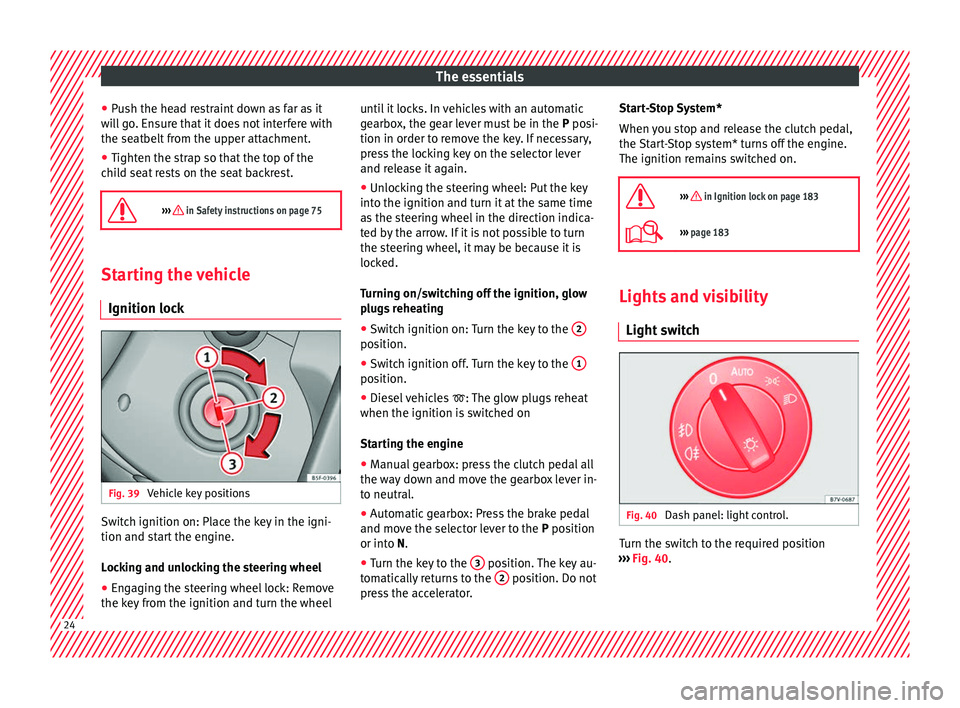
Ignition lock Fig. 39
Vehicle key positions Switch ignition on: Place the key in the igni-
tion and s
t
ar
t the engine.
Locking and unlocking the steering wheel
● Engaging the steering wheel lock: Remove
the key fr
om the ignition and turn the wheel until it locks. In vehicles with an automatic
gearbo
x, the gear lever must be in the P posi-
tion in order to remove the key. If necessary,
press the locking key on the selector lever
and release it again.
● Unlocking the steering wheel: Put the key
into the ignition and turn it
at the same time
as the steering wheel in the direction indica-
ted by the arrow. If it is not possible to turn
the steering wheel, it may be because it is
locked.
Turning on/switching off the ignition, glow
plugs reheating
● Switch ignition on: Turn the key to the 2 position.
●
Switch ignition off. Turn the key to the 1 position.
●
Diesel vehicles : The glo
w p
lugs reheat
when the ignition is switched on
Starting the engine
● Manual gearbox: press the clutch pedal all
the way
down and move the gearbox lever in-
to neutral.
● Automatic gearbox: Press the brake pedal
and move the sel
ector lever to the P position
or into N.
● Turn the key to the 3 position. The key au-
t om
atic
ally returns to the 2 position. Do not
pr e
s
s the accelerator. Start-Stop System*
When you s
top and release the clutch pedal,
the Start-Stop system* turns off the engine.
The ignition remains switched on.
››› in Ignition lock on page 183
››› page 183 Lights and visibility
Light sw
it
ch Fig. 40
Dash panel: light control. Turn the switch to the required position
› ›
›
Fig. 40. 24
Page 34 of 320
The essentials
■ Door u n
loc
k (individual opening, Auto
Lock)
■ Convenience handling of windows
■ Rear vision mirror adjustment
■ Lights & visibility settings
menu
■ Coming home and leaving home
■ Footwell light
■ Convenience turn signals
The stored settings are automatically activa-
ted, at the latest when the ignition is switch-
ed on. Please refer to the information and
tips relating to the seat memory
››› page 144. Cruise control
Operating the c ruise control system
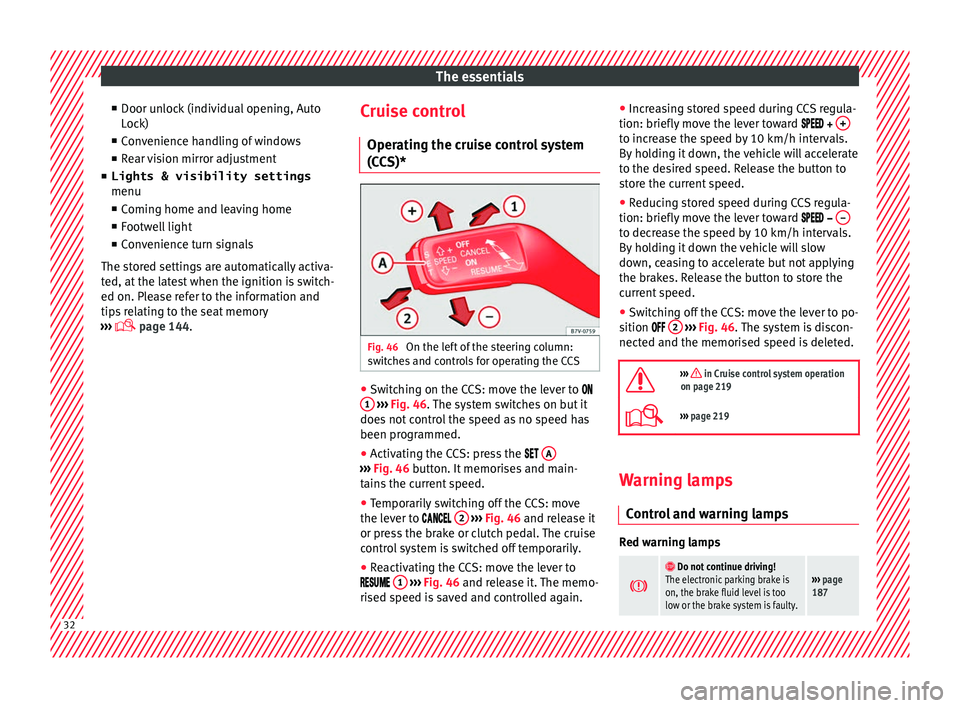
(CCS)* Fig. 46
On the left of the steering column:
sw it
c
hes and controls for operating the CCS ●
Switching on the CCS: move the lever to
1
› ›
› Fig. 46
. The system switches on but it
does not control the speed as no speed has
been programmed.
● Activating the CCS: press the A ›››
Fig. 46 butt on. It
memorises and main-
tains the current speed.
● Temporarily switching off the CCS: move
the lev er t
o 2
› ›
› Fig. 46 and release it
or press the brake or clutch pedal. The cruise
control system is switched off temporarily.
● Reactivating the CCS: move the lever to
1
› ›
› Fig. 46
and release it. The memo-
rised speed is saved and controlled again. ●
Incre
asing stored speed during CCS regula-
tion: briefly move the lever toward + to increase the speed by 10 km/h intervals.
B
y
ho
lding it down, the vehicle will accelerate
to the desired speed. Release the button to
store the current speed.
● Reducing stored speed during CCS regula-
tion: briefly mov
e the lever toward – to decrease the speed by 10 km/h intervals.
B
y
ho
lding it down the vehicle will slow
down, ceasing to accelerate but not applying
the brakes. Release the button to store the
current speed.
● Switching off the CCS: move the lever to po-
sition 2
› ›
› Fig. 46
. The system is discon-
nected and the memorised speed is deleted.
››› in Cruise control system operation
on page 219
››› page 219 Warning lamps
C ontr
o
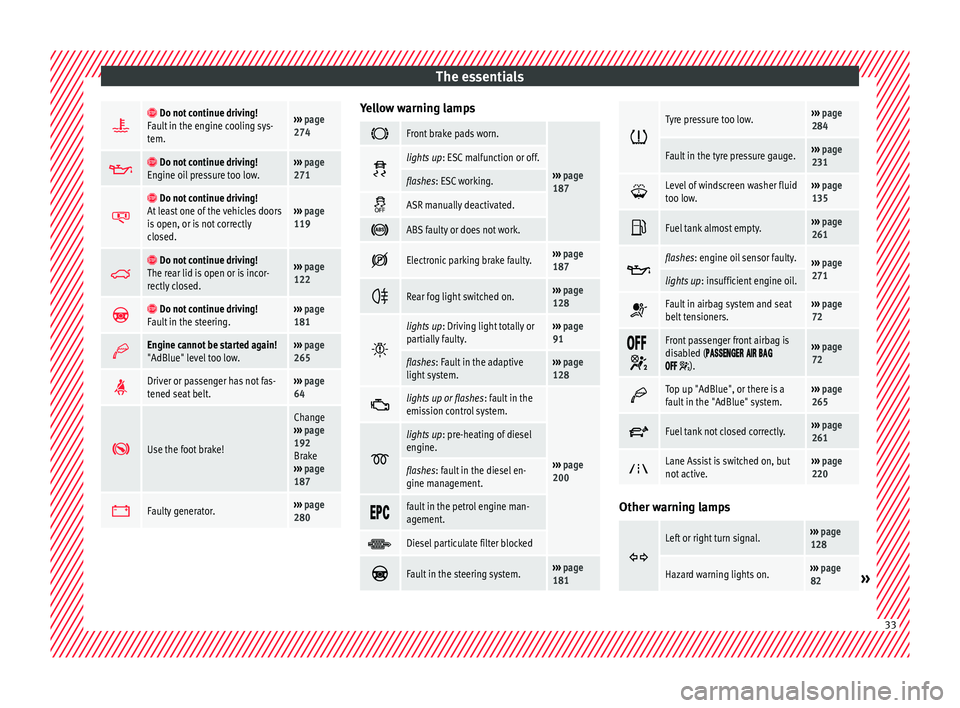
l and warning lamps Red warning lamps
Do not continue driving!
The electronic parking brake is
on, the brake fluid level is too
low or the brake system is faulty.››› page
187 32
Page 35 of 320
The essentials
Do not continue driving!
Fault in the engine cooling sys-
tem.››› page
274
Do not continue driving!
Engine oil pressure too low.››› page
271
Do not continue driving!
At least one of the vehicles doors
is open, or is not correctly
closed.››› page
119
Do not continue driving!
The rear lid is open or is incor-
rectly closed.››› page
122
Do not continue driving!
Fault in the steering.››› page
181
Engine cannot be started again!
"AdBlue" level too low.›››
page
265
Driver or passenger has not fas-
tened seat belt.›››
page
64
Use the foot brake!
Change
››› page
192
Brake
››› page
187
Faulty generator.›››
page
280 Yellow warning lamps
Front brake pads worn.
›››
page
187 lights up
: ESC malfunction or off.
flashes: ESC working.
ASR manually deactivated.
ABS faulty or does not work.
Electronic parking brake faulty.›››
page
187
Rear fog light switched on.›››
page
128
lights up
: Driving light totally or
partially faulty.››› page
91
flashes: Fault in the adaptive
light system.››› page
128
lights up or flashes
: fault in the
emission control system.
››› page
200
lights up
: pre-heating of diesel
engine.
flashes: fault in the diesel en-
gine management.
fault in the petrol engine man-
agement.
Diesel particulate filter blocked
Fault in the steering system.›››
page
181
Tyre pressure too low.›››
page
284
Fault in the tyre pressure gauge.››› page
231
Level of windscreen washer fluid
too low.›››
page
135
Fuel tank almost empty.›››
page
261
flashes: engine oil sensor faulty.›››
page
271
lights up : insufficient engine oil.
Fault in airbag system and seat
belt tensioners.›››
page
72
Front passenger front airbag is
disabled (
).
››› page
72
Top up "AdBlue", or there is a
fault in the "AdBlue" system.›››
page
265
Fuel tank not closed correctly.›››
page
261
Lane Assist is switched on, but
not active.›››
page
220 Other warning lamps
Left or right turn signal.›››
page
128
Hazard warning lights on.››› page
82» 33
Page 36 of 320
The essentials
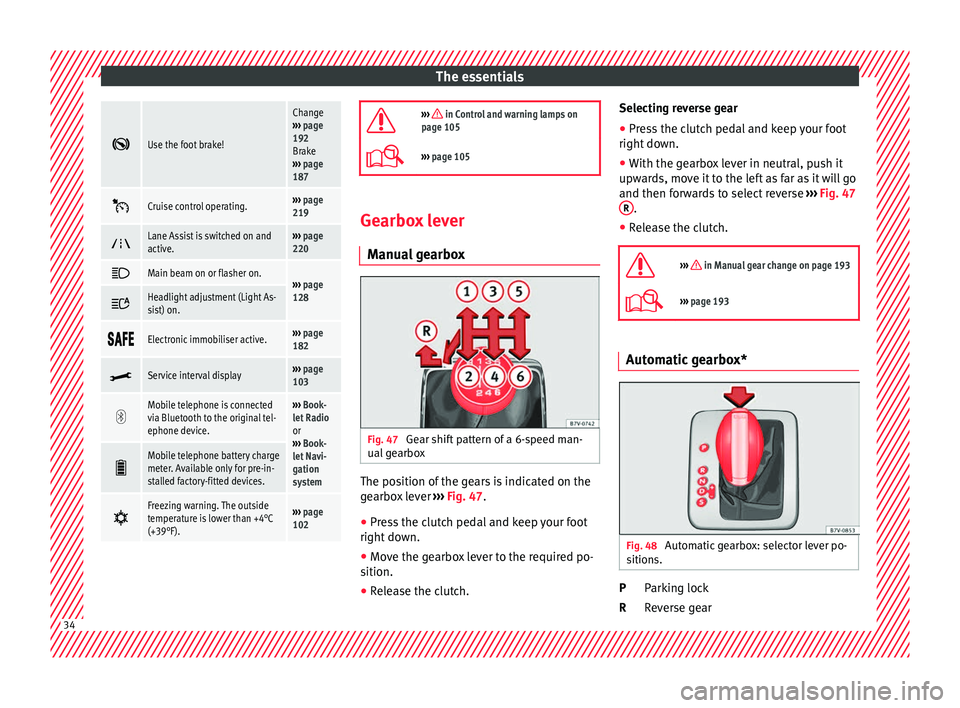
Use the foot brake!
Change
››› page
192
Brake
››› page
187
Cruise control operating.›››
page
219
Lane Assist is switched on and
active.›››
page
220
Main beam on or flasher on.›››
page
128 Headlight adjustment (Light As-
sist) on.
Electronic immobiliser active.›››
page
182
Service interval display›››
page
103
Mobile telephone is connected
via Bluetooth to the original tel-
ephone device.›››
Book-
let Radio
or
››› Book-
let Navi-
gation
system
Mobile telephone battery charge
meter. Available only for pre-in-
stalled factory-fitted devices.
Freezing warning. The outside
temperature is lower than +4°C
(+39°F).›››
page
102
››› in Control and warning lamps on
page 105
››› page 105 Gearbox lever
M anua
l
gearbox Fig. 47
Gear shift pattern of a 6-speed man-
ual g
e
arbox The position of the gears is indicated on the
g
e
arbo
x lever ››› Fig. 47.
● Press the clutch pedal and keep your foot
right down.
● Mo
ve the gearbox lever to the required po-
sition.
● Rel
ease the clutch. Selecting reverse gear
●
Press the clutch pedal and keep your foot
right down.
● W
ith the gearbox lever in neutral, push it
upwar
ds, move it to the left as far as it will go
and then forwards to select reverse ››› Fig. 47
R .
● Release the clutch.
››› in Manual gear change on page 193
››› page 193 Automatic gearbox*
Fig. 48
Automatic gearbox: selector lever po-
s ition
s. Parking lock
R
ev
er
se gear
P
R 34
Page 45 of 320
The essentials
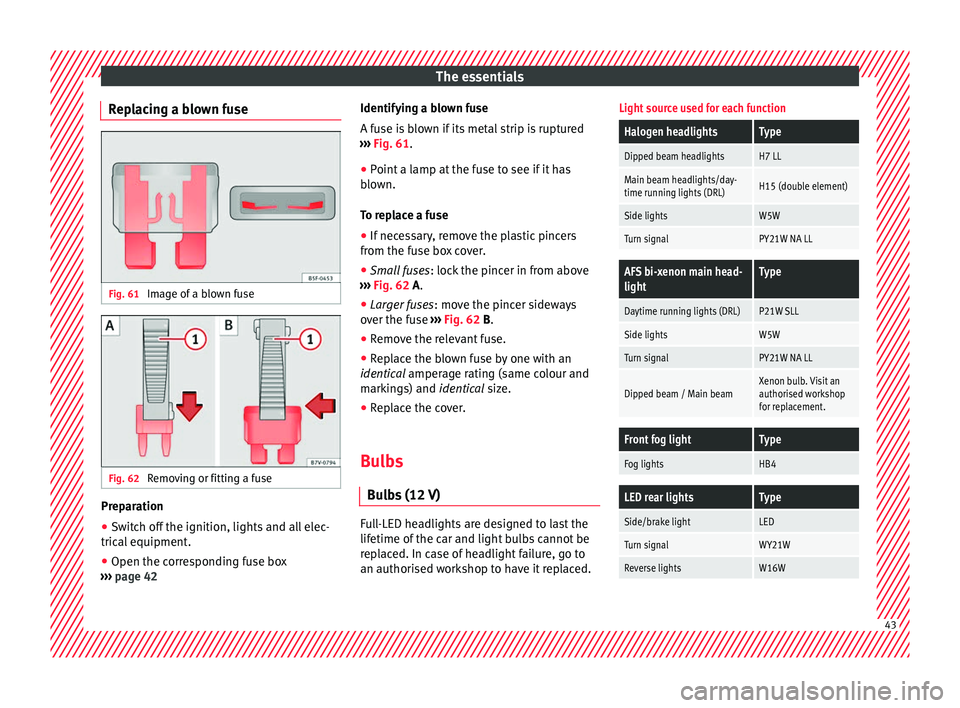
Replacing a blown fuse Fig. 61
Image of a blown fuse Fig. 62
Removing or fitting a fuse Preparation
● Switch off the ignition, lights and all elec-
tric al
equipment
.
● Open the corresponding fuse box
›››
page 42 Identifying a blown fuse
A fuse i
s blown if its metal strip is ruptured
››› Fig. 61.
● Point a lamp at the fuse to see if it has
blown.
T
o replace a fuse
● If necessary, remove the plastic pincers
from the fu
se box cover.
● Small fuses: lock the pinc
er in from above
››› Fig. 62 A.
● Larger fuses : move the pinc
er sideways
over the fuse ››› Fig. 62 B.
● Remove the relevant fuse.
● Replace the blown fuse by one with an
identica
l amperage rating (same colour and
markings) and identical size.
● Replace the cover.
Bulbs Bul
bs (12 V) Full-LED headlights are designed to last the
lif
etime of
the c
ar and light bulbs cannot be
replaced. In case of headlight failure, go to
an authorised workshop to have it replaced.
Light source used for each function
Halogen headlightsType
Dipped beam headlightsH7 LL
Main beam headlights/day-
time running lights (DRL)H15 (double element)
Side lightsW5W
Turn signalPY21W NA LL
AFS bi-xenon main head-
lightType
Daytime running lights (DRL)P21W SLL
Side lightsW5W
Turn signalPY21W NA LL
Dipped beam / Main beamXenon bulb. Visit an
authorised workshop
for replacement.
Front fog lightType
Fog lightsHB4
LED rear lightsType
Side/brake lightLED
Turn signalWY21W
Reverse lightsW16W 43
Page 46 of 320
The essentials
Action in the event of a punc-
t ur
e
Wh
at to do first ●
Park the vehicle on a horizontal surface
and in a saf e p
lace as far away from traffic as
possible.
● Apply the handbrake.
● Switch on the hazard warning lights.
● Manual gearbox: select the 1s
t gear.
● Automatic gearbox: Move the sel
ector lever
to position P.
● If you are towing a trailer, unhitch it from
your v
ehicle.
● Keep the vehicle tool kit ready*
›››
page 82.
● Observe the applicable legislation for each
countr
y (reflective vest, warning triangles,
etc.).
● All occupants should leave the vehicle and
wait in a s
afe place (for instance behind the
roadside crash barrier). WARNING
● Alw a
ys observe the above steps and pro-
tect yourself and other road users.
● If you change the wheel on a slope, block
the wheel on the oppo
site side of the car with
a stone or similar to prevent the vehicle from
moving. Repairing a tyre with the anti-punc-
t
ur
e k
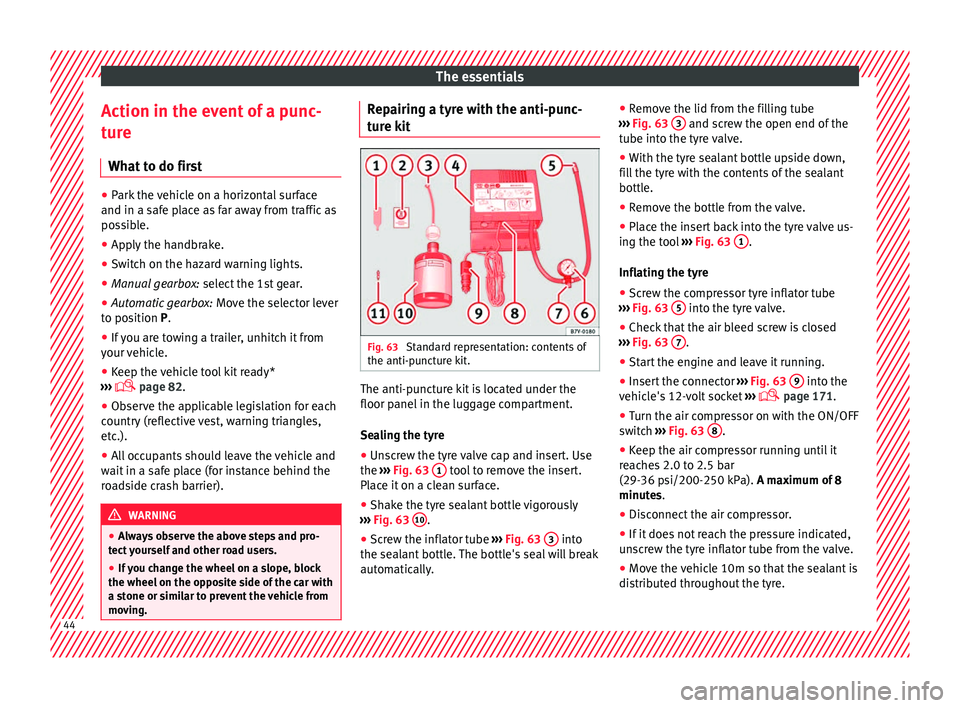
it Fig. 63
Standard representation: contents of
the anti-p u
nct
ure kit. The anti-puncture kit is located under the
floor p
anel
in the lug
gage compartment.
Sealing the tyre
● Unscrew the tyre valve cap and insert. Use
the ›››
Fig. 63 1 tool to remove the insert.
Pl ac
e it
on a clean surface.
● Shake the tyre sealant bottle vigorously
›››
Fig. 63 10 .
● Screw the inflator tube ››
›
Fig. 63 3 into
the se al
ant
bottle. The bottle's seal will break
automatically. ●
Remov
e the lid from the filling tube
››› Fig. 63 3 and screw the open end of the
t ube int
o the ty
re valve.
● With the tyre sealant bottle upside down,
fill
the tyre with the contents of the sealant
bottle.
● Remove the bottle from the valve.
● Place the insert back into the tyre valve us-
ing the too
l ››› Fig. 63 1 .
Infl atin
g the ty
re
● Screw the compressor tyre inflator tube
›››
Fig. 63 5 into the tyre valve.
● Check that the air bleed screw is closed
› ›
›
Fig. 63 7 .
● Start the engine and leave it running.
● Insert the connector ››
›
Fig. 63 9 into the
v ehic
l
e's 12-volt socket ›››
page 171.
● Turn the air compressor on with the ON/OFF
switc
h ››› Fig. 63 8 .
● Keep the air compressor running until it
r e
ac
hes 2.0 to 2.5 bar
(29-36 psi/200-250 kPa). A maximum of 8
minutes.
● Disconnect the air compressor.
● If it does not reach the pressure indicated,
uns
crew the tyre inflator tube from the valve.
● Move the vehicle 10m so that the sealant is
dis trib
uted throughout the tyre.44
Page 53 of 320
The essentials
Only secure the tow rope or tow bar to the
t o
wline anc
horage or specially designed fit-
ting.
Vehicles with a factory fitted towing device ,
can only be used for towing with a tow bar,
specially designed to fit on a tow hitch ball
››› page 234.
Towing vehicles with an automatic gearbox
Note the following for a towed vehicle: ● Make sure the gear selector lever is in the N
position.
● Do not
drive faster than 50 km/h (30 mph).
● Do not tow further than 50 km (30 miles).
● If a breakdown truck is used, the vehicle
must
be towed with the front wheels raised.
Note the following instructions for towing
four all-wheel drive vehicles.
Instructions for towing all-wheel drive vehi-
cles
All-wheel drive vehicles can be towed using a
toolbar or tow rope. If the vehicle is towed
with the front or rear axle raised, the engine
must be turned off to avoid transmission
damage.
For vehicles with a double clutched DSG ®
(di-
rect shift gearbox) the instructions for towing
vehicles with an automatic gearbox apply
››› page 51. Situations in which a vehicle should not be
tow
ed
In the following cases, the vehicle should not
be towed but transported on a trailer or spe-
cial vehicle:
● If the vehicle gearbox does not contain lu-
bricant due t
o a fault.
● If the vehicle battery is flat and, as a result,
the electronic
steering lock and electronic
parking brake cannot be disengaged if ap-
plied.
● If the vehicle to be towed has an automatic
gearbo
x and the distance to be covered is
greater than 50 km (30 miles).
››› in Introduction on page 87
››› page 87 Tow-starting
In general, the vehicle should not be started
b
y
t
owing. Jump-starting is much more pref-
erable ›››
page 51.
For technical reasons, the following vehicles
can not be tow started:
● Vehicles with an automatic gearbox. ●
Vehicl
es with the Keyless Access locking
and ignition system, since the electronic
steering lock may not unlock.
● Vehicles with an electronic parking brake,
given that
it is possible that the brake will
not be disengaged.
● If the vehicle battery is flat, it is possible
that the en
gine control units do not operate
correctly.
However, if your vehicle must absolutely be
tow-started (manual gearbox):
● Put it into second or third gear.
● Keep the clutch pressed down.
● Switch on the ignition and the hazard warn-
ing lights.
● Rel
ease the clutch when both vehicles are
movin
g.
● As soon as the engine starts, press the
clutc
h and move the gear lever into neutral.
This helps to prevent a collision with the tow-
ing vehicle.
How to jump start
Jump lea
ds If the engine fails to start because of a dis-
c
h
ar
ged battery, the battery of another vehi-
cle can be used to start the engine. Before » 51
Page 56 of 320
The essentials
on battery). Failure to comply could result in
an exp
lo
sion.
● Never use jump leads when one of the bat-
teries
is frozen. Danger of explosion! Even af-
ter the battery has thawed, battery acid could
leak and cause chemical burns. If a battery
freezes, it should be replaced.
● Keep sparks, flames and lighted cigarettes
awa
y from batteries, danger of explosion.
Failure to comply could result in an explo-
sion.
● Observe the instructions provided by the
manufact
urer of the jump leads.
● Do not connect the negative cable from the
other vehic
le directly to the negative terminal
of the flat battery. The gas emitted from the
battery could be ignited by sparks. Danger of
explosion.
● Do not attach the negative cable from the
other vehic
le to parts of the fuel system or to
the brake line.
● The non-insulated parts of the battery
clamp
s must not be allowed to touch. The
jump lead attached to the positive battery
terminal must not touch metal parts of the ve-
hicle, this can cause a short circuit.
● Position the leads in such a way that they
cannot c
ome into contact with any moving
parts in the engine compartment.
● Do not lean on the batteries. This could re-
sult
in chemical burns. Note
The vehicles must not touch each other, oth-
erw i
se electricity could flow as soon as the
positive terminals are connected. Changing windscreen wipers
Wind s
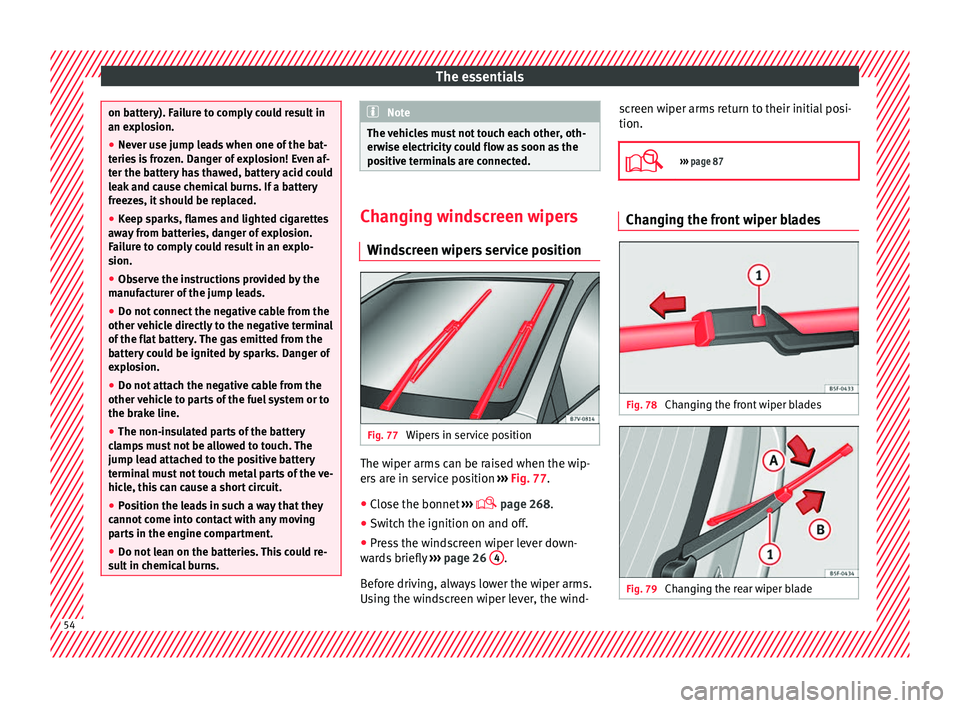
creen wipers service position Fig. 77
Wipers in service position The wiper arms can be raised when the wip-
er
s
ar
e in service position ››› Fig. 77.
● Close the bonnet ›››
page 268.
● Switch the ignition on and off.
● Press the windscreen wiper lever down-
ward
s briefly ››› page 26 4 .
B ef
or
e driving, always lower the wiper arms.
Using the windscreen wiper lever, the wind- screen wiper arms return to their initial posi-
tion.
››› page 87 Changing the front wiper blades
Fig. 78
Changing the front wiper blades Fig. 79
Changing the rear wiper blade54
Page 60 of 320
Safety
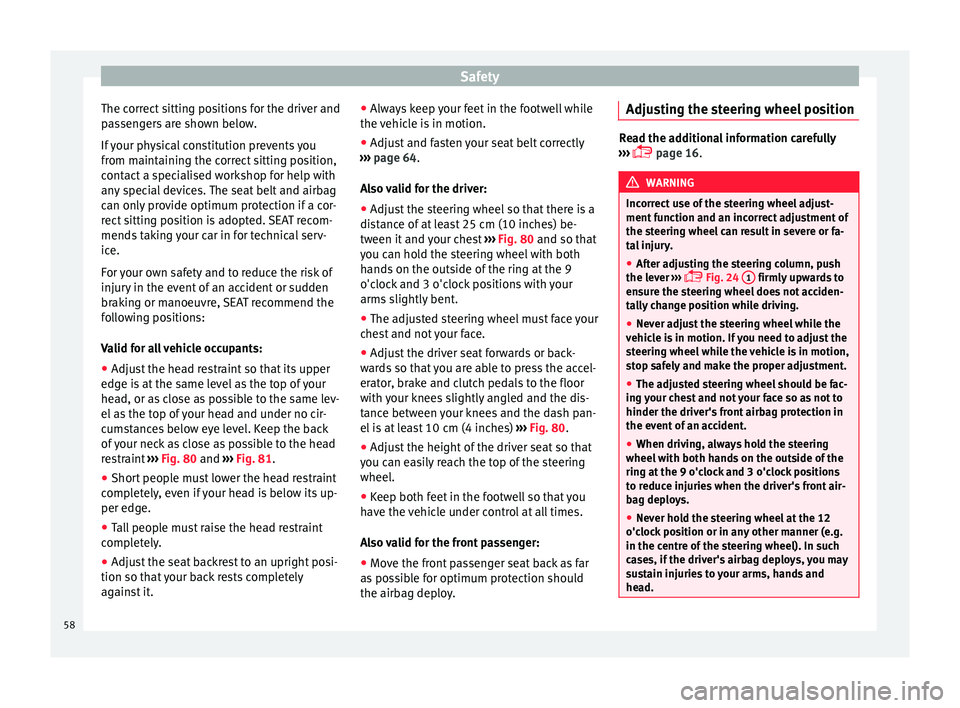
The correct sitting positions for the driver and
p a
s
sengers are shown below.
If your physical constitution prevents you
from maintaining the correct sitting position,
contact a specialised workshop for help with
any special devices. The seat belt and airbag
can only provide optimum protection if a cor-
rect sitting position is adopted. SEAT recom-
mends taking your car in for technical serv-
ice.
For your own safety and to reduce the risk of
injury in the event of an accident or sudden
braking or manoeuvre, SEAT recommend the
following positions:
Valid for all vehicle occupants:
● Adjust the head restraint so that its upper
edge is
at the same level as the top of your
head, or as close as possible to the same lev-
el as the top of your head and under no cir-
cumstances below eye level. Keep the back
of your neck as close as possible to the head
restraint ››› Fig. 80 and ››› Fig. 81.
● Short people must lower the head restraint
compl
etely, even if your head is below its up-
per edge.
● Tall people must raise the head restraint
compl
etely.
● Adjust the seat backrest to an upright posi-
tion so that
your back rests completely
against it. ●
Alwa
ys keep your feet in the footwell while
the vehicle is in motion.
● Adjust and fasten your seat belt correctly
›››
page 64.
Also valid for the driver:
● Adjust the steering wheel so that there is a
dist
ance of at least 25 cm (10 inches) be-
tween it and your chest ››› Fig. 80 and so that
you can hold the steering wheel with both
hands on the outside of the ring at the 9
o'clock and 3 o'clock positions with your
arms slightly bent.
● The adjusted steering wheel must face your
ches
t and not your face.
● Adjust the driver seat forwards or back-
ward
s so that you are able to press the accel-
erator, brake and clutch pedals to the floor
with your knees slightly angled and the dis-
tance between your knees and the dash pan-
el is at least 10 cm (4 inches) ››› Fig. 80.
● Adjust the height of the driver seat so that
you can e
asily reach the top of the steering
wheel.
● Keep both feet in the footwell so that you
have the
vehicle under control at all times.
Also valid for the front passenger:
● Move the front passenger seat back as far
as po
ssible for optimum protection should
the airbag deploy. Adjusting the steering wheel position Read the additional information carefully
›› ›
page 16. WARNING
Incorrect use of the steering wheel adjust-
ment f u
nction and an incorrect adjustment of
the steering wheel can result in severe or fa-
tal injury.
● After adjusting the steering column, push
the lever ›
›› Fig. 24
1 firmly upwards to
ens ur
e the steering wheel does not acciden-
tally change position while driving.
● Never adjust the steering wheel while the
vehicl
e is in motion. If you need to adjust the
steering wheel while the vehicle is in motion,
stop safely and make the proper adjustment.
● The adjusted steering wheel should be fac-
ing y
our chest and not your face so as not to
hinder the driver's front airbag protection in
the event of an accident.
● When driving, always hold the steering
wheel with both h
ands on the outside of the
ring at the 9 o'clock and 3 o'clock positions
to reduce injuries when the driver's front air-
bag deploys.
● Never hold the steering wheel at the 12
o'clock
position or in any other manner (e.g.
in the centre of the steering wheel). In such
cases, if the driver's airbag deploys, you may
sustain injuries to your arms, hands and
head. 58
Page 61 of 320
Safe driving
Danger of injuries due to an incorrect
s ittin
g po
sitionNumber of seats
Dependin
g on the equipment,
your vehicle
has a total of five or seven seats. Each seat is
equipped with a seat belt.
5 seats
Seats in the frontSeats in thesecond rowSeats in the third row
23–
7 seats
Seats in the frontSeats in thesecond rowSeats in the third row
232 If the seat belts are worn incorrectly or not at
al
l, the ri
sk
of severe injuries increases. Seat
belts can provide optimal protection only if
the belt web is properly worn. Being seated
in an incorrect position means the seat belt
cannot offer its full protection. This could re-
sult in severe and even fatal injuries. The risk
of severe or fatal injuries is especially height-
ened when a deploying airbag strikes a vehi-
cle occupant who has assumed an incorrect
sitting position. The driver is responsible for
all passengers in the vehicle, particularly
children. The following list shows just some examples
of incorr
ect sitting positions which can be
dangerous to all vehicle occupants.
Whenever the vehicle is in motion:
● Never stand in the vehicle.
● Never stand on the seats.
● Never kneel on the seats.
● Never tilt your seat backrest too far to the
rear
.
● Never lean against the dash panel.
● Never lie on the rear bench.
● Never sit on the front edge of a seat.
● Never sit sideways.
● Never lean out of a window.
● Never put your feet out of a window.
● Never put your feet on the dash panel.
● Never put your feet on the surface of a seat
or seat b
ackrest.
● Never travel in a footwell.
● Never sit on the armrests.
● Never travel on a seat without wearing the
seat belt
.
● Never carry any person in the luggage com-
partment
. WARNING
An incorrect sitting position in the vehicle
can l e
ad to severe injuries or death in the event of sudden braking or manoeuvres, colli-
sion or ac
c
idents or if the airbag deploys.
● Before the vehicle moves, assume the prop-
er sitting po
sition and maintain it throughout
the trip. This also includes fastening the seat
belt.
● Never transport more people than there are
seats
with a seat belt available in the vehicle.
● Children must always be protected with an
appro
ved child restraint system suited to
their height and weight ››› page 74.
● Always keep your feet in the footwell while
the vehic
le is in motion. Never, for example,
put your feet on the surface of a seat or on
the dash panel and never put them out of a
window. Otherwise the airbag and seat belt
offer insufficient protection and the risk of in-
jury in the event of an accident is increased. WARNING
Before every trip, adjust the seat, the seat
belt and the he a
d restraints and instruct your
passengers to fasten their seat belts proper-
ly.
● Move the front passenger seat back as far
as po
ssible.
● Adjust the driver seat so that there is a dis-
tance of
at least 25 cm (10 inches) between
the centre of your chest and the hub of the
steering wheel. Adjust the driver seat so that
you are able to press the accelerator, brake
and clutch pedals to the floor with your knees
slightly angled and that the distance » 59
Technical data
Advice
Operation
Emergencies
Safety