display Seat Alhambra 2017 Owner's Guide
[x] Cancel search | Manufacturer: SEAT, Model Year: 2017, Model line: Alhambra, Model: Seat Alhambra 2017Pages: 320, PDF Size: 6.88 MB
Page 132 of 320
Operation
When the light switch is in position
, a
phot o sen
sor automatically turns the instru-
ment and switch lighting on and off.
Automatic dipped beam control
The automatic dipped beam control is merely
intended as an aid and is not able to recog-
nise all driving situations.
When the light switch is in position , the
vehicle lights and the instrument panel and
switch lighting switch on and off automatical-
ly in the following situations ››› :
Automatic switching
onAutomatic switching
off or switch to day-
time running lighting
The photo sensor detects
darkness, for example,
when driving through a
tunnel.When adequate lighting is
detected.
The rain sensor detects
rain and activates the
windscreen wipers.When the windscreen wip-
er has been inactive for a
few minutes.
Adaptive headlights (AFS)
The a
d
aptiv
e headlights only operate when
the dipped beam is on and at speeds of over
10 km/h (6 mph). On bends, the adaptive
headlights automatically improve lighting on
the road ahead.
The adaptive headlights can be switched on
and off from the infotainment system. Static cornering lights
When turning s
lowly to change direction or
going round a tight bend, the static cornering
lights automatically come on. The static cor-
nering lights only work at speeds of less than
40 km/h (25 mph).
The static cornering lights may be incorpora-
ted into the fog lights or the front headlights,
depending upon the equipment. WARNING
If the road is not well lit and other road users
cannot see the
vehicle well enough or at all,
accidents may occur.
● The automatic dipped beam control ( )
only sw
itches on the dipped beam when
there are no changes in brightness, and not,
for example when it is foggy.
● Never drive with daytime lights if the road
is not
well lit due to weather or lighting con-
ditions. Daytime lights do not provide
enough light to illuminate the road properly
or be seen by other road users.
● The rear lights do not come on with the
daytime driv
ing light. A vehicle which does
not have the rear lights on may not be visible
to other drivers in the darkness, if it is rain-
ing or in conditions of poor visibility. Headlight adjustment
Headlight adjustment (Light Assist)
The hea
dlight
adjustment automatically con-
nects and disconnects these lights depend-
ing on the environmental and traffic condi-
tions and on the speed, within the limitations
of the system ››› . This is monitored by a
sensor loc at
ed on the inside of the wind-
screen, above the interior rear vision mirror.
The automatic headlight adjustment auto-
matically switches on the lights depending
on the vehicles travelling in front and in the
opposite direction, and on other environmen-
tal and traffic conditions from an approxi-
mate speed of 60 km/h (37 mph) and turns
them off again at speeds below approximate-
ly 30 km/h (18 mph).
Switching on and off
Action
Switch-
ing on:– With the ignition on, turn the lights control
to the position and put the turn signal
and main beam lever in the main beam posi-
tion ››› page 129. When the headlight adjust-
ment (automatic lights also) is activated, the
warning lamp lights up in the dash panel
display
. 130
Page 141 of 320

Lights and visibility
Exterior mirrors Fig. 148
In the driver door: exterior mirror
c ontr
o
ls Read the additional information carefully
› ›
›
page 16
Turn the knob to the required position:
Electric folding exterior mirrors
››› .
Switch on the exterior mirror heating This only
heats up if the ambient temperature is less
than +20°C (+68°F).
Adjust the left-hand exterior mirror by turning
the knob forward, backward, to the right or to
the left.
Adjust the right-hand exterior mirror by turning
the knob forward, backward, to the right or to
the left .
Zero position. Exterior mirror unfolded, exterior
mirror heating off, adjustment of exterior mir-
ror not possible. Synchronised mirror adjustment
●
In the Settings - Convenience menu,
sel ect
whether or not
the mirrors should
move in synchronisation ›››
page 26.
● Turn the knob to position L.
● Adjust the left-hand exterior mirror. The
right ext
erior mirror will be adjusted at the
same time (synchronised).
● If necessary the right exterior mirror adjust-
ment ma
y need correcting. turn the control to
position R.
Automatic anti-dazzle exterior mirror, driver
side
The automatic anti-dazzle exterior mirror is
controlled in the same way as the automatic
anti-dazzle rear vision mirror ››› page 138.
Store the reverse settings for the passenger
exterior mirror ● Select the vehicle key in which the setting
is t
o be stored.
● Use this key to unlock the vehicle.
● Connect the automatic parking brake.
● Turn the exterior mirror knob to position R
(pas
senger side).
● Switch the ignition on.
● Move the gear lever to neutral.
● Access the Settings menu on the instru-
ment
panel display using the multifunction steering wheel buttons and select
Conven-
ience .
● Select the Rear vision mirror ad-
justment function (if
it is already checked,
uncheck it and check the option again).
● Select reverse gear.
● Adjust the front passenger side exterior
mirror so that
you can see, for example, the
kerb area.
● The new position of the mirror will be stor-
ed automatic
ally and allocated to the vehicle
key that was used to unlock the vehicle. For
vehicles with seat memory, please see
››› page 144.
Activating the passenger exterior mirror set-
tings
● Turn the exterior mirror knob to position R.
● With the ignition switched on, select re-
verse g
ear.
● The stored position of the passenger exteri-
or mirror for r
everse gear is deleted when
driving forwards at 15 km/h (9 mph), or if the
knob is turned from position R to another po-
sition. WARNING
Fold and unfold the exterior mirror, taking
car e t
o avoid injuries.
● Only fold or unfold the exterior mirror when
there is
no-one in the way of the mirror. » 139
Technical data
Advice
Operation
Emergencies
Safety
Page 175 of 320
Air conditioning
the device and try plugging it back in af-
ter ar
ou
nd 10 seconds. Note
● Some ap pli
ances may not work properly in
the 230 Volt Euro power connector due to a
lack of power (Watts).
● The 230 Watt Euro power connector can be
modified for 115 W
att appliances and vice
versa. Consult a specialist shop for advice on
accessories to adapt the connector. SEAT rec-
ommends taking your car in for technical
service. Air conditioning
Air c onditionin
g
Intr
oduction Viewing Climatronic information
The fact
or
y-fitted radio or navigation system
screen briefly displays information relating to
Climatronic.
The units of temperature measurement is dis-
played on the factory-installed radio or navi-
gation system and, depending on the vehicle
equipment, can be set using the Configu-
ration menu on the instrument panel. WARNING
Reduced visibility through the windows in-
cr e
ases the risk of serious accidents.
● Ensure that all windows are free of ice and
snow and th
at they are not fogged up pre-
venting a clear view of everything outside.
● The maximum heat output required to de-
fros
t windows quickly is only available when
the engine has reached its normal running
temperature. Only drive when you have good
visibility.
● Always ensure that you use the air condi-
tioner and heated r
ear window to maintain
good visibility.
● Never leave the air recirculation on for a
long period of time. If
the cooling system is switched off and air recirculation mode
swit
c
hed on, the windows can mist over very
quickly, considerably limiting visibility.
● Switch air recirculation mode off when it is
not requir
ed. WARNING
Stuffy or used air will increase fatigue and re-
duc e driv er c
oncentration possibly resulting
in a serious accident.
● Never leave the fresh air fan turned off or
use the air rec
irculation for long periods of
time; the air in the vehicle interior will not be
refreshed. CAUTION
● Swit c
h the air conditioner off if you think it
may be broken. This will avoid additional
damage. Have the air conditioner checked by
a specialised workshop.
● Repairs to the air conditioner require spe-
cia
list knowledge and special tools. SEAT rec-
ommends taking your car in for technical
service.
● Do not smoke when air recirculation is
switc
hed on in vehicles with an air condition-
er. The smoke taken in could lie on the cool-
ing system vaporiser and on the activated
charcoal cartridge of the dust and pollen fil-
ter, leading to a permanently unpleasant
smell. » 173
Technical data
Advice
Operation
Emergencies
Safety
Page 177 of 320
Air conditioning
With Climatronic
● Press the A
UT
O button.
● Set the temperature to +22°C (+72°F).
● Open and direct all the air outlets in the
d a
sh p
anel ››› page 176.
Climatronic: Switching the measuring units
for temperature on the radio display or the
navigation system installed with the default
settings
Switching the temperature indication from
Celsius to Fahrenheit on the radio display or
the navigation system is carried out in the
menu on the instrument panel
››› page 30. The cooling system does not switch on
If the air conditionin
g system cannot be
switched on, this may be caused by the fol-
lowing:
● The engine is not running.
● The fan is switched off.
● The air conditioning fuse is blown.
● The outside temperature is lower than ap-
prox
imately +3°C (+38°F).
● The air conditioner compressor has been
temporari
ly switched off because the engine
coolant temperature is too high.
● Another fault in the vehicle. Have the air
conditioner chec
ked by a specialised work-
shop. Special features
If the humidity and t
emperature outside the
vehicle are high, condensation can drip off
the vaporiser in the cooling system and form
a pool underneath the vehicle. This is normal
and does not indicate a leak! Note
After starting the engine, any residual humid-
ity in the air c onditioner c
ould mist over the
windscreen. Switch on the defrost function as
soon as possible to clear the windscreen of
condensation. 175
Technical data
Advice
Operation
Emergencies
Safety
Page 182 of 320
Operation
Before pr ogramming, check that the day is
c orr
ectly set in the Auxiliary heater -
day of the week menu ››› .
En ab
lin
g the Auxiliary heater menu on
the instrument panel
● From the main menu, select the Auxili-
ary heater submenu and pre
ss the OK button on the windscreen wiper lever.
● OR: pr ess the or
arrow buttons on the
mu ltif
u
nction steering wheel until the Aux-
iliary heater menu is displayed.
Menu op-
tionsDescription
Switching
on
Switching
off
The auxiliary heater can be set to come
on automatically if required. To do so,
select a timer:
– The timer is displayed marked with a
.
– Only one timer can be selected. If a
timer has been selected, Prog. ON
will be displayed on the screen. If no
timer has been selected, the dash
panel display will show Prog. OFF.
– To modify the programmed timer, se-
lect another timer or select the Off
option.
Timer 1
Timer 2
Timer 3
Three different timers (hh.mm) can lat-
er be selected using the On option. If
the auxiliary heater is to be switched
on for just a certain day of the week,
select the day of the week and the
time for the auxiliary heater to come
on.
Menu op-
tionsDescription
DurationThe operating time may vary between
10 and 60 minutes and can be set to
5-minute intervals.
Operating
modeSet to heat or ventilate the vehicle in-
terior when the auxiliary heater is
switched on.
DaySet the current day of the week.
Factory
settingsThe predefined factory values for the
functions of this menu are restored.
BackThis returns to the main menu. Checking programming
If
the
timer h
a
s been switched on after
switching the ignition off, the light on button will remain lit for around 10 seconds.
WARNING
Never program the independent heating sys-
tem t o be activ
ated and operated in closed,
unventilated areas. The auxiliary heater
fumes contain carbon dioxide, an odourless
and colourless toxic gas. Carbon monoxide
can cause people to lose consciousness. It
can also cause death. Operating instructions
The auxiliary heater exhaust system located
below the
v
ehicle must be kept clear of snow,
mud and other objects. The exhaust gases
must not be obstructed in any way. The ex-
haust gases generated by the auxiliary heater
are removed via an exhaust pipe fitted under-
neath the vehicle.
On heating the vehicle interior, depending on
the outside temperature the warm air is first
directed at the windscreen and then to the
rest of the vehicle interior through the air
vents. If the air vents are turned towards the
windows, for example, the form of air distri-
bution may be affected.
Depending on the outside temperature, the
temperature at which the auxiliary heater
warms the vehicle interior may be somewhat
higher if the heating or air conditioner tem-
perature control is set to maximum before
switching the heating on.
Depending on the engine, vehicles with aux-
iliary heater may be fitted with a second bat-
tery in the luggage compartment that is re-
sponsible for powering the auxiliary heater.
When will the auxiliary heater will not switch
on?
● The auxiliary heater requires about as
much po w
er as the dipped beam headlights.
180
Page 184 of 320
Operation
It flashes yellow
Steering column de-
viation.Gently turn the steering wheel to
and fro.
Steering wheel not
unlocked or locked.Remove the key from the ignition
and then switch the ignition
back on. Check the messages
displayed on the instrument
panel at the same time.
Do not drive on, if
the steering
column remains locked after the
ignition has been switched on.
Seek specialist assistance. Several warning and control lamps light up
f
or a f
ew sec
onds when the ignition is switch-
ed on, signalling that the function is being
verified. They will switch off after a few sec-
onds. WARNING
Observe the safety warnings ›››
in Control
and warnin g l
amps on page 105. Information on the steering
Steering column electronic lock
V
ehic
l
es with Keyless Access: the steering
column locks when the driver's door is
opened and the ignition is switched off.
Therefore, the vehicle should be at a stand-
still and, where applicable, the selector lever
in position P. If the driver door is opened before the igni-
tion is sw
itched off, the steering column elec-
tronic lock is activated via the ignition key or
the sensor built into the door handle.
Steering column mechanical lock
To prevent theft, we recommend you lock the
steering before leaving the vehicle.
Please engage steer-
ing lockUnlocking the steering
Parking the vehicle
››› page 187.Turn the steering wheel
slightly to release the
steering lock.
Remove the key from the
ignition.Insert the key in the igni-
tion lock.
Turn the steering wheel
slightly until you hear the
steering lock.Hold the steering wheel in
this position and switch
on the ignition. Electromechanical power steering
W
ith the po
w
er steering system, the assisted
steering function automatically adjusts ac-
cording to the vehicle speed, the steering tor-
que and the wheel turning angle. The power
steering only works when the engine is run-
ning.
You should remember that you will need con-
siderably more power than normal to steer
the vehicle if the power steering is not work-
ing correctly or not at all. Counter steering assistance system
The count
er steering assistance system helps
the driver in critical situations. Additional
steering power helps the driver when counter
steering. WARNING
The counter steering assistance system com-
bined w ith E
SC helps the driver to steer the
vehicle in critical driving conditions. At all
times, it is the driver who steers the vehicle.
The counter steering system does not steer
the vehicle. Stopping and starting the en-
gine
Intr oduction Immobiliser display
When an in
v
alid k
ey is used or in the event of
a system fault, or Immobiliser on is
displayed on the instrument panel. The en-
gine cannot be started.
Pushing or towing
For technical reasons, the vehicle must not
be push- or tow-started. Jump starting is pref-
erable.
182
Page 186 of 320
Operation
be operated which may result in serious in-
jury
.
● Nev
er leave children or disabled people
alone in the car
. Passengers could be trapped
in the car in an emergency and not be able to
get themselves to safety. For example, de-
pending on the time of the year, tempera-
tures inside a locked and closed vehicle can
be extremely high or extremely low resulting
in serious injuries and illness or even death,
particularly for young children.
● Never remove the key from the ignition if
the vehic
le is in motion. The steering may
lock and it will not be possible to turn the
steering wheel. Note
● If the k ey
is left in the ignition lock with the
engine off for long periods, the vehicle bat-
tery will run flat.
● For automatic gearbox vehicles, the key can
only be r
emoved from the ignition lock if the
gear selector lever is in position P. In this
case, press and release the selector lever
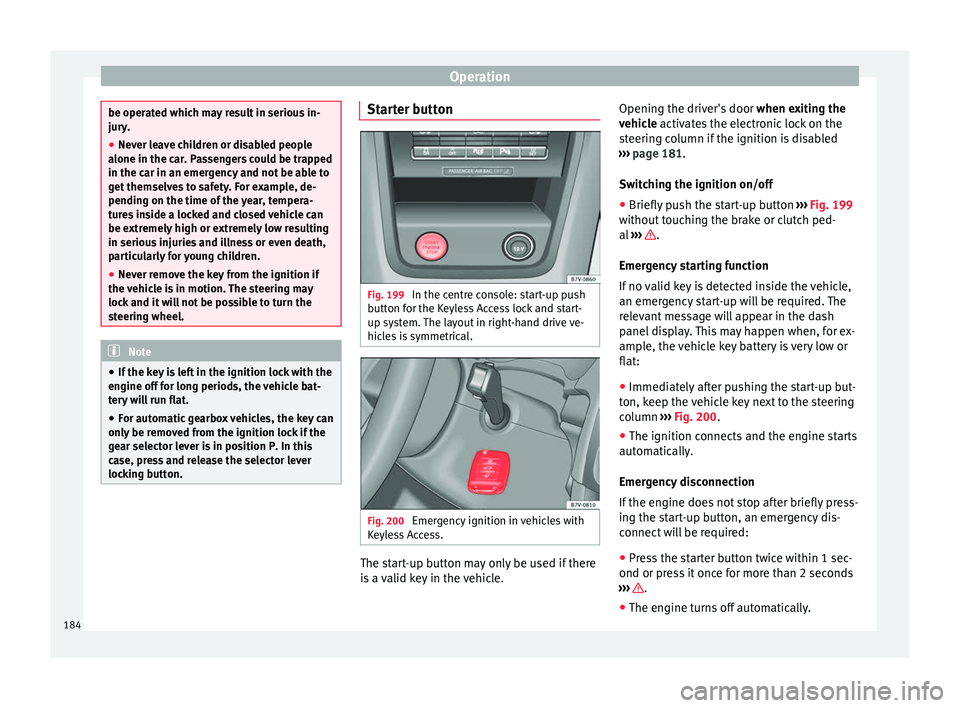
locking button. Starter button
Fig. 199
In the centre console: start-up push
b utt
on f
or the Keyless Access lock and start-
up system. The layout in right-hand drive ve-
hicles is symmetrical. Fig. 200
Emergency ignition in vehicles with
K eyl
e
ss Access. The start-up button may only be used if there
i
s a
valid key in the vehicle. Opening the driver's door
when exitin
g the
vehicle activates the electronic lock on the
steering column if the ignition is disabled
››› page 181.
Switching the ignition on/off
● Briefly push the start-up button ›››
Fig. 199
without touching the brake or clutch ped-
al ››› .
Emer g
ency
starting function
If no valid key is detected inside the vehicle,
an emergency start-up will be required. The
relevant message will appear in the dash
panel display. This may happen when, for ex-
ample, the vehicle key battery is very low or
flat:
● Immediately after pushing the start-up but-
ton, keep the
vehicle key next to the steering
column ››› Fig. 200.
● The ignition connects and the engine starts
automatic
ally.
Emergency disconnection
If the engine does not stop after briefly press-
ing the start-up button, an emergency dis-
connect will be required:
● Press the starter button twice within 1 sec-
ond or pres
s it once for more than 2 seconds
››› .
● The engine turns off automatically.
184
Page 187 of 320
Driving
Engine restart feature
If no
v
alid key is detected inside the vehicle
after the engine stops, you will only have 5
seconds to restart it. A warning will display
on the dash panel screen.
After this interval, it will not be possible to
start the engine without a valid key inside
the vehicle. WARNING
Any accidental movement of the vehicle could
re s
ult in serious injury.
● When pressing the start-up button, do not
pre
ss the brake or clutch pedal, this way the
engine will start immediately. WARNING
If vehicle keys are used negligently or with-
out due c ar
e, this may cause accidents and
serious injury.
● Never leave any key inside the vehicle
when exitin
g. Otherwise, a child or unauthor-
ised person could lock the vehicle, start the
engine or connect the ignition and, in this
way, operate electronic equipment (e.g. the
windows). Note
In diesel vehicles with the Keyless Access
sys t
em, there may be a delay in the engine
starting if it requires preheating. Starting the engine
Complete operations only in the sequence
given:
Vehicles without
Keyless AccessVehicles with
Keyless Access
1.Press and hold the brake pedal until step 5 is per- formed.
1a.In vehicles with a manual gearbox: press and
hold the clutch down until the engine starts.
2.Put the gearbox lever in neutral or the selector lever in position P or N.
3.
Only in vehicles with
diesel engines: for pre-
heating, turn the key in the ignition lock to po-
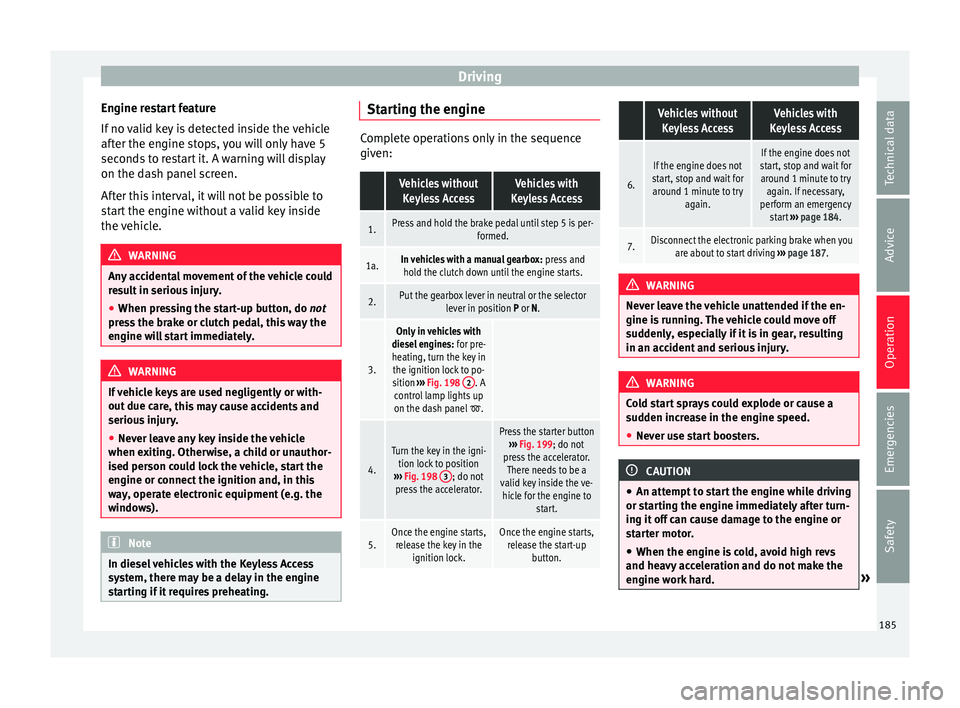
sition ››› Fig. 198 2
. A
control lamp lights up
on the dash panel
.
4.
Turn the key in the igni- tion lock to position
››› Fig. 198 3
; do not
press the accelerator.
Press the starter button ››› Fig. 199; do not
press the accelerator. There needs to be a
valid key inside the ve- hicle for the engine to start.
5.Once the engine starts,release the key in the ignition lock.Once the engine starts,release the start-up button.
Vehicles without
Keyless AccessVehicles with
Keyless Access
6.
If the engine does not
start, stop and wait for around 1 minute to try again.If the engine does not
start, stop and wait for around 1 minute to try again. If necessary,
perform an emergency start ››› page 184.
7.Disconnect the electronic parking brake when you
are about to start driving ››› page 187. WARNING
Never leave the vehicle unattended if the en-
gine is ru
nning. The vehicle could move off
suddenly, especially if it is in gear, resulting
in an accident and serious injury. WARNING
Cold start sprays could explode or cause a
sud den inc
rease in the engine speed.
● Never use start boosters. CAUTION
● An attempt t
o start the engine while driving
or starting the engine immediately after turn-
ing it off can cause damage to the engine or
starter motor.
● When the engine is cold, avoid high revs
and heavy ac
celeration and do not make the
engine work hard. » 185
Technical data
Advice
Operation
Emergencies
Safety
Page 189 of 320
Driving
The vehicle key has a chip that automatically
di s
ab
les the immobilizer when the key is
placed in the ignition lock.
The electronic immobiliser will be activated
again automatically as soon as you pull the
key out of the ignition lock. For vehicles with
the Keyless Access system, the key has to be
outside the vehicle ››› page 115.
For this reason, the vehicle can only be used
with a genuine SEAT key with the correct
code. Coded keys can be purchased from
your technical service centre ››› page 110.
If an unauthorised key is used, the message
SAFE or Immobiliser active is displayed
on the instrument panel. The vehicle cannot
be started in this case Note
The correct operation of the vehicle is only
guarant eed when origin
al SEAT keys are
used. Braking and parking
Intr oduction The a
ssisted braking systems include the an-
ti-loc k
braking system (ABS), the brake assist
system (BAS), the electronic differential lock
(EDL), the traction control system (ASR) and
the electronic stability control (ESC). WARNING
Driving with worn brake pads or a faulty
brak e sy
stem may lead to serious accident.
● If lights, alone or accompanied by a
warnin
g message on the instrument panel
display, please go immediately to a special-
ised workshop to check the brake pads and to
replace them if they are worn. WARNING
Careless parking can cause serious injury.
● Never remove the key from the ignition if
the v ehic
le is in motion. The steering lock
may engage and lock the steering wheel mak-
ing the vehicle impossible to control.
● Always park your vehicle so that no part of
the exhau
st system can come in contact with
flammable materials (such as wood, leaves,
dried grass, spilled fuel, etc.).
● Always apply the electronic parking brake
when you l
eave your vehicle and when you
park.
● Never leave children or disabled people
alone in the v
ehicle. They could release the
electronic parking brake, activate the selec-
tor lever or gear stick and start the vehicle
moving. This could result in a serious acci-
dent.
● Always take all the keys with you whenever
you le
ave the vehicle. The engine could acci-
dentally be started and electrical equipment
such as the windows could accidentally be
operated resulting in serious injury. ●
Never l e
ave children or disabled people
alone in the car. They could be trapped in the
car in an emergency and will not be able to
get themselves to safety. For example, de-
pending on the time of the year, tempera-
tures inside a locked and closed vehicle can
be extremely high or extremely low resulting
in serious injuries and illness or even death,
particularly for young children. CAUTION
● Spec i
al care should be taken when parking
in areas with high kerbs or fixed barriers. Ob-
jects protruding from the ground may dam-
age the bumper or other parts of the vehicle
during manoeuvres. To avoid damage, stop
before the wheels touch the barrier or kerb.
● Special attention is required when driving
through entranc
es, over ramps, kerbs or oth-
er objects. The vehicle underbody, bumpers,
mudguards and running gear, and the engine
and exhaust system could be damaged as
you drive over these objects. Control and warning lamps
It lights up red
Together with the
control lamp on
the button: Elec-
tronic parking brake
on.››› page 189» 187
Technical data
Advice
Operation
Emergencies
Safety
Page 191 of 320
Driving
is a fault in the brake system. Obtain profes-
sion
a
l assistance immediately ››› page 278,
Checking the brake fluid level.
● If the brake warning lamp lights up t
o-
gether with the ABS warning lamp , the
regulation function of the ABS could be mal-
functioning. As a result, the rear wheels can
lock relatively easily when braking. If the rear
wheels lock this could result in loss of vehicle
control! If possible, reduce your speed and
drive carefully to a specialised workshop
close by to check the brake system. During
the following journey, avoid sudden braking
and manoeuvres.
● If the ABS warning lamp does not
go out
or if it lights while driving, the ABS is mal-
functioning. The vehicle can only be stopped
using normal braking without ABS. The pro-
tection provided by the ABS is not available.
Visit a specialised workshop as soon as pos-
sible.
● If lights, alone or accompanied by a
warnin
g message on the instrument panel
display, please go immediately to a special-
ised workshop to check the brake pads and to
replace them if they are worn. Electronic parking brake
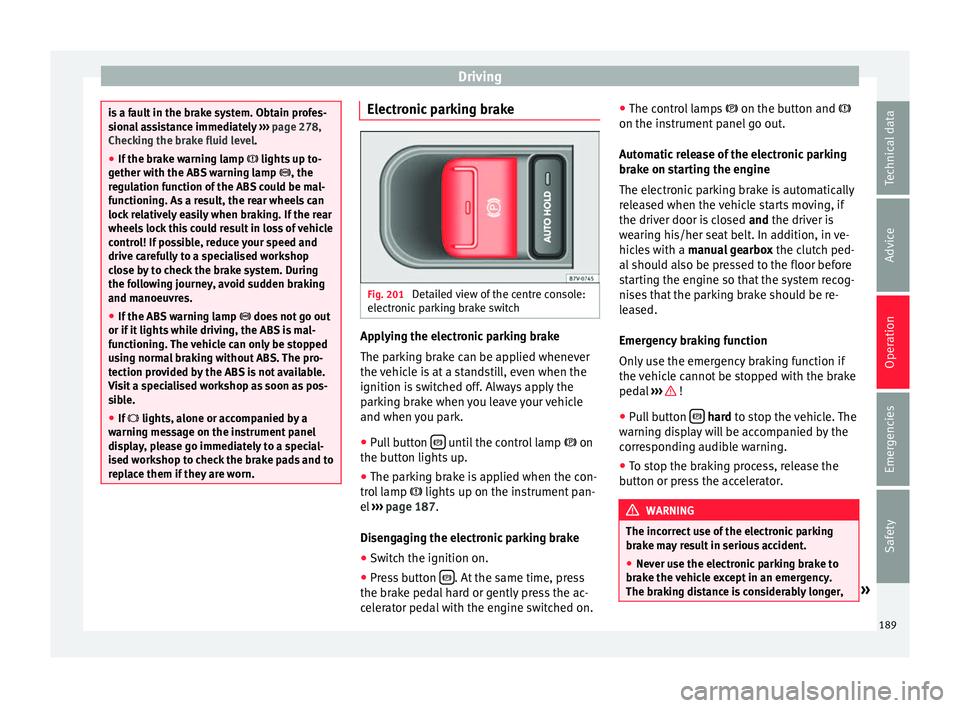
Fig. 201
Detailed view of the centre console:
el ectr
onic
parking brake switch Applying the electronic parking brake
The p
ark
in
g brake can be applied whenever
the vehicle is at a standstill, even when the
ignition is switched off. Always apply the
parking brake when you leave your vehicle
and when you park.
● Pull button until the control lamp
on
the b utt
on lights
up.
● The parking brake is applied when the con-
trol
lamp lights up on the instrument pan-
el ››› page 187.
Disengaging the electronic parking brake ● Switch the ignition on.
● Press button . At the same time, press
the br ak
e ped
al hard or gently press the ac-
celerator pedal with the engine switched on. ●
The contro
l lamps on the button and
on the instrument panel go out.
Automatic release of the electronic parking
brake on starting the engine
The electronic parking brake is automatically
released when the vehicle starts moving, if
the driver door is closed and the driver is
wearing his/her seat belt. In addition, in ve-
hicles with a manual gearbox the clutch ped-
al should also be pressed to the floor before
starting the engine so that the system recog-
nises that the parking brake should be re-
leased.
Emergency braking function
Only use the emergency braking function if
the vehicle cannot be stopped with the brake
pedal ››› !
● Pull button h
ard to stop the vehicle. The
w arnin
g display will be accompanied by the
corresponding audible warning.
● To stop the braking process, release the
button or pr
ess the accelerator. WARNING
The incorrect use of the electronic parking
brak e m
ay result in serious accident.
● Never use the electronic parking brake to
brake the
vehicle except in an emergency.
The braking distance is considerably longer, » 189
Technical data
Advice
Operation
Emergencies
Safety