warning Seat Alhambra 2018 Owner's Manual
[x] Cancel search | Manufacturer: SEAT, Model Year: 2018, Model line: Alhambra, Model: Seat Alhambra 2018Pages: 324, PDF Size: 7.04 MB
Page 170 of 324
Operation
Compartment in the front central arm-
r e
s
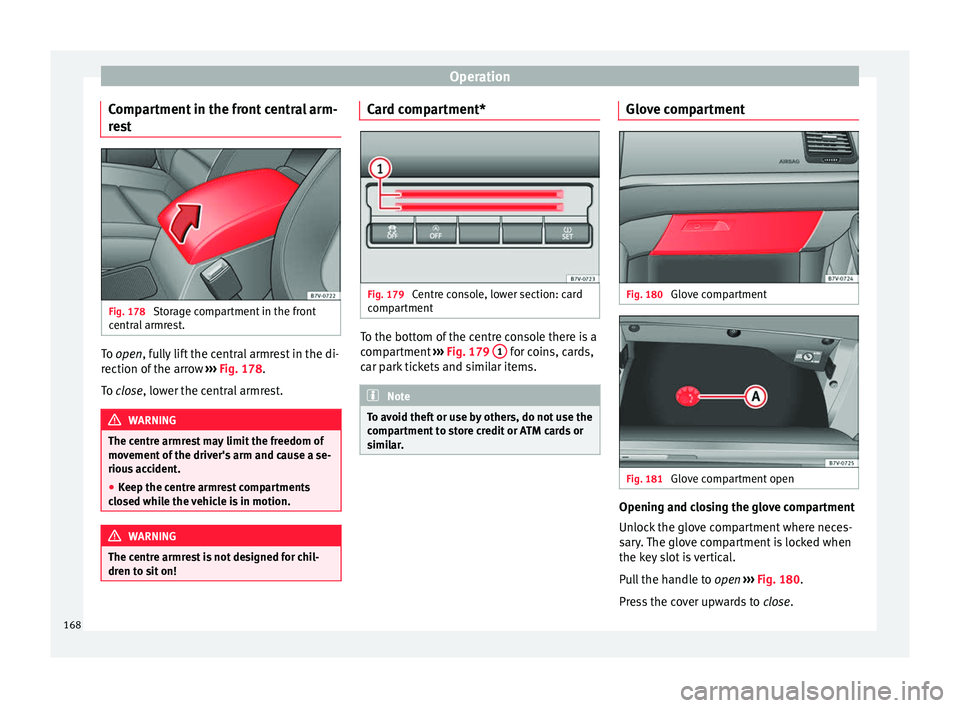
t Fig. 178
Storage compartment in the front
c entr
al
armrest. To open, f
ully lift the central armrest in the di-
r ection of
the arrow ››› Fig. 178.
To close, lower the central armrest. WARNING
The centre armrest may limit the freedom of
mov ement
of the driver's arm and cause a se-
rious accident.
● Keep the centre armrest compartments
closed whi
le the vehicle is in motion. WARNING
The centre armrest is not designed for chil-
dren t o s
it on! Card compartment*
Fig. 179
Centre console, lower section: card
c omp
ar
tment To the bottom of the centre console there is a
c
omp
ar
tment ››› Fig. 179 1 for coins, cards,
c ar p
ark
tickets and similar items. Note
To avoid theft or use by others, do not use the
comp ar
tment to store credit or ATM cards or
similar. Glove compartment
Fig. 180
Glove compartment Fig. 181
Glove compartment open Opening and closing the glove compartment
Un
loc
k
the glove compartment where neces-
sary. The glove compartment is locked when
the key slot is vertical.
Pull the handle to open ››› Fig. 180.
Press the cover upwards to close.
168
Page 171 of 324
Transport and practical equipment
Vehicle wallet compartment
The glo v
e c
ompartment is designed to store
the vehicle documentation.
The vehicle on-board documentation wallet
should always be kept in the glove compart-
ment. Insert it crosswise in the glove com-
partment.
Glove compartment cooling
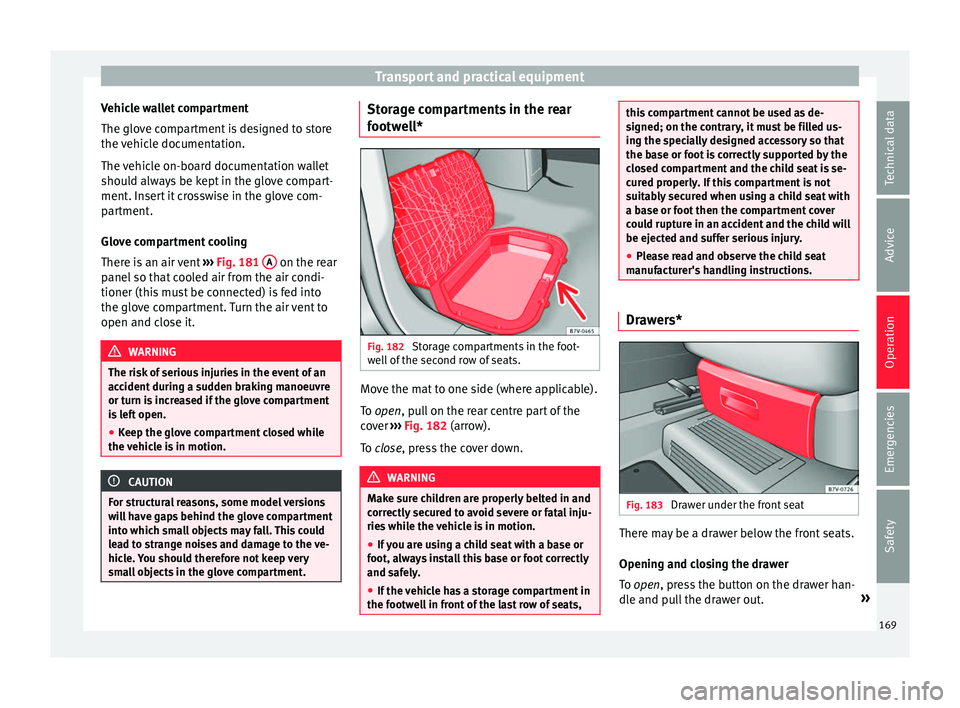
There is an air vent ››› Fig. 181 A on the rear
p anel
so th
at cooled air from the air condi-
tioner (this must be connected) is fed into
the glove compartment. Turn the air vent to
open and close it. WARNING
The risk of serious injuries in the event of an
acc ident
during a sudden braking manoeuvre
or turn is increased if the glove compartment
is left open.
● Keep the glove compartment closed while
the vehic
le is in motion. CAUTION
For structural reasons, some model versions
wi l
l have gaps behind the glove compartment
into which small objects may fall. This could
lead to strange noises and damage to the ve-
hicle. You should therefore not keep very
small objects in the glove compartment. Storage compartments in the rear
f
ootw
el
l* Fig. 182
Storage compartments in the foot-
w el
l
of the second row of seats. Move the mat to one side (where applicable).
T
o
open
, pull on the rear centre part of the
cover ›››
Fig. 182 (arrow).
To close, press the cover down. WARNING
Make sure children are properly belted in and
corr ectly
secured to avoid severe or fatal inju-
ries while the vehicle is in motion.
● If you are using a child seat with a base or
foot, alw
ays install this base or foot correctly
and safely.
● If the vehicle has a storage compartment in
the footwel
l in front of the last row of seats, this compartment cannot be used as de-
signed; on the c
ontr
ary, it must be filled us-
ing the specially designed accessory so that
the base or foot is correctly supported by the
closed compartment and the child seat is se-
cured properly. If this compartment is not
suitably secured when using a child seat with
a base or foot then the compartment cover
could rupture in an accident and the child will
be ejected and suffer serious injury.
● Please read and observe the child seat
manufact
urer's handling instructions. Drawers*
Fig. 183
Drawer under the front seat There may be a drawer below the front seats.
Openin
g and c
lo
sing the drawer
To open, press the button on the drawer han-
dle and pull the drawer out. »
169
Technical data
Advice
Operation
Emergencies
Safety
Page 172 of 324
Operation
To clo se, push the drawer under the seat until
it c
licks into place. WARNING
If the drawer is open it could obstruct use of
the peda l
s. This could result in serious acci-
dent.
● The drawers must remain closed while the
vehicl
e is in motion. Otherwise, the drawer
and any objects in it could fall into the driv-
er's footwell and obstruct the pedals. Folding table*
Fig. 184
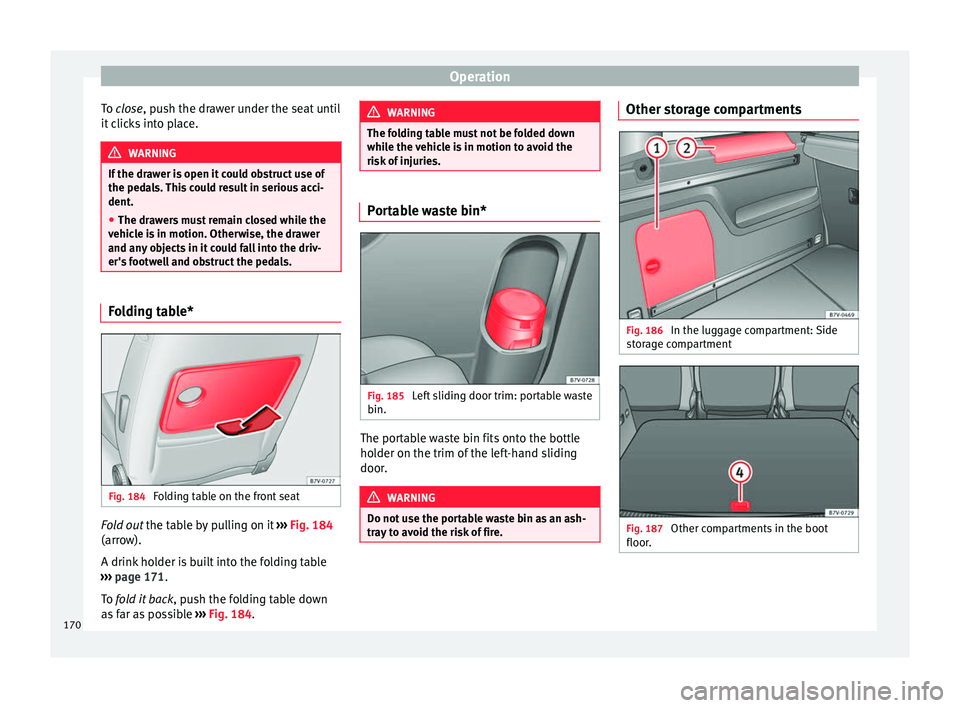
Folding table on the front seat Fold out the t
ab
l
e by pulling on it ››› Fig. 184
(arrow).
A drink holder is built into the folding table
››› page 171.
To fold it back , push the folding table down
as far as possible ››› Fig. 184. WARNING
The folding table must not be folded down
whil e the
vehicle is in motion to avoid the
risk of injuries. Portable waste bin*
Fig. 185
Left sliding door trim: portable waste
b in. The portable waste bin fits onto the bottle
ho
l
der on the trim of
the left-hand sliding
door. WARNING
Do not use the portable waste bin as an ash-
tra y
to avoid the risk of fire. Other storage compartments
Fig. 186
In the luggage compartment: Side
s t
or
age compartment Fig. 187
Other compartments in the boot
floor .170
Page 173 of 324
Transport and practical equipment
Side compartments in the luggage compart-
ment
Ther e ar
e other c
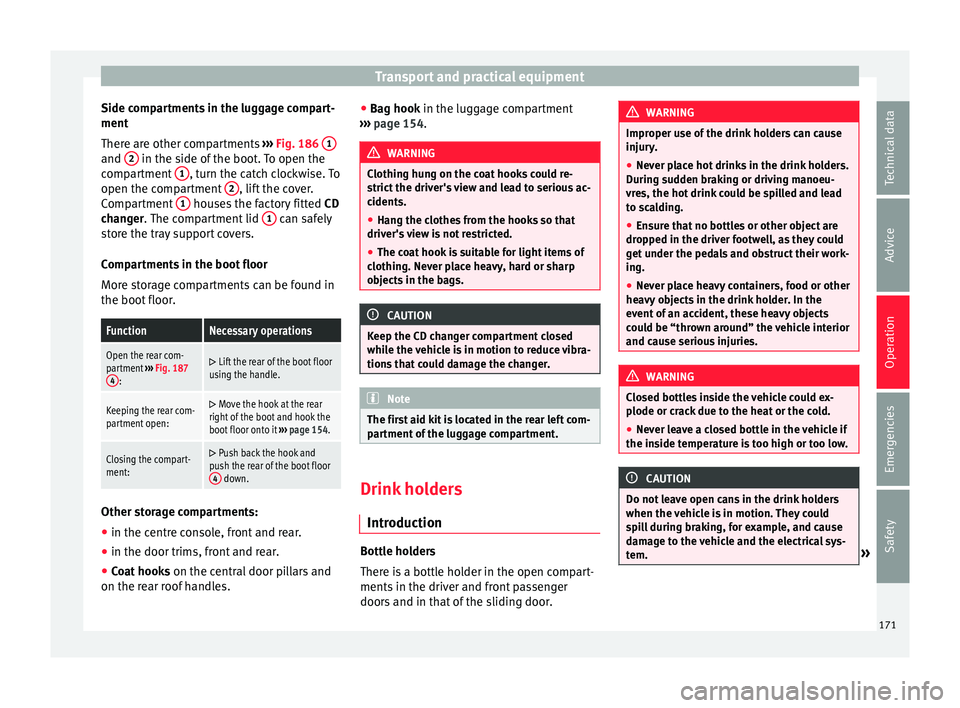
ompartments ››› Fig. 186 1 and
2 in the side of the boot. To open the
c omp
ar
tment 1 , turn the catch clockwise. To
open the c omp
ar
tment 2 , lift the cover.
C omp
ar
tment 1 houses the factory fitted
CD
c h
an
ger. The compartment lid 1 can safely
s t
or
e the tray support covers.
Compartments in the boot floor
More storage compartments can be found in
the boot floor.
FunctionNecessary operations
Open the rear com-
partment ››› Fig. 187
4
:
Lift the rear of the boot floor
using the handle.
Keeping the rear com-
partment open: Move the hook at the rear
right of the boot and hook the
boot floor onto it ››› page 154.
Closing the compart-
ment: Push back the hook and
push the rear of the boot floor 4
down. Other storage compartments:
● in the centre console, front and rear.
● in the door trims, front and rear.
● Coat hooks on the centr
al
door pillars and
on the rear roof handles. ●
Bag hook in the lug
gage compartment
››› page 154. WARNING
Clothing hung on the coat hooks could re-
strict the driv
er's view and lead to serious ac-
cidents.
● Hang the clothes from the hooks so that
driver's
view is not restricted.
● The coat hook is suitable for light items of
clothing. Nev
er place heavy, hard or sharp
objects in the bags. CAUTION
Keep the CD changer compartment closed
whil e the
vehicle is in motion to reduce vibra-
tions that could damage the changer. Note
The first aid kit is located in the rear left com-
par tment
of the luggage compartment. Drink holders
Intr oduction Bottle holders
Ther
e i
s
a bottle holder in the open compart-
ments in the driver and front passenger
doors and in that of the sliding door. WARNING
Improper use of the drink holders can cause
injury .
● Nev
er place hot drinks in the drink holders.
During s
udden braking or driving manoeu-
vres, the hot drink could be spilled and lead
to scalding.
● Ensure that no bottles or other object are
dropped in the driv
er footwell, as they could
get under the pedals and obstruct their work-
ing.
● Never place heavy containers, food or other
heavy o
bjects in the drink holder. In the
event of an accident, these heavy objects
could be “thrown around” the vehicle interior
and cause serious injuries. WARNING
Closed bottles inside the vehicle could ex-
plode or c r
ack due to the heat or the cold.
● Never leave a closed bottle in the vehicle if
the inside t
emperature is too high or too low. CAUTION
Do not leave open cans in the drink holders
when the v ehic
le is in motion. They could
spill during braking, for example, and cause
damage to the vehicle and the electrical sys-
tem. » 171
Technical data
Advice
Operation
Emergencies
Safety
Page 175 of 324
Transport and practical equipment
WARNING
Incorrect use of the ashtray may cause a fire
or burn s
and other serious injuries.
● Never put paper or other flammable objects
in the ashtra
y. Cigarette lighter
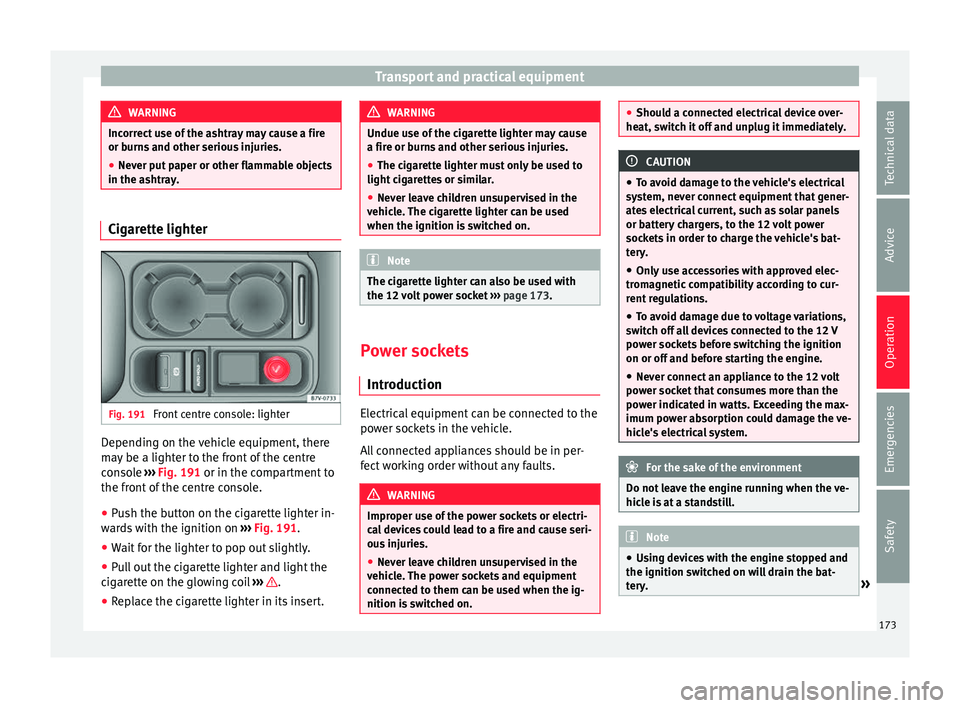
Fig. 191
Front centre console: lighter Depending on the vehicle equipment, there
m
a
y
be a lighter to the front of the centre
console ››› Fig. 191 or in the compartment to
the front of the centre console.
● Push the button on the cigarette lighter in-
ward
s with the ignition on ››› Fig. 191.
● Wait for the lighter to pop out slightly.
● Pull out the cigarette lighter and light the
cigar
ette on the glowing coil ››› .
● Replace the cigarette lighter in its insert. WARNING
Undue use of the cigarette lighter may cause
a fire or b urn
s and other serious injuries.
● The cigarette lighter must only be used to
light cig
arettes or similar.
● Never leave children unsupervised in the
vehicl
e. The cigarette lighter can be used
when the ignition is switched on. Note
The cigarette lighter can also be used with
the 12 v o
lt power socket ››› page 173. Power sockets
Intr oduction Electrical equipment can be connected to the
po
w
er soc
kets in the vehicle.
All connected appliances should be in per-
fect working order without any faults. WARNING
Improper use of the power sockets or electri-
ca l
devices could lead to a fire and cause seri-
ous injuries.
● Never leave children unsupervised in the
vehicl
e. The power sockets and equipment
connected to them can be used when the ig-
nition is switched on. ●
Shoul d a c
onnected electrical device over-
heat, switch it off and unplug it immediately. CAUTION
● To av oid d
amage to the vehicle's electrical
system, never connect equipment that gener-
ates electrical current, such as solar panels
or battery chargers, to the 12 volt power
sockets in order to charge the vehicle's bat-
tery.
● Only use accessories with approved elec-
tromagnetic
compatibility according to cur-
rent regulations.
● To avoid damage due to voltage variations,
switc
h off all devices connected to the 12 V
power sockets before switching the ignition
on or off and before starting the engine.
● Never connect an appliance to the 12 volt
power soc
ket that consumes more than the
power indicated in watts. Exceeding the max-
imum power absorption could damage the ve-
hicle's electrical system. For the sake of the environment
Do not leave the engine running when the ve-
hicl e i
s at a standstill. Note
● Us in
g devices with the engine stopped and
the ignition switched on will drain the bat-
tery. » 173
Technical data
Advice
Operation
Emergencies
Safety
Page 177 of 324
Transport and practical equipment
current only flows when the childproof lock is
u n
loc
ked.
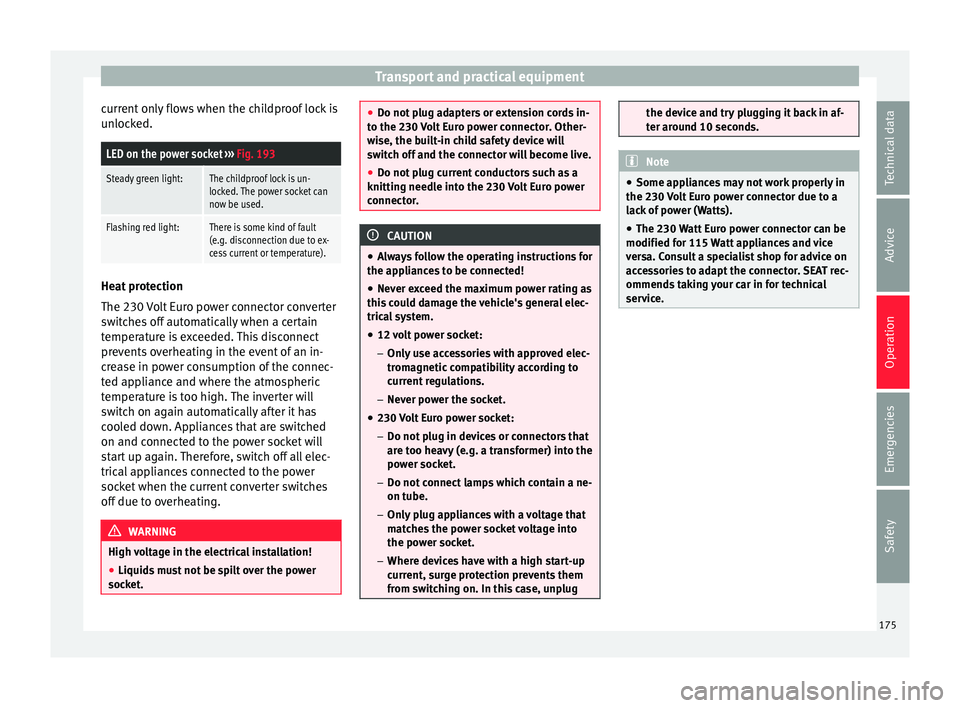
LED on the power socket ››› Fig. 193
Steady green light:The childproof lock is un-
locked. The power socket can
now be used.
Flashing red light:There is some kind of fault
(e.g. disconnection due to ex-
cess current or temperature). Heat protection
The 230
V
o
lt Euro power connector converter
switches off automatically when a certain
temperature is exceeded. This disconnect
prevents overheating in the event of an in-
crease in power consumption of the connec-
ted appliance and where the atmospheric
temperature is too high. The inverter will
switch on again automatically after it has
cooled down. Appliances that are switched
on and connected to the power socket will
start up again. Therefore, switch off all elec-
trical appliances connected to the power
socket when the current converter switches
off due to overheating. WARNING
High voltage in the electrical installation!
● Liquids must not be spilt over the power
sock et
. ●
Do not p lug a
dapters or extension cords in-
to the 230 Volt Euro power connector. Other-
wise, the built-in child safety device will
switch off and the connector will become live.
● Do not plug current conductors such as a
knitting needle int
o the 230 Volt Euro power
connector. CAUTION
● Alw a
ys follow the operating instructions for
the appliances to be connected!
● Never exceed the maximum power rating as
this c
ould damage the vehicle's general elec-
trical system.
● 12 volt power socket:
– Only u
se accessories with approved elec-
tromagnetic compatibility according to
current regulations.
– Never power the socket.
● 230 Volt Euro power socket:
– Do not plug in dev
ices or connectors that
are too heavy (e.g. a transformer) into the
power socket.
– Do not connect lamps which contain a ne-
on tube.
– Only plug appliances with a voltage that
matches the power socket voltage into
the power socket.
– Where devices have with a high start-up
current, surge protection prevents them
from switching on. In this case, unplug the device and try plugging it back in af-
ter ar
ou
nd 10 seconds. Note
● Some ap pli
ances may not work properly in
the 230 Volt Euro power connector due to a
lack of power (Watts).
● The 230 Watt Euro power connector can be
modified for 115 W
att appliances and vice
versa. Consult a specialist shop for advice on
accessories to adapt the connector. SEAT rec-
ommends taking your car in for technical
service. 175
Technical data
Advice
Operation
Emergencies
Safety
Page 178 of 324
Operation
Air conditioning
Air c onditionin
g
Intr
oduction Viewing Climatronic information
The fact
or
y-fitted radio or navigation system
screen briefly displays information relating to
Climatronic.
The units of temperature measurement is dis-
played on the factory-installed radio or navi-
gation system and, depending on the vehicle
equipment, can be set using the Configu-
ration menu on the instrument panel. WARNING
Reduced visibility through the windows in-
cr e
ases the risk of serious accidents.
● Ensure that all windows are free of ice and
snow and th
at they are not fogged up pre-
venting a clear view of everything outside.
● The maximum heat output required to de-
fros
t windows quickly is only available when
the engine has reached its normal running
temperature. Only drive when you have good
visibility.
● Always ensure that you use the air condi-
tioner and heated r
ear window to maintain
good visibility.
● Never leave the air recirculation on for a
long period of time. If
the cooling system is switched off and air recirculation mode
swit
c
hed on, the windows can mist over very
quickly, considerably limiting visibility.
● Switch air recirculation mode off when it is
not requir
ed. WARNING
Stuffy or used air will increase fatigue and re-
duc e driv er c
oncentration possibly resulting
in a serious accident.
● Never leave the fresh air fan turned off or
use the air rec
irculation for long periods of
time; the air in the vehicle interior will not be
refreshed. CAUTION
● Swit c
h the air conditioner off if you think it
may be broken. This will avoid additional
damage. Have the air conditioner checked by
a specialised workshop.
● Repairs to the air conditioner require spe-
cia
list knowledge and special tools. SEAT rec-
ommends taking your car in for technical
service.
● Do not smoke when air recirculation is
switc
hed on in vehicles with an air condition-
er. The smoke taken in could lie on the cool-
ing system vaporiser and on the activated
charcoal cartridge of the dust and pollen fil-
ter, leading to a permanently unpleasant
smell. Note
● When the coo lin
g system is turned off, air
coming from the outside will not be dried. To
avoid fogging up the windows, SEAT recom-
mends leaving the cooler (compressor) on. To
do this, press the A/C button. The button
lamp shou l
d light up.
● If the humidity and temperature outside the
vehicl
e are high, condensation can drip off
the evaporator in the cooling system and
form a pool underneath the vehicle, this is
completely normal and there is no need to
suspect a leak.
● Keep the air intake slots in front of the
winds
creen free of snow, ice and leaves to en-
sure heating and cooling are not impaired,
and to prevent the windows from misting
over. Controls
Read the additional information carefully
› ›
›
page 37
To switch a function on or off, press the ap-
propriate button. Press the button again to
switch off the function.
The LED on each control lights up to indicate
that the respective function of a control has
been switched on.
Some Climatronic controls may also be on
the air conditioner control panel located in
176
Page 181 of 324
Air conditioning
heat-sensitive, they may be damaged or
ma
de u
nsuitable for use by the air coming
from the air vents. Note
The air from the vents flows through the vehi-
c le int
erior and out through the outlets below
the rear window. The slots must not be cov-
ered with items of clothing or other objects. Air recirculation
Air recirculation mode prevents the ambient
air fr
om ent
erin
g the interior.
When the outside temperature is very high,
selecting manual air recirculation mode for a
short period refreshes the vehicle interior
more quickly.
For safety reasons, air recirculation mode is
switched off when the button is press-
ed or the air distributor turned to ››› .
Sw it
c
hing the recirculation mode on and off
manually on the air conditioning (Electronic
manual air conditioning)
Switching on: press the button until the
lamp on the button lights up.
Switching off: press the button until the
lamp on it is not lit up. Switching the recirculation mode on and off
manual
ly on the Climatronic
Switching on: press the button until the
lamp on the button lights up.
Switching off: press the button until the
lamp on it is not lit up.
Automatic air recirculation mode
When in position , fresh air enters the ve-
hicle interior. If the system detects a high
concentration of hazardous substances in the
ambient air, air recirculation mode is switch-
ed on automatically. When the level of impur-
ities drops to within a normal range, recircu-
lation mode is switched off.
The system is unable to detect unpleasant
smells.
With the following outside temperatures and
conditions the air recirculation does not
switch on automatically:
● The cooling system is switched on (the AC button is lit up) and the outside temperature
i
s
belo
w +3°C (+38°F).
● The cooling system and the windscreen
wipers
are switched off and the outside tem-
perature is below +10°C (+50°F).
● The cooling system is switched off and the
outside temper
ature is below +15°C (+59°F).
The windscreen wiper is switched on. Switching the automatic air recirculation
mode on and off
Switc
hing on: press the button until the
right-hand lamp on the button lights up.
Switching off: press the button until no
lamp on the button is lit up.
Switching the automatic air recirculation
mode off temporarily
● press the button t
o temporarily switch
to manual air recirculation mode in the event
of unpleasant smells from outside. The left
indicator lamp turns on.
● After more than two seconds, press the
button ag
ain to restart automatic air recircu-
lation. The right indicator lamp turns on. WARNING
Observe the safety warnings ›››
in Intro-
duction on pag e 176
.
● If the cooling system is switched off and air
recir
culation mode switched on, the windows
can mist over very quickly, considerably limit-
ing visibility.
● Switch air recirculation mode off when it is
not requir
ed. » 179
Technical data
Advice
Operation
Emergencies
Safety
Page 182 of 324
Operation
CAUTION
Do not smoke when air recirculation is
swit c
hed on in vehicles with an air condition-
er. The smoke taken in could lie on the cool-
ing system vaporiser and on the activated
charcoal cartridge of the dust and pollen fil-
ter, leading to a permanently unpleasant
smell. Note
Climatronic: air recirculation mode switches
on to pr ev
ent exhaust gas from entering the
vehicle interior when it is in reverse and
while the automatic windscreen wipers are
working. Auxiliary heater* (additional
he
at
er)
Intr
oduction The auxiliary heater is powered by fuel from
the
v
ehic
le's fuel tank and can be used while
the vehicle is in motion and at a standstill.
Select the mode required ( heat or fan )
››› page 182 on the dash panel.
In winter, the auxiliary heater can be used in
heat mode before switching on the ignition
to remove any ice, mist or snow from the
windscreen (thin layers only). WARNING
The auxiliary heater fumes contain carbon di-
ox ide, an odourl
ess and colourless toxic gas.
Carbon monoxide can cause people to lose
consciousness. It can also cause death.
● Never switch on the auxiliary heater or
leav
e it running in places that are enclosed or
unventilated.
● Never program the independent heating
syst
em to be activated and operated in
closed, unventilated areas. WARNING
The components of the auxiliary heater ex-
hau s
t system heat up a great deal. This could
cause a fire.
● Always park your vehicle so that no part of
the exhau
st system can come in contact with
flammable materials (such as dried grass). CAUTION
Never place food, medicines or other heat-
sens itiv
e objects close to the air vents. Food,
medicines and other heat-sensitive objects
may be damaged or made unsuitable for use
by the air coming from the air vents. Switching the auxiliary heater on and
off
Switching the auxiliary heater on:
Manually using the instant on/off
button.›››
page
176
Manually using the remote control.›››
page
181
Automatically at the programmed
and enabled on time.››› page
182
Switching the auxiliary heater off:
Manually using the instant on/off
button for the air conditioner.›››
page
176
Manually using the remote con-
trol.›››
page
181
Automatically after the program-
med time.››› page
182
Automatically, when the lamp
(fuel reserve) comes on.››› page
264
Automatically when the battery
power drops to a very low level.››› page
283 Special feature
Af
t
er sw
itching the auxiliary heater off, it con-
tinues to run for a short period to completely
180
Page 184 of 324
Operation
An optimum range is obtained by keeping
the r emot
e c
ontrol vertical, with the aerial
››› Fig. 196 A pointing upwards. When doing
so , do not
c
over the aerial with your fingers
or with the palm of your hand.
There must be a minimum distance of 2 me-
tres between the remote control and the vehi-
cle. CAUTION
● The ra dio fr
equency remote control con-
tains electronic components. Therefore, avoid
getting it wet and being knocked and protect
it from direct sunlight.
● Use of inappropriate batteries may damage
the remote c
ontrol. For this reason, always re-
place the used battery with another of the
same voltage, size and specifications. For the sake of the environment
● Ple a
se dispose of old batteries so that they
do not harm the environment.
● The remote control battery may contain
perch
lorate. Observe the legal requirements
for their disposal. Programming the auxiliary heater
The heater or ventilation inside the vehicle
c
an be pr
ogr
ammed for a certain period. Before programming, check that the day is
corr
ectly set in the Auxiliary heater -
day of the week menu ››› .
En ab
lin
g the Auxiliary heater menu on
the instrument panel
● From the main menu, select the Auxili-
ary heater submenu and pre
ss the OK button on the windscreen wiper lever.
● OR: pr ess the
or
arrow buttons on the
multifunction steering wheel until the Aux-
iliary heater menu is displayed.
Menu op-
tionsDescription
Switching
on
Switching
off
The auxiliary heater can be set to come
on automatically if required. To do so,
select a timer:
– The timer is displayed marked with a
.
– Only one timer can be selected. If a
timer has been selected, Prog. ON
will be displayed on the screen. If no
timer has been selected, the dash
panel display will show Prog. OFF.
– To modify the programmed timer, se-
lect another timer or select the Off
option.
Timer 1
Timer 2
Timer 3
Three different timers (hh.mm) can lat-
er be selected using the On option. If
the auxiliary heater is to be switched
on for just a certain day of the week,
select the day of the week and the
time for the auxiliary heater to come
on.
Menu op-
tionsDescription
DurationThe operating time may vary between
10 and 60 minutes and can be set to
5-minute intervals.
Operating
modeSet to heat or ventilate the vehicle in-
terior when the auxiliary heater is
switched on.
DaySet the current day of the week.
Factory
settingsThe predefined factory values for the
functions of this menu are restored.
BackThis returns to the main menu. Checking programming
If
the
timer h
a
s been switched on after
switching the ignition off, the light on the
button will remain lit for around 10 seconds. WARNING
Never program the independent heating sys-
tem t o be activ
ated and operated in closed,
unventilated areas. The auxiliary heater
fumes contain carbon dioxide, an odourless
and colourless toxic gas. Carbon monoxide
can cause people to lose consciousness. It
can also cause death. 182