trailer Seat Alhambra 2018 User Guide
[x] Cancel search | Manufacturer: SEAT, Model Year: 2018, Model line: Alhambra, Model: Seat Alhambra 2018Pages: 324, PDF Size: 7.04 MB
Page 134 of 324
Operation
Note
● If the c on
venience turn signals are operat-
ing (three flashes) and the other convenience
turn signals are switched on, the active part
stops flashing and only flashes once in the
new part selected.
● The turn signal only works when the igni-
tion is sw
itched on. The hazard warning
lights also work when the ignition is switch-
ed off ››› page 83.
● If a turn signal on the vehicle or trailer is
faulty
, the warning lamp flashes twice as fast
as usual.
● The main beam headligh
ts can only be
switched on if the dipped beam headlights
are already on. Lights and visibility: functions
Parking light
When the p ark
in
g light is switched on, (right
or left turn signal), the front side light and
the rear light on the corresponding side of
the vehicle stay lit. The parking lights will on-
ly work with the ignition off.
Daytime running lights
The daytime running lights reduce the risk of
accidents by increasing the visibility of the
vehicle. These are independent lights that
are built into the headlights and come on each time the ignition is turned on if the light
switc
h is in position or 0.
When the light switch is in position , a
photo sensor automatically turns the instru-
ment and switch lighting on and off.
Automatic dipped beam control
The automatic dipped beam control is merely
intended as an aid and is not able to recog-
nise all driving situations.
When the light switch is in position , the
vehicle lights and the instrument panel and
switch lighting switch on and off automatical-
ly in the following situations ››› :
Automatic switching
onAutomatic switching
off or switch to day-
time running lighting
The photo sensor detects
darkness, for example,
when driving through a
tunnel.When adequate lighting is
detected.
The rain sensor detects
rain and activates the
windscreen wipers.When the windscreen wip-
er has been inactive for a
few minutes.
Adaptive headlights (AFS)
The a
d
aptiv
e headlights only operate when
the dipped beam is on and at speeds of over
10 km/h (6 mph). On bends, the adaptive
headlights automatically improve lighting on
the road ahead. The adaptive headlights can be switched on
and off from the inf
otainment system.
Static cornering lights
When turning slowly to change direction or
going round a tight bend, the static cornering
lights automatically come on. The static cor-
nering lights only work at speeds of less than
40 km/h (25 mph).
The static cornering lights may be incorpora-
ted into the fog lights or the front headlights,
depending upon the equipment. WARNING
If the road is not well lit and other road users
cannot see the
vehicle well enough or at all,
accidents may occur.
● The automatic dipped beam control ( )
only sw
itches on the dipped beam when
there are no changes in brightness, and not,
for example when it is foggy.
● Never drive with daytime lights if the road
is not
well lit due to weather or lighting con-
ditions. Daytime lights do not provide
enough light to illuminate the road properly
or be seen by other road users.
● The rear lights do not come on with the
daytime driv
ing light. A vehicle which does
not have the rear lights on may not be visible
to other drivers in the darkness, if it is rain-
ing or in conditions of poor visibility. 132
Page 138 of 324
Operation
1 Instrument and switch lighting
When the he a
dlights
are switched on, the
brightness of the instruments and switch
lighting can be regulated by turning the
switch ››› Fig. 140 1 .
2 Headlight range control
The he a
dlight
range control ››› Fig. 140 2 is
modified ac c
or
ding to the value of the head-
light beam and the vehicle load status. This
offers the driver optimum visibility and the
headlights do not dazzle oncoming drivers
››› .
The he a
dlights
can only be adjusted when
the dipped beam is switched on.
To reset, turn switch ››› Fig. 140 2 :
ValueVehicle load status
a)
Two front occupants, luggage compart-
ment empty
All seats occupied, luggage compartment
empty
All seats occupied, luggage compartment
full. With trailer and minimum drawbar
load.
Driver only, luggage compartment full With
trailer and maximum drawbar load.
a)
If the vehicle load does not correspond to those shown in the
table, it is possible to select intermediary positions.
Dynamic headlight range control
The control 2 is not mounted in vehicles
w ith dy
n
amic headlight range control. The
headlight range is automatically adjusted ac-
cording to the vehicle load status when they
are switched on. WARNING
Heavy objects in the back of vehicle may
cau se he
adlight dazzle and distract other
drivers. This could result in a serious acci-
dent.
● Adjust the light beam to the vehicle load
stat
us so that it does not blind other drivers. Interior and reading lights
Read the additional information carefully
› ›
›
page 27
Storage and luggage compartment lighting
When the glove compartment and the rear lid
are opened and closed, a light automatically
switches on or off.
Ambient lighting
The ambient lighting in the front covering of
the ceiling lights up the controls on the cen-
tre console from above when the side light or
dipped beam lights are on. In addition, the lever on the door moulding
can also be i
lluminated. Note
The reading lights go out when the vehicle is
lock ed, or a f
ew minutes after the key is re-
moved from the ignition. This prevents the
vehicle's battery from discharging. Visibility
Su n
visors Fig. 141
Sun visor Options for adjusting driver and front pas-
sen
g
er s
un visors:
● Lower the sun visor towards the wind-
scr
een.
136
Page 200 of 324
Operation
necessary to drive with the engine at an ex-
c eption
al
ly high speed ››› page 202. WARNING
The recommended gear display is intended as
a guideline only; it shou
ld never replace the
driver's attention to driving carefully.
● Responsibility for selecting the correct gear
for eac
h situation continues to lie with the
driver, for example when overtaking, climb-
ing a hill or towing a trailer. For the sake of the environment
Selecting the most appropriate gear for the
sit uation w
ill help you to save fuel. Note
The recommended gear display is switched
off when the c lut
ch pedal is pressed.Address
Intr oduction The power steering is not hydraulic but elec-
tr
omec
h
anical. The advantage of this steer-
ing system is that it disposes of hydraulic
tubes, hydraulic oil, the pump, filter and oth-
er components. The electromechanical sys-
tem saves fuel. While a hydraulic system re-
quires oil pressure to be maintained, electro- mechanical steering only requires energy
when the steerin
g wheel is turned.
With the power steering system, the assisted
steering function automatically adjusts ac-
cording to the vehicle speed, the steering tor-
que and the wheel turning angle. The power
steering only works when the engine is run-
ning. WARNING
If the power steering is not working then the
st eerin
g wheel is much more difficult to turn
and the vehicle more difficult to control.
● The power steering only works when the
engine is
running.
● Never allow the vehicle to move when the
engine is
switched off.
● Never remove the key from the ignition if
the vehic
le is in motion. The steering may
lock and it will not be possible to turn the
steering wheel. Control and warning lamps
It lights up red
Power steering faulty.The steering system should be
checked by a specialised work-
shop as soon as possible.
It lights up yellow
Power steering opera-
tion reduced.The steering system should be
checked by a specialised work-
shop as soon as possible.
If, after restarting the engine
and driving for a short dis-
tance, the yellow warning lamp
no longer comes on, it will
not
be necessary to take the vehi-
cle to a specialised workshop.
The vehicle battery
was disconnected and
has been reconnec-
ted.Drive for a short distance at
15-20 km/h (9-12 mph).
Flashes red
Fault in the steering
column electronic
lock.
Do not drive on!
Seek professional advice.
It flashes yellow
Steering column devi-
ation.Gently turn the steering wheel
to and fro.
Steering wheel not
unlocked or locked.Remove the key from the igni-
tion and then switch the igni-
tion back on. Check the mes-
sages displayed on the instru-
ment panel at the same time.
Do not drive on, if
the steering
column remains locked after
the ignition has been switched
on. Seek specialist assistance. 198
Page 202 of 324
Operation
● Do not u
se f
ull throttle.
● Do not force the engine above two thirds of
its max
imum speed.
● Do not tow a trailer.
Between 1000 and 1500 k
ilometres (600 to
1000 miles), gradually increase power until
reaching the maximum speed and high en-
gine speeds.
Running in new tyres and brake pads
● Replacement of wheel rims and new tyres
›››
page 287
● Notes on the brakes ›››
page 191 For the sake of the environment
If the engine is run in gently, the life of the
engine w i
ll be increased and the engine oil
consumption reduced. Environmental compatibility
Environmental protection is a top priority in
the de
s
ign, c
hoice of materials and manufac-
ture of your new SEAT.
Constructive measures to encourage recy-
cling
● Joints and connections designed for easy
dismantlin
g. ●
Modular c
onstruction to facilitate disman-
tling.
● Increased use of single-grade materials.
● Plastic parts and elastomers are marked in
accor
dance with ISO 1043, ISO 11469 and
ISO 1629.
Choice of materials
● Use of recycled materials.
● Use of compatible plastics in the same part
if its c
omponents are not easily separated.
● Use of recycled materials and/or materials
originating fr
om renewable sources.
● Reduction of volatile components, includ-
ing odour, in p
lastic materials.
● Use of CFC-free coolants.
Ban on heavy
metals, with the exceptions
dictated by law (Annex II of ELV Directive
2000/53/EC): cadmium, lead, mercury, hexa-
valent chromium.
Manufacturing methods
● Reduction of the quantity of thinner in the
protectiv
e wax for cavities.
● Use of plastic film as protection during ve-
hicle tr
ansport.
● Use of solvent-free adhesives.
● Use of CFC-free coolants in cooling sys-
tems. ●
Recyc
ling and energy recovery from resi-
dues (RDF).
● Improvement in the quality of waste water.
● Use of systems for the recovery of residual
heat (therm
al recovery, enthalpy wheels,
etc.).
● The use of water-soluble paints.
Economical and environmentally
friendly drivin
g Fuel consumption, environmental impact and
en
gine, br
ak
e and tyre wear depend largely
on three factors:
● Personal driving style.
● Conditions of use (weather, road surface).
● Technical requirements.
Saving
s of up to 25% in fuel consumption
are possible with an appropriate driving style
and the adoption of certain simple tips.
Changing gear early
General instructions: The highest gear is al-
ways the most economical. As a guideline,
for the majority of vehicles: at a speed of
30 km/h (19 mph), drive in third gear, at
40 km/h (25 mph) in fourth gear and at
50 km/h (31 mph) in fifth gear.
200
Page 204 of 324
Operation
Therefore, unnecessary short journeys
shou l
d be av
oided. Try to combine trips.
The vehicle uses more fuel in winter than in
summer, even when other conditions are the
same.
The engine takes a long time to warm up
when it is idling. Mechanical wear and pollu-
tant emissions are also especially high dur-
ing this initial warm-up phase. It is therefore
best to drive off immediately after starting
the engine. Avoid running the engine at high
speed.
Adjusting type pressures.
Having the correct pressure in your tyres
helps to reduce rolling resistance and, as a
result reduces fuel consumption. Increasing
the tyre pressure slightly (+0.2 bar
[2.9 psi/20 kPa]) can help to save fuel.
If you are prepared to accept a slight reduc-
tion in comfort, the tyres may be filled to the
pressures recommended for a fully-loaded
vehicle. This is also valid when driving alone
without luggage.
When you buy new tyres, make sure they are
optimised for minimum rolling resistance.
Avoid carrying unnecessary loads
The lighter the vehicle, the more economical
and ecological the driving style. For example, an additional weight of 100 kg will increase
fuel c
onsumption up to 0.3 l/100 km.
Remove any unnecessary objects or loads
from the vehicle.
Remove optional equipment and unnecessa-
ry accessories
The more aerodynamic the vehicle, the lower
the fuel consumption. Optional equipment
and accessories (such as roof racks or bike
carriers) reduce the aerodynamic benefits of
the vehicle.
Therefore, we recommend you remove all op-
tional and unnecessary equipment and racks,
especially if you intend to drive at high
speeds.
Other factors which increase fuel consump-
tion (examples):
● Fault in engine management.
● Driving on hills.
● Trailer towing. WARNING
Always adapt your speed and the distance to
the v ehic
les ahead in line with visibility,
weather conditions, the condition of the road
and the traffic situation. Engine management and ex-
h
au
s
t gas purification system
Introduction WARNING
The components of the exhaust system reach
ver y
high temperatures. This could cause a
fire.
● Always park your vehicle so that no part of
the exhau
st system can come in contact with
flammable materials (such as dried grass).
● Do not apply additional underseal or anti-
corro
sion coatings to the exhaust pipes, cata-
lytic converter, heat shields or the diesel par-
ticulate filter. Control lamps
It lights up
fault in the petrol
engine manage-
ment.Take the vehicle to a specialised
workshop as soon as possible
and have the engine checked.
It lights up
Diesel engine glow
plug system.The engine glow plug system has
been activated. The engine can
be started straight away when
the lamp switches off.
202
Page 207 of 324
Driver assistance systems
● Do not driv
e f
aster than a pedestrian.
● Do not stop in the water, use reverse gear
or switc
h off the engine.
● Oncoming traffic will cause waves which
raise the l
evel of the water, making it difficult
to cross the water.
The Start/Stop system must be deactivated
when driving through flooded areas WARNING
When driving through water, mud, melted
sno w
, etc., please remember that due to
damp or frozen brake discs and shoes in win-
ter, the braking effect may be delayed, there-
fore the required braking distance is greater.
● “Dry the brakes and remove ice” by braking
caref
ully. Ensure that you are not endanger-
ing other road-users or breaking traffic regu-
lations in the process.
● After driving through water, avoid sudden
sharp manoeu
vres. CAUTION
● Drivin g thr
ough flooded areas may severely
damage vehicle components such as the en-
gine, transmission, drive train or electrical
system.
● Never drive through salt water as salt cau-
ses c
orrosion. Always rinse any parts of the
vehicle which have been in contact with salt
water. Driver assistance systems
Br ak
in
g and stability systems
Brake assist systems The brake assist systems ESC, ABS, BAS, ASR
and EDL on
ly
operate when the ignition is
switched on. They contribute significantly to
increasing active safety.
Electronic Stability Control (ESC)
ESC reduces the risk of skidding and increa-
ses the vehicle stability by braking individual
wheels under specific driving conditions. ESC
detects critical handling situations, such as
understeer, oversteer and wheelspin on the
driven wheels. The system stabilises the ve-
hicle by braking individual wheels or by re-
ducing the engine torque.
The ESC has limits. It is important to realise
that the ESC is also subject to the laws of
physics. ESC will not be able to deal with all
situations with which drivers may be faced.
For example, if the road surface changes sud-
denly then ESC will not be useful in all cases.
If the vehicle suddenly enters a section cov-
ered by water, mud or snow then ESC will not
provide assistance in the same way as on dry
ground. If the vehicle loses its grip on the
ground and moves on a film of water (“aqua-
planing”), the ESC will not be able to assist the driver to control the vehicle as the loss of
adher
enc
e with the road surface will prevent-
ing braking and steering. If the vehicle is
driven through series of bends at high
speed, the ESC will not always be as effec-
tive: the vehicle reaction to aggressive driv-
ing is not the same as at reduced speeds.
When driving with a trailer, ESC does not pro-
vide the same amount of vehicle control as
without a trailer.
Adjust your speed and driving style to road,
traffic and weather conditions. ESC cannot
push the limits of the laws of physics; im-
prove the transmission available or maintain
the vehicle on the road if a lack of driver at-
tention creates an inevitable situation. Other-
wise, ESC assists in maintaining vehicle con-
trol in extreme situations and uses the move-
ments of the steering made by the driver to
maintain the vehicle moving in the desired
direction. If the vehicle is driven at such a
speed that it will leave the road before ESC
can intervene then the system cannot pro-
vide assistance.
The ABS, BAS, ASR and EDL systems are in-
corporated into the ESC. The ESC is always
on. The ESC should only be turned off using
the ASR button ›››
Fig. 204 when traction is
insufficient. Always remember to turn on the
ASR once more when the vehicle has traction
again. »
205
Technical data
Advice
Operation
Emergencies
Safety
Page 212 of 324
Operation
Vehicles with a manual gearbox
● When the vehicle is at a standstill, leave it
in neutr al
and t
ake your foot off the clutch.
The engine switches off.
● Simply depress the clutch pedal to move
off again.
V
ehicles with an automatic gearbox
● When the vehicle is at a standstill, depress
the brake or k
eep it pressed down. The en-
gine switches off.
● The engine will start again as soon as you
rele
ase the brake pedal.
● With the selector lever set to position P, the
engine wi
ll not start until a range of gears is
selected or the accelerator pedal is de-
pressed.
Important conditions for the engine to auto-
matically switch off
● The driver seat belt must be buckled.
● The driver door must be closed.
● The bonnet must be closed.
● The factory-fitted towing bracket must not
be electrical
ly connected to a trailer.
● A minimum engine temperature has been
reac
hed.
● The steering wheel must not be turned
more than 270 de
grees.
● The vehicle has moved since the last stop. ●
In vehic
les with Climatronic: the tempera-
ture inside the vehicle is within the pre-set
temperature range.
● The temperature set is neither very high nor
very
low.
● The air conditioning defrost function is not
switc
hed on.
● In vehicles with Climatronic: the blower has
not been manual
ly set to a high speed.
● The power level of the vehicle's battery is
sufficient
.
● The vehicle's battery temperature is neither
too high nor too lo
w.
● The vehicle is not on a steep gradient or
slope.
● The front
wheels are not overly turned.
● The heated windscreen is not switched on.
● Reverse gear is not engaged.
● The park assist system is not switched on.
Conditions
for automatically restarting the
engine
The engine may automatically restart under
the following conditions:
● If the vehicle interior is too hot or too cold.
● If the vehicle moves.
● If the vehicle's battery voltage drops. Conditions requiring the key to restart the
engine
The engine mu
st be started manually under
the following conditions:
● If the driver unbuckles his/her seat belt.
● If the driver door is opened.
● If the bonnet is opened.
● In vehicles with a manual gearbox: if a gear
has
been selected.
Switching Start-Stop mode on and off man-
ually
● Press the button on the c
entre console
››› Fig. 206.
● The button will light up when the Start-Stop
function i
s switched off.
The engine will start immediately if the vehi-
cle is in Stop mode when it is switched off
manually. WARNING
The brake servo and the power steering do
not w ork
when the engine is switched off.
● Never allow the vehicle to move when the
engine is
switched off. CAUTION
Using the Start-Stop function for a long peri-
od at v
ery high outside temperatures could
damage the vehicle's battery. 210
Page 213 of 324
Driver assistance systems
Note
● In some ca se
s, you may have to restart the
vehicle using the key. Observe the corre-
sponding message on the instrument panel
display.
● If the steering wheel is turned more than
270°, Stop w
ill not function; however, the an-
gle of steering wheel turn does not affect
starting the vehicle. Parking distance warning sys-
t
em*
Intr oduction The parking distance warning system assists
the driv
er when p
ark
ing. When the vehicle
approaches an obstacle, forwards or back-
wards, an intermittent audible warning will
be heard, higher or lower depending on the
distance. The shorter the distance, the short-
er the intervals between tones. If the vehicle
is too close to the obstacle, the audible warn-
ing becomes constant.
If you continue to approach an obstacle when
the sound is continuous, this means the sys-
tem can no longer measure the distance.
The sensor system on the bumpers transmit
and receive ultrasound. Using the ultrasound
signal (transmission, reflection from the ob-
stacle and reception), this system continu- ously calculates the distance between the
bumper and the ob
stacle. WARNING
The parking distance warning system and the
optica l
parking system cannot replace driver
awareness.
● The sensors have blind spots in which ob-
stac
les and people are not registered.
● Always observe the area around the vehi-
cle, a
s the sensors do not always detect
small children, animals or objects.
● The surface of certain objects and some
clothing do not
reflect the ultrasound signals
from the parking distance system. The sys-
tem cannot detect or incorrectly detects
these objects and people wearing these
types of clothes.
● External sound sources can affect the park-
ing dis
tance aid signals. In this case, under
certain circumstances, people and objects
will not be detected. CAUTION
● The sensor s
may not always be able to de-
tect objects such as trailer draw bars, thin
rails, fences, posts, trees and open boots,
etc. This could result in damage to your car.
● Although the parking distance warning sys-
tem detect
s and warns of the presence of an
obstacle, the obstacle could disappear from
the angle of measurement of the sensors if it
is too high or low and the system would no longer show it. Therefore, it will not warn you
of the
se o
bjects. Ignoring the warnings of the
parking sensor system could cause consider-
able damage to the vehicle.
● The bumper sensors may become damaged
or misa
ligned, for example, when parking.
● To ensure that the system works properly,
the bumper sensor
s must be kept clean, free
of ice and snow and uncovered.
● When cleaning the sensors with high-pres-
sure or s
team cleaning equipment, spray the
sensors briefly at a distance of no less than
10 cm (4 inches). Note
Acoustic sources may lead to erroneous warn-
ing s
on the parking sensor system, e.g.
rough tarmac, cobbles or the noise of other
vehicles. 211
Technical data
Advice
Operation
Emergencies
Safety
Page 215 of 324
Driver assistance systems
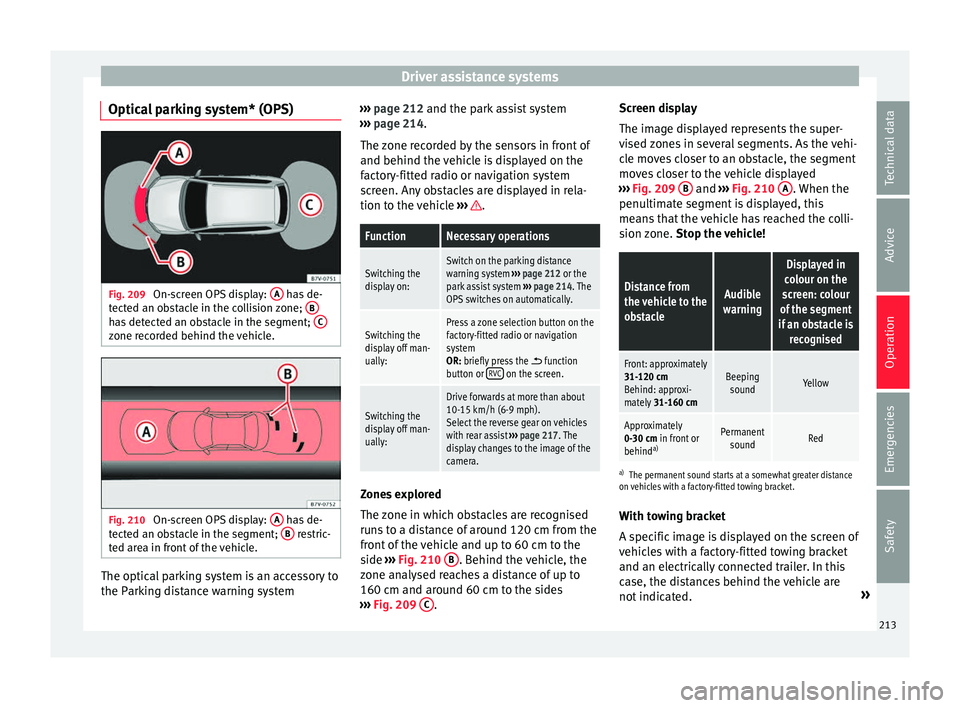
Optical parking system* (OPS) Fig. 209
On-screen OPS display: A has de-
t ect
ed an o
bstacle in the collision zone; Bhas detected an obstacle in the segment;
Czone recorded behind the vehicle.
Fig. 210
On-screen OPS display: A has de-
t ect
ed an o
bstacle in the segment; B restric-
t ed ar e
a in front of the vehicle. The optical parking system is an accessory to
the P
ark
in
g distance warning system ›››
page 212 and the park assist system
››
› page 214.
The zone recorded by the sensors in front of
and behind the vehicle is displayed on the
factory-fitted radio or navigation system
screen. Any obstacles are displayed in rela-
tion to the vehicle ››› .
FunctionNecessary operations
Switching the
display on:Switch on the parking distance
warning system
››› page 212 or the
park assist system ››› page 214. The
OPS switches on automatically.
Switching the
display off man-
ually:Press a zone selection button on the
factory-fitted radio or navigation
system
OR: briefly press the
function
button or RVC on the screen.
Switching the
display off man-
ually:
Drive forwards at more than about
10-15 km/h (6-9 mph).
Select the reverse gear on vehicles
with rear assist
››› page 217. The
display changes to the image of the
camera. Zones explored
The
z
one in whic
h obstacles are recognised
runs to a distance of around 120 cm from the
front of the vehicle and up to 60 cm to the
side ›››
Fig. 210 B . Behind the vehicle, the
z one an
aly
sed reaches a distance of up to
160 cm and around 60 cm to the sides
››› Fig. 209 C .Screen display
The im
ag
e di
splayed represents the super-
vised zones in several segments. As the vehi-
cle moves closer to an obstacle, the segment
moves closer to the vehicle displayed
››› Fig. 209 B and
›››
Fig. 210
A . When the
penu ltim
at
e segment is displayed, this
means that the vehicle has reached the colli-
sion zone. Stop the vehicle!
Distance from
the vehicle to the
obstacleAudible
warning
Displayed in
colour on the
screen: colour
of the segment
if an obstacle is recognised
Front: approximately
31-120 cmBehind: approxi-
mately 31-160 cmBeeping
soundYellow
Approximately
0-30 cm in front or
behind a)Permanent
soundRed
a) The permanent sound starts at a somewhat greater distance
on vehicles with a factory-fitted towing bracket.
With towing bracket
A specific image is displayed on the screen of
vehicles with a factory-fitted towing bracket
and an electrically connected trailer. In this
case, the distances behind the vehicle are
not indicated. »
213
Technical data
Advice
Operation
Emergencies
Safety
Page 216 of 324
Operation
Switching the parking sensor system sound
on and off
If the
b
utton on the radio or navigation
system screen is pressed briefly, it may mute
the sound of OPS warnings. To switch the
warnings back on, press the button again
briefly.
When the OPS is switched off and back on
again, muting is cancelled. Error messages
cannot be switched off. WARNING
Do not be distracted from the traffic when
lookin g at
the screen. Park Assist system* (Park As-
s
i
s
t)
Related video Fig. 211
Park Assist Introduction
The Park Assist system helps the driver to
find a suit
ab
le place to park, to insert the ve-
hicle into parallel and perpendicular parking
places and to leave parallel parking places.
The Park Assist system is limited to the sys-
tem abilities and requires that the driver is
especially attentive ››› .
The park in
g sensor system is a component of
the Park Assist system that helps to park the
vehicle.
For vehicles with the optical parking system
(OPS), the radio navigation systems screen
displays the detected zones in front of and
behind the vehicle, indicating - within the
limits of the system - the position of obsta-
cles in relation to the vehicle.
The park assist system cannot be switched
on if the factory-fitted towing bracket is elec-
trically connected to a trailer. WARNING
Despite the assistance provided by the park
as s
ist system, do not run any risks when
parking. The system is not a replacement for
driver awareness.
● Unintentional movements of the vehicle
coul
d cause serious injury.
● Adjust your speed and driving style to visi-
bility
, road, traffic and weather conditions. ●
The sur f
ace of certain objects and items of
clothing and external sound sources may
have a negative affect on the park assist sig-
nals or on the system sensors or may not re-
flect its signals.
● The sensors have blind spots in which ob-
stac
les and people are not registered.
● Always observe the area around the vehi-
cle, a
s the sensors do not always detect
small children, animals or objects. CAUTION
● The p ark a
ssist system aims exclusively at
other parked vehicles, without taking curbs
or other circumstances into account. Make
sure you do not damage the tyres and wheel
rims when parking. Where necessary, stop
manoeuvring to avoid damaging the vehicle.
● The sensors may not always be able to de-
tect o
bjects such as trailer draw bars, thin
rails, fences, posts and trees, etc. This could
result in damage to your car.
● Although the parking distance warning sys-
tem detect
s and warns of the presence of an
obstacle, the obstacle could disappear from
the angle of measurement of the sensors if it
is too high or low and the system would no
longer show it. Therefore, it will not warn you
of these objects. Ignoring the warnings of the
parking sensor system could cause consider-
able damage to the vehicle. This is also valid
when using the park assist (e.g. to park be-
hind a truck or motorcycle). Therefore, always
keep a close watch on the area in front of and 214