heating Seat Alhambra 2018 Owner's Guide
[x] Cancel search | Manufacturer: SEAT, Model Year: 2018, Model line: Alhambra, Model: Seat Alhambra 2018Pages: 324, PDF Size: 7.04 MB
Page 180 of 324
Operation
● Another f au
lt
in the vehicle. Have the air
conditioner checked by a specialised work-
shop.
Special features
If the humidity and temperature outside the
vehicle are high, condensation can drip off the vaporiser in the cooling system and form
a pool u
nderneath the vehicle. This is normal
and does not indicate a leak! Note
After starting the engine, any residual humid-
ity in the air c onditioner c
ould mist over the
windscreen. Switch on the defrost function as soon as possible to clear the windscreen of
conden
s
ation. Air vents
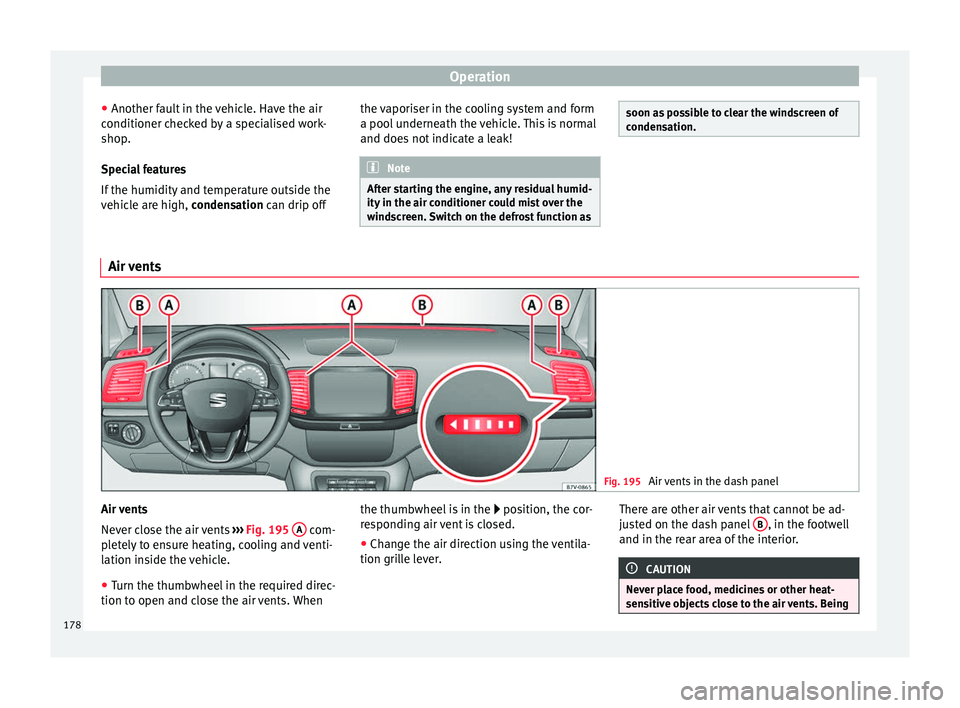
Fig. 195
Air vents in the dash panel Air vents
Nev
er clo
se the air vents ››› Fig. 195 A com-
p let
ely to ensure heating, cooling and venti-
lation inside the vehicle.
● Turn the thumbwheel in the required direc-
tion to open and clo
se the air vents. When the thumbwheel is in the
position, the c
or-
responding air vent is closed.
● Change the air direction using the ventila-
tion grill
e lever. There are other air vents that cannot be ad-
just
ed on the dash panel B , in the footwell
and in the r ear ar
ea of the interior. CAUTION
Never place food, medicines or other heat-
sens itiv
e objects close to the air vents. Being178
Page 182 of 324
Operation
CAUTION
Do not smoke when air recirculation is
swit c
hed on in vehicles with an air condition-
er. The smoke taken in could lie on the cool-
ing system vaporiser and on the activated
charcoal cartridge of the dust and pollen fil-
ter, leading to a permanently unpleasant
smell. Note
Climatronic: air recirculation mode switches
on to pr ev
ent exhaust gas from entering the
vehicle interior when it is in reverse and
while the automatic windscreen wipers are
working. Auxiliary heater* (additional
he
at
er)
Intr
oduction The auxiliary heater is powered by fuel from
the
v
ehic
le's fuel tank and can be used while
the vehicle is in motion and at a standstill.
Select the mode required ( heat or fan )
››› page 182 on the dash panel.
In winter, the auxiliary heater can be used in
heat mode before switching on the ignition
to remove any ice, mist or snow from the
windscreen (thin layers only). WARNING
The auxiliary heater fumes contain carbon di-
ox ide, an odourl
ess and colourless toxic gas.
Carbon monoxide can cause people to lose
consciousness. It can also cause death.
● Never switch on the auxiliary heater or
leav
e it running in places that are enclosed or
unventilated.
● Never program the independent heating
syst
em to be activated and operated in
closed, unventilated areas. WARNING
The components of the auxiliary heater ex-
hau s
t system heat up a great deal. This could
cause a fire.
● Always park your vehicle so that no part of
the exhau
st system can come in contact with
flammable materials (such as dried grass). CAUTION
Never place food, medicines or other heat-
sens itiv
e objects close to the air vents. Food,
medicines and other heat-sensitive objects
may be damaged or made unsuitable for use
by the air coming from the air vents. Switching the auxiliary heater on and
off
Switching the auxiliary heater on:
Manually using the instant on/off
button.›››
page
176
Manually using the remote control.›››
page
181
Automatically at the programmed
and enabled on time.››› page
182
Switching the auxiliary heater off:
Manually using the instant on/off
button for the air conditioner.›››
page
176
Manually using the remote con-
trol.›››
page
181
Automatically after the program-
med time.››› page
182
Automatically, when the lamp
(fuel reserve) comes on.››› page
264
Automatically when the battery
power drops to a very low level.››› page
283 Special feature
Af
t
er sw
itching the auxiliary heater off, it con-
tinues to run for a short period to completely
180
Page 184 of 324
Operation
An optimum range is obtained by keeping
the r emot
e c
ontrol vertical, with the aerial
››› Fig. 196 A pointing upwards. When doing
so , do not
c
over the aerial with your fingers
or with the palm of your hand.
There must be a minimum distance of 2 me-
tres between the remote control and the vehi-
cle. CAUTION
● The ra dio fr
equency remote control con-
tains electronic components. Therefore, avoid
getting it wet and being knocked and protect
it from direct sunlight.
● Use of inappropriate batteries may damage
the remote c
ontrol. For this reason, always re-
place the used battery with another of the
same voltage, size and specifications. For the sake of the environment
● Ple a
se dispose of old batteries so that they
do not harm the environment.
● The remote control battery may contain
perch
lorate. Observe the legal requirements
for their disposal. Programming the auxiliary heater
The heater or ventilation inside the vehicle
c
an be pr
ogr
ammed for a certain period. Before programming, check that the day is
corr
ectly set in the Auxiliary heater -
day of the week menu ››› .
En ab
lin
g the Auxiliary heater menu on
the instrument panel
● From the main menu, select the Auxili-
ary heater submenu and pre
ss the OK button on the windscreen wiper lever.
● OR: pr ess the
or
arrow buttons on the
multifunction steering wheel until the Aux-
iliary heater menu is displayed.
Menu op-
tionsDescription
Switching
on
Switching
off
The auxiliary heater can be set to come
on automatically if required. To do so,
select a timer:
– The timer is displayed marked with a
.
– Only one timer can be selected. If a
timer has been selected, Prog. ON
will be displayed on the screen. If no
timer has been selected, the dash
panel display will show Prog. OFF.
– To modify the programmed timer, se-
lect another timer or select the Off
option.
Timer 1
Timer 2
Timer 3
Three different timers (hh.mm) can lat-
er be selected using the On option. If
the auxiliary heater is to be switched
on for just a certain day of the week,
select the day of the week and the
time for the auxiliary heater to come
on.
Menu op-
tionsDescription
DurationThe operating time may vary between
10 and 60 minutes and can be set to
5-minute intervals.
Operating
modeSet to heat or ventilate the vehicle in-
terior when the auxiliary heater is
switched on.
DaySet the current day of the week.
Factory
settingsThe predefined factory values for the
functions of this menu are restored.
BackThis returns to the main menu. Checking programming
If
the
timer h
a
s been switched on after
switching the ignition off, the light on the
button will remain lit for around 10 seconds. WARNING
Never program the independent heating sys-
tem t o be activ
ated and operated in closed,
unventilated areas. The auxiliary heater
fumes contain carbon dioxide, an odourless
and colourless toxic gas. Carbon monoxide
can cause people to lose consciousness. It
can also cause death. 182
Page 185 of 324
Driving
Operating instructions The auxiliary heater exhaust system located
below the
v
ehicle must be kept clear of snow,
mud and other objects. The exhaust gases
must not be obstructed in any way. The ex-
haust gases generated by the auxiliary heater
are removed via an exhaust pipe fitted under-
neath the vehicle.
On heating the vehicle interior, depending on
the outside temperature the warm air is first
directed at the windscreen and then to the
rest of the vehicle interior through the air
vents. If the air vents are turned towards the
windows, for example, the form of air distri-
bution may be affected.
Depending on the outside temperature, the
temperature at which the auxiliary heater
warms the vehicle interior may be somewhat
higher if the heating or air conditioner tem-
perature control is set to maximum before
switching the heating on.
Depending on the engine, vehicles with aux-
iliary heater may be fitted with a second bat-
tery in the luggage compartment that is re-
sponsible for powering the auxiliary heater.
When will the auxiliary heater will not switch
on?
● The auxiliary heater requires about as
much po w
er as the dipped beam headlights.
If the battery charge is low, the auxiliary heat- er will switch off automatically or will not
even swit
ch on. This avoids problems when
starting the engine.
● The heater will switch on just once each
time. The timer wi
ll also have to be switched
back on every time it is required. Note
● Noise w i
ll be heard while the auxiliary
heater is running.
● When the air humidity is high and the out-
side temper
ature low, the heating system
may evaporate condensation from the auxili-
ary heater. In this case, steam may be re-
leased from underneath the vehicle. This is
completely normal and there is no need to
suspect a fault!
● If the auxiliary heater runs several times
over a pr
olonged period, the vehicle battery
may run flat. To re-charge the battery, drive
the vehicle for a long distance. As a general
rule, drive for as much time as the auxiliary
heating was working. Driving
St op
pin
g and starting the en-
gine
Introduction Immobiliser display
When an inv
alid k
ey is used or in the event of
a system fault, or Immobiliser on is
displayed on the instrument panel. The en-
gine cannot be started.
Pushing or towing
For technical reasons, the vehicle must not
be push- or tow-started. Jump starting is pref-
erable. WARNING
Turning off the engine while driving will make
st op
ping the vehicle difficult; this could even
result in the loss of control causing an acci-
dent with serious consequences.
● The assisted braking and steering systems,
the airbag sys
tem, seat belts and certain
safety equipment are only active while the
engine is running.
● The engine should only be switched off
when the vehic
le is at a standstill. » 183
Technical data
Advice
Operation
Emergencies
Safety
Page 186 of 324
Operation
WARNING
While the engine is running or starting it
cou l
d help reduce the risk of serious injury.
● Never start or leave the engine running in
poorly v
entilated or closed spaces. Exhaust
gas contains carbon monoxide, a toxic, col-
ourless and odourless gas. Carbon monoxide
can cause people to lose consciousness. It
can also cause death.
● Never leave the vehicle unattended if the
engine is
running. The vehicle could move off
suddenly or something unexpected could
happen resulting in damage and serious in-
jury.
● Never use start boosters. Cold start sprays
coul
d explode or increase the engine speed
unexpectedly. WARNING
The components of the exhaust system reach
ver y
high temperatures. This could cause a
fire and considerable damage.
● Always park your vehicle so that no part of
the exhau
st system can come in contact with
flammable materials (such as wood, leaves,
dried grass, spilled fuel, etc.).
● Do not apply additional underseal or anti-
corro
sion coatings to the exhaust pipes, cata-
lytic converter, heat shields or the diesel par-
ticulate filter. Ignition lock
Fig. 197
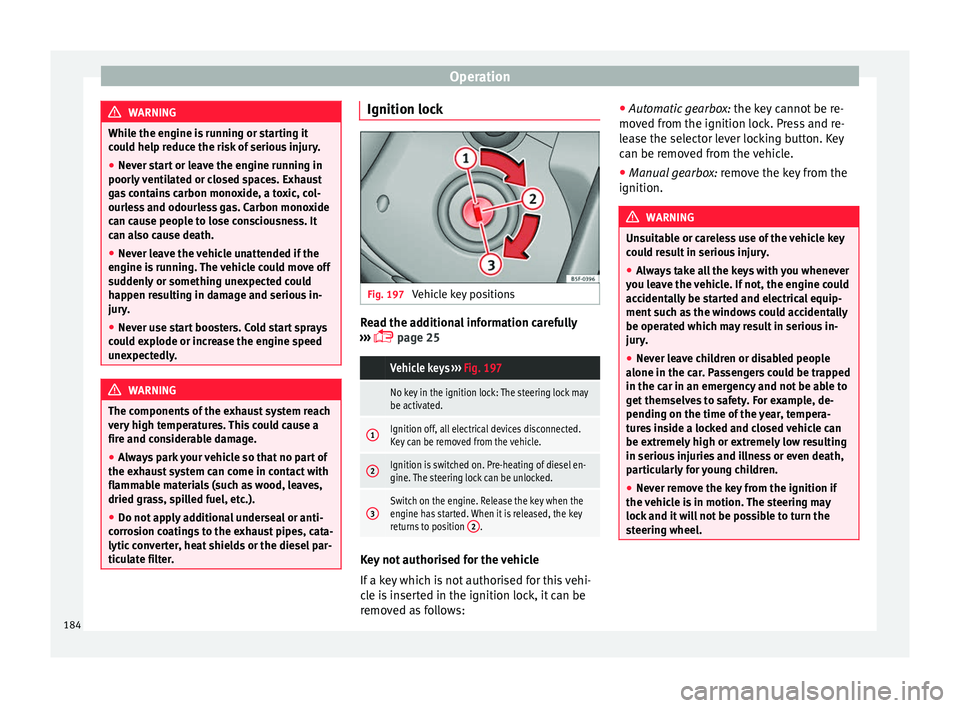
Vehicle key positions Read the additional information carefully
› ›
›
page 25
Vehicle keys
››› Fig. 197
No key in the ignition lock: The steering lock may
be activated.
1Ignition off, all electrical devices disconnected.
Key can be removed from the vehicle.
2Ignition is switched on. Pre-heating of diesel en-
gine. The steering lock can be unlocked.
3Switch on the engine. Release the key when the
engine has started. When it is released, the key
returns to position 2
. Key not authorised for the vehicle
If
a k
ey
which is not authorised for this vehi-
cle is inserted in the ignition lock, it can be
removed as follows: ●
Automatic ge
arbox: the key cannot be re-
moved from the ignition lock. Press and re-
lease the selector lever locking button. Key
can be removed from the vehicle.
● Manual gearbox: remov
e the key from the
ignition. WARNING
Unsuitable or careless use of the vehicle key
cou l
d result in serious injury.
● Always take all the keys with you whenever
you le
ave the vehicle. If not, the engine could
accidentally be started and electrical equip-
ment such as the windows could accidentally
be operated which may result in serious in-
jury.
● Never leave children or disabled people
alone in the car
. Passengers could be trapped
in the car in an emergency and not be able to
get themselves to safety. For example, de-
pending on the time of the year, tempera-
tures inside a locked and closed vehicle can
be extremely high or extremely low resulting
in serious injuries and illness or even death,
particularly for young children.
● Never remove the key from the ignition if
the vehic
le is in motion. The steering may
lock and it will not be possible to turn the
steering wheel. 184
Page 188 of 324
Operation
WARNING
If vehicle keys are used negligently or with-
out due c ar
e, this may cause accidents and
serious injury.
● Never leave any key inside the vehicle
when exitin
g. Otherwise, a child or unauthor-
ised person could lock the vehicle, start the
engine or connect the ignition and, in this
way, operate electronic equipment (e.g. the
windows). Note
In diesel vehicles with the Keyless Access
sys t
em, there may be a delay in the engine
starting if it requires preheating. Starting the engine
Complete operations only in the sequence
giv
en:
Vehicles without
Keyless AccessVehicles with
Keyless Access
1.Press and hold the brake pedal until step 5 is per- formed.
1a.In vehicles with a manual gearbox: press and
hold the clutch down until the engine starts.
2.Put the gearbox lever in neutral or the selector lever in position P or N.
Vehicles without
Keyless AccessVehicles with
Keyless Access
3.
Only in vehicles with
diesel engines: for pre-
heating, turn the key in the ignition lock to po-
sition ››› Fig. 197 2
. A
control lamp lights up
on the dash panel
.
4.
Turn the key in the igni- tion lock to position
››› Fig. 197 3
; do not
press the accelerator.
Press the starter button ››› Fig. 198; do not
press the accelerator. There needs to be a
valid key inside the ve- hicle for the engine to start.
5.Once the engine starts,release the key in the ignition lock.Once the engine starts,release the start-up button.
6.
If the engine does not
start, stop and wait for around 1 minute to try again.If the engine does not
start, stop and wait for around 1 minute to try again. If necessary,
perform an emergency start ››› page 185.
7.Disconnect the electronic parking brake when you
are about to start driving ››› page 188. WARNING
Never leave the vehicle unattended if the en-
gine is ru
nning. The vehicle could move off
suddenly, especially if it is in gear, resulting
in an accident and serious injury. WARNING
Cold start sprays could explode or cause a
sud den inc
rease in the engine speed.
● Never use start boosters. CAUTION
● An attempt t
o start the engine while driving
or starting the engine immediately after turn-
ing it off can cause damage to the engine or
starter motor.
● When the engine is cold, avoid high revs
and heavy ac
celeration and do not make the
engine work hard.
● Do not push or tow start the engine. Un-
burnt f
uel could damage the catalytic con-
verter. For the sake of the environment
Do not warm the engine at idle speed; start
drivin g immedi
ately if the visibility is OK.
This helps the engine reach operating tem-
perature faster and reduces emissions. Note
● For e x
ample, if the key battery is very worn
or flat, the engine cannot be started with the
starter button. In this case, remove the igni-
tion button from the lock and insert the key.
● Electrical devices with a high power con-
sumption are sw
itched off temporarily when
the engine starts. 186
Page 199 of 324
Driving
checked by a specialised workshop as soon
a s
po
ssible.
Protection against overloading the DSG ®
6-
gear automatic gearbox
When the clutch is overloaded, the vehicle
begins to jerk and the selector lever position
indicator begins to flash. To prevent damage
to the clutch, this interrupts the power trans-
mission between the engine and the gear-
box. There is no more traction and it is not
possible to accelerate. If the clutch is opened
automatically due to overloading, press the
brake pedal. Wait a few seconds before start-
ing to move again.
Kick-down
The kick-down system provides maximum ac-
celeration when the gear selector lever is in
the positions D, S or in the Tiptronic position.
When the accelerator pedal is pressed right
down, the automatic gearbox will shift down
to a lower gear, depending on road speed
and engine speed. This takes advantage of
the maximum acceleration of the vehicle
››› .
When the ac c
el
erator is pressed to the floor,
the automatic gearbox shifts to the next gear
only after the engine reaches the specified
maximum engine speed. Launch-Control Programme
The Launch-C
ontrol programme enables max-
imum acceleration while at a standstill.
● Switch off the ASR ›››
page 188.
● Press and hold the brake pedal with your
left
foot.
● Place the selector lever in position S or Tip-
tronic
.
● Press the accelerator with the right foot un-
til the
vehicle reaches an engine speed of ap-
proximately 3200 rpm.
● Lift the left foot off the brake ›››
. The ve-
hic l
e s
tarts with maximum acceleration.
● Turn on the ASR after accelerating! WARNING
Rapid acceleration can cause loss of traction
and skid din
g, especially on slippery ground.
This could cause loss of control of the vehicle
resulting in an accident and considerable
damage.
● Only use kick-down and rapid acceleration
when weather c
onditions, surface conditions
and traffic conditions permit; accelerate and
drive in a manner that does not endanger
other road users.
● Please remember that the driven wheels
can slip and the
vehicle can skid if the ASR is
turned off, especially on slippery ground.
● Turn on the ASR after accelerating! CAUTION
● If y
ou stop on a hill with a gear range en-
gaged, do not try to prevent the vehicle from
rolling back by pressing on the accelerator.
This could cause overheating and damage the
automatic gearbox.
● Never allow the vehicle to move with the
gear sel
ector lever in N, especially with the
engine turned off. The automatic gearbox will
not be lubricated and could be damaged. Recommended gear display
In some vehicles, the recommended gear for
r
educ
in
g fuel consumption is displayed on
the instrument panel:
DisplayMeaning
Optimum gear.
Recommendation to change up a
gear.
Recommendation to change down a
gear.
Information for “cleaning” the diesel partic-
u
l
at
e filter
The exhaust gas system control recognises
when the diesel particulate filter is blocked,
and helps to clean it by recommending a spe-
cific gear for driving. It may therefore be »
197
Technical data
Advice
Operation
Emergencies
Safety
Page 203 of 324
Driving
In addition, “skipping” gears when shifting
up help s
t
o save fuel, weather and traffic
conditions permitting.
Do not wait until the last moment before
changing gear. Only use first gear when you
move off and change to second gear quickly.
Avoid the kick-down function in vehicles with
automatic gearbox.
Vehicles with a gear display help to achieve
an economical driving style as the display in-
dicates the best moment to change gear.
Let the vehicle roll
If you take your foot off the accelerator, the
fuel supply is stopped and consumption is
reduced.
Allow the vehicle to roll without accelerating,
for example when approaching a red traffic
light. However, if the vehicle is rolling too
slowly or the distance is too long, the clutch
pedal should be pressed to declutch. The en-
gine will then operate at idle speed.
If the vehicle is going to be at a standstill for
a period of time, switch off the engine; for ex-
ample, while waiting at a level crossing. In
vehicles which have the Start-Stop function
on, the engine switches off automatically
when the vehicle is not moving. Think ahead and “flow” with the traffic
Frequent ac
celeration and braking considera-
bly increase fuel consumption. If you think
ahead as you drive and keep a safe distance
from the vehicle in front, it is possible to slow
down by simply lifting your foot off the accel-
erator. This eliminates the need for constant
braking and acceleration.
Calm and steady driving
Constancy is more important than speed: The
more you drive at a constant speed, the lower
the fuel consumption.
When driving on the motorway, it is more effi-
cient to drive at a constant and more moder-
ate speed than to be continuously accelerat-
ing and braking. As a general rule, you will
reach your destination just as quickly when
you drive at a constant speed.
The cruise control function helps you to ach-
ieve a constant style of driving.
Moderate use of additional devices
It is important to travel in comfort, but con-
venience systems should be used ecological-
ly.
Some equipment, when connected, increase
fuel consumption considerably, for example:
● Air conditioning cooling system: If the air
conditionin g sy
stem is required to cool to
significantly lower temperatures than the true outside temperature, it will require a large
amount
of
energy from the engine. Therefore,
we recommend that the selected temperature
for the vehicle is not too different to the out-
side temperature. It is a good idea to air the
vehicle before starting your journey and to
drive a short distance with all the windows
open. Only then should you close all the win-
dows and switch on the air conditioning.
Keep windows closed when travelling at high
speeds. Driving with the windows open in-
creases fuel consumption.
● Switch off the seat heating when the seats
have w
armed up.
● Switch off the heated rear window and the
winds
creen heating when the windows have
demisted and are free of ice.
● Do not leave the auxiliary heater switched
on when the vehic
le is moving ››› page 180.
Avoid short journeys
Fuel consumption is much higher when the
engine is cold, immediately after it has been
started. It takes a few kilometres of driving
for the engine to warm up and to normalise
consumption.
The engine and catalytic converter need to
reach their proper working temperature in or-
der to minimise fuel consumption and emis-
sions. The ambient temperature has a deci-
sive influence. »
201
Technical data
Advice
Operation
Emergencies
Safety
Page 205 of 324
Driving
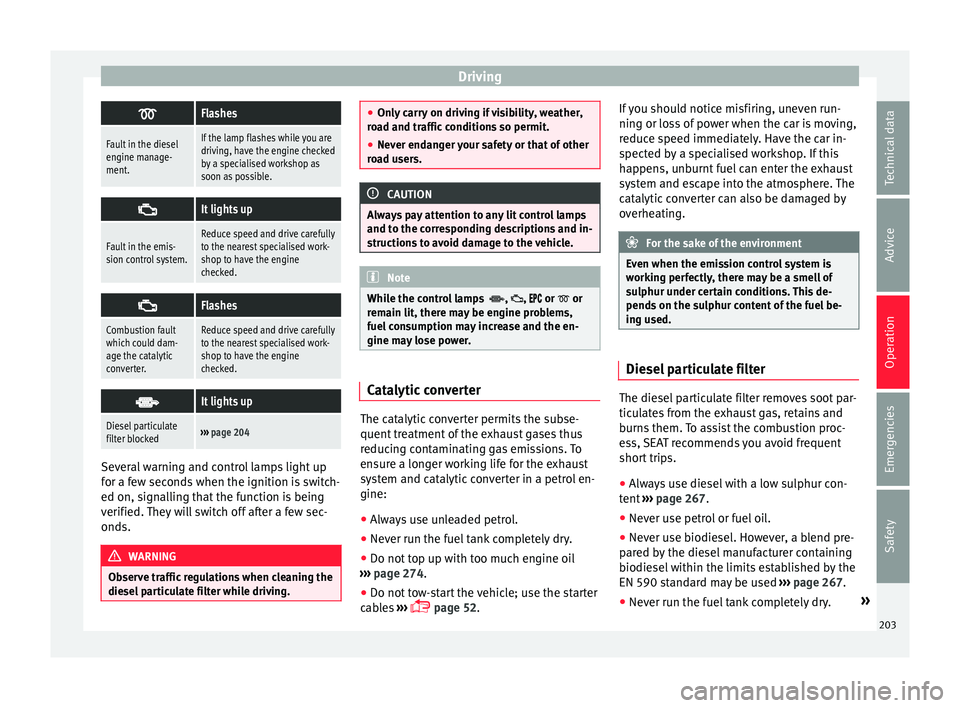
Flashes
Fault in the diesel
engine manage-
ment.If the lamp flashes while you are
driving, have the engine checked
by a specialised workshop as
soon as possible.
It lights up
Fault in the emis-
sion control system.Reduce speed and drive carefully
to the nearest specialised work-
shop to have the engine
checked.
Flashes
Combustion fault
which could dam-
age the catalytic
converter.Reduce speed and drive carefully
to the nearest specialised work-
shop to have the engine
checked.
It lights up
Diesel particulate
filter blocked›››
page 204 Several warning and control lamps light up
f
or a f
ew sec
onds when the ignition is switch-
ed on, signalling that the function is being
verified. They will switch off after a few sec-
onds. WARNING
Observe traffic regulations when cleaning the
diesel p
articulate filter while driving. ●
Only c
arry on driving if visibility, weather,
road and traffic conditions so permit.
● Never endanger your safety or that of other
roa
d users. CAUTION
Always pay attention to any lit control lamps
and t o the c orr
esponding descriptions and in-
structions to avoid damage to the vehicle. Note
While the control lamps , , or or
rem ain lit, ther
e may be engine problems,
fuel consumption may increase and the en-
gine may lose power. Catalytic converter
The catalytic converter permits the subse-
quent
tr
e
atment of the exhaust gases thus
reducing contaminating gas emissions. To
ensure a longer working life for the exhaust
system and catalytic converter in a petrol en-
gine:
● Always use unleaded petrol.
● Never run the fuel tank completely dry.
● Do not top up with too much engine oil
›››
page 274.
● Do not tow-start the vehicle; use the starter
cabl
es ›››
page 52. If you should notice misfiring, uneven run-
ning or los
s of power when the car is moving,
reduce speed immediately. Have the car in-
spected by a specialised workshop. If this
happens, unburnt fuel can enter the exhaust
system and escape into the atmosphere. The
catalytic converter can also be damaged by
overheating. For the sake of the environment
Even when the emission control system is
work in
g perfectly, there may be a smell of
sulphur under certain conditions. This de-
pends on the sulphur content of the fuel be-
ing used. Diesel particulate filter
The diesel particulate filter removes soot par-
tic
u
l
ates from the exhaust gas, retains and
burns them. To assist the combustion proc-
ess, SEAT recommends you avoid frequent
short trips.
● Always use diesel with a low sulphur con-
tent ›
›› page 267.
● Never use petrol or fuel oil.
● Never use biodiesel. However, a blend pre-
pared b
y the diesel manufacturer containing
biodiesel within the limits established by the
EN 590 standard may be used ›››
page 267.
● Never run the fuel tank completely dry. »
203
Technical data
Advice
Operation
Emergencies
Safety
Page 208 of 324
Operation
Anti-lock system (ABS)
ABS c
an pr
event the wheels from locking dur-
ing braking until just before the vehicle stops
thus helping the driver to steer the vehicle
and maintain control. This means that, even
during full braking, the risk of skidding is re-
duced:
● Press and hold the brake pedal fully. Do not
remov
e your foot from the brake pedal or re-
duce braking force!
● Do not “pump” the brake pedal, or reduce
brakin
g force!
● Maintain vehicle direction when braking
ful
ly.
● When the brake pedal is released or when
the brake f
orce is reduced, ABS is turned off.
ABS control can be observed by vibration of
the brake pedal and noise. You should never
expect the ABS to reduce the braking dis-
tance under any circumstances. This distance
will increase when driving on gravel, recent
snow or on icy and slippery ground.
When driving on loose ground, the all-terrain
configuration of the ABS is automatically
turned on. When ABS is activated, the front
wheels may lock briefly. This shortens the
braking distance in off-road situations as the
wheels are prevented from digging into loose
surfaces. All-terrain ABS only intervenes
when driving in a straight line. When the front wheels are turned, the normal ABS is
activated.
Br
ake assist system (BAS)
The brake assist system may reduce the re-
quired braking distance. The brake assist
system boosts the braking force if you press
the brake pedal quickly in an emergency. As
a result, the braking pressure increases rap-
idly, the braking force is multiplied and the
braking distance is reduced. This enables the
ABS to be activated more quickly and effec-
tively.
¡Do not lift your foot off the brake pedal!
When the brake pedal is released or when
the brake force is reduced, braking assist au-
tomatically turns off the brake servo.
Traction control when accelerating (ASR)
In the event of wheelspin, the traction control
system reduces the engine torque to match
the amount of grip available. The ASR makes
some situations easier, for example, when
starting, accelerating or going uphill, even in
unfavourable road conditions.
The ASR can be switched on or off manually
››› page 207.
Electronic differential lock system (EDS)
EDL is available when driving in straight lines
under normal conditions. When the EDL de-
tects wheelspin, it brakes the spinning wheel and directs the power to the other drive
wheels. T
o prevent the disc brake of the
braked wheel from overheating, the EDL cuts
out automatically if subjected to excessive
loads. The EDL will switch on again automati-
cally when the brake has cooled down.
Electronic drive torque management (XDS)
When taking a curve, the driveshaft differen-
tial mechanism allows the outer wheel to turn
at a higher speed than the inner wheel. In
this way, the wheel that is turning faster (out-
er wheel) receives less drive torque than the
inner wheel. This may mean that in certain
situations the torque delivered to the inner
wheel is too high, causing the wheels to
spin. On the other hand, the outer wheel is
receiving a lower drive torque than it could
transmit. This causes an overall loss of lateral
grip on the front axle, resulting in understeer
or “lengthening” of the trajectory.
The XDS system can detect and correct this
effect via the sensors and signals of the ESC.
Via the ESC, the XDS will brake the inside
wheel and counter the excess driving torque
of that wheel. This means that the driver's
desired trajectory is much more precise.
The XDS system works in combination with
the ESC and is always active, even when ASR
traction control is disconnected.
206