lights Seat Alhambra 2018 Owner's Guide
[x] Cancel search | Manufacturer: SEAT, Model Year: 2018, Model line: Alhambra, Model: Seat Alhambra 2018Pages: 324, PDF Size: 7.04 MB
Page 99 of 324
Fuses and bulbs Rear light, leftRear light, right
4.Unscrew the attachment screw
››› Fig. 112 2 us-
ing the screwdriver from the vehicle tool kit
››› page 83. The bolt is secured in its position.
5.Extract the rear light from the bodywork by careful-
ly pulling backwards.
6.Pull the red strip on the connector and extract the connector.
7.Disassemble the tail light unit and place it on aflat, clean surface.To change the bulb
8.To release the bulb holder, press on the attach-
ment tabs
››› Fig. 113 1 to 4 in the direction of
the arrow.
9.Remove the bulb holder from the rear light unit.
10.Replace the faulty bulb with a new identical bulb.
11.Place the bulb holder in the tail light unit. The at-
tachment tabs should audibly click into place.
12.Insert the connector and press the red attachment
strip in so that the connector is locked into place. Assembling the rear light units
C
omp
l
ete operations only in the sequence
given:
Rear light, leftRear light, right
13.Carefully insert the tail light unit into the opening in the bodywork. To do this, insert the upper rear light unit guide into the attachment ring.
14.Tighten the white attachment screw using the screwdriver from the vehicle tool kit.
15.Ensure that the tail light unit has been correctly fitted and is firmly secured.
16.
Replace the cap
››› Fig. 112 1 and ro-
tate it 90° in the oppo-
site direction of the ar-
row.Move the 12 V power
socket support up-
wards gently until it is
correctly closed.
17.Close the storage com-
partment.
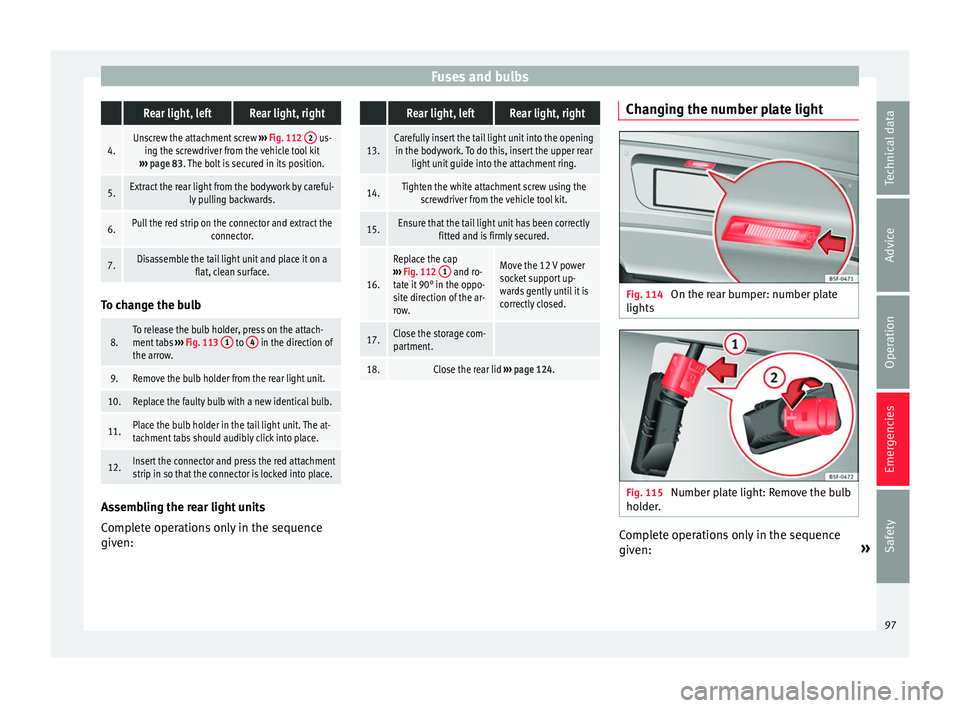
18.Close the rear lid ››› page 124. Changing the number plate light
Fig. 114
On the rear bumper: number plate
lights Fig. 115
Number plate light: Remove the bulb
ho l
der
. Complete operations only in the sequence
giv
en: »
97
Technical data
Advice
Operation
Emergencies
Safety
Page 103 of 324
General instrument panel
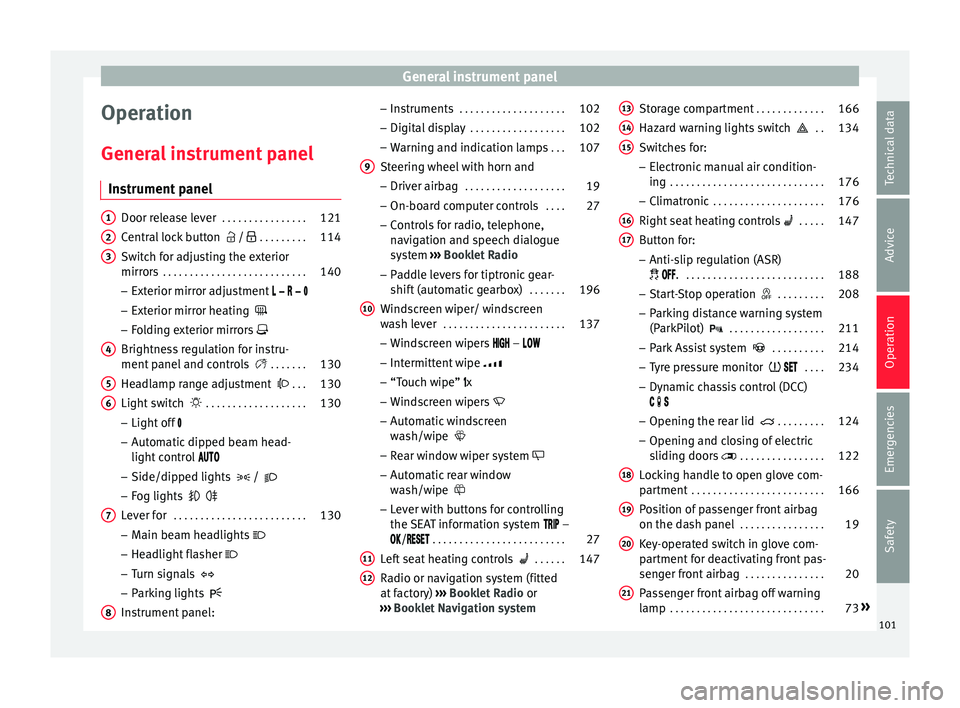
Operation
Gener a
l
instrument panel
Instrument panel Door release lever
. . . . . . . . . . . . . . . . 121
Central lock button / . . . . . . . . . 114
Switch for adjusting the exterior
mirror s . . . . . . . . . . . . . . . . . . . . . . . . . . . 140
– Exterior mirr or a
djustment
– Exterior mirror heating
– Folding exterior mirrors
Brightness regulation for instru-
ment panel and controls . . . . . . .130
Headlamp range adjustment . . .130
Light switch . . . . . . . . . . . . . . . . . . . 130
– Light off
– Aut
omatic dipped beam head-
light control
– Side/dipped lights /
– Fog lights
Lever for . . . . . . . . . . . . . . . . . . . . . . . . . 130
– Main beam he
adlights
– Headlight flasher
– Turn signals
– Parking lights
Instrument panel:
1 2
3
4
5
6
7
8 –
Ins
truments . . . . . . . . . . . . . . . . . . . . 102
– Digit
al di
splay . . . . . . . . . . . . . . . . . . 102
– Warning and indic
ation lamps . . .107
Steering wheel with horn and – Driver airbag . . . . . . . . . . . . . . . . . . . 19
– On-bo
ard c
omputer controls . . . .27
– Contro
ls for radio, telephone,
navigation and speech dialogue
system ››› Booklet Radio
– Paddle levers for tiptronic gear-
shift (automatic gearbox) . . . . . . .196
Windscreen wiper/ windscreen
wash l
ever . . . . . . . . . . . . . . . . . . . . . . . 137
– Wind s
creen wipers –
– Intermittent wipe
– “Touch wipe” x
– Windscreen wipers
– Automatic windscreen
wash/wipe
– Rear window wiper system
– Automatic rear window
wash/wipe
– Lever with buttons for controlling
the SEAT information system –
/ . . . . . . . . . . . . . . . . . . . . . . . . . 27
Left seat heating controls . . . . . .147
Radio or navigation system (fitted
at fact
ory) ››› Booklet Radio or
››› Booklet Navigation system
9
10
11
12 Storage compartment
. . . . . . . . . . . . .166
Hazard warning lights switch . .134
Switches for: – Electr
onic
manual air condition-
ing . . . . . . . . . . . . . . . . . . . . . . . . . . . . . 176
– Climatr
onic . . . . . . . . . . . . . . . . . . . . . 176
Right seat heating controls . . . . . 147
Button for:
– Anti-slip r
egulation (ASR)
. . . . . . . . . . . . . . . . . . . . . . . . . . . 188
– Star t
-Stop operation . . . . . . . . .208
– Parkin
g distance warning system
(ParkPilot) . . . . . . . . . . . . . . . . . . 211
– Park As
sist system . . . . . . . . . .214
– Tyr
e pressure monitor . . . .234
– Dyn
amic chassis control (DCC)
– Opening the rear lid . . . . . . . . .124
– Opening and clo
sing of electric
sliding doors . . . . . . . . . . . . . . . . 122
Locking handle to open glove com-
par tment . . . . . . . . . . . . . . . . . . . . . . . . . 166
P
osition of passenger front airbag
on the dash p
anel . . . . . . . . . . . . . . . . 19
Key-operated switch in glove com-
partment
for deactivating front pas-
senger front airbag . . . . . . . . . . . . . . .20
Passenger front airbag off warning
lamp . . . . . . . . . . . . . . . . . . . . . . . . . . . . . 73»
13 14
15
16
17
18
19
20
21
101
Technical data
Advice
Operation
Emergencies
Safety
Page 117 of 324
Opening and closing
Description of the central locking sys-
t em The central locking system allows all doors
and the re
ar lid t
o be locked and unlocked
centrally.
● From outside, using the vehicle key.
● From outside with the Keyless Access sys-
tem ››
› page 117,
● From inside, by pushing the central locking
button ›
›› page 116.
In the submenu Convenience in the Con-
figuration menu, or by visiting a special-
ised workshop, special functions of the cen-
tral locking system can be switched on or off
››› page 27.
In case of a vehicle key fault or central lock-
ing system fault, all doors can be locked or
unlocked manually.
Automatic locking (Auto Lock)
In this instance, the vehicle locks automati-
cally when moving at speeds above approx.
15 km/h (10 mph) ›››
page 27. When the
vehicle is locked, the control lamp on the
central locking button lights up in yellow
››› Fig. 129. Automatic unlocking (Auto Unlock)
When the key
i
s removed from the ignition
slot, here the vehicle unlocks all doors and
the boot automatically ›››
page 27.
Locking the vehicle after the airbags have
been deployed
If the airbags are deployed due to an acci-
dent, the vehicle will be automatically and
completely unlocked. Depending on the
amount of damage, it can be locked follow-
ing an accident in the following ways:
FunctionAction
Lock the vehicle
by pushing the
central locking
button:– Switch off the ignition.
– Open a door of the vehicle and
close it again.
– Push the central locking button
.
Lock the vehicle
with the vehicle
key:– Disconnect the ignition button.
OR: remove the key from the igni-
tion.
– Open a door once.
– Lock the vehicle with the key. Note
If the vehicle key buttons are pressed
›› ›
Fig. 128 or one of the central locking but-
tons is pressed ››› Fig. 129 several times in
quick succession, the central locking feature
is disabled briefly to protect from overload-
ing. The vehicle will then remain unlocked for
around 30 seconds. If no door nor the boot is opened during this time, the vehicle will then
autom
atic
ally unlock. Unlocking and locking the vehicle
from out
s
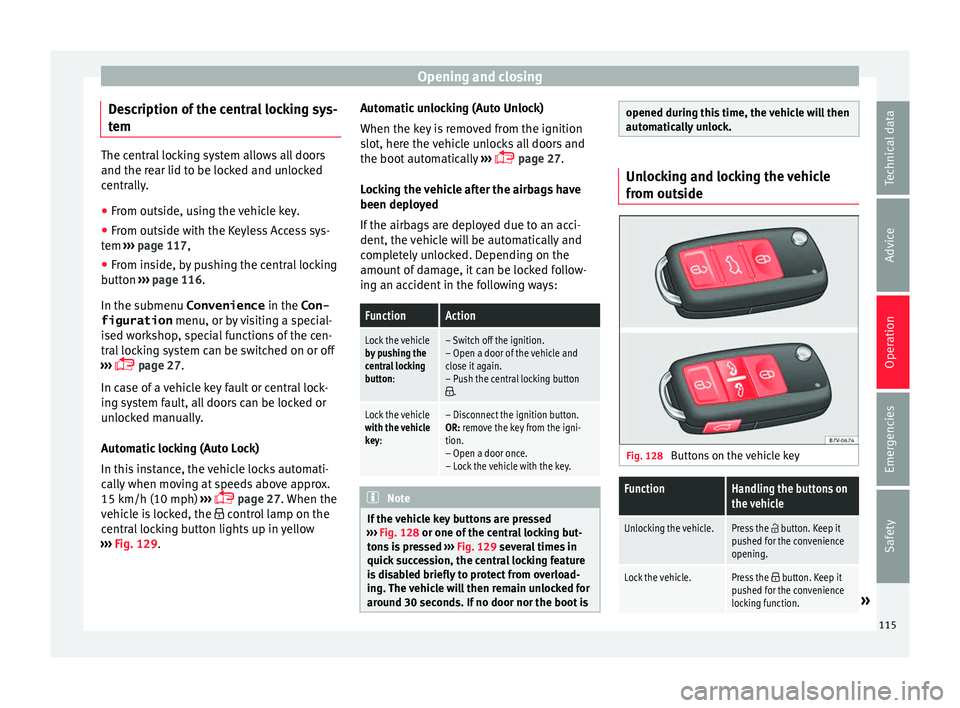
ide Fig. 128
Buttons on the vehicle key
FunctionHandling the buttons on
the vehicle
Unlocking the vehicle.Press the button. Keep it
pushed for the convenience
opening.
Lock the vehicle.Press the button. Keep it
pushed for the convenience
locking function.
» 115
Technical data
Advice
Operation
Emergencies
Safety
Page 118 of 324
OperationFunctionHandling the buttons on
the vehicle
Unlocking the rear lid.Press the button.
Open the sliding door.›››
page 122. Please note: depending on the c
entr
al lock-
ing function selected in the Convenience submenu, you may have to push the but-
ton twice ›››
page 27 to unlock all doors
and the rear lid.
The vehicle key only locks and unlocks the
vehicle if it is within range of the vehicle and
if the batteries have enough power. When
locking, the vehicle's turn signals will blink.
If the driver door is open, the vehicle cannot
be locked with the key. If you unlock the vehi-
cle without opening any doors or the rear lid,
it will lock again automatically after a few
seconds. This function prevents the vehicle
from remaining unlocked if the unlocking
button is pressed by mistake.
Convenience open/close function
● See ››
›
page 127, Controls for the win-
dows: functions.
● See ›››
page 129, Panoramic sliding sun-
roof: operating. Unlocking and locking the vehicle
from ins
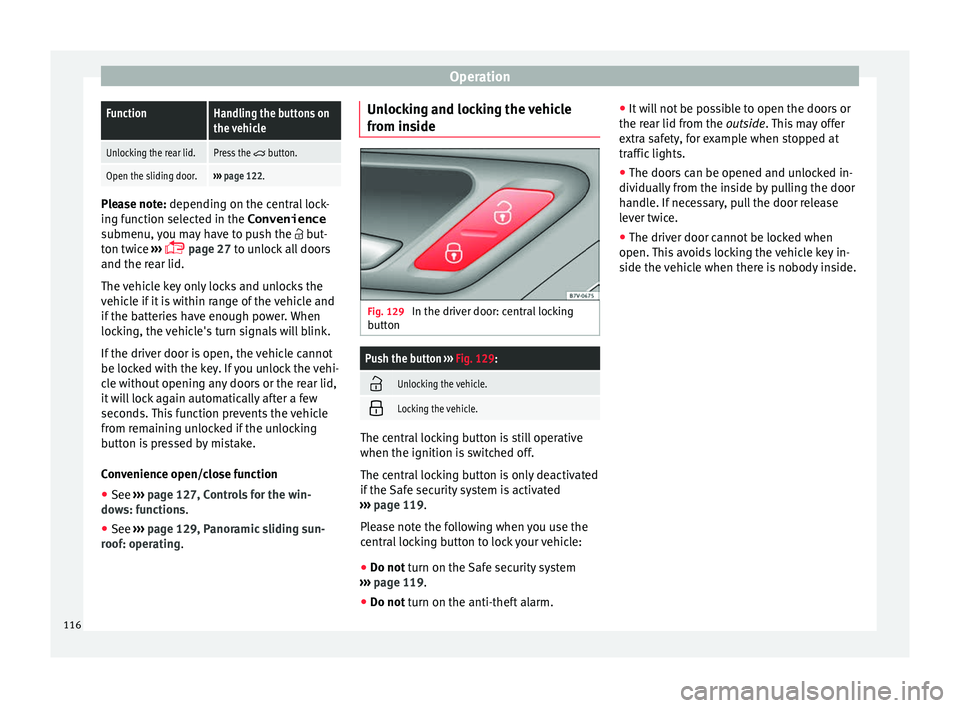
ide Fig. 129
In the driver door: central locking
b utt
on
Push the button ››› Fig. 129:
Unlocking the vehicle.
Locking the vehicle.
The central locking button is still operative
when the ignition i
s
sw
itched off.
The central locking button is only deactivated
if the Safe security system is activated
››› page 119.
Please note the following when you use the
central locking button to lock your vehicle:
● Do not turn on the Safe security system
› ›
› page 119.
● Do not turn on the anti-theft alarm. ●
It w i
ll not be possible to open the doors or
the rear lid from the outside. This may offer
extra safety, for example when stopped at
traffic lights.
● The doors can be opened and unlocked in-
dividually
from the inside by pulling the door
handle. If necessary, pull the door release
lever twice.
● The driver door cannot be locked when
open. This
avoids locking the vehicle key in-
side the vehicle when there is nobody inside.
116
Page 119 of 324
Opening and closing
Locking and unlocking the vehicle
w ith K
eyl
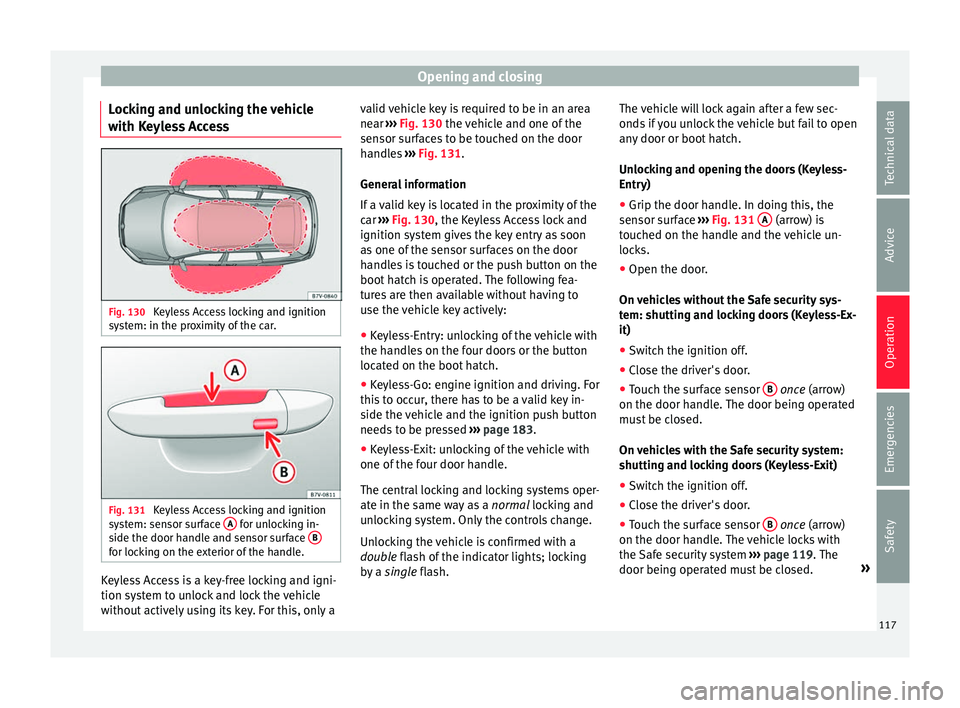
ess Access Fig. 130
Keyless Access locking and ignition
sy s
t
em: in the proximity of the car. Fig. 131
Keyless Access locking and ignition
sy s
t
em: sensor surface A for unlocking in-
s ide the door h
andl
e and sensor surface Bfor locking on the exterior of the handle.
Keyless Access is a key-free locking and igni-
tion sy
s
t
em to unlock and lock the vehicle
without actively using its key. For this, only a valid vehicle key is required to be in an area
near
››
› Fig. 130 the vehicle and one of the
sensor surfaces to be touched on the door
handles ››› Fig. 131.
General information
If a valid key is located in the proximity of the
car ››› Fig. 130, the Keyless Access lock and
ignition system gives the key entry as soon
as one of the sensor surfaces on the door
handles is touched or the push button on the
boot hatch is operated. The following fea-
tures are then available without having to
use the vehicle key actively:
● Keyless-Entry: unlocking of the vehicle with
the handle
s on the four doors or the button
located on the boot hatch.
● Keyless-Go: engine ignition and driving. For
this t
o occur, there has to be a valid key in-
side the vehicle and the ignition push button
needs to be pressed ››› page 183.
● Keyless-Exit: unlocking of the vehicle with
one of the four door h
andle.
The central locking and locking systems oper-
ate in the same way as a normal locking and
unlocking system. Only the controls change.
Unlocking the vehicle is confirmed with a
double flash of the indicator lights; locking
by a single flash. The vehicle will lock again after a few sec-
onds if
you unlock the vehicle but fail to open
any door or boot hatch.
Unlocking and opening the doors (Keyless-
Entry)
● Grip the door handle. In doing this, the
sensor sur
face ››› Fig. 131 A (arrow) is
t ouc
hed on the h
andle and the vehicle un-
locks.
● Open the door.
On vehic
les without the Safe security sys-
tem: shutting and locking doors (Keyless-Ex-
it)
● Switch the ignition off.
● Close the driver's door.
● Touch the surface sensor B onc
e (arrow)
on the door h andl
e. The door being operated
must be closed.
On vehicles with the Safe security system:
shutting and locking doors (Keyless-Exit)
● Switch the ignition off.
● Close the driver's door.
● Touch the surface sensor B onc
e (arrow)
on the door h andl
e. The vehicle locks with
the Safe security system ››› page 119. The
door being operated must be closed. »
117
Technical data
Advice
Operation
Emergencies
Safety
Page 120 of 324
Operation
● Touc
h
the sensor surface B twice (arrow)
on the door h andl
e t
o lock the vehicle with-
out the Safe security system ››› page 119.
Unlocking and locking the boot hatch
When the vehicle is locked, the hatch auto-
matically unlocks on opening if ››› Fig. 130
there is a valid vehicle key in the proximity.
Open or close the hatch normally
››› page 124.
After closing, the hatch locks automatically.
In the following instances, the rear lid does
not lock automatically after closing:
● If the entire vehicle is unlocked.
● If the key used last is inside the vehicle. All
vehicl
e indicator lights flash four times. The
vehicle will lock again after a few seconds if
no door or boot hatch are opened.
Locking the vehicle with a second key
If there is a vehicle key inside the vehicle and
it is locked from the outside with a second
vehicle key, the key inside the vehicle is
blocked for engine ignition ››› page 183. In
order to enable engine ignition, the button
on the key inside the vehicle needs to be
pressed ››› Fig. 128.
Automatically disabling sensors
If the vehicle is not locked or unlocked for a
long period of time, the proximity sensor on the passenger door is automatically disa-
bled.
If
the exterior sensor on the door handle is
often activated unusually with the vehicle
locked (e.g. by the branches of a bush rub-
bing against it), all proximity sensors are dis-
abled for a time. If this only happens with the
exterior sensor on the driver's door, only this
sensor is disabled.
Sensors will again be enabled:
● After a time.
● OR: if the vehicle is unlocked with the
butt
on on the key.
● OR: if the boot is opened.
Keyl
ess Access temporary disconnection
function*
You can deactivate the vehicle's Keyless Ac-
cess unlocking for a locking and unlocking
cycle.
● Move the gear lever to position P (if the v
e-
hicle has automatic gearbox), since other-
wise the vehicle cannot be locked.
● Close the door.
● Push the central locking button on the
remote c
ontrol and touch the locking sensor
surface ›››
Fig. 131 B on the driver door han-
dl e onc e w
ithin the following 5 seconds. Do
not grip the door handle, otherwise the vehi-
cle will not lock. Deactivation is also possible if the vehicle is locked through the driver’s
door lock.
●
To c
heck that the function has been deacti-
vated, w
ait at least 10 seconds, grip and pull
on the door handle. The door should not
open.
The next time the door can only be unlocked
via the remote control or the lock cylinder.
The next time the door is locked/unlocked,
Keyless Access will be active again.
Convenience functions
To close all electric windows, the sun roof
and electric tilting panoramic roof with the
convenience feature, keep your finger for a
few seconds on the lock sensor surface B located on the exterior part of the driver or
p
a
s
senger door handle until the windows
and roof close.
Opening the doors by touching the sensor
surface on the handle takes places in accord-
ance with the settings activated on the menu
Configuration - Convenience
››› page 27. CAUTION
The sensor surfaces on the door handles
cou l
d engage if hit with a water jet or high
pressure steam if there is a valid vehicle key
in the nearby area. If at least one of the win-
dows is open and the sensor surface B on
one of the h andl
e permanently activates, all 118
Page 123 of 324
Opening and closing
Switching off the interior monitoring and the
anti-t o
w sy
stems
The vehicle interior monitoring is switched off
by pressing the remote control lock button
twice.
● Lock all doors and rear lid.
● Use the key to lock the vehicle. The interior
monitoring and / or anti-t
owing alarm are
switched off until the next time the vehicle is
locked.
To turn off the interior monitoring and anti-
tow systems before unlocking the vehicle, for
example in the following situations:
● When leaving animals inside the vehicle
›››
page 114.
● When the vehicle must be loaded.
● When the vehicle is being transported, for
examp
le, by ferry.
● When the vehicle must be towed with the
axle r
aised.
Risk of false alarms
The interior monitoring system will only oper-
ate correctly if the vehicle is completely
closed. Observe legal requirements. The
alarm may be accidentally triggered in the
following cases:
● When a window is completely or partially
open. ●
If the su
nglasses storage compartment in
the roof console is open.
● When the panoramic sliding sunroof is
compl
etely or partially open.
● When suspended objects are hung from
the interior mirror (air fr
eshener) or there are
loose papers in the vehicle.
● If the separation net is fitted and moves
(due to heatin
g).
● Due to a vibrating mobile telephone inside
the vehic
le. Note
Upon activating the alarm, if any door or the
re ar lid i
s open, only the anti-theft alarm will
be activated. The interior monitoring and an-
ti-tow systems will only be activated when
the doors and rear lid are fully closed. Doors
Intr oduction WARNING
If a door is not correctly closed, it could open
une xpect
edly when driving and cause serious
injuries.
● Always stop immediately and close the
door. ●
When clo s
ing, ensure that the door has
closed correctly. A closed door should be
flush with the corresponding parts of the
bodywork.
● Open and close doors only when nobody is
in the way
of the door. WARNING
A door held open by its retainer could be
b lo wn c
losed by the wind or close if the vehi-
cle is on a hill, causing injury.
● When opening and closing doors, always
use the door handl
e. Warning lamp
It lights up
At least one vehicle
door is open or not
correctly shut.
Stop driving immediately!
Open the corresponding door
and close it immediately. Several warning and control lamps light up
f
or a f
ew sec
onds when the ignition is switch-
ed on, signalling that the function is being
verified. They will switch off after a few sec-
onds.
If a door is open or not properly closed, the
warning lamp or will light up on the in-
strument panel.
Depending on the vehicle equipment, a sym-
bol may be displayed on the dash panel »
121
Technical data
Advice
Operation
Emergencies
Safety
Page 127 of 324
Opening and closing
Warning lamp It lights up
The rear lid is open
or not correctly
shut.
Stop driving immediately!
Open the rear lid and close it
again. Several warning and control lamps light up
for a f
ew sec
onds when the ignition is switch-
ed on, signalling that the function is being
verified. They will switch off after a few sec-
onds.
The warning lamp appears on the dash
panel if the rear lid is open or not properly
closed.
Depending on the vehicle equipment, a sym-
bol may be displayed on the dash panel
screen instead of the warning lamp. The indi-
cation is also visible when the ignition is
switched off. The indication disappears
around 15 seconds after the vehicle has
been locked. WARNING
If the rear lid is not correctly closed, it could
open une xpect
edly when driving and cause
serious injuries.
● Always stop immediately and close the rear
lid.
● Ensure that the rear lid has been locked in-
to pl
ace by the element on the lock carrier
when you close it. Note
At outside temperatures of less than 0°C
(+32°F), the pre s
surised gas struts cannot al-
ways automatically lift the rear lid. In this
case, open the rear lid manually. Closing the rear lid
Fig. 136
Rear lid open: hand grip Closing the rear lid
● Grab the handgrip inside the rear lid
› ›
›
Fig. 136 (arrow).
● Push the rear lid downwards until it locks
into pl
ace in the lock.
● Ensure that it is correctly closed by pulling
on it firmly
.
Locking the rear lid
If you unlock the vehicle without opening any
doors or the rear lid, it will lock again auto- matically after 30 seconds. This function pre-
vents the
vehicle from remaining unlocked if
the unlocking button is pressed by mistake.
Locking is only possible when the rear lid is
correctly and fully closed.
● The rear lid is also locked by a central lock-
ing.
● If the
vehicle rear lid is locked or unlocked
usin
g the button of the vehicle key, when
it is closed again it will lock automatically.
● A closed but not locked rear lid will lock au-
tomatic
ally at a speed above about 9 km/h
(7 mph). WARNING
Unsuitable or careless closing and locking of
the re ar lid c
ould cause serious injuries.
● Never leave the vehicle unattended, or al-
low chi
ldren to play inside or around the vehi-
cle without supervision, especially if the rear
lid is open. Children could enter the luggage
compartment, close the rear lid and become
trapped. A locked vehicle can be subjected to
extremely high and low temperatures, de-
pending on the time of year, thus causing se-
rious injuries/illness and even death. Note
Before closing the rear lid, make sure that the
key h
as not been left inside the luggage com-
partment. 125
Technical data
Advice
Operation
Emergencies
Safety
Page 128 of 324
Operation
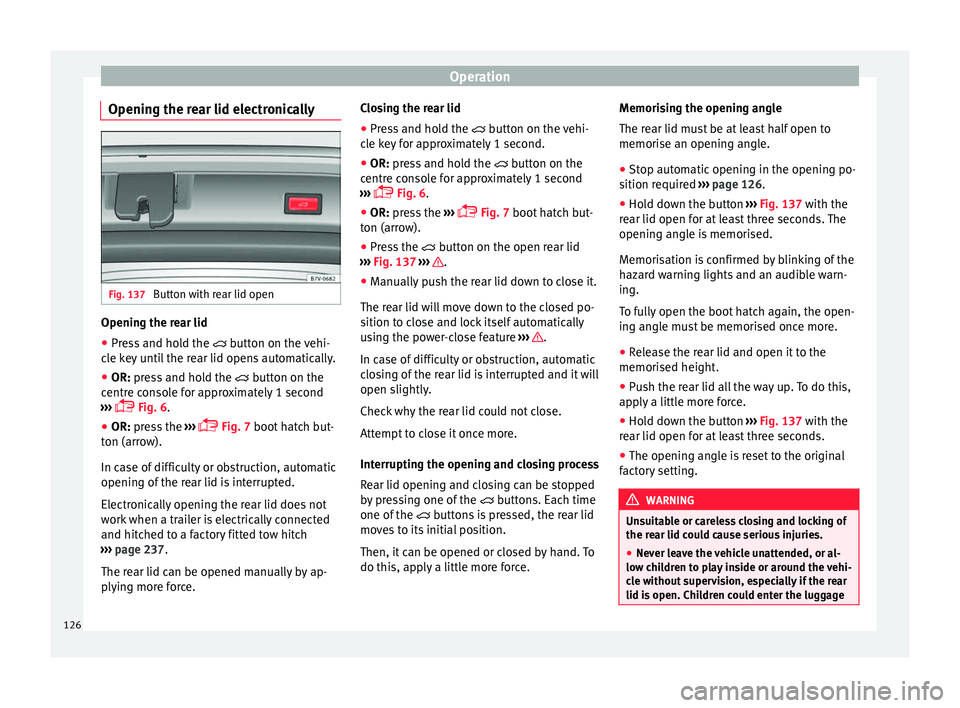
Opening the rear lid electronically Fig. 137
Button with rear lid open Opening the rear lid
● Press and hold the butt
on on the vehi-
cle key until the rear lid opens automatically.
● OR: press and hold the butt
on on the
centre console for approximately 1 second
››› Fig. 6.
● OR: press the ››
›
Fig. 7 boot hatch but-
ton (arrow).
In case of difficulty or obstruction, automatic
opening of the rear lid is interrupted.
Electronically opening the rear lid does not
work when a trailer is electrically connected
and hitched to a factory fitted tow hitch
››› page 237.
The rear lid can be opened manually by ap-
plying more force. Closing the rear lid
● Press and hold the button on the
vehi-
cle key for approximately 1 second.
● OR: press and hold the b
utton on the
centre console for approximately 1 second
››› Fig. 6.
● OR: press the ››
›
Fig. 7 boot hatch but-
ton (arrow).
● Press the button on the open r
ear lid
››› Fig. 137 ››› .
● Manually push the rear lid down to close it.
The r e
ar lid w
ill move down to the closed po-
sition to close and lock itself automatically
using the power-close feature ››› .
In c a
se of
difficulty or obstruction, automatic
closing of the rear lid is interrupted and it will
open slightly.
Check why the rear lid could not close.
Attempt to close it once more.
Interrupting the opening and closing process
Rear lid opening and closing can be stopped
by pressing one of the buttons. Each time
one of the buttons is pressed, the rear lid
moves to its initial position.
Then, it can be opened or closed by hand. To
do this, apply a little more force. Memorising the opening angle
The rear lid mu
st be at least half open to
memorise an opening angle.
● Stop automatic opening in the opening po-
sition requir
ed ››› page 126.
● Hold down the button ›››
Fig. 137 with the
rear lid open for at least three seconds. The
opening angle is memorised.
Memorisation is confirmed by blinking of the
hazard warning lights and an audible warn-
ing.
To fully open the boot hatch again, the open-
ing angle must be memorised once more.
● Release the rear lid and open it to the
memorised height.
● P
ush the rear lid all the way up. To do this,
apply
a little more force.
● Hold down the button ›››
Fig. 137 with the
rear lid open for at least three seconds.
● The opening angle is reset to the original
factor
y setting. WARNING
Unsuitable or careless closing and locking of
the re ar lid c
ould cause serious injuries.
● Never leave the vehicle unattended, or al-
low chi
ldren to play inside or around the vehi-
cle without supervision, especially if the rear
lid is open. Children could enter the luggage 126
Page 132 of 324
Operation
Anti-trap function of the panoramic
s lidin
g s
unroof and the sun blindThe anti-trap function reduces the risk of in-
jury
when openin
g and closing the panoram-
ic sliding sunroof and sun blind ››› . When
they enc ou
nter an obstacle while closing,
they reopen.
● Check why the panoramic sliding sunroof
or the sun b
lind did not close.
● Attempt to close the panoramic sliding
sunr
oof or sun blind once again.
● If the panoramic sliding sunroof or sun
blind i s
still obstructed, it will stop at the cor-
responding position. Close it without the an-
ti-trap function.
Closing without the roll-back function
● The switch ›››
Fig. 13 should be in the
“closed” position 1 .
● Panoramic sliding sunroof: within fiv
e sec
-
onds of triggering the anti-trap function, pull
the control all the way back ›››
Fig. 13 (ar-
row 5 ) until the panoramic sliding sunroof
c lo
se
s fully.
● Sun blind: Within 5 second
s of triggering
the anti-trap function, push button
››› Fig. 138 2 until the sun blind closes com-
p l
et
ely.
● The panoramic sliding sunroof or sun blind
close
s without the anti-trap function. ●
If the panor
amic sliding sunroof still cannot
be closed, visit a specialised workshop. WARNING
Closing the panoramic sliding sunroof or sun
blind w ithout
the anti-trap function can cause
serious injuries.
● Always close the panoramic sliding sunroof
caref
ully.
● Nobody should be in the way of the panor-
amic slidin
g sunroof or sun blind, especially
when they are closed without the anti-trap
function.
● The anti-trap function does not prevent fin-
gers
or other parts of the body getting
pinched against the window frame and caus-
ing injury. Note
The anti-trap function is activated if the win-
dow s
and the panoramic sliding sunroof are
closed from the outside of the vehicle using
the ignition key for convenience closing
››› page 127. Lights and visibility
Light s
C ontr
ol lamps
It lights up
Driving light totally or
partially faulty.
Replace the corresponding
bulb
››› page 92.
If all the bulbs are OK, the ve-
hicle should be taken to a
specialised workshop if nec-
essary.
Fault in adaptive light.››› page 132.
Flashes
Fault in the adaptive
light system.Contact a specialised work-
shop
››› page 132.
It lights up
Rear fog light switched
on.›››
page 25.
It lights up
Front fog lights switch-
ed on›››
page 25. 130