lights Seat Alhambra 2018 Repair Manual
[x] Cancel search | Manufacturer: SEAT, Model Year: 2018, Model line: Alhambra, Model: Seat Alhambra 2018Pages: 324, PDF Size: 7.04 MB
Page 195 of 324
Driving
reduce the strain on the brake system. Other-
wi
se, the br
akes may overheat and fail. Only
use the brakes to reduce speed or to stop. Note
When checking the front brake pads, take the
time t o al
so check the rear brake pads. The
thickness of the brake pads should be
checked visually and regularly, by looking
through the openings in the wheel rims or
from underneath the vehicle. If necessary, re-
move the wheels to check them thoroughly.
SEAT recommends taking your car in for tech-
nical service. Gearbox
Intr oduction When reverse gear is engaged and the igni-
tion i
s
sw
itched on the following takes place:
● Reverse lights light up.
● When reversing, the air conditioner auto-
matical
ly changes to air recirculation mode.
● The rear window heater switches on when
the winds
creen wiper is activated.
● Also, the parking sensor system, the opti-
cal p
arking sensor and the camera for the re-
verse assist system are connected. WARNING
Rapid acceleration can cause loss of traction
and skid din
g, especially on slippery ground.
This could cause loss of control of the vehicle
resulting in an accident and considerable
damage.
● Only use the kick-down function or rapid
accel
eration if visibility, weather, road and
traffic conditions so permit. WARNING
Do not allow the brakes to “rub” for a pro-
long ed period of
time, or brake frequently or
for long periods of time. Continuous braking
heats up the brakes. This could significantly
reduce braking power, increase braking dis-
tance or even result in the total failure of the
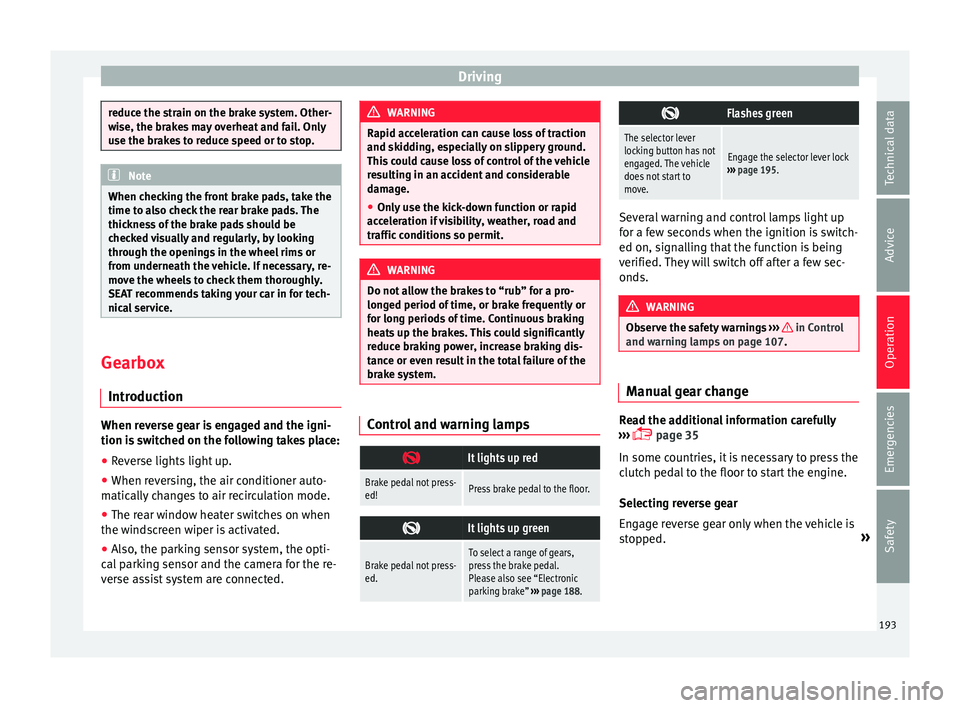
brake system. Control and warning lamps
It lights up red
Brake pedal not press-
ed!Press brake pedal to the floor.
It lights up green
Brake pedal not press-
ed.To select a range of gears,
press the brake pedal.
Please also see “Electronic
parking brake”
››› page 188.
Flashes green
The selector lever
locking button has not
engaged. The vehicle
does not start to
move.
Engage the selector lever lock
››› page 195. Several warning and control lamps light up
for a f
ew sec
onds when the ignition is switch-
ed on, signalling that the function is being
verified. They will switch off after a few sec-
onds. WARNING
Observe the safety warnings ›››
in Control
and warnin g l
amps on page 107. Manual gear change
Read the additional information carefully
› ›
›
page 35
In some countries, it is necessary to press the
clutch pedal to the floor to start the engine.
Selecting reverse gear
Engage reverse gear only when the vehicle is
stopped. »
193
Technical data
Advice
Operation
Emergencies
Safety
Page 200 of 324
Operation
necessary to drive with the engine at an ex-
c eption
al
ly high speed ››› page 202. WARNING
The recommended gear display is intended as
a guideline only; it shou
ld never replace the
driver's attention to driving carefully.
● Responsibility for selecting the correct gear
for eac
h situation continues to lie with the
driver, for example when overtaking, climb-
ing a hill or towing a trailer. For the sake of the environment
Selecting the most appropriate gear for the
sit uation w
ill help you to save fuel. Note
The recommended gear display is switched
off when the c lut
ch pedal is pressed.Address
Intr oduction The power steering is not hydraulic but elec-
tr
omec
h
anical. The advantage of this steer-
ing system is that it disposes of hydraulic
tubes, hydraulic oil, the pump, filter and oth-
er components. The electromechanical sys-
tem saves fuel. While a hydraulic system re-
quires oil pressure to be maintained, electro- mechanical steering only requires energy
when the steerin
g wheel is turned.
With the power steering system, the assisted
steering function automatically adjusts ac-
cording to the vehicle speed, the steering tor-
que and the wheel turning angle. The power
steering only works when the engine is run-
ning. WARNING
If the power steering is not working then the
st eerin
g wheel is much more difficult to turn
and the vehicle more difficult to control.
● The power steering only works when the
engine is
running.
● Never allow the vehicle to move when the
engine is
switched off.
● Never remove the key from the ignition if
the vehic
le is in motion. The steering may
lock and it will not be possible to turn the
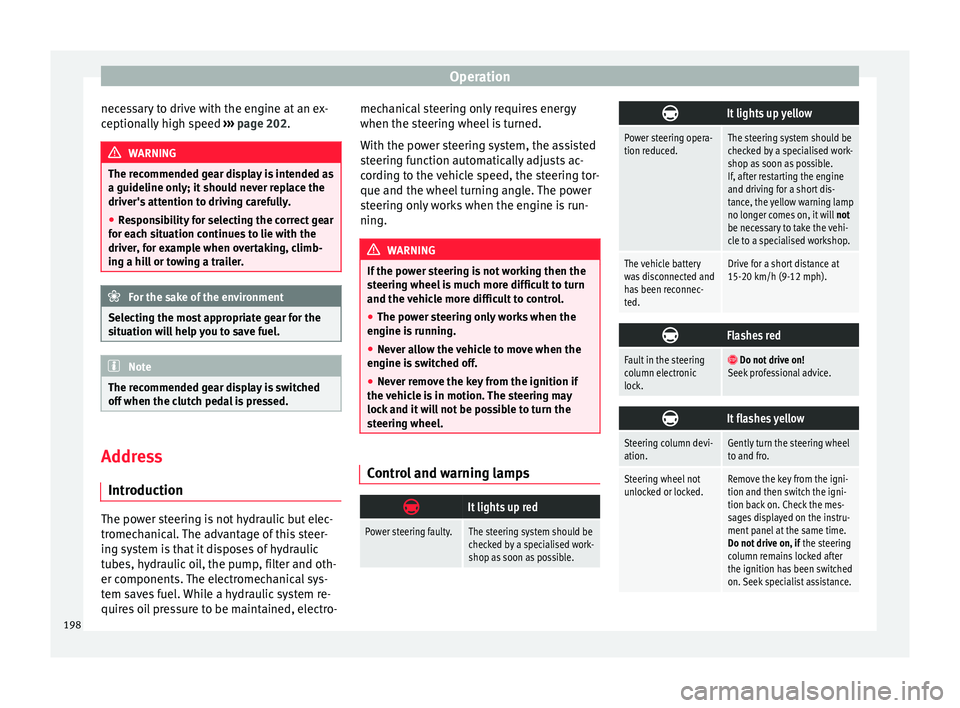
steering wheel. Control and warning lamps
It lights up red
Power steering faulty.The steering system should be
checked by a specialised work-
shop as soon as possible.
It lights up yellow
Power steering opera-
tion reduced.The steering system should be
checked by a specialised work-
shop as soon as possible.
If, after restarting the engine
and driving for a short dis-
tance, the yellow warning lamp
no longer comes on, it will
not
be necessary to take the vehi-
cle to a specialised workshop.
The vehicle battery
was disconnected and
has been reconnec-
ted.Drive for a short distance at
15-20 km/h (9-12 mph).
Flashes red
Fault in the steering
column electronic
lock.
Do not drive on!
Seek professional advice.
It flashes yellow
Steering column devi-
ation.Gently turn the steering wheel
to and fro.
Steering wheel not
unlocked or locked.Remove the key from the igni-
tion and then switch the igni-
tion back on. Check the mes-
sages displayed on the instru-
ment panel at the same time.
Do not drive on, if
the steering
column remains locked after
the ignition has been switched
on. Seek specialist assistance. 198
Page 204 of 324
Operation
Therefore, unnecessary short journeys
shou l
d be av
oided. Try to combine trips.
The vehicle uses more fuel in winter than in
summer, even when other conditions are the
same.
The engine takes a long time to warm up
when it is idling. Mechanical wear and pollu-
tant emissions are also especially high dur-
ing this initial warm-up phase. It is therefore
best to drive off immediately after starting
the engine. Avoid running the engine at high
speed.
Adjusting type pressures.
Having the correct pressure in your tyres
helps to reduce rolling resistance and, as a
result reduces fuel consumption. Increasing
the tyre pressure slightly (+0.2 bar
[2.9 psi/20 kPa]) can help to save fuel.
If you are prepared to accept a slight reduc-
tion in comfort, the tyres may be filled to the
pressures recommended for a fully-loaded
vehicle. This is also valid when driving alone
without luggage.
When you buy new tyres, make sure they are
optimised for minimum rolling resistance.
Avoid carrying unnecessary loads
The lighter the vehicle, the more economical
and ecological the driving style. For example, an additional weight of 100 kg will increase
fuel c
onsumption up to 0.3 l/100 km.
Remove any unnecessary objects or loads
from the vehicle.
Remove optional equipment and unnecessa-
ry accessories
The more aerodynamic the vehicle, the lower
the fuel consumption. Optional equipment
and accessories (such as roof racks or bike
carriers) reduce the aerodynamic benefits of
the vehicle.
Therefore, we recommend you remove all op-
tional and unnecessary equipment and racks,
especially if you intend to drive at high
speeds.
Other factors which increase fuel consump-
tion (examples):
● Fault in engine management.
● Driving on hills.
● Trailer towing. WARNING
Always adapt your speed and the distance to
the v ehic
les ahead in line with visibility,
weather conditions, the condition of the road
and the traffic situation. Engine management and ex-
h
au
s
t gas purification system
Introduction WARNING
The components of the exhaust system reach
ver y
high temperatures. This could cause a
fire.
● Always park your vehicle so that no part of
the exhau
st system can come in contact with
flammable materials (such as dried grass).
● Do not apply additional underseal or anti-
corro
sion coatings to the exhaust pipes, cata-
lytic converter, heat shields or the diesel par-
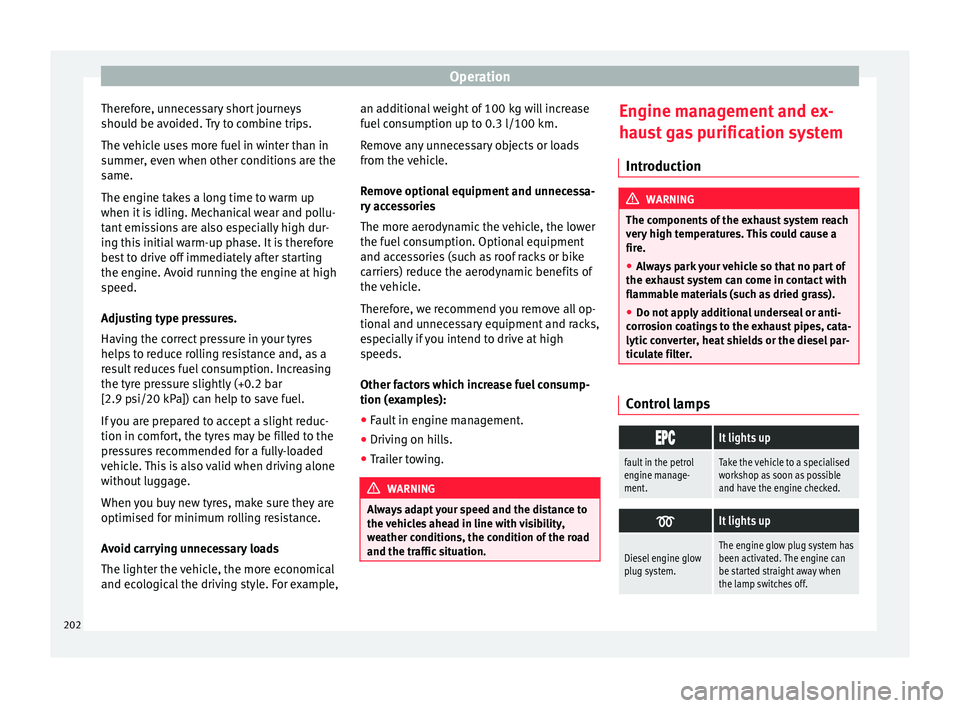
ticulate filter. Control lamps
It lights up
fault in the petrol
engine manage-
ment.Take the vehicle to a specialised
workshop as soon as possible
and have the engine checked.
It lights up
Diesel engine glow
plug system.The engine glow plug system has
been activated. The engine can
be started straight away when
the lamp switches off.
202
Page 205 of 324
Driving
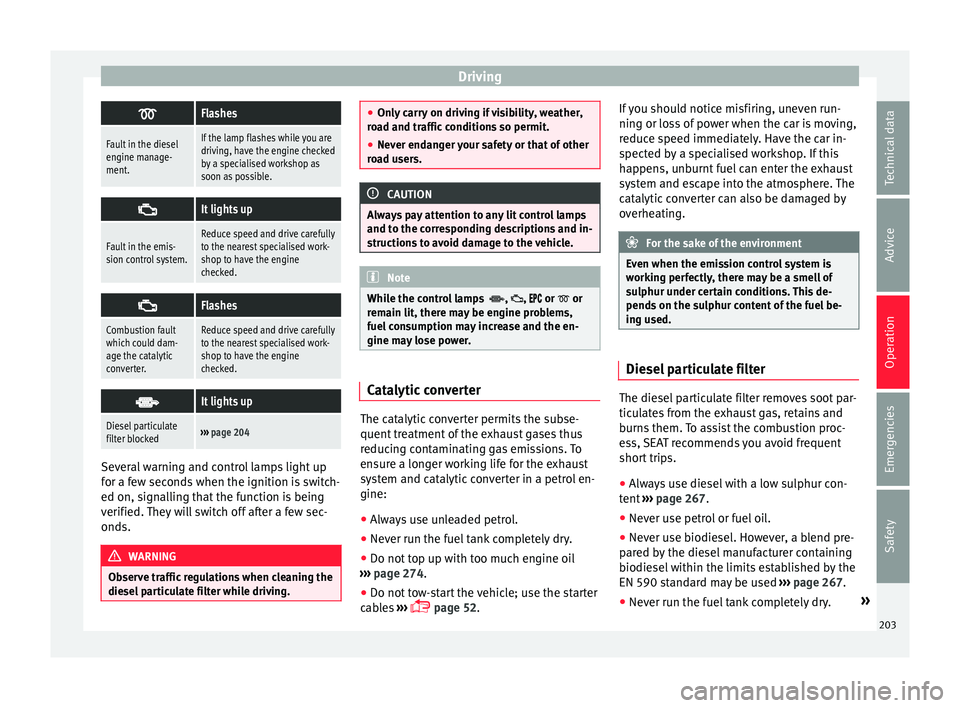
Flashes
Fault in the diesel
engine manage-
ment.If the lamp flashes while you are
driving, have the engine checked
by a specialised workshop as
soon as possible.
It lights up
Fault in the emis-
sion control system.Reduce speed and drive carefully
to the nearest specialised work-
shop to have the engine
checked.
Flashes
Combustion fault
which could dam-
age the catalytic
converter.Reduce speed and drive carefully
to the nearest specialised work-
shop to have the engine
checked.
It lights up
Diesel particulate
filter blocked›››
page 204 Several warning and control lamps light up
f
or a f
ew sec
onds when the ignition is switch-
ed on, signalling that the function is being
verified. They will switch off after a few sec-
onds. WARNING
Observe traffic regulations when cleaning the
diesel p
articulate filter while driving. ●
Only c
arry on driving if visibility, weather,
road and traffic conditions so permit.
● Never endanger your safety or that of other
roa
d users. CAUTION
Always pay attention to any lit control lamps
and t o the c orr
esponding descriptions and in-
structions to avoid damage to the vehicle. Note
While the control lamps , , or or
rem ain lit, ther
e may be engine problems,
fuel consumption may increase and the en-
gine may lose power. Catalytic converter
The catalytic converter permits the subse-
quent
tr
e
atment of the exhaust gases thus
reducing contaminating gas emissions. To
ensure a longer working life for the exhaust
system and catalytic converter in a petrol en-
gine:
● Always use unleaded petrol.
● Never run the fuel tank completely dry.
● Do not top up with too much engine oil
›››
page 274.
● Do not tow-start the vehicle; use the starter
cabl
es ›››
page 52. If you should notice misfiring, uneven run-
ning or los
s of power when the car is moving,
reduce speed immediately. Have the car in-
spected by a specialised workshop. If this
happens, unburnt fuel can enter the exhaust
system and escape into the atmosphere. The
catalytic converter can also be damaged by
overheating. For the sake of the environment
Even when the emission control system is
work in
g perfectly, there may be a smell of
sulphur under certain conditions. This de-
pends on the sulphur content of the fuel be-
ing used. Diesel particulate filter
The diesel particulate filter removes soot par-
tic
u
l
ates from the exhaust gas, retains and
burns them. To assist the combustion proc-
ess, SEAT recommends you avoid frequent
short trips.
● Always use diesel with a low sulphur con-
tent ›
›› page 267.
● Never use petrol or fuel oil.
● Never use biodiesel. However, a blend pre-
pared b
y the diesel manufacturer containing
biodiesel within the limits established by the
EN 590 standard may be used ›››
page 267.
● Never run the fuel tank completely dry. »
203
Technical data
Advice
Operation
Emergencies
Safety
Page 206 of 324
Operation
● Do not t
op up w
ith too much engine oil
››› page 274.
● Do not tow-start the vehicle; use the starter
cabl
es ›››
page 52.
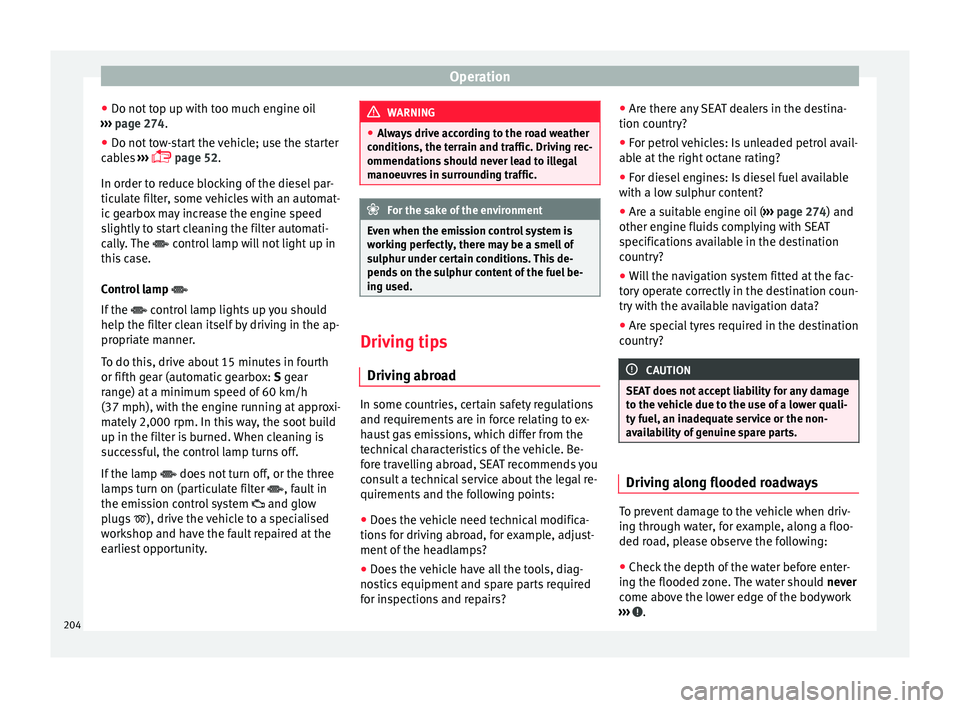
In order to reduce blocking of the diesel par-
ticulate filter, some vehicles with an automat-
ic gearbox may increase the engine speed
slightly to start cleaning the filter automati-
cally. The control lamp will not light up in
this case.
Control lamp
If the control lamp lights up you should
help the filter clean itself by driving in the ap-
propriate manner.
To do this, drive about 15 minutes in fourth
or fifth gear (automatic gearbox: S gear
range) at a minimum speed of 60 km/h
(37 mph), with the engine running at approxi-
mately 2,000 rpm. In this way, the soot build
up in the filter is burned. When cleaning is
successful, the control lamp turns off.
If the lamp does not turn off, or the three
lamps turn on (particulate filter , fault in
the emission control system and glow
plugs ), drive the vehicle to a specialised
workshop and have the fault repaired at the
earliest opportunity. WARNING
● Alw a
ys drive according to the road weather
conditions, the terrain and traffic. Driving rec-
ommendations should never lead to illegal
manoeuvres in surrounding traffic. For the sake of the environment
Even when the emission control system is
work in
g perfectly, there may be a smell of
sulphur under certain conditions. This de-
pends on the sulphur content of the fuel be-
ing used. Driving tips
Driv ing abr
oad In some countries, certain safety regulations
and r
equir
ements
are in force relating to ex-
haust gas emissions, which differ from the
technical characteristics of the vehicle. Be-
fore travelling abroad, SEAT recommends you
consult a technical service about the legal re-
quirements and the following points:
● Does the vehicle need technical modifica-
tions f
or driving abroad, for example, adjust-
ment of the headlamps?
● Does the vehicle have all the tools, diag-
nostic
s equipment and spare parts required
for inspections and repairs? ●
Are there an
y SEAT dealers in the destina-
tion country?
● For petrol vehicles: Is unleaded petrol avail-
able at
the right octane rating?
● For diesel engines: Is diesel fuel available
with a low s
ulphur content?
● Are a suitable engine oil ( ›››
page 274) and
other engine fluids complying with SEAT
specifications available in the destination
country?
● Will the navigation system fitted at the fac-
tory
operate correctly in the destination coun-
try with the available navigation data?
● Are special tyres required in the destination
countr
y? CAUTION
SEAT does not accept liability for any damage
to the v
ehicle due to the use of a lower quali-
ty fuel, an inadequate service or the non-
availability of genuine spare parts. Driving along flooded roadways
To prevent damage to the vehicle when driv-
in
g thr
ough w
ater, for example, along a floo-
ded road, please observe the following:
● Check the depth of the water before enter-
ing the flooded z
one. The water should never
come above the lower edge of the bodywork
››› .
204
Page 214 of 324
Operation
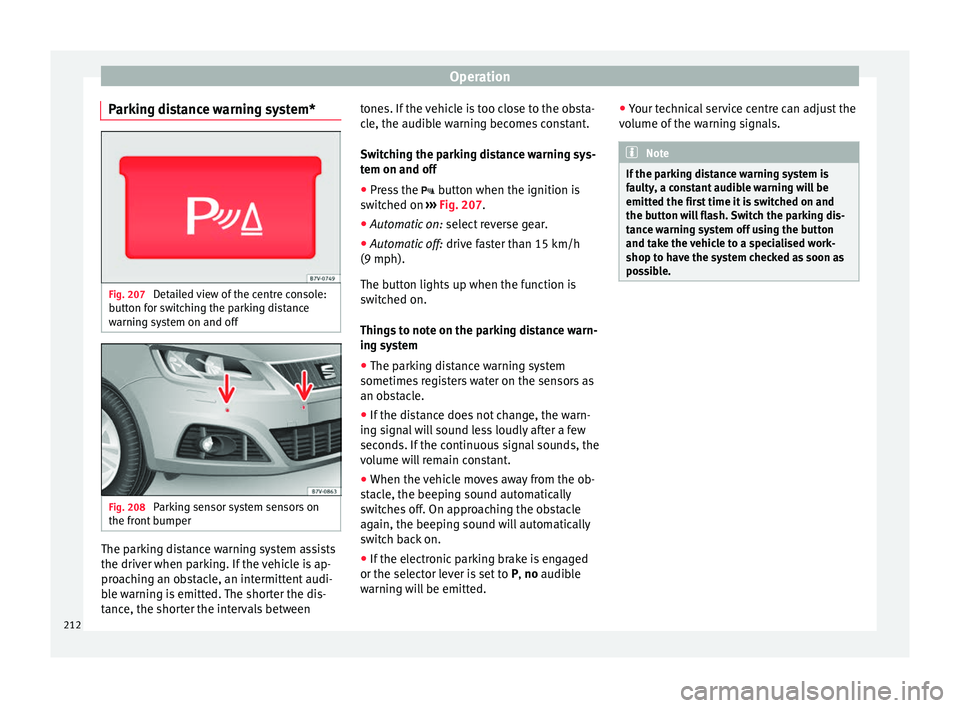
Parking distance warning system* Fig. 207
Detailed view of the centre console:
b utt
on f
or switching the parking distance
warning system on and off Fig. 208
Parking sensor system sensors on
the fr ont
b
umper The parking distance warning system assists
the driv
er when p
ark
ing. If the vehicle is ap-
proaching an obstacle, an intermittent audi-
ble warning is emitted. The shorter the dis-
tance, the shorter the intervals between tones. If the vehicle is too close to the obsta-
cle, the audib
le warning becomes constant.
Switching the parking distance warning sys-
tem on and off ● Press the button when the ignition i
s
switched on ››› Fig. 207.
● Automatic on: select r
everse gear.
● Automatic off: drive fa
ster than 15 km/h
(9 mph).
The button lights up when the function is
switched on.
Things to note on the parking distance warn-
ing system
● The parking distance warning system
sometimes r
egisters water on the sensors as
an obstacle.
● If the distance does not change, the warn-
ing sign
al will sound less loudly after a few
seconds. If the continuous signal sounds, the
volume will remain constant.
● When the vehicle moves away from the ob-
stac
le, the beeping sound automatically
switches off. On approaching the obstacle
again, the beeping sound will automatically
switch back on.
● If the electronic parking brake is engaged
or the selector l
ever is set to P, no audible
warning will be emitted. ●
Your tec
hnical service centre can adjust the
volume of the warning signals. Note
If the parking distance warning system is
fau lty
, a constant audible warning will be
emitted the first time it is switched on and
the button will flash. Switch the parking dis-
tance warning system off using the button
and take the vehicle to a specialised work-
shop to have the system checked as soon as
possible. 212
Page 223 of 324
Driver assistance systems
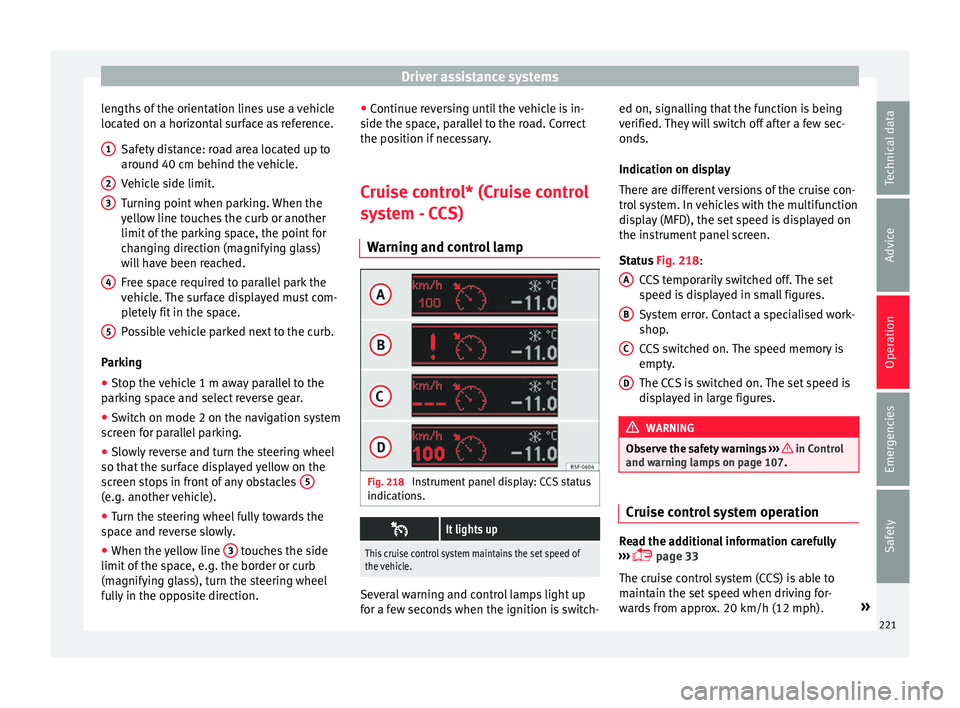
lengths of the orientation lines use a vehicle
loc at
ed on a horiz
ontal surface as reference.
Safety distance: road area located up to
around 40 cm behind the vehicle.
Vehicle side limit.
Turning point when parking. When the
yellow line touches the curb or another
limit of the parking space, the point for
changing direction (magnifying glass)
will have been reached.
Free space required to parallel park the
vehicle. The surface displayed must com-
pletely fit in the space.
Possible vehicle parked next to the curb.
Parking
● Stop the vehicle 1 m away parallel to the
parkin
g space and select reverse gear.
● Switch on mode 2 on the navigation system
scr
een for parallel parking.
● Slowly reverse and turn the steering wheel
so that the s
urface displayed yellow on the
screen stops in front of any obstacles 5(e.g. another vehicle).
●
Turn the steering wheel fully towards the
s p
ac
e and reverse slowly.
● When the yellow line 3 touches the side
limit of
the s
pace, e.g. the border or curb
(magnifying glass), turn the steering wheel
fully in the opposite direction. 1 2
3
4
5 ●
Continue r
ev
ersing until the vehicle is in-
side the space, parallel to the road. Correct
the position if necessary.
Cruise control* (Cruise control
syst
em - CCS)
Warning and control lamp Fig. 218
Instrument panel display: CCS status
indic ation
s.
It lights up
This cruise control system maintains the set speed of
the vehicle.
Several warning and control lamps light up
f
or a f
ew sec
onds when the ignition is switch- ed on, signalling that the function is being
verified. They
will switch off after a few sec-
onds.
Indication on display
There are different versions of the cruise con-
trol system. In vehicles with the multifunction
display (MFD), the set speed is displayed on
the instrument panel screen.
Status Fig. 218:
CCS temporarily switched off. The set
speed is displayed in small figures.
System error. Contact a specialised work-
shop.
CCS switched on. The speed memory is
empty.
The CCS is switched on. The set speed is
displayed in large figures. WARNING
Observe the safety warnings ›››
in Control
and warnin g l
amps on page 107. Cruise control system operation
Read the additional information carefully
› ›
›
page 33
The cruise control system (CCS) is able to
maintain the set speed when driving for-
wards from approx. 20 km/h (12 mph). »
A B
C
D
221
Technical data
Advice
Operation
Emergencies
Safety
Page 225 of 324
Driver assistance systems
Note
The lane assist system has been exclusively
developed f or driv
ing on asphalted roads.Note
If the lane assist system does not work as de-
sc ribed in thi
s chapter, do not use it and con-
tact a specialised workshop. Note
If you observe any system malfunction, have
the sys t
em checked by a specialised work-
shop. Control lamps
Blinks or lights up yellow:
Lane assist sys-
tem connected
but inactive.The system cannot clearly detect the
lane. See
page 223, The lane assist
system is inactive (control lamp lit
in yellow) .
Blinks or lights up green:
Lane assist system connected and active.
Several warning and control lamps light up
f
or a f
ew sec
onds when the ignition is switch-
ed on, signalling that the function is being
verified. They will switch off after a few sec-
onds. WARNING
Observe the safety warnings ›››
in Control
and warnin g l
amps on page 107. Operation mode
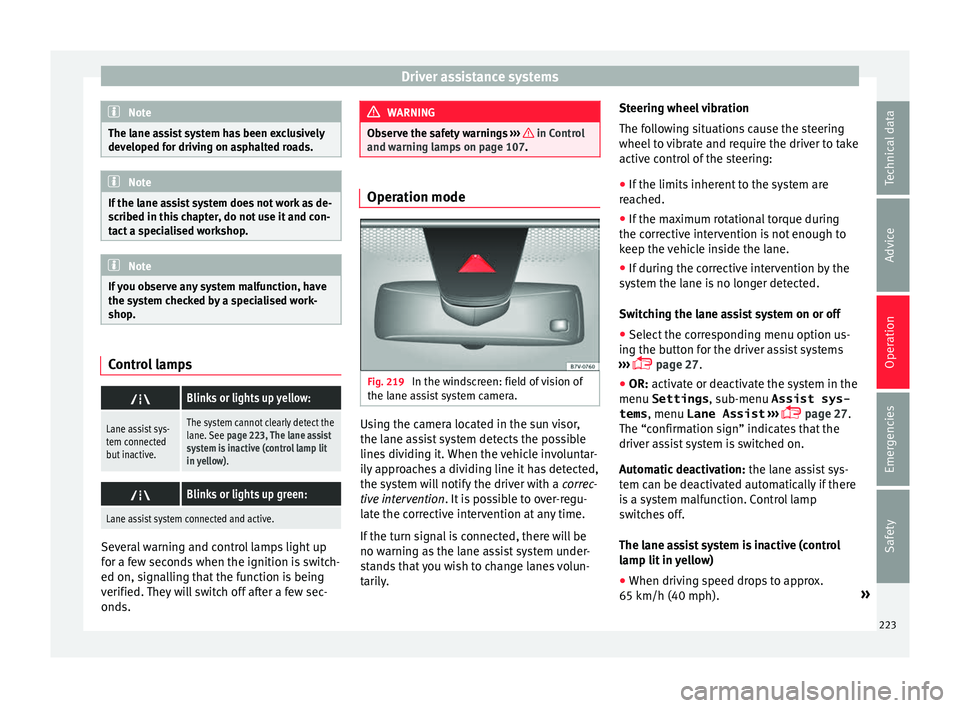
Fig. 219
In the windscreen: field of vision of
the l ane a
s
sist system camera. Using the camera located in the sun visor,
the l
ane a
s
sist system detects the possible
lines dividing it. When the vehicle involuntar-
ily approaches a dividing line it has detected,
the system will notify the driver with a correc-
tive intervention. It is possible to over-regu-
late the corrective intervention at any time.
If the turn signal is connected, there will be
no warning as the lane assist system under-
stands that you wish to change lanes volun-
tarily. Steering wheel vibration
The fol
lowing situations cause the steering
wheel to vibrate and require the driver to take
active control of the steering:
● If the limits inherent to the system are
reac
hed.
● If the maximum rotational torque during
the correctiv
e intervention is not enough to
keep the vehicle inside the lane.
● If during the corrective intervention by the
syst
em the lane is no longer detected.
Switching the lane assist system on or off
● Select the corresponding menu option us-
ing the butt
on for the driver assist systems
››› page 27.
● OR: activate or deactivate the system in the
menu Settings , sub-menu Assist sys-
tems , menu
Lane Assist ›››
page 27.
The “confirmation sign” indicates that the
driver assist system is switched on.
Automatic deactivation: the lane assist sys-
tem can be deactivated automatically if there
is a system malfunction. Control lamp
switches off.
The lane assist system is inactive (control
lamp lit in yellow)
● When driving speed drops to approx.
65 km/h (40 mph). »
223
Technical data
Advice
Operation
Emergencies
Safety
Page 227 of 324
Driver assistance systems
Blind spot detector (BSD) with
r e
ar c
ross traffic alert (RCTA)
Related video Fig. 220
Blind Spot De-
tector (BSD) Introduction
The blind spot detector (BSD) helps detect
the tr
affic
s
ituation to the sides and behind
the vehicle.
The integrated parking assistant (RCTA) helps
the driver when backing out of a parallel
parking spot and in manoeuvring.
The blind spot detector has been developed
for driving on paved roads. WARNING
The smart technology incorporated into the
blind s pot
detector (BSD) with parking assis-
tance (RCTA) included cannot overcome the
limits imposed by the laws of physics; it only
works within the limits of the system. Acci-
dents and severe injury may occur if the blind spot detection system or the rear cross traffic
al
er
t are used negligently or involuntarily.
The system is not a replacement for driver
awareness.
● Adapt your speed and safe distance to the
vehicl
e in front of you at all times to suit visi-
bility, weather, road and traffic conditions.
● Keep your hands on the wheel at all times,
and be rea
dy to intervene in the steering at
any time.
● Pay attention to the control lamps that may
come on in the ext
ernal rear view mirrors and
on the instrument panel, and follow any in-
structions they may give.
● The blind spot assistant may react in the
face of
any special constructions that may be
present on the sides of the vehicle: e.g., high
or irregular protective fences. This may cause
erroneous warnings.
● Never use the blind spot detector with rear
cro
ss traffic alert on unpaved roads. The blind
spot detector with rear cross traffic alert has
been designed for use on paved roads.
● Always pay attention to the vehicle's sur-
roundin
gs.
● Never use the blind spot detector with rear
cro
ss traffic alert if the radar sensors are
dirty, covered or damaged. The system may
work incorrectly in these cases. CAUTION
● The ra d
ar sensors on the rear bumper may
be damaged or shifted in the event of a colli- sion, for example, when entering or exiting a
park
in
g space. This may result in the system
disconnecting itself, or at least having its
functionality diminished.
● In order to ensure that the radar sensors
work pr
operly, keep the rear bumper free of
snow and ice and do not cover it.
● The rear bumper should only be painted
with paint
authorised by SEAT. The blind spot
detector's functions may be limited or work
incorrectly if other paints are used.
● The external rear view mirror control lamps
may
have their functionality limited in the
event of solar radiation. Note
If the blind spot detector with rear cross traf-
fic a l
ert does not work as described in this
chapter, do not use it and have it checked by
a specialised workshop. Control lamps
Control lamp in external rear view mirrors:
Lights up
Lights up once briefly: the blind spot detector is activa-
ted and ready to operate.
Lights up: blind spot detector has detected a vehicle in
the blind spot.»
225
Technical data
Advice
Operation
Emergencies
Safety
Page 237 of 324
Driver assistance systems
●
Re gu
larly check your tyres for damage and
wear.
● Never exceed the maximum permitted
speed or loa
ds specified for the type of tyre
fitted on your vehicle. WARNING
Incorrect use of the tyre monitoring indicator
b utt on c
ould result in the indicator giving er-
roneous messages or prevented from indicat-
ing the danger caused by a defective tyre
››› page 236. CAUTION
● The tyr e
valves may be damaged if the cap
is not in place. Check that the caps are identi-
cal to the standard caps and have been cor-
rectly tightened. Do not use metal caps
››› page 236.
● Do not damage the valves when changing
the tyre
s ››› page 236. For the sake of the environment
Under-inflated tyres lead to increased fuel
con s
umption and tyre wear. Note
● Do not on ly
rely on the tyre monitoring sys-
tem. Regularly check your tyres to ensure
that the tyre pressure is correct and that the
tyres are not damaged due to puncture, cuts, tears and impacts/dents. Remove objects
from the ty
r
es only when the tyres have not
been pierced by these.
● The tyre monitoring system is set to the
tyre pr
essure recommended by the manufac-
turer and indicated on the label ››› Fig. 252. Elements of the tyre monitoring indi-
cat
or
Tyre monitoring indicator with button.
See ››› page 236.
Control lamp on the instrument panel.
Button on the centre console.
Monitoring the tread of all tyres using ABS sensors
(indirect measurement).
Adjustable medium and full-load tyre pressures.
Button to update the system when the tyre pressure is
changed. Control lamp
Blinks or lights up
The tyre pressure of
a wheel has drop-
ped considerably in
relation to the pres-
sure set by the driv-
er
››› page 236. Stop the vehicle!
Reduce
your speed immediately! Stop
the vehicle safely as soon as
possible. Avoid sudden ma-
noeuvres and braking!
Check all tyres and pressures.
Replace any damaged tyres.
System malfunction.
Consult a specialised workshop
if the tyre pressure is correct and
the lamp remains lit after switch-
ing the ignition off and back on
again. Have the system checked
there. Several warning and control lamps light up
f
or a f
ew sec
onds when the ignition is switch-
ed on, signalling that the function is being
verified. They will switch off after a few sec-
onds. WARNING
Observe the safety warnings ›››
in Control
and warnin g l
amps on page 107. WARNING
When the tyres are inflated at different pres-
sur e
s or at a pressure that is too low then a
tyre may be damaged resulting in a loss of
control of the vehicle and a serious or fatal
accident. » 235
Technical data
Advice
Operation
Emergencies
Safety