display Seat Alhambra 2018 Workshop Manual
[x] Cancel search | Manufacturer: SEAT, Model Year: 2018, Model line: Alhambra, Model: Seat Alhambra 2018Pages: 324, PDF Size: 7.04 MB
Page 233 of 324
Driver assistance systems
CAUTION
● If o l
d mapping data is used in the naviga-
tion system, this may cause the traffic signs
to be shown incorrectly.
● In the route points mode (navigation by
route point
s) of the navigation system, Sign
Assist is only partly available. Indication on display
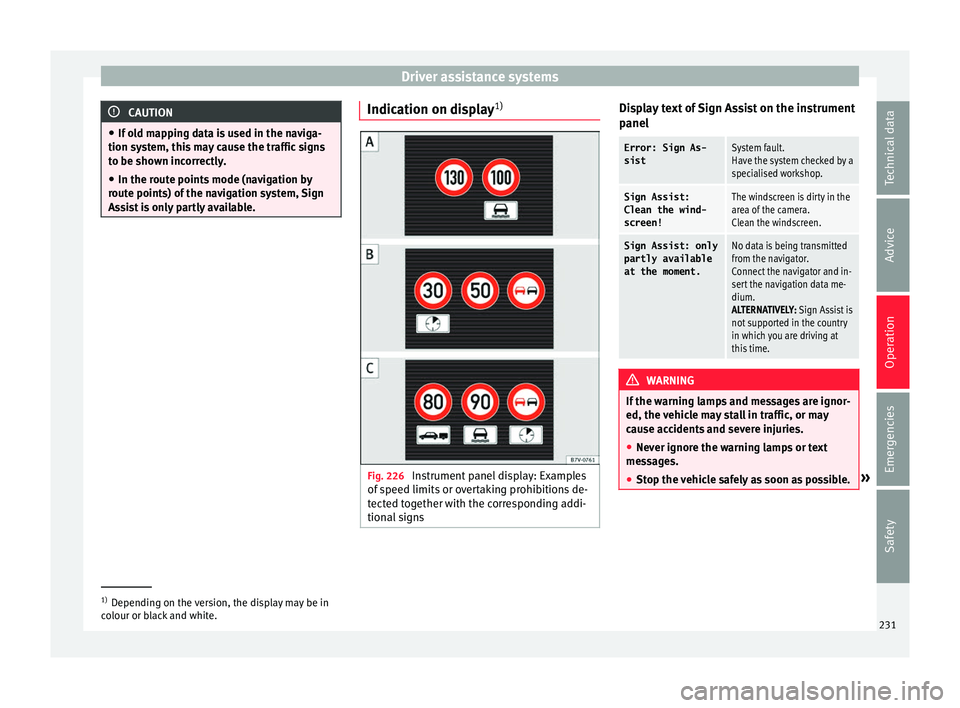
1) Fig. 226
Instrument panel display: Examples
of s
peed limits
or overtaking prohibitions de-
tected together with the corresponding addi-
tional signs Display text of Sign Assist on the instrument
p
anel
Error: Sign As-
sistSystem fault.
Have the system checked by a
specialised workshop.
Sign Assist:
Clean the wind-
screen!The windscreen is dirty in the
area of the camera.
Clean the windscreen.
Sign Assist: only
partly available
at the moment.No data is being transmitted
from the navigator.
Connect the navigator and in-
sert the navigation data me-
dium.
ALTERNATIVELY: Sign Assist is
not supported in the country
in which you are driving at
this time. WARNING
If the warning lamps and messages are ignor-
ed, the v ehic
le may stall in traffic, or may
cause accidents and severe injuries.
● Never ignore the warning lamps or text
mess
ages.
● Stop the vehicle safely as soon as possible. »1)
Depending on the version, the display may be in
co lour or b
lack and white. 231
Technical data
Advice
Operation
Emergencies
Safety
Page 234 of 324
Operation
CAUTION
Failure to heed the control lamps and text
mes s
ages when they appear may result in ve-
hicle faults. Operation mode
Sign Assist does not work in all countries.
This
mu
st be taken into account when travel-
ling abroad.
Display of traffic signs
Speed limits or overtaking prohibitions to-
gether with the corresponding additional
signs are shown on the instrument panel dis-
play ›››
Fig. 226. Depending on the naviga-
tion system installed in the vehicle, traffic
signs will be shown as above and also in the
navigation system's map display.
When Sign Assist is connected, the vehicle
records the traffic signs with a camera in the
base of the interior rear vision mirror. After
checking and evaluating the information
from the camera, the navigation system and
the current vehicle data, up to three valid
traffic signs are displayed in conjunction with
the corresponding additional signs. The traf-
fic sign that is currently valid for the driver is
shown first, in the left side of the screen. A
traffic sign of only limited validity,
e.g. 90 km/h (56 mph) is shown second, to-
gether with the additional sign “if the road is wet”. If the vehicle's rain sensor detects rain
during tr
av
el, the traffic sign valid at this mo-
ment will move to the first position along the
additional sign “if the road is wet”.
The permanent display on the instrument
panel screen is shown as you pass the real
traffic signs. The signs for entering and leav-
ing towns activate the display of the usual
speed limits for that country on roads in
populated areas and national highways, even
if the speed is not limited by an actual traffic
sign.
The end of a prohibition or limitation is not
displayed. If you exceed the speed limits
shown, a warning will not appear. The system
does not detect areas with little traffic. The
current legal provisions apply.
Connection and disconnection
● Connect or disconnect the assist system in
the Settings menu in the SEA
T information
system ›››
page 27.
● OR: press the button for the driver assist
sys
tems on the main beam lever.
Trailer
Connect or disconnect the secondary display
for speed limits and overtaking bans that ap-
ply to trailers (trailer mode) in the Settings
menu in the SEAT information system
››› page 27. Tiredness detection (recom-
mendation to t
ake a break)
Introduction WARNING
Do not let the extra convenience afforded by
the tiredne s
s detection function tempt you
into taking any risks when driving. When
making long trips, conveniently long breaks
must be taken.
● The driver is responsible for determining
their capac
ity to drive.
● Never drive when tired.
● The system does not always detect the
tirednes
s of the driver. Please read the infor-
mation provided in the section ››› page 233,
Limited operation.
● In some situations the system may incor-
rectly int
erpret an intended manoeuvre as a
sign of tiredness of the driver.
● In the event of the an episode called “mi-
cro
sleep” at the wheel, a strong warning is
not in place!
● Observe the indications on the display of
the instrument
panel and act in accordance
with them. 232
Page 235 of 324
Driver assistance systems
Note
● The tiredne s
s detection function has only
been designed for driving on motorways and
wide roads.
● If there is a fault in the system, refer to a
Speci
alised workshop to have the system in-
spected. Function and operation
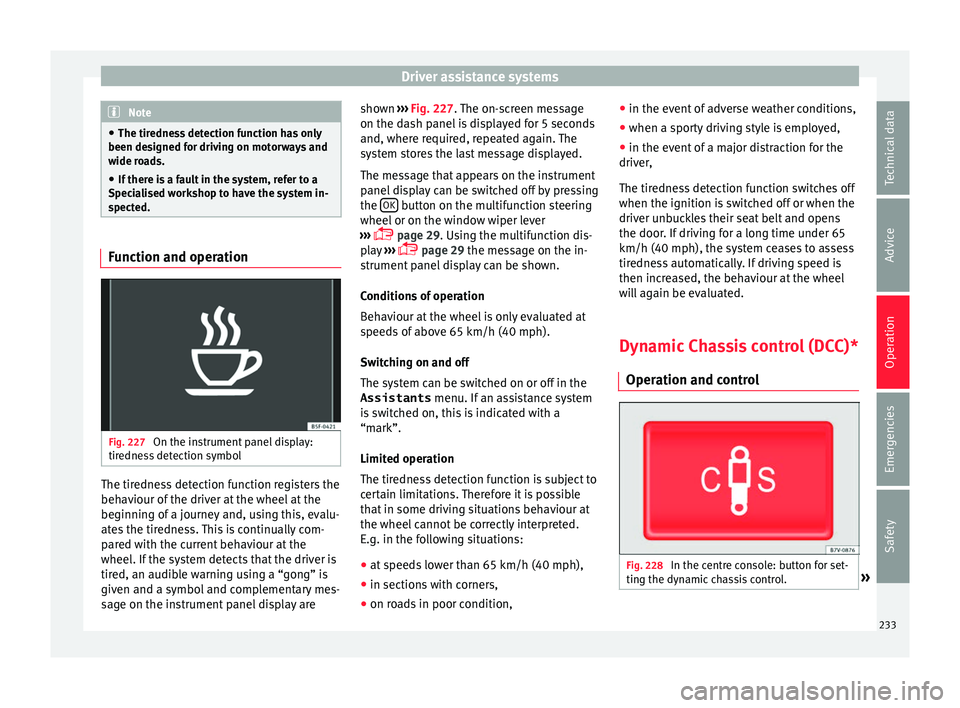
Fig. 227
On the instrument panel display:
tir edne
s
s detection symbol The tiredness detection function registers the
beh
av
iour of
the driver at the wheel at the
beginning of a journey and, using this, evalu-
ates the tiredness. This is continually com-
pared with the current behaviour at the
wheel. If the system detects that the driver is
tired, an audible warning using a “gong” is
given and a symbol and complementary mes-
sage on the instrument panel display are shown
››› Fig. 227.
The on-screen message
on the dash panel is displayed for 5 seconds
and, where required, repeated again. The
system stores the last message displayed.
The message that appears on the instrument
panel display can be switched off by pressing
the OK button on the multifunction steering
wheel or on the w
indo
w wiper lever
››› page 29. Using the multifunction dis-
play ›››
page 29 the message on the in-
strument panel display can be shown.
Conditions of operation
Behaviour at the wheel is only evaluated at
speeds of above 65 km/h (40 mph).
Switching on and off
The system can be switched on or off in the
Assistants menu. If an assistance system
is switched on, this is indicated with a
“mark”.
Limited operation
The tiredness detection function is subject to
certain limitations. Therefore it is possible
that in some driving situations behaviour at
the wheel cannot be correctly interpreted.
E.g. in the following situations:
● at speeds lower than 65 km/h (40 mph),
● in sections with corners,
● on roads in poor condition, ●
in the event of
adverse weather conditions,
● when a sporty driving style is employed,
● in the event of a major distraction for the
driver,
The tir
edness detection function switches off
when the ignition is switched off or when the
driver unbuckles their seat belt and opens
the door. If driving for a long time under 65
km/h (40 mph), the system ceases to assess
tiredness automatically. If driving speed is
then increased, the behaviour at the wheel
will again be evaluated.
Dynamic Chassis control (DCC)*
Operation and contr
ol Fig. 228
In the centre console: button for set-
tin g the dy
n
amic chassis control. » 233
Technical data
Advice
Operation
Emergencies
Safety
Page 236 of 324
Operation
DCC continuously adapts the suspension to
the c ondition of
the r
oad and current driving
conditions, according to the pre-set pro-
gramme.
Steering is also adapted in the “Sport” pro-
gramme.
ProgrammeDriving recommendations
“COMFORT” C
Adjust it to the most comfortable
setting, for example, driving on
surfaces in poor condition, or mak-
ing long trips.
“NORMAL”Balanced setting, suitable, for ex-
ample, for day-to-day use.
“SPORT” SSport setting for sporty style driv-
ing Select a program
● Switch the ignition on.
● Press the butt
on r
epeatedly until the
desired program is displayed
The “NORMAL” programme is active when
neither the C nor S buttons are lit up. WARNING
Switching the dynamic chassis control sys-
tem on whi l
e the vehicle is in motion could
divert your attention from the traffic and
cause accidents. WARNING
Adjusting the suspension can change driving
proper tie
s. Dynamic chassis control must
never lead to any kinds of risk.
● Adapt your speed and driving style at all
times t
o suit visibility, weather, road and traf-
fic conditions. Note
If the dynamic chassis control does not oper-
ate a s
described in this chapter, go to an au-
thorised workshop and request it be checked. Note
In case of a fault in the dynamic chassis con-
tro l, the b
uttons C and S will so indicate. A
fault could the affect driving comfort. Have
the system checked by a specialised work-
shop. Tyre monitoring systems
Intr oduction The tyre monitor indicator monitors the tyre
pr
e
s
sure of each wheel during driving using
the ABS sensors. The ABS sensors monitor
the tyre tread perimeter and vibrations of
each tyre. The tyre monitor indicator warns
the driver if it detects a considerable drop in
tyre pressure of one or several tyres while driving. Loss of tyre pressure will be indica-
ted by
the indicator as well as an audible
warning and sometimes a text message on
the dash panel display. When you open the
driver door, you will find a label indicating
the tyre pressure recommended by the manu-
facturer for the maximum vehicle load for
each tyre approved for the vehicle in ques-
tion. By pressing the adjustment button on
the tyre monitoring indicator, you may
change the reference pressure for the tyres
so that the tyre pressure coincides with ac-
tual pressure ››› page 236.
Suitable use of the adjustment button
››› page 236. WARNING
Unsuitable handling of the wheels and tyres
ma y
lead to sudden tyre pressure losses, to
tread separation or even to a blow-out.
● Check tyre pressures regularly and ensure
they are m
aintained at the pressures indica-
ted. If the tyre pressure is too low, the tyres
could overheat, resulting in tread detachment
or even burst tyres.
● Tyre pressure should be that indicated on
the label when the ty
res are cold at all times
››› page 291.
● Regularly check the cold inflation pressure
of the tyr
es. If necessary, change the tyre
pressure of the vehicle tyres while they are
cold. 234
Page 252 of 324
Advice
The optimal reach of the equipment is only
ac hiev
ed w
ith an external aerial.
Check first with a specialised workshop that
understands the technical possibilities of in-
stallation if you wish to use a two-way radio
with a transmitting power of over 10 watts.
SEAT recommends taking your car in for tech-
nical service.
All legal requirements, together with the in-
structions for the use of two-way radios must
be observed. WARNING
If the two-way radio is not securely fastened
in pos ition, it
could be sent flying around the
vehicle in the event of sharp braking, sudden
manoeuvres or accident, causing injury.
● While driving, two-way radios must be se-
curely
fastened in position, outside the radi-
us of action of the airbags, or safely stowed
away. WARNING
When using a two-way radio without a con-
nection to an e xt
erior aerial, the maximum
permitted levels of electromagnetic radiation
may be exceeded. This is also the case if the
aerial has not been correctly installed.
● You should only use a two-way radio inside
the vehic
le if it has first been correctly con-
nected to an exterior aerial. Information stored by the control
u
nit
s Your vehicle is fitted at the factory with a ser-
ies
of
electronic control units responsible for
the engine and gearbox management. In ad-
dition, the control units supervise the per-
formance of the exhaust gas system and the
airbag systems.
Therefore, while the vehicle is being driven,
these electronic control units are continuous-
ly analysing the vehicle data. In the event of
faults or deviations from the theoretical val-
ues, only this data is stored. Normally, the
warning lamps on the instrument panel light
up in the event of faults.
This data can only be read and analysed us-
ing special equipment.
The storing of the data allows specialised
workshops to detect and repair faults. Stored
data may include:
● Data relating to the engine or the gearbox
● Speed
● Direction of travel
● Braking force
● Detection of seat belt
The v ehic
le control units never record conver-
sations held by passengers in the vehicle.
In vehicles equipped with an emergency call
function via the mobile phone or other appli- ances connected in the vehicle, it is possible
to send the v
ehicle position. If the control
unit records an accident with airbag activa-
tion, the system may automatically send a
signal. This will depend on the network oper-
ator. Normally, transmission is only possible
in areas with good coverage.
Event Data Recorder
The vehicle is not fitted with an event data re-
corder.
An event data recorder temporarily stores the
vehicle information. Therefore, in the event of
an accident, it is possible to obtain detailed
information about how the accident occur-
red. For example, in vehicles with airbag sys-
tems, data relating to speed of impact, seat
belt status, seat positions and airbag activa-
tion times may be stored. The volume of data
depends on the manufacturer.
Event data recorders can only be mounted
with authorisation from the vehicle owner
and, in some countries, they are governed by
local legislation.
Reprogramming control units
On the whole, all the data required for the
component management is stored in the con-
trol units. The programming of certain con-
venience functions, such as the turn signals,
individual door opening and instructions on
the display can be modified using special
250
Page 271 of 324
Checking and refilling levels
●
Top up w ith AdBlue at
the latest 1,000 km
or 600 miles before it runs out.
● Do not allow the AdBlue to run too low. WARNING
AdBlue is an irritant, corrosive liquid that can
c au se injurie
s if it touches the skin, eyes or
respiratory organs.
● If AdBlue get in contact with eyes and skin,
rinse for at
least 15 minutes with plenty of
water and seek medical help.
● If the AdBlue is swallowed, wash your
mouth with pl
enty of water for at least 15 mi-
nutes. Do not try to provoke vomiting unless
recommended by a Doctor. Seek medical ad-
vice immediately. CAUTION
AdBlue damages surfaces such as painted ve-
hicl e p
arts, plastic, items of clothing and car-
pets. Spilt AdBlue should be removed as
quickly as possible using a damp cloth and
plenty of cold water.
● If the AdBlue has crystallised, remove with
warm wat
er and a sponge. Control and warning lamps
It lights up red
The engine cannot
be restarted! The
level of AdBlue is
too low.Stop the vehicle in a suitable,
safe and flat area then top up
with the minimum quantity of
AdBlue required ››› page 270.
It lights up redtogether with
The engine cannot
be restarted! AdBlue
system malfunction.Contact a specialised workshop.
Have the system checked there.
It lights up yellow
The AdBlue reserve
is low.
Refill AdBlue over the next kilo-
metres or miles as indicated
››› page 270. SEAT recommends
contacting a specialised work-
shop.
It lights up yellowtogether with
There is a fault in
the AdBlue system
or unsuitable
AdBlue fluid has
been used.
Contact a specialised workshop.
Have the system checked there. Several warning and control lamps should
light
up f
or a f
ew seconds when the ignition
is switched on, signalling that the function is
being verified. They will switch off after a few
seconds. WARNING
Observe the safety warnings ›››
in Control
and warnin g l
amps on page 107. Information on AdBlue
A message will be displayed on the dash
p
anel
ar
ound 2,400 km before the next serv-
ice to indicate that AdBlue must be refilled
››› page 270. If you ignore this message and
do not refill, you will be unable to start the
engine afterwards ›››
page 269.
SEAT recommends contacting a specialised
workshop. If not possible, it should be parti-
ally filled with a minimum 5.0 litres of
AdBlue. Only refill using AdBlue expressly
approved by SEAT.
When the and warning lamps light up
simultaneously, there is a fault. SEAT recom-
mends visiting the closest specialised work-
shop.
AdBlue ®
is a registered trademark in the US,
Germany, the European Union and other »
269
Technical data
Advice
Operation
Emergencies
Safety
Page 288 of 324
Advice
and they must be charged in a controlled en-
v ir
onment
››› . SEAT recommends taking
y our c
ar in f
or technical service.
Replacing a vehicle battery
The battery has been developed to suit the
conditions of its location and has special
safety features. If the battery must be re-
placed, consult a technical service for infor-
mation on electromagnetic compatibility, the
size and maintenance, performance and
safety requirements of the new battery in
your vehicle before you purchase one. SEAT
recommends you have the battery replaced
by a technical service.
Use only maintenance-free genuine batteries
conforming to TL 825 06 and VW 7 50 73
Standards. These standards must be dated
April 2008 or later.
Start-Stop systems ( ››› page 209) are equip-
ped with a special battery. Therefore, it must
only be replaced with a battery of the same
specifications.
Disconnecting the vehicle's battery
If you must disconnect the battery from the
electrical system, please note the following:
● Switch off the ignition and all electrical
equipment. ●
The vehic le must be unlocked before dis-
connecting the battery, otherwise the alarm
will be triggered.
● First disconnect the negative cable and
then the positiv
e ››› .
C onnectin
g the
vehicle's battery
● Before reconnecting the battery, switch off
the engine and all
electrical devices.
● First reconnect the positive cable and then
the negativ
e ››› .
Diff er
ent
control lamps may light up after
connecting the battery and switching the ig-
nition on. They will be turned off after a short
trip at a speed of between 15-20 km/h
(10-12 mph). If the warning indicators remain
lit, please visit a specialised workshop to
have the vehicle checked.
If the battery has been disconnected for a
long time, it is possible that the next service
date is not displayed or calculated correctly
››› page 102. Respect the maximum service
intervals permitted ››› Booklet Maintenance
Programme.
Vehicles with Keyless Access (››› page 117):
if, after connecting the battery, the ignition
cannot be switched on, lock and unlock the
vehicle from outside. Then try to switch on
the ignition again. If the ignition does not
work, seek professional assistance. Automatically disconnecting devices
The intellig
ent vehicle electrical system auto-
matically implements a range of measures to
prevent the battery from discharging when
high demands are made on it:
● the idling speed is increased so that the al-
ternat
or provides more electricity.
● where necessary, the power of the most
power
ful devices is reduced or even com-
pletely disconnected.
● On starting the engine, the power supply
from the 12-v
olt power sockets and the ciga-
rette lighter may be interrupted for a short
time.
The on-board management program cannot
always prevent the battery from running flat.
For example, if the ignition is left on for a
long period with the engine off or if the side
lights or parking lights are left on while the
vehicle is stationary.
Why does the battery run flat?
● When stationary for a long time without
star
ting the engine, particularly if the ignition
is switched on.
● Use of electrical devices with the engine
switc
hed off.
● If the auxiliary heater is running
›››
page 180.
286
Page 298 of 324
Advice
● Adju s
t
speeds to within the limits indicated
(code letter on tyre) ››› .
S peed limit
A c ode l
etter indicating the speed limit is
stamped on all winter tyres ››› page 295.
In some vehicles, it is possible to set a speed
warning in the MFD (multifunction
display) menu on the instrument panel
››› page 27.
If you use V-rated tyres the speed limits and
tyre pressure will be determined by engine
size. Please ask your technical service centre
for further information on the maximum per-
mitted speed and the required pressures for
the tyres.
All-wheel drive*
Thanks to its all-wheel drive, your car will
have plenty of traction in winter conditions,
even with the standard tyres. Nevertheless,
SEAT still recommend that winter tyres or all-
season tyres should be fitted on all four
wheels when winter road conditions are ex-
pected, mainly because this will give a better
braking response.
Please observe all instructions and warnings
when using snow chains ›››
page 50. WARNING
Although winter tyres help to make driving
saf er in the w
inter, you should not take un-
necessary risks.
● Adjust your speed and driving style to visi-
bility
, road, traffic and weather conditions.
● Never exceed the maximum permitted
speed or loa
ds specified for the type of winter
tyre fitted on your vehicle. For the sake of the environment
When winter is over, change back to summer
tyr e
s when you have the time. In tempera-
tures above +7°C (+45°F), performance will
be improved if summer tyres are used. Fuel
consumption, wear and noises while driving
will all be reduced. Note
● If the v
ehicle is fitted with a tyre control
system, this should be “reprogrammed”
whenever a tyre is changed ››› page 236.
● Please ask at a technical service centre for
information about
the permitted sizes for
winter tyres. 296
Page 312 of 324
Index
lane assist system . . . . . . . . . . . . . . . . . . . . . . 223
lights . . . . . . . . . . . . . . . . . . . . . . . . . . . .
130, 131
loc
king the steering column . . . . . . . . . . . . . . 198
overview . . . . . . . . . . . . . . . . . . . . . . . . . . 34, 107
rear cross traffic alert (RCTA) . . . . . . . . . . . . . . 225
rear lid . . . . . . . . . . . . . . . . . . . . . . . . . . . . . . . . 125
refuelling . . . . . . . . . . . . . . . . . . . . . . . . . . . . . . 266
remote control . . . . . . . . . . . . . . . . . . . . . . . . . 181
tyre monitoring indicator . . . . . . . . . . . . . . . . . 235
vehicle battery . . . . . . . . . . . . . . . . . . . . . . . . . 284
windscreen washer fluid level . . . . . . . . . . . . . 137
Control of function rain sensor . . . . . . . . . . . . . . . . . . . . . . . . . . . . 139
Controls for the windows . . . . . . . . . . . . . . . 13, 127
Controls on the steering wheel operating the audio system and telephone . . 108
Control units . . . . . . . . . . . . . . . . . . . . . . . . . . . . . 250 reprogramming . . . . . . . . . . . . . . . . . . . . . . . . . 250
Convenience closing windows . . . . . . . . . . . . . . . . . . . . . . . . . . . . . . 127
Convenience functions reprogramming . . . . . . . . . . . . . . . . . . . . . . . . . 250
Convenience opening windows . . . . . . . . . . . . . . . . . . . . . . . . . . . . . . 127
Convenient entry function for the third row of seats . . . . . . . . . . . . . . . . . . . . . . . . . . . . . . . . . 149
Cooling system checking the coolant . . . . . . . . . . . . . . . . . . . . 277
topping up with coolant . . . . . . . . . . . . . . . . . . 277
Cornering lights see "Static cornering lights" . . . . . . . . . . . . . . 132
static . . . . . . . . . . . . . . . . . . . . . . . . . . . . . . . . . 132
Correct position . . . . . . . . . . . . . . . . . . . . . . . . . . . 58 driver . . . . . . . . . . . . . . . . . . . . . . . . . . . . . . . . . . 58
Counter steering assistance system . . . . . . . . . . 199
Crossing through water salt water . . . . . . . . . . . . . . . . . . . . . . . . . . . . . 205
Cruise control . . . . . . . . . . . . . . . . . . . . . . . . . . . . 221 Cruise Control System (CCS) . . . . . . . . . . . . 33, 221
contro l lamp . . . . . . . . . . . . . . . . . . . . . . . . . . . 221
operations . . . . . . . . . . . . . . . . . . . . . . . . . . . . . 221
warning lamp . . . . . . . . . . . . . . . . . . . . . . . . . . 221
D Dangers of not using a seat belt . . . . . . . . . . . . . . 64
Dash panel . . . . . . . . . . . . . . . . . . . . . . . . . . . . . . 101 airbag system . . . . . . . . . . . . . . . . . . . . . . . . . . 262
Data plate . . . . . . . . . . . . . . . . . . . . . . . . . . . . . . . 297
Data registry . . . . . . . . . . . . . . . . . . . . . . . . . . . . . 250
Data storage during the journey . . . . . . . . . . . . . 250
Daytime running lights . . . . . . . . . . . . . . . . . . . . 132
DCC see Dynamic chassis control . . . . . . . . . . . . . . 233
De-icing the locks . . . . . . . . . . . . . . . . . . . . . . . . . 258
Diagnostics connector . . . . . . . . . . . . . . . . . . . . . 251
Diesel refuelling . . . . . . . . . . . . . . . . . . . . . . . . . . . . . . 268
Diesel particulate filter . . . . . . . . . . . . . . . . . . . . 203 malfunction . . . . . . . . . . . . . . . . . . . . . . . . . . . . 203
recommended gear . . . . . . . . . . . . . . . . . . . . . 197
Differential lock see Brake assist system . . . . . . . . . . . . . . . . . . 206
Digital clock . . . . . . . . . . . . . . . . . . . . . . . . . . . . . 102
Dimensions . . . . . . . . . . . . . . . . . . . . . . . . . . . . . . 305
Directional tread pattern tyres . . . . . . . . . . . . . . . . . . . . . . . . . . . . . . . . . . . 50
Disconnecting devices . . . . . . . . . . . . . . . . . . . . . 286
Disconnecting the passenger front airbag . . . . . . 20
Display . . . . . . . . . . . . . . . . . . . . . . . . . . . . 102, 103
Disposal belt tension device . . . . . . . . . . . . . . . . . . . . . . . 69
Door . . . . . . . . . . . . . . . . . . . . . . . . . . . . . . . . . . . . 121 childproof lock . . . . . . . . . . . . . . . . . . . . . . . . . 123
emergency locking and unlocking . . . . . . . . . . . 10 opening and closing . . . . . . . . . . . . . . . . . . . . . 10
warning l
amp . . . . . . . . . . . . . . . . . . . . . . . . . . 121
Door handle . . . . . . . . . . . . . . . . . . . . . . . . . . . . . . 10
Door lock . . . . . . . . . . . . . . . . . . . . . . . . . . . . . . . . . 10
Door lock cylinder . . . . . . . . . . . . . . . . . . . . . . . . . 10
Door release lever . . . . . . . . . . . . . . . . . . . . . . . . 101
Drawbar load . . . . . . . . . . . . . . . . . . . . . . . . . . . . 237 loading the trailer . . . . . . . . . . . . . . . . . . . . . . . 242
Drawers . . . . . . . . . . . . . . . . . . . . . . . . . . . . . . . . . 169
Drink holder central console . . . . . . . . . . . . . . . . . . . . . . . . . 172
Drink holders . . . . . . . . . . . . . . . . . . . . . . . . . . . . 171 rear . . . . . . . . . . . . . . . . . . . . . . . . . . . . . . . . . . 172
Driving automatic gearbox . . . . . . . . . . . . . . . . . . . . . . 196
cross country . . . . . . . . . . . . . . . . . . . . . . . . . . . 57
data storage . . . . . . . . . . . . . . . . . . . . . . . . . . . 250
driving abroad . . . . . . . . . . . . . . . . . . . . . . . . . 204
driving through water . . . . . . . . . . . . . . . . . . . . 204
economical . . . . . . . . . . . . . . . . . . . . . . . . . . . . 200
fuel gauge . . . . . . . . . . . . . . . . . . . . . . . . . . . . . 266
fuel level too low . . . . . . . . . . . . . . . . . . . . . . . 266
parking downhill . . . . . . . . . . . . . . . . . . . . . . . . 191
parking uphill . . . . . . . . . . . . . . . . . . . . . . . . . . 191
safe . . . . . . . . . . . . . . . . . . . . . . . . . . . . . . . . . . . 57
towing . . . . . . . . . . . . . . . . . . . . . . . . . . . . . . . . . 90
trailer . . . . . . . . . . . . . . . . . . . . . . . . . . . . . . . . . 243
undercarriage guard . . . . . . . . . . . . . . . . . . . . . . 57
with a trailer . . . . . . . . . . . . . . . . . . . . . . . . . . . 237
Driving abroad headlights . . . . . . . . . . . . . . . . . . . . . . . . . . . . . 135
Driving in winter fuel consumption . . . . . . . . . . . . . . . . . . . . . . . 202
snow chains . . . . . . . . . . . . . . . . . . . . . . . . . . . . 50
tread depth . . . . . . . . . . . . . . . . . . . . . . . . . . . . 292
tyre pressures . . . . . . . . . . . . . . . . . . . . . . . . . . 291
windscreen washer reservoir . . . . . . . . . . . . . . 256
310
Page 315 of 324
Index
Head restraints . . . . . . . . . . . . . . . . . . . . . . . . . . . 145 adju
s
tment . . . . . . . . . . . . . . . . . . . . . . . . 17, 144
assembly and removal . . . . . . . . . . . . . . . . . . . 145
Headrests adjustment . . . . . . . . . . . . . . . . . . . . . . . . 17, 144
assembly and removal . . . . . . . . . . . . . . . . . . . 145
Heat and air conditioning . . . . . . . . . . . . . . . . . . 176
Heated rear window . . . . . . . . . . . . . . . . . . . . . . . . 38
Heated windscreen . . . . . . . . . . . . . . . . . . . . . . . . 39
Heating and air conditioning controls . . . . . . . . . . . . . . . . . . . . . . . . . . . . . . . . 37
Hitch ball electric release . . . . . . . . . . . . . . . . . . . . . . . . . 239
Horn . . . . . . . . . . . . . . . . . . . . . . . . . . . . . . . . . . . 101
How to jump start . . . . . . . . . . . . . . . . . . . . . . . . . . 52
Hubcaps . . . . . . . . . . . . . . . . . . . . . . . . . . . . . . . . . 46
I Identifying letters on engine . . . . . . . . . . . . . . . . 297
Ignition . . . . . . . . . . . . . . . . . . . . . . . . . . . . . . . . . . 25 see Engine and ignition . . . . . . . . . . . . . . . . . . 183
Ignition lock . . . . . . . . . . . . . . . . . . . . . . . . . . . . . . 25 removal lock . . . . . . . . . . . . . . . . . . . . . . . . . . . 185
unauthorised vehicle key . . . . . . . . . . . . . . . . . 184
Immobiliser . . . . . . . . . . . . . . . . . . . . . . . . . . . . . . 187
In case of emergency . . . . . . . . . . . . . . . . . . . . . . . 83
Indication on display Sign Assist . . . . . . . . . . . . . . . . . . . . . . . . . . . . 231
Indications on the display . . . . . . . . . . . . . . . . . . 103 outside temperature . . . . . . . . . . . . . . . . . . . . . 104
Information call . . . . . . . . . . . . . . . . . . . . . . . . . . 111
Instrument panel . . . . . . . . . . . . . . . . . . . . . 28, 102 control and warning lamps . . . . . . . . . . . 34, 107
display . . . . . . . . . . . . . . . . . . . . . . . . 28, 102, 103
general instrument panel . . . . . . . . . . . . . . . . . 101
instruments . . . . . . . . . . . . . . . . . . . . . . . . . . . . 102
menus . . . . . . . . . . . . . . . . . . . . . . . . . . . . . . . . . 29 service intervals . . . . . . . . . . . . . . . . . . . . . . . . 105
symbols
. . . . . . . . . . . . . . . . . . . . . . . . . . . 34, 107
Instruments . . . . . . . . . . . . . . . . . . . . . . . . . . . . . 102
Integrated child seat . . . . . . . . . . . . . . . . . . . . . . . 79 removing . . . . . . . . . . . . . . . . . . . . . . . . . . . . . . . 81
seat belt routing . . . . . . . . . . . . . . . . . . . . . . . . . 81
setting up . . . . . . . . . . . . . . . . . . . . . . . . . . . . . . 80
Interior lights . . . . . . . . . . . . . . . . . . . . . . . . . . . . . 27
Interior rear vision mirror . . . . . . . . . . . . . . . . . . . 140 anti-dazzle . . . . . . . . . . . . . . . . . . . . . . . . . . . . 140
Interior view left guide . . . . . . . . . . . . . . . . . . . . . . . . . . . . . . . . 9
ISOFIX . . . . . . . . . . . . . . . . . . . . . . . . . . . . . . . . . . . 24
ISOFIX system . . . . . . . . . . . . . . . . . . . . . . . . . . . . . 24
J Jack . . . . . . . . . . . . . . . . . . . . . . . . . . . . . . 46, 83, 85 mounting points . . . . . . . . . . . . . . . . . . . . . . . . . 48
Jump leads . . . . . . . . . . . . . . . . . . . . . . . . . . . . . . . 52
K
Keyless Access keyless-Entry . . . . . . . . . . . . . . . . . . . . . . . . . . . 117
keyless-Exit . . . . . . . . . . . . . . . . . . . . . . . . . . . . 117
locking and unlocking the vehicle . . . . . . . . . . 117
starter button . . . . . . . . . . . . . . . . . . . . . . . . . . 185
things to note . . . . . . . . . . . . . . . . . . . . . . . . . . 118
Keyless Access locking and ignition system see Keyless Access . . . . . . . . . . . . . . . . . . . . . . 117
Keys control lamp . . . . . . . . . . . . . . . . . . . . . . . . . . . 113
locking and unlocking . . . . . . . . . . . . . . . . . . . . 10
remote control . . . . . . . . . . . . . . . . . . . . . . . . . 112
replacing the battery . . . . . . . . . . . . . . . . . . . . 113
spare key . . . . . . . . . . . . . . . . . . . . . . . . . . . . . . 112 synchronising . . . . . . . . . . . . . . . . . . . . . . . . . . 114
unloc
king and locking . . . . . . . . . . . . . . 115, 116
vehicle key . . . . . . . . . . . . . . . . . . . . . . . . . . . . 112
L
Labels and plates . . . . . . . . . . . . . . . . . . . . . . . . . 263
Lane Assist . . . . . . . . . . . . . . . . . . . . . . . . . . . . . . 222
Lane Assist system . . . . . . . . . . . . . . . . . . . 222, 223 control lamp . . . . . . . . . . . . . . . . . . . . . . . . . . . 223
malfunction . . . . . . . . . . . . . . . . . . . . . . . . . . . . 223
operation mode . . . . . . . . . . . . . . . . . . . . . . . . 223
when is it necessary to disconnect it? . . . . . . . 224
Leaving Home . . . . . . . . . . . . . . . . . . . . . . . . . . . . 133
Lift platform . . . . . . . . . . . . . . . . . . . . . . . . . . . . . 252
Lighting of the instrument panel . . . . . . . . . . . . . 135
Lights . . . . . . . . . . . . . . . . . . . . . . . . . . 25, 130, 131 AUTO . . . . . . . . . . . . . . . . . . . . . . . . . . . . . . . . . 132
automatic dipped beam control . . . . . . . . . . . 132
coming home . . . . . . . . . . . . . . . . . . . . . . . . . . 133
control and warning lamps . . . . . . . . . . . . . . . 130
cornering lights . . . . . . . . . . . . . . . . . . . . . . . . 132
daytime running lights . . . . . . . . . . . . . . . . . . . 132
dipped beam headlights . . . . . . . . . . . . . . . . . 131
driving abroad . . . . . . . . . . . . . . . . . . . . . . . . . 135
fog lights . . . . . . . . . . . . . . . . . . . . . . . . . . . . . . . 26
functions . . . . . . . . . . . . . . . . . . . . . . . . . . . . . . 132
hazard warning lights . . . . . . . . . . . . . . . . . . . . 26
headlight range control . . . . . . . . . . . . . . . . . . 135
interior lights . . . . . . . . . . . . . . . . . . . . . . . . . . 136
leaving home . . . . . . . . . . . . . . . . . . . . . . . . . . 133
light controls . . . . . . . . . . . . . . . . . . . . . . . . . . . 131
lighting of the instruments . . . . . . . . . . . . . . . 135
lighting of the switches . . . . . . . . . . . . . . . . . . 135
main beam headlights . . . . . . . . . . . . . . . . . . . 131
main beam lever . . . . . . . . . . . . . . . . . . . . . . . . 131
main beams . . . . . . . . . . . . . . . . . . . . . . . . . . . . 26
parking light . . . . . . . . . . . . . . . . . . . . . . . . . . . 132
313