heater Seat Alhambra 2018 Owner's Manual
[x] Cancel search | Manufacturer: SEAT, Model Year: 2018, Model line: Alhambra, Model: Seat Alhambra 2018Pages: 324, PDF Size: 7.04 MB
Page 7 of 324
Table of Contents
Table of Contents
The e s
senti
als . . . . . . . . . . . . . . . . . . . . . . . . 7
Exterior view . . . . . . . . . . . . . . . . . . . . . . . . . . . . 7
Exterior view . . . . . . . . . . . . . . . . . . . . . . . . . . . . 8
Interior view (left-hand drive) . . . . . . . . . . . . . . 9
How it works . . . . . . . . . . . . . . . . . . . . . . . . . . . . 10
Unlocking and locking . . . . . . . . . . . . . . . . . . . . 10
Before driving . . . . . . . . . . . . . . . . . . . . . . . . . . . 15
Airbags . . . . . . . . . . . . . . . . . . . . . . . . . . . . . . . . 19
Child seats . . . . . . . . . . . . . . . . . . . . . . . . . . . . . 22
Starting the vehicle . . . . . . . . . . . . . . . . . . . . . . 25
Lights and visibility . . . . . . . . . . . . . . . . . . . . . . 25
SEAT information system . . . . . . . . . . . . . . . . . . 27
Cruise control . . . . . . . . . . . . . . . . . . . . . . . . . . . 33
Warning lamps . . . . . . . . . . . . . . . . . . . . . . . . . . 34
Gearbox lever . . . . . . . . . . . . . . . . . . . . . . . . . . . 35
Air conditioning . . . . . . . . . . . . . . . . . . . . . . . . . 37
Fluid Level control . . . . . . . . . . . . . . . . . . . . . . . 40
Emergencies . . . . . . . . . . . . . . . . . . . . . . . . . . . . 43
Fuses . . . . . . . . . . . . . . . . . . . . . . . . . . . . . . . . . . 43
Bulbs . . . . . . . . . . . . . . . . . . . . . . . . . . . . . . . . . . 44
Action in the event of a puncture . . . . . . . . . . . 45
Changing a wheel . . . . . . . . . . . . . . . . . . . . . . . 46
Snow chains . . . . . . . . . . . . . . . . . . . . . . . . . . . . 50
Emergency towing of the vehicle . . . . . . . . . . . 51
How to jump start . . . . . . . . . . . . . . . . . . . . . . . . 52
Changing windscreen wipers . . . . . . . . . . . . . . 55
Safety . . . . . . . . . . . . . . . . . . . . . . . . . . . . . . . . 57
Safe driving . . . . . . . . . . . . . . . . . . . . . . . . . . . . 57
Safety first! . . . . . . . . . . . . . . . . . . . . . . . . . . . . . 57
Advice about driving . . . . . . . . . . . . . . . . . . . . . 57
Correct position of the vehicle occupants . . . . 58
Pedal area . . . . . . . . . . . . . . . . . . . . . . . . . . . . . . 61 Seat belts
. . . . . . . . . . . . . . . . . . . . . . . . . . . . . . 62
Why wear a seat belt . . . . . . . . . . . . . . . . . . . . . 62
How to properly adjust your seatbelt . . . . . . . . 65
Seat belt tensioners . . . . . . . . . . . . . . . . . . . . . . 68
Airbag system . . . . . . . . . . . . . . . . . . . . . . . . . . 69
Brief introduction . . . . . . . . . . . . . . . . . . . . . . . . 69
Airbag safety instructions . . . . . . . . . . . . . . . . . 72
Deactivating airbags . . . . . . . . . . . . . . . . . . . . . 73
Transporting children safely . . . . . . . . . . . . . . . 75
Safety for children . . . . . . . . . . . . . . . . . . . . . . . 75
Child seats . . . . . . . . . . . . . . . . . . . . . . . . . . . . . 76
Integrated child seat . . . . . . . . . . . . . . . . . . . . . 79
Emergencies . . . . . . . . . . . . . . . . . . . . . . . . . . 83
Self-help . . . . . . . . . . . . . . . . . . . . . . . . . . . . . . . 83
In case of emergency . . . . . . . . . . . . . . . . . . . . . 83
Vehicle tool kit* . . . . . . . . . . . . . . . . . . . . . . . . . 83
Changing a wheel* . . . . . . . . . . . . . . . . . . . . . . . 85
Tyre repair . . . . . . . . . . . . . . . . . . . . . . . . . . . . . . 86
Changing the windscreen wiper blades . . . . . . 88
Tow-starting and towing . . . . . . . . . . . . . . . . . . 88
Emergency locking and unlocking . . . . . . . . . . 90
Fuses and bulbs . . . . . . . . . . . . . . . . . . . . . . . . . 91
Fuses . . . . . . . . . . . . . . . . . . . . . . . . . . . . . . . . . . 91
Changing bulbs . . . . . . . . . . . . . . . . . . . . . . . . . 92
Operation . . . . . . . . . . . . . . . . . . . . . . . . . . . . . 101
General instrument panel . . . . . . . . . . . . . . . . . 101
Instrument panel . . . . . . . . . . . . . . . . . . . . . . . . 100
Instruments . . . . . . . . . . . . . . . . . . . . . . . . . . . . 102
Control lamps . . . . . . . . . . . . . . . . . . . . . . . . . . . 107
Communications and multimedia . . . . . . . . . . . 108
Steering wheel controls* . . . . . . . . . . . . . . . . . . 108
Multimedia . . . . . . . . . . . . . . . . . . . . . . . . . . . . . 110
Three button unit in headliner . . . . . . . . . . . . . . 110
Opening and closing . . . . . . . . . . . . . . . . . . . . . 112
Vehicle key set . . . . . . . . . . . . . . . . . . . . . . . . . . 112
Central locking and locking system . . . . . . . . . 114 Doors . . . . . . . . . . . . . . . . . . . . . . . . . . . . . . . . . . 121
Sliding doors . . . . . . . . . . . . . . . . . . . . . . . . . . . 122
Rear lid . . . . . . . . . . . . . . . . . . . . . . . . . . . . . . . . 124
Controls for the windows . . . . . . . . . . . . . . . . . . 127
Panoramic sliding sunroof* . . . . . . . . . . . . . . . . 129
Lights and visibility
. . . . . . . . . . . . . . . . . . . . . . 130
Lights . . . . . . . . . . . . . . . . . . . . . . . . . . . . . . . . . 130
Visibility . . . . . . . . . . . . . . . . . . . . . . . . . . . . . . . 136
Windscreen wiper and window wiper sys-
tems . . . . . . . . . . . . . . . . . . . . . . . . . . . . . . . . . . 137
R
ear vision mirror . . . . . . . . . . . . . . . . . . . . . . . . 140
Seats and head restraints . . . . . . . . . . . . . . . . . 143
Adjusting the seats and headrests . . . . . . . . . . 143
Seat functions . . . . . . . . . . . . . . . . . . . . . . . . . . 147
Transport and practical equipment . . . . . . . . . 152
Transporting objects . . . . . . . . . . . . . . . . . . . . . 152
Luggage compartment . . . . . . . . . . . . . . . . . . . . 154
Roof carrier* . . . . . . . . . . . . . . . . . . . . . . . . . . . . 164
Storage compartments . . . . . . . . . . . . . . . . . . . 166
Drink holders . . . . . . . . . . . . . . . . . . . . . . . . . . . 171
Ashtray and cigarette lighter* . . . . . . . . . . . . . . 172
Power sockets . . . . . . . . . . . . . . . . . . . . . . . . . . . 173
Air conditioning . . . . . . . . . . . . . . . . . . . . . . . . . 176
Air conditioning . . . . . . . . . . . . . . . . . . . . . . . . . 176
Auxiliary heater* (additional heater) . . . . . . . . 180
Driving . . . . . . . . . . . . . . . . . . . . . . . . . . . . . . . . 183
Stopping and starting the engine . . . . . . . . . . . 183
Braking and parking . . . . . . . . . . . . . . . . . . . . . 188
Gearbox . . . . . . . . . . . . . . . . . . . . . . . . . . . . . . . . 193
Address . . . . . . . . . . . . . . . . . . . . . . . . . . . . . . . . 198
Run-in and economical driving . . . . . . . . . . . . . 199
Engine management and exhaust gas purifica-
tion syst
em . . . . . . . . . . . . . . . . . . . . . . . . . . . . . 202
Driving tips . . . . . . . . . . . . . . . . . . . . . . . . . . . . . 204
Driver assistance systems . . . . . . . . . . . . . . . . . 205
Braking and stability systems . . . . . . . . . . . . . . 205
Start assist systems . . . . . . . . . . . . . . . . . . . . . . 208
Parking distance warning system* . . . . . . . . . . 211 5
Page 56 of 324
The essentials
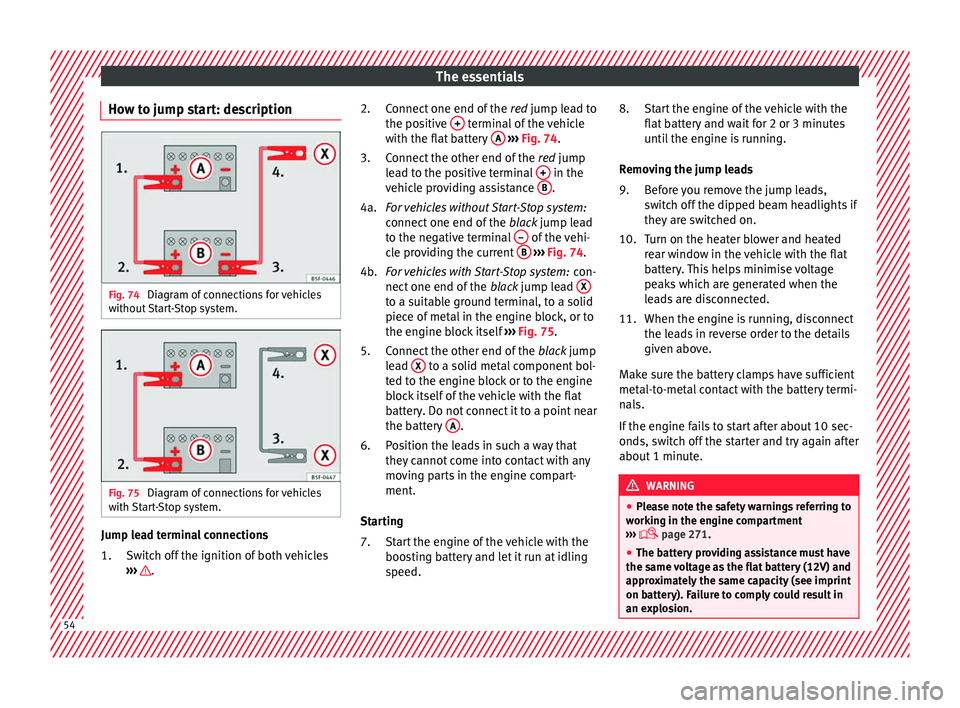
How to jump start: description Fig. 74
Diagram of connections for vehicles
w ithout
Start-Stop system. Fig. 75
Diagram of connections for vehicles
w ith
St
art-Stop system. Jump lead terminal connections
Swit
c
h off the ignition of both vehicles
››› .
1. Connect one end of the
re
d
jump lead to
the positive + terminal of the vehicle
w ith the fl
at
battery A
› ››
Fig. 74
.
C
onnect the other end of the red jump
lead to the positive terminal + in the
v ehic
l
e providing assistance B .
F or
vehicles without Start-Stop system:
connect one end of the black jump lead
to the negative terminal – of the vehi-
c l
e pr
oviding the current B
› ››
Fig. 74
.
F
or vehicles with Start-Stop system: con-
nect one end of the black jump lead X to a suitable ground terminal, to a solid
piec
e of
met
al in the engine block, or to
the engine block itself ››› Fig. 75.
Connect the other end of the black jump
lead X to a solid metal component bol-
t ed t
o the en
gine block or to the engine
block itself of the vehicle with the flat
battery. Do not connect it to a point near
the battery A .
P o
s
ition the leads in such a way that
they cannot come into contact with any
moving parts in the engine compart-
ment.
Starting Start the engine of the vehicle with the
boosting battery and let it run at idling
speed.
2.
3.
4a.
4b.
5.
6.
7.
Start the engine of the vehicle with the
flat b
attery and wait for 2 or 3 minutes
until the engine is running.
Removing the jump leads Before you remove the jump leads,
switch off the dipped beam headlights if
they are switched on.
Turn on the heater blower and heated
rear window in the vehicle with the flat
battery. This helps minimise voltage
peaks which are generated when the
leads are disconnected.
When the engine is running, disconnect
the leads in reverse order to the details
given above.
Make sure the battery clamps have sufficient
metal-to-metal contact with the battery termi-
nals.
If the engine fails to start after about 10 sec-
onds, switch off the starter and try again after
about 1 minute. WARNING
● Ple a
se note the safety warnings referring to
working in the engine compartment
››› page 271.
● The battery providing assistance must have
the same v
oltage as the flat battery (12V) and
approximately the same capacity (see imprint
on battery). Failure to comply could result in
an explosion. 8.
9.
10.
11.
54
Page 149 of 324
Seats and head restraints
Seat functions Se at
he
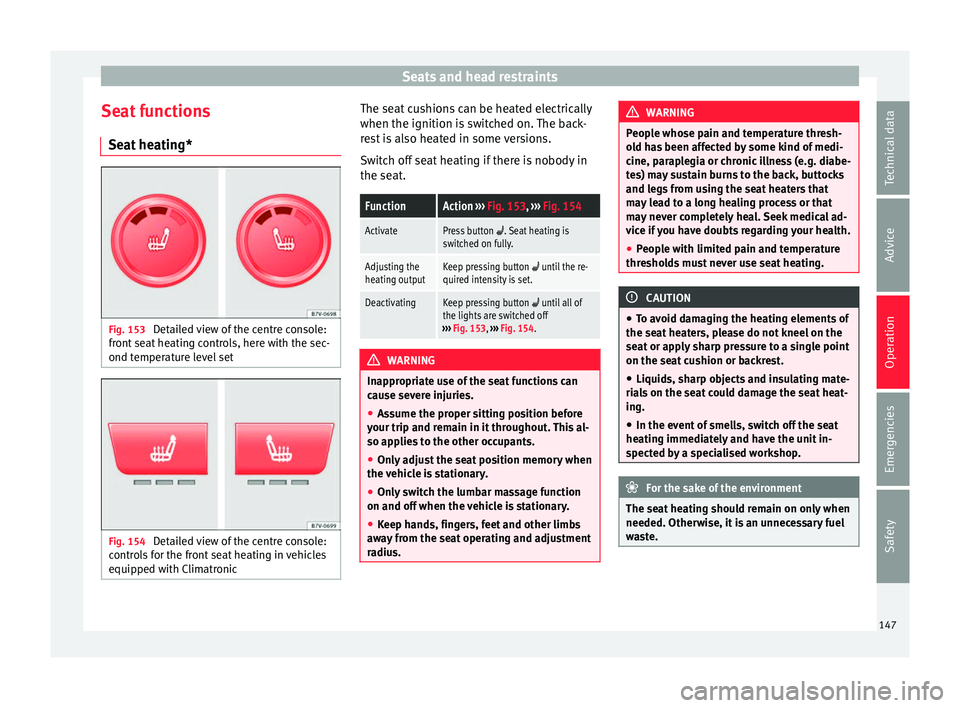
ating* Fig. 153
Detailed view of the centre console:
fr ont
se
at heating controls, here with the sec-
ond temperature level set Fig. 154
Detailed view of the centre console:
c ontr o
ls for the front seat heating in vehicles
equipped with Climatronic The seat cushions can be heated electrically
when the ignition i
s
sw
itched on. The back-
rest is also heated in some versions.
Switch off seat heating if there is nobody in
the seat.
FunctionAction ››› Fig. 153, ››› Fig. 154
ActivatePress button . Seat heating is
switched on fully.
Adjusting the
heating outputKeep pressing button until the re-
quired intensity is set.
DeactivatingKeep pressing button until all of
the lights are switched off
››› Fig. 153, ››› Fig. 154. WARNING
Inappropriate use of the seat functions can
cau se sev
ere injuries.
● Assume the proper sitting position before
your trip and rem
ain in it throughout. This al-
so applies to the other occupants.
● Only adjust the seat position memory when
the vehic
le is stationary.
● Only switch the lumbar massage function
on and off when the v
ehicle is stationary.
● Keep hands, fingers, feet and other limbs
awa
y from the seat operating and adjustment
radius. WARNING
People whose pain and temperature thresh-
ol d h
as been affected by some kind of medi-
cine, paraplegia or chronic illness (e.g. diabe-
tes) may sustain burns to the back, buttocks
and legs from using the seat heaters that
may lead to a long healing process or that
may never completely heal. Seek medical ad-
vice if you have doubts regarding your health.
● People with limited pain and temperature
thresho
lds must never use seat heating. CAUTION
● To av oid d
amaging the heating elements of
the seat heaters, please do not kneel on the
seat or apply sharp pressure to a single point
on the seat cushion or backrest.
● Liquids, sharp objects and insulating mate-
rial
s on the seat could damage the seat heat-
ing.
● In the event of smells, switch off the seat
heating immedi
ately and have the unit in-
spected by a specialised workshop. For the sake of the environment
The seat heating should remain on only when
needed. Otherw i
se, it is an unnecessary fuel
waste. 147
Technical data
Advice
Operation
Emergencies
Safety
Page 156 of 324
Operation
WARNING
Toxic gases may enter the vehicle interior
when the re ar lid i
s open. This could cause
loss of consciousness, carbon monoxide poi-
soning, serious injury and accidents.
● To avoid toxic gases entering the vehicle al-
way
s drive with the rear lid closed.
● In exceptional circumstances, if you must
drive with the r
ear lid open, observe the fol-
lowing to reduce the entry of toxic gases in-
side the vehicle:
– Close all windows and the sliding sun-
roof.
– Turn off the air recirculation for the heat-
ing and air conditioner.
– Open all of the air outlets in the dash
panel.
– Turn the heating fan and heater to the
highest level. CAUTION
An open boot hatch changes the length and
height of the
vehicle.Driving with the vehicle loaded
For the best handling when driving a loaded
v
ehic
l
e, note the following:
● Secure all objects ›››
page 153.
● Accelerate gently and carefully. ●
Avoid s
udden braking and manoeuvres.
● Brake early.
● If necessary, read the instructions for driv-
ing with a tr
ailer ››› page 237.
● If necessary, read the instructions for driv-
ing with a r
oof carrier system ››› page 164. WARNING
A sliding load could considerably affect the
st ab
ility and safety of the vehicle resulting in
an accident with serious consequences.
● Secure loads correctly so they do not move.
● When transporting heavy objects, use suit-
able r
opes or straps.
● Lock the seat backs in vertical position. Luggage compartment
Intr oduction Always transport heavy loads in the luggage
c
omp
ar
tment and place the seat backs in a
vertical position. Always use the fastening
rings with suitable rope or straps. Never over-
load the vehicle. Both the carrying capacity
as well as the distribution of the load in the
vehicle have effects on the driving behaviour
and braking ability ››› . WARNING
When the vehicle is not in use or being
wat c
hed, always lock the doors and the rear
lid to reduce the risk of serious injury or
death.
● Do not leave children unwatched, especial-
ly when the boot i
s open. Children could
climb into the luggage compartment, close
the rear lid from inside and be unable to es-
cape themselves. This could lead to serious
injury or death.
● Never allow children to play in or around
the vehic
le.
● Never transport people in the luggage com-
partment
. WARNING
Unsecured or incorrectly secured objects can
cau se seriou
s injury in case of a sudden ma-
noeuvring or breaking or in case of an acci-
dent. This is especially true when objects are
struck by a detonating airbag and fired
through the vehicle interior. To reduce the
risks, please note the following:
● Secure all objects in the vehicle. Always
plac
e equipment and heavy objects in the
boot.
● Always secure objects with suitable ropes
or strap
s so that they cannot be pushed in-
side the cabin and move around the areas
around the front or side airbags in the event
of sudden braking or an accident. 154
Page 182 of 324
Operation
CAUTION
Do not smoke when air recirculation is
swit c
hed on in vehicles with an air condition-
er. The smoke taken in could lie on the cool-
ing system vaporiser and on the activated
charcoal cartridge of the dust and pollen fil-
ter, leading to a permanently unpleasant
smell. Note
Climatronic: air recirculation mode switches
on to pr ev
ent exhaust gas from entering the
vehicle interior when it is in reverse and
while the automatic windscreen wipers are
working. Auxiliary heater* (additional
he
at
er)
Intr
oduction The auxiliary heater is powered by fuel from
the
v
ehic
le's fuel tank and can be used while
the vehicle is in motion and at a standstill.
Select the mode required ( heat or fan )
››› page 182 on the dash panel.
In winter, the auxiliary heater can be used in
heat mode before switching on the ignition
to remove any ice, mist or snow from the
windscreen (thin layers only). WARNING
The auxiliary heater fumes contain carbon di-
ox ide, an odourl
ess and colourless toxic gas.
Carbon monoxide can cause people to lose
consciousness. It can also cause death.
● Never switch on the auxiliary heater or
leav
e it running in places that are enclosed or
unventilated.
● Never program the independent heating
syst
em to be activated and operated in
closed, unventilated areas. WARNING
The components of the auxiliary heater ex-
hau s
t system heat up a great deal. This could
cause a fire.
● Always park your vehicle so that no part of
the exhau
st system can come in contact with
flammable materials (such as dried grass). CAUTION
Never place food, medicines or other heat-
sens itiv
e objects close to the air vents. Food,
medicines and other heat-sensitive objects
may be damaged or made unsuitable for use
by the air coming from the air vents. Switching the auxiliary heater on and
off
Switching the auxiliary heater on:
Manually using the instant on/off
button.›››
page
176
Manually using the remote control.›››
page
181
Automatically at the programmed
and enabled on time.››› page
182
Switching the auxiliary heater off:
Manually using the instant on/off
button for the air conditioner.›››
page
176
Manually using the remote con-
trol.›››
page
181
Automatically after the program-
med time.››› page
182
Automatically, when the lamp
(fuel reserve) comes on.››› page
264
Automatically when the battery
power drops to a very low level.››› page
283 Special feature
Af
t
er sw
itching the auxiliary heater off, it con-
tinues to run for a short period to completely
180
Page 183 of 324

Air conditioning
burn any fuel remaining in the auxiliary heat-
er .
The e
xhaust gases are also extracted from
the system.
Remote control Fig. 196
Auxiliary heater: remote control
Fig. 196Meaning
Switch the auxiliary heater on.
Switch the auxiliary heater off:
AAerial.
BLight.
The auxiliary heater may accidentally switch
on if
a b
utt
on is pressed on the remote con-
trol by mistake. This may also occur outside
the range of the remote control or if the light
flashes. Remote control light
The remote c
ontrol light provides users with
different information at the push of a button:
Battery light
Fig. 196 BMeaning
Lights up green for
around two seconds.The auxiliary heater has been
switched on using the but-
ton.
Lights up red for
around two seconds.The auxiliary heater has been
switched off using the but-
ton.
Slowly flashes green
for around two sec-
onds.No on a)
signal has been re-
ceived.
Quickly flashes green
for around two sec-
onds.The auxiliary heater is locked.
Possible causes: the fuel tank
is almost empty, the battery
charge is very low or there is a
fault.
Flashes red for
around two seconds.No off a)
signal has been re-
ceived.
Lights up orange for
around two seconds,
then green or red.The remote control battery is
almost flat. However, the on or
off signal has been received,
respectively.
Lights up orange for
around two seconds,
then flashes green or
red.The remote control battery is
almost flat. The on or off signal
has not been received, respec-
tively.
Battery light
Fig. 196 BMeaning
Flashes orange for
around five seconds.The remote control battery is
flat. The on or off signal has
not been received, respective-
ly.
a)
Within its range, the remote control might not receive the sig-
nal sent by the vehicle receiver. In this case, the remote control
will send an error message whether the auxiliary heater is on or
off. Come closer to the vehicle and press the corresponding but-
ton on the remote control once again.
Replacing the remote control battery
If the light ›››
Fig. 196 B on the remote con-
tr o
l
does not come on when the button is
pressed, the remote control battery should
soon be replaced.
The battery is located beneath a cover on the
back of the remote control. Turn the slot to
the left using a flat, blunt object (e.g. a coin).
When changing the battery, use another bat-
tery of the same model and observe the po-
larity when fitting it ››› .
R an
g
e
The receiver is in the interior of the vehicle.
The remote control, when fitted with new bat-
teries, has a range of several hundred me-
tres. Obstacles between the remote control
and the vehicle, bad weather conditions and
discharged batteries can considerably reduce
the range of the remote control. »
181
Technical data
Advice
Operation
Emergencies
Safety
Page 184 of 324
Operation
An optimum range is obtained by keeping
the r emot
e c
ontrol vertical, with the aerial
››› Fig. 196 A pointing upwards. When doing
so , do not
c
over the aerial with your fingers
or with the palm of your hand.
There must be a minimum distance of 2 me-
tres between the remote control and the vehi-
cle. CAUTION
● The ra dio fr
equency remote control con-
tains electronic components. Therefore, avoid
getting it wet and being knocked and protect
it from direct sunlight.
● Use of inappropriate batteries may damage
the remote c
ontrol. For this reason, always re-
place the used battery with another of the
same voltage, size and specifications. For the sake of the environment
● Ple a
se dispose of old batteries so that they
do not harm the environment.
● The remote control battery may contain
perch
lorate. Observe the legal requirements
for their disposal. Programming the auxiliary heater
The heater or ventilation inside the vehicle
c
an be pr
ogr
ammed for a certain period. Before programming, check that the day is
corr
ectly set in the Auxiliary heater -
day of the week menu ››› .
En ab
lin
g the Auxiliary heater menu on
the instrument panel
● From the main menu, select the Auxili-
ary heater submenu and pre
ss the OK button on the windscreen wiper lever.
● OR: pr ess the
or
arrow buttons on the
multifunction steering wheel until the Aux-
iliary heater menu is displayed.
Menu op-
tionsDescription
Switching
on
Switching
off
The auxiliary heater can be set to come
on automatically if required. To do so,
select a timer:
– The timer is displayed marked with a
.
– Only one timer can be selected. If a
timer has been selected, Prog. ON
will be displayed on the screen. If no
timer has been selected, the dash
panel display will show Prog. OFF.
– To modify the programmed timer, se-
lect another timer or select the Off
option.
Timer 1
Timer 2
Timer 3
Three different timers (hh.mm) can lat-
er be selected using the On option. If
the auxiliary heater is to be switched
on for just a certain day of the week,
select the day of the week and the
time for the auxiliary heater to come
on.
Menu op-
tionsDescription
DurationThe operating time may vary between
10 and 60 minutes and can be set to
5-minute intervals.
Operating
modeSet to heat or ventilate the vehicle in-
terior when the auxiliary heater is
switched on.
DaySet the current day of the week.
Factory
settingsThe predefined factory values for the
functions of this menu are restored.
BackThis returns to the main menu. Checking programming
If
the
timer h
a
s been switched on after
switching the ignition off, the light on the
button will remain lit for around 10 seconds. WARNING
Never program the independent heating sys-
tem t o be activ
ated and operated in closed,
unventilated areas. The auxiliary heater
fumes contain carbon dioxide, an odourless
and colourless toxic gas. Carbon monoxide
can cause people to lose consciousness. It
can also cause death. 182
Page 185 of 324
Driving
Operating instructions The auxiliary heater exhaust system located
below the
v
ehicle must be kept clear of snow,
mud and other objects. The exhaust gases
must not be obstructed in any way. The ex-
haust gases generated by the auxiliary heater
are removed via an exhaust pipe fitted under-
neath the vehicle.
On heating the vehicle interior, depending on
the outside temperature the warm air is first
directed at the windscreen and then to the
rest of the vehicle interior through the air
vents. If the air vents are turned towards the
windows, for example, the form of air distri-
bution may be affected.
Depending on the outside temperature, the
temperature at which the auxiliary heater
warms the vehicle interior may be somewhat
higher if the heating or air conditioner tem-
perature control is set to maximum before
switching the heating on.
Depending on the engine, vehicles with aux-
iliary heater may be fitted with a second bat-
tery in the luggage compartment that is re-
sponsible for powering the auxiliary heater.
When will the auxiliary heater will not switch
on?
● The auxiliary heater requires about as
much po w
er as the dipped beam headlights.
If the battery charge is low, the auxiliary heat- er will switch off automatically or will not
even swit
ch on. This avoids problems when
starting the engine.
● The heater will switch on just once each
time. The timer wi
ll also have to be switched
back on every time it is required. Note
● Noise w i
ll be heard while the auxiliary
heater is running.
● When the air humidity is high and the out-
side temper
ature low, the heating system
may evaporate condensation from the auxili-
ary heater. In this case, steam may be re-
leased from underneath the vehicle. This is
completely normal and there is no need to
suspect a fault!
● If the auxiliary heater runs several times
over a pr
olonged period, the vehicle battery
may run flat. To re-charge the battery, drive
the vehicle for a long distance. As a general
rule, drive for as much time as the auxiliary
heating was working. Driving
St op
pin
g and starting the en-
gine
Introduction Immobiliser display
When an inv
alid k
ey is used or in the event of
a system fault, or Immobiliser on is
displayed on the instrument panel. The en-
gine cannot be started.
Pushing or towing
For technical reasons, the vehicle must not
be push- or tow-started. Jump starting is pref-
erable. WARNING
Turning off the engine while driving will make
st op
ping the vehicle difficult; this could even
result in the loss of control causing an acci-
dent with serious consequences.
● The assisted braking and steering systems,
the airbag sys
tem, seat belts and certain
safety equipment are only active while the
engine is running.
● The engine should only be switched off
when the vehic
le is at a standstill. » 183
Technical data
Advice
Operation
Emergencies
Safety
Page 189 of 324
Driving
●
When the engine i s
started cold, there may
be strong vibrations for a few moments for
technical reasons. This is quite normal, and
no cause for concern.
● At temperatures below +5°C (+41°F),
smoke ma
y be given off below the vehicle
when the additional heater is turned on. Stopping the engine
Complete operations only in the sequence
given:
Vehicles without
Keyless AccessVehicles with
Keyless Access
1.Bring the vehicle to a full stop ››› .
2.Press and hold the brake pedal until the step 4 is
performed.
3.If the vehicle has an automatic gearbox, place theselector lever in position P.
4.Connect the electronic parking brake ››› page 188.
5.Turn the vehicle key in
the ignition lock to po-
sition ››› Fig. 197 1
.
Briefly press the start-
up button
››› Fig. 198. If
the engine fails to
switch off, perform an
emergency disconnect
››› page 185.
6.If the vehicle is equipped with a manual gearbox,
put it into 1st or reverse. WARNING
Never switch off the engine while the vehicle
is mo
ving. You may lose control of the vehicle
and there is a risk of serious accident.
● The airbags and belt tensioners do not
work when the ignition i
s switched off.
● The brake servo does not work with the en-
gine off. T
o stop, the brake pedal must be
pressed with more force.
● As the power steering does not work if the
engine is
not running, you will need more
strength to steer than normally.
● If the key is removed from the ignition, the
steerin
g may lock and it will not be possible
to steer the vehicle. CAUTION
● If the v
ehicle is stopped and the Start-Stop
system* switches off the engine, the ignition
remains switched on. Make sure that the igni-
tion is switched off before leaving the vehi-
cle, otherwise the battery could discharge.
● If the engine has been driven at high speed
for a pro
longed period of time, it may over-
heat when turned off. To avoid engine dam-
age, allow the engine to run for approximate-
ly two minutes in neutral before switching it
off. Note
● In v ehic
les with automatic gearbox, the key
can only be removed when the selector lever
is in position P.
● After stopping the engine, the engine com-
partment
fan may continue running for a few
minutes, even when the ignition has been
switched off or the key removed. The radiator
fan is automatically switched off. Electronic immobiliser
The gear lock prevents the engine from being
s
t
ar
ted with an unauthorised key and the ve-
hicle being moved.
The vehicle key has a chip that automatically
disables the immobilizer when the key is
placed in the ignition lock.
The electronic immobiliser will be activated
again automatically as soon as you pull the
key out of the ignition lock. For vehicles with
the Keyless Access system, the key has to be
outside the vehicle ›››
page 117.
For this reason, the vehicle can only be used
with a genuine SEAT key with the correct
code. Coded keys can be purchased from
your technical service centre ›››
page 112.
If an unauthorised key is used, the message SAFE or Immobiliser active is displayed
on the instrument panel. The vehicle cannot
be started in this case »
187
Technical data
Advice
Operation
Emergencies
Safety
Page 195 of 324
Driving
reduce the strain on the brake system. Other-
wi
se, the br
akes may overheat and fail. Only
use the brakes to reduce speed or to stop. Note
When checking the front brake pads, take the
time t o al
so check the rear brake pads. The
thickness of the brake pads should be
checked visually and regularly, by looking
through the openings in the wheel rims or
from underneath the vehicle. If necessary, re-
move the wheels to check them thoroughly.
SEAT recommends taking your car in for tech-
nical service. Gearbox
Intr oduction When reverse gear is engaged and the igni-
tion i
s
sw
itched on the following takes place:
● Reverse lights light up.
● When reversing, the air conditioner auto-
matical
ly changes to air recirculation mode.
● The rear window heater switches on when
the winds
creen wiper is activated.
● Also, the parking sensor system, the opti-
cal p
arking sensor and the camera for the re-
verse assist system are connected. WARNING
Rapid acceleration can cause loss of traction
and skid din
g, especially on slippery ground.
This could cause loss of control of the vehicle
resulting in an accident and considerable
damage.
● Only use the kick-down function or rapid
accel
eration if visibility, weather, road and
traffic conditions so permit. WARNING
Do not allow the brakes to “rub” for a pro-
long ed period of
time, or brake frequently or
for long periods of time. Continuous braking
heats up the brakes. This could significantly
reduce braking power, increase braking dis-
tance or even result in the total failure of the
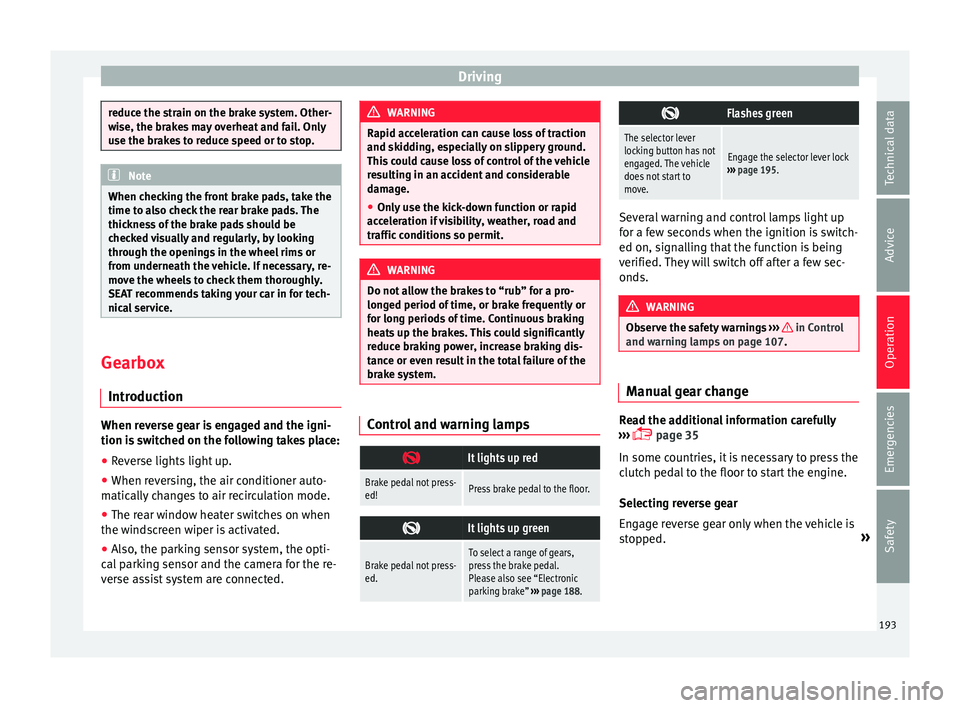
brake system. Control and warning lamps
It lights up red
Brake pedal not press-
ed!Press brake pedal to the floor.
It lights up green
Brake pedal not press-
ed.To select a range of gears,
press the brake pedal.
Please also see “Electronic
parking brake”
››› page 188.
Flashes green
The selector lever
locking button has not
engaged. The vehicle
does not start to
move.
Engage the selector lever lock
››› page 195. Several warning and control lamps light up
for a f
ew sec
onds when the ignition is switch-
ed on, signalling that the function is being
verified. They will switch off after a few sec-
onds. WARNING
Observe the safety warnings ›››
in Control
and warnin g l
amps on page 107. Manual gear change
Read the additional information carefully
› ›
›
page 35
In some countries, it is necessary to press the
clutch pedal to the floor to start the engine.
Selecting reverse gear
Engage reverse gear only when the vehicle is
stopped. »
193
Technical data
Advice
Operation
Emergencies
Safety