steering Seat Altea 2005 Owner's Guide
[x] Cancel search | Manufacturer: SEAT, Model Year: 2005, Model line: Altea, Model: Seat Altea 2005Pages: 286, PDF Size: 9.59 MB
Page 99 of 286
Opening and closing97
Safety First
Operating instructions
Tips and Maintenance
Te c h n i c a l D a t a
KeysKey set
The set of keys includes a remote control, a key without a
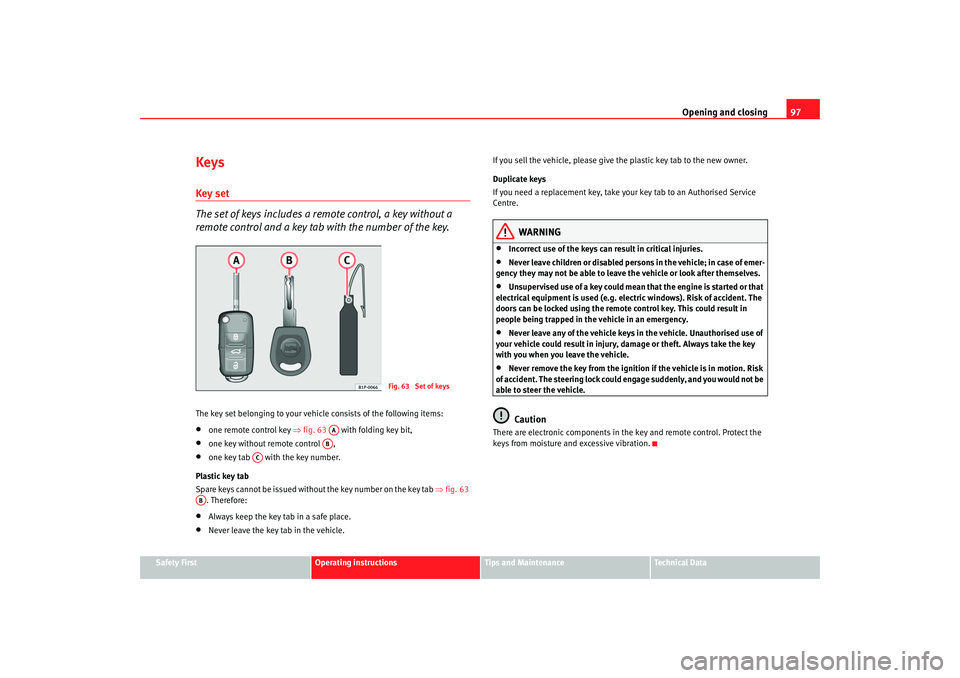
remote control and a key tab with the number of the key.The key set belonging to your vehicle consists of the following items:•
one remote control key ⇒fig. 63 with folding key bit,
•
one key without remote control ,
•
one key tab with the key number.
Plastic key tab
Spare keys cannot be issued with out the key number on the key tab ⇒fig. 63
. Therefore:
•
Always keep the key tab in a safe place.
•
Never leave the key tab in the vehicle. If you sell the vehicle, please give the plastic key tab to the new owner.
Duplicate keys
If you need a replacement key, take y
our key tab to an Authorised Service
Centre.
WARNING
•
Incorrect use of the keys can result in critical injuries.
•
Never leave children or disabled persons in the vehicle; in case of emer-
gency they may not be able to leave the vehicle or look after themselves.
•
Unsupervised use of a key could mean that the engine is started or that
electrical equipment is used (e.g. elec tric windows). Risk of accident. The
doors can be locked using the remote control key. This could result in
people being trapped in the vehicle in an emergency.
•
Never leave any of the vehicle keys in the vehicle. Unauthorised use of
your vehicle could result in injury, damage or theft. Always take the key
with you when you leave the vehicle.
•
Never remove the key from the ignition if the vehicle is in motion. Risk
of accident. The steering lock could engage suddenly, and you would not be
able to steer the vehicle.Caution
There are electronic compon ents in the key and remote control. Protect the
keys from moisture and excessive vibration.
Fig. 63 Set of keys
AAAB
AC
AB
altea_ingles Seite 97 Donnerstag, 19. Mai 2005 3:02 15
Page 116 of 286
Lights and visibility
114
Switching main beam on and off
– Turn the light switch to position
.
– Press the lever forward ⇒page 113, fig. 79 to switch on the
main beams.
– Pull the lever back towards you to switch the main beam head- lights off again.
Headlight flasher
– Pull the lever towards the steering wheel to operate the flasher.
Switching on parking lights
– Switch off the ignition and remove the key from the lock.
– Move the lever up or down to turn on the right or left-hand parking lights respectively.
WARNING
The main beam can dazzle other drivers. Risk of accident! Never use the
main beam headlights or the headlight flasher if they could dazzle other
drivers.
Note
•
The turn signals only work when the ignition is switched on. The corre-
sponding warning lamp
or flashes in the combi-instrument. The
warning lamp
flashes when the turn signals are operated, provided a
trailer is correctly attached and connected to the vehicle. If a turn signal bulb
is defective, the warning lamp flashes at double speed. If the trailer turn signal bulbs are damaged, warning lamp
does not light up. You should
have the bulb replaced.
•
The main beam headlights can only be switched on if the dipped beam
headlights are already on. The warning lamp
then comes on in the combi-
instrument.
•
The headlight flasher comes on for as long as you pull the lever – even if
no other lights are switch ed on. The warning lamp
then comes on in the
combi-instrument.
•
When the parking lights are switched on, the headlight and the rear light
on the corresponding side of the vehicle light up. The parking lights will only
work if the key is removed from the igni tion. If the lights are switched on, a
buzzer gives an audible warning while the driver door is open.
•
If the turn signal lever is left on after the key has been taken out of the
ignition lock, an acoustic signal sounds when the driver door is opened. This
is a reminder to switch off the turn signal, unless of course you wish to leave
the parking light on.
A3
A4
altea_ingles Seite 114 Donnerstag, 19. Mai 2005 3:02 15
Page 120 of 286

Lights and visibility
118The make-up mirrors in the sun visors have covers. When you open the cover
, a lamp in the roof lights up.
The lamp* in the roof lining will go ou t when the vanity mirror cover is pushed
back or the sun visor is pushed back up.
Note
The roof lamp will turn off about 10 minutes following the removal of the igni-
tion key. This prevents the battery discharging.Windscreen washersFront windscreen wipers
The windscreen wiper lever controls the windscreen wipers
and the automatic wash and wipe.
The windscreen wiper lever ⇒ fig. 86 has the following positions:
Switching off the wipers
– Move the lever to position .
Intermittent wipe
– Move the lever up to position .
– Move the control to the left or right to set the length of the intervals. Control to the left - longer wipe pause, control to the
right - shor ter wipe pauses. Four wiper inter val stages can be set
using switch .
Slow wipe
– Move the lever up to position .
Continuous wipe
– Move the lever up to position .
Brief wipe
– Move the lever down to position to give the windscreen a brief
wipe. The wiper will start to move faster if you keep the lever
pressed down for longer than 2 seconds.
Wash and wipe automatic system
– Pull the lever towards the steering wheel - Position . The wash function will start immediately and the wipers will start with a
slight delay. The wash and wiper systems will function at the
same time at speeds of over 120 km/h.
– Then release the lever. The wipers will keep running for approxi- mately four seconds.
A2
Fig. 86 Windscreen wiper
and windscreen wash
lever
A0A1
AA
AA
A2A3A4
A5
altea_ingles Seite 118 Donnerstag, 19. Mai 2005 3:02 15
Page 123 of 286
Lights and visibility121
Safety First
Operating instructions
Tips and Maintenance
Te c h n i c a l D a t a
Rear window wiper
The windscreen wiper lever operates the windscreen wiper
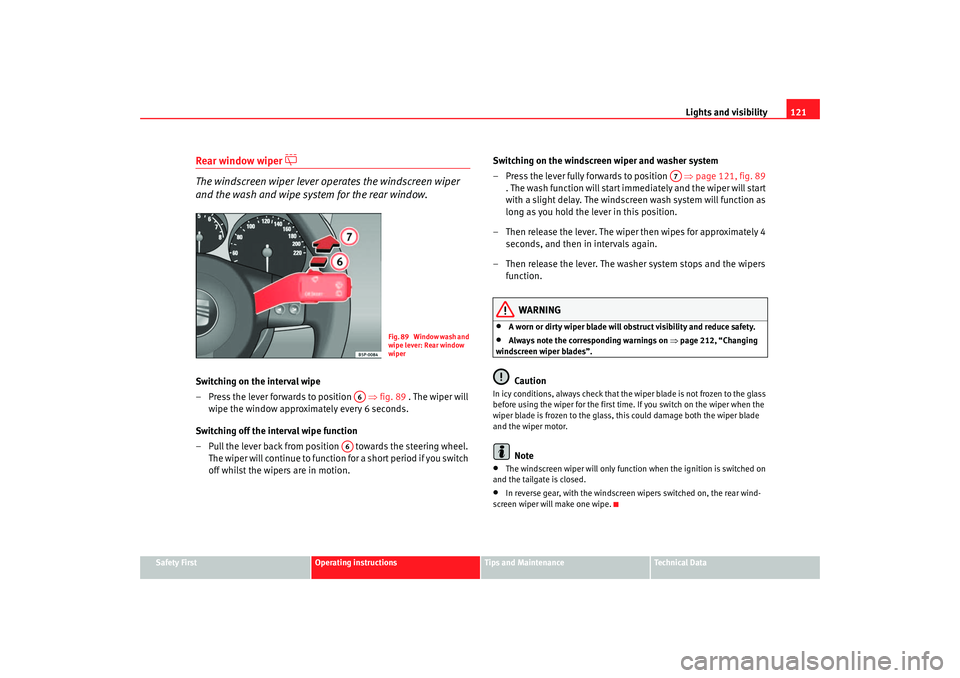
and the wash and wipe system for the rear window.Switching on the interval wipe
– Press the lever forwards to position ⇒fig. 89 . The wiper will
wipe the window approximately every 6 seconds.
Switching off the interval wipe function
– Pull the lever back from positi on towards the steering wheel.
The wiper will continue to function for a short period if you switch
off whilst the wipers are in motion. Switching on the windscreen wiper and washer system
– Press the lever fully forwards to position
⇒page 121, fig. 89
. The wash function will start immediately and the wiper will start
with a slight delay. The windscreen wash system will function as
long as you hold the lever in this position.
– Then release the lever. The wiper then wipes for approximately 4 seconds, and then in intervals again.
– Then release the lever. The washer system stops and the wipers function.
WARNING
•
A worn or dirty wiper blade will obstruct visibility and reduce safety.
•
Always note the corresponding warnings on ⇒page 212, “Changing
windscreen wiper blades”.Caution
In icy conditions, always check that the wiper blade is not frozen to the glass
before using the wiper for the first time. If you switch on the wiper when the
wiper blade is frozen to the glass, this could damage both the wiper blade
and the wiper motor.
Note
•
The windscreen wiper will only function when the ignition is switched on
and the tailgate is closed.
•
In reverse gear, with the windscreen wipers switched on, the rear wind-
screen wiper will make one wipe.
F i g . 8 9 W i n d o w w a s h a n d
wipe lever: Rear window
wiper
A6
A6
A7
altea_ingles Seite 121 Donnerstag, 19. Mai 2005 3:02 15
Page 124 of 286

Lights and visibility
122Headlight washer system
The headlight washers clean the headlight lenses.The headlight washers are activated automatically when the windscreen
washer is used and the windscreen wiper lever is pulled towards the steering
wheel for at least 1.5 seconds – provided the dipped headlights or main
beams are switched on. Clean off stubborn dirt (insects, etc.) from the head-
lights at regular intervals, for in stance when filling the fuel tank.
Note
•
To ensure that the headlight washers work properly in winter, keep the
nozzle holders in the bumper free of snow and remove any ice with a de-icer
spray.
•
To remove water, the windscreen wiper s will be activated from time to
time, the headlight wipers will be activated every three cycles.
MirrorsInterior mirror
It is dangerous to drive if you cannot see clearly through the
rear window.Manual anti-dazzle function for interior mirror
In the basic mirror position, the lever at the bottom edge of the mirror should
be at the front. Pull the lever to the back to select the anti-dazzle function.
Automatic anti-dazzle interior mirror*
The automatic anti-dazzle function can be switched on and off
as desired.Switching off anti-dazzle function
– Press button ⇒fig. 90 . Warning lamp goes out:
Switching on anti-dazzle function
– Press button ⇒fig. 90 . Warning lamp is lit.Anti-dazzle function
The anti-dazzle function is activated every time the ignition is switched on.
The green indicator lamp ligh ts up in the mirror housing.
When the anti-dazzle function is acti vated the interior mirror will darken auto-
matically according to the amount of light it receives (for example from the
headlights of a vehicle behind). The anti-dazzle function is cancelled if
reverse gear is engaged.
Fig. 90 Automatic anti-
dazzle interior mirror.
AA
AB
AA
altea_ingles Seite 122 Donnerstag, 19. Mai 2005 3:02 15
Page 127 of 286

Seats and stowage125
Safety First
Operating instructions
Tips and Maintenance
Te c h n i c a l D a t a
Seats and stowageThe importance of correct seat adjustmentProper seat adjustment optimi ses the level of protection
offered by seat belts and airbags.Your vehicle has five passenger places, two individual front seats and three
places on the rear seat. Each seat is equipped with a three-point seat belt.
The driver seat and front passenger seat can be adjusted in many ways to suit
the physical requirements of the vehicle occupants. The correct seat position
is very important for:•
fast and easy operation of all controls on the instrument panel,
•
relaxed posture that does not cause drowsiness,
•
safe driving ⇒ page 7,
•
and to ensure that the seat belts and airbag system provide maximum
protection ⇒page 19.
WARNING
•
If the driver and passengers assume improper sitting positions, they
may sustain critical injuries.
•
Never transport more people than there are seats available in the
vehicle.
•
Every occupant in the vehicle must properly fasten and wear the seat
belt belonging to his or her seat. Children must be protected with an appro-
priate child restraint system ⇒page 46, “Child safety”.
•
The front seats and all head restraints must always be adjusted to body
size and the seat belt must always be properly adjusted to provide you and
your passengers with optimum protection.
•
Always keep your feet in the footwell when the vehicle is moving; never
rest them on the dash panel, out of the window or on the se at. This also
applies to passengers. An incorrect sitting position exposes you to an
increased risk of injury in the event of a braking manoeuvre or an accident.
If the airbag is triggered, you could sustain severe injuries due to an incor-
rect sitting position.
•
It is important for the driver and front passenger to maintain a distance
of at least 25 cm from the steering wheel or dash panel. If this minimum
distance is not respected, the airbag will not provide the intended protec-
tion and there is a fatality risk! Always ensure the maximum possible
distance between the driver and the st eering wheel as well as between the
passenger and the dash panel.
•
Adjust the driver or front passenger seat only when the vehicle is
stationary. This also applies to the forwards/backwards adjustment of the
rear seats. Otherwise your seat coul d move unexpectedly while the vehicle
is moving. This could increase the risk of an accident and therefore injury.
In addition, while adjusting your seat, you will assume an incorrect sitting
position. Risk of fatal accidents.
•
Special guidelines apply to installing a child seat on the front
passenger seat. When installing a child seat, observe the warning note in
the ⇒page 46, “Child safety”.WARNING (continued)
altea_ingles Seite 125 Donnerstag, 19. Mai 2005 3:02 15
Page 157 of 286
Driving155
Safety First
Operating instructions
Tips and Maintenance
Te c h n i c a l D a t a
DrivingSteeringAdjusting the steering wheel position
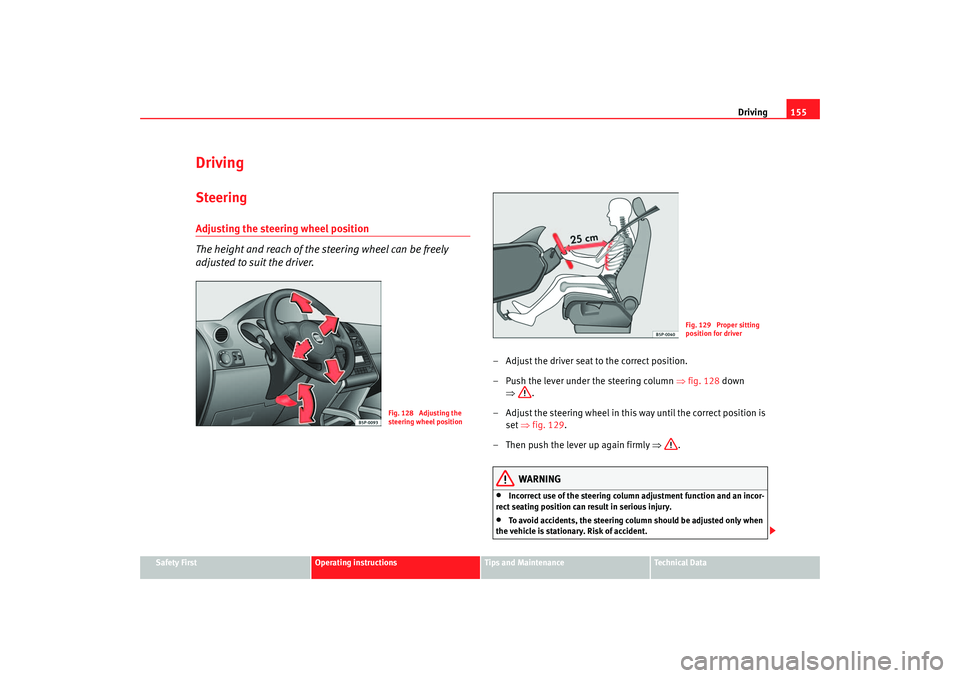
The height and reach of the steering wheel can be freely
adjusted to suit the driver.
– Adjust the driver seat to the correct position.
– Push the lever under the steering column ⇒fig. 128 down
⇒ .
– Adjust the steering wheel in this way until the correct position is set ⇒fig. 129 .
– Then push the lever up again firmly ⇒.
WARNING
•
Incorrect use of the steering column adjustment function and an inc or-
rect seating position can result in serious injury.
•
To avoid accidents, the steering column should be adjusted only when
the vehicle is stationary. Risk of accident.
Fig. 128 Adjusting the
steering wheel position
Fig. 129 Proper sitting
position for driver
altea_ingles Seite 155 Donnerstag, 19. Mai 2005 3:02 15
Page 158 of 286
Driving
156•
Adjust the driver seat or steering wheel so that there is a distance of at
least 25 cm between the steering wheel and your breast bone ⇒page 155,
fig. 129. If you fail to observe the minimum distance, the airbag will not
protect you. Risk of fatal injury.
•
If your physical constitution prevents you from maintaining the
minimum distance of 25 cm, contact an Authorised Service Centre. The
Authorised Service Centre will help you decide if special specific modifica-
tions are necessary.
•
If you adjust the steering wheel so tha t it points towards your face, the
driver airbag will not protect you properly in the event of an accident. Make
sure that the steering wheel points towards your chest.
•
When driving, always hold the steer ing wheel with both hands on the
outside of the ring at the 9 o'clock and 3 o'clock positions. Never hold the
steering wheel at the 12 o'clock positi on, or in any other manner (e.g. in
the centre of the steering wheel, or on the inside of the rim). In such cases,
you could receive severe injuries to the arms, hands and head.
SafetyElectronic stabilisation programme (ESP)*
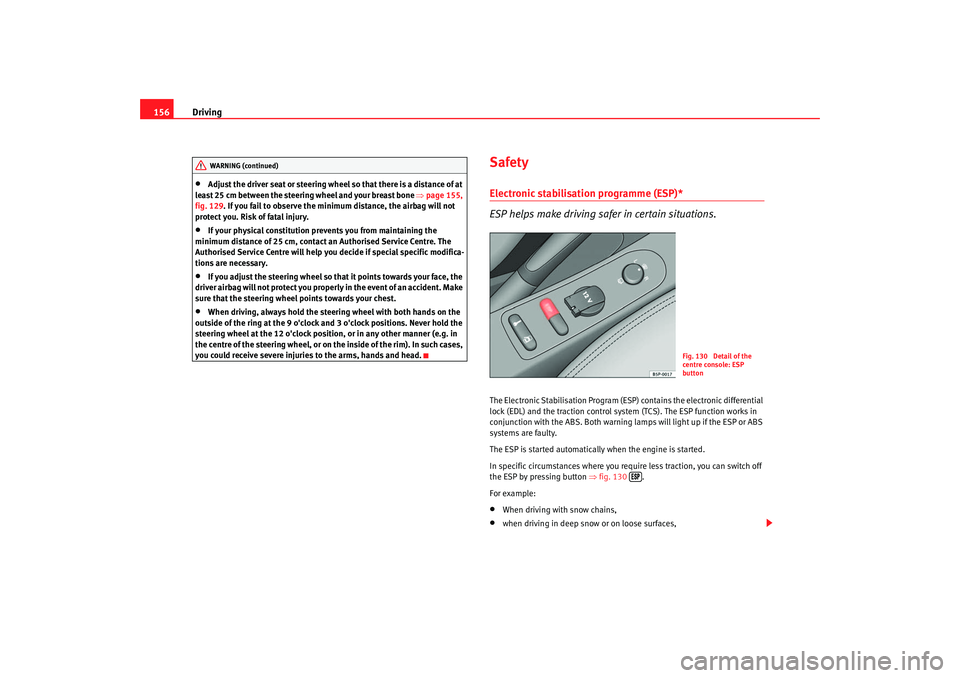
ESP helps make driving safer in certain situations.The Electronic Stabilisation Program (ESP ) contains the electronic differential
lock (EDL) and the traction control syst em (TCS). The ESP function works in
conjunction with the ABS. Both warning lamps will light up if the ESP or ABS
systems are faulty.
The ESP is started automatically when the engine is started.
In specific circumstances where you require less traction, you can switch off
the ESP by pressing button ⇒fig. 130 .
For example:•
When driving with snow chains,
•
when driving in deep snow or on loose surfaces,
WARNING (continued)
Fig. 130 Detail of the
centre console: ESP
button
altea_ingles Seite 156 Donnerstag, 19. Mai 2005 3:02 15
Page 159 of 286
Driving157
Safety First
Operating instructions
Tips and Maintenance
Te c h n i c a l D a t a
•
when rocking the vehicle backwards and forwards to free it from mud, for
example.
You should press the button to switch the ESP back on when you no longer
need wheel spin.
The TCS and EDL are also switched off if the ESP is switched off. That is to say,
these systems are not available while ESP is not activated.
When does the button light up or flash?
•
It lights up when the ignition is switched on and should go out again after
about 2 seconds.
•
It will start flashing to indicate that ESP is counteracting an unstable
driving condition.
•
It will light up continuously if there is a malfunction in the ESP.
•
It will light up continuously if the ESP is switched off.
WARNING
•
The electronic stabilisation program (ESP) cannot defy the laws of
physics. This should be kept in mind, particularly on slippery and wet
roads and when towing a trailer.
•
Always adapt your driving style to suit the condition of the roads and
the traffic situation. Do not let the extra safety afforded by ESP tempt you
into taking any risks when driving, this can cause accidents.
•
Please refer to the corresponding warning notes on ESP in ⇒page 173,
“Intelligent technology”.
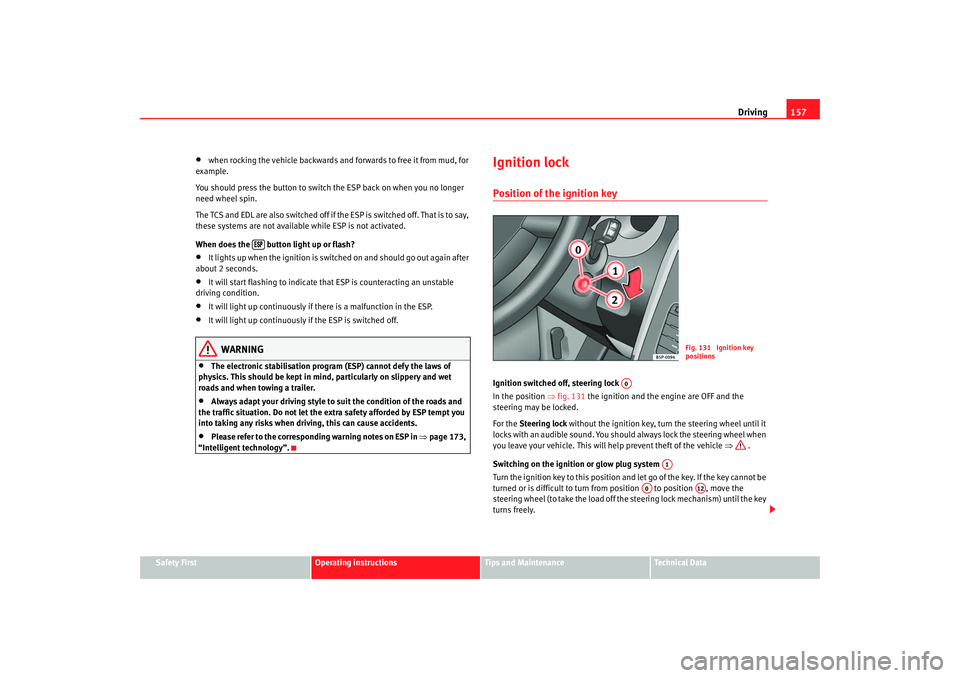
Ignition lockPosition of the ignition keyIgnition switched off, steering lock
In the position ⇒fig. 131 the ignition and the engine are OFF and the
steering may be locked.
For the Steering lock without the ignition key, turn the steering wheel until it
locks with an audible sound. You should always lock the steering wheel when
you leave your vehicle. This will help prevent theft of the vehicle ⇒ .
Switching on the ignition or glow plug system
Tu rn the ignition key to this position and let go of the key. If the key canno t b e
turned or is difficult to turn from position to position , move the
steering wheel (to take the load off the steering lock mechanism) until the key
turns freely.
Fig. 131 Ignition key
positions
A0
A1
A0
A12
altea_ingles Seite 157 Donnerstag, 19. Mai 2005 3:02 15
Page 160 of 286
Driving
158Starting
The engine is started when the key is in this position. Electrical components
with a high power consumption are switched off temporarily.
Each time that the vehicle must be star ted, the ignition key must be turned to
the position . The repetitive start prevention lock of the ignition prevents
possible damage to the starter moto r is the engine is already running.
WARNING
•
Never remove the ignition key from the ignition until the vehicle is
completely stopped! Otherwise, the steering may lock immediately and
there is a risk of an accident.
•
Always remove the key from the ignition lock when leaving the vehicle,
even if you only intend to be gone for a short period. This is especially
important if you must leave children or disabled people in the vehicle, they
could accidentally start the engine or work electrical equipment s uch as
the windows possibly resulting in an accident.
•
Unsupervised use of the keys could result in the engine being started
or electrical systems, such as the el ectric windows, being used. This can
result in serious injury.Caution
The starter motor will only work when the engine is stopped (ignition key
position ).
Electronic immobiliser
The immobiliser prevents unauthorised persons from driving
the vehicle.Inside the key there is a chip that deac tivates the electronic immobiliser auto-
matically when the key is inserted into the ignition.
The immobiliser will be activated again automatically as soon as you pull the
key out of the ignition lock.
The engine can only be started using a genuine SEAT key with the correct
code.
Note
The vehicle cannot be operated properly if you do not have a genuine SEAT
key.Starting and stopping the engineStarting petrol engines
The engine can only be started using a genuine SEAT key with
the correct code.– Move the gear lever to the ne utral position and depress the
clutch pedal fully and hold it in this position, the starter will then
only have to turn the engine.
– Turn the ignition key to position ⇒ page 157 to start the engine.
A2A0
A2
altea_ingles Seite 158 Donnerstag, 19. Mai 2005 3:02 15