maintenance Seat Altea 2005 Workshop Manual
[x] Cancel search | Manufacturer: SEAT, Model Year: 2005, Model line: Altea, Model: Seat Altea 2005Pages: 286, PDF Size: 9.59 MB
Page 103 of 286

Opening and closing101
Safety First
Operating instructions
Tips and Maintenance
Te c h n i c a l D a t a
Opening the doors mechanically (emergency opening)
If the remote control functi
on fails, you will have to use the key to unlock the
car. This is done as follows:
•
Unfold the key by pressing the button (arrow).
•
Use the lock on the driver door to unlock the vehicle. The anti-theft alarm
system remains active, but an alarm is not triggered immediately.
•
Switch on the ignition within 15 secon ds. When the ignition is switched
on, the electronic immobiliser recognises a valid vehicle key and deactivates
the anti-theft alarm system. If you do not switch on the ignition within 15
seconds, the alarm is triggered.
How is the alarm switched off?
When the vehicle is unlocked via the unlocking button of the remote control
or when the key is inserted in the ignition lock.Note
•
If, after the alarm goes off, access is gained to a second secured zone
(e.g. the tailgate is opened after a door has been opened), the warning signal
is triggered again.
•
Vehicle monitoring remains active even if the battery is disconnected or
not working for any reason.
•
The alarm is triggered immediately if one of the battery cables is discon-
nected while the alarm system is active.
Interior monitoring system*Deactivating interior monitor
– Open the driver's door and press the button to deactivate the interior monitoring system. A lamp in the button lights up.
– Lock the vehicle within 30 seconds. The interior monitoring system will be switched off unti l the next time the vehicle is
locked.The interior monitoring system will be switched on automatically with the
anti-theft alarm. All of the doors and the tailgate must be closed to activate
the sensor of the interior monitoring system.
The interior monitor should be switched off, if for example animals are briefly
left in the locked vehicle. Their movements could otherwise trigger an alarm.
Fig. 67 Button for deacti-
vating the interior moni-
toring system
altea_ingles Seite 101 Donnerstag, 19. Mai 2005 3:02 15
Page 105 of 286
Opening and closing103
Safety First
Operating instructions
Tips and Maintenance
Te c h n i c a l D a t a
WARNING
•
Always close the tailgate properly. Risk of accident or injury.
•
The tailgate must not be opened when the reverse or rear fog lights are
lit. This may damage the lighting units.
•
Do not close the tailgate by pushin g it down with your hand on the
window. The glass could shatter. Risk of injury!
•
Ensure the tailgate is locked after closing. If not, it may open unexpect-
edly while driving.
•
Never allow children to play in or ar ound the vehicle. A locked vehicle
can be subjected to extremely high and low temperatures, depending on
the time of year. This could cause serious injuries/illness. It could even
have fatal consequences. Close and lock both the tailgate and all the other
doors when you are not using the vehicle.
•
Never close the tailgate without observing and ensuring it is clear, to do
otherwise could cause serious injury to you and others. Make sure that no
one is in the path of the tailgate.
•
Never drive with the tailgate open or half-closed, exhaust gasses may
penetrate into the interior of th e vehicle. Danger of poisoning!
•
If only the boot is opened then do not leave the key inside. The vehicle
may not be opened if the key is left inside.
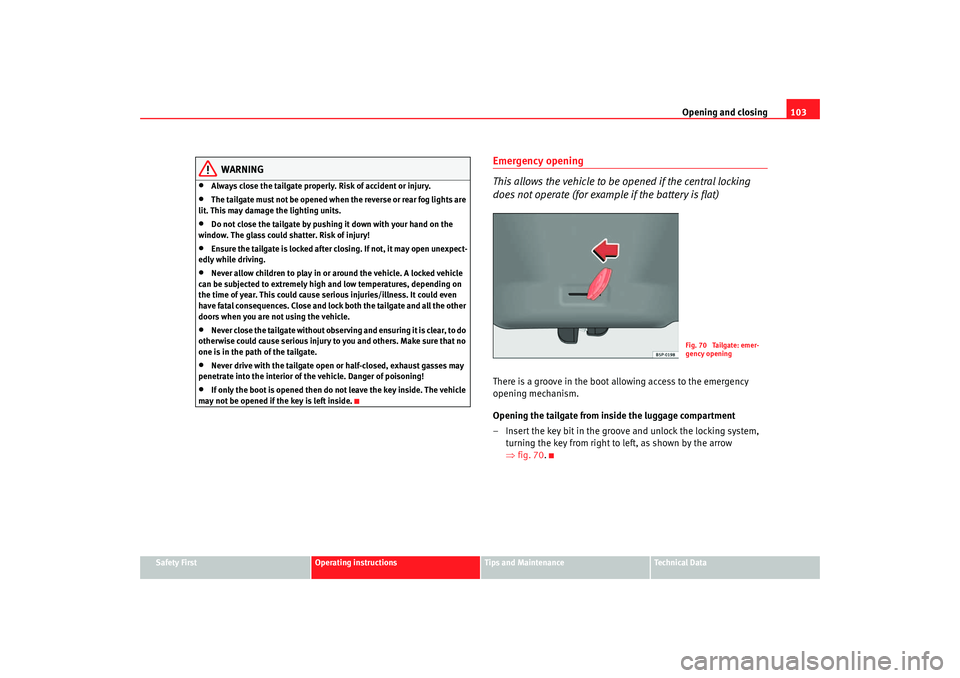
Emergency opening
This allows the vehicle to be opened if the central locking
does not operate (for example if the battery is flat)There is a groove in the boot allowing access to the emergency
opening mechanism.
Opening the tailgate from inside the luggage compartment
– Insert the key bit in the groove and unlock the locking system, turning the key from right to left, as shown by the arrow
⇒fig. 70 .
Fig. 70 Tailgate: emer-
gency opening
altea_ingles Seite 103 Donnerstag, 19. Mai 2005 3:02 15
Page 107 of 286
Opening and closing105
Safety First
Operating instructions
Tips and Maintenance
Te c h n i c a l D a t a
•
If necessary, use the safety switch to disable the rear electric windows.
Make sure that they have been disabled.Note
If the window is not able to close because it is stiff or because of an obstruc-
tion, the window will automatically open again ⇒page 105. If this happens,
check why the window could not be clos ed before attempting to close it
again.One-touch opening and closing
One-touch opening and closing means you do not have to
hold down the button.One-touch closing
– Pull up the button for the window briefly to the second position. The window closes fully.
One-touch opening
– Push down the button for the window briefly to the second posi- tion. The window opens fully.
Restoring one-touch opening and closing
– Close all windows.
– Use the key to lock the vehicle from outside and hold the key in the lock position for at least one second. The one-touch function
is now ready for operation.
The buttons ⇒page 104, fig. 71 and have two levels for opening the
window and two for closing it. This makes it easier to open or close w indows
to the desired position.
One-touch closing does not work when the ignition has been switched off,
even if the key is in the ignition.
The automatic open and close function wi ll not work if the battery has been
temporarily disconnected, or if the battery is flat. The function then has to be
reactivated.
The one-touch function and roll-back function will not work if there is a
malfunction in the electric windows. Contact an Authorised Service Centre.Roll-back function
The windows have a roll-back function. This reduces the risk
of injuries when the windows are closing.•
If a window is obstructed when closing automatically, the window stops
at this point and lowers immediately ⇒.
•
If this happens, check immediately (within 10 seconds) why the window
could not be closed before attempting to close it again. After 10 seconds the
normal automatic function resumes.
•
If the window is still obstructed , the window stops at this point.
•
If there is no obvious reason why the window cannot be closed, try to
close it again within five seconds.
If you wait longer than 10 / 5 seconds, the window will open fully when you
operate one of the buttons. One-touch closing is reactivated.
The one-touch function and roll-back function will not work if there is a
malfunction in the electric windows. Contact an Authorised Service Centre.
WARNING (continued)
A1
A2
altea_ingles Seite 105 Donnerstag, 19. Mai 2005 3:02 15
Page 109 of 286
Opening and closing107
Safety First
Operating instructions
Tips and Maintenance
Te c h n i c a l D a t a
Tilting the sliding/tilting sunroof
– Turn the rotary button to position .Always close the sliding/tilting roof fully if you park the vehicle or leave it
unattended ⇒.
The sliding/tilting sunroof can be operat ed for up to about ten minutes after
the ignition has been switched off, pr ovided the driver door and the front
passenger door are not opened.
Sunroof blind
The sunroof blind is opened together with the sliding/tilting roof. If required,
it can be closed by hand when the sunroof is closed.
WARNING
•
Incorrect use of the sliding/tilting sunroof can result in injury.
•
Never close the sliding/tilting sunr oof without observing and ensuring
it is clear, to do otherwise could cause serious injury to you and others.
Make sure that no one is in the path of the sliding/tilting sunroof.
•
Always take the vehicle key with you when you leave the vehicle.
•
Never leave children or disabled persons in the vehicle, particularly if
they have access to the keys. Unsupervised use of a key could mean that
the engine is started or that electrical equipment is used (e.g. electric
sliding/tilting sunroof). Risk of accide nt! The doors can be locked using the
remote control key. This could result in people being trapped in the vehicle
in an emergency.
•
The sliding/tilting sunroof continues to function until one of the front
doors is opened and the key removed from the ignition.
Convenience closing*Using the door lock
– Hold the key in the door lock of the driver's door in the locking position until the sliding/tilting sunroof is closed.
– Release the key to interrupt this function.
NoteThe sliding/tilting sunroof rotary button remains in the last position selected
if the roof is closed using convenience closing from outside the vehicle and
will have to be re-positioned the next time you drive.
AD
altea_ingles Seite 107 Donnerstag, 19. Mai 2005 3:02 15
Page 111 of 286

Lights and visibility109
Safety First
Operating instructions
Tips and Maintenance
Te c h n i c a l D a t a
Lights and visibilityLightsSwitching lights on and off
Switching on the side lights
– Turn the light switch ⇒ fig. 75 to position
.
Switching on dipped headlights
– Turn the light switch to position
.
Switching off the lights
– Turn the light switch to position 0. Switching on the fog lights*
– Pull the switch out of position
or
to the first stop. The
symbol
in the light switch lights up.
Switching on the rear fog lights (vehicles with front fog lights)
– Pull the switch out of position
or
to the second stop
⇒ . A warning lamp lights up in the control panel.
Switching on the rear fog lights (vehicles with no front fog lights)
– Pull the switch out of position
to the last stop. A warning lamp
lights up in the instrument panel.
WARNING
Never drive with just the side lights on . Risk of accident. The side lights are
not bright enough to illuminate the road ahead and to ensure that other
road users are able to see you. Always use your dipped headlights if it is
dark or if visibility is poor.
Note
•
The dipped beam headlights will only work with the ignition on. The side
lights come on automatically when the ignition is turned off.
•
If the lights are left on after the key has been taken out of the ignition lock,
a buzzer sounds when the driver door is opened. This is a reminder to switch
off the lights.
Fig. 75 Detail of the dash
panel: Switch for lights,
fog lights and rear fog
light
altea_ingles Seite 109 Donnerstag, 19. Mai 2005 3:02 15
Page 113 of 286
Lights and visibility111
Safety First
Operating instructions
Tips and Maintenance
Te c h n i c a l D a t a
Coming home / leaving home function*
After dark the area around the car is lit up with the aid of the
coming home / leaving home function.To activate the function
– Put the light switch into the position
or in the “Auto” position
for those vehicles fitted with the automatic lighting function.
– Remove key from ignition switch.
To deactivate the function
– Turn light switch to position 0
Coming home function*
When the system is activated and it is dark, the coming home function will
illuminate the vehicle and its surroundings by switching on the dipped head-
lights, rear lights and nu mber plate lights when the driver's door is opened.
While one of the doors or the tailgate are open, the dipped headlights, the
rear lights and the registration plate lighting remain on for about 90 seconds.
If, before this time is up, all of the doors and the tailgate are closed, another
40 seconds of lighting is given. However, if all of the doors and the tailgate
are closed after the 90 seconds have passed, the system will be deactivated
and the lights will not come on.
When the vehicle is completely closed and both 90 second periods are up,
the system will be turned off and the lights will also turn off. If you wish to
reactivate the system, you must start from the beginning.
The lighting time is defined at the time of manufacture. Leaving home function*
The function is activated when the vehicle is unlocked using the remote
control. In the dark, the leaving home function will light the dipped beam
lights, the rear lights and the registration plate lighting for about 40 seconds.
Note
•
If the vehicle is used often during the night for short trips using the
coming home function, this will place a heavy demand on the battery. To
avoid this, make longer journeys whenever possible.
•
Observe all relevant statutory requirements when using the lighting
systems described here.
•
For those vehicles fitted with the “Dot Matrix” display, the delay in turning
off the headlights (about 40 seconds) can be adjusted using the “Configura-
tion, lights and visibility” menu.
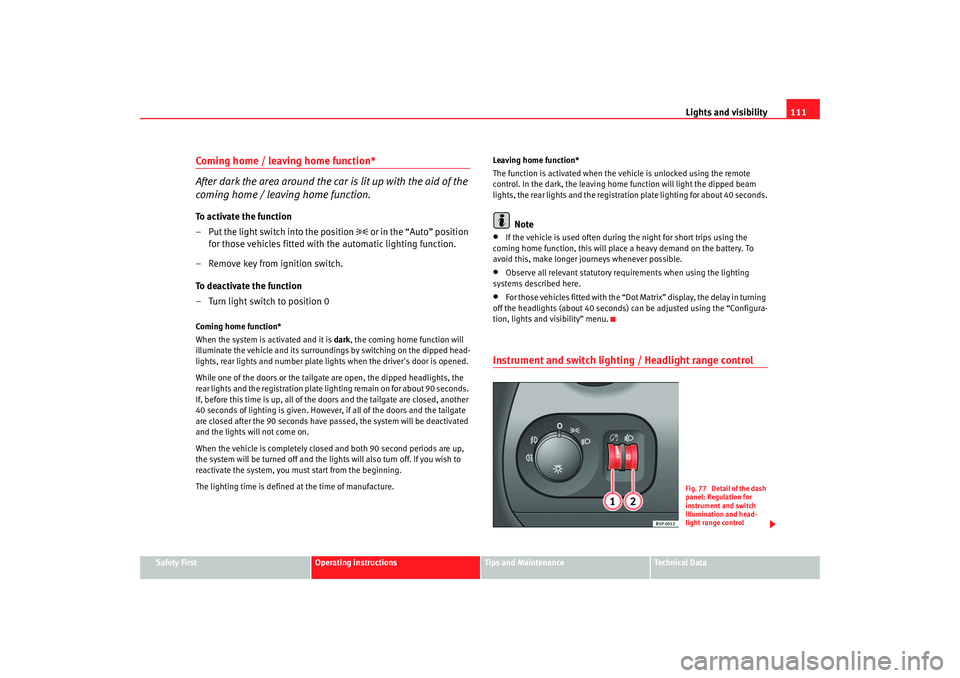
Instrument and switch lighting / Headlight range control
Fig. 77 Detail of the dash
panel: Regulation for
instrument and switch
illumination and head-
light range control
altea_ingles Seite 111 Donnerstag, 19. Mai 2005 3:02 15
Page 115 of 286
Lights and visibility113
Safety First
Operating instructions
Tips and Maintenance
Te c h n i c a l D a t a
7. Always take the vehicle key wi th you when you leave the vehicle.You should switch on the hazard warning lights to warn other road users, for
instance:•
When reaching the tail end of a traffic jam
•
There is an emergency
•
Your vehicle breaks down due to a technical defect
•
You are towing another vehicle or your vehicle is being towed.
All turn signals flash simultaneously when the hazard warning lights are
switched on. That is that the two turn signal indicator lamps
and the
indicator lamp in the switch
will flash at the same time. The hazard
warning lights also work when the ignition is switched off.
WARNING
•
The risk of an accident increases if your vehicle breaks down. Always
using the hazard warning lights and a warning triangle to draw the atten-
tion of other road users to your stationary vehicle.
•
Never park where the catalytic converter could come into contact with
inflammable materials under the vehicle, for example dry grass or spilt
petrol. This could start a fire!Note
•
The battery will run down if the hazard warning lights are left on for a long
time, even if the ignition is switched off.
•
The use of the hazard warning lights d escribed here is subject to the rele-
vant statutory requirements.
Turn signal and main beam headlight lever
The turn signal and main beam lever also operates the
parking lights and the headlight flasher.The turn signal and main beam headlight lever has the following
functions:
Switching on the turn signals
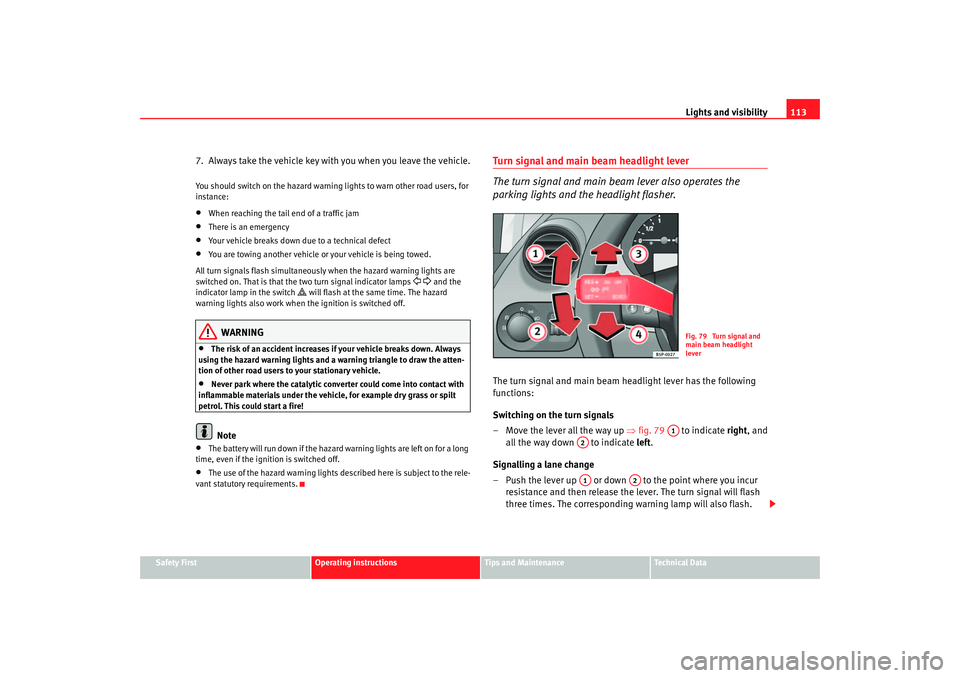
– Move the lever all the way up ⇒fig. 79 to indicate right, and
all the way down to indicate left.
Signalling a lane change
– Push the lever up or down to the point where you incur resistance and then release the lever. The turn signal will flash
three times. The corresponding warning lamp will also flash.
Fig. 79 Turn signal and
main beam headlight
lever
A1
A2A1
A2
altea_ingles Seite 113 Donnerstag, 19. Mai 2005 3:02 15
Page 117 of 286
Lights and visibility115
Safety First
Operating instructions
Tips and Maintenance
Te c h n i c a l D a t a
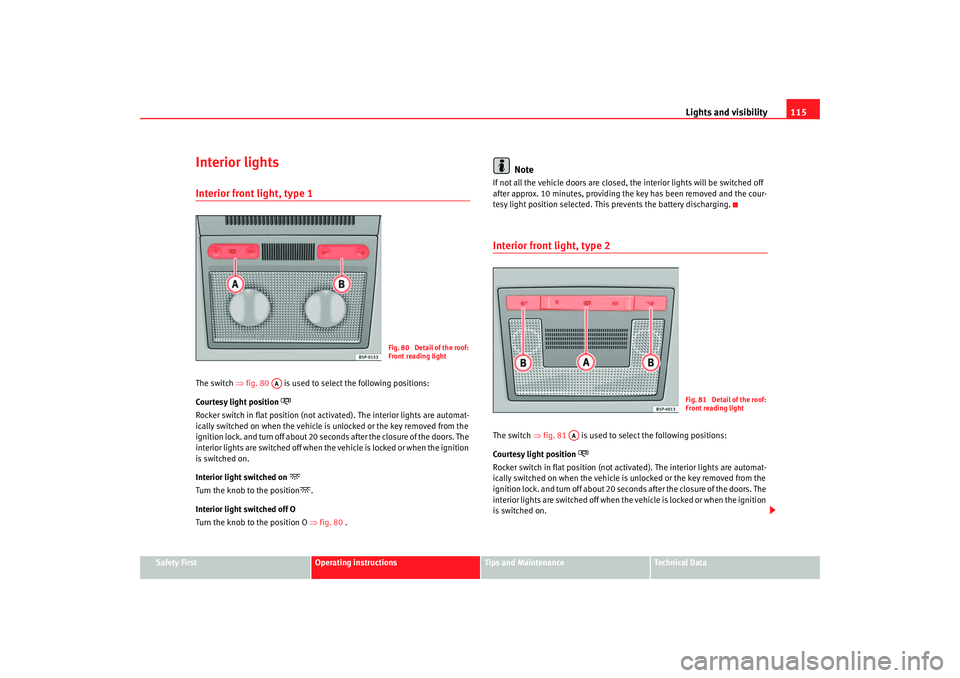
Interior lightsInterior front light, type 1 The switch ⇒fig. 80 is used to select the following positions:
Courtesy light position
Rocker switch in flat position (not ac tivated). The interior lights are automat-
ically switched on when the vehicle is unlocked or the key removed from the
ignition lock. and turn off about 20 secon ds after the closure of the doors. The
interior lights are switched off when the vehicle is locked or when the ignition
is switched on.
Interior light switched on
Turn the knob to the position
.
Interior light switched off O
Turn the knob to the position O ⇒fig. 80 .
Note
If not all the vehicle doors are closed, th e interior lights will be switched off
after approx. 10 minutes, providing the key has been removed and the cour-
tesy light position selected. This prevents the battery discharging.Interior front light, type 2 The switch ⇒fig. 81 is used to select the following positions:
Courtesy light position
Rocker switch in flat position (not ac tivated). The interior lights are automat-
ically switched on when the vehicle is unlocked or the key removed from the
ignition lock. and turn off about 20 seconds after the closure of the doors. The
interior lights are switched off when th e vehicle is locked or when the ignition
is switched on.
Fig. 80 Detail of the roof:
Front reading light
AA
Fig. 81 Detail of the roof:
Front reading light
AA
altea_ingles Seite 115 Donnerstag, 19. Mai 2005 3:02 15
Page 119 of 286
Lights and visibility117
Safety First
Operating instructions
Tips and Maintenance
Te c h n i c a l D a t a
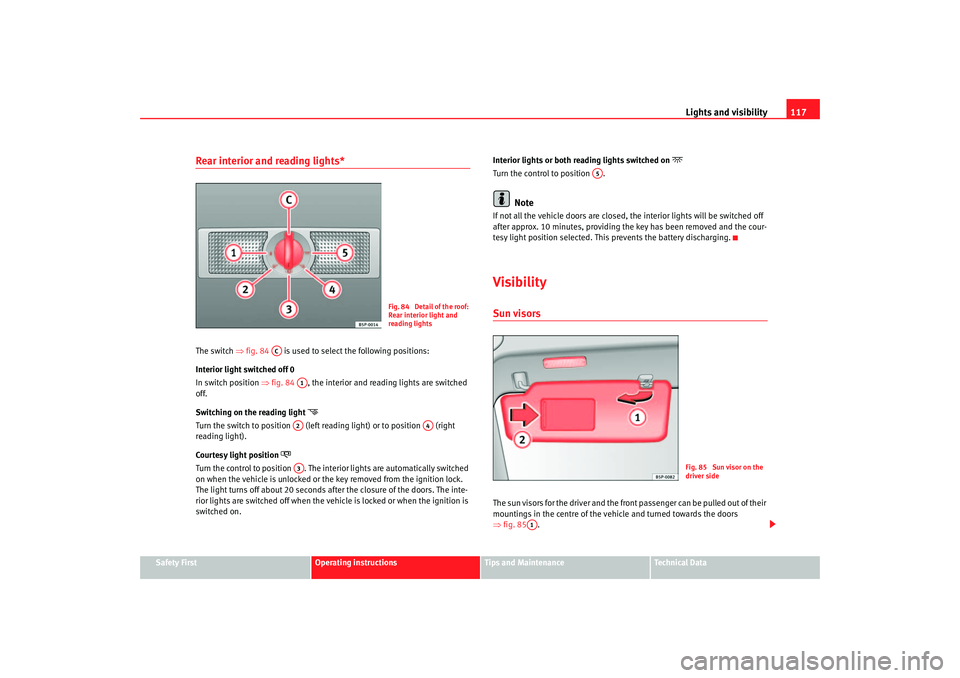
Rear interior and reading lights* The switch ⇒fig. 84 is used to select the following positions:
Interior light switched off 0
In switch position ⇒fig. 84 , the interior and reading lights are switched
off.
Switching on the reading light
Turn the switch to position (left reading light) or to position (right
reading light).
Courtesy light position
Turn the control to position . The interior lights are automatically switched
on when the vehicle is unlocked or the key removed from the ignition lock.
The light turns off about 20 seconds afte r the closure of the doors. The inte-
rior lights are switched off when the vehicle is locked or when the ignition is
switched on. Interior lights or both reading lights switched on
Turn the control to position .
Note
If not all the vehicle doors are closed, th
e interior lights will be switched off
after approx. 10 minutes, providing the key has been removed and the cour-
tesy light position selected. This prevents the battery discharging.VisibilitySun visorsThe sun visors for the driver and the front passenger can be pulled out of their
mountings in the centre of the vehicle and turned towards the doors
⇒ fig. 85 .
Fig. 84 Detail of the roof:
Rear interior light and
reading lights
AC
A1A2
A4
A3
A5
Fig. 85 Sun visor on the
driver side
A1
altea_ingles Seite 117 Donnerstag, 19. Mai 2005 3:02 15
Page 121 of 286

Lights and visibility119
Safety First
Operating instructions
Tips and Maintenance
Te c h n i c a l D a t a
Optional heated windscreen in the wiper blade* area
In some countries and with some versions, there is the possibility of heating
the windscreen in the area of the windscreen wiper blades in order to aid de-
icing in the zone.
This function is activated by turning the exterior heated rearview mirror*
control forwards.
⇒page 123
WARNING
•
Worn and dirty wiper blades obstruct visibility and reduce safety levels.
•
In cold conditions, you should not use the wash / wipe system unless
you have warmed the windscreen with the heating and ventilation system.
The washer fluid could otherwise freeze on the windscreen and obscure
your view of the road.
•
Always note the corresponding warnings on ⇒page 212, “Changing
windscreen wiper blades”.Caution
In icy conditions, always check that th e wiper blades are not frozen to the
glass before using the wipers for the fi rst time. If you switch on the wipers
when the wiper blades are frozen to the windscreen, you could damage both
the wiper blades and the wiper motor.
Note
•
The windscreen wipers will only function when the ignition is switched on
and the bonnet is closed.
•
When in use, the wipers do not go as far as the rest position. When the
lever is moved to position 0, they are totally hidden.
•
The next speed down will automatically be selected if wiper speed
⇒ page 118, fig. 86 or is selected when the vehicle stops. The set speed
will be resumed when the vehicle starts again
•
The windscreen will be wiped again after approximately five seconds once
the “automatic wipe/wash system” has been operated while the vehicle is in
transit.
•
When the “intermittent wi pe function” is on, the intervals are directly
proportional to the speed. This way, the higher the vehicle speed the shorter
the intervals.
•
The wiper will try to wipe away any obstacles that are on the windscreen.
The wiper will stop moving if the obstacle blocks its path. Remove the
obstacle and switch the wiper back on again.
•
Before removing any objects that may be trapped in the side areas of the
windscreen, always move the wiper arms to the service position
(horizontal).
A2
A3
altea_ingles Seite 119 Donnerstag, 19. Mai 2005 3:02 15