gearbox Seat Altea 2005 Owner's Manual
[x] Cancel search | Manufacturer: SEAT, Model Year: 2005, Model line: Altea, Model: Seat Altea 2005Pages: 286, PDF Size: 9.59 MB
Page 5 of 286
Contents3
ContentsThe structure of this manual
. . . . .
Content
. . . . . . . . . . . . . . . . . . . . . . . . . . . . . . . .
Safety First
. . . . . . . . . . . . . . . . . . . . . . . . . . .
Safe driving
. . . . . . . . . . . . . . . . . . . . . . . . . . . . . .
Brief introduction . . . . . . . . . . . . . . . . . . . . . . . .
Proper sitting position for occupants . . . . . . . . .
Pedal area . . . . . . . . . . . . . . . . . . . . . . . . . . . . . .
Stowing luggage . . . . . . . . . . . . . . . . . . . . . . . . .
Seat belts
. . . . . . . . . . . . . . . . . . . . . . . . . . . . . . . .
Introduction . . . . . . . . . . . . . . . . . . . . . . . . . . . . .
Why wear seat belts? . . . . . . . . . . . . . . . . . . . . . .
Seat belts . . . . . . . . . . . . . . . . . . . . . . . . . . . . . . .
Belt tension devices . . . . . . . . . . . . . . . . . . . . . .
Airbag system
. . . . . . . . . . . . . . . . . . . . . . . . . . . .
Brief introduction . . . . . . . . . . . . . . . . . . . . . . . .
Front airbags . . . . . . . . . . . . . . . . . . . . . . . . . . . .
Side airbags . . . . . . . . . . . . . . . . . . . . . . . . . . . . .
Curtain airbags . . . . . . . . . . . . . . . . . . . . . . . . . .
Deactivating airbags* . . . . . . . . . . . . . . . . . . . . .
Child safety
. . . . . . . . . . . . . . . . . . . . . . . . . . . . . .
Brief introduction . . . . . . . . . . . . . . . . . . . . . . . .
Child seats . . . . . . . . . . . . . . . . . . . . . . . . . . . . . .
Securing child seats . . . . . . . . . . . . . . . . . . . . . .
Operating instructions
. . . . . . . . . . . .
Cockpit
. . . . . . . . . . . . . . . . . . . . . . . . . . . . . . . . . . .
Overview . . . . . . . . . . . . . . . . . . . . . . . . . . . . . . .
Instruments . . . . . . . . . . . . . . . . . . . . . . . . . . . . .
Digital display in the instrument panel . . . . . . .
Instrument panel menus . . . . . . . . . . . . . . . . . . .
Warning lamps . . . . . . . . . . . . . . . . . . . . . . . . . . .
Steering wheel controls
. . . . . . . . . . . . . . . . . . .
Using these instructions . . . . . . . . . . . . . . . . . . .
Audio system . . . . . . . . . . . . . . . . . . . . . . . . . . . .
Radio navigation system . . . . . . . . . . . . . . . . . . .
Steering wheel lighting controls . . . . . . . . . . . .
Opening and closing
. . . . . . . . . . . . . . . . . . . . . .
Central locking . . . . . . . . . . . . . . . . . . . . . . . . . . .
Keys . . . . . . . . . . . . . . . . . . . . . . . . . . . . . . . . . . .
Radio frequency remote control . . . . . . . . . . . . .
Anti-theft alarm system* . . . . . . . . . . . . . . . . . . .
Tailgate . . . . . . . . . . . . . . . . . . . . . . . . . . . . . . . . .
Windows . . . . . . . . . . . . . . . . . . . . . . . . . . . . . . .
Sliding/tilting roof* . . . . . . . . . . . . . . . . . . . . . . .
Lights and visibility
. . . . . . . . . . . . . . . . . . . . . . .
Lights . . . . . . . . . . . . . . . . . . . . . . . . . . . . . . . . . .
Interior lights . . . . . . . . . . . . . . . . . . . . . . . . . . . .
Visibility . . . . . . . . . . . . . . . . . . . . . . . . . . . . . . . .
Windscreen washers . . . . . . . . . . . . . . . . . . . . . .
Mirrors . . . . . . . . . . . . . . . . . . . . . . . . . . . . . . . . .
Seats and stowage
. . . . . . . . . . . . . . . . . . . . . . .
The importance of correct seat adjustment . . . .
Head restraints . . . . . . . . . . . . . . . . . . . . . . . . . .
Electric Front seats . . . . . . . . . . . . . . . . . . . . . . .
Rear seat bench . . . . . . . . . . . . . . . . . . . . . . . . . .
Stowage compartments . . . . . . . . . . . . . . . . . . . Ashtrays*, cigarette lighter* and electrical
sockets . . . . . . . . . . . . . . . . . . . . . . . . . . . . . . . . .
First-aid kit, warning triangle, fire extinguisher
Luggage compartment . . . . . . . . . . . . . . . . . . . .
Air conditioning
. . . . . . . . . . . . . . . . . . . . . . . . . .
Heating . . . . . . . . . . . . . . . . . . . . . . . . . . . . . . . . .
Climatic* . . . . . . . . . . . . . . . . . . . . . . . . . . . . . . .
2C-Climatronic* . . . . . . . . . . . . . . . . . . . . . . . . . .
General notes . . . . . . . . . . . . . . . . . . . . . . . . . . .
Driving
. . . . . . . . . . . . . . . . . . . . . . . . . . . . . . . . . . .
Steering . . . . . . . . . . . . . . . . . . . . . . . . . . . . . . . .
Safety . . . . . . . . . . . . . . . . . . . . . . . . . . . . . . . . . .
Ignition lock . . . . . . . . . . . . . . . . . . . . . . . . . . . . .
Starting and stopping the engine . . . . . . . . . . .
Manual gearbox . . . . . . . . . . . . . . . . . . . . . . . . . .
Automatic gearbox* . . . . . . . . . . . . . . . . . . . . . .
Handbrake . . . . . . . . . . . . . . . . . . . . . . . . . . . . . .
Acoustic parking aid system* . . . . . . . . . . . . . . .
Cruise control system (CCS)* . . . . . . . . . . . . . . .
Tips and Maintenance
. . . . . . . . . . . . .
Intelligent technology
. . . . . . . . . . . . . . . . . . . . .
Brakes . . . . . . . . . . . . . . . . . . . . . . . . . . . . . . . . .
Anti-lock brake system and traction control M-ABS
(ABS and TCS) . . . . . . . . . . . . . . . . . . . . . . . . . . .
Electronic stabilisation program (ESP)* . . . . . . .
Driving and the environment
. . . . . . . . . . . . . .
Running-in . . . . . . . . . . . . . . . . . . . . . . . . . . . . . .
Catalytic converter* . . . . . . . . . . . . . . . . . . . . . . .
Driving abroad . . . . . . . . . . . . . . . . . . . . . . . . . . .
5
6
7
7
7
10
16
17
19
19
21
24
28
30
30
34
37
41
44
46
46
48
50 55
55
55
56
59
65
71
83
83
83
87
90
91
91
97
98
100
102
104
106
109
109
115
117
118
122
125
125
126
128
129
131 139
141
142
145
145
147
150
154
155
155
156
157
158
161
162
166
167
169
173
173
173
174
175
177
177
178
179
altea_ingles Seite 3 Donnerstag, 19. Mai 2005 3:02 15
Page 61 of 286
Cockpit59
Safety First
Operating instructions
Tips and Maintenance
Te c h n i c a l D a t a
Digital display in the instrument panelDisplay (without warning or information texts)
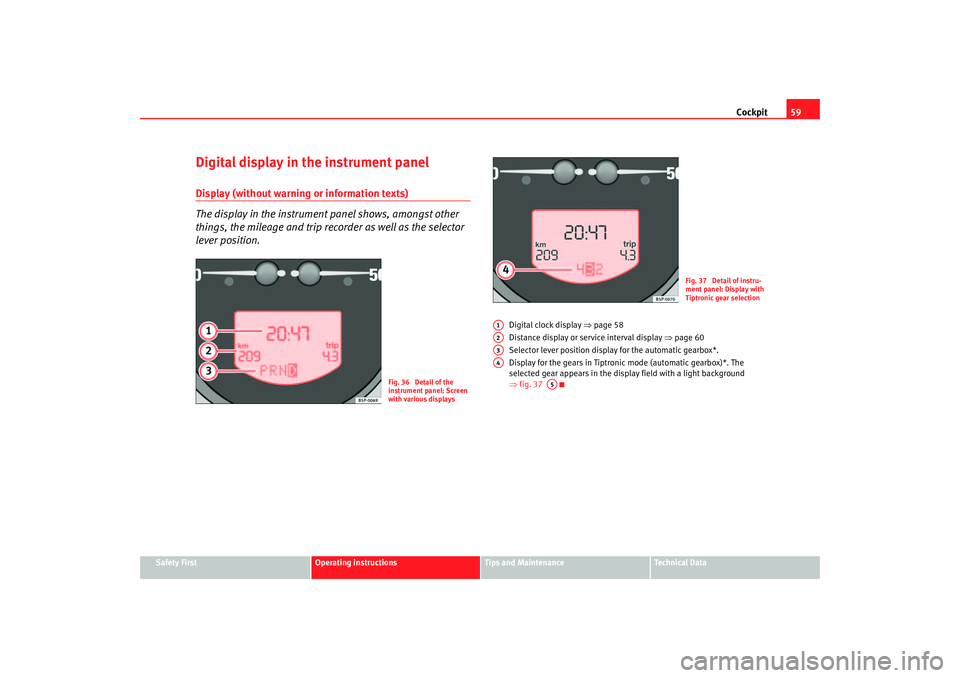
The display in the instrument panel shows, amongst other
things, the mileage and trip recorder as well as the selector
lever position.
Digital clock display ⇒page 58
Distance display or service interval display ⇒page 60
Selector lever position display for the automatic gearbox*.
Display for the gears in Tiptronic mode (automatic gearbox)*. The
selected gear appears in the display field with a light background
⇒ fig. 37
Fig. 36 Detail of the
instrument panel: Screen
with various displays
Fig. 37 Detail of instru-
ment panel: Display with
Tiptronic gear selection
A1A2A3A4
A5
altea_ingles Seite 59 Donnerstag, 19. Mai 2005 3:02 15
Page 62 of 286
Cockpit
60Displayed categories
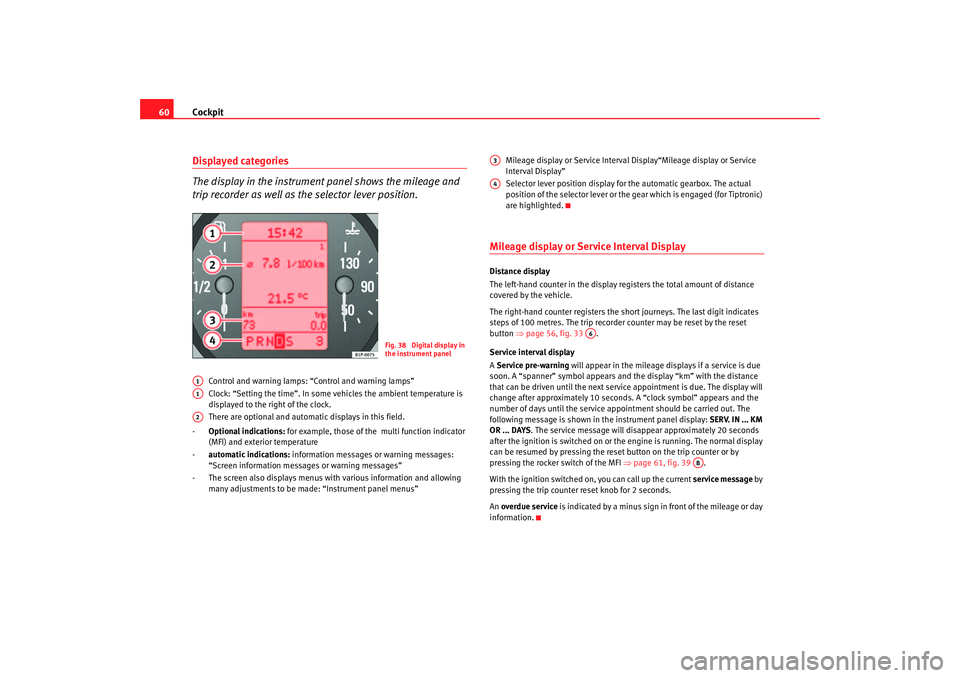
The display in the instrument panel shows the mileage and
trip recorder as well as the selector lever position.
Control and warning lamps: “Control and warning lamps”
Clock: “Setting the time”. In some vehicles the ambient temperature is
displayed to the right of the clock.
There are optional and automatic displays in this field.
- Optional indications: for example, those of the multi function indicator
(MFI) and exterior temperature
- automatic indications: information messages or warning messages:
“Screen information messages or warning messages”
- The screen also displays menus with various information and allowing many adjustments to be made: “Instrument panel menus” Mileage display or Service Interval Display“Mileage display or Service
Interval Display”
Selector lever position display for the automatic gearbox. The actual
position of the selector lever or the gear which is engaged (for Tiptronic)
are highlighted.
Mileage display or Service Interval DisplayDistance display
The left-hand counter in the display registers the total amount of distance
covered by the vehicle.
The right-hand counter regi
sters the short journeys. The last digit indicates
steps of 100 metres. The trip recorder counter may be reset by the reset
button ⇒page 56, fig. 33 .
Service interval display
A Service pre-warning will appear in the mileage displays if a service is due
soon. A “spanner” symbol appears and the display “km” with the distance
that can be driven until the next service appointment is due. The display will
change after approximately 10 seconds. A “clock symbol” appears and the
number of days until the service appointment should be carried out. The
following message is shown in the instrument panel display: SERV. IN ... KM
OR ... DAYS . The service message will disappear approximately 20 seconds
after the ignition is switched on or th e engine is running. The normal display
can be resumed by pressing the reset button on the trip counter or by
pressing the rocker switch of the MFI ⇒page 61, fig. 39 .
With the ignition switched on, you can call up the current service message by
pressing the trip counter reset knob for 2 seconds.
An overdue service is indicated by a minus sign in front of the mileage or day
information.
Fig. 38 Digital display in
the instrument panel
A1A1A2
A3A4
A6
AB
altea_ingles Seite 60 Donnerstag, 19. Mai 2005 3:02 15
Page 82 of 286
Cockpit
80Glow plug system / Engine fault
The warning lamp lights up to show that the glow plugs are
preheating the engine. It flashes if there is an engine fault.
Warning lamp
is lit
The warning lamp lights up while the glow plugs are preheating. When the
warning lamp goes off, the engine should be started straight away.
Warning lamp
flashes
If a fault develops in the engine management system while you are driving,
the glow plug lamp will flash
. Take the vehicle to an Authorised Service
Centre as soon as possible and have the engine checked.
Emission control system*
This warning lamp monitors the exhaust system.
Warning lamp
flashes:
When there is misfiring that can damage the catalytic converter. Reduce
speed and drive carefully to the near est qualified workshop to have the
engine checked.
The following information text display ed in the instrument panel display
13) :
EXHAUST TUBE SEE WORKSHOP
Warning lamp
is lit:
If a fault has developed during driving which has reduced the quality of the
exhaust gas (e. g. lambda probe fault). Reduce speed and drive carefully to
the nearest qualified workshop to have the engine checked. The following information text display
ed in the instrument panel display:
EXHAUST TUBE SEE WORKSHOP .
Electronic stabilisation programme (ESP)*
This warning lamp monitors the electronic stabilisation
program.
This program includes the ABS, EDL and TCS.
The warning lamp
has the following functions:
•
It will light for about 2 seconds when the ignition is switched on while a
test of the function is carried out.
•
It flashes when the ESP is activated when driving.
•
It will light up continuously if there is a malfunction in the ESP.
•
It will light up continuously if the ESP is switched off.
•
It will also come on if a fault should occur in the ABS because the ESP
operates in conjunction with the ABS.
If the ESP warning lamp
lights up and stays on af ter the engine is started,
this may mean that the control system has temporarily switched off the ESP.
In this case the ESP can be reactivated by switching the ignition off and then
on again. If the warning lamp goes out, this means the system is fully
functional.
Operating the foot brake
The footbrake must be depressed when this warning lamp lights up. This is
necessary when the automatic gearbox* selector lever is moved out of the
positions P or N.
13)Depending on the model version
altea_ingles Seite 80 Donnerstag, 19. Mai 2005 3:02 15
Page 114 of 286
Lights and visibility
112Instrument and switch lighting
When the headlights are switched on, the brightness of the instruments and
switch lighting can be regulated to suit your requirements by turning the
thumb wheel ⇒page 111, fig. 77 .
Those vehicles fitted with xenon gas discharge headlights are fitted with an
automatic headlight range system.
Headlight range control
Using the electrical headlight range control, you can adjust the headlight
range to the load level that is being carried in the vehicle. In this way it is
possible to avoid dazzling oncoming traffic more than necessary. At the same
time, the driver has the best possible lighting for the road ahead using the
correct headlight settings.
The headlights can only be adjusted when the dipped beam is switched on.
To lower the beam, turn the thumb wh eel down from the basic setting 0.
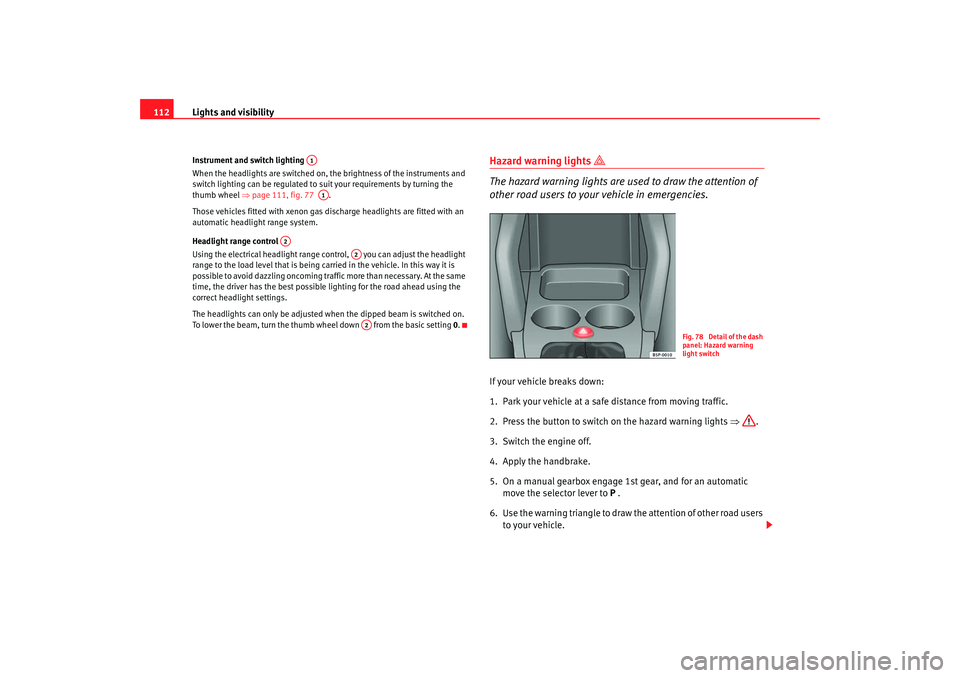
Hazard warning lights
The hazard warning lights are used to draw the attention of
other road users to your vehicle in emergencies.
If your vehicle breaks down:
1. Park your vehicle at a safe distance from moving traffic.
2. Press the button to switch on the hazard warning lights ⇒ .
3. Switch the engine off.
4. Apply the handbrake.
5. On a manual gearbox engage 1st gear, and for an automatic move the selector lever to P .
6. Use the warning triangle to draw the attention of other road users
to your vehicle.
A1A1
A2
A2A2
Fig. 78 Detail of the dash
panel: Hazard warning
light switch
altea_ingles Seite 112 Donnerstag, 19. Mai 2005 3:02 15
Page 163 of 286

Driving161
Safety First
Operating instructions
Tips and Maintenance
Te c h n i c a l D a t a
Caution
If the engine has been driven hard for a long period, the engine could over-
heat when it is switched off. Risk of engine damage. For this reason, you
should idle the engine for approx. 2 minutes before you switch it off.Manual gearboxDriving a car with a manual gearbox
Selecting the reverse gear
– T h e v e h i c l e s h o u l d b e s t a t i o n a r y with the engine idling. Press the
clutch right down.
–Place the gear lever into neutra l gate and push the lever all the
way down.
– Slide the gearstick to the left, and then into the reverse position shown on the gearstick.The reversing lights come on when the reverse gear is selected and the igni-
tion is on.
WARNING
•
When the engine is running, the vehicle will start to move as soon as a
gear is engaged and the clutch released.
•
Never select the reverse gear when the vehicle is in motion. Risk of acci-
dent.
Fig. 132 Detail of the
centre console: Shift
diagram of a 5-speed
manual gearbox
Fig. 133 Detail of the
centre console: Shift
diagram of a 6-speed
manual gearbox
altea_ingles Seite 161 Donnerstag, 19. Mai 2005 3:02 15
Page 164 of 286

Driving
162
Note•
Do not rest your hand on the gear lever when driving. The pressure of your
hand could cause premature wear on the selector forks in the gearbox.
•
When changing gear, you should always depress the clutch fully to avoid
unnecessary wear and damage.
•
Do not hold the car “on the clutch” on hills. This causes premature wear
and damage to the clutch.
Automatic gearbox*Selector lever positionsSelector lever positions indicated on the cover
P Parking position (lever locked).
R Reverse position. N
Neutral position (lever locked). This position is similar to the neutral
position for manual gearboxes).
D Drive position (economic driving program).
S Sports driving position.
+/- Tiptronic driving position (this progra m is similar to the operation of a
manual gearbox).
Driving programs
The automatic gearbox has two gearbox programsSelecting the normal program
– Put the selector lever into position D to drive forwards
– Put the selector lever into position R to reverse. This position is
shared by all programs for reversing.
Fig. 134 Automatic
gearbox: Selector lever
positions
Fig. 135 Program selec-
tion
altea_ingles Seite 162 Donnerstag, 19. Mai 2005 3:02 15
Page 166 of 286

Driving
164Driving with an automatic gearbox*
The drive and reverse gears are automatically engaged.Driving
– Press and hold the foot brake.
– Press on the button on the selector lever knob (on the left,
⇒fig. 137.
– Select a gear for driving ( R, D or S).
– Release the button and wait a few seconds for the gear to engage, a light jerk will be felt.
– Release the brake and accelerate. Short stop
– Hold the vehicle stationary with the brake pressed down (for
example at traffic lights). The sele ctor lever does not need to be
put into the positions P or N for this.
– Do not press the accelerator.
Parking the vehicle
– Press the foot brake and hold to bring the vehicle to a stop.
–Apply the handbrake firmly.
– Press in the button on the selector lever knob, move the lever to the position P and release the button.
Driving slowly
– Move the selector lever to the position D and press to the right to
put the lever into Tiptronic mode.
– Press the gear lever towards (-) to select a lower gear.
Hill stop
– Hold the vehicle, in all cases, using the foot brake to prevent rolling back.
– Do not try to slow the vehicle using another forward gear (engine braking).
Descending gradients
– With the gear engaged, release the brake and accelerate.
The steeper the gradient the lower the gear must be for effective engine
braking. For example, if 3rd gear is used on a very steep gradient, the engine
Fig. 137 Driving
altea_ingles Seite 164 Donnerstag, 19. Mai 2005 3:02 15
Page 167 of 286

Driving165
Safety First
Operating instructions
Tips and Maintenance
Te c h n i c a l D a t a
braking is insufficient and vehicle accelerates. So that the engine speed does
not become excessive, the gearbox changes to the next highest gear. Depress
the brake pedal and move the selector lever to the Tiptronic gate to return to
3rd gear.
WARNING
•
The driver should never leave the vehicle while the engine is running or
with any gear selected. If for any reason you must leave the vehicle with the
engine running, apply the handbrake and move the selector lever to posi-
tion P.
•
When the engine is running and the po sitions D, S or R are selected, it
is necessary to hold the vehicle with the foot brake because the vehicle will
creep at a low speed.
•
Never accelerate while changing the position of the selector lever (risk
of an accident).
•
The selector lever must never be mo ved into the positions R or P while
moving (risk of an accident).
•
Before descending a steep gradient, reduce speed and use the Tiptronic
program to select a lower gear.
•
If you must stop on a hill, always hold the vehicle using the footbrake
to avoid rolling back.
•
The footbrake must not be held fo r a long period of time, not even
lightly; continuous braking will cause overheating of the brakes and a
reduction or even a loss of braking power and a significant increase in
braking distances.
•
Never allow the vehicle to coast down a gradient with the selector lever
in positions N or D, even when the engine is not running. For descents, the
use of the Tiptronic program is recommended to keep the speed reduced.
Caution
•
Never use the automatic gearbox to hold the vehicle stationary on a hill,
even for short periods, as this may overheat the gearbox and cause damage.
Apply the handbrake or depress the foot brake to hold the vehicle in position.
•
If the vehicle is allowed to roll with the engine stopped but the selector in
position N then the gearbox may be damaged because it will not be
lubricated.
Using the Tiptronic gear system
The Tiptronic system allows the driver to manually select
gearsChanging gear with Tiptronic
– Put the lever in the position D and press towards the right to
enter the Tiptronic gate.
Fig. 138 Changing gear
with Tiptronic
altea_ingles Seite 165 Donnerstag, 19. Mai 2005 3:02 15
Page 204 of 286
Checking and refilling levels
202
WARNING
All work on the engine or in the engine compartment, e.g. checking and
refilling fluids, involves the danger of injury and scalding as well as the risk
of accident or fire.•
Never open the bonnet if you see steam, smoke or coolant escaping
from the engine compartment. Otherwise, there is a risk of sustaining
burns. Wait until no more steam or coolant is emitted, then allow the
engine to cool before carefully opening the bonnet.
•
Switch off the engine and remove the key from the ignition.
•
Apply the handbrake and move the gea r stick to neutral or selector
lever to position P.
•
Keep children away from the vehicle.
•
Never touch hot engine parts. This is a risk of burns.
•
Never spill liquids on a hot engine or on a hot exhaust gas system. This
is a fire hazard.
•
Avoid causing short-circuits in the electrical system, particularly at the
points where the jump leads are attached ⇒page 250. The battery could
explode.
•
Never touch the radiator fan. It is temperature controlled and could
start automatically, even when the engine has been switched off and the
key removed from the ignition!
•
Do not unscrew the cap on the expansion tank when the engine is hot.
If the coolant is hot, the cooling system will be pressurised!
•
Protect face, hands and arms by covering the cap with a large, thick
cloth to protect against escaping coolant and steam.
•
Always make sure you have not left any objects, such as cleaning cloths
and tools, in the engine compartment.
•
If you have to work underneath the vehicle, you must use suitable
stands additionally to support the vehicle, risk of accident!. A hydraulic
jack is insufficient for securing the vehicle and there is a risk of injury.
•
If any work has to be performed when the engine is started or with the
engine running, there is an additional, potentially fatal, safety risk from the
rotating parts, such as the drive belt s, alternator, radiator fan, etc., and
from the high-voltage ignition system. You should also observe the
following points:
−Never touch the electrical wiring of the ignition system.
− Ensure that jewellery, loose clothing and long hair do not get
trapped in rotating engine parts. Danger of death. Before starting any
work remove jewellery, tie back and cover hair, and wear tight-fitting
clothes.
− Always think carefully about pressing the accelerator if a gear is
engaged in either an automatic or manual gearbox. The vehicle could
move, even if the handbrake is applied. Danger of death.
•
If work has to be carried out on the fuel system or on electrical compo-
nents, you must observe the following safety notes in addition to the above
warnings:
−Always disconnect the battery. The vehicle must be unlocked when
this is done, otherwise the alarm will be triggered.
− Do not smoke.
− Never work near naked flames.
− Always have a fire extinguisher on hand.Caution
When changing or topping up service fluids, make absolutely certain that you
fill the fluids into the correct reservoirs. Failure to observe this point will result
in serious malfunctions and engine damage!
WARNING (continued)
altea_ingles Seite 202 Donnerstag, 19. Mai 2005 3:02 15