change time Seat Altea 2009 Owner's Manual
[x] Cancel search | Manufacturer: SEAT, Model Year: 2009, Model line: Altea, Model: Seat Altea 2009Pages: 299, PDF Size: 9.39 MB
Page 63 of 299
Cockpit
62Display with multi-function display (MFD)*
The multi-function display (MFD) shows you information on
the journey and fuel consumption.
The multi-function system uses two automatic memories: 1 - Actual
memory and 2 - Total memory. The selected memory will be shown in the upper right-hand corner of the display.
Selecting a memory
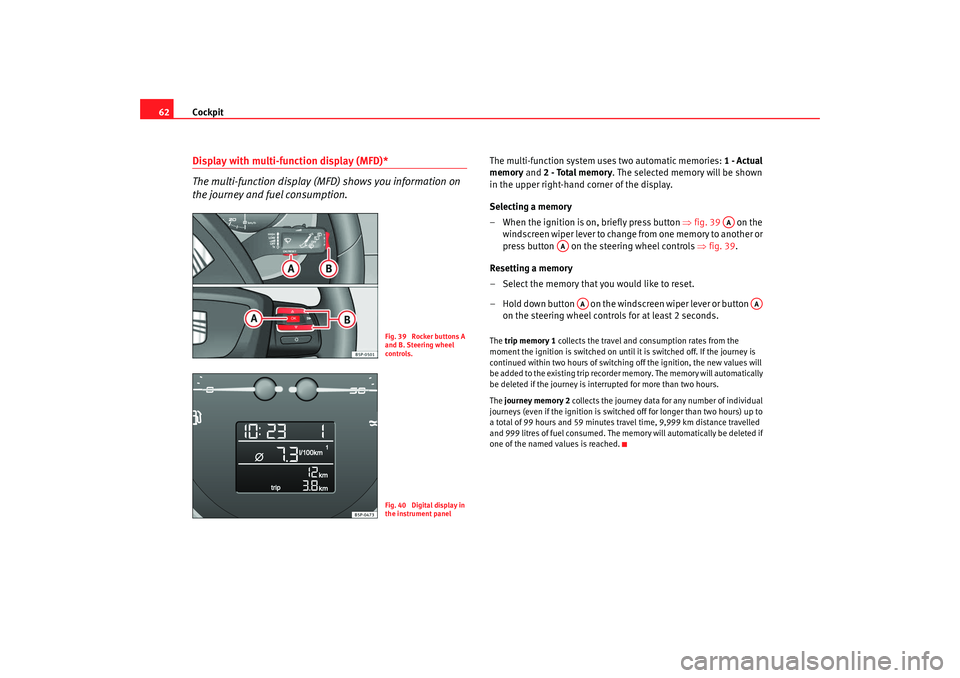
– When the ignition is on, briefly press button ⇒ fig. 39 on the
windscreen wiper lever to change from one memory to another or
press button on the steering wheel controls ⇒fig. 39.
Resetting a memory
– Select the memory that you would like to reset.
– Hold down button on the windscreen wiper lever or button on the steering wheel controls for at least 2 seconds.The trip memory 1 collects the travel and consumption rates from the
moment the ignition is switched on until it is switched off. If the journey is
continued within two hours of switching off the ignition, the new values will
be added to the existing trip recorder memory. The memory will automatically
be deleted if the journey is interrupted for more than two hours.
The journey memory 2 collects the journey data for any number of individual
journeys (even if the ignition is switched off for longer than two hours) up to
a total of 99 hours and 59 minutes trav el time, 9,999 km distance travelled
and 999 litres of fuel consumed. The me mory will automatically be deleted if
one of the named values is reached.
Fig. 39 Rocker buttons A
and B. Steering wheel
controls.Fig. 40 Digital display in
the instrument panel
AA
AA
AA
AA
Altea_EN.book Seite 62 Montag, 19. Januar 2009 1:31 13
Page 70 of 299
Cockpit69
Safety First
Operating instructions
Practical tips
Te c h n i c a l D a t a
Note
For electronic and vehicle equipment on e or more of these menus will be
displayed.
Multi-function display menu (MFD)
The multi-function display (MFD) shows you information on
the journey and fuel consumption.The multifunction display (MFD) has two automatic memories: 1 - Trip
memory and 2 - Total memory . The selected memory is shown on the upper
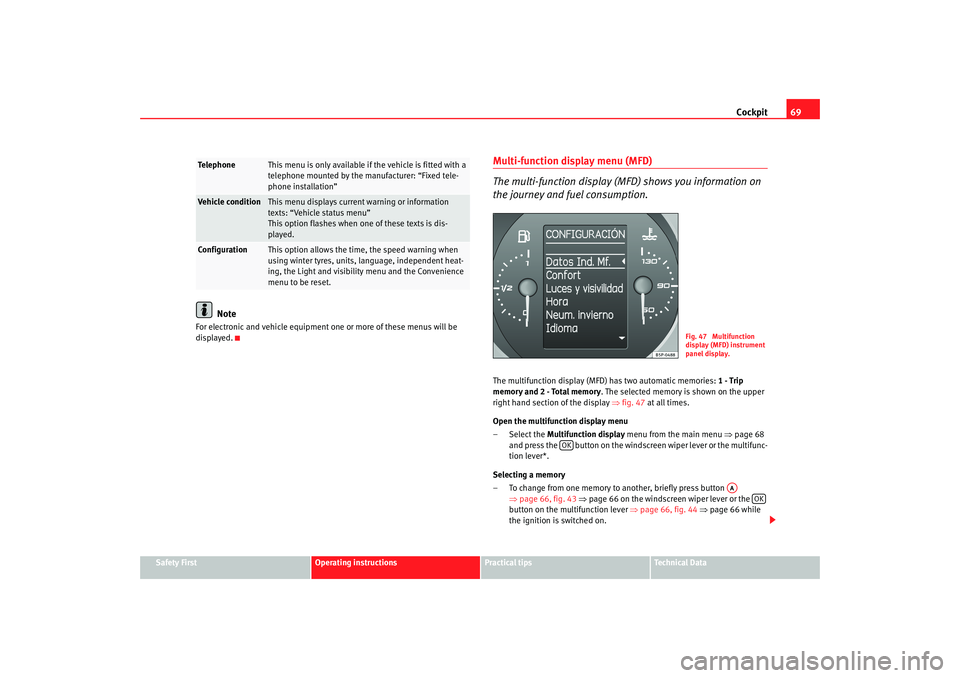
right hand section of the display ⇒fig. 47 at all times.
Open the multifunction display menu
– Select the Multifunction display menu from the main menu ⇒page 68
and press the button on the windscreen wiper lever or the multifunc-
tion lever*.
Selecting a memory
– To change from one memory to another, briefly press button ⇒page 66, fig. 43 ⇒ page 66 on the windscreen wiper lever or the
button on the multifunction lever ⇒page 66, fig. 44 ⇒ page 66 while
the ignition is switched on.
Telephone
This menu is only available if the vehicle is fitted with a
telephone mounted by the manufacturer: “Fixed tele-
phone installation”
Vehicle condition
This menu displays current warning or information
texts: “Vehicle status menu”
This option flashes when one of these texts is dis-
played.
Configuration
This option allows the time, the speed warning when
using winter tyres, units, language, independent heat-
ing, the Light and visibility menu and the Convenience
menu to be reset.
Fig. 47 Multifunction
display (MFD) instrument
panel display.
OK
AA
OK
Altea_EN.book Seite 69 Montag, 19. Januar 2009 1:31 13
Page 73 of 299
Cockpit
72The warning and information texts may be viewed in this menu. If there is no
warning or information message, the option Vehicle status is not displayed.
If there are several messages, each one is shown for a few seconds.
Example of menu use ⇒page 66
Note
If there are no warning messages, this menu is not available.Configuration menu
This menu is used to make the settings for the vehicle func-
tions.Open Configuration menu
– Select the option Configuration from the main menu: “Main
menu” and press button ⇒page 66, fig. 43 on the wind-
screen wiper lever. or
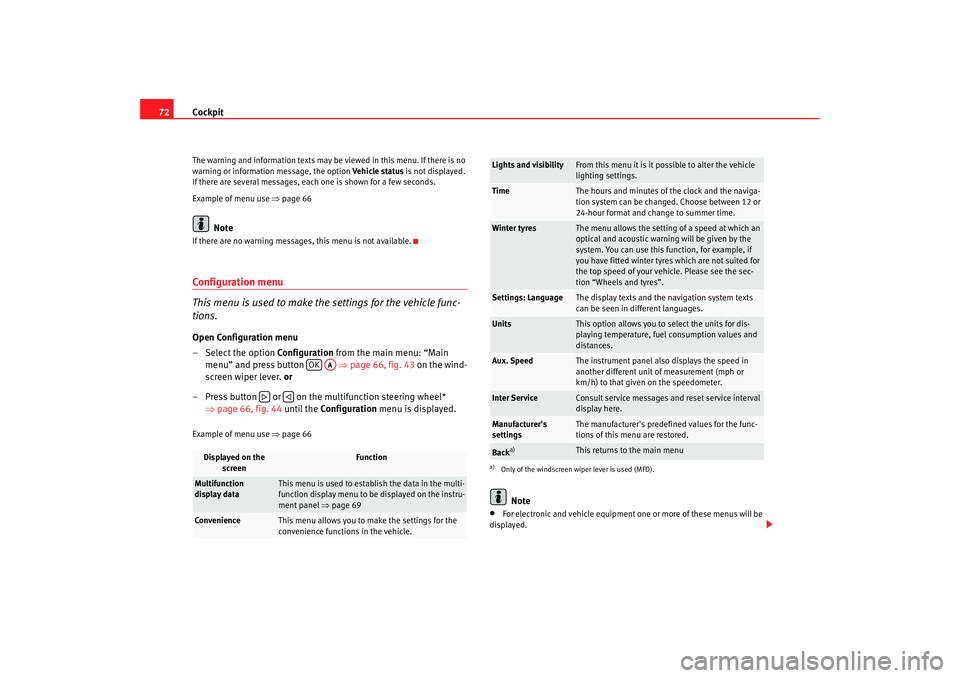
– Press button or on the multifunction steering wheel* ⇒page 66, fig. 44 until the Configuration menu is displayed.Example of menu use ⇒page 66
Note
•
For electronic and vehicle equipment on e or more of these menus will be
displayed.
Displayed on the screen
Function
Multifunction
display data
This menu is used to establish the data in the multi-
function display menu to be displayed on the instru-
ment panel ⇒page 69
Convenience
This menu allows you to make the settings for the
convenience functions in the vehicle.
OK
AA
Lights and visibility
From this menu it is it possible to alter the vehicle
lighting settings.
Time
The hours and minutes of the clock and the naviga-
tion system can be changed. Choose between 12 or
24-hour format and change to summer time.
Winter tyres
The menu allows the setting of a speed at which an
optical and acoustic warning will be given by the
system. You can use this function, for example, if
you have fitted winter tyres which are not suited for
the top speed of your vehicle. Please see the sec-
tion “Wheels and tyres”.
Settings: Language
The display texts and the navigation system texts
can be seen in different languages.
Units
This option allows you to select the units for dis-
playing temperature, fuel consumption values and
distances.
Aux. Speed
The instrument panel also displays the speed in
another different unit of measurement (mph or
km/h) to that given on the speedometer.
Inter Service
Consult service messages and reset service interval
display here.
Manufacturer's
settings
The manufacturer's predefined values for the func-
tions of this menu are restored.
Back
a)
This returns to the main menu
a)Only of the windscreen wiper lever is used (MFD).
Altea_EN.book Seite 72 Montag, 19. Januar 2009 1:31 13
Page 119 of 299
Lights and visibility
118Indicator and main beam headlight lever
The turn signal and main beam lever also operates the
parking lights and the headlight flasher.The turn signal and main beam headlight lever has the following
functions:
Switching on the turn signals
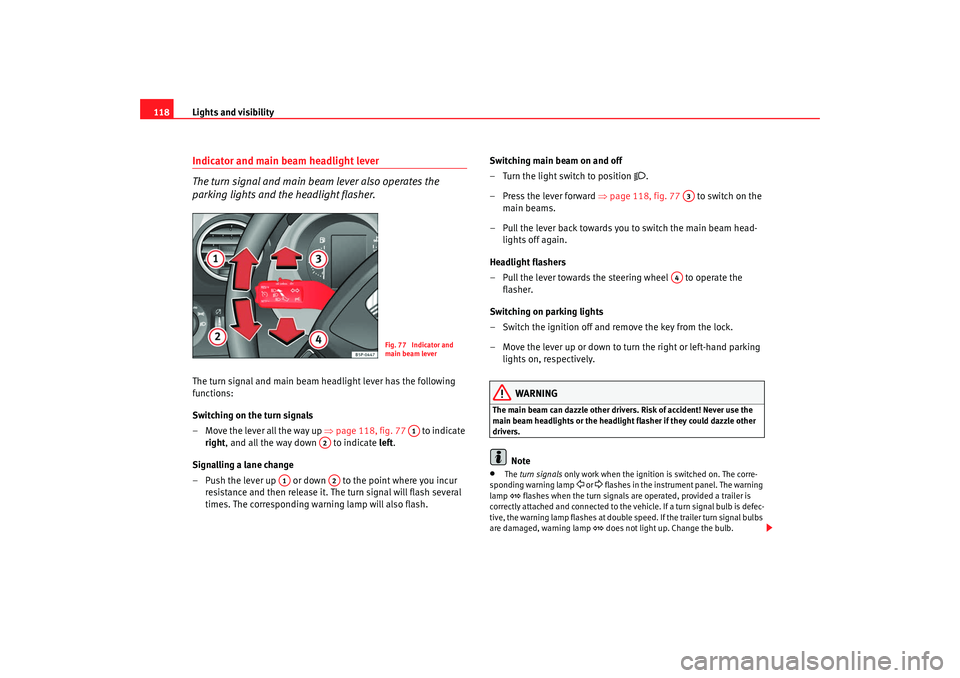
– Move the lever all the way up ⇒page 118, fig. 77 to indicate
right , and all the way down to indicate left.
Signalling a lane change
– Push the lever up or down to the point where you incur resistance and then release it. The turn signal will flash several
times. The corresponding warning lamp will also flash. Switching main beam on and off
– Turn the light switch to position
.
–Press the lever forward ⇒ page 118, fig. 77 to switch on the
main beams.
– Pull the lever back towards you to switch the main beam head- lights off again.
Headlight flashers
– Pull the lever towards the steering wheel to operate the flasher.
Switching on parking lights
– Switch the ignition off and remove the key from the lock.
– Move the lever up or down to turn the right or left-hand parking lights on, respectively.
WARNING
The main beam can dazzle other driver s. Risk of accident! Never use the
main beam headlights or the headligh t flasher if they could dazzle other
drivers.
Note
•
The turn signals only work when the ignition is switched on. The corre-
sponding warning lamp
or flashes in the instrume nt panel. The warning
lamp
flashes when the turn signals are operated, provided a trailer is
correctly attached and connected to the vehicle. If a turn signal bulb is defec-
tive, the warning lamp flashes at double speed. If the trailer turn signal bulbs
are damaged, warning lamp
does not light up. Change the bulb.
Fig. 77 Indicator and
main beam lever
A1
A2
A1
A2
A3
A4
Altea_EN.book Seite 118 Montag, 19. Januar 2009 1:31 13
Page 151 of 299
Seats and stowage
150Luggage compartmentStowing luggage
All luggage must be securely stowed.Please observe the following points to ensure the vehicle handles
well at all times:
– Distribute the load as evenly as possible.
– Place heavy objects as far forward in the luggage compartment
as possible.
– Secure luggage in the luggage compartment with suitable straps on the fastening rings.
WARNING
•
Loose luggage and other loose items in the vehicle can cause serious
injuries.
•
Loose objects in the luggage compartment can suddenly move and
change the way the vehicle handles.
•
During sudden manoeuvres or accidents, loose objects in the
passenger compartment can be flung forward, injuring vehicle occupants.
•
Always store objects in the luggage compartment and secure with suit-
able straps. This is especially important for heavy objects.
•
When you transport heavy objects, always take in account that a
change in the centre of gravity can also cause changes in vehicle handling.
•
Please observe information on safe driving ⇒page 7, “Safe driving”.
Caution
Hard objects on the shelf could chafe against the wires of the heating
element in the rear window and cause damage.
Note
The ventilation slots in front of the rear side windows must not be covered as
this would prevent stale air being extracted from the vehicle.
Altea_EN.book Seite 150 Montag, 19. Januar 2009 1:31 13
Page 164 of 299
Heating, Ventilation and Air conditioning 163
Safety First
Operating instructions
Practical tips
Te c h n i c a l D a t a
When the button is off (LED off),
the heating, ventilation and air condi-
tioning system is off.
When the button is off, the heating, ventilation and air conditioning
system is switched off to save fuel. The temperature continues to self-regu-
late. The set temperature can then only be reached if it is higher than the
ambient temperature.
Driver and passenger temperature control
The button controls the synchronisation of the 2 Climatronic climate
zones.
When the button is on (LED lit), the climate zone of the Climatronic is
personalised, for example: Driver side temperature 22°C and passenger side
temperature 23°C.
When the button is off (LED off), the climate zone of the Climatronic is
synchronised, for example: Driver side temperature 22°C and passenger side
temperature 22°C.
If the button is off and the passenger side temperature is changed, the
function is automatically activated.
Air recirculation mode
Air recirculation mode prevents fumes or unpleasant smells
from coming from the outside.– Press the button ⇒ page 162, fig. 132 to switch air recir-
culation mode on or off. It is switched on if the following symbol
appears in the display
.
Air recirculation mode prevents strong odours in the ambient air from
entering the vehicle interior, for example when passing through a tunnel or in
a traffic jam. With low temperatures outside, the air recirculation increases the effective-
ness of the heating system by heating the air inside the passenger compart-
ment rather than the air from outside.
With high ambient temperatures, the air recirculation increases the effective-
ness of the air conditioning system by cooling the air inside the passenger
compartment rather than the ambient air.
If the windscreen air output is on and the air recirculation mode is pressed,
this remains active. When the recirculation mode is on, if the air distribution
towards the windscreen mode is selecte
d, the recirculation mode is deacti-
vated. For safety reasons, the air recirculation mode should not be
connected.
WARNING
In air recirculation mode, no cold air from the outside enters the vehicle
interior. If the air conditioning syst em is switched off, the windows can
quickly mist over. Therefore, never leave the air recirculation mode
switched on for a long time (risk of accident).General notesThe impurity filter
The impurity filter (a combined particle filter and active carbon filter) serves
as a barrier against impurities in the ambient air, including dust and pollen.
For the air conditioning system to work with maximum efficiency, the pollen
filter must be replaced at the intervals specified in the Service Schedule.
If the filter loses efficiency prematurely due to use in areas reaching very high
pollution levels, the pollen filter must be changed more frequently than
stated in the Service Schedule.
ACAC
DUAL
DUALDUAL
DUAL
A2
Altea_EN.book Seite 163 Montag, 19. Januar 2009 1:31 13
Page 174 of 299
Driving173
Safety First
Operating instructions
Practical tips
Te c h n i c a l D a t a
the full power of the engi
ne. This programme is not recommended for use on
the motorway or in the city.
Selecting the manual programme (tiptronic)
This programme allows driving similar to a manual gearbox.
This programme may be accessed using the selector lever or from the
steering wheel controls when this option is fitted ⇒page 175.
Selector lever locking
The selector lever lock prevents gears from being engaged
inadvertently, which would cause the vehicle to move.Releasing the selector lever lock
–Start the vehicle. – Press and release the brake pedal, at the same time press the
button on the selector lever.
The lock is only activated when the vehicle is stopped or at a speed of less
than 5 km/h. At higher speeds, the lock is automatically released in position
N.
For rapid changes of position (e.g. from R to D) the lever will not lock. If the
lever remains in the position N more than one second then it is locked. With
the automatic lock, the lever is prevented passing from P and N to any other
gear without first pressing the brake pedal.
The selector lever must be put in the position P in order to remove the key.Driving with an automatic gearbox* / DSG automatic gearbox
The drive and reverse gears are automatically engaged.
Fig. 141 Deactivating the
lock
Fig. 142 Driving
Altea_EN.book Seite 173 Montag, 19. Januar 2009 1:31 13
Page 182 of 299
Driving181
Safety First
Operating instructions
Practical tips
Te c h n i c a l D a t a
To w i n g b r a c k e tIn towing mode, the rear parking sensors are not enabled when you select
reverse gear or press the switch
. This function may not be guaranteed on
towing brackets that are not factory fitted. This results in the following restric-
tions:
SEAT parking system*
No warning is given
SEAT parking system plus*
There is no rear distance warning. The system will still give a warning when
obstacles are detected while driving forwards. The optical display changes to
towing mode.
Fault messagesIf you hear a long beep for a few seconds and the LED on the switch
* starts
flashing when you switch on the parking aid, a system fault has occurred.
Please refer the problem to an Authori sed SEAT dealer or specialised work-
shop.
Note
If the fault is not corrected before you switch off the ignition, it will only be
indicated by the flashing LED on the switch
the next time you switch on
the parking aid.
Cruise control system (CCS)*Description
The cruise control system is able to maintain the set speed in
the range from approx. 30 km/h to 180 km/h.Once the speed setting has been saved, you may take your foot off the accel-
erator.
WARNING
It could be dangerous to use the cruise control system if it is not possible
to drive at constant speed.•
For safety reasons the cruise control system should not be used in
dense traffic, in sections with bends or where roads are in bad conditions
(e.g. aquaplanning, loose chippings, slippery surfaces, snow). Risk of acci-
dent.
•
Always switch the CCS off when finish to use it in order to avoid an
involuntary use.
•
It is dangerous to use a set speed which is too high for the current road,
traffic or weather conditions. Risk of accident.Note
The cruise control cannot maintain a constant speed when descending down-
hills. The vehicle will accelerate due to its own weight. Use the foot brake to
slow the vehicle.
Altea_EN.book Seite 181 Montag, 19. Januar 2009 1:31 13
Page 192 of 299
Intelligent technology191
Safety First
Operating instructions
Practical tips
Te c h n i c a l D a t a
Caution
•
Never let the brakes “drag” by leaving your foot on the pedal when you do
not really intend to brake. This overhe ats the brakes, resulting in longer stop-
ping distances and greater wear.
•
Before driving down a long, steep gradient, it is advisable to reduce speed
and change to a lower gear (or move the selector lever to a lower gear position
if your car has automatic transmission). This makes use of engine braking
and prolongs the service life of the brakes. If you still have to use the brakes,
it is better to brake firmly at intervals than to apply the brakes continuously.Note
•
If the brake servo is not functioning due to a malfunction, or if the vehicle
has to be towed, you will have to press the brake pedal considerably harder
to make up for the lack of servo assistance.
•
If you wish to equip the car with accessories such as a front spoiler or
wheel covers, it is important that the flow of air to the front wheels is not
obstructed, otherwise the brakes can overheat.
Power steering (servotronic*)
The power steering assists the driver when turning the
steering wheel (with the engine running).The power steering assists the driver by reducing the force needed to turn the
steering wheel. In cars equipped with servotronic* power steering the degree
of power assistance is regulated electronically according to road speed.
The power steering will keep on working even if the servotronic* device fails.
The degree of power assistance will, however, no longer adapt to different
speeds. If the electronic regulating system is not working properly, this is
most noticeable when turning the steering wheel at low speeds (for instance when parking) – more effort will be requ
ired than usual. The fault should be
corrected by a qualified work shop as soon as possible.
The power steering does not work if the engine is off. In this case the steering
wheel is very hard to turn.
If the steering is held at its turning limit when the car is stationary, this will
place an excessive load on the power steering system. Turning the steering
wheel to its limit places a load on the sy stem, which causes noise. It will also
reduce the idling speed of the engine.
Caution
When the engine is running, do not tu rn the steering wheel to its limit for
more than 15 seconds. Otherwise, there is a risk of damaging the power
steering.
Note
•
If the power steering should fail at any time or the engine is switched off
(for instance when being towed), the car can still be steered. However, more
effort will be required to turn the steering wheel.
•
If the system is leaking or malfunctioning, please take the car to a quali-
fied workshop as soon as possible.
•
The power steering requires a special hydraulic fluid. The container is
located in the engine compartment (front left). The correct fluid level in the
reservoir is important for the power steering to function properly. The
hydraulic fluid level is checked at the Inspection Service.
Altea_EN.book Seite 191 Montag, 19. Januar 2009 1:31 13
Page 195 of 299
Driving and the environment
194Diesel engine particulate filter*
The diesel engine particulate filter eliminates soot produced
by burning diesel.The diesel engine dust filter eliminates most of the soot from the exhaust gas
system. Under normal driving conditions, the filter cleans itself. If the driving
conditions do not allow the filter to cle an itself (for example, multiple short
trips) the filter will be obstructed by dust and pollen and the indicator
for
the diesel engine particulate filter indicator will light. See under Warning
Lights.
WARNING
•
The diesel engine particulate filter may reach extremely high tempera-
tures; it should not enter into cont act with flammable materials under-
neath the vehicle. Failure to comply could result in fire.Caution
•
The vehicle is not designed for refuel ling with mixtures of FAME fuel
(biodiesel) over 7% in accordance with DIN 51628. The diesel particle filter is
damaged when this mixture percentage is exceeded.
Economical and ecological drivingEconomical and environmental drivingFuel consumption, environmental pollution and wear to the engine, brakes
and tyres depends in large part on your driving style. By adopting an econom-
ical driving style and anticipating the traffic situation ahead, you can easily reduce fuel consumption by 10-15%. Next, we provide you with some tips in
order to help reduce contamination
and, at the same time, save money.
Driving ahead of the circumstances
A vehicle uses most fuel when accele rating. When you anticipate the situa-
tion, you have to brake less often and, thus, accelerate less. If it is possible,
let the vehicle roll with a gear engaged, for example, if you see a red light
ahead. The braking effect preserves brakes and tyres from wear; the emis-
sions and fuel consumption are reduce d to zero (disconnection out of
inertia).
Change gear early to save energy
An effective way of saving fuel is to change up quickly through the gears.
Running the engine at high rpm in the lower gears uses an unnecessary
amount of fuel.
Manual gearbox: Change from first to second gear as quickly as possible. We
recommend that, whenever possible, you change to a higher gear upon
reaching 2,000 rpm.
Automatic gearbox: Accelerate in moderation and avoid the “kick-down”
position.
Avoid driving at high speed
We advise you not to drive at the top speed permitted by the vehicle. Fuel
consumption, exhaust emissions and noise levels all increase very rapidly at
higher speeds. Driving at moderate speeds will help to save fuel.
Avoid idling
It is worthwhile switching off the engine when waiting in a traffic jam, at level
crossings or at traffic lights with a long red phase. The fuel saved after only
30 - 40 seconds is greater than the amount of fuel needed to restart the
engine.
The engine takes a very long time to warm up when it is running at idling
speed. Mechanical wear and pollutant emissions are also especially high
Altea_EN.book Seite 194 Montag, 19. Januar 2009 1:31 13