steering Seat Altea 2010 Owner's Guide
[x] Cancel search | Manufacturer: SEAT, Model Year: 2010, Model line: Altea, Model: Seat Altea 2010Pages: 310, PDF Size: 7.46 MB
Page 80 of 310
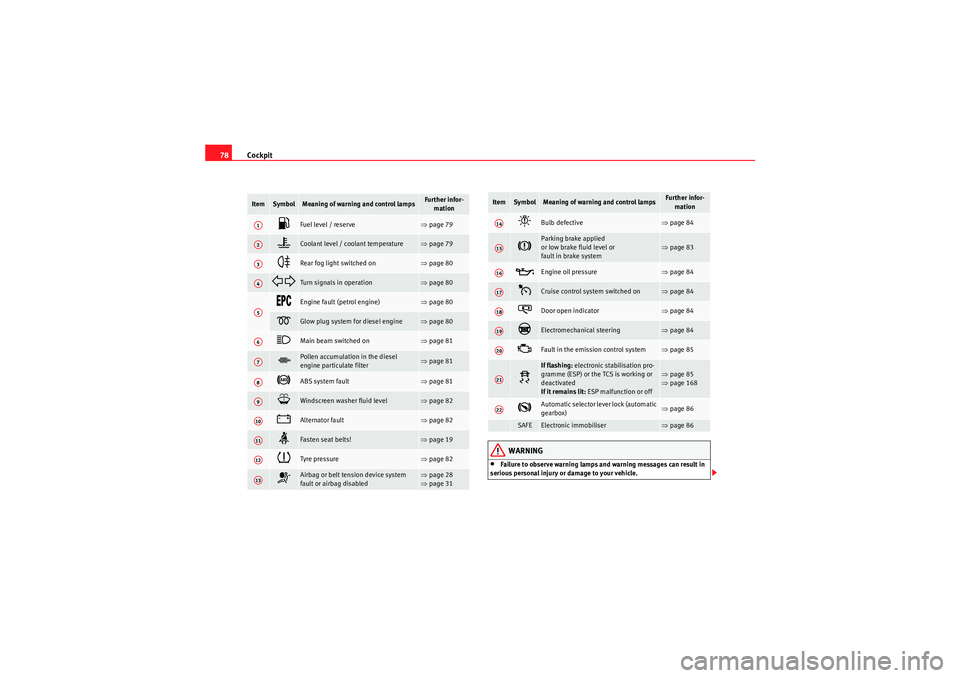
Cockpit
78
WARNING
•Failure to observe warning lamps and warning messages can result in
serious personal injury or damage to your vehicle.
Item
Symbol
Meaning of warning and control lamps
Further infor- mation
Fuel level / reserve
⇒page 79
Coolant level / coolant temperature
⇒page 79
Rear fog light switched on
⇒page 80
Turn signals in operation
⇒page 80
Engine fault (petrol engine)
⇒page 80
Glow plug system for diesel engine
⇒page 80
Main beam switched on
⇒page 81
Pollen accumulation in the diesel
engine particulate filter
⇒page 81
ABS system fault
⇒page 81
Windscreen washer fluid level
⇒page 82
Alternator fault
⇒page 82
Fasten seat belts!
⇒page 19
Tyre pressure
⇒page 82
Airbag or belt tension device system
fault or airbag disabled
⇒page 28
⇒ page 31
A1A2A3A4A5A6A7A8A9A10A11A12A13
Bulb defective
⇒page 84
Parking brake applied
or low brake fluid level or
fault in brake system
⇒page 83
Engine oil pressure
⇒page 84
Cruise control system switched on
⇒page 84
Door open indicator
⇒page 84
Electromechanical steering
⇒page 84
Fault in the emission control system
⇒page 85
If flashing: electronic stabilisation pro-
gramme (ESP) or the TCS is working or
deactivated
If it remains lit: ESP malfunction or off
⇒page 85
⇒ page 168
Automatic selector lever lock (automatic
gearbox)
⇒page 86
SAFE
Electronic immobiliser
⇒page 86
Item
Symbol
Meaning of warning and control lamps
Further infor-
mation
A14A15A16A17A18A19A20A21A22
altea_EN Seite 78 Mittwoch, 26. August 2009 6:00 18
Page 86 of 310
Cockpit
84•If the brake warning lamp
lights up together with the ABS warning
lamp
, the control function of the ABS could be out of action. This could
cause the rear wheels to lock quickly when you brake. This could cause the
rear to break away. Risk of skidding. Stop the vehicle and seek technical
assistance.
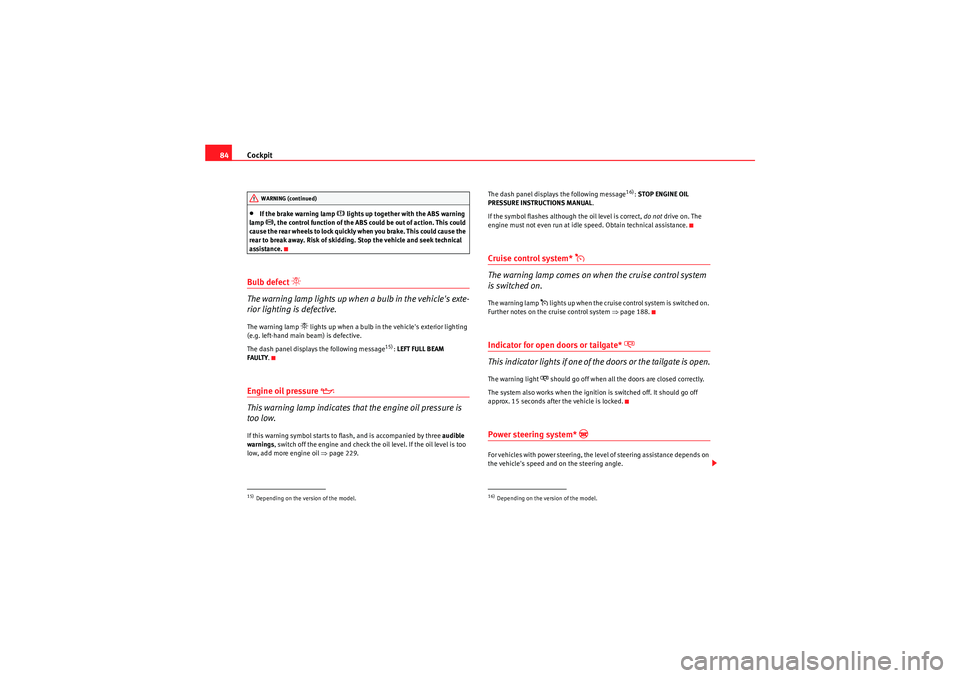
Bulb defect
The warning lamp lights up when a bulb in the vehicle's exte-
rior lighting is defective.The warning lamp
lights up when a bulb in the vehicle's exterior lighting
(e.g. left-hand main beam) is defective.
The dash panel displays the following m essage
15): LEFT FULL BEAM
FAULTY .
Engine oil pressure
This warning lamp indicates that the engine oil pressure is
too low.If this warning symbol starts to flash, and is accompanied by three audible
warnings , switch off the engine and check the oil level. If the oil level is too
low, add more engine oil ⇒page 229. The dash panel displays the following message
16):
STOP ENGINE OIL
PRESSURE INSTRUCTIONS MANUAL .
If the symbol flashes although the oil level is correct, do not drive on. The
engine must not even run at idle speed. Obtain technical assistance.
Cruise control system*
The warning lamp comes on when the cruise control system
is switched on.The warning lamp
lights up when the cruise control system is switched on.
Further notes on the cruise control system ⇒page 188.
Indicator for open doors or tailgate*
This indicator lights if one of the doors or the tailgate is open.The warning light
should go off when all the doors are closed correctly.
The system also works when the ignition is switched off. It should go off
approx. 15 seconds after the vehicle is locked.
Power steering system*
For vehicles with power steering, the level of steering assistance depends on
the vehicle's speed and on the steering angle.
15)Depending on the version of the model.WARNING (continued)
16)Depending on the version of the model.
altea_EN Seite 84 Mittwoch, 26. August 2009 6:00 18
Page 87 of 310
Cockpit85
Safety First
Operating instructions
Practical tips
Technical Data
The warning lamp should light up for a few seconds when the ignition is
switched on. It should go out once the engine is started.
If the battery is disconnected, the indicator remains lit, even with the engine
running. The warning light only goes off after a distance of approx. 50 m.
There is a fault in the electromechanical steering system if the lamp does not
go out or lights up whilst the vehicle is in motion. The indicator may appear
in two different colours to indicate faults. If it lights yellow, this indicates a
minor fault. If it lights red, seek workshop assistance immediately, if no
assistance is available stop driving. Stop the vehicle and seek technical
assistance. The power steering does not work if the battery is flat or if the
engine is off (for example, for towing). You should take into account that you
will need considerably more power than normal to steer the vehicle if the
steering assistance is reduced or has failed completely.
For those vehicles fitted with ESP* the function “Recommended steering
manoeuvre” is included. See
⇒page 195.
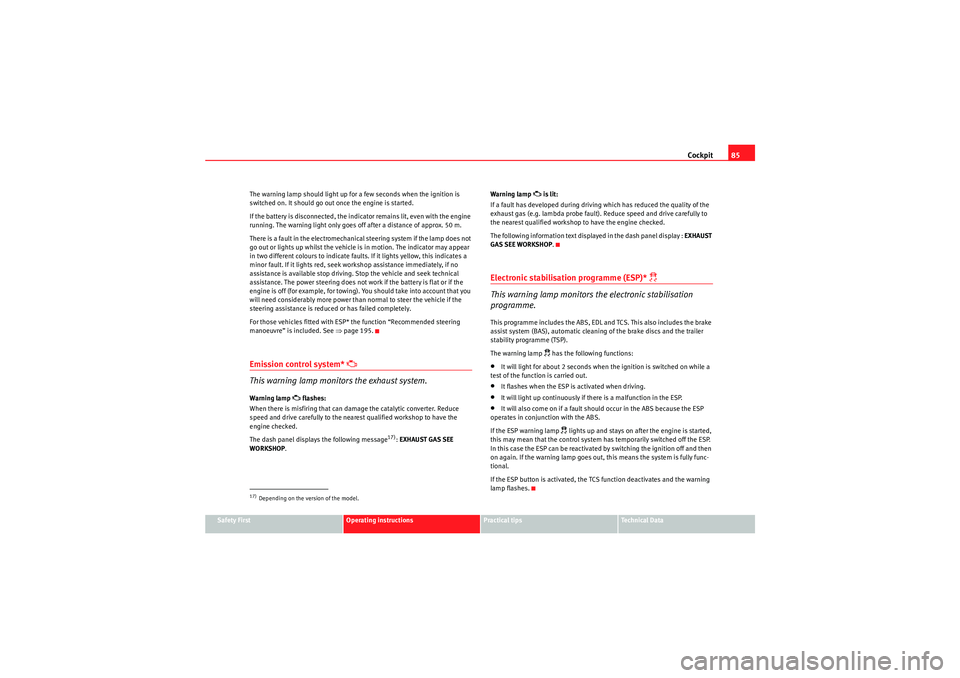
Emission control system*
This warning lamp monitors the exhaust system.
Warning lamp
flashes:
When there is misfiring that can damage the catalytic converter. Reduce
speed and drive carefully to the nearest qualified workshop to have the
engine checked.
The dash panel displays the following message
17): EXHAUST GAS SEE
WORKSHOP . Warning lamp
is lit:
If a fault has developed during driving which has reduced the quality of the
exhaust gas (e.g. lambda probe fault). Reduce speed and drive carefully to
the nearest qualified workshop to have the engine checked.
The following information text displayed in the dash panel display : EXHAUST
GAS SEE WORKSHOP .
Electronic stabilisation programme (ESP)*
This warning lamp monitors the electronic stabilisation
programme.
This programme includes the ABS, EDL and TCS. This also includes the brake
assist system (BAS), automatic cleaning of the brake discs and the trailer
stability programme (TSP).
The warning lamp
has the following functions:
•It will light for about 2 seconds when the ignition is switched on while a
test of the function is carried out.•It flashes when the ESP is activated when driving.•It will light up continuously if there is a malfunction in the ESP.•It will also come on if a fault should occur in the ABS because the ESP
operates in conjunction with the ABS.
If the ESP warning lamp
lights up and stays on after the engine is started,
this may mean that the control system has temporarily switched off the ESP.
In this case the ESP can be reactivated by switching the ignition off and then
on again. If the warning lamp goes out, this means the system is fully func-
tional.
If the ESP button is activated, the TCS function deactivates and the warning
lamp flashes.
17)Depending on the version of the model.
altea_EN Seite 85 Mittwoch, 26. August 2009 6:00 18
Page 89 of 310
Steering wheel controls87
Safety First
Operating instructions
Practical tips
Technical Data
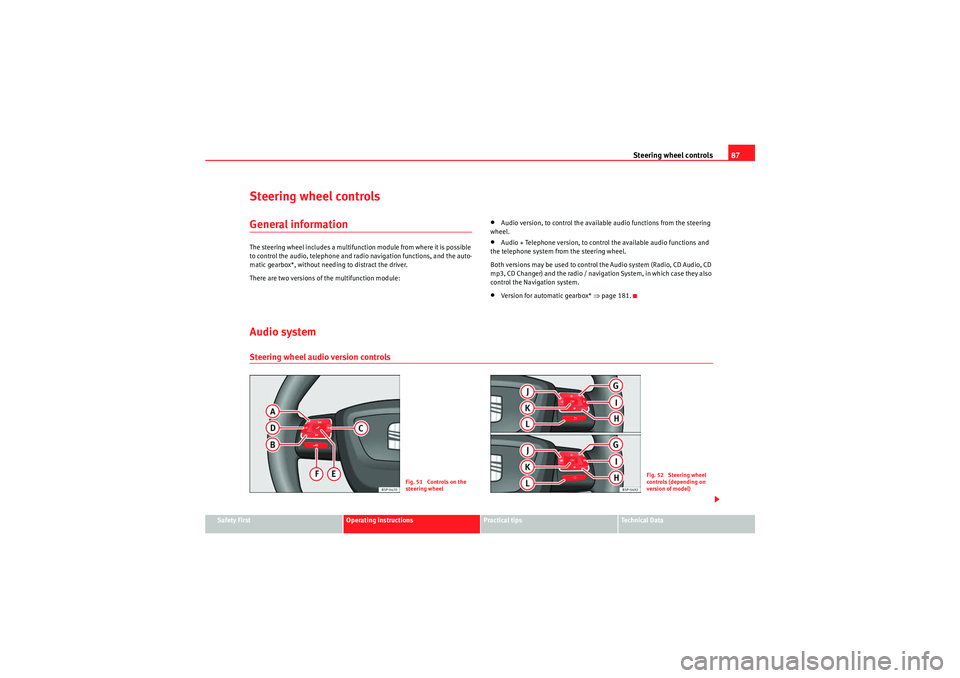
Steering wheel controlsGeneral informationThe steering wheel includes a multifunction module from where it is possible
to control the audio, telephone and radio navigation functions, and the auto-
matic gearbox*, without needing to distract the driver.
There are two versions of the multifunction module:
•Audio version, to control the available audio functions from the steering
wheel.•Audio + Telephone version, to control the available audio functions and
the telephone system from the steering wheel.
Both versions may be used to control the Audio system (Radio, CD Audio, CD
mp3, CD Changer) and the radio / navigation System, in which case they also
control the Navigation system.•Version for automatic gearbox* ⇒page 181.
Audio systemSteering wheel audio version controls
Fig. 51 Controls on the
steering wheel
Fig. 52 Steering wheel
controls (depending on
version of model)
altea_EN Seite 87 Mittwoch, 26. August 2009 6:00 18
Page 90 of 310
Steering wheel controls
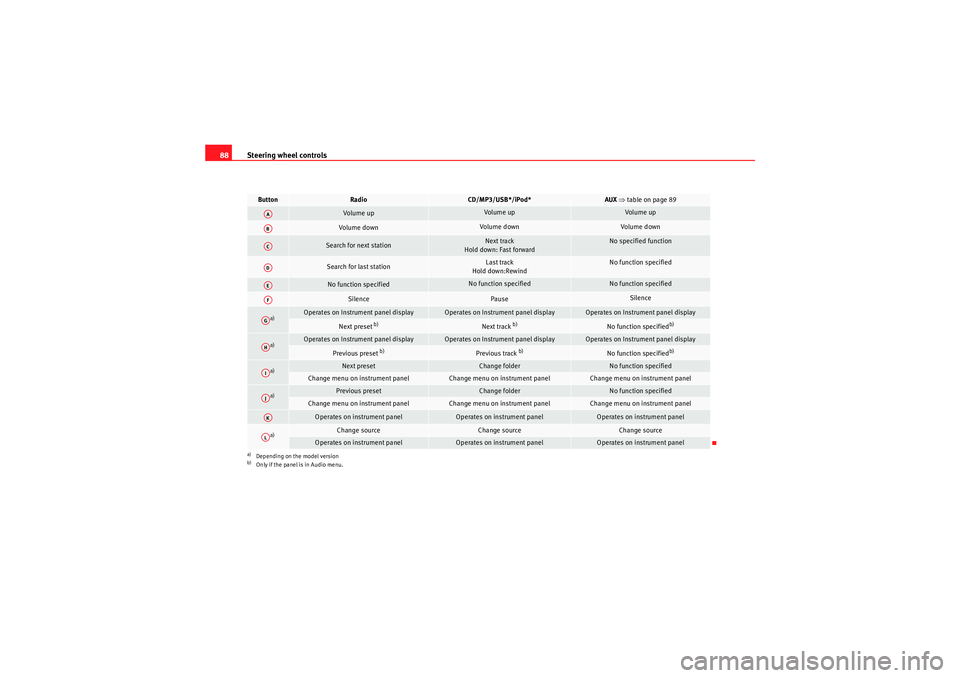
88Button
Radio
CD/MP3/USB*/iPod*
AUX ⇒ table on page 89
Volume up
Volume up
Volume up
Volume down
Volume down
Volume down
Search for next station
Next track
Hold down: Fast forward
No specified function
Search for last station
Last track
Hold down:Rewind
No function specified
No function specified
No function specified
No function specified
Silence
Pause
Silence
a)
a)Depending on the model version
Operates on Instrument panel display
Operates on Instrument panel display
Operates on Instrument panel display
Next preset
b)
b)Only if the panel is in Audio menu.
Next track
b)
No function specified
b)
a)
Operates on Instrument panel display
Operates on Instrument panel display
Operates on Instrument panel display
Previous preset
b)
Previous track
b)
No function specified
b)
a)
Next preset
Change folder
No function specified
Change menu on instrument panel
Change menu on instrument panel
Change menu on instrument panel
a)
Previous preset
Change folder
No function specified
Change menu on instrument panel
Change menu on instrument panel
Change menu on instrument panel
Operates on instrument panel
Operates on instrument panel
Operates on instrument panel
a)
Change source
Change source
Change source
Operates on instrument panel
Operates on instrument panel
Operates on instrument panel
AAABACADAEAFAGAHAIAJAKAL
altea_EN Seite 88 Mittwoch, 26. August 2009 6:00 18
Page 91 of 310
Steering wheel controls89
Safety First
Operating instructions
Practical tips
Technical Data
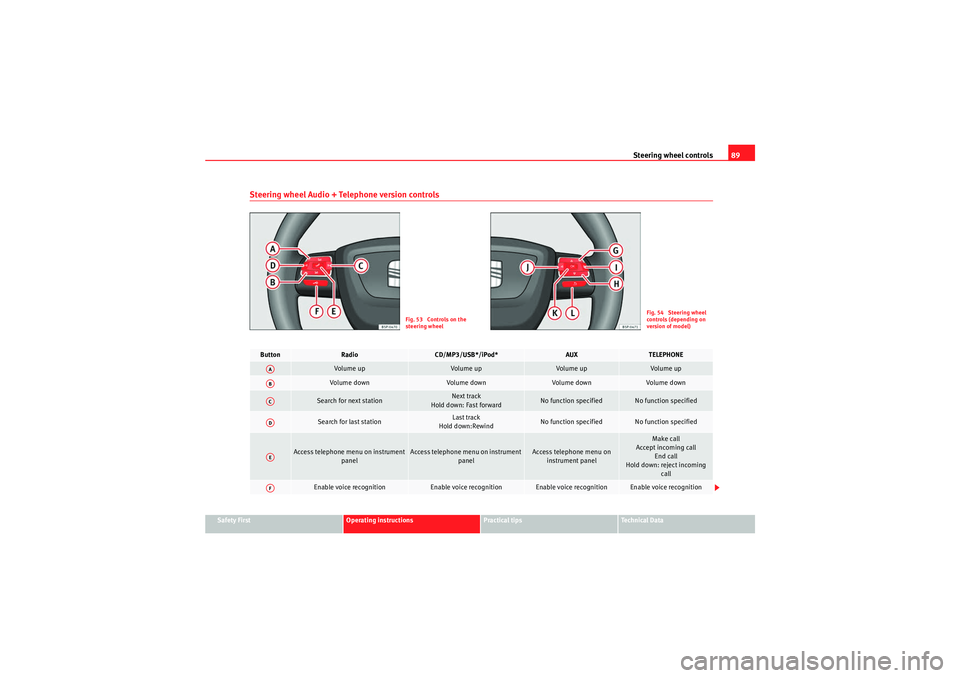
Steering wheel Audio + Telephone version controls
Fig. 53 Controls on the
steering wheel
Fig. 54 Steering wheel
controls (depending on
version of model)
Button
Radio
CD/MP3/USB*/iPod*
AUX
TELEPHONE
Volume up
Volume up
Volume up
Volume up
Vol um e d own
Volume down
Volume down
Volume down
Search for next station
Next track
Hold down: Fast forward
No function specified
No function specified
Search for last station
Last track
Hold down:Rewind
No function specified
No function specified
Access telephone menu on instrument panel
Access telephone menu on instrument panel
Access telephone menu on instrument panel
Make call
Accept incoming call End call
Hold down: reject incoming call
Enable voice recognition
Enable voice recognition
Enable voice recognition
Enable voice recognition
AAABACADAEAF
altea_EN Seite 89 Mittwoch, 26. August 2009 6:00 18
Page 92 of 310
Steering wheel controls
90
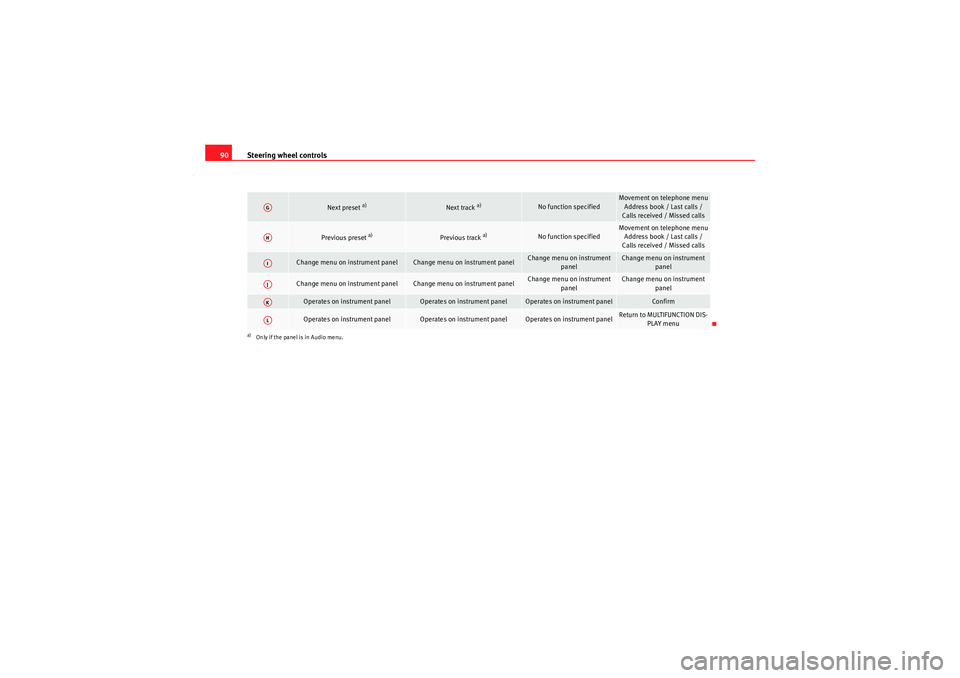
Next preset
a)
Next track
a)
No function specified
Movement on telephone menu
Address book / Last calls /
Calls received / Missed calls
Previous preset
a)
Previous track
a)
No function specified
Movement on telephone menu Address book / Last calls /
Calls received / Missed calls
Change menu on instrument panel
Change menu on instrument panel
Change menu on instrument panel
Change menu on instrument panel
Change menu on instrument panel
Change menu on instrument panel
Change menu on instrument
panel
Change menu on instrument panel
Operates on instrument panel
Operates on instrument panel
Operates on instrument panel
Confirm
Operates on instrument panel
Operates on instrument panel
Operates on instrument panel
Return to MULTIFUNCTION DIS-PLAY menu
a)Only if the panel is in Audio menu.AGAHAIAJAKAL
altea_EN Seite 90 Mittwoch, 26. August 2009 6:00 18
Page 93 of 310
Steering wheel controls91
Safety First
Operating instructions
Practical tips
Technical Data
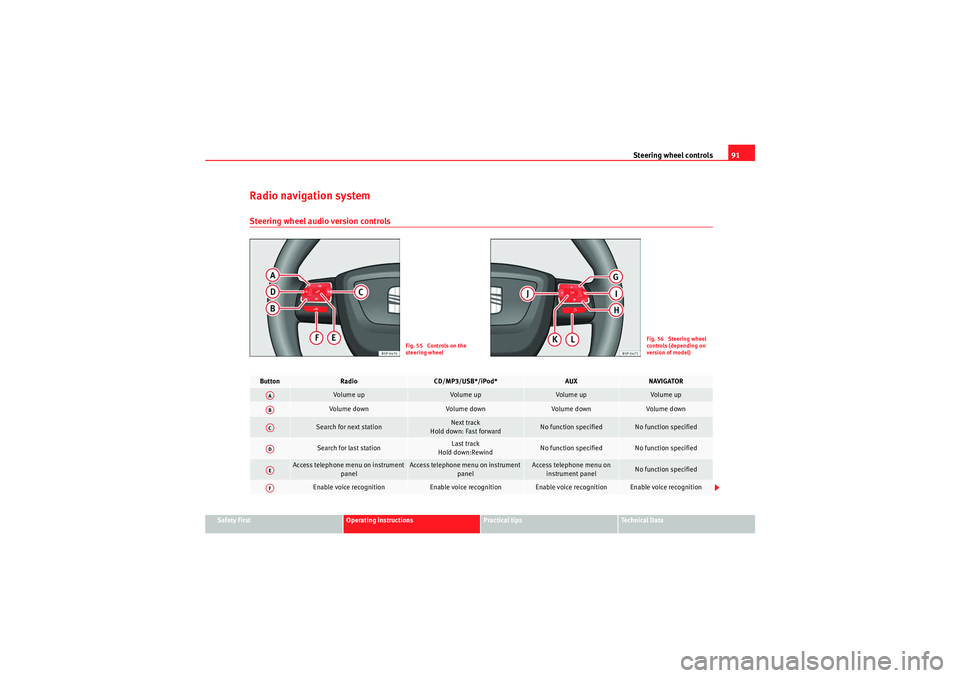
Radio navigation systemSteering wheel audio version controls
Fig. 55 Controls on the
steering wheel
Fig. 56 Steering wheel
controls (depending on
version of model)
Button
Radio
CD/MP3/USB*/iPod*
AUX
NAVIGATOR
Vol um e u p
Volume up
Volume up
Volume up
Volume down
Vol um e d own
Volume down
Volume down
Search for next station
Next track
Hold down: Fast forward
No function specified
No function specified
Search for last station
Last track
Hold down:Rewind
No function specified
No function specified
Access telephone menu on instrument panel
Access telephone menu on instrument panel
Access telephone menu on instrument panel
No function specified
Enable voice recognition
Enable voice recognition
Enable voice recognition
Enable voice recognition
AAABACADAEAF
altea_EN Seite 91 Mittwoch, 26. August 2009 6:00 18
Page 94 of 310
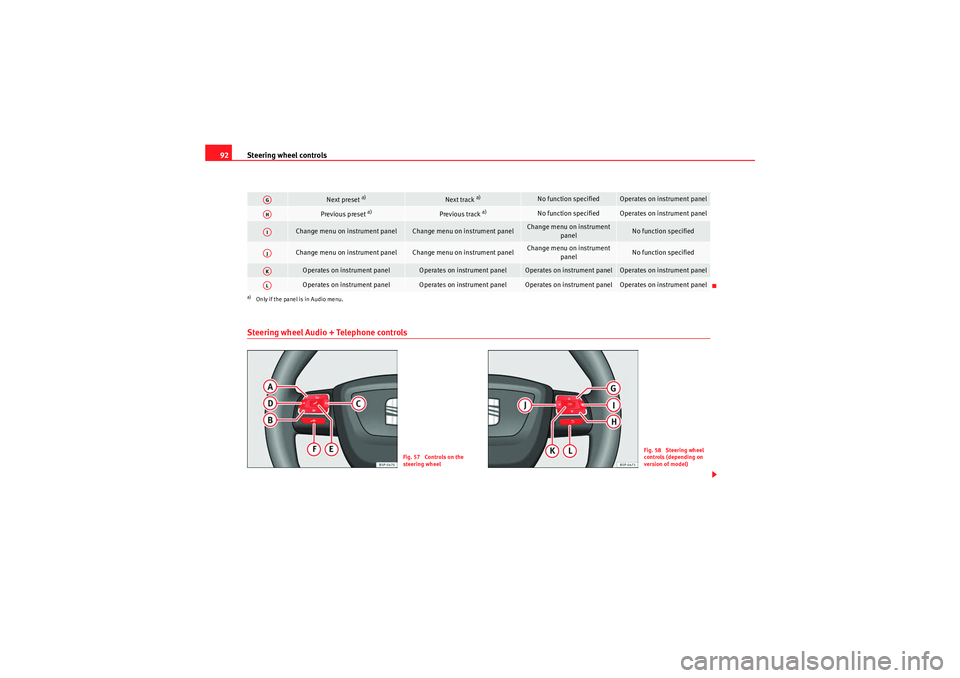
Steering wheel controls
92Steering wheel Audio + Telephone controls
Next preset
a)
Next track
a)
No function specified
Operates on instrument panel
Previous preset
a)
Previous track
a)
No function specified
Operates on instrument panel
Change menu on instrument panel
Change menu on instrument panel
Change menu on instrument
panel
No function specified
Change menu on instrument panel
Change menu on instrument panel
Change menu on instrument panel
No function specified
Operates on instrument panel
Operates on instrument panel
Operates on instrument panel
Operates on instrument panel
Operates on instrument panel
Operates on instrument panel
Operates on instrument panel
Operates on instrument panel
a)Only if the panel is in Audio menu.AGAHAIAJAKAL
Fig. 57 Controls on the
steering wheel
Fig. 58 Steering wheel
controls (depending on
version of model)
altea_EN Seite 92 Mittwoch, 26. August 2009 6:00 18
Page 95 of 310
Steering wheel controls93
Safety First
Operating instructions
Practical tips
Technical Data
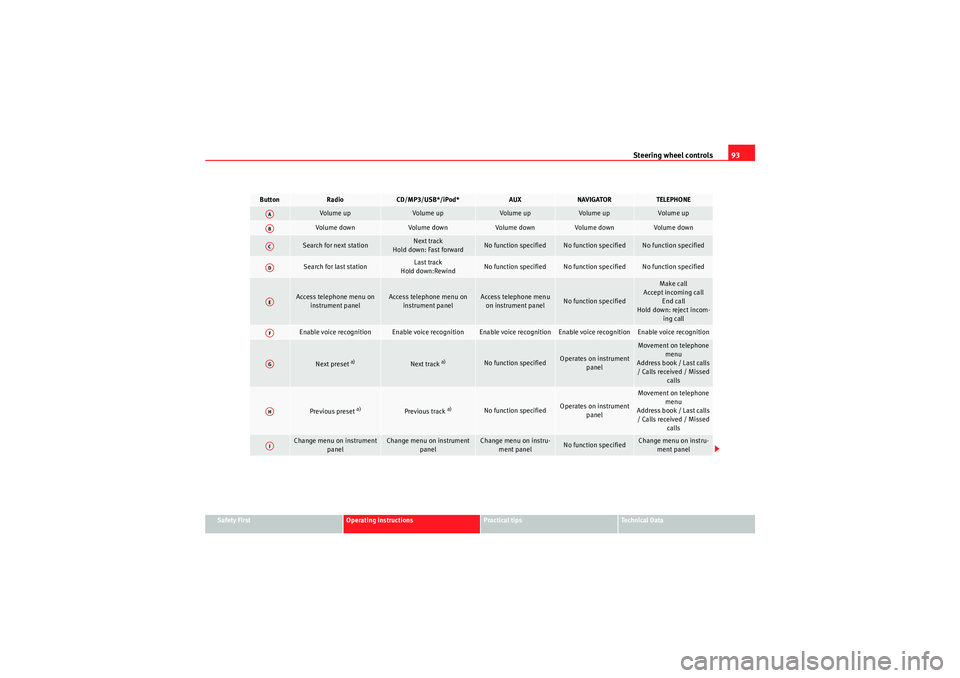
Button
Radio
CD/MP3/USB*/iPod*
AUX
NAVIGATOR
TELEPHONE
Volume up
Volume up
Volume up
Volume up
Volume up
Volume down
Volume down
Volume down
Volume down
Volume down
Search for next station
Next track
Hold down: Fast forward
No function specified
No function specified
No function specified
Search for last station
Last track
Hold down:Rewind
No function specified
No function specified
No function specified
Access telephone menu on instrument panel
Access telephone menu on instrument panel
Access telephone menu on instrument panel
No function specified
Make call
Accept incoming call End call
Hold down: reject incom- ing call
Enable voice recognition
Enable voice recognition
Enable voice recognition
Enable voice recognition
Enable voice recognition
Next preset
a)
Next track
a)
No function specified
Operates on instrument panel
Movement on telephone menu
Address book / Last calls / Calls received / Missed calls
Previous preset
a)
Previous track
a)
No function specified
Operates on instrument panel
Movement on telephone
menu
Address book / Last calls / Calls received / Missed calls
Change menu on instrument panel
Change menu on instrument panel
Change menu on instru-ment panel
No function specified
Change menu on instru-ment panel
AAABACADAEAFAGAHAI
altea_EN Seite 93 Mittwoch, 26. August 2009 6:00 18