ESP Seat Altea 2010 Owner's Guide
[x] Cancel search | Manufacturer: SEAT, Model Year: 2010, Model line: Altea, Model: Seat Altea 2010Pages: 310, PDF Size: 7.46 MB
Page 156 of 310
Seats and stowage
154Roof carrier*Please observe the following points if you intend to carry loads on the roof:•For safety reasons, only luggage racks and accessories approved by SEAT
should be used.•It is imperative to precisely follow the fitting instructions included for the
rack, taking special care when fitting the front bar in the holes designed for
this and the rear bar between the marks on the upper part of the rear door
frame while respecting the correct direction of travel indicated in the installa-
tion manual. Not following these instructions may damage the bodywork.•Pay special attention to the tightening torque of the attachment bolts and
check them following a short journey. If necessary, retighten the bolts and
check them at regular intervals.•Distribute the load evenly. A maximum load of 40 kg only is permitted for
each roof carrier system support bar, the load must be distributed evenly
along the entire length. However, the maximum load permitted for the entire
roof (including the support system) of 75 kg must not be exceeded nor should
the total weight of the vehicle be exceeded. See the chapter on “Technical
Data”.•When transporting heavy or large objects on the roof, any change in the
normal vehicle behaviour due to a change in the centre of gravity or an
increased wind resistance must be taken into account. For this reason, a suit-
able speed and driving style must be used.•For those vehicles fitted with a sunroof*, ensure that it does not interfere
with the load on the roof carrier system when opened.
altea_EN Seite 154 Mittwoch, 26. August 2009 6:00 18
Page 163 of 310
Heating, Ventilation and Air conditioning161
Safety First
Operating instructions
Practical tips
Technical Data
2C-Climatronic*Control switches
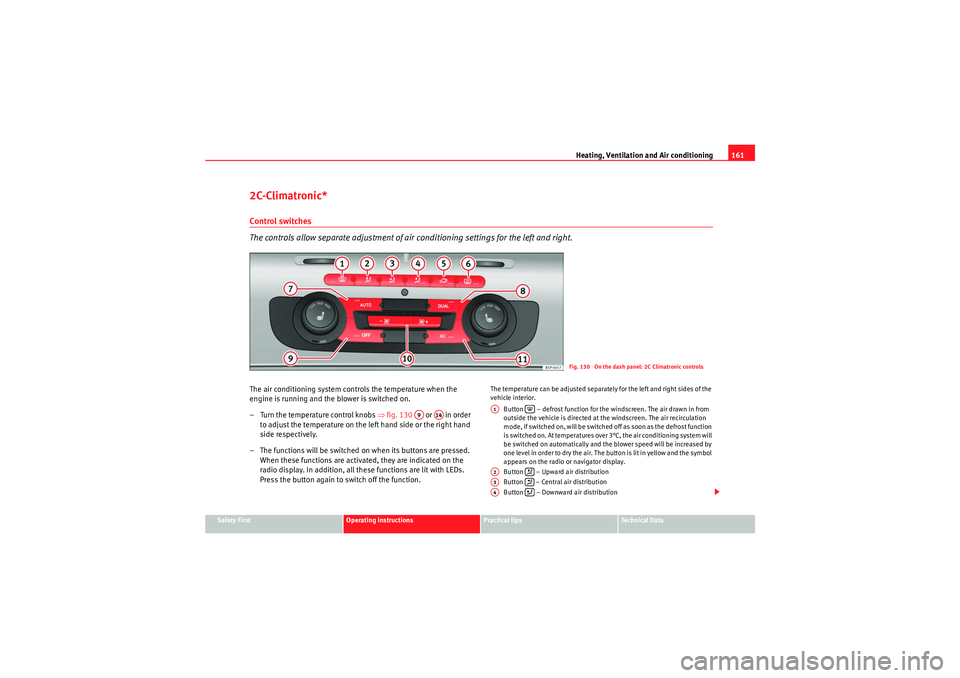
The controls allow separate adjustment of air co nditioning settings for the left and right.The air conditioning system controls the temperature when the
engine is running and the blower is switched on.
– Turn the temperature control knobs ⇒fig. 130 or in order
to adjust the temperature on the left hand side or the right hand
side respectively.
– The functions will be switched on when its buttons are pressed.
When these functions are activated, they are indicated on the
radio display. In addition, all these functions are lit with LEDs.
Press the button again to switch off the function.
The temperature can be adjusted separately for the left and right sides of the
vehicle interior.
Button – defrost function for the windscreen. The air drawn in from
outside the vehicle is directed at the windscreen. The air recirculation
mode, if switched on, will be switched off as soon as the defrost function
is switched on. At temperatures over 3°C, the air conditioning system will
be switched on automatically and the blower speed will be increased by
one level in order to dry the air. The button is lit in yellow and the symbol
appears on the radio or navigator display.
Button – Upward air distribution
Button – Central air distribution
Button – Downward air distribution
Fig. 130 On the dash panel: 2C Climatronic controls
A9
A14
A1
A2
A3
A4
altea_EN Seite 161 Mittwoch, 26. August 2009 6:00 18
Page 170 of 310

Driving
168•Adjust the driver seat or steering wheel so that there is a distance of at
least 25 cm between the steering wheel and your chest ⇒page 167,
fig. 135 . If you fail to observe the minimum distance, the airbag will not
protect you. Risk of fatal injury.•If your physical constitution does not allow you to maintain the
minimum distance of 25 cm, contact an Authorised Service Centre. The
Authorised Service Centre will help you to decide if special specific modifi-
cations are necessary.•If you adjust the steering wheel so that it points towards your face, the
driver airbag will not protect you properly in the event of an accident. Make
sure that the steering wheel points towards your chest.•When driving, always hold the steering wheel with both hands on the
outside of the ring at the 9 o'clock and 3 o'clock positions. Never hold the
steering wheel at the 12 o'clock position, or in any other manner (e.g. in
the centre of the steering wheel, or on the inside of the rim). In such cases,
you could receive severe injuries to the arms, hands and head.
SafetyElectronic stabilisation programme (ESP)*
ESP helps make driving safer in certain situations.The electronic stabilisation programme (ESP) includes the electronic differen-
tial lock (EDS), the traction control system (TCS), the brake assist system
(BAS) and the trailer stability programme (TSP). The ESP function works
together with the ABS. Both warning lamps will light up if the ESP or ABS
systems are faulty.
The ESP is started automatically when the engine is started.
The ESP is always active, and cannot be switched off. With the ESP switch it is
only possible to switch TCS off.
The TCS can be deactivated when in cases where wheel sliding is desirable.
For example:•When driving with snow chains,
WARNING (continued)
Fig. 136 Detail of the
centre console: ESP
button
altea_EN Seite 168 Mittwoch, 26. August 2009 6:00 18
Page 171 of 310
Driving169
Safety First
Operating instructions
Practical tips
Technical Data
•when driving in deep snow or on loose surfaces,•when rocking the vehicle backwards and forwards to free it from mud, for
example.
Next, the button should be pressed to reactivate the TCS.
When does the warning light switch on or flash? •On switching the ignition on, it lights up for about two seconds to carry
out a function control.•The warning lamp will start flashing when the vehicle is moving if the ESP
or the TCS is activated. The warning lamp will light up slowly if the TCS is
switched off.•It will light up continuously if there is a malfunction in the ESP.WARNING
•The electronic stabilisation programme (ESP) cannot defy the laws of
physics. This should be kept in mind, particularly on slippery and wet
roads and when towing a trailer.•Always adapt your driving style to suit the condition of the roads and
the traffic situation. Do not let the extra safety afforded by ESP tempt you
into taking any risks when driving, this can cause accidents.•Please refer to the corresponding warning notes on ESP in ⇒page 193,
“Intelligent technology”.
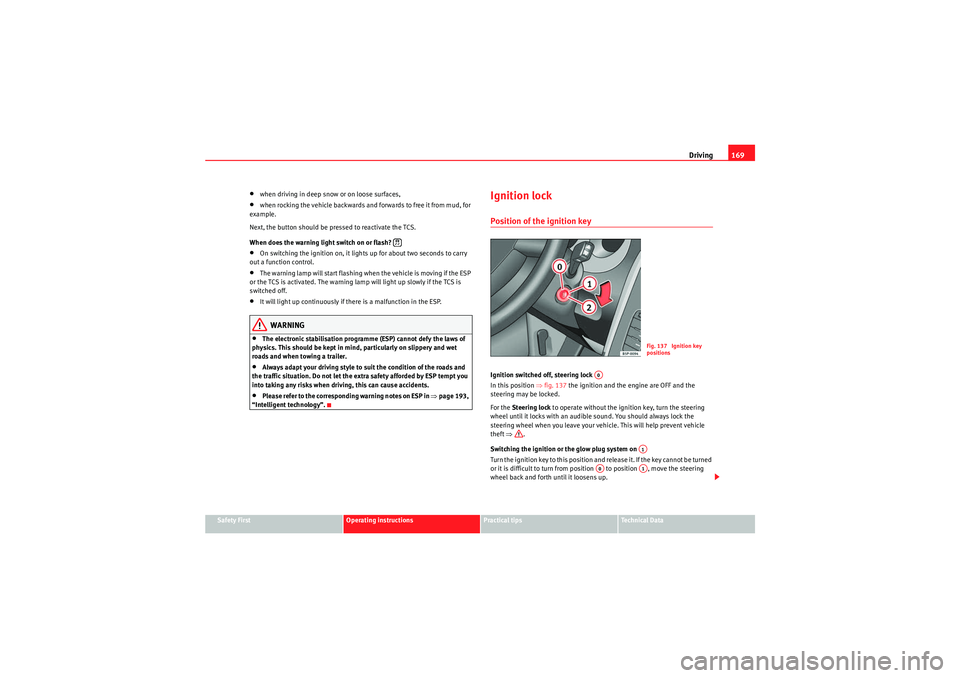
Ignition lockPosition of the ignition keyIgnition switched off, steering lock
In this position ⇒fig. 137 the ignition and the engine are OFF and the
steering may be locked.
For the Steering lock to operate without the ignition key, turn the steering
wheel until it locks with an audible sound. You should always lock the
steering wheel when you leave your vehicle. This will help prevent vehicle
theft ⇒ .
Switching the ignition or the glow plug system on
Turn the ignition key to this position and release it. If the key cannot be turned
or it is difficult to turn from position to position , move the steering
wheel back and forth until it loosens up.
Fig. 137 Ignition key
positions
A0
A1
A0
A1
altea_EN Seite 169 Mittwoch, 26. August 2009 6:00 18
Page 172 of 310
Driving
170Starting
The engine is started when the key is in this position. Electrical components
with a high power consumption are switched off temporarily.
Every time the vehicle is started again, the ignition key must be turned to
position . The repetitive start prevention lock of the ignition prevents
possible damage to the starter motor if the engine is already running.
WARNING
•The ignition key must NOT be removed from the lock until the vehicle
comes to a standstill. Otherwise, the steering could be immediately
blocked- Risk of accident!•Always remove the key from the ignition lock when leaving the vehicle,
even for a short period. This is especially important if children or disabled
people are left alone in the vehicle. They could accidentally start the
engine or work electrical equipment such as the electric windows, conse-
quently resulting in an accident.•Unsupervised use of the keys could start the engine or any electrical
system, such as the electric window. This could result in serious injury.Caution
The starter motor will only work when the engine is stopped (ignition key
position ).Electronic immobiliser
The immobiliser prevents unauthorised persons from driving
the vehicle.Inside the key there is a chip that deactivates the electronic immobiliser auto-
matically when the key is inserted into the ignition. The immobiliser will be activated again automatically as soon as you pull the
key out of the ignition lock.
The engine can only be started using a genuine SEAT key with its correct code.
Note
A perfect operation of the vehicle is ensured if genuine SEAT keys are used.Starting and stopping the engineStarting petrol engines
The engine can only be started using a genuine SEAT key with
its correct code.– Move the gear lever to the neutral position and depress the
clutch pedal thoroughly and hold it in this position for the starter
to turn the engine on.
– Turn the ignition key to the starting ⇒page 169 position.
– Let go of the ignition key as soon as the engine starts; the starter motor must not run on with the engine.After starting a very hot engine, you may need to slightly press down the
accelerator.
When starting a very cold engine, it may be a little noisy for the first few
seconds until oil pressure has built up in the hydraulic valve compensators.
This is quite normal, and no cause for concern.
A2A0A2
altea_EN Seite 170 Mittwoch, 26. August 2009 6:00 18
Page 176 of 310
Driving
174•If there is a fault in the LPG system.•At very low temperatures below minus 10°C.
Manual switch from petrol to LPG
Press the GAS button to switch modes. When the necessary conditions are
met, the system switches to LPG mode and the ON lamp is lit. If the ON
lamp flashes, the following conditions have not been met:•There is enough LPG in the tank.•The temperature of the vehicle coolant is above 30°C.•Engine speed while driving is above 1200 rpm.
When these conditions are met, the system switches to LPG mode and the ON
lamp is lit .
Manual switch from LPG to petrol
Press the button to switch modes. When the OFF lamp is lit, the
vehicle is running on petrol.
Running on petrol
Run the engine with petrol for short journeys at regular intervals to avoid
problems in the petrol system.WARNING
LPG is a highly explosive and inflammable substance. It may cause severe
burns and other injury.•Due care must be taken to avoid any risk of fire or explosion.•When parking the vehicle in a closed area (for example in a garage),
make sure that there is adequate ventilation, either natural or mechanical,
to neutralise the LPG in the event of a leak.
Note
•If frequent short journeys are made, especially when the outside temper-
ature is low, the vehicle will tend to run on petrol more often than on LPG.
Therefore, the petrol tank may empty before the LPG tank.Start-Stop function*Description and operationThe Start-Stop function stops the engine when the vehicle is
stopped and starts it automatically when required.
– When the vehicle is stopped, put it in neutral and release the clutch pedal. The engine will stop.
– When the clutch pedal is pressed, the engine starts again.
– The instrument panel screen displays information about the status of the Start-Stop function ⇒page 176, fig. 140 .Start-Stop function conditions•The driver's seat belt must be buckled.•The engine hood must be closed.•The engine must be at operating temperature•The steering wheel must be straight.•The vehicle must be on flat ground.•The vehicle must not be in reverse.•A trailer must not be connected.
A1
A3
A3A3GAS
A1
A2
altea_EN Seite 174 Mittwoch, 26. August 2009 6:00 18
Page 186 of 310
Driving
184Parking
The handbrake should always be firmly applied when the
vehicle is parked.Always note the following points when parking the vehicle:
– Use the foot brake to stop the vehicle.
– Apply the handbrake.
– The first gear should also be selected.
– Switch the engine off and remove the key from the ignition lock.
Turn the steering wheel slightly to engage the steering lock.
– Always take you car keys with you when you leave the vehicle ⇒ .Additional notes on parking the vehicle on gradients:
Turn the steering wheel so that the vehicle rolls against the kerb if it started
to roll.•If the vehicle is parked facing downhill, turn the front wheels so that they
point towards the kerb .•If the vehicle is parked facing uphill, turn the front wheels so that they
point away from the kerb .•Secure the vehicle as normal by applying the handbrake firmly and
engaging first gear.WARNING
•Take measures to reduce the risk of injury when you leave your vehicle
unattended.
•Never park where the hot exhaust system could ignite inflammable
materials, such as dry grass, low bushes, spilt fuel etc.•Never allow vehicle occupants to remain in the vehicle when it is
locked. They would be unable to open the vehicle from the inside, and
could become trapped in the vehicle in an emergency. In the event of an
emergency, locked doors will delay assistance to occupants.•Never leave children alone in the vehicle. They could set the vehicle in
motion, for example, by releasing the handbrake or the gear lever /
selector lever.•Depending on weather conditions, it may become extremely hot or cold
inside the vehicle. This can be fatal.
Hill-start aid*
This function is only included in vehicles with ESP.This device helps when starting uphill.
These are the basic operation conditions: doors closed, brake pedal pressed
down and vehicle in neutral. The system is activated on engaging gear.
After removing your foot from the brake pedal, the braking force is maintained
for a few seconds to prevent the vehicle from moving backward when
engaging gear. This short space of time is enough to start the vehicle with
ease.
This system also works when reversing uphill.
WARNING (continued)
altea_EN Seite 184 Mittwoch, 26. August 2009 6:00 18
Page 187 of 310
Driving185
Safety First
Operating instructions
Practical tips
Technical Data
WARNING
•If you do not start the vehicle immediately after taking your foot off the
brake pedal, the vehicle may start to roll back under certain conditions.
Depress the brake pedal or use the hand brake immediately.•If the engine stalls, depress the brake pedal or use the hand brake
immediately.•When following a line of traffic uphill, if you want to prevent the vehicle
from rolling back accidentally when starting off, hold the brake pedal down
for a few seconds before starting off.Note
The Official Service or a specialist workshop can tell you if your vehicle is
equipped with this system.Parking aid acoustic system*General notesVarious systems are available to help you when parking or manoeuvring in
tight spaces, depending on the equipment fitted on your vehicle.
The SEAT parking system* gives an acoustic warning if there are any obsta-
cles behind your car.
When you are parking, the SEAT Parking System plus* warns you acoustically
and optically
20) about obstacles “in front of” and “behind” the vehicle.
Note
To ensure the acoustic parking aid works properly, the sensors must be kept
clean and free of snow and ice.SEAT Parking System: Description
The parking system is an acoustic parking aid.Sensors are located in the rear bumper. When the sensors detect an obstacle,
you are alerted by acoustic signals (beeps). The measuring range of the
sensors starts at about:
The acoustic signals sound with increasing frequency as you approach the
obstacle. When the vehicle is less than approx. 0.30 m away from the
obstacle, the warning tone will sound continuously. Do not drive on!
The volume of the warning beeps will be gradually reduced after about 4
seconds if the vehicle remains at a constant distance from a detected
obstacle (it does not affect the permanent acoustic signal).
The parking aid is switched on automatically when reverse gear is engaged.
You will hear a brief acknowledgement tone.
WARNING
•The parking aid is not a replacement for driver awareness. The driver is
personally responsible for safe parking and other manoeuvres.•The sensors have blind spots in which obstacles are not registered.
Always look out for small children and animals because the system will not
20)Vehicles with a navigation system.
Rear
Side
0,60
Centre
1,60
altea_EN Seite 185 Mittwoch, 26. August 2009 6:00 18
Page 189 of 310
Driving187
Safety First
Operating instructions
Practical tips
Technical Data
Disabling
– Drive forwards faster than 10 km/h, or
– Press the switch
or
– Switch the ignition off.
Segments in the optical display
Some colour segments in front and behind and an acoustic signal enable the
driver to assess the distance with respect to an obstacle. The amber colour
segments combined with a discontinuous beep indicate the presence of an
obstacle. As the vehicle gets closer to the obstacle, the colour of the segment
changes to red and the acoustic signal beeps continuously. When the penul-
timate segment is displayed, this means that the vehicle has reached the
collision zone. Stop moving immediately! ⇒.
WARNING
•The parking aid is not a replacement for driver awareness. The driver is
personally responsible for safe parking and other manoeuvres.•The sensors have blind spots in which obstacles are not registered.
Always look out for small children and animals because the system will not
always detect them. Always pay attention when reversing to avoid acci-
dents.•Always keep a close eye on the area around the vehicle and make full
use of the rear-view mirrors.Caution
Please note that low obstacles detected by the system may no longer be
registered by the sensors as the car moves closer, so the system will not give
any further warning. Certain kinds of obstacles (such as wire fences, chains,
thin painted posts or trailer draw bars, etc) may not always be detected by the
system, so take care not to damage the vehicle in such cases.
Note
•Please refer to the notes on towing ⇒page 187.•There is a slight delay in the picture display.To w i n g b r a c k e tIn towing mode, the rear parking sensors are not enabled when you select
reverse gear or press the switch
. This function may not be guaranteed on
towing brackets that are not factory fitted. This results in the following restric-
tions:
SEAT Parking System*
No warning is given
SEAT Parking System Plus:*
There is no rear distance warning. The system will still give a warning when
obstacles are detected while driving forwards. The optical display changes to
towing mode.
Fault messagesIf you hear a long beep for a few seconds and the LED on the switch
* starts
flashing when you switch on the parking aid, a system fault has occurred.
Please refer the problem to an Authorised SEAT dealer or specialised work-
shop.
altea_EN Seite 187 Mittwoch, 26. August 2009 6:00 18
Page 192 of 310
Driving
190When you increase speed with the accelerator and then release the pedal, the
system will automatically restore the set speed. This will not be the case,
however, if the vehicle speed is more than 10 km/h higher than the stored
speed for longer than 5 minutes. The speed will have to be stored again.
Control of the set speed is switched off if you reduce speed by depressing the
brake pedal. You can reactivate the control by pressing once on the upper part
of the rocker switch RES/+ ⇒ page 189, fig. 153 .
WARNING
It is dangerous to use a set speed which is too high for the current road,
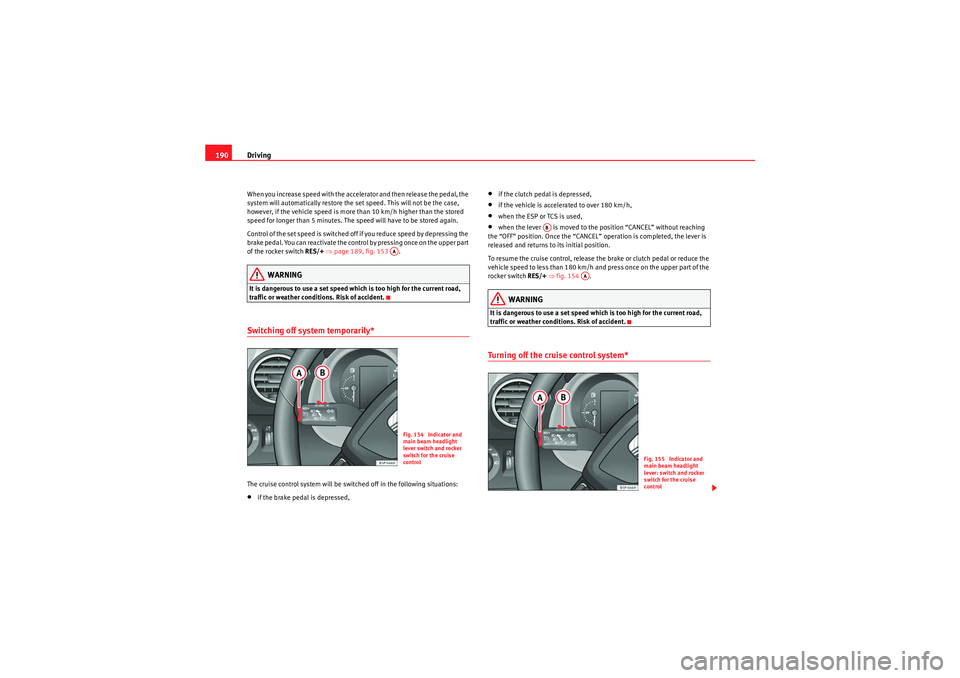
traffic or weather conditions. Risk of accident.Switching off system temporarily*The cruise control system will be switched off in the following situations:•if the brake pedal is depressed,
•if the clutch pedal is depressed,•if the vehicle is accelerated to over 180 km/h,•when the ESP or TCS is used,•when the lever is moved to the position “CANCEL” without reaching
the “OFF” position. Once the “CANCEL” operation is completed, the lever is
released and returns to its initial position.
To resume the cruise control, release the brake or clutch pedal or reduce the
vehicle speed to less than 180 km/h and press once on the upper part of the
rocker switch RES/+ ⇒ fig. 154 .WARNING
It is dangerous to use a set speed which is too high for the current road,
traffic or weather conditions. Risk of accident.Turning off the cruise control system*
AAFig. 154 Indicator and
main beam headlight
lever switch and rocker
switch for the cruise
control
AB
AA
Fig. 155 Indicator and
main beam headlight
lever: switch and rocker
switch for the cruise
control
altea_EN Seite 190 Mittwoch, 26. August 2009 6:00 18