stop start Seat Altea 2012 User Guide
[x] Cancel search | Manufacturer: SEAT, Model Year: 2012, Model line: Altea, Model: Seat Altea 2012Pages: 313, PDF Size: 4.47 MB
Page 90 of 313
88Cockpit
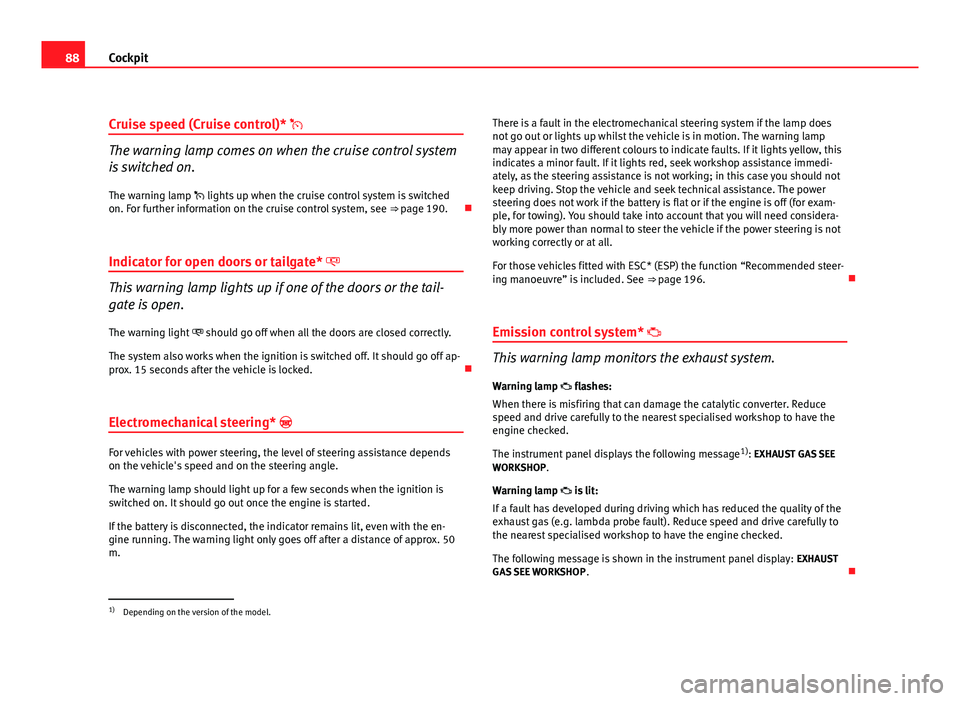
Cruise speed (Cruise control)*
The warning lamp comes on when the cruise control system
is switched on.
The warning lamp lights up when the cruise control system is switched
on. For further information on the cruise control system, see ⇒ page 190.
Indicator for open doors or tailgate*
This warning lamp lights up if one of the doors or the tail-
gate is open. The warning light should go off when all the doors are closed correctly.
The system also works when the ignition is switched off. It should go off ap-
prox. 15 seconds after the vehicle is locked.
Electromechanical steering*
For vehicles with power steering, the level of steering assistance depends
on the vehicle's speed and on the steering angle.
The warning lamp should light up for a few seconds when the ignition is
switched on. It should go out once the engine is started.
If the battery is disconnected, the indicator remains lit, even with the en-
gine running. The warning light only goes off after a distance of approx. 50
m. There is a fault in the electromechanical steering system if the lamp does
not go out or lights up whilst the vehicle is in motion. The warning lamp
may appear in two different colours to indicate faults. If it lights yellow, this
indicates a minor fault. If it lights red, seek workshop assistance immedi-
ately, as the steering assistance is not working; in this case you should not
keep driving. Stop the vehicle and seek technical assistance. The power
steering does not work if the battery is flat or if the engine is off (for exam-
ple, for towing). You should take into account that you will need considera-
bly more power than normal to steer the vehicle if the power steering is not
working correctly or at all.
For those vehicles fitted with ESC* (ESP) the function “Recommended steer-
ing manoeuvre” is included. See
⇒ page 196.
Emission control system*
This warning lamp monitors the exhaust system.
Warning lamp flashes:
When there is misfiring that can damage the catalytic converter. Reduce
speed and drive carefully to the nearest specialised workshop to have the
engine checked.
The instrument panel displays the following message 1)
: EXHAUST GAS SEE
WORKSHOP.
Warning lamp is lit:
If a fault has developed during driving which has reduced the quality of the
exhaust gas (e.g. lambda probe fault). Reduce speed and drive carefully to
the nearest specialised workshop to have the engine checked.
The following message is shown in the instrument panel display: EXHAUST
GAS SEE WORKSHOP .
1)
Depending on the version of the model.
Page 91 of 313
89
Cockpit
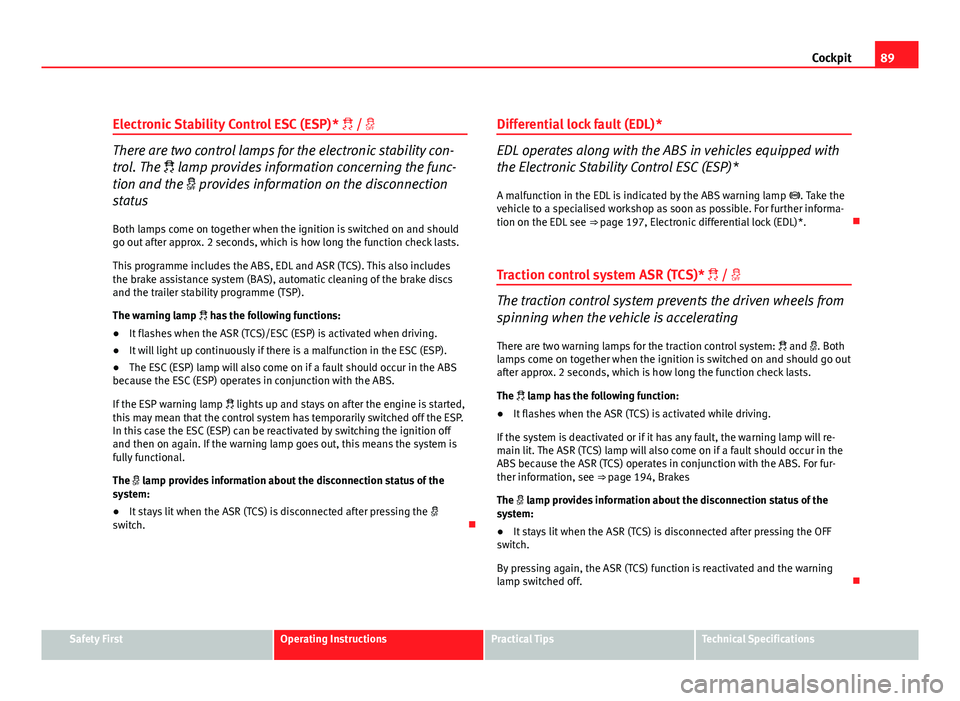
Electronic Stability Control ESC (ESP) * /
There are two control lamps for the electronic stability con-
trol. The lamp provides information concerning the func-
tion and the provides information on the disconnection
status
Both lamps come on together when the ignition is switched on and should
go out after approx. 2 seconds, which is how long the function check lasts.
This programme includes the ABS, EDL and ASR (TCS). This also includes
the brake assistance system (BAS), automatic cleaning of the brake discs
and the trailer stability programme (TSP).
The warning lamp has the following functions:
● It flashes when the ASR (TCS)/ESC (ESP) is activated when driving.
● It will light up continuously if there is a malfunction in the ESC (ESP).
● The ESC (ESP) lamp will also come on if a fault should occur in the ABS
because the ESC (ESP) operates in conjunction with the ABS.
If the ESP warning lamp lights up and stays on after the engine is started,
this may mean that the control system has temporarily switched off the ESP.
In this case the ESC (ESP) can be reactivated by switching the ignition off
and then on again. If the warning lamp goes out, this means the system is
fully functional.
The lamp provides information about the disconnection status of the
system:
● It stays lit when the ASR (TCS) is disconnected after pressing the
switch. Differential lock fault (EDL)*EDL operates along with the ABS in vehicles equipped with
the Electronic Stability Control ESC (ESP)*
A malfunction in the EDL is indicated by the ABS warning lamp . Take the
vehicle to a specialised workshop as soon as possible. For further informa-
tion on the EDL see ⇒ page 197, Electronic differential lock (EDL)*.
Traction control system ASR (TCS)* /
The traction control system prevents the driven wheels from
spinning when the vehicle is accelerating
There are two warning lamps for the traction control system: and . Both
lamps come on together when the ignition is switched on and should go out
after approx. 2 seconds, which is how long the function check lasts.
The lamp has the following function:
● It flashes when the ASR (TCS) is activated while driving.
If the system is deactivated or if it has any fault, the warning lamp will re-
main lit. The ASR (TCS) lamp will also come on if a fault should occur in the
ABS because the ASR (TCS) operates in conjunction with the ABS. For fur-
ther information, see ⇒ page 194, Brakes
The lamp provides information about the disconnection status of the
system:
● It stays lit when the ASR (TCS) is disconnected after pressing the OFF
switch.
By pressing again, the ASR (TCS) function is reactivated and the warning
lamp switched off.
Safety FirstOperating InstructionsPractical TipsTechnical Specifications
Page 99 of 313
97
Unlocking and locking
Unlocking and locking
Central locking Basic functions
The central locking system enables you to lock and unlock
all doors by just pushing the button.Description
Central locking can be activated by using any of the following options:
● the key, by inserting it into the driver door cylinder and rotating it man-
ually,
● the central lock button in the vehicle interior ⇒ page 100.
● the radio frequency remote control , using the buttons on the key,
⇒ page 105
Various functions are available to improve the vehicle safety: “Safe” locking system
Selective unlocking system*
Automatic speed-dependent locking and unlocking system*
Self-locking system to prevent involuntary unlocking
Emergency unlocking system
Unlocking the vehicle* Press button
⇒ fig. 64 on remote control to unlock all the doors and
tailgate.
–
–
–
–
–
– Locking the vehicle*
Press button
⇒
fig. 64 on the remote control to lock all doors and the
tailgate or turn the key in the door to lock all doors and the tailgate.
WARNING
● Never leave children or disabled persons in the vehicle. In case of
emergency, they may not be able to leave the vehicle or manage on their
own.
● Never allow children to play in or around the vehicle. A locked vehicle
can be subjected to extremely high and low temperatures, depending on
the time of year, thus causing serious injuries/illness. It could even have
fatal consequences. Close and lock both the tailgate and all the other
doors when you are not using the vehicle.
● Always take you car keys with you when you leave the vehicle. Misuse
of the keys, for example, by children, may result in serious damage and
accident.
–The engine may accidentally be started and be out of control.
– If the ignition is switched on, the electric equipment could be acti-
vated with risk of injury, for example, in the electric windows.
– The doors can be locked using the remote control key. This could
make the aid difficult in an emergency situation.
– Always take the key with you when you leave the vehicle.
● Never remove the key from the ignition if the vehicle is in motion. The
steering lock could suddenly engage, and you would not be able to steer
the vehicle.
–
Safety FirstOperating InstructionsPractical TipsTechnical Specifications
Page 107 of 313
105
Unlocking and locking
Radio frequency remote control Locking and unlocking the vehicle
The remote control key is used to lock and unlock the vehicle
from a distance.
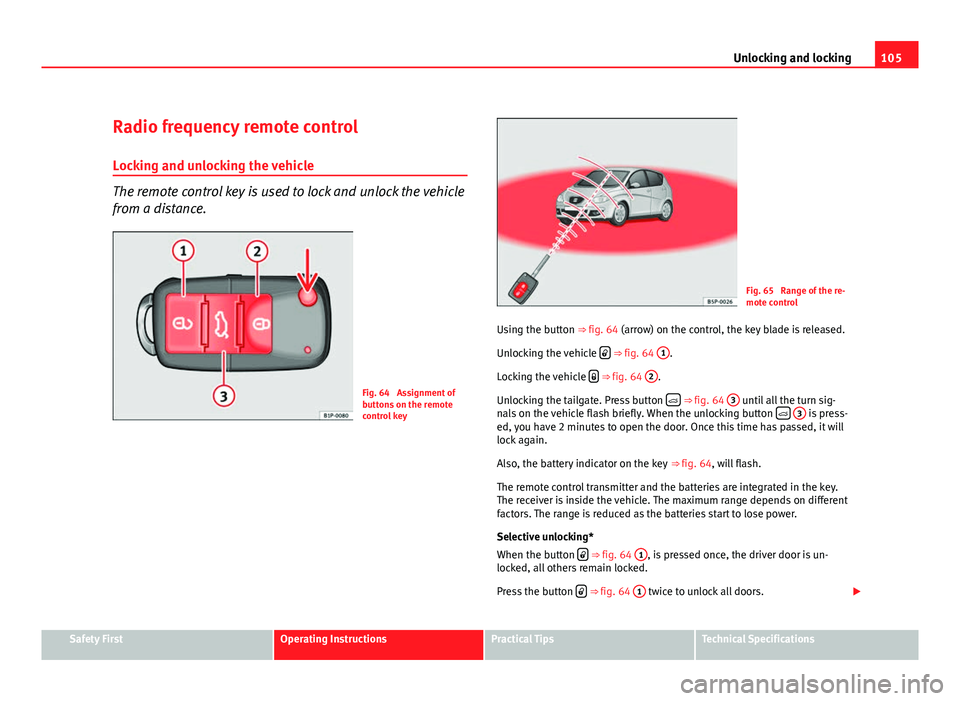
Fig. 64 Assignment of
buttons on the remote
control key
Fig. 65 Range of the re-
mote control
Using the button ⇒ fig. 64 (arrow) on the control, the key blade is released. Unlocking the vehicle
⇒ fig. 64
1.
Locking the vehicle
⇒ fig. 64
2.
Unlocking the tailgate. Press button
⇒ fig. 64
3 until all the turn sig-
nals on the vehicle flash briefly. When the unlocking button
3 is press-
ed, you have 2 minutes to open the door. Once this time has passed, it will
lock again.
Also, the battery indicator on the key ⇒ fig. 64, will flash.
The remote control transmitter and the batteries are integrated in the key.
The receiver is inside the vehicle. The maximum range depends on different
factors. The range is reduced as the batteries start to lose power.
Selective unlocking*
When the button
⇒
fig. 64 1, is pressed once, the driver door is un-
locked, all others remain locked.
Press the button
⇒ fig. 64
1 twice to unlock all doors.
Safety FirstOperating InstructionsPractical TipsTechnical Specifications
Page 113 of 313
111
Unlocking and locking
Windows Opening or closing the electric windows
The front and rear electric windows can be operated by us-
ing the controls on the driver door.
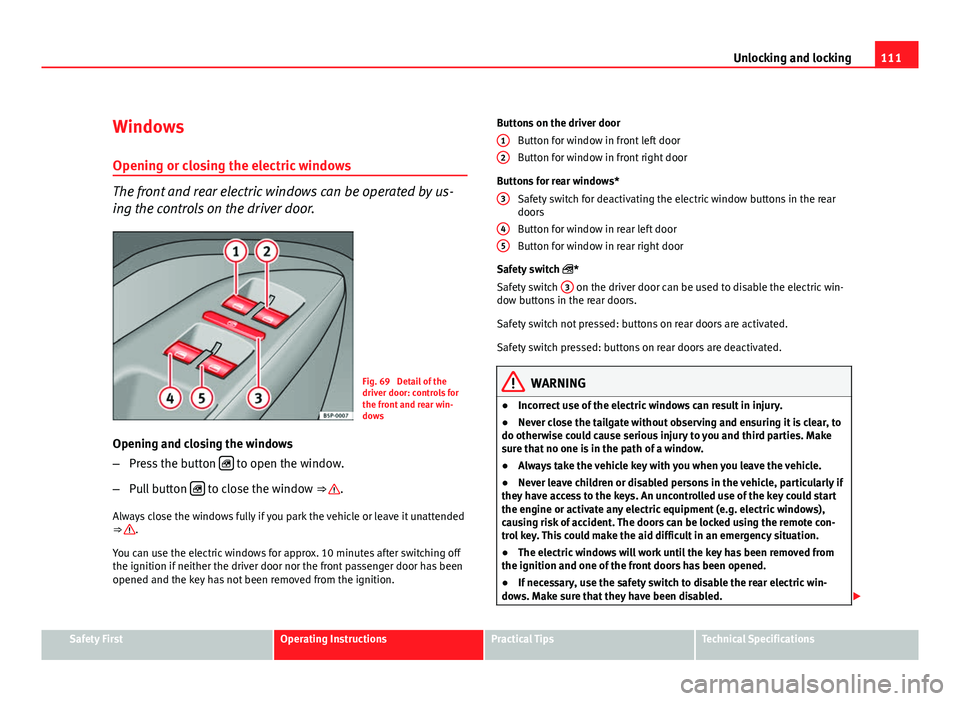
Fig. 69 Detail of the
driver door: controls for
the front and rear win-
dows
Opening and closing the windows
– Press the button
to open the window.
– Pull button
to close the window ⇒ .
Always close the windows fully if you park the vehicle or leave it unattended
⇒
.
You can use the electric windows for approx. 10 minutes after switching off
the ignition if neither the driver door nor the front passenger door has been
opened and the key has not been removed from the ignition. Buttons on the driver door
Button for window in front left door
Button for window in front right door
Buttons for rear windows* Safety switch for deactivating the electric window buttons in the rear
doors
Button for window in rear left door
Button for window in rear right door
Safety switch *
Safety switch 3
on the driver door can be used to disable the electric win-
dow buttons in the rear doors.
Safety switch not pressed: buttons on rear doors are activated.
Safety switch pressed: buttons on rear doors are deactivated.
WARNING
● Incorrect use of the electric windows can result in injury.
● Never close the tailgate without observing and ensuring it is clear, to
do otherwise could cause serious injury to you and third parties. Make
sure that no one is in the path of a window.
● Always take the vehicle key with you when you leave the vehicle.
● Never leave children or disabled persons in the vehicle, particularly if
they have access to the keys. An uncontrolled use of the key could start
the engine or activate any electric equipment (e.g. electric windows),
causing risk of accident. The doors can be locked using the remote con-
trol key. This could make the aid difficult in an emergency situation.
● The electric windows will work until the key has been removed from
the ignition and one of the front doors has been opened.
● If necessary, use the safety switch to disable the rear electric win-
dows. Make sure that they have been disabled.
12
3
45
Safety FirstOperating InstructionsPractical TipsTechnical Specifications
Page 121 of 313
119
Lights and visibility
Note
Please observe any relevant legal requirements which may apply in your
country.
Coming home / leaving home function*
The Coming Home function is controlled manually. The Leav-
ing Home function is controlled with a photosensor.
If the Coming Home or Leaving Home function is connected, the front side
and dipped lights, the tail lights and the number plate light will light up to
provide assistance.
Coming home function
The Coming Home function is activated by switching off the ignition and
briefly flashing the lights. When the driver door is opened, the Coming
Home lighting comes on. If the driver door is already open when the lights
are flashed briefly, the Coming Home lighting comes on immediately.
When the last door of the vehicle or the tailgate is closed, the Coming Home
function starts and the switching off the headlights is delayed.
The Coming Home lighting switches off in the following cases:
● On completion of the time period established for the delay in switching
off the lights after all the vehicle doors and the tailgate have been closed.
● If, 30 seconds after being connected, any doors or the tailgate remain
open.
● If the light switch is turned to position .
● If the ignition is switched on.
Leaving home function
The Leaving Home function is activated when the vehicle is unlocked if: ●
the light control is in position and
● the photosensor detects “darkness”.
The Leaving Home lighting switches off in the following cases:
● If the time period for the delay in switching off the headlights has ended
● If the vehicle is locked again.
● If the light switch is turned to position .
● If the ignition is switched on.
Note
The setting for the delay in switching off the headlights in the Coming Home
and Leaving Home function can be changed or the function can be connec-
ted or disconnected in the menu Lights and visibility ⇒ page 76.
● If the ignition key is removed while the lights are on, and the lights are
flashed briefly and the driver door opened, no acoustic signal is heard, as
when the Coming Home function is on, the lights are automatically switched
off after a period of time (except when the light switch is in position or
.
Safety FirstOperating InstructionsPractical TipsTechnical Specifications
Page 131 of 313
129
Lights and visibility
WARNING
● Worn and dirty wiper blades reduce visibility and safety levels while
driving.
● In cold conditions, you should not use the wash / wipe system unless
you have warmed the windscreen with the heating and ventilation sys-
tem. The washer fluid could otherwise freeze on the windscreen and ob-
scure your view of the road.
● Always note the corresponding warnings on ⇒ page 240.
CAUTION
In icy conditions, always check that the wiper blades are not frozen to the
glass before using the wipers for the first time. If you switch on the wipers
when the wiper blades are frozen to the windscreen, you could damage
both the wiper blades and the wiper motor.
Note
● The windscreen wipers will only work when the ignition is switched on.
● In certain versions of vehicles with alarms, the windscreen wiper will on-
ly work when the ignition is on and the bonnet closed.
● When in use, the wipers do not go as far as the rest position. When the
lever is moved to position 0, they are totally hidden.
● The next speed down will automatically be selected if wiper speed 2
⇒ fig. 85 or 3 is selected when the vehicle stops. The set speed will be re-
sumed when the vehicle starts again
● The windscreen will be wiped again after approximately five seconds
once the “automatic wipe/wash system” has been operated, provided the
vehicle is in transit (drip function). If you activate the wipers less than three
seconds after the drip function, a new wash sequence will begin without the
last wipe. For the “drip” function to work again, you have to turn the ignition
off and then on again. ●
When the “intermittent wipe function” is on, the intervals are directly
proportional to the speed. This way, the higher the vehicle speed the short-
er the intervals.
● The wiper will try to wipe away any obstacles that are on the windscreen.
The wiper will stop moving if the obstacle blocks its path. Remove the ob-
stacle and switch the wiper back on again.
● Before removing any objects that may be trapped in the side areas of
the windscreen, always move the wiper arms to the service position (hori-
zontal).
● The heat output of the heated jets is controlled automatically when the
ignition is switched on, depending upon the outside temperature.
Safety FirstOperating InstructionsPractical TipsTechnical Specifications
Page 133 of 313
131
Lights and visibility
Rear window wiper
The windscreen wiper lever operates the windscreen wiper
and the wash and wipe system for the rear window.
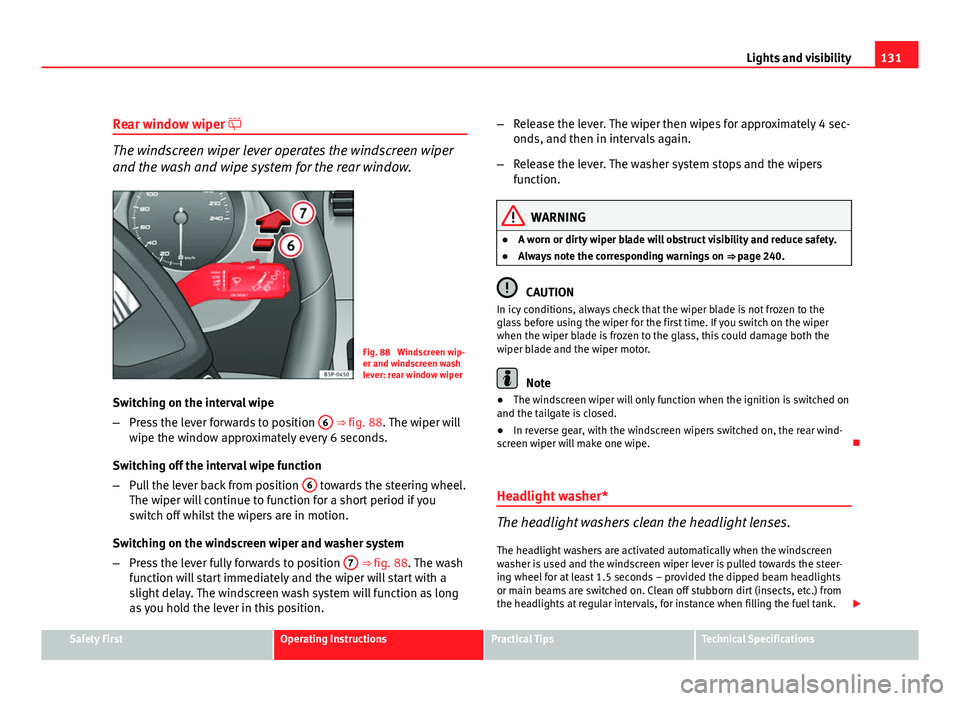
Fig. 88 Windscreen wip-
er and windscreen wash
lever: rear window wiper
Switching on the interval wipe
– Press the lever forwards to position 6
⇒ fig. 88. The wiper will
wipe the window approximately every 6 seconds.
Switching off the interval wipe function
– Pull the lever back from position 6
towards the steering wheel.
The wiper will continue to function for a short period if you
switch off whilst the wipers are in motion.
Switching on the windscreen wiper and washer system
– Press the lever fully forwards to position 7
⇒ fig. 88. The wash
function will start immediately and the wiper will start with a
slight delay. The windscreen wash system will function as long
as you hold the lever in this position. –
Release the lever. The wiper then wipes for approximately 4 sec-
onds, and then in intervals again.
– Release the lever. The washer system stops and the wipers
function.
WARNING
● A worn or dirty wiper blade will obstruct visibility and reduce safety.
● Always note the corresponding warnings on ⇒ page 240.
CAUTION
In icy conditions, always check that the wiper blade is not frozen to the
glass before using the wiper for the first time. If you switch on the wiper
when the wiper blade is frozen to the glass, this could damage both the
wiper blade and the wiper motor.
Note
● The windscreen wiper will only function when the ignition is switched on
and the tailgate is closed.
● In reverse gear, with the windscreen wipers switched on, the rear wind-
screen wiper will make one wipe.
Headlight washer*
The headlight washers clean the headlight lenses. The headlight washers are activated automatically when the windscreen
washer is used and the windscreen wiper lever is pulled towards the steer-
ing wheel for at least 1.5 seconds – provided the dipped beam headlights
or main beams are switched on. Clean off stubborn dirt (insects, etc.) from
the headlights at regular intervals, for instance when filling the fuel tank.
Safety FirstOperating InstructionsPractical TipsTechnical Specifications
Page 153 of 313
151
Seats and storage compartments
Cigarette lighter*
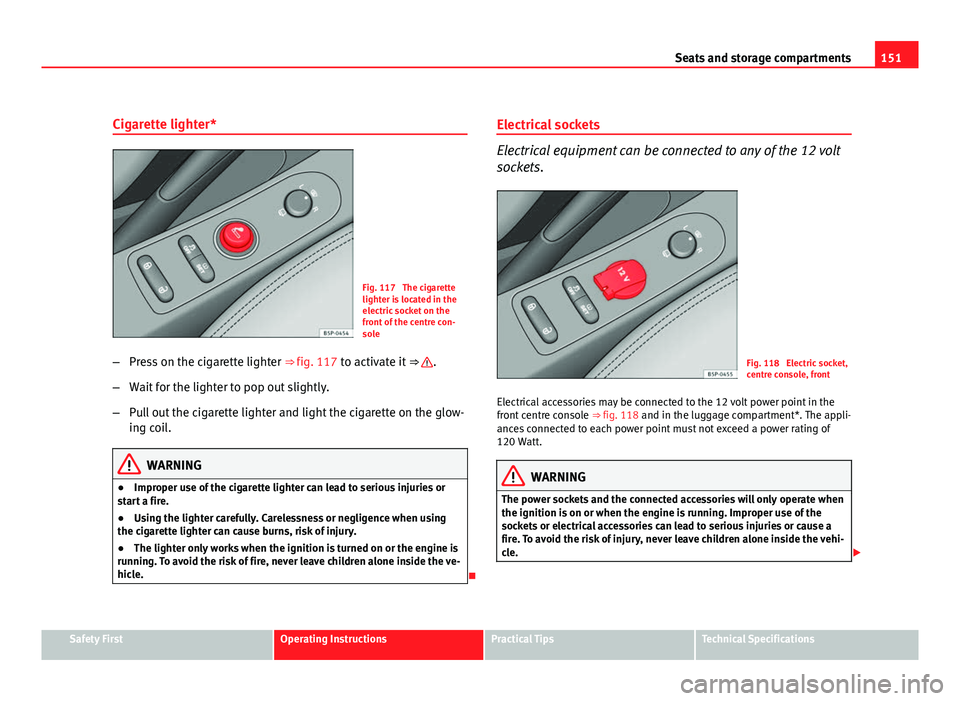
Fig. 117 The cigarette
lighter is located in the
electric socket on the
front of the centre con-
sole
– Press on the cigarette lighter ⇒ fig. 117 to activate it ⇒
.
– Wait for the lighter to pop out slightly.
– Pull out the cigarette lighter and light the cigarette on the glow-
ing coil.
WARNING
● Improper use of the cigarette lighter can lead to serious injuries or
start a fire.
● Using the lighter carefully. Carelessness or negligence when using
the cigarette lighter can cause burns, risk of injury.
● The lighter only works when the ignition is turned on or the engine is
running. To avoid the risk of fire, never leave children alone inside the ve-
hicle.
Electrical sockets
Electrical equipment can be connected to any of the 12 volt
sockets.
Fig. 118 Electric socket,
centre console, front
Electrical accessories may be connected to the 12 volt power point in the
front centre console ⇒ fig. 118 and in the luggage compartment*. The appli-
ances connected to each power point must not exceed a power rating of
120 Watt.
WARNING
The power sockets and the connected accessories will only operate when
the ignition is on or when the engine is running. Improper use of the
sockets or electrical accessories can lead to serious injuries or cause a
fire. To avoid the risk of injury, never leave children alone inside the vehi-
cle.
Safety FirstOperating InstructionsPractical TipsTechnical Specifications
Page 174 of 313
172Driving
Starting 2
The engine is started when the key is in this position. Electrical components
with a high power consumption are switched off temporarily.
Every time the vehicle is started again, the ignition key must be turned to
position 0
. The
repetitive start prevention lock of the ignition prevents
possible damage to the starter motor if the engine is already running.
WARNING
● The ignition key must NOT be removed from the lock until the vehicle
comes to a standstill. Otherwise, the steering could be immediately
blocked- Risk of accident!
● Always remove the key from the ignition when leaving the vehicle,
even for a short period. This is especially important if children or disa-
bled people are left alone in the vehicle. They could accidentally start the
engine or work electrical equipment such as the electric windows, conse-
quently resulting in an accident.
● Unsupervised use of the keys could start the engine or any electrical
system, such as the electric window. This could result in serious injury.
CAUTION
The starter motor will only work when the engine is stopped (ignition key
position 2
).
Electronic immobiliser
The immobiliser prevents unauthorised persons from driv-
ing the vehicle.
Inside the key there is a chip that deactivates the electronic immobiliser au-
tomatically when the key is inserted into the ignition. The immobiliser will be activated again automatically as soon as you pull
the key out of the ignition lock.
The engine can only be started using a genuine SEAT key with its correct
code.
Note
A perfect operation of the vehicle is ensured if genuine SEAT keys are used.
Starting and stopping the engine Starting petrol engines
The engine can only be started using a genuine SEAT key
with its correct code. – Move the gear lever to the neutral position and depress the
clutch pedal thoroughly and hold it in this position for the start-
er to turn the engine on.
– Turn the ignition key to the starting position ⇒ page 171.
– Let go of the ignition key as soon as the engine starts; the start-
er motor must not run on with the engine.
After starting a very hot engine, you may need to slightly press down the ac-
celerator.
When starting a very cold engine, it may be a little noisy for the first few sec-
onds until oil pressure has built up in the hydraulic valve compensators.
This is quite normal, and no cause for concern.