change wheel Seat Altea 2014 User Guide
[x] Cancel search | Manufacturer: SEAT, Model Year: 2014, Model line: Altea, Model: Seat Altea 2014Pages: 321, PDF Size: 4.52 MB
Page 94 of 321
92Steering wheel controls
Ia)Next presetChange folderNo function specifiedChange menu on instrument panelChange menu on instrument panelChange menu on instrument panel
Ja)Previous presetChange folderNo function specifiedChange menu on instrument panelChange menu on instrument panelChange menu on instrument panelKOperates on instrument panelOperates on instrument panelOperates on instrument panel
La)Change sourceChange sourceChange sourceOperates on instrument panelOperates on instrument panelOperates on instrument panela)
Depending on the model version
b) Only if the panel is in Audio menu.
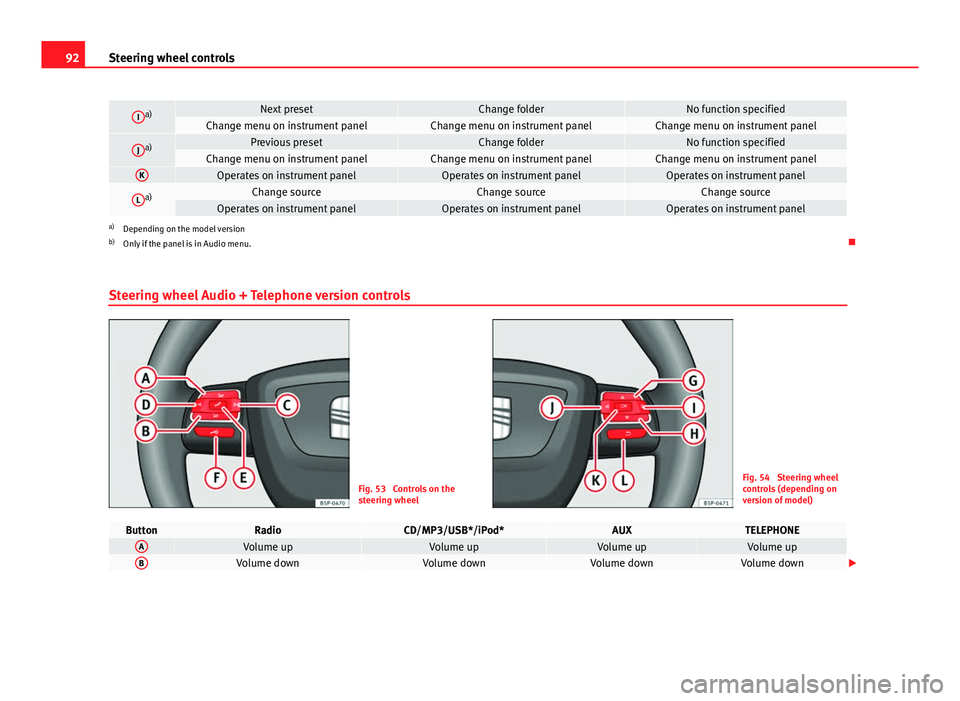
Steering wheel Audio + Telephone version controls
Fig. 53 Controls on the
steering wheelFig. 54 Steering wheel
controls (depending on
version of model)
ButtonRadioCD/MP3/USB*/iPod*AUXTELEPHONEAVolume upVolume upVolume upVolume upBVolume downVolume downVolume downVolume down
Page 95 of 321
93
Steering wheel controls
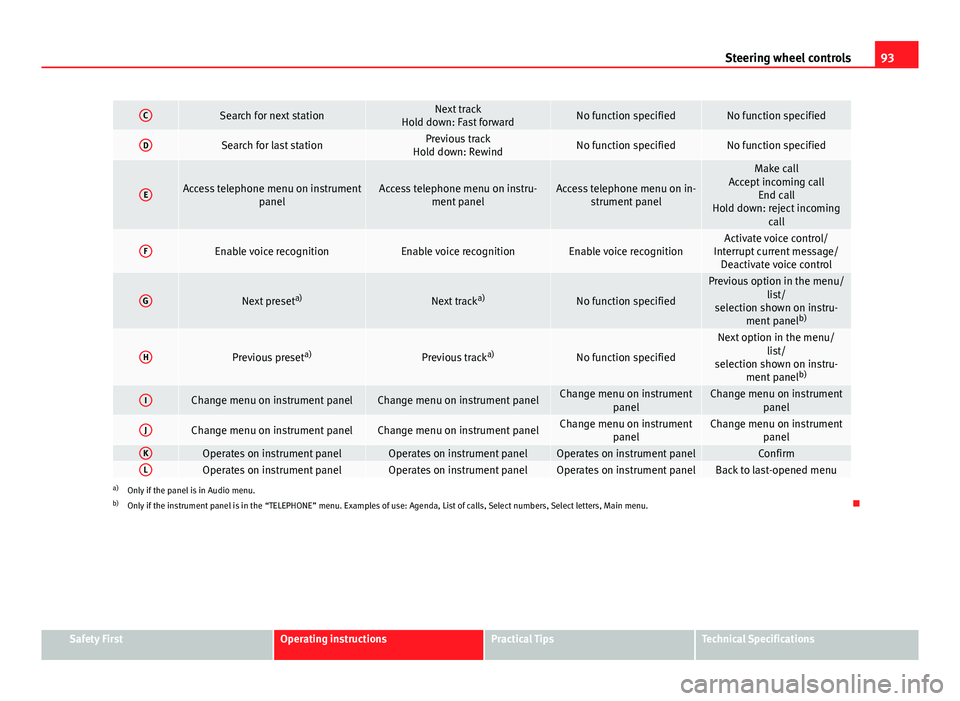
CSearch for next stationNext track
Hold down: Fast forwardNo function specifiedNo function specified
DSearch for last stationPrevious track
Hold down: RewindNo function specifiedNo function specified
EAccess telephone menu on instrument panelAccess telephone menu on instru-ment panelAccess telephone menu on in-strument panel
Make call
Accept incoming call End call
Hold down: reject incoming call
FEnable voice recognitionEnable voice recognitionEnable voice recognitionActivate voice control/
Interrupt current message/ Deactivate voice control
GNext preset a)Next tracka)No function specified
Previous option in the menu/
list/
selection shown on instru- ment panel b)
HPrevious preset a)Previous tracka)No function specified
Next option in the menu/
list/
selection shown on instru- ment panel b)
IChange menu on instrument panelChange menu on instrument panelChange menu on instrument
panelChange menu on instrumentpanel
JChange menu on instrument panelChange menu on instrument panelChange menu on instrumentpanelChange menu on instrumentpanel
KOperates on instrument panelOperates on instrument panelOperates on instrument panelConfirmLOperates on instrument panelOperates on instrument panelOperates on instrument panelBack to last-opened menua)Only if the panel is in Audio menu.
b) Only if the instrument panel is in the “TELEPHONE” menu. Examples of use: Agenda, List of calls, Select numbers, Select letters, Main menu.
Safety FirstOperating instructionsPractical TipsTechnical Specifications
Page 97 of 321
95
Steering wheel controls
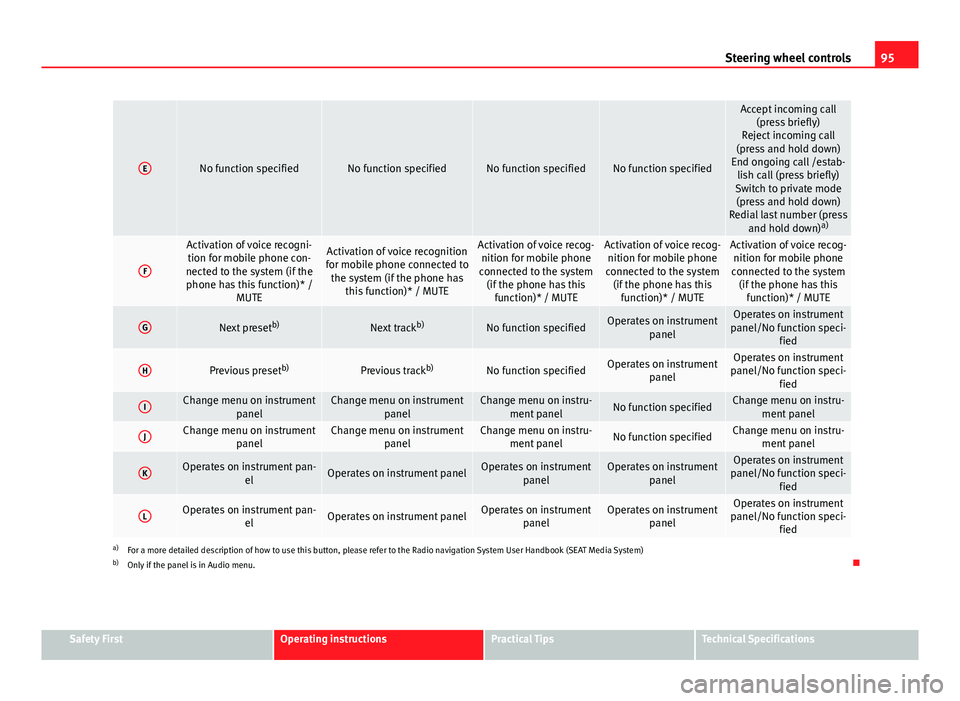
ENo function specifiedNo function specifiedNo function specifiedNo function specified
Accept incoming call
(press briefly)
Reject incoming call
(press and hold down)
End ongoing call /estab- lish call (press briefly)
Switch to private mode (press and hold down)
Redial last number (press and hold down) a)
F
Activation of voice recogni-
tion for mobile phone con-
nected to the system (if the phone has this function)* / MUTEActivation of voice recognition
for mobile phone connected to the system (if the phone has this function)* / MUTEActivation of voice recog-nition for mobile phone
connected to the system (if the phone has this function)* / MUTEActivation of voice recog-nition for mobile phone
connected to the system (if the phone has this function)* / MUTEActivation of voice recog-nition for mobile phone
connected to the system (if the phone has this function)* / MUTE
GNext preset b)Next trackb)No function specifiedOperates on instrument
panelOperates on instrument
panel/No function speci- fied
HPrevious preset b)Previous trackb)No function specifiedOperates on instrument
panelOperates on instrument
panel/No function speci- fied
IChange menu on instrument panelChange menu on instrumentpanelChange menu on instru-ment panelNo function specifiedChange menu on instru- ment panel
JChange menu on instrument panelChange menu on instrumentpanelChange menu on instru-ment panelNo function specifiedChange menu on instru- ment panel
KOperates on instrument pan- elOperates on instrument panelOperates on instrumentpanelOperates on instrumentpanelOperates on instrument
panel/No function speci- fied
LOperates on instrument pan- elOperates on instrument panelOperates on instrumentpanelOperates on instrumentpanelOperates on instrument
panel/No function speci- fied
a)For a more detailed description of how to use this button, please refer to the Radio navigation System User Handbook (SEAT Media System)
b) Only if the panel is in Audio menu.
Safety FirstOperating instructionsPractical TipsTechnical Specifications
Page 124 of 321
122Lights and visibility
Turn signal and main beam headlight lever
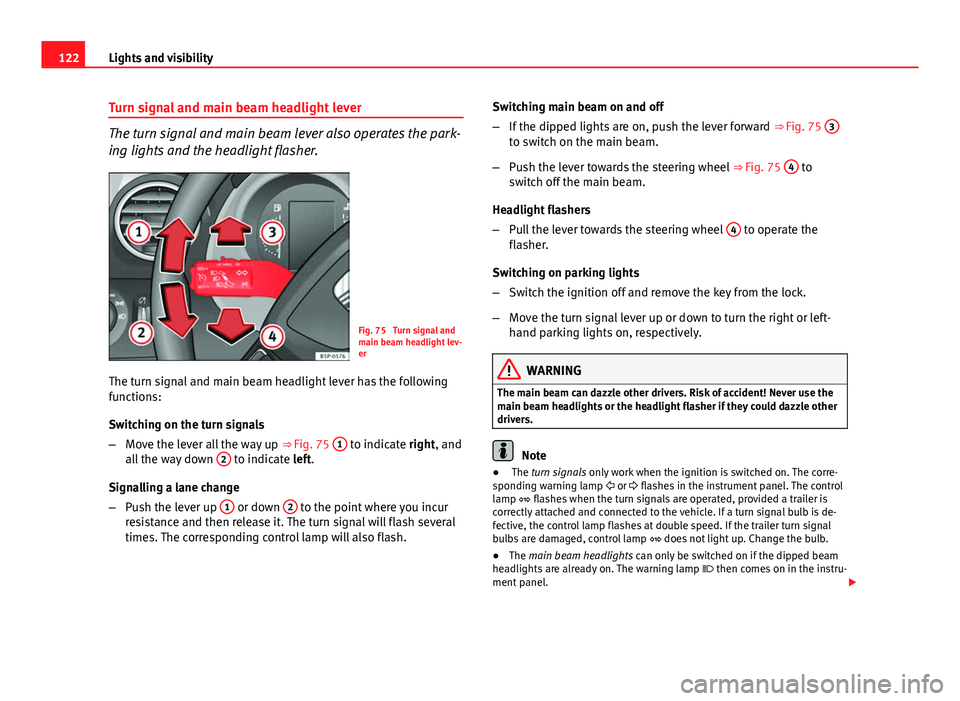
The turn signal and main beam lever also operates the park-
ing lights and the headlight flasher.
Fig. 75 Turn signal and
main beam headlight lev-
er
The turn signal and main beam headlight lever has the following
functions:
Switching on the turn signals
– Move the lever all the way up ⇒ Fig. 75 1
to indicate right, and
all the way down 2 to indicate left.
Signalling a lane change
– Push the lever up 1
or down 2 to the point where you incur
resistance and then release it. The turn signal will flash several
times. The corresponding control lamp will also flash. Switching main beam on and off
–
If the dipped lights are on, push the lever forward ⇒ Fig. 75 3
to switch on the main beam.
– Push the lever towards the steering wheel ⇒ Fig. 75 4
to
switch off the main beam.
Headlight flashers
– Pull the lever towards the steering wheel 4
to operate the
flasher.
Switching on parking lights
– Switch the ignition off and remove the key from the lock.
– Move the turn signal lever up or down to turn the right or left-
hand parking lights on, respectively.
WARNING
The main beam can dazzle other drivers. Risk of accident! Never use the
main beam headlights or the headlight flasher if they could dazzle other
drivers.
Note
● The turn signals only work when the ignition is switched on. The corre-
sponding warning lamp or flashes in the instrument panel. The control
lamp flashes when the turn signals are operated, provided a trailer is
correctly attached and connected to the vehicle. If a turn signal bulb is de-
fective, the control lamp flashes at double speed. If the trailer turn signal
bulbs are damaged, control lamp does not light up. Change the bulb.
● The main beam headlights can only be switched on if the dipped beam
headlights are already on. The warning lamp then comes on in the instru-
ment panel.
Page 186 of 321
184Driving
speeds to use the full power of the engine. This programme is not recom-
mended for use on the motorway or in the city.
Selecting the manual programme (tiptronic)
This programme allows driving similar to a manual gearbox.
This programme may be accessed using the selector lever or from the steer-
ing wheel controls when this option is fitted ⇒ page 186.
Selector lever locking
The selector lever lock prevents gears from being engaged
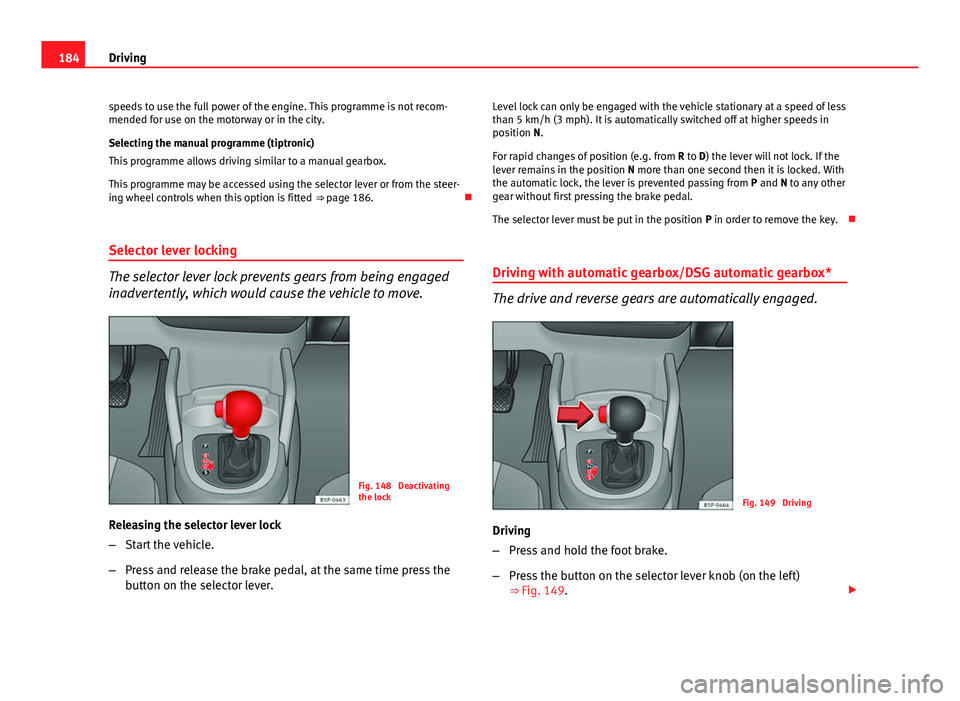
inadvertently, which would cause the vehicle to move.
Fig. 148 Deactivating
the lock
Releasing the selector lever lock
– Start the vehicle.
– Press and release the brake pedal, at the same time press the
button on the selector lever. Level lock can only be engaged with the vehicle stationary at a speed of less
than 5 km/h (3 mph). It is automatically switched off at higher speeds in
position N.
For rapid changes of position (e.g. from
R to D) the lever will not lock. If the
lever remains in the position N more than one second then it is locked. With
the automatic lock, the lever is prevented passing from P and N to any other
gear without first pressing the brake pedal.
The selector lever must be put in the position P in order to remove the key.
Driving with automatic gearbox/DSG automatic gearbox*
The drive and reverse gears are automatically engaged.
Fig. 149 Driving
Driving
– Press and hold the foot brake.
– Press the button on the selector lever knob (on the left)
⇒ Fig. 149.
Page 189 of 321
187
Driving
Changing gear with the selector lever
– Put the lever in position D and press towards the right to enter
the tiptronic gate ⇒ Fig. 150.
– Press the gear lever forwards +
⇒ Fig. 150 to select a higher
gear.
– Press the gear lever back –
⇒ Fig. 150 to select a lower gear.
Changing gear with the steering wheel levers
– Press the right paddle lever +
(+OFF) towards the steering
wheel to change up ⇒ Fig. 151.
– Press the left paddle –
towards the steering wheel to change
down ⇒ Fig. 151.
Using the paddle levers on the steering wheel, you can access manual driv-
ing mode regardless of the pre-selected driving mode.
General information about driving in tiptronic mode
When accelerating, the automatic gearbox / DSG automatic gearbox goes
into a higher gear a little before the engine reaches its maximum permitted
revolutions.
If a lower gear is selected, the automatic gearbox / DSG automatic gearbox
will only change down when the engine cannot go over its maximum permit-
ted revolutions.
If tiptronic is selected whilst the vehicle is in motion and the automatic
gearbox / DSG automatic gearbox is in third gear and selector lever position
D, tiptronic mode will then also be in third gear.
Changing gears in the normal or sport programme using the steering wheel
paddle levers
If the paddle levers ⇒ Fig. 151 are used in the normal or sport programme,
the system switches temporarily to tiptronic mode. To exit tiptronic mode again, press the right paddle lever
+ OFF
towards the steering wheel for ap-
proximately one second. You will also leave “Tiptronic” mode if the paddle
levers are not moved for a certain time.
Note
● The gearbox controls on the steering wheel can operate with the selector
lever in any position and with the vehicle in motion.
Kick-down feature
This feature allows maximum acceleration. If you press the accelerator down thoroughly, the gearbox automatically
changes down, depending on speed and engine speed, into a lower gear to
take full advantage of give the vehicle maximum acceleration.
The gearbox does not change gear until the engine reaches the maximum
determined engine speed for the gear.
WARNING
You could lose control of the vehicle if you accelerate on slippery road
surfaces. Risk of serious injury.
● Be particularly careful when using the kick-down features on slippery
road surfaces. With a fast acceleration, the vehicle could lose traction
and skid.
● You should use the kick-down feature only when traffic and weather
conditions allow it to be used safely.
Safety FirstOperating instructionsPractical TipsTechnical Specifications
Page 191 of 321
189
Driving
– Apply the handbrake.
– Select first gear.
– Switch the engine off and remove the key from the ignition. Turn
the steering wheel slightly to engage the steering lock.
– Always take you keys with you when you leave the vehicle ⇒
.
Additional notes on parking the vehicle on gradients:
Turn the steering wheel so that the vehicle rolls against the kerb if it started
to roll.
● If the vehicle is parked facing downhill, turn the front wheels so that
they point towards the kerb .
● If the vehicle is parked facing uphill, turn the front wheels so that they
point away from the kerb .
● Secure the vehicle as normal by applying the handbrake firmly and se-
lecting first gear.
WARNING
● Take measures to reduce the risk of injury when you leave your vehi-
cle unattended.
● Never park where the hot exhaust system could ignite inflammable
materials, such as dry grass, low bushes, spilt fuel etc.
● Never allow vehicle occupants to remain in the vehicle when it is
locked. They would be unable to open the vehicle from the inside, and
could become trapped in the vehicle in an emergency. In the event of an
emergency, locked doors will delay assistance to vehicle occupants.
● Never leave children alone in the vehicle. They could set the vehicle
in motion, for example, by releasing the handbrake or the gearbox lever.
● Depending on weather conditions, it may become extremely hot or
cold inside the vehicle. This can be fatal.
Hill driving assistant*
This function is only included in vehicles with ESC.
The hill driving assistant helps the driver to move off and upwards on a hill
when the vehicle is stationary.
The system maintains brake pressure for approximately two seconds after
the driver takes his foot off the brake pedal to prevent the vehicle from
lurching backwards when it is started. During these two seconds, the driver
has enough time to release the clutch pedal and accelerate without the ve-
hicle moving and without having to use the handbrake, making start-up
easier, more comfortable and safer.
These are the basic operation conditions:
● being on a ramp or hill/slope,
● closed doors,
● vehicle completely stationary,
● engine running and foot on the brake,
● besides having a gear engaged or being in neutral for manual gear
change and with the selector lever at positions S, D or R in vehicles with au-
tomatic gearbox.
This system is also active in reversing uphill.
WARNING
● If you do not start the vehicle immediately after taking your foot off
the brake pedal, the vehicle may start to roll back under certain condi-
tions. Depress the brake pedal or use the hand brake immediately.
● If the engine stalls, depress the brake pedal or use the hand brake
immediately.
● When following a line of traffic uphill, if you want to prevent the vehi-
cle from rolling back accidentally when starting off, hold the brake pedal
down for a few seconds before starting off.
Safety FirstOperating instructionsPractical TipsTechnical Specifications
Page 201 of 321
199
Intelligent technology
Electronic Stability Control (ESC)*
The ESC reduces the risk of skidding by braking the wheels individually.
The system uses the steering wheel angle and road speed to calculate the
changes of direction desired by the driver, and constantly compares them
with the actual behaviour of the vehicle. When irregularities occur, for exam-
ple, if the vehicle begins to skid, the ESC brakes the appropriate wheel au-
tomatically.
The forces acting on the braked wheel bring the vehicle back to a stable
condition. If the vehicle tends to oversteer, the system will act on the front
wheel on the outside of the turn.
Steering manoeuvre recommendations
This is a complementary safety function included in the ESC. This function
aids the driver to better stabilize the vehicle in a critical situation. For exam-
ple, in case of sudden braking surface with varied adherence, the vehicle
will tend to destabilise its trajectory to the right or to the left. In this case,
the ESC recognises the situation and assists the driver with a counter steer-
ing manoeuvre from the power steering.
This function simply provides the driver with a recommended manoeuvre in
critical situations.
The vehicle does not steer itself with this function, the driver has full control
of the vehicle at all times.
WARNING
● Remember that not even the ESC can defy the laws of physics. This
should be kept in mind, particularly on slippery and wet roads and when
towing a trailer.
● Always adapt your driving style to suit the condition of the roads and
the traffic situation. The greater safety provided by the ESC should not
encourage you to run any risks.
CAUTION
● To ensure that the ESC works correctly, all four wheels must be fitted
with the same tyres. Any differences in the rolling radius of the tyres can
cause the system to reduce engine power when this is not desired.
● Any modifications made to the vehicle (for example, to the engine,
brake system, running gear or to the combination of wheels and tyres) may
affect the operation of the ABS, EDL, ESC and ASR.
Anti-lock brake system (ABS)
The anti-lock brake system prevents the wheels locking during braking
⇒ page 197.
Electronic differential lock (EDL)*
The electronic differential lock helps prevent the loss of trac-
tion caused if one of the driven wheels starts spinning.
EDL helps the vehicle to start moving, accelerate and climb a gradient in
slippery conditions where this may otherwise be difficult or even impossi-
ble.
The system will control the revolutions of the driven wheels using the ABS
sensors (in case of an EDL fault the warning lamp for ABS lights up)
⇒ page 83.
At speeds of up to approximately 80 km/h, it is able to balance out differen-
ces in the speed of the driven wheels of approximately 100 rpm caused by a
slippery road surface on one side of the vehicle. It does this by braking the
wheel which has lost traction and distributing more driving force to the oth-
er driven wheel via the differential.
Safety FirstOperating instructionsPractical TipsTechnical Specifications
Page 204 of 321
202Intelligent technology
WARNING
● Apply the brakes heavily to clean the brake system only in a suitable
traffic situation. Be sure not to inconvenience or endanger other road
users. Risk of accident.
● Ensure the vehicle does not move while in neutral, when the engine is
stopped. Failure to do so could result in an accident.
CAUTION
● Never let the brakes “drag” by leaving your foot on the pedal when it is
not necessary to brake. This overheats the brakes, resulting in longer stop-
ping distances and greater wear.
● Before driving down a long, steep gradient, it is advisable to reduce
speed and change to a lower gear (or move the gear lever to a lower gear
position if your vehicle has an automatic gearbox). This makes use of en-
gine braking and prolongs the useful life of the brakes. If you still have to
use the brakes, it is better to brake firmly at intervals than to apply the
brakes continuously.
Note
● If the brake servo is not functioning due to a malfunction, or if the vehi-
cle has to be towed, you will have to press the brake pedal considerably
harder to make up for the lack of servo assistance.
● If you wish to equip the vehicle with accessories such as a front spoiler
or wheel covers, it is important that the flow of air to the front wheels is not
obstructed, otherwise the brakes can overheat. Power steering (servotronic*)
Power steering makes it easier to turn the steering wheel
when the engine is running.
Power steering assists the driver by reducing the force needed to turn the
steering wheel. In cars equipped with servotronic* power steering the de-
gree of power assistance is regulated electronically according to road
speed.
The power steering will keep on working even if the servotronic* device
fails. The degree of power assistance will, however, no longer adapt to dif-
ferent speeds. If the electronic regulating system is not working properly,
this is most noticeable when turning the steering wheel at low speeds (for
instance when parking), as more effort will be required than usual. The fault
should be corrected by a specialised workshop as soon as possible.
Power steering does not work if the engine is off. In this case the steering
wheel requires much more force to turn.
If the steering is held at its turning limit when the vehicle is stationary, this
will place an excessive load on the power steering system. Turning the
steering wheel to its limit places a load on the system, which causes noise.
It will also reduce the idling speed of the engine.
CAUTION
When the engine is running, do not turn the steering wheel to its limit for
more than 15 seconds. Otherwise, there is a risk of damaging the power
steering.
Page 256 of 321
254Wheels and tyres
2. The tyre pressures should only be checked when the tyres are
cold. The slightly raised pressures of warm tyres must not be re-
duced.
3. Adjust the tyre pressure to the load you are carrying.
Tyre pressure
The correct tyre pressure is especially important at high speeds. The pres-
sure should therefore be checked at least once a month and before starting
a journey.
The sticker with the tyre pressure values can be found on the inside of the
fuel tank flap. The tyre pressure values given are for cold tyres. Do not re-
duce the slightly raised pressures of warm tyres ⇒
.
WARNING
● Check the tyre pressure at least once per month. Checking the tyre
pressure is very important. If the tyre pressure is too high or too low,
there is an increased danger of accidents - particularly at high speeds.
● A tyre can easily burst if the pressure is too low, causing an accident!
● At continuously high speeds, a tyre with insufficient pressure flexes
more. In this way it becomes too hot, and this can cause tread separation
and tyre blow-out. Always observe the recommended tyre pressures.
● If the tyre pressure is too low or too high, the tyres will wear prema-
turely and the vehicle will not handle well. Risk of accident!
For the sake of the environment
Under-inflated tyres will increase fuel consumption. Tyre pressure monitoring
The tyre pressure monitoring system constantly checks the
pressure of the tyres.
The system uses the speed sensors of the ABS wheels. It operates by analy-
sing the speed and frequency spectrum of each wheel.
For optimum performance, use genuine SEAT tyres. In addition, check and
adjust tyre pressures regularly.
Whenever the tyre pressures are changed or one or more tyres are changed,
the system should be Reset by pressing the SET switch on the centre con-
sole.
The system warns the driver in the event of a loss of pressure by means of
symbols and messages in the instrument panel display. The system oper-
ates via the ESC ⇒ page 198.
Note that tyre pressure also depends on tyre temperature. Tyre pressure in-
creases about 0.1 bar (2.9 psi / 10 kPa) for each +10 °C (+50 °F) in tyre tem-
perature increase. The tyre heats up while the vehicle is being driven and
the tyre pressure will rise accordingly. For this reason, you should only ad-
just the tyre pressures when they are cold (i.e. approximately at ambient
temperature).
To ensure that the tyre pressure monitoring system works reliably, you
should check and, if necessary, adjust the tyre pressures at regular intervals
and store the correct pressures (reference values) in the system.
A tyre pressure information label is attached to the inside of the fuel tank
flap.