instrument panel Seat Altea 2014 User Guide
[x] Cancel search | Manufacturer: SEAT, Model Year: 2014, Model line: Altea, Model: Seat Altea 2014Pages: 321, PDF Size: 4.52 MB
Page 64 of 321
62Cockpit
Recommended gear display*
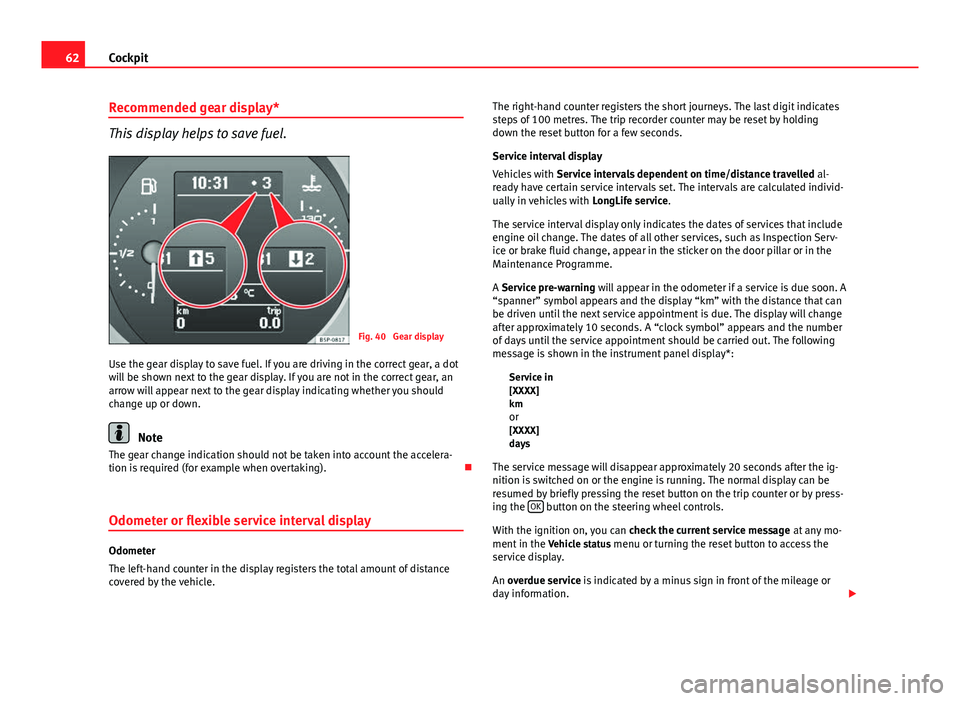
This display helps to save fuel.
Fig. 40 Gear display
Use the gear display to save fuel. If you are driving in the correct gear, a dot
will be shown next to the gear display. If you are not in the correct gear, an
arrow will appear next to the gear display indicating whether you should
change up or down.
Note
The gear change indication should not be taken into account the accelera-
tion is required (for example when overtaking).
Odometer or flexible service interval display
Odometer
The left-hand counter in the display registers the total amount of distance
covered by the vehicle. The right-hand counter registers the short journeys. The last digit indicates
steps of 100 metres. The trip recorder counter may be reset by holding
down the reset button for a few seconds.
Service interval display
Vehicles with
Service intervals dependent on time/distance travelled al-
ready have certain service intervals set. The intervals are calculated individ-
ually in vehicles with LongLife service.
The service interval display only indicates the dates of services that include
engine oil change. The dates of all other services, such as Inspection Serv-
ice or brake fluid change, appear in the sticker on the door pillar or in the
Maintenance Programme.
A Service pre-warning will appear in the odometer if a service is due soon. A
“spanner” symbol appears and the display “km” with the distance that can
be driven until the next service appointment is due. The display will change
after approximately 10 seconds. A “clock symbol” appears and the number
of days until the service appointment should be carried out. The following
message is shown in the instrument panel display*: Service in
[XXXX]
kmor
[XXXX]
days
The service message will disappear approximately 20 seconds after the ig-
nition is switched on or the engine is running. The normal display can be
resumed by briefly pressing the reset button on the trip counter or by press-
ing the OK
button on the steering wheel controls.
With the ignition on, you can check the current service message at any mo-
ment in the Vehicle status menu or turning the reset button to access the
service display.
An overdue service is indicated by a minus sign in front of the mileage or
day information.
Page 65 of 321
63
Cockpit
Indications for vehicles with LongLife service
Technical progress has made it possible to considerably reduce servicing re-
quirements. With the LongLife System, SEAT ensures that your vehicle only
has an interval service when it is necessary. The length of the Interval Serv-
ices (max. two years) is determined by factors such as conditions under
which the vehicle is used and personal driving style.
The service pre-warning will first appear 20 days before the date on which
the service is due. The distance travelled is rounded off to the nearest
100 km (miles) and the time to full days. The current service message can
only be consulted 500 km (300 miles) after the last service. Until that time,
only dashes are displayed.
Note
● If you reset the display manually, the next service interval will be indica-
ted after 15 000 km (10 000 miles) or one year and will not be calculated
individually.
● Do not reset the display between service intervals as the display will
otherwise be incorrect.
● In LongLife Service vehicles, if the battery is disconnected for a long pe-
riod, the days remaining until the next service cannot be calculated. There-
fore, the service message displays on the instrument panel may be incor-
rect. Take into account the maximum authorised service intervals. Multifunction display (MFI)*
The multifunction display (MFI) shows you information on
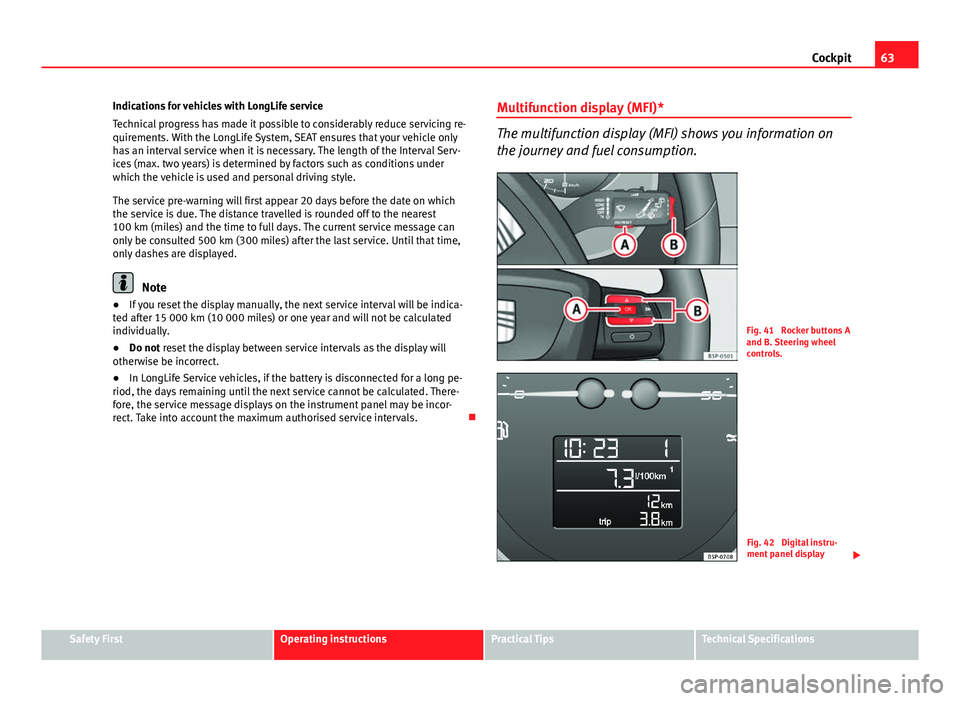
the journey and fuel consumption.
Fig. 41 Rocker buttons A
and B. Steering wheel
controls.
Fig. 42 Digital instru-
ment panel display
Safety FirstOperating instructionsPractical TipsTechnical Specifications
Page 70 of 321
68Cockpit
Instrument panel menus*
Example of menu use
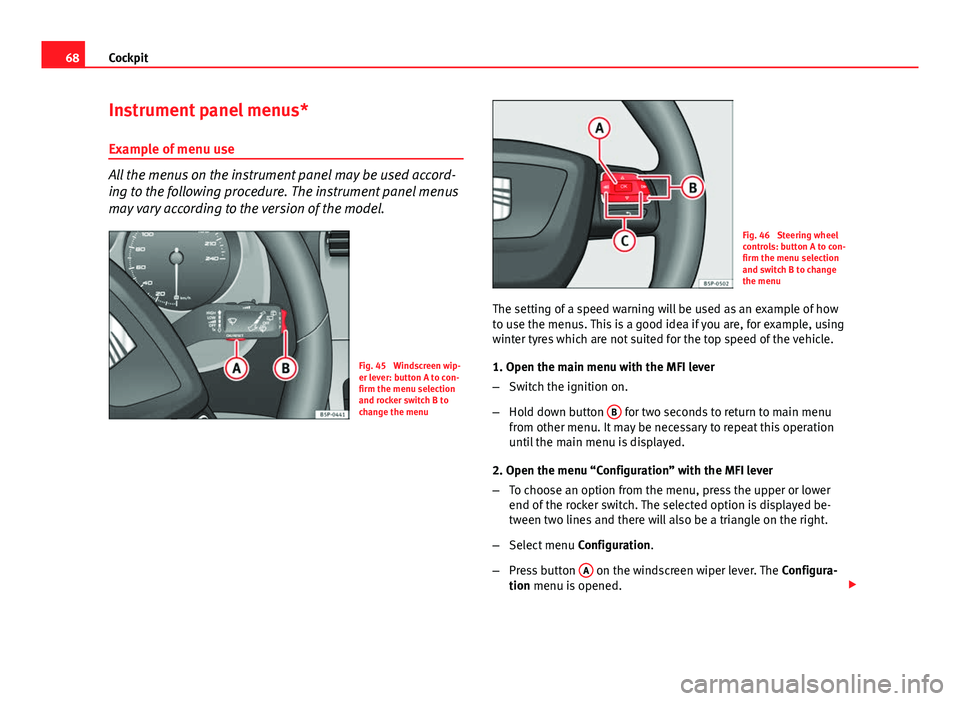
All the menus on the instrument panel may be used accord-
ing to the following procedure. The instrument panel menus
may vary according to the version of the model.
Fig. 45 Windscreen wip-
er lever: button A to con-
firm the menu selection
and rocker switch B to
change the menu
Fig. 46 Steering wheel
controls: button A to con-
firm the menu selection
and switch B to change
the menu
The setting of a speed warning will be used as an example of how
to use the menus. This is a good idea if you are, for example, using
winter tyres which are not suited for the top speed of the vehicle.
1. Open the main menu with the MFI lever
– Switch the ignition on.
– Hold down button B
for two seconds to return to main menu
from other menu. It may be necessary to repeat this operation
until the main menu is displayed.
2. Open the menu “Configuration” with the MFI lever
– To choose an option from the menu, press the upper or lower
end of the rocker switch. The selected option is displayed be-
tween two lines and there will also be a triangle on the right.
– Select menu Configuration.
– Press button A
on the windscreen wiper lever. The
Configura-
tion menu is opened.
Page 73 of 321
71
Cockpit
Selecting a memory To change from one memory to another, briefly press button A
⇒ Fig. 45 ⇒ page 68 on the windscreen wiper lever or the OK button on
the multifunction steering wheel ⇒ Fig. 46 ⇒ page 68 while the ignition
is switched on.
Resetting a memory Select the memory where you wish to erase the values.
Hold down button A
on the windscreen wiper lever or the OK button
on the multifunction steering wheel* for at least two seconds.
The trip memory 1 collects the travel and consumption data from the mo-
ment the ignition is switched on until it is switched off. If the journey is con-
tinued within two hours of switching off the ignition, the new values will be
added to the existing trip recorder memory. The memory will automatically
be deleted if the journey is interrupted for more than two hours.
The total memory 2 collects the journey data for any number of individual
journeys (even if the ignition is switched off for longer than two hours) up to
a total of 19 hours and 59 minutes travel time or 1999 km (miles) distance
travelled. The memory will automatically be deleted if one of the named val-
ues is reached.
Memory indications
The following data can be viewed on the multifunction display using the
rocker switch B
⇒ Fig. 45 ⇒
page 68 on the windscreen wiper lever or by
pressing button or ⇒
Fig. 46 on the multifunction steering wheel*.
Personal selection of display
The driver can establish which displays are shown on the instrument panel
display as required:
● Select the submenu Multifunction Display Data from the Configuration
menu ⇒ page 73.
● The displays can be activated or deactivated individually by marking the
required option and pressing the OK
button on the windscreen wiper lever
or the multifunction steering wheel*. –
–
– Duration in h and min
The display shows the amount of time which has elapsed since the ignition
was switched on.
The maximum display value in both memories is 19 hours and 59 minutes.
The memory will automatically be deleted once this value has been
reached.
Current fuel consumption in l/100 km or l/hour
The display will show the current fuel consumption in litres/100 km whilst
the vehicle is in motion or in litres/hour when the vehicle is in a stationary
position with the engine running.
Using this display you can see how your driving style affects fuel consump-
tion ⇒ page 171.
Average fuel consumption in l/100 km
The average fuel consumption will be shown after a distance of approxi-
mately 100 metres has been travelled. Until then dashes will appear in the
display. The display will be updated every five seconds while the vehicle is
in motion. The amount of fuel used will not be shown.
Distance travelled in km (miles)
The display shows the distance travelled since the ignition was switched on.
The maximum display value in both memories is 1999 km (miles). The
memory will automatically be deleted once this value has been reached.
Average speed in km/h (mph) After starting the ignition, the average speed will be shown after a distance
of approximately 100 metres has been travelled. Until then dashes will ap-
pear in the display. The display will be updated every five seconds while the
vehicle is in motion.
Speed warning at --- km/h (mph)
This function may help you to keep within the speed limits. Press the OKbutton on the windscreen wiper lever
A or the multifunction steering
Safety FirstOperating instructionsPractical TipsTechnical Specifications
Page 74 of 321
72Cockpit
wheel* to select the current speed. The instrument panel display gives the
selected speed, for example, Speed warning 120 km/h. You have five sec-
onds to reset the speed between 30 km/h (18 mph) and 250 km/h (155
mph) using rocker switch B
or buttons or on the multifunction steer-
ing wheel*. Press the OK button or wait five seconds until the speed is stor-
ed and the warning is activated. If the set speed is exceeded, an audible
warning is heard and a warning message is displayed until the speed is re-
duced to at least 4 km/h (2 mph) below the stored speed. The function is
switched off by pressing the OK
button again. Speed warning --- km/h
(miles) is now displayed on the instrument panel.
WARNING
There could be black ice on the road surface even if the “snowflake sym-
bol” is not shown. For this reason you should not rely exclusively on this
display - Risk of accident!
Note
● There are different instrument panels; therefore the multifunction dis-
play may vary.
● When the vehicle is stationary or travelling at very low speeds, the tem-
perature displayed may be slightly higher than the actual outside tempera-
ture as a result of the heat radiated from the engine.
● Vehicles with a multifunction steering wheel* do not have buttons on
the windscreen wiper lever. The multifunction display can only be controlled
from the buttons on the multifunction steering wheel*. Vehicle status menu
This menu shows warning or information texts
Open Vehicle Condition menu
– Select the option Vehicle status from the main menu: “Main
menu” and press button OK
on the windscreen wiper lever
A⇒ Fig. 47. or
– Press button
or on the multifunction steering wheel*
⇒ Fig. 46 until the Vehicle Status menu is displayed.
Priority 2 warning messages and information texts: “Information and warn-
ing messages on the screen” will automatically disappear from the screen
after a time and will be stored in the Vehicle status menu.
The warning and information texts may be viewed in this menu. If there is
no warning or information message, the option Vehicle status is not dis-
played. If there are several messages, each one is shown for a few seconds.
Example of menu use ⇒ page 68.
Note
If there are no warning messages, this menu is not available.
Page 75 of 321
73
Cockpit
Configuration menu
This menu is used to make the settings for the vehicle func-
tions. Open Configuration menu
– Select the option Configuration from the main menu: “Main
menu” and press button OK
A ⇒ Fig. 45 on the windscreen
wiper lever. or
– Press button
or on the multifunction steering wheel*
⇒ Fig. 46 until the Configuration menu is displayed.
Example of menu use ⇒ page 68.
Displayed on the
screeneffect
Multifunction display
data.This menu is used to establish the data in the mul-
tifunction display menu to be displayed on the in-
strument panel ⇒ page 70
ConvenienceThis menu allows you to make the settings for the
convenience functions in the vehicle.
Lights and visibilityFrom this menu it is it possible to alter the vehicle
lighting settings.
TimeThe hours and minutes of the clock and the naviga-
tion system can be changed. Choose between 12
and 24-hour format and change to summer time.
Winter tyresThe menu allows the setting of a speed at which an
optical and acoustic warning will be given by the
system. You can use this function, for example, if
you have fitted winter tyres which are not suited for
the top speed of your vehicle. Please see the sec-
tion “Wheels and tyres”.
LanguageThe display texts and the navigation system texts
can be seen in different languages.
UnitsThis option allows you to select the units for dis-
playing temperature, fuel consumption values and
distances.
sel. speedThe instrument panel also displays the speed in
another different unit of measurement (mph or km/
h) to that given on the speedometer.
Inter ServiceConsult service messages and reset service interval
display here.
Factory settingsThe manufacturer's predefined values for the func-
tions of this menu are restored.
Backa)This returns to the main menu.a)
Only if the windscreen wiper lever is used (MFI).
Note
● For electronic and vehicle equipment one or more of these menus will be
displayed.
● SEAT dealerships are able to programme other functions or change the
existing functions depending upon the vehicle equipment.
● The Configuration menu is only accessible when the vehicle is at a
standstill.
Convenience menu
From this menu it is it possible to alter the vehicle conven-
ience settings.
Open menu Convenience
– Choose the option Configuration from the main menu and press
the button OK
A ⇒ Fig. 45 on the windscreen wiper lever.
Safety FirstOperating instructionsPractical TipsTechnical Specifications
Page 78 of 321
76Cockpit
Warning lamps
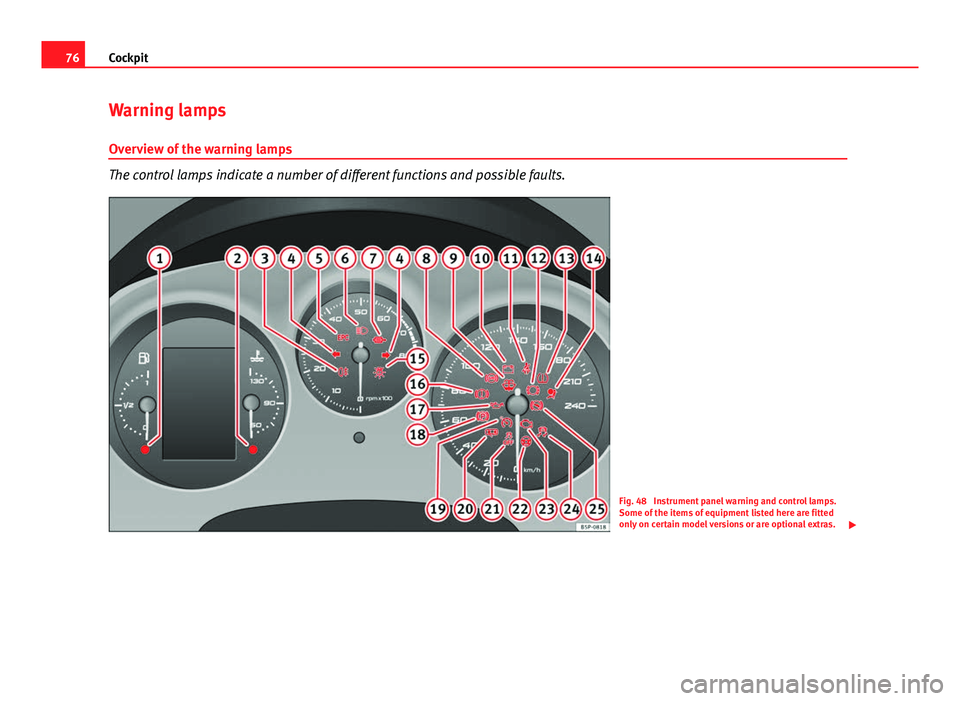
Overview of the warning lamps
The control lamps indicate a number of different functions and possible faults.
Fig. 48 Instrument panel warning and control lamps.
Some of the items of equipment listed here are fitted
only on certain model versions or are optional extras.
Page 80 of 321
78Cockpit
WARNING
● Failure to observe control lamps and warning messages can result in
serious personal injury or damage to your vehicle.
● The risk of an accident increases if your vehicle breaks down. Use a
warning triangle to draw the attention of other road users in order to pre-
vent danger to third parties.
● The engine compartment is a dangerous area. Before you open the
bonnet to work on the engine or in the engine compartment, you must
switch the engine off and allow it to cool to reduce the risk of scalding or
other injuries. Read and observe the relevant warnings ⇒ page 235.
Note
● The appropriate control lamp for a fault will light up in vehicles without
warning or information messages in the display.
● In vehicles with warning or information messages on the screen, the ap-
propriate control lamp for a fault will light up and a warning or information
message will also appear on the screen. Applies to the model: ALTEA / ALTEA XL
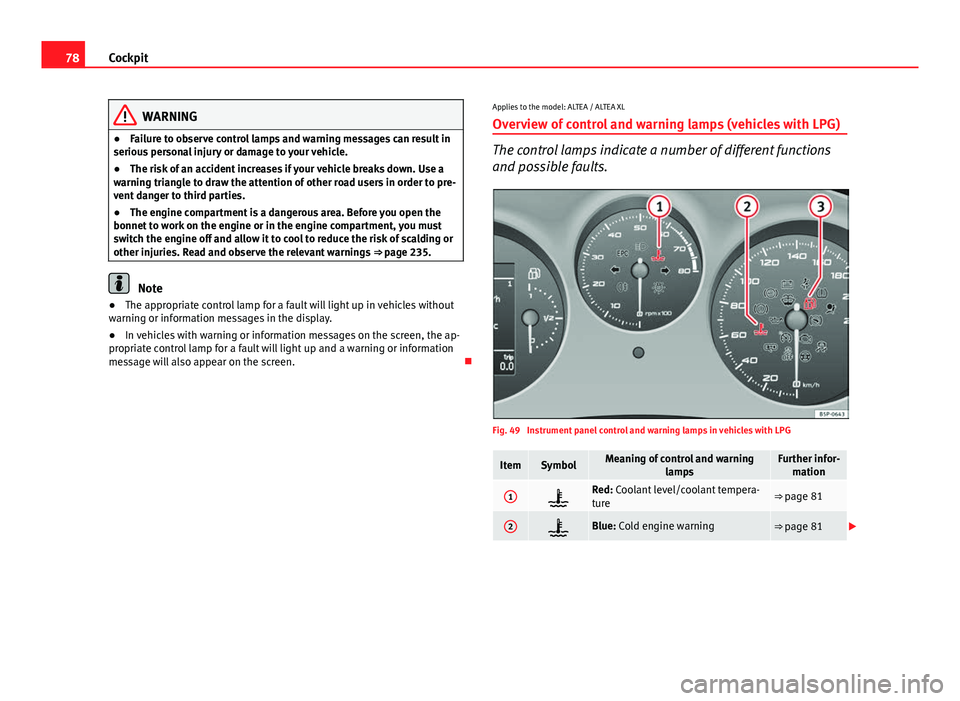
Overview of control and warning lamps (vehicles with LPG)
The control lamps indicate a number of different functions
and possible faults.
Fig. 49 Instrument panel control and warning lamps in vehicles with LPG
ItemSymbolMeaning of control and warning lampsFurther infor-mation
1Red: Coolant level/coolant tempera-
ture⇒ page 81
2Blue: Cold engine warning⇒ page 81
Page 82 of 321
80Cockpit
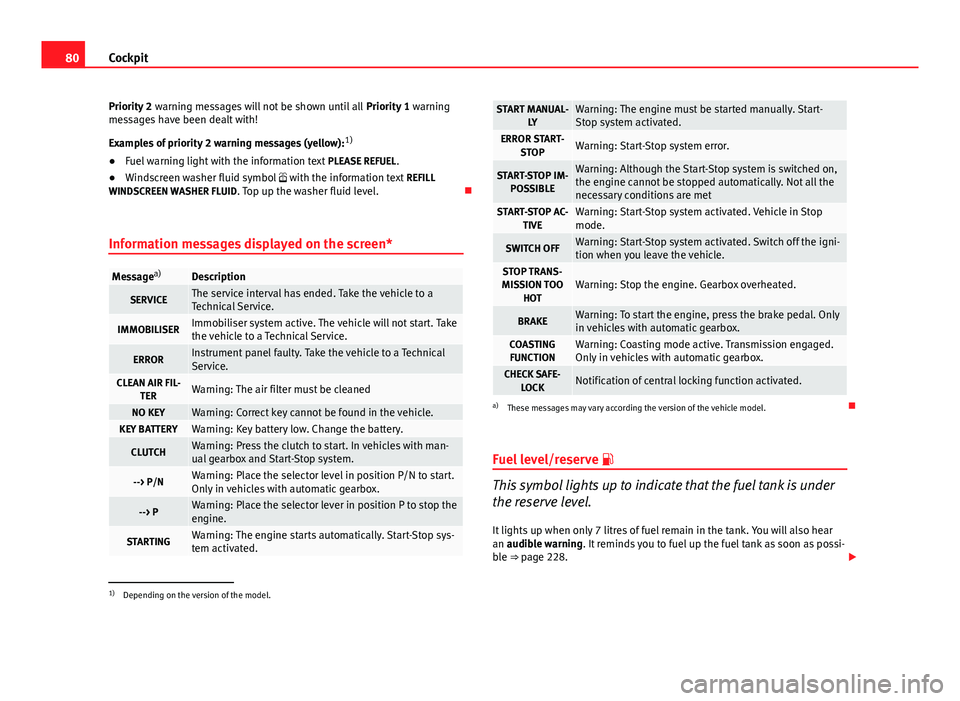
Priority 2 warning messages will not be shown until all Priority 1 warning
messages have been dealt with!
Examples of priority 2 warning messages (yellow): 1)
● Fuel warning light with the information text PLEASE REFUEL.
● Windscreen washer fluid symbol with the information text REFILL
WINDSCREEN WASHER FLUID . Top up the washer fluid level.
Information messages displayed on the screen*
Message a)Description
SERVICEThe service interval has ended. Take the vehicle to a
Technical Service.
IMMOBILISERImmobiliser system active. The vehicle will not start. Take
the vehicle to a Technical Service.
ERRORInstrument panel faulty. Take the vehicle to a Technical
Service.
CLEAN AIR FIL-
TERWarning: The air filter must be cleaned
NO KEYWarning: Correct key cannot be found in the vehicle.KEY BATTERYWarning: Key battery low. Change the battery.
CLUTCHWarning: Press the clutch to start. In vehicles with man-
ual gearbox and Start-Stop system.
--> P/NWarning: Place the selector level in position P/N to start.
Only in vehicles with automatic gearbox.
--> PWarning: Place the selector lever in position P to stop the
engine.
STARTINGWarning: The engine starts automatically. Start-Stop sys-
tem activated.
START MANUAL- LYWarning: The engine must be started manually. Start-
Stop system activated.
ERROR START-STOPWarning: Start-Stop system error.
START-STOP IM-POSSIBLEWarning: Although the Start-Stop system is switched on,
the engine cannot be stopped automatically. Not all the
necessary conditions are met
START-STOP AC- TIVEWarning: Start-Stop system activated. Vehicle in Stop
mode.
SWITCH OFFWarning: Start-Stop system activated. Switch off the igni-
tion when you leave the vehicle.
STOP TRANS-
MISSION TOO HOTWarning: Stop the engine. Gearbox overheated.
BRAKEWarning: To start the engine, press the brake pedal. Only
in vehicles with automatic gearbox.
COASTINGFUNCTIONWarning: Coasting mode active. Transmission engaged.
Only in vehicles with automatic gearbox.
CHECK SAFE- LOCKNotification of central locking function activated.
a)These messages may vary according the version of the vehicle model.
Fuel level/reserve
This symbol lights up to indicate that the fuel tank is under
the reserve level.
It lights up when only 7 litres of fuel remain in the tank. You will also hear
an audible warning. It reminds you to fuel up the fuel tank as soon as possi-
ble ⇒ page 228.
1)
Depending on the version of the model.
Page 83 of 321
81
Cockpit
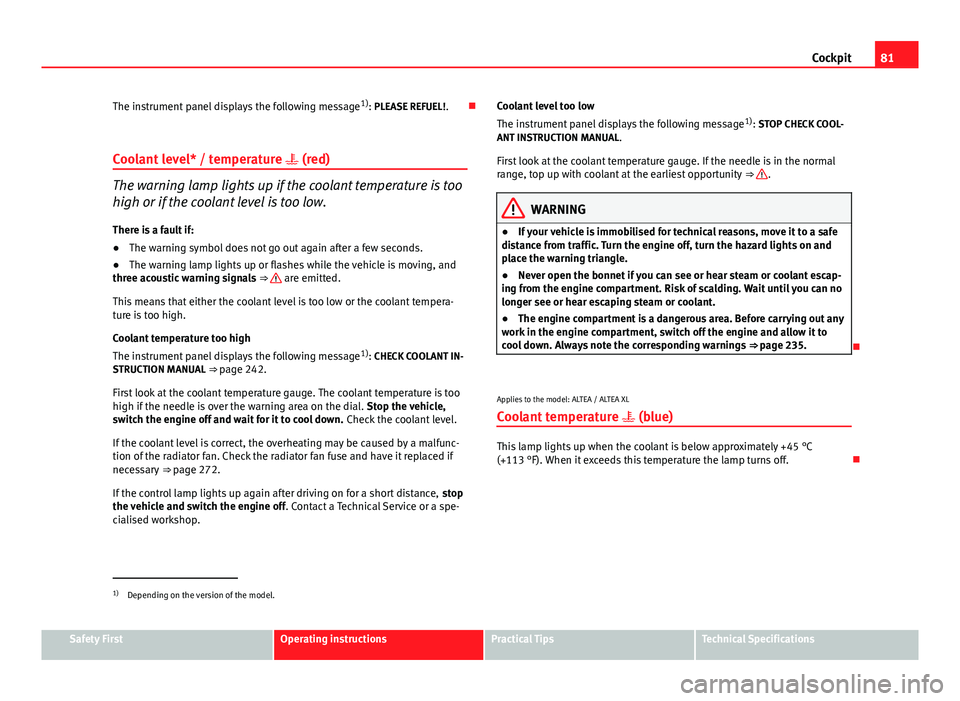
The instrument panel displays the following message 1)
: PLEASE REFUEL! .
Coolant level* / temperature (red)
The warning lamp lights up if the coolant temperature is too
high or if the coolant level is too low.
There is a fault if:
● The warning symbol does not go out again after a few seconds.
● The warning lamp lights up or flashes while the vehicle is moving, and
three acoustic warning signals ⇒
are emitted.
This means that either the coolant level is too low or the coolant tempera-
ture is too high.
Coolant temperature too high
The instrument panel displays the following message 1)
: CHECK COOLANT IN-
STRUCTION MANUAL ⇒ page 242.
First look at the coolant temperature gauge. The coolant temperature is too
high if the needle is over the warning area on the dial. Stop the vehicle,
switch the engine off and wait for it to cool down. Check the coolant level.
If the coolant level is correct, the overheating may be caused by a malfunc-
tion of the radiator fan. Check the radiator fan fuse and have it replaced if
necessary ⇒ page 272.
If the control lamp lights up again after driving on for a short distance, stop
the vehicle and switch the engine off . Contact a Technical Service or a spe-
cialised workshop. Coolant level too low
The instrument panel displays the following message
1)
: STOP CHECK COOL-
ANT INSTRUCTION MANUAL.
First look at the coolant temperature gauge. If the needle is in the normal
range, top up with coolant at the earliest opportunity ⇒
.
WARNING
● If your vehicle is immobilised for technical reasons, move it to a safe
distance from traffic. Turn the engine off, turn the hazard lights on and
place the warning triangle.
● Never open the bonnet if you can see or hear steam or coolant escap-
ing from the engine compartment. Risk of scalding. Wait until you can no
longer see or hear escaping steam or coolant.
● The engine compartment is a dangerous area. Before carrying out any
work in the engine compartment, switch off the engine and allow it to
cool down. Always note the corresponding warnings ⇒ page 235.
Applies to the model: ALTEA / ALTEA XL Coolant temperature (blue)
This lamp lights up when the coolant is below approximately +45 °C
(+113 °F). When it exceeds this temperature the lamp turns off.
1)
Depending on the version of the model.
Safety FirstOperating instructionsPractical TipsTechnical Specifications