warning lights Seat Altea 2014 Owner's Guide
[x] Cancel search | Manufacturer: SEAT, Model Year: 2014, Model line: Altea, Model: Seat Altea 2014Pages: 321, PDF Size: 4.52 MB
Page 122 of 321
120Lights and visibility
Dynamic cornering lights* (AFS)
The dynamic cornering lights only operate if the vehicle is travelling at more
than 10 km/h (6 mph) and the dipped headlights are on. When taking a
bend, the road is illuminated better with directional gas discharge bulbs
than with conventional fixed headlights.
A fault in the system is indicated via the flashing of the control lamp on
the instrument panel. At the same time, a text message with information or
instructions to perform necessary operations may appear on the instrument
panel display. Take the vehicle to a specialised workshop and have the fault
repaired.
If the control lamp lights up on the instrument panel but all the bulbs are
operating correctly ⇒ page 274, there may still be a fault in the dynamic
curve lighting system (AFS). Take the vehicle to a specialised workshop and
have the fault repaired.
WARNING
If the “automatic dipped beam control” is switched on, the dipped beam
headlights will not be switched on in fog. They should be switched on
manually using the light switch. The driver is personally responsible for
the correct use of lights in all situations. “Automatic headlight control”
is merely a system to support the driver. Where necessary, switch on the
lights manually using the light switch.
Applies to the model: ALTEA / ALTEA XL Fog lights with cornering function*
When the turn signal is switched on to turn or on very tight bends, the right
or left fog light automatically comes on to function as a cornering light. The
cornering light only operates if the dipped beam lights are on.
WARNING
If the “automatic dipped beam control” is switched on, the dipped beam
headlights will not be switched on in fog. They should be switched on
manually using the light switch. The driver is personally responsible for
the correct use of lights in all situations. “Automatic headlight control”
is merely a system to support the driver. Where necessary, switch on the
lights manually using the light switch.
Hazard warning lights
The hazard warning lights are used to draw the attention of
other road users to your vehicle in emergencies.
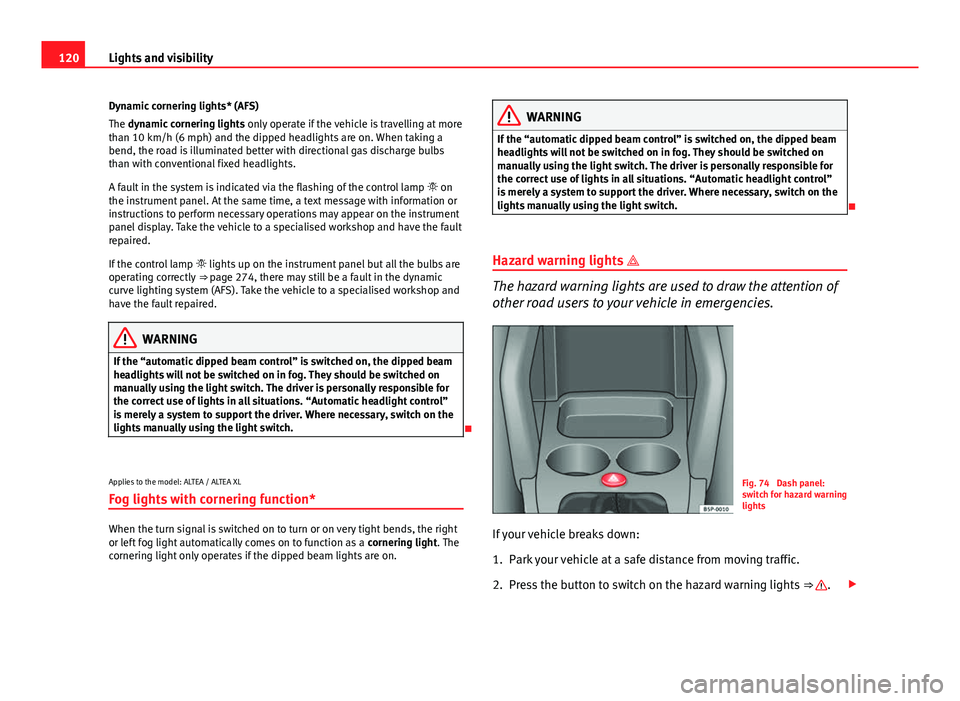
Fig. 74 Dash panel:
switch for hazard warning
lights
If your vehicle breaks down:
1. Park your vehicle at a safe distance from moving traffic.
2. Press the button to switch on the hazard warning lights ⇒
.
Page 123 of 321
121
Lights and visibility
3. Switch the ignition off.
4. Apply the handbrake.
5. On a manual gearbox engage 1st gear. On an automatic gear- box, move the selector lever to P.
6. Use the warning triangle to draw the attention of other road users to your vehicle.
7. Always take the vehicle key with you when you leave the vehi- cle.
Switch on the hazard warning lights to warn other road users, for example:
● reaching the tail end of a traffic jam,
● there is an emergency
● your vehicle breaks down due to a technical fault,
● you are towing another vehicle or your vehicle is being towed.
All turn signals flash simultaneously when the hazard warning lights are
switched on. The two turn signal turn signal lamps and the turn signal
lamp in the switch will flash at the same time. The hazard warning lights
also work when the ignition is switched off.
Emergency braking warning
If the vehicle is braked suddenly and continuously at a speed of more than
80 km/h (50 mph), the brake light flashes several times per second to warn
vehicles driving behind. If you continue braking, the hazard warning lights
will come on automatically when the vehicle comes to a standstill. They
switch off automatically when the vehicle starts to move again.
WARNING
● The risk of an accident increases if your vehicle breaks down. Always
use the hazard warning lights and a warning triangle to draw the atten-
tion of other road users to your stationary vehicle.
● Never park where the catalytic converter could come into contact with
inflammable materials under the vehicle, for example dry grass or spilt
petrol. This could start a fire!
Note
● The battery will run down if the hazard warning lights are left on for a
long time, even if the ignition is switched off.
● The use of the hazard warning lights described here is subject to the rel-
evant statutory requirements.
Safety FirstOperating instructionsPractical TipsTechnical Specifications
Page 124 of 321
122Lights and visibility
Turn signal and main beam headlight lever
The turn signal and main beam lever also operates the park-
ing lights and the headlight flasher.
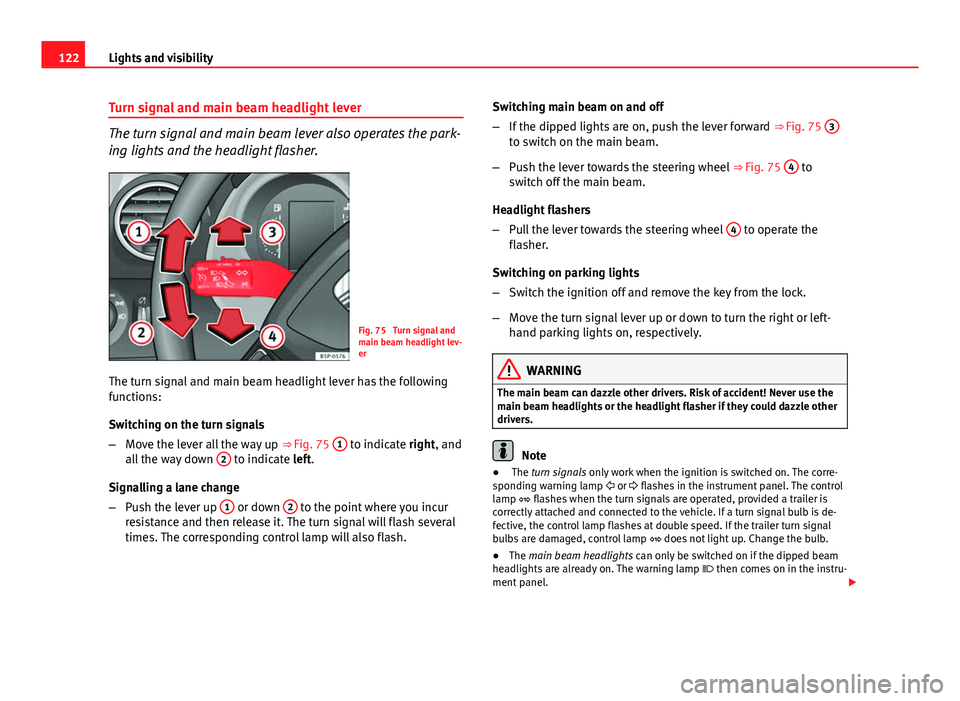
Fig. 75 Turn signal and
main beam headlight lev-
er
The turn signal and main beam headlight lever has the following
functions:
Switching on the turn signals
– Move the lever all the way up ⇒ Fig. 75 1
to indicate right, and
all the way down 2 to indicate left.
Signalling a lane change
– Push the lever up 1
or down 2 to the point where you incur
resistance and then release it. The turn signal will flash several
times. The corresponding control lamp will also flash. Switching main beam on and off
–
If the dipped lights are on, push the lever forward ⇒ Fig. 75 3
to switch on the main beam.
– Push the lever towards the steering wheel ⇒ Fig. 75 4
to
switch off the main beam.
Headlight flashers
– Pull the lever towards the steering wheel 4
to operate the
flasher.
Switching on parking lights
– Switch the ignition off and remove the key from the lock.
– Move the turn signal lever up or down to turn the right or left-
hand parking lights on, respectively.
WARNING
The main beam can dazzle other drivers. Risk of accident! Never use the
main beam headlights or the headlight flasher if they could dazzle other
drivers.
Note
● The turn signals only work when the ignition is switched on. The corre-
sponding warning lamp or flashes in the instrument panel. The control
lamp flashes when the turn signals are operated, provided a trailer is
correctly attached and connected to the vehicle. If a turn signal bulb is de-
fective, the control lamp flashes at double speed. If the trailer turn signal
bulbs are damaged, control lamp does not light up. Change the bulb.
● The main beam headlights can only be switched on if the dipped beam
headlights are already on. The warning lamp then comes on in the instru-
ment panel.
Page 125 of 321
123
Lights and visibility
● The headlight flasher comes on for as long as you pull the lever – even if
no other lights are switched on. The warning lamp then comes on in the
instrument panel.
● When the parking lights are switched on, the headlight and the tail light
on the corresponding side of the vehicle light up. The parking lights will on-
ly work if the key is removed from the ignition. If the lights are switched on,
an audible warning will be emitted while the driver door is open.
● If the turn signal lever is left on after the key has been taken out of the
ignition lock, an acoustic signal sounds when the driver door is opened.
This is a reminder to switch off the turn signal, unless of course you wish to
leave the parking light on.
Interior lights
Front interior light type 1
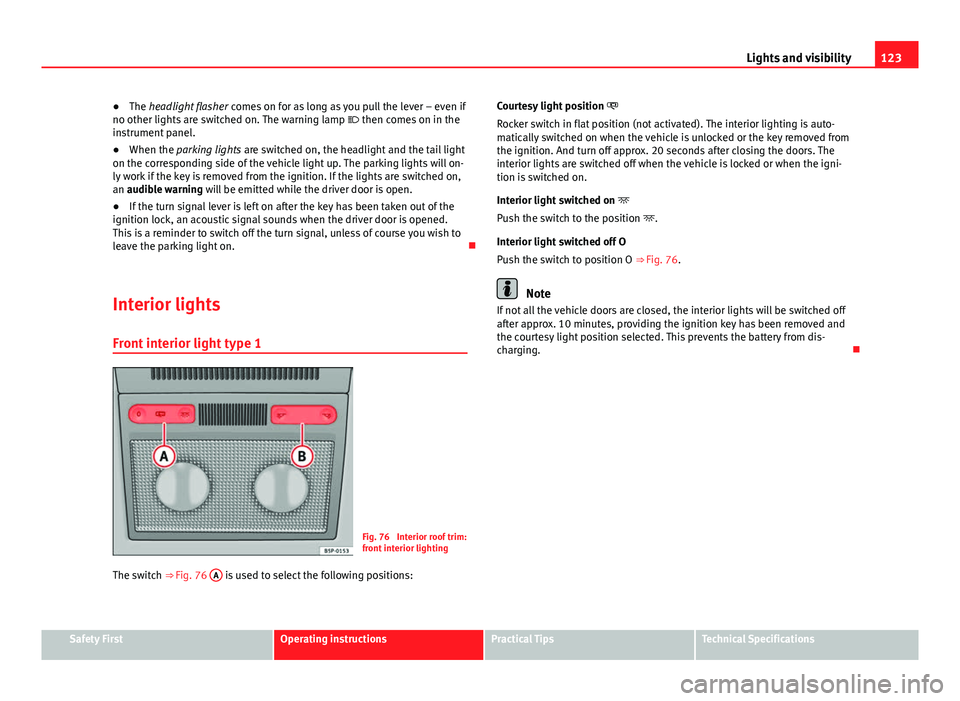
Fig. 76 Interior roof trim:
front interior lighting
The switch ⇒ Fig. 76 A
is used to select the following positions: Courtesy light position
Rocker switch in flat position (not activated). The interior lighting is auto-
matically switched on when the vehicle is unlocked or the key removed from
the ignition. And turn off approx. 20 seconds after closing the doors. The
interior lights are switched off when the vehicle is locked or when the igni-
tion is switched on.
Interior light switched on
Push the switch to the position .
Interior light switched off O
Push the switch to position O ⇒ Fig. 76.
Note
If not all the vehicle doors are closed, the interior lights will be switched off
after approx. 10 minutes, providing the ignition key has been removed and
the courtesy light position selected. This prevents the battery from dis-
charging.
Safety FirstOperating instructionsPractical TipsTechnical Specifications
Page 130 of 321
128Lights and visibility
WARNING
● Worn and dirty wiper blades reduce visibility and safety levels while
driving.
● In cold conditions, you should not use the wash/wipe system unless
you have warmed the windscreen with the heating and ventilation sys-
tem. The windscreen washer fluid could otherwise freeze on the wind-
screen and obscure your view of the road.
● Always note the corresponding warnings on ⇒ page 245.
CAUTION
In icy conditions, always check that the wiper blades are not frozen to the
glass before using the wipers for the first time. If you switch on the wind-
screen wipers when the wiper blades are frozen to the windscreen, you
could damage both the wiper blades and the wiper motor.
Note
● The windscreen wipers will only work when the ignition is switched on.
● In certain versions of vehicles with alarms, the windscreen wiper will on-
ly work when the ignition is on and the bonnet closed.
● When in use, the wipers do not go as far as the rest position. When the
lever is moved to position 0, they are totally hidden.
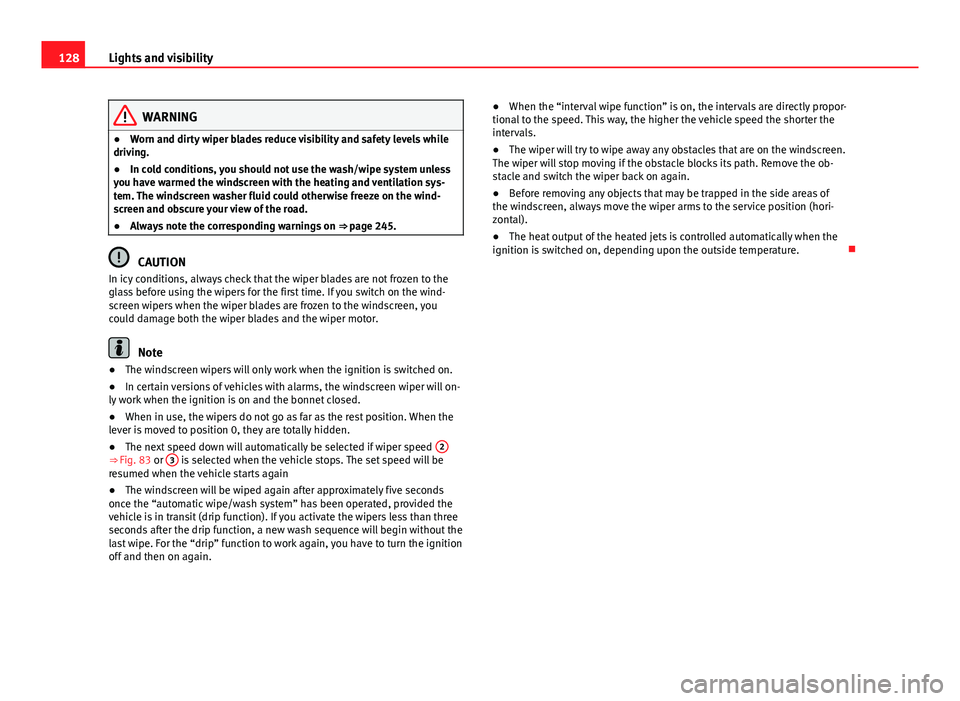
● The next speed down will automatically be selected if wiper speed 2
⇒ Fig. 83 or 3 is selected when the vehicle stops. The set speed will be
resumed when the vehicle starts again
● The windscreen will be wiped again after approximately five seconds
once the “automatic wipe/wash system” has been operated, provided the
vehicle is in transit (drip function). If you activate the wipers less than three
seconds after the drip function, a new wash sequence will begin without the
last wipe. For the “drip” function to work again, you have to turn the ignition
off and then on again. ●
When the “interval wipe function” is on, the intervals are directly propor-
tional to the speed. This way, the higher the vehicle speed the shorter the
intervals.
● The wiper will try to wipe away any obstacles that are on the windscreen.
The wiper will stop moving if the obstacle blocks its path. Remove the ob-
stacle and switch the wiper back on again.
● Before removing any objects that may be trapped in the side areas of
the windscreen, always move the wiper arms to the service position (hori-
zontal).
● The heat output of the heated jets is controlled automatically when the
ignition is switched on, depending upon the outside temperature.
Page 132 of 321
130Lights and visibility
Rear window wiper
The window wiper lever operates the windscreen wiper and
the wash and wipe system for the rear window.
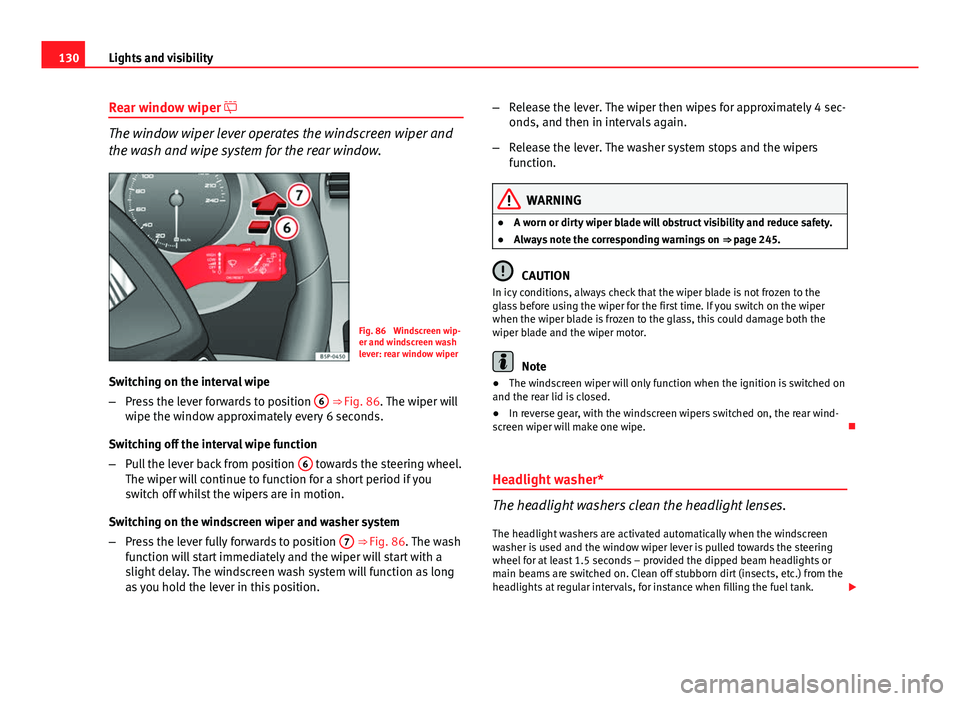
Fig. 86 Windscreen wip-
er and windscreen wash
lever: rear window wiper
Switching on the interval wipe
– Press the lever forwards to position 6
⇒ Fig. 86. The wiper will
wipe the window approximately every 6 seconds.
Switching off the interval wipe function
– Pull the lever back from position 6
towards the steering wheel.
The wiper will continue to function for a short period if you
switch off whilst the wipers are in motion.
Switching on the windscreen wiper and washer system
– Press the lever fully forwards to position 7
⇒ Fig. 86. The wash
function will start immediately and the wiper will start with a
slight delay. The windscreen wash system will function as long
as you hold the lever in this position. –
Release the lever. The wiper then wipes for approximately 4 sec-
onds, and then in intervals again.
– Release the lever. The washer system stops and the wipers
function.
WARNING
● A worn or dirty wiper blade will obstruct visibility and reduce safety.
● Always note the corresponding warnings on ⇒ page 245.
CAUTION
In icy conditions, always check that the wiper blade is not frozen to the
glass before using the wiper for the first time. If you switch on the wiper
when the wiper blade is frozen to the glass, this could damage both the
wiper blade and the wiper motor.
Note
● The windscreen wiper will only function when the ignition is switched on
and the rear lid is closed.
● In reverse gear, with the windscreen wipers switched on, the rear wind-
screen wiper will make one wipe.
Headlight washer*
The headlight washers clean the headlight lenses. The headlight washers are activated automatically when the windscreen
washer is used and the window wiper lever is pulled towards the steering
wheel for at least 1.5 seconds – provided the dipped beam headlights or
main beams are switched on. Clean off stubborn dirt (insects, etc.) from the
headlights at regular intervals, for instance when filling the fuel tank.
Page 133 of 321
131
Lights and visibility
Note
● To ensure that the headlight washers work properly in winter, keep the
nozzle holders in the bumper free of snow and remove any ice with a de-icer
spray.
● To remove water, the windscreen wipers will be activated from time to
time, the headlight washers will be activated every three cycles.
Rear vision mirrors Interior rear vision mirror
It is dangerous to drive if you cannot see clearly through the
rear window.
Manual anti-dazzle function for interior rear vision mirror
In the basic mirror position, the lever at the bottom edge of the rear vision
mirror should be at the front. Pull the lever to the back to select the anti-
dazzle function. Automatic anti-dazzle interior rear vision mirror*
The automatic anti-dazzle function can be switched on and
off as desired.
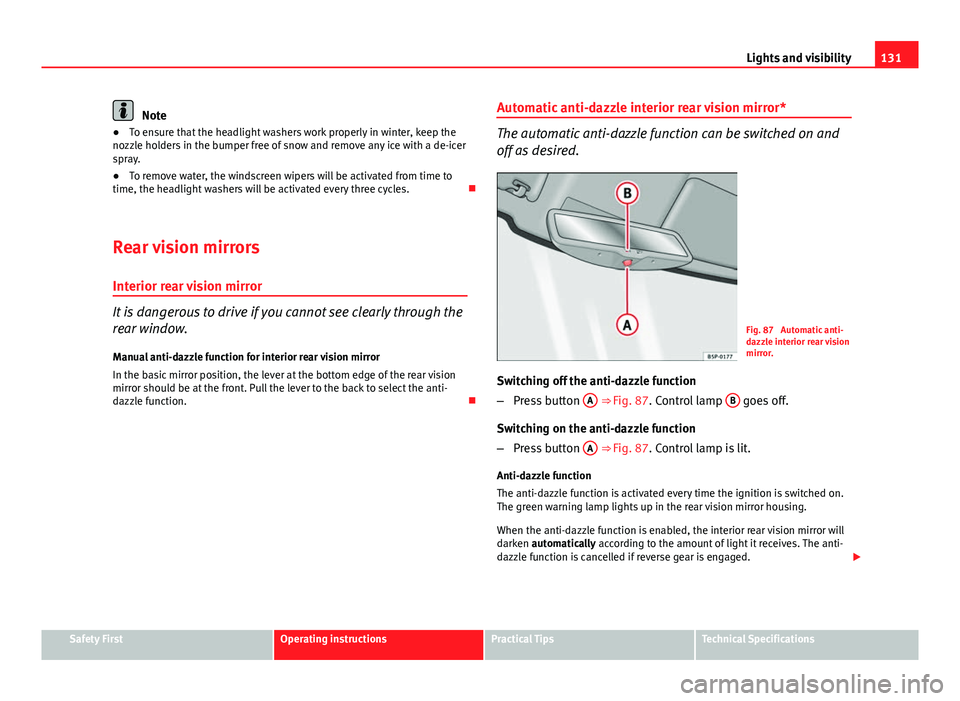
Fig. 87 Automatic anti-
dazzle interior rear vision
mirror.
Switching off the anti-dazzle function
– Press button A
⇒ Fig. 87. Control lamp B goes off.
Switching on the anti-dazzle function
– Press button A
⇒ Fig. 87. Control lamp is lit.
Anti-dazzle function
The anti-dazzle function is activated every time the ignition is switched on.
The green warning lamp lights up in the rear vision mirror housing.
When the anti-dazzle function is enabled, the interior rear vision mirror will
darken automatically according to the amount of light it receives. The anti-
dazzle function is cancelled if reverse gear is engaged.
Safety FirstOperating instructionsPractical TipsTechnical Specifications
Page 135 of 321
133
Lights and visibility
2. Turn the rotary knob to position the exterior mirror so that you have a good view to the rear of the vehicle. The right exterior
mirror will be adjusted at the same time (synchronised).
WARNING
● Convex or aspheric mirrors increase the field of vision however the
objects appear smaller and further away in the mirrors. If you use these
mirrors to estimate the distance to vehicles behind you when changing
lane, you could make a mistake. Risk of accident.
● If possible, use the rear vision mirror to estimate distances to vehi-
cles behind you.
● Make sure that you do not get your finger trapped between the mirror
and the mirror base when folding back the mirrors. Risk of injury!
For the sake of the environment
The exterior mirror heating should be switched off when it is no longer nee-
ded. Otherwise, it is an unnecessary fuel waste.
Note
● If the electrical adjustment ever fails to operate, the mirrors can be ad-
justed by hand by lightly pressing the edge of the mirror glass.
● In vehicles with electric exterior mirrors, the following points should be
observed: if, due to an external force (e.g. a knock while manoeuvring), the
adjustment of the mirror housing is altered, the mirror will have to be com-
pletely folded electrically. Do not readjust the rear vision mirror housing by
hand, as this will interfere with the mirror adjuster function.
● The rear vision mirrors can be adjusted separately or simultaneously, as
described before.
● The fold-in function on the exterior mirrors is not active at speeds over
40 km/h (25 mph).
Safety FirstOperating instructionsPractical TipsTechnical Specifications
Page 167 of 321
165
Air conditioning
– The functions will be switched on when its buttons are pressed.
When these functions are activated, they are indicated on the
radio display. In addition, all these functions are lit with LEDs.
Press the button again to switch off the function.
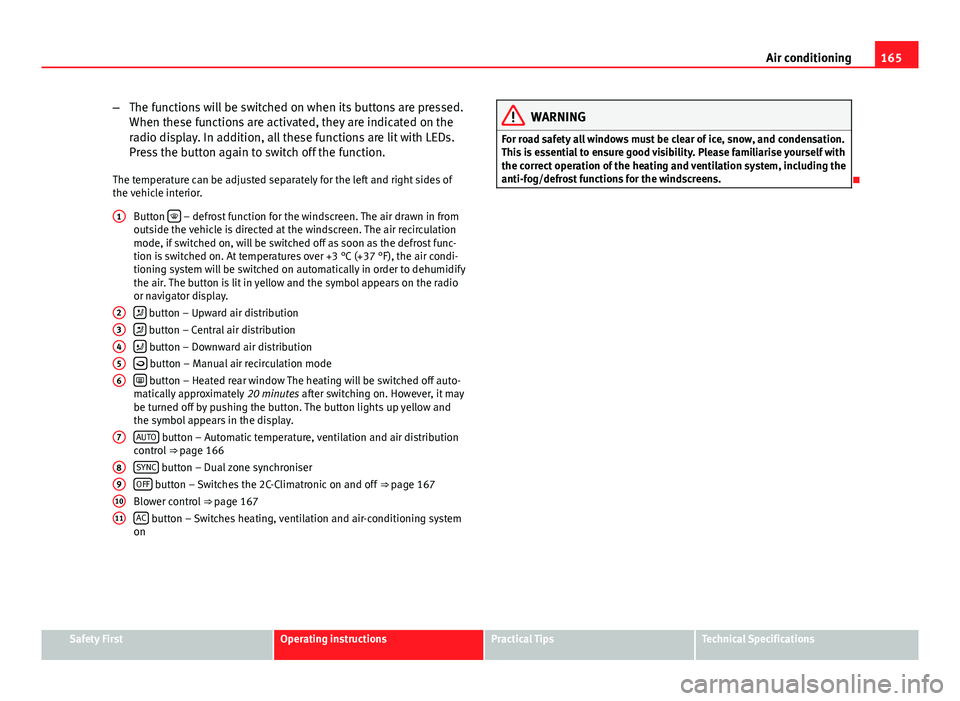
The temperature can be adjusted separately for the left and right sides of
the vehicle interior. Button
– defrost function for the windscreen. The air drawn in from
outside the vehicle is directed at the windscreen. The air recirculation
mode, if switched on, will be switched off as soon as the defrost func-
tion is switched on. At temperatures over +3 °C (+37 °F), the air condi-
tioning system will be switched on automatically in order to dehumidify
the air. The button is lit in yellow and the symbol appears on the radio
or navigator display.
button – Upward air distribution
button – Central air distribution
button – Downward air distribution
button – Manual air recirculation mode
button – Heated rear window The heating will be switched off auto-
matically approximately 20 minutes after switching on. However, it may
be turned off by pushing the button. The button lights up yellow and
the symbol appears in the display.
AUTO
button – Automatic temperature, ventilation and air distribution
control ⇒ page 166
SYNC
button – Dual zone synchroniser
OFF button – Switches the 2C-Climatronic on and off ⇒ page 167
Blower control ⇒ page 167
AC
button – Switches heating, ventilation and air-conditioning system
on
1
23456
7
891011
WARNING
For road safety all windows must be clear of ice, snow, and condensation.
This is essential to ensure good visibility. Please familiarise yourself with
the correct operation of the heating and ventilation system, including the
anti-fog/defrost functions for the windscreens.
Safety FirstOperating instructionsPractical TipsTechnical Specifications
Page 184 of 321
182Driving
Manual gearbox
Driving with a manual gearbox
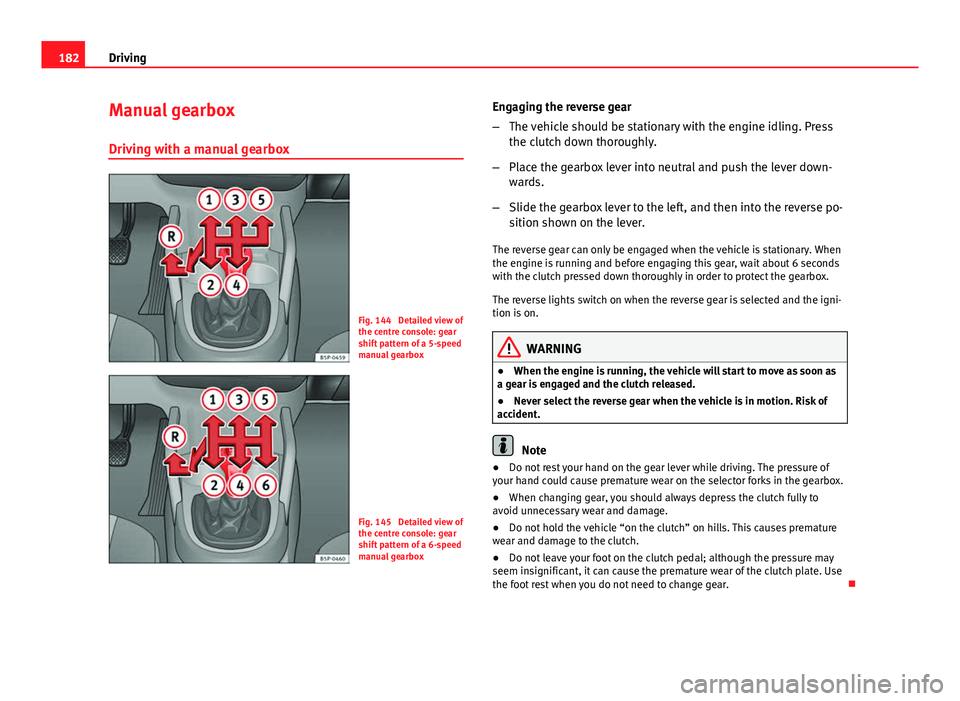
Fig. 144 Detailed view of
the centre console: gear
shift pattern of a 5-speed
manual gearbox
Fig. 145 Detailed view of
the centre console: gear
shift pattern of a 6-speed
manual gearbox Engaging the reverse gear
–
The vehicle should be stationary with the engine idling. Press
the clutch down thoroughly.
– Place the gearbox lever into neutral and push the lever down-
wards.
– Slide the gearbox lever to the left, and then into the reverse po-
sition shown on the lever.
The reverse gear can only be engaged when the vehicle is stationary. When
the engine is running and before engaging this gear, wait about 6 seconds
with the clutch pressed down thoroughly in order to protect the gearbox.
The reverse lights switch on when the reverse gear is selected and the igni-
tion is on.
WARNING
● When the engine is running, the vehicle will start to move as soon as
a gear is engaged and the clutch released.
● Never select the reverse gear when the vehicle is in motion. Risk of
accident.
Note
● Do not rest your hand on the gear lever while driving. The pressure of
your hand could cause premature wear on the selector forks in the gearbox.
● When changing gear, you should always depress the clutch fully to
avoid unnecessary wear and damage.
● Do not hold the vehicle “on the clutch” on hills. This causes premature
wear and damage to the clutch.
● Do not leave your foot on the clutch pedal; although the pressure may
seem insignificant, it can cause the premature wear of the clutch plate. Use
the foot rest when you do not need to change gear.