brake light Seat Altea 2015 User Guide
[x] Cancel search | Manufacturer: SEAT, Model Year: 2015, Model line: Altea, Model: Seat Altea 2015Pages: 236, PDF Size: 4.23 MB
Page 48 of 236
Operation
The warning lamp
has the following
f
unctions:
● It flashes whilst driving when the ASR/ESC
is activated.
● It will light up if there is a fault in the ESC.
● As the ESC operates in conjunction with the
ABS, the ESC light will also come on if a fault
should occur in the ABS.
If the ESC control lamp
stays on after the
engine is started, this may mean that the
control system has temporarily switched off
the ESC. In this case the ESC can be reactiva-
ted by switching the ignition off and then on
again. If the control lamp goes out, this
means the system is fully functional.
The lamp provides information about the
disconnection status of the system:
● It stays lit when the ASR is disconnected
when pressing the switch.
Differential lock fault (EDL)* The EDL operates along with the ABS in vehi-
cles equipped with Electronic Stability Con-
trol (ESC)*.
A malfunction in the EDL is indicated by the
ABS control lamp
. Take the vehicle to a specialised workshop as soon as possible.
For further information on the EDL see
››› page 135, Electronic differential lock
(EDL)* .
T r
action control system (ASR)* / The traction control system prevents the driv-
en wheels from spinning when the vehicle is
accelerating.
There are two warning lamps for the traction
control system:
and . Both warning lamps
light up together when the ignition is switch-
ed on and should turn off after approximately
2 seconds. This is the time taken for the func-
tion check.
The lamp has the following function:
● It flashes when the ASR is working if the ve-
hicle is moving.
If the system is deactivated or if it has any
fault, the warning lamp will remain lit. The
warning lamp will also light up if a fault
should occur in the ABS because the ASR op-
erates in conjunction with the ABS. For fur-
ther information, see ›››
page 137. The
lamp provides information about the
di
sconnection status of the system:
● It stays lit when the ASR is disconnected
when pressing the ASR OFF switch.
By pressing it again, the ASR function is reac-
tivated and the warning lamp switched off.
Speed selector lever lock The brake pedal must be depressed when
this warning lamp lights up. This is necessary
when the automatic gearbox* selector lever
is moved out of the positions
P
or N
.
Electronic immobiliser* “Safe” This warning lamp flashes if an unauthorised
key is used.
Inside the key there is a chip that deactivates
the electronic immobiliser automatically
when the key is inserted into the ignition.
The electronic immobiliser will be activated
again automatically as soon as you pull the
key out of the ignition lock.
The instrument panel displays the following
message
1)
: IMMOBILISER
. The vehicle cannot
be used in that case ›››
page 121. 1)
Depending on the version of the model.
46
Page 51 of 236
Dash panel
●
In LongLife Service vehicles, if the battery
is disconnected for a long period, the days re-
maining until the next service cannot be cal-
culated. Therefore, the service message dis-
plays on the instrument panel may be incor-
rect. Take into account the maximum author-
ised service intervals. Warning or information message in
the display
The system runs a check on certain compo-
nents and functions when the ignition is
switched on and while the vehicle is moving.
Functional faults are indicated by symbols
with warning or information messages in the
display. An audible warning is given in cer-
tain cases.
Warning symbols
There are red warning symbols (priority 1)
and yellow warning symbols (priority 2).
Information text
In addition to warning messages given on a
fault, you will receive information in the dis-
play on procedures or will be asked to carry
out certain tasks. Note
In the case of screens without warning or in-
formation messages, faults are indicated ex-
clusively by the control lamps. Warning messages, Priority 1 (red)
If one of these faults occurs, the warning
lamp will light up or flash and will be accom-
panied by
three audible warnings. This is a
danger warning. Stop the vehicle and switch
off the en
gine. Check the fault and correct it.
Obtain professional assistance if necessary.
If several priority 1 faults are detected at the
same time, the symbols will be displayed one
after the other for about 2 seconds at a time
and will continue until the fault is corrected.
No menus will be shown in the display for the
duration of a priority 1 warning message.
Examples of priority 1 warning messages
(red)
● Brake system symbol with the warning
message STOP BRAKE FLUID INSTRUCTION
MANUAL or STOP BRAKE FAULT INSTRUCTION
MANUAL . ●
Coolant symbol with the warning mes-
s ag
e STOP SEE COOLANT INSTRUCTION MAN-
UAL.
● Engine oil pressure symbol with the
warnin
g message STOP ENGINE OIL PRESSURE
LOW! INSTRUCTION MANUAL.
Warning messages, Priority 2 (yellow) If one of these faults occurs, the correspond-
ing warning lamp lights up and is accompa-
nied by
an audible warning. The function
should be checked as soon as possible.
If several priority 2 warning messages are de-
tected at the same time, the symbols are dis-
played one after the other for about 2 sec-
onds at a time. After a set time, the informa-
tion text will disappear and the symbol will
be shown as a reminder at the side of the
display.
Priority 2 warning messages will not be
shown until all Priority 1 warning messages
have been dealt with!
Examples of priority 2 warning messages
(yellow): 1)
● Fuel warning light with the information text
PLEASE REFUEL .
»1)
Depending on the version of the model.
49
Technical specifications
Advice
Operation
Safety
Page 83 of 236
Lights and visibility
correct use of lights in all situations. “Auto-
matic headlight control” is merely a system
to support the driver. Where necessary,
switch on the lights manually using the light
switch.
Fog lights with cornering function*
3 Applies to the model: ALTEA / ALTEA XL
When the t urn s
ignal is switched on to turn or
on very tight bends, the right or left fog light
automatically comes on to function as a cor-
nering light. The cornering light only oper-
at e
s if the dipped beam lights are on. WARNING
Read and observe the relevant warnings ››› in Adaptive headlights* (for driving round
bends) on page 80 Hazard warning lights
Fig. 63
Dash panel: switch for hazard warn-
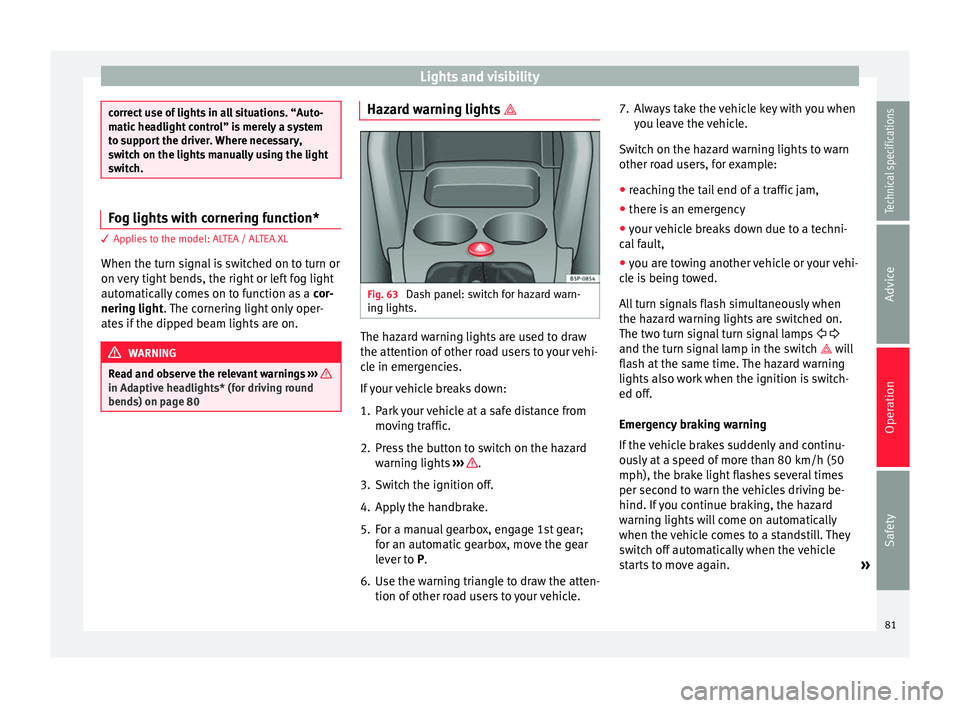
ing lights. The hazard warning lights are used to draw
the attention of other road users to your vehi-
cle in emergencies.
If your vehicle breaks down:
1. Park your vehicle at a safe distance from
moving traffic.
2. Press the button to switch on the hazard warning lights ››› .
3. Switch the ignition off.
4. Apply the handbrake.
5. For a manual gearbox, engage 1st gear; for an automatic gearbox, move the gear
lever to P
.
6.
Use the warning triangle to draw the atten-
tion of other road users to your vehicle. 7. Always take the vehicle key with you when
you leave the vehicle.
Switch on the hazard warning lights to warn
other road users, for example:
● reaching the tail end of a traffic jam,
● there is an emergency
● your vehicle breaks down due to a techni-
cal fault,
● you are towing another vehicle or your vehi-
cle is being towed.
All turn signals flash simultaneously when
the hazard warning lights are switched on.
The two turn signal turn signal lamps
and the turn signal lamp in the switch will
flash at the same time. The hazard warning
lights also work when the ignition is switch-
ed off.
Emergency braking warning
If the vehicle brakes suddenly and continu-
ously at a speed of more than 80 km/h (50
mph), the brake light flashes several times
per second to warn the vehicles driving be-
hind. If you continue braking, the hazard
warning lights will come on automatically
when the vehicle comes to a standstill. They
switch off automatically when the vehicle
starts to move again. »
81
Technical specifications
Advice
Operation
Safety
Page 98 of 236
Operation
● in the side trims of the luggage compart-
ment,
● in the spare wheel recess in the luggage
compartment (only on vehicles with an op-
tional anti-puncture kit*.
The clothes hooks are located on the rear
roof handles. WARNING
● Do not store loose objects on the dash pan-
el. These objects could be flung through the
passenger compartment when the vehicle is
moving (e.g. while accelerating, braking or
cornering) and distract the driver.
● Ensure that no objects can fall from the
centre console or other storage compart-
ments into the driver footwell while the vehi-
cle is moving. In the event of a sudden brak-
ing manoeuvre, you will not be able to use
the brake, clutch or accelerator. Risk of acci-
dent.
● Clothing hung on the coat hooks must not
restrict the driver's view. Risk of accident.
The coat hooks are intended only for use with
light articles of clothing. Do not leave any
hard, sharp or heavy objects in hanging arti-
cles of clothing. During sudden braking ma-
noeuvres or accidents, especially those in-
volving airbag deployment, these objects
could injure the vehicle occupants. Multi-purpose mobile storage
compartment*
General information Fig. 91
Mobile storage compartment. Open-
ing. Fig. 92
Mobile storage compartment. Func-
tions. This storage compartment may only be
placed in the central area of the rear seat.
Opening
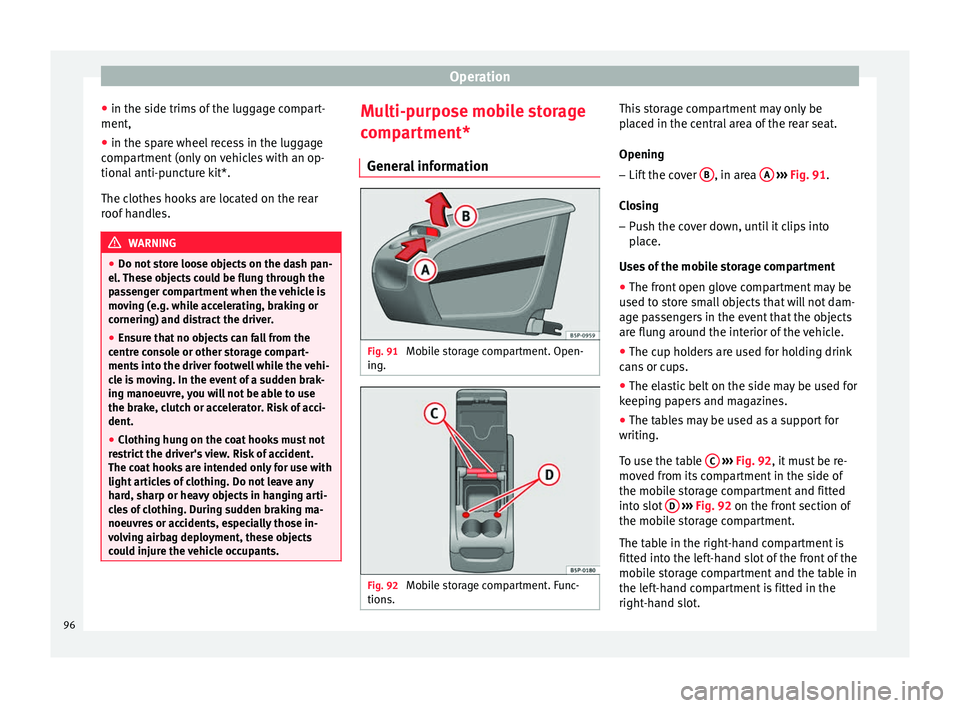
– Lift the cover B , in area
A
››› Fig. 91 .
C lo
sing
– Push the cover down, until it clips into
place.
Uses of the mobile storage compartment
● The front open glove compartment may be
used to store small objects that will not dam-
age passengers in the event that the objects
are flung around the interior of the vehicle.
● The cup holders are used for holding drink
cans or cups.
● The elastic belt on the side may be used for
keeping papers and magazines.
● The tables may be used as a support for
writing.
To use the table C
››› Fig. 92 , it must be re-
mo v
ed from its compartment in the side of
the mobile storage compartment and fitted
into slot D
››› Fig. 92 on the front section of
the mo b
ile storage compartment.
The table in the right-hand compartment is
fitted into the left-hand slot of the front of the
mobile storage compartment and the table in
the left-hand compartment is fitted in the
right-hand slot.
96
Page 126 of 236
Operation
WARNING
● Apply the brakes heavily to clean the brake
system only in a suitable traffic situation. Do
not put other road users in danger: there is
risk of causing an accident.
● Ensure the vehicle does not move while in
neutral, when the engine is stopped. Failure
to follow this instruction could result in an
accident.
● If the brake fluid loses its viscosity and is
subjected to heavy use, vapour bubbles can
form in the brake system. This reduces the ef-
ficiency of the brakes.
● If a brake system circuit fails, the braking
distance will be increased considerably. Con-
tact a specialised workshop immediately and
avoid unnecessary journeys. CAUTION
● Never let the brakes “drag” by leaving your
foot on the pedal when it is not necessary to
brake. This overheats the brakes, resulting in
longer stopping distances and greater wear.
● Before driving down a long, steep gradient,
it is advisable to reduce speed and select a
lower gear. This makes use of engine braking
and relieves the brakes. If you still have to
use the brakes, it is better to brake firmly at
intervals than to apply the brakes continu-
ously. Note
● If the brake servo is out of action, for exam-
ple when the car is being towed, you will
have to press the brake pedal considerably
harder than normal to make up for the lack of
servo assistance.
● If you wish to equip the vehicle with acces-
sories such as a front spoiler or wheel covers,
it is important that the flow of air to the front
wheels is not obstructed, otherwise the
brakes can overheat. Before purchasing ac-
cessories please observe the relevant instruc-
tions ››› page 147, Technical modifications . Operating the handbrake
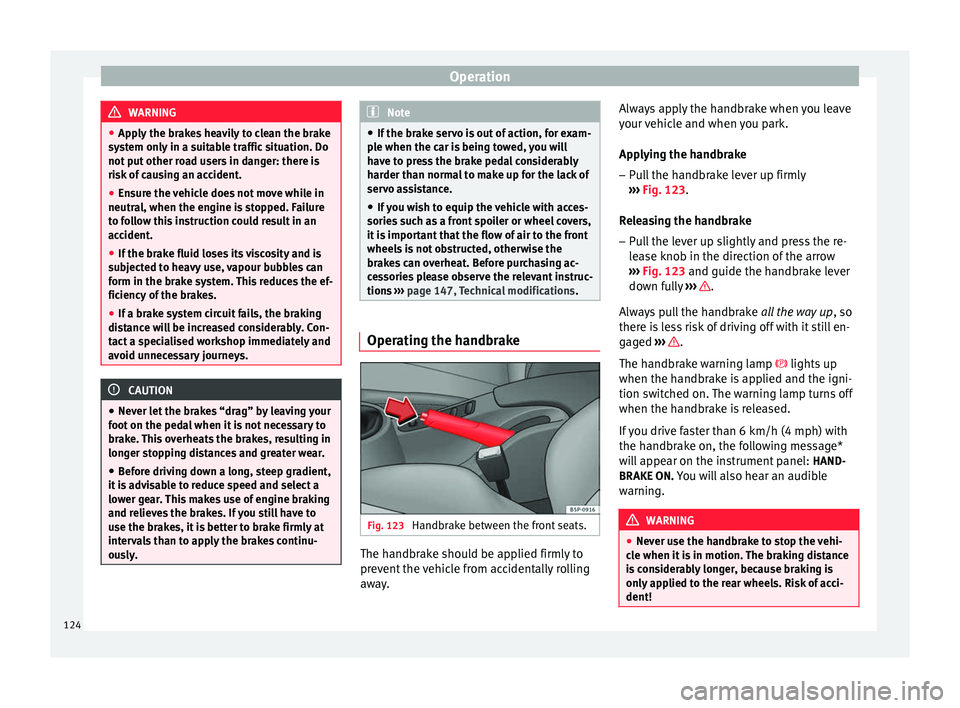
Fig. 123
Handbrake between the front seats. The handbrake should be applied firmly to
prevent the vehicle from accidentally rolling
away.Always apply the handbrake when you leave
your vehicle and when you park.
Applying the handbrake
– Pull the handbrake lever up firmly
››› Fig. 123 .
R el
easing the handbrake
– Pull the lever up slightly and press the re-
lease knob in the direction of the arrow
››› Fig. 123 and guide the handbrake lever
down f
ully ››› .
Always pull the handbrake all the way up, so
there is less risk of driving off with it still en-
gaged ››› .
The handbrake warning lamp lights up
when the handbrake is applied and the igni-
tion switched on. The warning lamp turns off
when the handbrake is released.
If you drive faster than 6 km/h (4 mph) with
the handbrake on, the following message*
will appear on the instrument panel: HAND-
BRAKE ON. You will also hear an audible
warning. WARNING
● Never use the handbrake to stop the vehi-
cle when it is in motion. The braking distance
is considerably longer, because braking is
only applied to the rear wheels. Risk of acci-
dent! 124
Page 127 of 236
Driving
●
If the handbrake is only partially released,
this will cause the rear brakes to overheat,
which can impair the function of the brake
system and could lead to an accident. This al-
so causes premature wear on the rear brake
pads. CAUTION
Always apply the handbrake before you leave
the vehicle. Put it in 1st gear as well. Parking
The handbrake should always be firmly ap-
plied when the vehicle is parked.
Always note the following points when park-
ing the vehicle:
– Use the brake pedal to stop the vehicle.
– Apply the handbrake.
– Put it in 1st gear.
– Switch the engine off and remove the key
from the ignition. Turn the steering wheel
slightly to engage the steering lock.
– Always take you keys with you when you
leave the vehicle ››› .Additional notes on parking the vehicle on
gradients:
Turn the steering wheel so that the vehicle
rolls against the kerb if it started to roll.
●
If the vehicle is parked facing downhill,
turn the front wheels so that they point to-
wards the kerb .
● If the vehicle is parked facing uphill, turn
the fr ont
wheels so that they point away from
the kerb
.
● Secure the vehicle as usual by applying the
handbrake firmly and putting it in 1st gear. WARNING
● Take measures to reduce the risk of injury
when you leave your vehicle unattended.
● Never park where the hot exhaust system
could ignite inflammable materials, such as
dry grass, low bushes, spilt fuel etc.
● Never allow vehicle occupants to remain in
the vehicle when it is locked. They would be
unable to open the vehicle from the inside,
and could become trapped in the vehicle in
an emergency. In the event of an emergency,
locked doors will delay assistance to vehicle
occupants.
● Never leave children alone in the vehicle.
They could set the vehicle in motion, for ex-
ample, by releasing the handbrake or the
gearbox lever. ●
Depending on weather conditions, it may
become extremely hot or cold inside the vehi-
cle. This can be fatal. Hill driving assistant*
This function is only included in vehicles with
ESC.
The hill driving assistant helps the driver to
move off and upward on a hill without rolling
backward.
The system maintains brake pressure for ap-
proximately 2 seconds after the driver takes
his foot off the brake pedal to prevent the ve-
hicle from rolling backward when starting off.
During these 2 seconds, the driver has
enough time to release the clutch pedal and
accelerate without the vehicle moving and
without having to use the handbrake, making
starting off easier, more comfortable and saf-
er.
These are the basic operation conditions:
● being on a ramp or hill/slope,
● closed doors,
● vehicle completely stationary,
● engine running and foot on the brake,
● besides having a gear engaged or being in
neutral for manual gear change and with the
selector lever at position S,
D
or R for an au-
tomatic gearbox. »
125
Technical specifications
Advice
Operation
Safety
Page 128 of 236
Operation
This system is also active when reversing up-
hill. WARNING
● If you do not start the vehicle immediately
after taking your foot off the brake pedal, the
vehicle may start to roll back under certain
conditions. Depress the brake pedal or use
the hand brake immediately.
● If the engine stalls, depress the brake ped-
al or use the hand brake immediately.
● When following a line of traffic uphill, if you
want to prevent the vehicle from rolling back
accidentally when starting off, hold the brake
pedal down for a few seconds before starting
to move. Note
The official service or a specialist workshop
can tell you if your vehicle is equipped with
this system. Manual gearbox
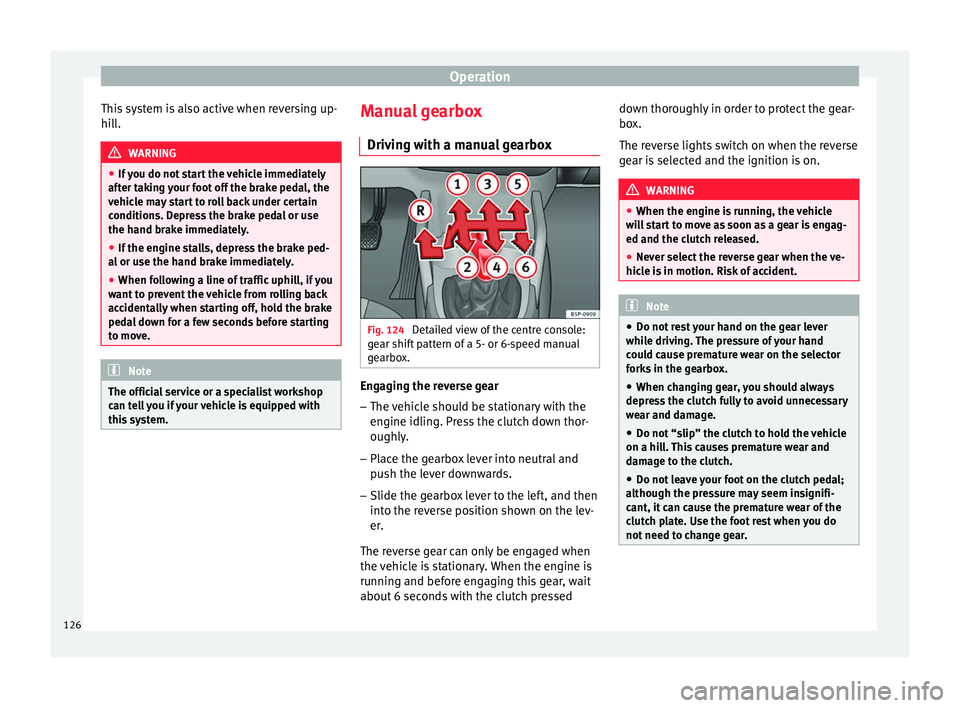
Driving with a manual gearbox Fig. 124
Detailed view of the centre console:
gear shift pattern of a 5- or 6-speed manual
gearbox. Engaging the reverse gear
– The vehicle should be stationary with the
engine idling. Press the clutch down thor-
oughly.
– Place the gearbox lever into neutral and
push the lever downwards.
– Slide the gearbox lever to the left, and then
into the reverse position shown on the lev-
er.
The reverse gear can only be engaged when
the vehicle is stationary. When the engine is
running and before engaging this gear, wait
about 6 seconds with the clutch pressed down thoroughly in order to protect the gear-
box.
The reverse lights switch on when the reverse
gear is selected and the ignition is on.
WARNING
● When the engine is running, the vehicle
will start to move as soon as a gear is engag-
ed and the clutch released.
● Never select the reverse gear when the ve-
hicle is in motion. Risk of accident. Note
● Do not rest your hand on the gear lever
while driving. The pressure of your hand
could cause premature wear on the selector
forks in the gearbox.
● When changing gear, you should always
depress the clutch fully to avoid unnecessary
wear and damage.
● Do not “slip” the clutch to hold the vehicle
on a hill. This causes premature wear and
damage to the clutch.
● Do not leave your foot on the clutch pedal;
although the pressure may seem insignifi-
cant, it can cause the premature wear of the
clutch plate. Use the foot rest when you do
not need to change gear. 126
Page 130 of 236
Operation
prevented from passing from P
and N to any
other gear without first pressing the brake
pedal.
The selector lever must be put in the position
P
in order to remove the key.
Driving with automatic gearbox/DSG
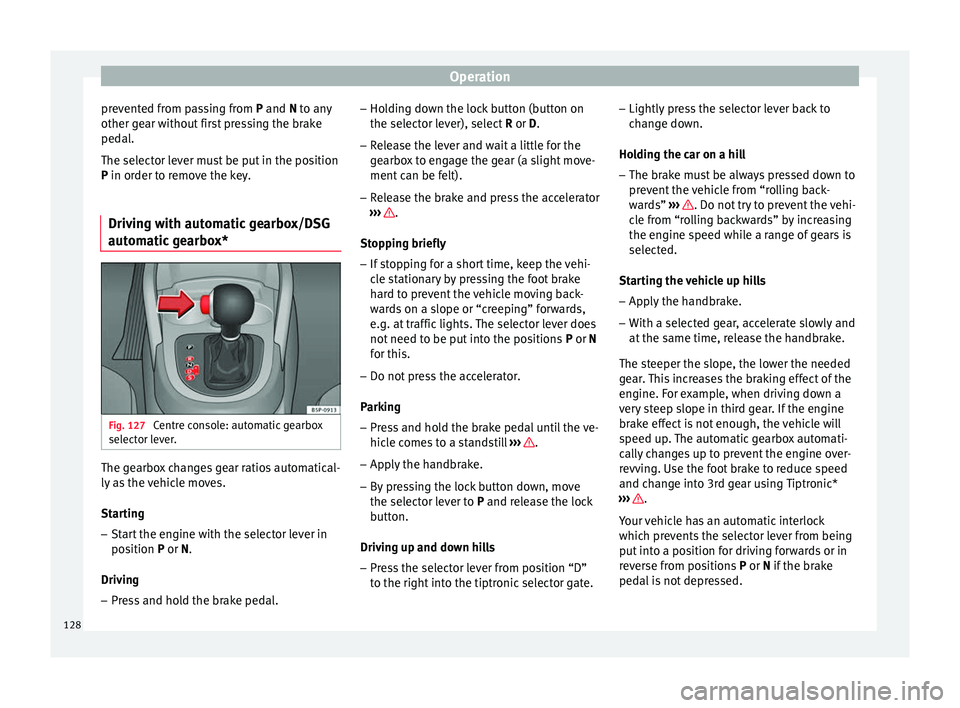
automatic gearbox* Fig. 127
Centre console: automatic gearbox
selector lever. The gearbox changes gear ratios automatical-
ly as the vehicle moves.
Starting
– Start the engine with the selector lever in
position P
or
N.
Driving – Press and hold the brake pedal. –
Holding down the lock button (button on
the selector lever), select R or D.
– Rel
ease the lever and wait a little for the
gearbox to engage the gear (a slight move-
ment can be felt).
– Release the brake and press the accelerator
››› .
Stopping briefly – If stopping for a short time, keep the vehi-
cle stationary by pressing the foot brake
hard to prevent the vehicle moving back-
wards on a slope or “creeping” forwards,
e.g. at traffic lights. The selector lever does
not need to be put into the positions P or N
f or thi
s.
– Do not press the accelerator.
Parking
– Press and hold the brake pedal until the ve-
hicle comes to a standstill ››› .
– Apply the handbrake.
– By pressing the lock button down, move
the selector lever to P
and release the lock
b
utton.
Driving up and down hills
– Press the selector lever from position “D”
to the right into the tiptronic selector gate. –
Lightly press the selector lever back to
change down.
Holding the car on a hill – The brake must be always pressed down to
prevent the vehicle from “rolling back-
wards” ››› . Do not try to prevent the vehi-
cle from “rolling backwards” by increasing
the engine speed while a range of gears is
selected.
Starting the vehicle up hills
– Apply the handbrake.
– With a selected gear, accelerate slowly and
at the same time, release the handbrake.
The steeper the slope, the lower the needed
gear. This increases the braking effect of the
engine. For example, when driving down a
very steep slope in third gear. If the engine
brake effect is not enough, the vehicle will
speed up. The automatic gearbox automati-
cally changes up to prevent the engine over-
revving. Use the foot brake to reduce speed
and change into 3rd gear using Tiptronic*
››› .
Your vehicle has an automatic interlock
which prevents the selector lever from being
put into a position for driving forwards or in
reverse from positions P or N
if the brake
ped
al is not depressed.
128
Page 131 of 236
Driving
The ignition key cannot be removed unless
the selector lever is in position P.
C ontr
ol lamp “Pressing brake pedal”
When the warning lamp next to the selector
lever lights up, press the brake pedal. This is
necessary when the automatic gearbox selec-
tor lever is moved out of positions P or N
. A
text message or instructions to perform nec-
essary operations may appear on the instru-
ment panel. WARNING
● As a driver, you should never leave your ve-
hicle if the engine is running and a gear range
is engaged. If you have to leave your vehicle
while the engine is running, you must apply
the parking brake and put the selector lever
in position P.
● If the engine is running and if D or R is en-
gaged, you will need to hold the car on the
foot brake. The car will creep forward as the
power transmission is not fully interrupted
even when the engine is idling.
● Never accelerate when moving the selector
lever or you may cause an accident.
● Never move the selector lever to R or P
when driving. Risk of accident!
● Before driving down a long, steep slope, it
is advisable to reduce speed and change into
a lower gear. ●
If you stop the vehicle up hill, always hold
the foot brake strongly depressed down to
stop it from rolling back.
● Never allow the brake to rub and do not use
the brake pedal too often or for long periods.
Constant braking will cause the brakes to
overheat and will considerably reduce the
brake effect. This increases the braking dis-
tance and could cause the brake system to
fail.
● Never allow the car to roll down a gradient
with the gear in neutral N, or in selector lever
position D, even if the engine is not running. CAUTION
● If you stop the vehicle up hills, do not at-
tempt to stop it from rolling back by depress-
ing the accelerator when a gear has been se-
lected. Otherwise, the automatic gearbox
may overheat causing damage. Pull the hand-
brake up or fully depress the brake pedal to
prevent the vehicle from rolling away.
● If you allow the vehicle to roll when the en-
gine is not running, or with the selector lever
in position N, a lack of lubrication in the auto-
matic gearbox will damage it. Changing gear in Tiptronic mode*
Fig. 128
Changing gear with Tiptronic. Fig. 129
Steering wheel with paddle shifters
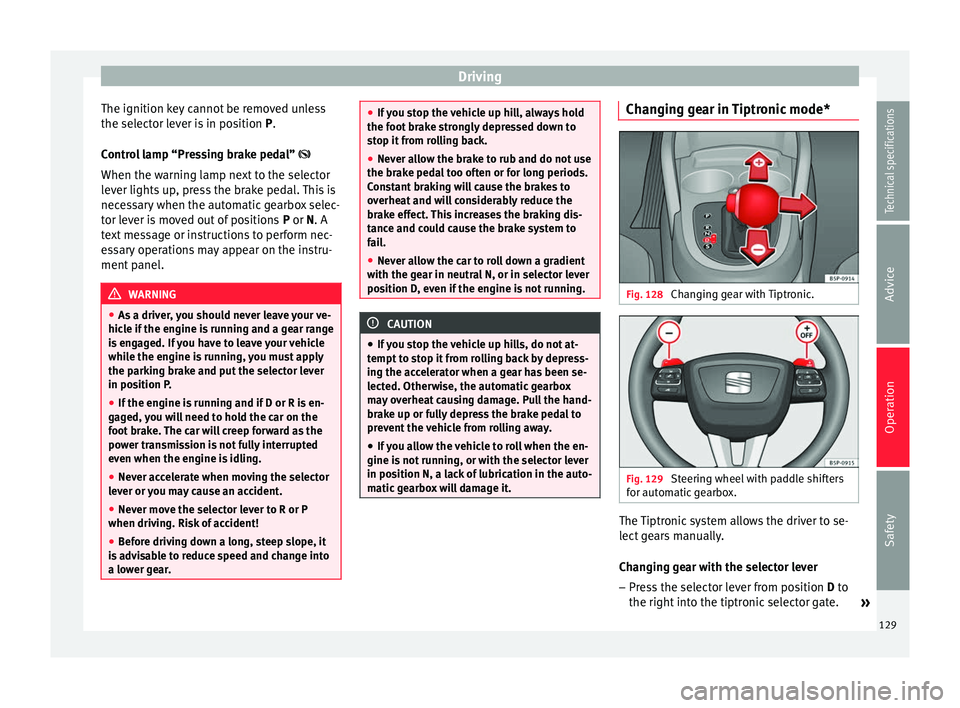
for automatic gearbox. The Tiptronic system allows the driver to se-
lect gears manually.
Changing gear with the selector lever
– Press the selector lever from position D to
the right int
o the tiptronic selector gate. »
129
Technical specifications
Advice
Operation
Safety
Page 134 of 236
Operation
●
Do not apply additional underseal or anti-
corrosion coatings to the exhaust pipes, cata-
lytic converter or the heat shields on the ex-
haust system. These materials could catch
fire when the vehicle is being driven. CAUTION
Never run the fuel tank completely dry be-
cause the irregularity of the fuel supply may
cause ignition problems. This allows unburnt
fuel to enter the exhaust system, which could
cause overheating and damage the catalytic
converter. For the sake of the environment
Even when the emission control system is
working perfectly, there may be a smell of
sulphur from the exhaust gas under some
conditions. This depends on the sulphur con-
tent of the fuel used. Quite often the problem
can be solved by changing to another brand
of fuel. Diesel engine particulate filter*
Fig. 130
Vehicle data sticker on back cover of
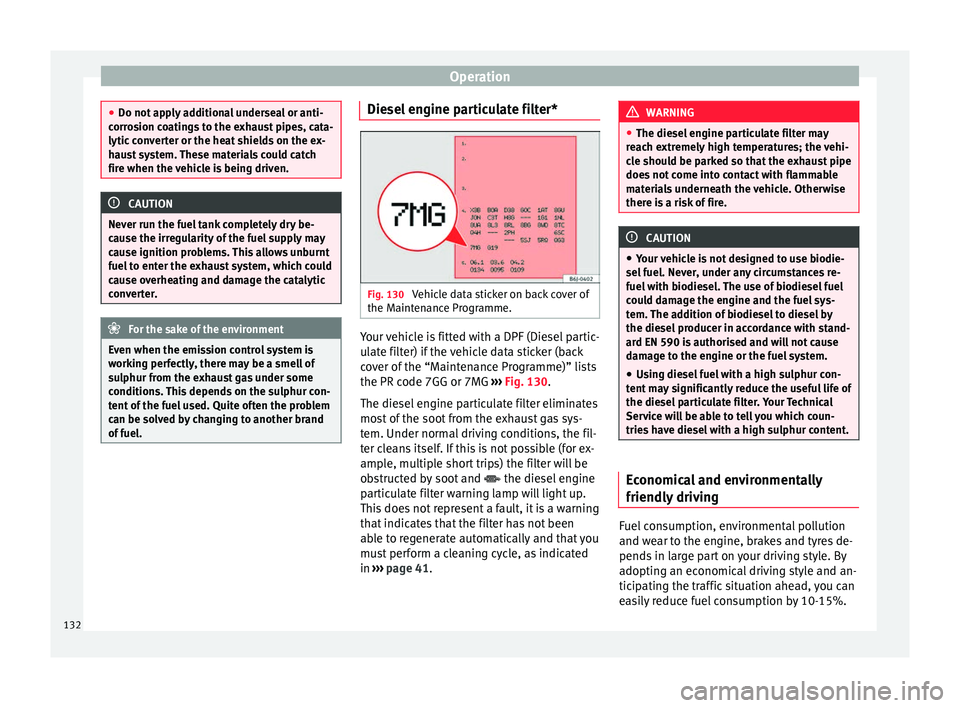
the Maintenance Programme. Your vehicle is fitted with a DPF (Diesel partic-
ulate filter) if the vehicle data sticker (back
cover of the “Maintenance Programme)” lists
the PR code 7GG or 7MG
››› Fig. 130 .
The die sel
engine particulate filter eliminates
most of the soot from the exhaust gas sys-
tem. Under normal driving conditions, the fil-
ter cleans itself. If this is not possible (for ex-
ample, multiple short trips) the filter will be
obstructed by soot and the diesel engine
particulate filter warning lamp will light up.
This does not represent a fault, it is a warning
that indicates that the filter has not been
able to regenerate automatically and that you
must perform a cleaning cycle, as indicated
in ››› page 41
. WARNING
● The diesel engine particulate filter may
reach extremely high temperatures; the vehi-
cle should be parked so that the exhaust pipe
does not come into contact with flammable
materials underneath the vehicle. Otherwise
there is a risk of fire. CAUTION
● Your vehicle is not designed to use biodie-
sel fuel. Never, under any circumstances re-
fuel with biodiesel. The use of biodiesel fuel
could damage the engine and the fuel sys-
tem. The addition of biodiesel to diesel by
the diesel producer in accordance with stand-
ard EN 590 is authorised and will not cause
damage to the engine or the fuel system.
● Using diesel fuel with a high sulphur con-
tent may significantly reduce the useful life of
the diesel particulate filter. Your Technical
Service will be able to tell you which coun-
tries have diesel with a high sulphur content. Economical and environmentally
friendly driving
Fuel consumption, environmental pollution
and wear to the engine, brakes and tyres de-
pends in large part on your driving style. By
adopting an economical driving style and an-
ticipating the traffic situation ahead, you can
easily reduce fuel consumption by 10-15%.
132