gearbox Seat Altea 2015 User Guide
[x] Cancel search | Manufacturer: SEAT, Model Year: 2015, Model line: Altea, Model: Seat Altea 2015Pages: 236, PDF Size: 4.23 MB
Page 127 of 236
Driving
●
If the handbrake is only partially released,
this will cause the rear brakes to overheat,
which can impair the function of the brake
system and could lead to an accident. This al-
so causes premature wear on the rear brake
pads. CAUTION
Always apply the handbrake before you leave
the vehicle. Put it in 1st gear as well. Parking
The handbrake should always be firmly ap-
plied when the vehicle is parked.
Always note the following points when park-
ing the vehicle:
– Use the brake pedal to stop the vehicle.
– Apply the handbrake.
– Put it in 1st gear.
– Switch the engine off and remove the key
from the ignition. Turn the steering wheel
slightly to engage the steering lock.
– Always take you keys with you when you
leave the vehicle ››› .Additional notes on parking the vehicle on
gradients:
Turn the steering wheel so that the vehicle
rolls against the kerb if it started to roll.
●
If the vehicle is parked facing downhill,
turn the front wheels so that they point to-
wards the kerb .
● If the vehicle is parked facing uphill, turn
the fr ont
wheels so that they point away from
the kerb
.
● Secure the vehicle as usual by applying the
handbrake firmly and putting it in 1st gear. WARNING
● Take measures to reduce the risk of injury
when you leave your vehicle unattended.
● Never park where the hot exhaust system
could ignite inflammable materials, such as
dry grass, low bushes, spilt fuel etc.
● Never allow vehicle occupants to remain in
the vehicle when it is locked. They would be
unable to open the vehicle from the inside,
and could become trapped in the vehicle in
an emergency. In the event of an emergency,
locked doors will delay assistance to vehicle
occupants.
● Never leave children alone in the vehicle.
They could set the vehicle in motion, for ex-
ample, by releasing the handbrake or the
gearbox lever. ●
Depending on weather conditions, it may
become extremely hot or cold inside the vehi-
cle. This can be fatal. Hill driving assistant*
This function is only included in vehicles with
ESC.
The hill driving assistant helps the driver to
move off and upward on a hill without rolling
backward.
The system maintains brake pressure for ap-
proximately 2 seconds after the driver takes
his foot off the brake pedal to prevent the ve-
hicle from rolling backward when starting off.
During these 2 seconds, the driver has
enough time to release the clutch pedal and
accelerate without the vehicle moving and
without having to use the handbrake, making
starting off easier, more comfortable and saf-
er.
These are the basic operation conditions:
● being on a ramp or hill/slope,
● closed doors,
● vehicle completely stationary,
● engine running and foot on the brake,
● besides having a gear engaged or being in
neutral for manual gear change and with the
selector lever at position S,
D
or R for an au-
tomatic gearbox. »
125
Technical specifications
Advice
Operation
Safety
Page 128 of 236
Operation
This system is also active when reversing up-
hill. WARNING
● If you do not start the vehicle immediately
after taking your foot off the brake pedal, the
vehicle may start to roll back under certain
conditions. Depress the brake pedal or use
the hand brake immediately.
● If the engine stalls, depress the brake ped-
al or use the hand brake immediately.
● When following a line of traffic uphill, if you
want to prevent the vehicle from rolling back
accidentally when starting off, hold the brake
pedal down for a few seconds before starting
to move. Note
The official service or a specialist workshop
can tell you if your vehicle is equipped with
this system. Manual gearbox
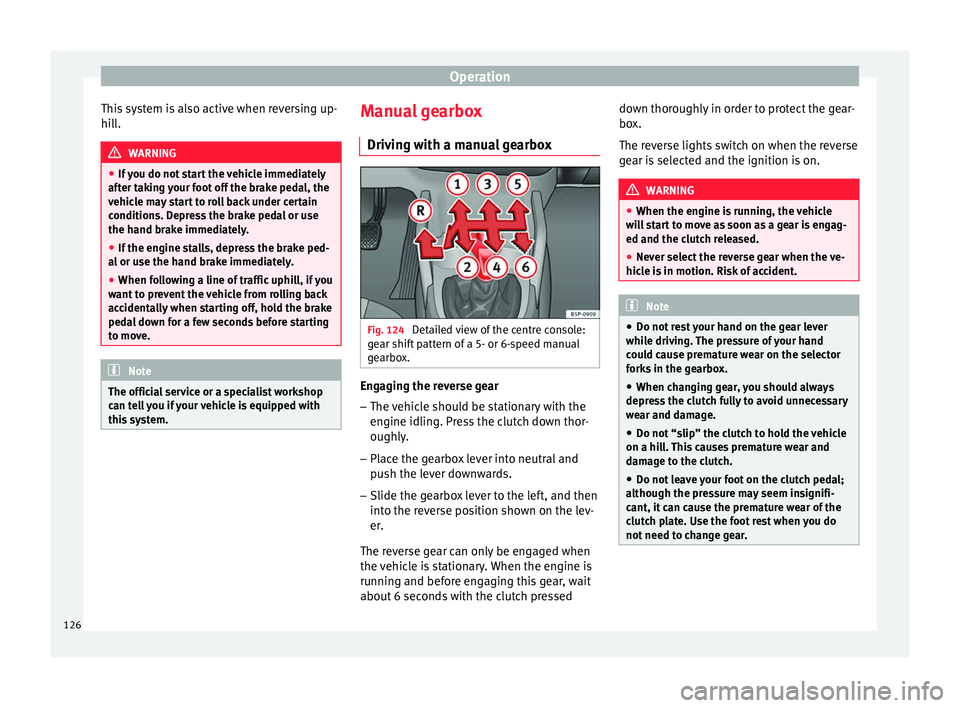
Driving with a manual gearbox Fig. 124
Detailed view of the centre console:
gear shift pattern of a 5- or 6-speed manual
gearbox. Engaging the reverse gear
– The vehicle should be stationary with the
engine idling. Press the clutch down thor-
oughly.
– Place the gearbox lever into neutral and
push the lever downwards.
– Slide the gearbox lever to the left, and then
into the reverse position shown on the lev-
er.
The reverse gear can only be engaged when
the vehicle is stationary. When the engine is
running and before engaging this gear, wait
about 6 seconds with the clutch pressed down thoroughly in order to protect the gear-
box.
The reverse lights switch on when the reverse
gear is selected and the ignition is on.
WARNING
● When the engine is running, the vehicle
will start to move as soon as a gear is engag-
ed and the clutch released.
● Never select the reverse gear when the ve-
hicle is in motion. Risk of accident. Note
● Do not rest your hand on the gear lever
while driving. The pressure of your hand
could cause premature wear on the selector
forks in the gearbox.
● When changing gear, you should always
depress the clutch fully to avoid unnecessary
wear and damage.
● Do not “slip” the clutch to hold the vehicle
on a hill. This causes premature wear and
damage to the clutch.
● Do not leave your foot on the clutch pedal;
although the pressure may seem insignifi-
cant, it can cause the premature wear of the
clutch plate. Use the foot rest when you do
not need to change gear. 126
Page 129 of 236
Driving
Automatic gearbox/DSG
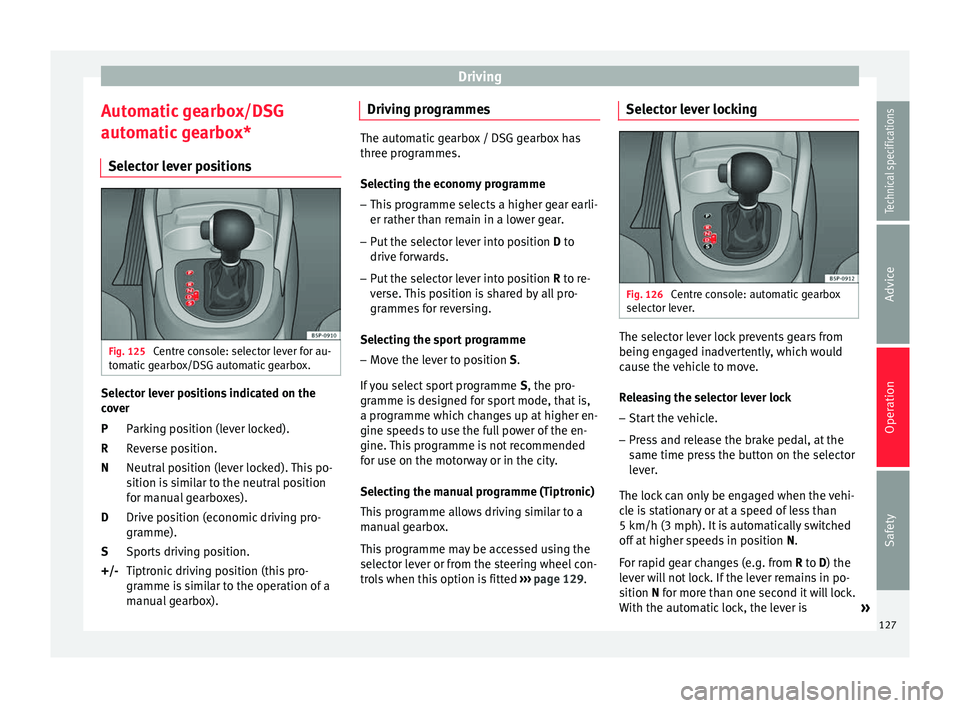
automatic gearbox* Selector lever positions Fig. 125
Centre console: selector lever for au-
tomatic gearbox/DSG automatic gearbox. Selector lever positions indicated on the
cover
Parking position (lever locked).
Reverse position.
Neutral position (lever locked). This po-
sition is similar to the neutral position
for manual gearboxes).
Drive position (economic driving pro-
gramme).
Sports driving position.
Tiptronic driving position (this pro-
gramme is similar to the operation of a
manual gearbox).
P
R
N
D
S
+/- Driving programmes The automatic gearbox / DSG gearbox has
three programmes.
Selecting the economy programme
– This programme selects a higher gear earli-
er rather than remain in a lower gear.
– Put the selector lever into position D to
driv e f
orwards.
– Put the selector lever into position R to re-
ver
se. This position is shared by all pro-
grammes for reversing.
Selecting the sport programme – Move the lever to position S.
If you select sport programme S, the pro-
gr amme i
s designed for sport mode, that is,
a programme which changes up at higher en-
gine speeds to use the full power of the en-
gine. This programme is not recommended
for use on the motorway or in the city.
Selecting the manual programme (Tiptronic)
This programme allows driving similar to a
manual gearbox.
This programme may be accessed using the
selector lever or from the steering wheel con-
trols when this option is fitted ›››
page 129. Selector lever locking
Fig. 126
Centre console: automatic gearbox
selector lever. The selector lever lock prevents gears from
being engaged inadvertently, which would
cause the vehicle to move.
Releasing the selector lever lock
– Start the vehicle.
– Press and release the brake pedal, at the
same time press the button on the selector
lever.
The lock can only be engaged when the vehi-
cle is stationary or at a speed of less than
5 km/h (3 mph). It is automatically switched
off at higher speeds in position N.
F or r
apid gear changes (e.g. from R
to D) the
lever will not lock. If the lever remains in po-
sition
N for more than one second it will lock.
With the automatic lock, the lever is »
127
Technical specifications
Advice
Operation
Safety
Page 130 of 236
Operation
prevented from passing from P
and N to any
other gear without first pressing the brake
pedal.
The selector lever must be put in the position
P
in order to remove the key.
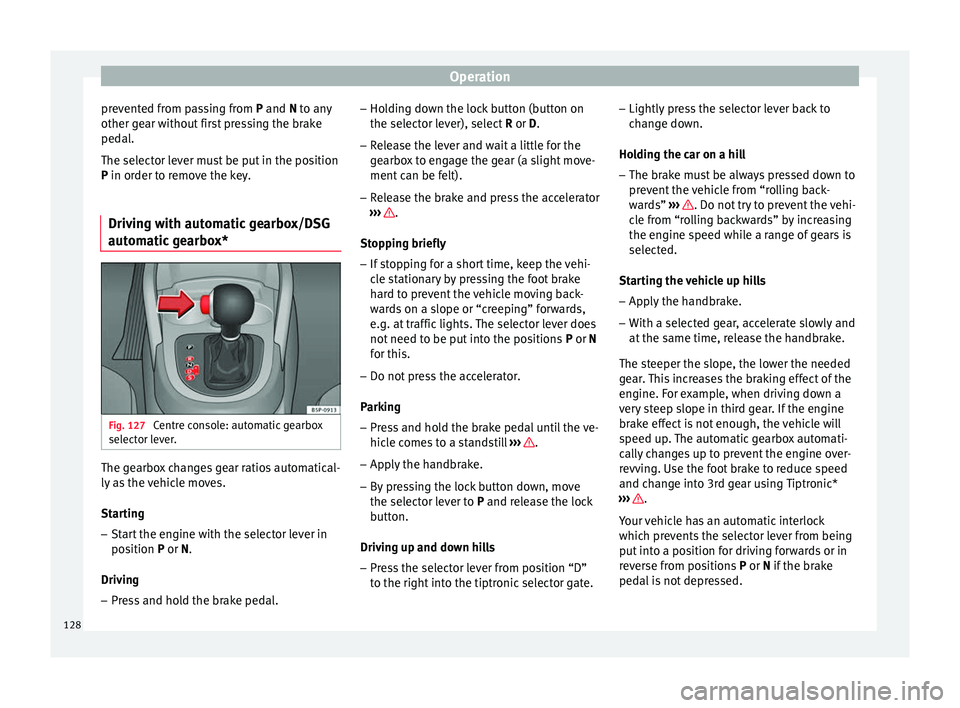
Driving with automatic gearbox/DSG
automatic gearbox* Fig. 127
Centre console: automatic gearbox
selector lever. The gearbox changes gear ratios automatical-
ly as the vehicle moves.
Starting
– Start the engine with the selector lever in
position P
or
N.
Driving – Press and hold the brake pedal. –
Holding down the lock button (button on
the selector lever), select R or D.
– Rel
ease the lever and wait a little for the
gearbox to engage the gear (a slight move-
ment can be felt).
– Release the brake and press the accelerator
››› .
Stopping briefly – If stopping for a short time, keep the vehi-
cle stationary by pressing the foot brake
hard to prevent the vehicle moving back-
wards on a slope or “creeping” forwards,
e.g. at traffic lights. The selector lever does
not need to be put into the positions P or N
f or thi
s.
– Do not press the accelerator.
Parking
– Press and hold the brake pedal until the ve-
hicle comes to a standstill ››› .
– Apply the handbrake.
– By pressing the lock button down, move
the selector lever to P
and release the lock
b
utton.
Driving up and down hills
– Press the selector lever from position “D”
to the right into the tiptronic selector gate. –
Lightly press the selector lever back to
change down.
Holding the car on a hill – The brake must be always pressed down to
prevent the vehicle from “rolling back-
wards” ››› . Do not try to prevent the vehi-
cle from “rolling backwards” by increasing
the engine speed while a range of gears is
selected.
Starting the vehicle up hills
– Apply the handbrake.
– With a selected gear, accelerate slowly and
at the same time, release the handbrake.
The steeper the slope, the lower the needed
gear. This increases the braking effect of the
engine. For example, when driving down a
very steep slope in third gear. If the engine
brake effect is not enough, the vehicle will
speed up. The automatic gearbox automati-
cally changes up to prevent the engine over-
revving. Use the foot brake to reduce speed
and change into 3rd gear using Tiptronic*
››› .
Your vehicle has an automatic interlock
which prevents the selector lever from being
put into a position for driving forwards or in
reverse from positions P or N
if the brake
ped
al is not depressed.
128
Page 131 of 236
Driving
The ignition key cannot be removed unless
the selector lever is in position P.
C ontr
ol lamp “Pressing brake pedal”
When the warning lamp next to the selector
lever lights up, press the brake pedal. This is
necessary when the automatic gearbox selec-
tor lever is moved out of positions P or N
. A
text message or instructions to perform nec-
essary operations may appear on the instru-
ment panel. WARNING
● As a driver, you should never leave your ve-
hicle if the engine is running and a gear range
is engaged. If you have to leave your vehicle
while the engine is running, you must apply
the parking brake and put the selector lever
in position P.
● If the engine is running and if D or R is en-
gaged, you will need to hold the car on the
foot brake. The car will creep forward as the
power transmission is not fully interrupted
even when the engine is idling.
● Never accelerate when moving the selector
lever or you may cause an accident.
● Never move the selector lever to R or P
when driving. Risk of accident!
● Before driving down a long, steep slope, it
is advisable to reduce speed and change into
a lower gear. ●
If you stop the vehicle up hill, always hold
the foot brake strongly depressed down to
stop it from rolling back.
● Never allow the brake to rub and do not use
the brake pedal too often or for long periods.
Constant braking will cause the brakes to
overheat and will considerably reduce the
brake effect. This increases the braking dis-
tance and could cause the brake system to
fail.
● Never allow the car to roll down a gradient
with the gear in neutral N, or in selector lever
position D, even if the engine is not running. CAUTION
● If you stop the vehicle up hills, do not at-
tempt to stop it from rolling back by depress-
ing the accelerator when a gear has been se-
lected. Otherwise, the automatic gearbox
may overheat causing damage. Pull the hand-
brake up or fully depress the brake pedal to
prevent the vehicle from rolling away.
● If you allow the vehicle to roll when the en-
gine is not running, or with the selector lever
in position N, a lack of lubrication in the auto-
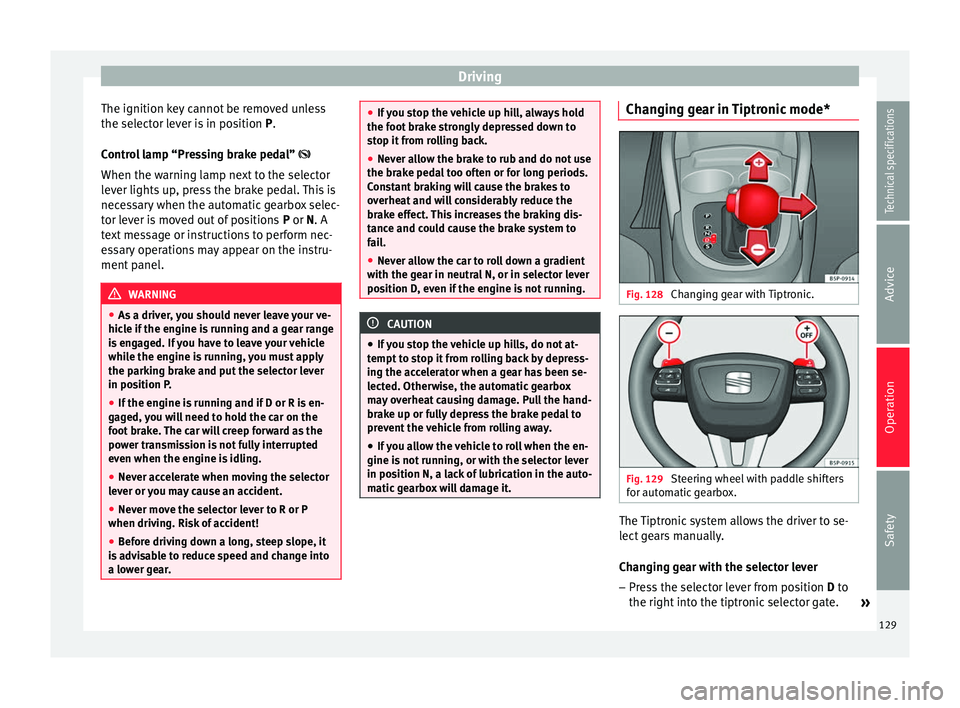
matic gearbox will damage it. Changing gear in Tiptronic mode*
Fig. 128
Changing gear with Tiptronic. Fig. 129
Steering wheel with paddle shifters
for automatic gearbox. The Tiptronic system allows the driver to se-
lect gears manually.
Changing gear with the selector lever
– Press the selector lever from position D to
the right int
o the tiptronic selector gate. »
129
Technical specifications
Advice
Operation
Safety
Page 132 of 236
Operation
– Lightly press the selector lever forward
››› Fig. 128 + to change up to a higher
gear.
– Lightly press the selector lever backward
››› Fig. 128 - to change down to a lower
gear.
Changing gear with the steering wheel
paddle levers* – Press the right paddle lever + towards the
steering wheel to change up ››› Fig. 129 .
– Pr e
ss the left paddle – towards the steer-
ing wheel to change down ››› Fig. 129 .
U s
ing the paddle levers on the steering
wheel, you can access manual driving mode
regardless of the pre-selected driving mode.
General information about driving in
tiptronic mode
When accelerating, the automatic gearbox /
DSG automatic gearbox goes into a higher
gear a little before the engine reaches its
maximum permitted revolutions.
If a lower gear is selected, the automatic
gearbox / DSG automatic gearbox will only
change down when the engine cannot go
over its maximum permitted revolutions.
If “tiptronic” is selected whilst the vehicle is
in motion and the automatic gearbox / DSG
automatic gearbox is in third gear and selec- tor lever position D, “tiptronic” mode will
then also be in third gear.
Changing gears in the normal or sport
programme using the steering wheel paddle
levers
If the paddle levers
››› Fig. 129 are used in
the normal
or sport programme, the system
switches temporarily to “tiptronic” mode. To
exit “Tiptronic” mode again, press the right
paddle shifter +OFF toward the steering
wheel for approximately one second. You will
also leave “Tiptronic” mode if the paddle lev-
ers are not moved for a certain time. Note
● The gearbox controls on the steering wheel
can operate with the selector lever in any po-
sition and with the vehicle in motion. Kick-down feature
This feature allows maximum acceleration.
If you press the accelerator down thoroughly,
the gearbox automatically changes down, de-
pending on speed and engine speed, into a
lower gear to take full advantage of give the
vehicle maximum acceleration.
The gearbox does not change gear until the
engine reaches the maximum determined en-
gine speed for the gear. WARNING
You could lose control of the vehicle if you ac-
celerate on slippery road surfaces. Risk of se-
rious injury.
● Be particularly careful when using the kick-
down features on slippery road surfaces. With
a fast acceleration, the vehicle could lose
traction and skid.
● You should use the kick-down feature only
when traffic and weather conditions allow it
to be used safely. Run-in and economical driving
Running in a new engine The engine needs to be run in over the first
1,500 km.
Up to 1,000 kilometres
– Do not drive at speeds of more than 2/3
the maximum speed.
– Do not accelerate hard.
– Avoid high engine revolutions.
– Do not tow a trailer.
130
Page 135 of 236
Driving
Some tips on how to help you reduce pollu-
tion while saving money are listed below.
Drive anticipating the traffic situation
A vehicle uses most fuel when accelerating.
When you anticipate situations, you have to
brake less often and, thus, accelerate less. If
it is possible, let the vehicle roll with a gear
engaged , for example, if you see a red light
ahe a
d. The braking effect achieved in this
way helps to reduce the wear of brakes and
tyres; emissions and fuel consumption are
reduced to zero (disconnection due to iner-
tia).
Change gear early to save energy
An effective way of saving fuel is to change
up
quickly through the gears. Running the
engine at high rpm in the lower gears uses
an unnecessary amount of fuel.
Manual gearbox: shift up from first to second
gear as soon as possible. We recommend
that, whenever possible, you change to a
higher gear upon reaching 2000 rpm. Follow
the “recommended gear” indication that ap-
pears on the instrument panel ››› page 47.
Avoid driving at high speed
We advise you not to drive at the top speed
permitted by the vehicle. Fuel consumption,
exhaust emissions and noise levels all in- crease very rapidly at higher speeds. Driving
at moderate speeds will help to save fuel.
Avoid idling
It is worthwhile switching off the engine
when waiting in a traffic jam, at level cross-
ings or at traffic lights with a long red phase.
The fuel saved after only 30 - 40 seconds is
greater than the amount of fuel needed to re-
start the engine.
The engine takes a long time to warm up
when it is idling. Mechanical wear and pollu-
tant emissions are also especially high dur-
ing this initial warm-up phase. It is therefore
best to drive off immediately after starting
the engine. Avoid running the engine at high
speed.
Periodic maintenance
Periodic maintenance work guarantees that,
before beginning a journey, you will not con-
sume more than the required amount of fuel.
A well-serviced engine gives you the benefit
of
improved fuel efficiency as well as maxi-
mum reliability and an enhanced resale val-
ue.
A badly serviced engine can consume up to
10% more fuel than necessary.
Avoid short journeys
To reduce the consumption and emission of
polluting exhaust gases, the engine and the exhaust gas filtration systems should reach
the optimum operating temperature.
With the en
gine cold, fuel consumption is
proportionally higher. The engine does not
warm up and fuel consumption does not nor-
malise until having driven approximately four
kilometres. This is why we recommend avoid-
ing short trips whenever possible.
Maintain the correct tyre pressures
Bear in mind that keeping the tyres at an ad-
equate pressure saves fuel. If the tyre pres-
sure is just one bar (14.5 psi / 100 kPa) too
low, fuel consumption can increase by as
much as 5%. Due to the greater rolling resist-
ance, under-inflation also increases tyre wear
and impairs handling.
The tyre pressures should always be checked
when the tyres are cold.
Do not u
se winter tyres
all year round as they
increase fuel consumption by up to 10%.
Avoid unnecessary weight
Given that every kilo of extra weight
will in-
crease the fuel consumption, it is advisable
to always check the luggage compartment to
make sure that no unnecessary loads are be-
ing transported.
A roof rack is often left in place for the sake
of convenience, even when it is no longer
needed. At a speed of 100 km/h (62 mph) »
133
Technical specifications
Advice
Operation
Safety
Page 141 of 236
Driver assistance systems
● The windscreen de-mist function is turned
on.
● The temperature of the passenger compart-
ment exceeds comfort limits (button A/C
11 ›››
Fig. 120 should be selected).
● If in an inc
rease in airflow 10
››› Fig. 120 is
r equir
ed for more than three presses.
● Temperature setting HI or LO is selected.
● The engine coolant temperature is insuffi-
cient.
● The alternator is faulty, for example the V-
belt has ruptured.
● If any of the conditions described in the
previous section are not fulfilled. WARNING
Never allow the vehicle to move with the en-
gine off for any reason. You could lose control
of your vehicle. This could cause an accident
and serious injury.
● Power steering does not work when the en-
gine is not running. That is why it is much
more difficult to turn the steering wheel.
● Turn off the Start-Stop system when driving
through water (fording streams, etc.). Note
● For vehicles with the Start-Stop function
and a manual gearbox, when the engine is
started, the clutch must be pressed. ●
When the conditions for the Start-Stop
function are not fulfilled, the instrument pan-
el displays the Start-Stop indicator dimmed.
● If the steering wheel is turned more than
270°, Stop will not function; however, the an-
gle of steering wheel turn does not affect
starting the vehicle. Activating and deactivating the Start-
Stop function
Fig. 132
The Start-Stop function button. Every time the ignition is switched on, the
Start-Stop function is automatically activa-
ted.
Manually deactivating the Start-Stop
function
– Press the A
››› Fig. 132 located in the cen-
tre console. When the Start-Stop function is deactivated, the pushbutton indicator
lights.
– If the Start-Stop function is operating then
the engine starts immediately.
Switching the Start-Stop function on
manually – Press the A
››› Fig. 132 located in the cen-
tre console. The indicator on the button will
go out.
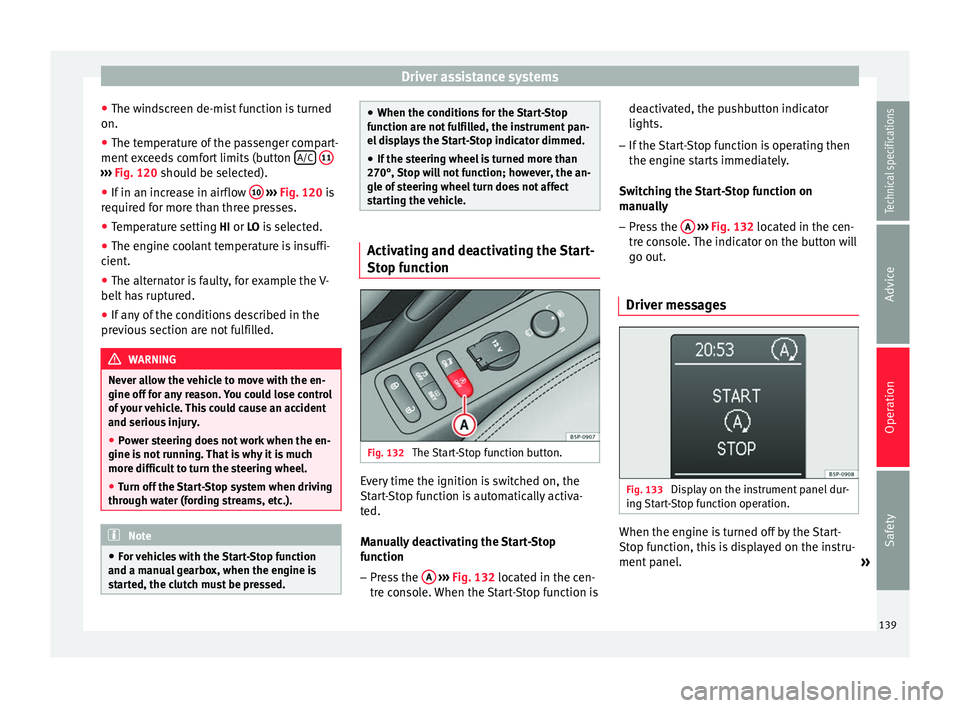
Driver messages Fig. 133
Display on the instrument panel dur-
ing Start-Stop function operation. When the engine is turned off by the Start-
Stop function, this is displayed on the instru-
ment panel.
»
139Technical specifications
Advice
Operation
Safety
Page 146 of 236
Operation
once on the upper part of the rocker switch RES/+ ››› Fig. 137 A .
Complete system deactivation* Vehicles with a manual gearbox
The system is completely turned off
by mov-
ing the control B
››› Fig. 137 all the way to
the right (OFF
engaged), or when the vehicle
is stationary, by switching off the ignition.
Vehicles with automatic gearbox/DSG
automatic gearbox
To completely disengage the system, the se-
lector lever must be placed in one of the fol-
lowing positions: P ,
N, R or 1 or with the vehi-
cle stopped and the ignition turned off. Towing bracket device
Trailer towing Instructions to follow Your vehicle may be used to tow a trailer
when fitted with the correct equipment.
If the car is supplied with a
factory-fitted tow-
in g br
acket it will already have the necessary
technical modifications and meet the statuto-
ry requirements for towing a trailer. If you
wish to retrofit a towing bracket, consult
›
›› page 146.
Connect
ors
Your vehicle is fitted with a 12-pin connector
for the electrical connection between the
trailer and the vehicle.
If the trailer has a 7-pin plug you will need to
use an a
dapter cable. It is available at any
Technical Service.
Trailer weight/drawbar load
Never exceed the authorised trailer weight. If
you do not load the trailer up to the maxi-
mum permitted trailer weight, you can then
climb correspondingly steeper slopes.
The maximum trailer weights listed are only applicable for altitudes up to 1000 m above
sea l
evel. With increasing altitude the engine power and therefore the vehicle climbing
ability are impaired because of the reduced
air density. The maximum trailer weight has
to be reduced accordingly. The weight of the
vehicle and trailer combination must be re-
duced by 10% for every further 1000 m (or
part thereof). The gross combination weight
is the actual weight of the laden vehicle plus
the actual weight of the laden trailer. When
possible, operate the trailer with the maxi-
mum permitted drawbar load on the ball joint
of the t
owing bracket, but do not exceed the
specified limit.
The figures for trailer weights
and drawbar
loads that are given on the data plate of the
towing bracket are for certification purposes
only. The correct figures for your specific
model, which may be lower than these fig-
ures for the towing bracket, are given in the
vehicle documentation or in ››› chapter Tech-
nical Data .
Distributing the load
Distribute loads in the trailer so that heavy
objects are as near to the axle as possible.
Loads carried in the trailer must be secured
to prevent them moving.
144
Page 185 of 236
Emergencies
– Switch off the engine. Switch on the hazard
warning lights.
– Apply the handbrake firmly.
– En g
age the first gear , or put
the selector
lever to position P for those vehicles with
an automatic gearbox.
– If you are towing a trailer, unhitch it from
your vehicle.
– Take the vehicle tools and the spare wheel
out of
the luggage compartment. WARNING
Put the hazard warning lights on and place
the warning triangle in position. This is for
your own safety and also warns other road
users. CAUTION
If you have to change the tyre on a gradient,
block the wheel opposite the wheel being
changed by placing a stone or similar object
under it to prevent the vehicle from rolling
away. Note
Please observe related legal requirements. Changing a wheel
Change the wheel as described below: –
Remove the wheel cover
. A
l
so refer to
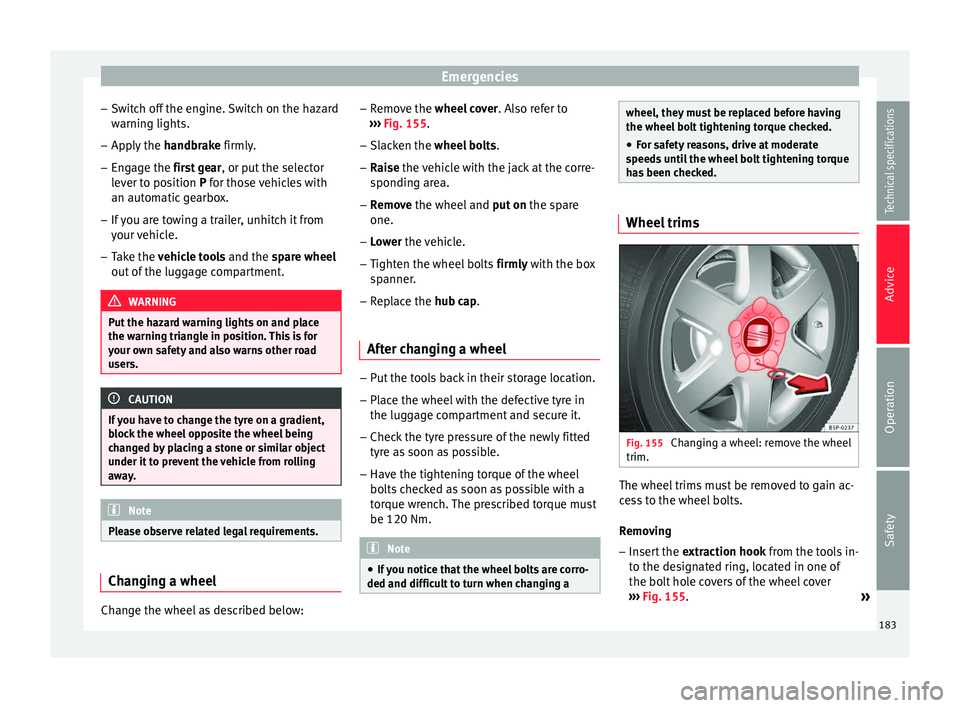
››› Fig. 155.
– Slac
ken the wheel bolts .
– Rai
se the vehicle with the jack at the corre-
spondin
g area.
– Remove the wheel and put
on the spare
one.
– Lower the vehicle.
– Tighten the wheel
bolts firmly with the box
sp
anner.
– Replace the hub cap.
Aft
er changing a wheel –
Put the tools back in their storage location.
– Place the wheel with the defective tyre in
the luggage compartment and secure it.
– Check the tyre pressure of the newly fitted
tyre as soon as possible.
– Have the tightening torque of the wheel
bolts checked as soon as possible with a
torque wrench. The prescribed torque must
be 120 Nm. Note
● If you notice that the wheel bolts are corro-
ded and difficult to turn when changing a wheel, they must be replaced before having
the wheel bolt tightening torque checked.
● For safety reasons, drive at moderate
speeds until the wheel bolt tightening torque
has been checked. Wheel trims
Fig. 155
Changing a wheel: remove the wheel
trim. The wheel trims must be removed to gain ac-
cess to the wheel bolts.
Removing
– Insert the extraction hook from the tools in-
to the designated ring, located in one of
the bolt hole covers of the wheel cover
››› Fig. 155 .
»
183
Technical specifications
Advice
Operation
Safety