instrument panel Seat Altea 2015 Owner's Guide
[x] Cancel search | Manufacturer: SEAT, Model Year: 2015, Model line: Altea, Model: Seat Altea 2015Pages: 236, PDF Size: 4.23 MB
Page 57 of 236
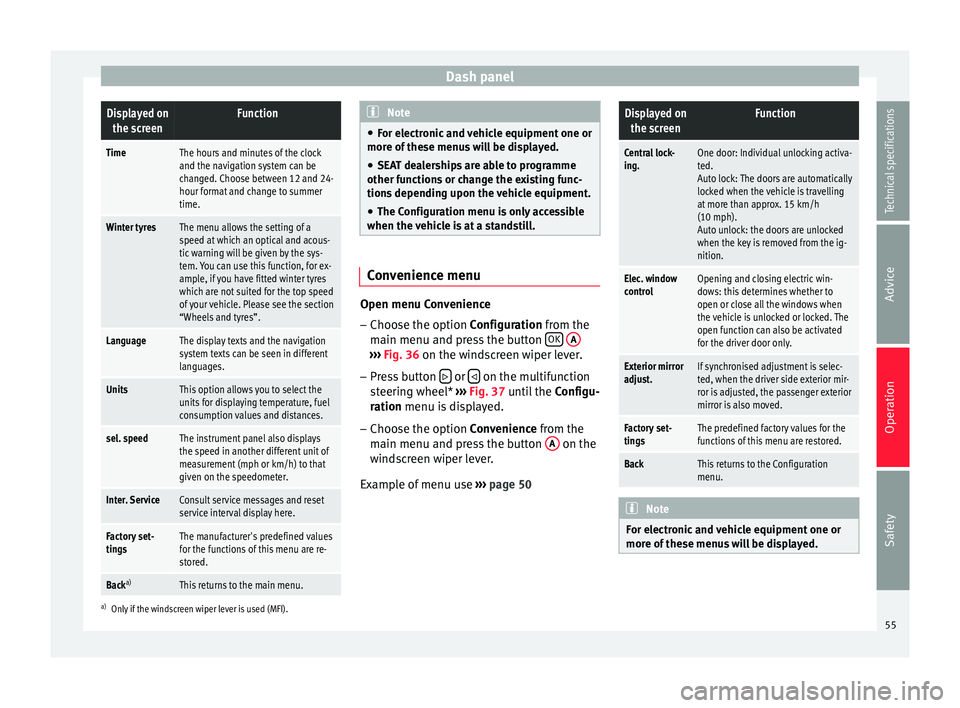
Dash panelDisplayed on
the screenFunction
TimeThe hours and minutes of the clock
and the navigation system can be
changed. Choose between 12 and 24-
hour format and change to summer
time.
Winter tyresThe menu allows the setting of a
speed at which an optical and acous-
tic warning will be given by the sys-
tem. You can use this function, for ex-
ample, if you have fitted winter tyres
which are not suited for the top speed
of your vehicle. Please see the section
“Wheels and tyres”.
LanguageThe display texts and the navigation
system texts can be seen in different
languages.
UnitsThis option allows you to select the
units for displaying temperature, fuel
consumption values and distances.
sel. speedThe instrument panel also displays
the speed in another different unit of
measurement (mph or km/h) to that
given on the speedometer.
Inter. ServiceConsult service messages and reset
service interval display here.
Factory set-
tingsThe manufacturer's predefined values
for the functions of this menu are re-
stored.
Back a)This returns to the main menu.
a)
Only if the windscreen wiper lever is used (MFI). Note
● For electronic and vehicle equipment one or
more of these menus will be displayed.
● SEAT dealerships are able to programme
other functions or change the existing func-
tions depending upon the vehicle equipment.
● The Configuration menu is only accessible
when the vehicle is at a standstill. Convenience menu
Open menu Convenience
– Choose the option Configuration
from the
m
ain menu and press the button OK
A ›››
Fig. 36 on the windscreen wiper lever.
– Pr e
ss button or
on the multifunction
steering wheel* ›››
Fig. 37 until the
C
onfigu-
r
ation menu is displayed.
– Choose the option
Convenience from the
main menu and press the button A on the
windscreen wiper lever.
Example of menu use ›››
page 50
Displayed on
the screenFunction
Central lock-
ing.One door: Individual unlocking activa-
ted.
Auto lock: The doors are automatically
locked when the vehicle is travelling
at more than approx. 15 km/h
(10 mph).
Auto unlock: the doors are unlocked
when the key is removed from the ig-
nition.
Elec. window
controlOpening and closing electric win-
dows: this determines whether to
open or close all the windows when
the vehicle is unlocked or locked. The
open function can also be activated
for the driver door only.
Exterior mirror
adjust.If synchronised adjustment is selec-
ted, when the driver side exterior mir-
ror is adjusted, the passenger exterior
mirror is also moved.
Factory set-
tingsThe predefined factory values for the
functions of this menu are restored.
BackThis returns to the Configuration
menu. Note
For electronic and vehicle equipment one or
more of these menus will be displayed. 55
Technical specifications
Advice
Operation
Safety
Page 60 of 236
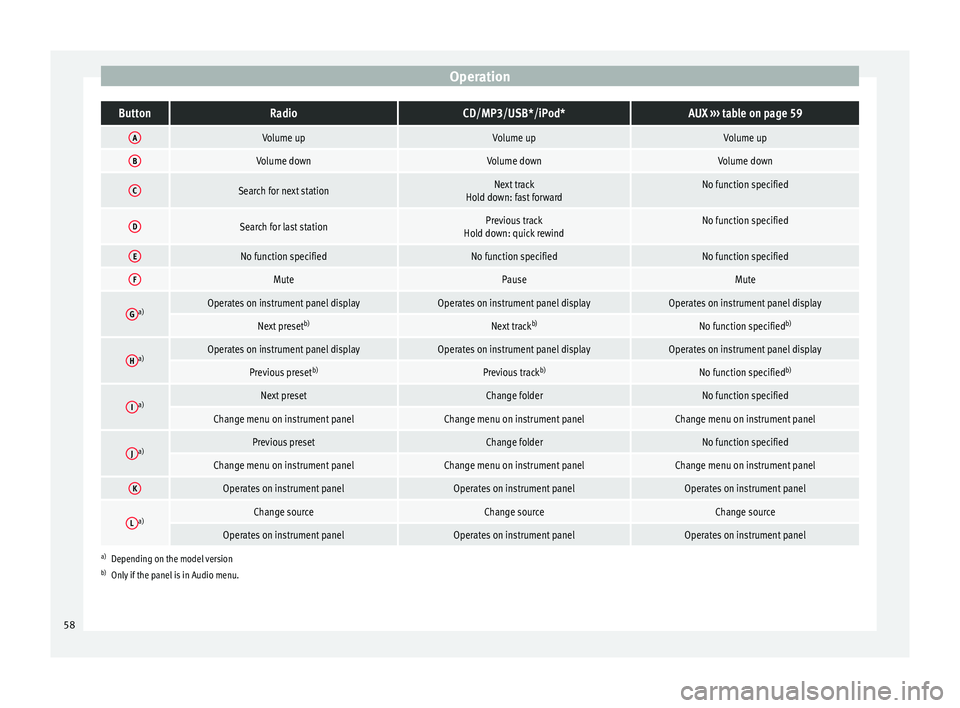
OperationButtonRadioCD/MP3/USB*/iPod*AUX
››› table on page 59
AVolume upVolume upVolume up
BVolume downVolume downVolume down
CSearch for next stationNext track
Hold down: fast forwardNo function specified
DSearch for last stationPrevious track
Hold down: quick rewindNo function specified
ENo function specifiedNo function specifiedNo function specified
FMutePauseMute
Ga)Operates on instrument panel displayOperates on instrument panel displayOperates on instrument panel display
Next preset b)Next trackb)No function specified b)
Ha)Operates on instrument panel displayOperates on instrument panel displayOperates on instrument panel display
Previous presetb)Previous trackb)No function specified b)
Ia)Next presetChange folderNo function specified
Change menu on instrument panelChange menu on instrument panelChange menu on instrument panel
Ja)Previous presetChange folderNo function specified
Change menu on instrument panelChange menu on instrument panelChange menu on instrument panel
KOperates on instrument panelOperates on instrument panelOperates on instrument panel
La)Change sourceChange sourceChange source
Operates on instrument panelOperates on instrument panelOperates on instrument panel
a)
Depending on the model version
b) Only if the panel is in Audio menu.
58
Page 61 of 236
Steering wheel controls*
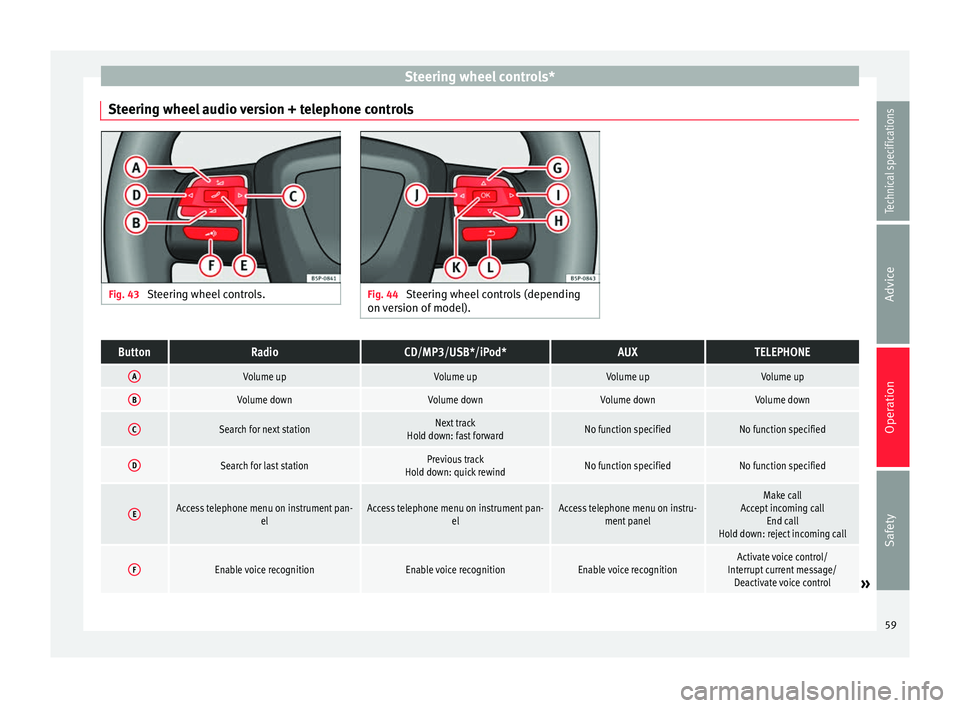
Steering wheel audio version + telephone controls Fig. 43
Steering wheel controls. Fig. 44
Steering wheel controls (depending
on version of model).ButtonRadioCD/MP3/USB*/iPod*AUXTELEPHONE
AVolume upVolume upVolume upVolume up
BVolume downVolume downVolume downVolume down
CSearch for next stationNext track
Hold down: fast forwardNo function specifiedNo function specified
DSearch for last stationPrevious track
Hold down: quick rewindNo function specifiedNo function specified
EAccess telephone menu on instrument pan- elAccess telephone menu on instrument pan-elAccess telephone menu on instru-ment panelMake call
Accept incoming call End call
Hold down: reject incoming call
FEnable voice recognitionEnable voice recognitionEnable voice recognitionActivate voice control/
Interrupt current message/ Deactivate voice control
» 59
Technical specifications
Advice
Operation
Safety
Page 62 of 236
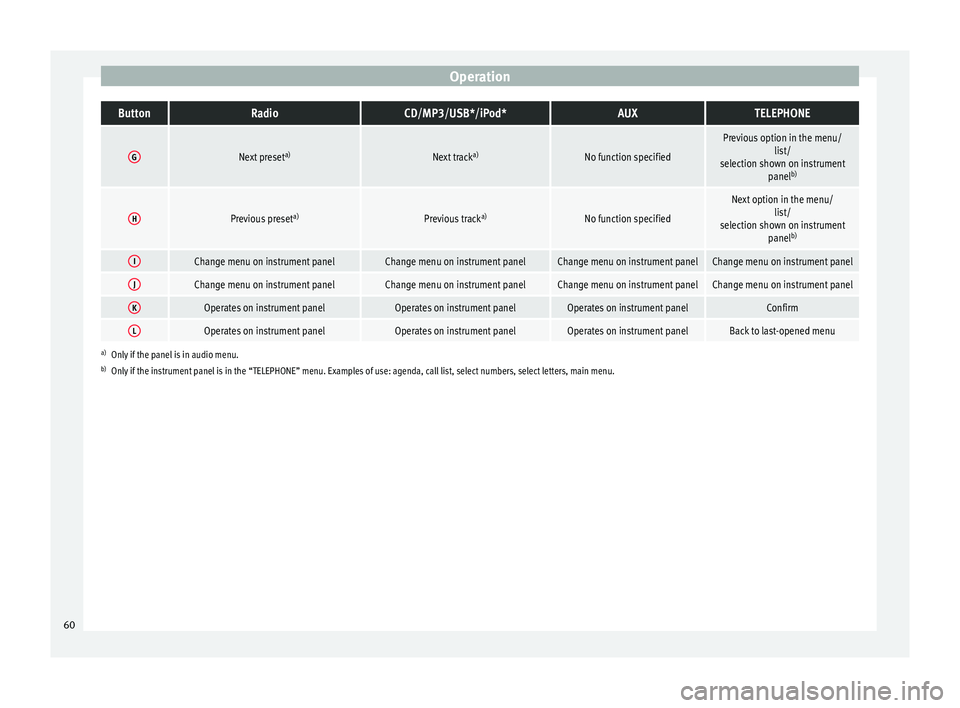
OperationButtonRadioCD/MP3/USB*/iPod*AUXTELEPHONE
GNext preset
a)Next tracka)No function specified
Previous option in the menu/
list/
selection shown on instrument panelb)
HPrevious preset a)Previous tracka)No function specified
Next option in the menu/
list/
selection shown on instrument panelb)
IChange menu on instrument panelChange menu on instrument panelChange menu on instrument panelChange menu on instrument panel
JChange menu on instrument panelChange menu on instrument panelChange menu on instrument panelChange menu on instrument panel
KOperates on instrument panelOperates on instrument panelOperates on instrument panelConfirm
LOperates on instrument panelOperates on instrument panelOperates on instrument panelBack to last-opened menu
a)
Only if the panel is in audio menu.
b) Only if the instrument panel is in the “TELEPHONE” menu. Examples of use: agenda, call list, select numbers, select letters, main menu.
60
Page 64 of 236
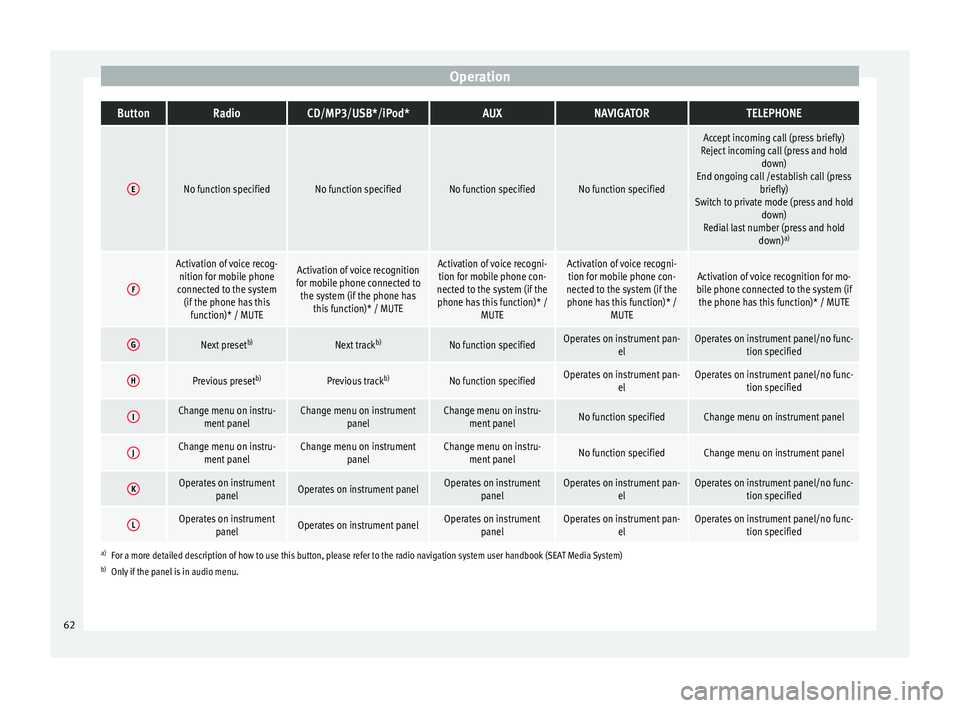
OperationButtonRadioCD/MP3/USB*/iPod*AUXNAVIGATORTELEPHONE
ENo function specifiedNo function specifiedNo function specifiedNo function specified
Accept incoming call (press briefly)
Reject incoming call (press and hold down)
End ongoing call /establish call (press briefly)
Switch to private mode (press and hold down)
Redial last number (press and hold down)a)
F
Activation of voice recog-
nition for mobile phone
connected to the system (if the phone has this function)* / MUTEActivation of voice recognition
for mobile phone connected to the system (if the phone has this function)* / MUTEActivation of voice recogni-tion for mobile phone con-
nected to the system (if the phone has this function)* / MUTEActivation of voice recogni-tion for mobile phone con-
nected to the system (if the phone has this function)* / MUTEActivation of voice recognition for mo-
bile phone connected to the system (if the phone has this function)* / MUTE
GNext preset b)Next trackb)No function specifiedOperates on instrument pan-
elOperates on instrument panel/no func-tion specified
HPrevious preset b)Previous trackb)No function specifiedOperates on instrument pan-
elOperates on instrument panel/no func-tion specified
IChange menu on instru-ment panelChange menu on instrument panelChange menu on instru-ment panelNo function specifiedChange menu on instrument panel
JChange menu on instru-ment panelChange menu on instrument panelChange menu on instru-ment panelNo function specifiedChange menu on instrument panel
KOperates on instrument panelOperates on instrument panelOperates on instrumentpanelOperates on instrument pan- elOperates on instrument panel/no func-tion specified
LOperates on instrumentpanelOperates on instrument panelOperates on instrumentpanelOperates on instrument pan- elOperates on instrument panel/no func-tion specified
a)For a more detailed description of how to use this button, please refer to the radio navigation system user handbook (SEAT Media System)
b) Only if the panel is in audio menu. 62
Page 73 of 236
Opening and closing
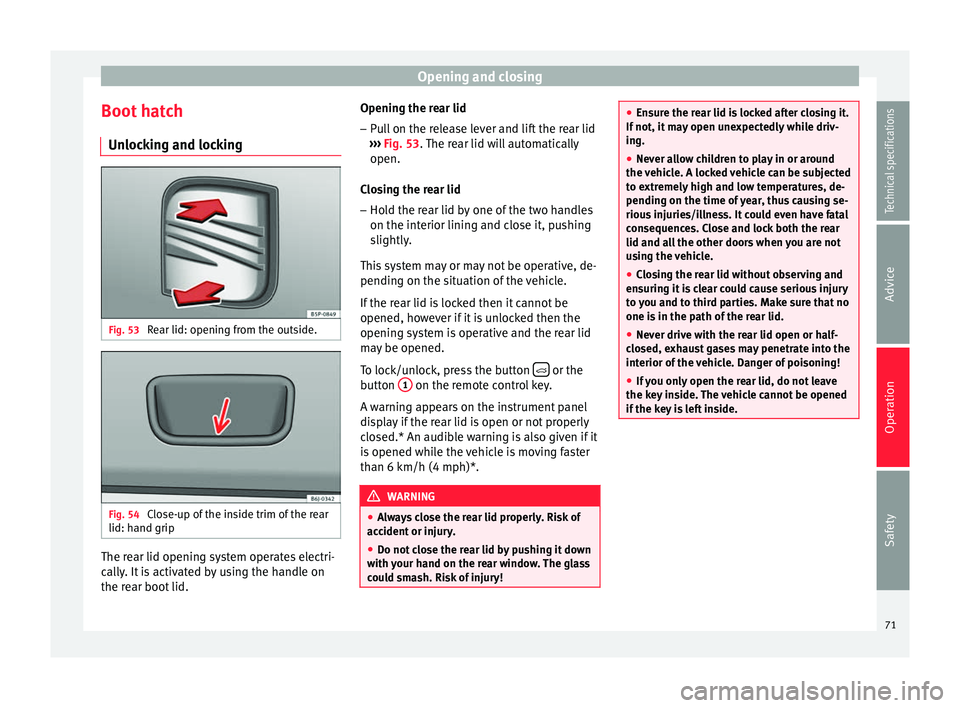
Boot hatch Unlocking and locking Fig. 53
Rear lid: opening from the outside. Fig. 54
Close-up of the inside trim of the rear
lid: hand grip The rear lid opening system operates electri-
cally. It is activated by using the handle on
the rear boot lid. Opening the rear lid
– Pull on the release lever and lift the rear lid
››› Fig. 53 . The rear lid will automatically
open.
C lo
sing the rear lid
– Hold the rear lid by one of the two handles
on the interior lining and close it, pushing
slightly.
This system may or may not be operative, de-
pending on the situation of the vehicle.
If the rear lid is locked then it cannot be
opened, however if it is unlocked then the
opening system is operative and the rear lid
may be opened.
To lock/unlock, press the button or the
button 1 on the remote control key.
A warning appears on the instrument panel
display if the rear lid is open or not properly
closed.* An audible warning is also given if it
is opened while the vehicle is moving faster
than 6 km/h (4 mph)*. WARNING
● Always close the rear lid properly. Risk of
accident or injury.
● Do not close the rear lid by pushing it down
with your hand on the rear window. The glass
could smash. Risk of injury! ●
Ensure the rear lid is locked after closing it.
If not, it may open unexpectedly while driv-
ing.
● Never allow children to play in or around
the vehicle. A locked vehicle can be subjected
to extremely high and low temperatures, de-
pending on the time of year, thus causing se-
rious injuries/illness. It could even have fatal
consequences. Close and lock both the rear
lid and all the other doors when you are not
using the vehicle.
● Closing the rear lid without observing and
ensuring it is clear could cause serious injury
to you and to third parties. Make sure that no
one is in the path of the rear lid.
● Never drive with the rear lid open or half-
closed, exhaust gases may penetrate into the
interior of the vehicle. Danger of poisoning!
● If you only open the rear lid, do not leave
the key inside. The vehicle cannot be opened
if the key is left inside. 71
Technical specifications
Advice
Operation
Safety
Page 80 of 236
Operation
panel. The control lamp
flashes when the
t urn s
ignals are operated, provided a trailer is
correctly attached and connected to the vehi-
cle. If a turn signal bulb is defective, the con-
trol lamp flashes at double speed. If the trail-
er turn signal bulbs are defective, the control
lamp does not light up. Change the bulb.
● The main beam headlights can only be
sw
itched on if the dipped beam headlights
are already on. The warning lamp then
comes on in the instrument panel.
● The headlight flasher come
s on for as long
as you pull the lever – even if no other lights
are switched on. The warning lamp then
comes on in the instrument panel.
● When the parking lights are switched on,
the he
adlight and the tail light on the corre-
sponding side of the vehicle light up. The
parking lights will only work if the key is re-
moved from the ignition. If said light is on, an
audible warning will be emitted while the
driver door is open.
● If the turn signal lever is left on after the
key has been taken out of the ignition lock,
an acoustic signal sounds when the driver
door is opened. This is intended as a remind-
er to switch off the turn signal, unless you
wish to leave the parking light on. Daytime driving lights*
Daytime running lights are signalling devices
for improving road safety. The lights are built into the headlights and come on each time
the ignition is turned on if the light switch is
in position
0 or
. It is automatically
sw
itched off when the side lights are turned
on.
Automatic control of the dipped beam in
combination with the daytime running lights
If the dipped beam control and the daytime
running lights
are activated at the same
time, the dipped beams and the instrument
panel lighting will automatically come on as
required (e.g. when entering a tunnel) and
the daytime running lights will switch off.
When the automatic dipped beam control
switches off the dipped beams (e.g. when
coming out of a tunnel), the daytime running
lights come back on. WARNING
The side lights or daytime driving lights are
not bright enough to illuminate the road
ahead and to ensure that other road users are
able to see you.
● Always use your dipped beam head lights if
it is raining or if visibility is poor.
● The rear lights do not come on with the
daytime driving light. A vehicle which does
not have the rear lights on may not be visible
to other drivers in the darkness, if it is rain-
ing or in conditions of poor visibility. Note
Please observe any relevant legal require-
ments which may apply in your country. Nordic country solution
3 Only available in certain countries or as an
option
al
extra
The so-called “Nordic country solution” is an
alternative solution to daytime running lights
in vehicles without this function. It consists
of simultaneously connecting the dimmed
dipped beams, the sidelights and the licence
plate lights.
The aforementioned lights are switched on
each time the ignition is turned on if the light
switch is in position 0 or . Depending
upon the model, the control lamp on the
light control switch or the instrument panel
lighting will indicate that the lights are on.
Activation of the Nordic country solution
● Remove the key from the ignition, move the
turn signal lever upward (right turn signal),
press it back to flash position and hold it
there.
● Insert the key and switch on the ignition,
holding it in this position for 3 seconds.
Then, switch off the ignition. The Nordic
country solution is now activated and the cor-
responding lights can come on.
78
Page 81 of 236

Lights and visibility
Deactivation of the Nordic country solution
● Remove the key from the ignition, press the
turn signal lever down (left turn signal), press
it back to flash position and hold it here.
● Insert the key and switch on the ignition,
holding it in this position for 3 seconds.
Then, switch off the ignition. The Nordic
country solution is now deactivated and the
corresponding lights will not come on.
Coming Home/Leaving Home
function* The Coming Home function is controlled man-
ually. The Leaving Home function is control-
led with a photosensor.
If the Coming Home or Leaving Home func-
tion is connected, the front side and dipped
lights, the tail lights and the number plate
light will light up to provide assistance.
Coming home function
The Coming Home function is activated by
switching off the ignition and briefly flashing
the lights. When the driver door is opened,
the Coming Home lighting comes on. If the
driver door is already open when the lights
are flashed briefly, the Coming Home lighting
comes on
immediately .
When the l a
st door of the vehicle or the rear
lid is closed, the Coming Home function starts and the switching off the headlights is
delayed.
The Coming Home lighting switches off in the
following cases:
● On completion of the time period establish-
ed for the delay in switching off the lights af-
ter all the vehicle doors and the rear lid have
been closed.
● If, 30 seconds after being connected, any
doors or the rear lid remain open.
● If the light switch is turned to position
.
● If the ignition is switched on.
Leaving home function
The Leaving Home function is activated when
the vehicle is unlocked if:
● the light control is in position and
● the photosensor detects “darkness”.
The Leaving Home lighting switches off in the
following cases:
● If the time period for the delay in switching
off the headlights has ended
● If the vehicle is locked again.
● If the light switch is turned to position .
● If the ignition is switched on. Note
The setting for the delay in switching off the
headlights in the Coming Home and Leaving
Home function can be changed or the func-
tion can be connected or disconnected in the
menu Lights and visibility › ›
› page 56.
● If the ignition key is removed while the
lights are on, the lights flash briefly and the
driver door opens, no audible warning is
heard, since with the Coming Home function
on, the lights are automatically switched off
after a period of time (except when the light
switch is in position or . Instrument and switch lighting /
Headlight range control
Fig. 61
Dash panel: Instrument panel and
control dimmers and headlight range control. » 79
Technical specifications
Advice
Operation
Safety
Page 82 of 236
Operation
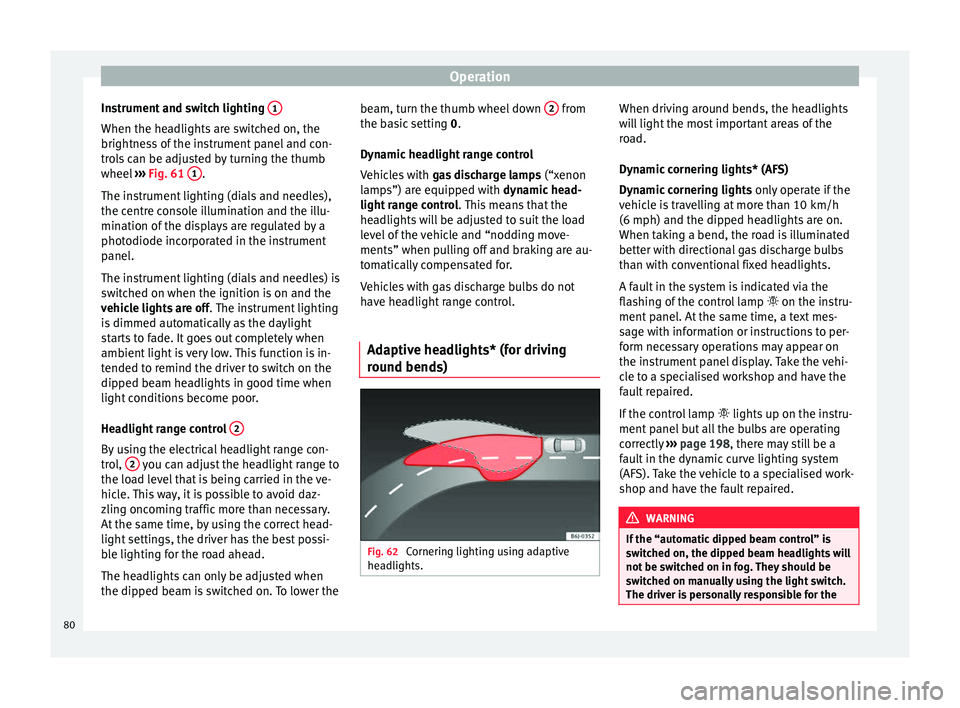
Instrument and switch lighting 1When the headlights are switched on, the
brightness of the instrument panel and con-
trols can be adjusted by turning the thumb
wheel
››› Fig. 61 1 .
The instrument lighting (dials and needles),
the centre console illumination and the illu-
mination of the displays are regulated by a
photodiode incorporated in the instrument
panel.
The instrument lighting (dials and needles) is
switched on when the ignition is on and the
vehicle lights are off . The instrument lighting
is dimmed automatically as the daylight
starts to fade. It goes out completely when
ambient light is very low. This function is in-
tended to remind the driver to switch on the
dipped beam headlights in good time when
light conditions become poor.
Headlight range control 2By using the electrical headlight range con-
trol,
2 you can adjust the headlight range to
the load level that is being carried in the ve-
hicle. This way, it is possible to avoid daz-
zling oncoming traffic more than necessary.
At the same time, by using the correct head-
light settings, the driver has the best possi-
ble lighting for the road ahead.
The headlights can only be adjusted when
the dipped beam is switched on. To lower the beam, turn the thumb wheel down
2 from
the basic setting 0.
D y
namic headlight range control
Vehicles with gas discharge lamps (“xenon
lamps”) are equipped with
dynamic head-
light range control . This means that the
headlights will be adjusted to suit the load
level of the vehicle and “nodding move-
ments” when pulling off and braking are au-
tomatically compensated for.
Vehicles with gas discharge bulbs do not
have headlight range control.
Adaptive headlights* (for driving
round bends) Fig. 62
Cornering lighting using adaptive
headlights. When driving around bends, the headlights
will light the most important areas of the
road.
Dynamic cornering lights* (AFS)
Dynamic cornering lights
only operate if the
vehicle is travelling at more than 10 km/h
(6 mph) and the dipped headlights are on.
When taking a bend, the road is illuminated
better with directional gas discharge bulbs
than with conventional fixed headlights.
A fault in the system is indicated via the
flashing of the control lamp on the instru-
ment panel. At the same time, a text mes-
sage with information or instructions to per-
form necessary operations may appear on
the instrument panel display. Take the vehi-
cle to a specialised workshop and have the
fault repaired.
If the control lamp lights up on the instru-
ment panel but all the bulbs are operating
correctly ››› page 198 , there may still be a
f au
lt in the dynamic curve lighting system
(AFS). Take the vehicle to a specialised work-
shop and have the fault repaired. WARNING
If the “automatic dipped beam control” is
switched on, the dipped beam headlights will
not be switched on in fog. They should be
switched on manually using the light switch.
The driver is personally responsible for the 80
Page 90 of 236
Operation
the rear of the vehicle. The right exterior
mirror will be adjusted at the same time
(sy nc
hronised). WARNING
● Convex or spherical mirrors increase the
field of vision however the objects appear
smaller and further away. If you use these
mirrors to estimate the distance to vehicles
behind you when changing lane, you could
make a mistake. Risk of accident.
● If possible, use the rear vision mirror to es-
timate distances to vehicles behind you.
● Make sure that you do not get your finger
trapped between the mirror and the mirror
base when folding back the mirrors. Risk of
injury! For the sake of the environment
The exterior mirror heating should be switch-
ed off when it is no longer needed. Other-
wise, it is an unnecessary fuel waste. Note
● If the electrical adjustment ever fails to op-
erate, the mirrors can be adjusted by hand by
lightly pressing the edge of the mirror glass.
● In vehicles with electric exterior mirrors,
the following points should be observed: if, due to an external force (e.g. being knocked
while manoeuvring), the adjustment of the
mirror housing is altered, the mirror will have
to be fully folded electrically. Do not readjust the rear vision mirror housing by hand, as
this will interfere with the mirror adjuster
function.
● The rear vision mirrors can be adjusted sep-
arately or simultaneously, as described
above.
● The folding function on the exterior mirrors
is not active at speeds over 40 km/h
(25 mph). Seats and head restraints
Adjusting the seat and head
restraints
The importance of correct seat
adjustment Proper seat adjustment optimises the level of
protection offered by seat belts and airbags.
Your vehicle has
five
seats, two in the front
and thr ee in the r
ear. Each seat is equipped
with a three-point seat belt.
The driver seat and the front passenger seat
can be adjusted in many ways to suit the
physical requirements of the vehicle occu-
pants. The correct seat position is very impor-
tant for:
● a fast and easy operation of all controls on
the instrument panel,
● a relaxed posture which does not cause
drowsiness,
● a safe driving ›››
page 5,
● ensuring that the seat belts and airbag sys-
tem provide maximum protection ›››
page 11. WARNING
● If the driver and passengers assume im-
proper sitting positions, they may sustain
critical injuries. 88