phone Seat Altea 2015 Owner's Manual
[x] Cancel search | Manufacturer: SEAT, Model Year: 2015, Model line: Altea, Model: Seat Altea 2015Pages: 236, PDF Size: 4.23 MB
Page 7 of 236
Safe driving
Safety
Safe driving Safety first! WARNING
● This manual contains important informa-
tion about the operation of the vehicle, both
for the driver and the passengers. The other
sections of the on-board documentation also
contain further information that you should
be aware of for your own safety and for the
safety of your passengers.
● Ensure that the onboard documentation is
kept in the vehicle at all times. This is espe-
cially important when lending or selling the
vehicle to another person. Advice about driving
Before setting off For your own safety and the safety of your
passengers, always note the following points
before every trip:
– Make sure that the vehicle's lights and turn
signals are working properly.
– Check tyre pressure. –
Ensure that all windows provide a clear and
good view of the surroundings.
– Make sure all luggage is secured
››› page 101.
– Make sure that no objects can interfere
with the pedals.
– Adjust front seat, head restraint and rear vi-
sion mirrors properly according to your
size.
– Ensure that the passengers in the rear
seats always have the head restraints in
the in-use position ››› page 10.
– Instruct passengers to adjust the head re-
straints according to their height.
– Protect children with appropriate child
seats and properly applied seat belts
››› page 24 .
– As s
ume the correct sitting position. Instruct
your passengers also to assume a proper
sitting position. ››› page 6.
– Fasten your seat belt securely. Instruct your
passengers also to fasten their seat belts
properly. ››› page 11
.
What affects driving safety? As a driver, you are responsible for yourself
and your passengers. When your concentra-
tion or driving safety is affected by any cir-cumstance, you endanger yourself as well as
others on the road
››› , for this reason:
– Always pay attention to traffic and do not
get distracted by passengers or telephone calls.
– Never drive when your driving ability is im-
paired (e.g. by medication, alcohol, drugs).
– Observe traffic laws and speed limits.
– Always reduce your speed as appropriate
for road, traffic and weather conditions.
– When travelling long distances, take
breaks regularly - at least every two hours.
– If possible, avoid driving when you are tired
or stressed. WARNING
When driving safety is impaired during a trip,
the risk of injury and accidents increases. Safety equipment
Never put your safety or the safety of your
passengers in danger. In the event of an acci-
dent, the safety equipment may reduce the
risk of injury. The following list includes most
of the safety equipment in your SEAT:
● Three-point seat belts
● belt tension limiters for the front and rear
side seats, »
5
Technical specifications
Advice
Operation
Safety
Page 22 of 236
Safety
Airbag overview Front airbags Fig. 13
Driver airbag in the steering wheel. Fig. 14
Front passenger airbag in the dash
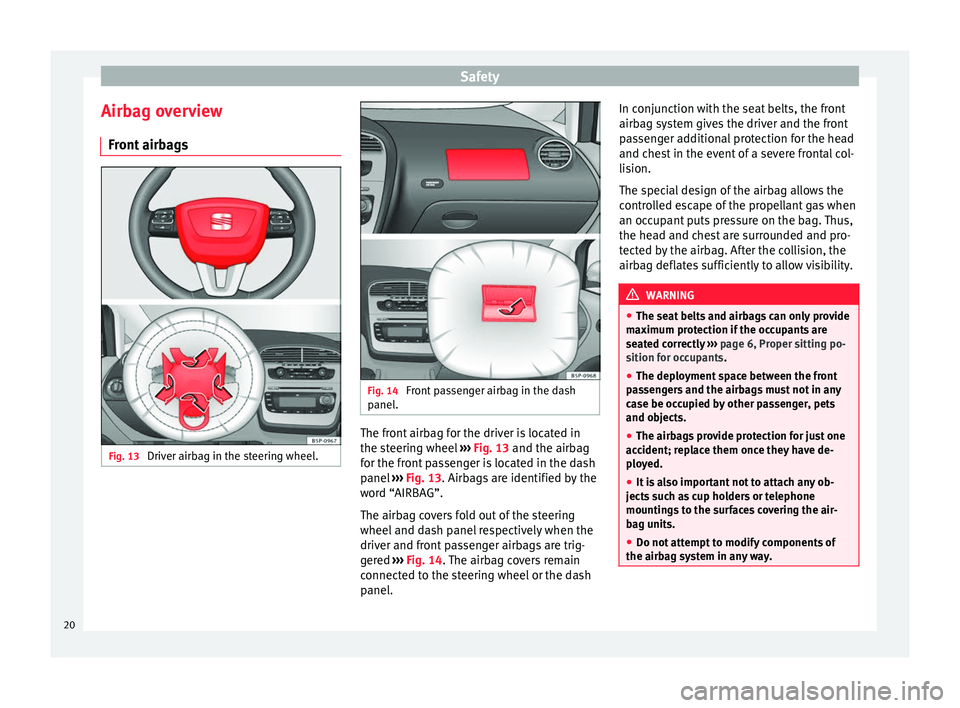
panel. The front airbag for the driver is located in
the steering wheel
››› Fig. 13 and the airbag
f or the fr
ont passenger is located in the dash
panel ››› Fig. 13. Airbags are identified by the
word “AIRBAG”.
The airbag covers fold out of the steering
wheel and dash panel respectively when the
driver and front passenger airbags are trig-
gered ››› Fig. 14. The airbag covers remain
connected to the steering wheel or the dash
panel. In conjunction with the seat belts, the front
airbag system gives the driver and the front
passenger additional protection for the head
and chest in the event of a severe frontal col-
lision.
The special design of the airbag allows the
controlled escape of the propellant gas when
an occupant puts pressure on the bag. Thus,
the head and chest are surrounded and pro-
tected by the airbag. After the collision, the
airbag deflates sufficiently to allow visibility.
WARNING
● The seat belts and airbags can only provide
maximum protection if the occupants are
seated correctly ››› page 6, Proper sitting po-
sition for occupants.
● The dep lo
yment space between the front
passengers and the airbags must not in any
case be occupied by other passenger, pets
and objects.
● The airbags provide protection for just one
accident; replace them once they have de-
ployed.
● It is also important not to attach any ob-
jects such as cup holders or telephone
mountings to the surfaces covering the air-
bag units.
● Do not attempt to modify components of
the airbag system in any way. 20
Page 53 of 236
Dash panel
The function “Winter tyres” sends an optical
and an acoustic signal when the vehicle rea-
ches the set speed.
Example menu “Winter tyres”In the menu
Winter tyresFunction
Name of menu displayed
X km/hThe current set speed is displayed
or ---or dashes will appear if the function is
deactivated
On / OffIf the function is activated or deactivated
+10 km/hThe set value increases by 10 km/h
-10 km/hThe set value decreases by 10 km/h
BackThe menu “Winter tyres” is closed and
the last displayed menu is shown. Note
For electronic and vehicle equipment one or
more of these menus will be displayed. Main menu
Fig. 38
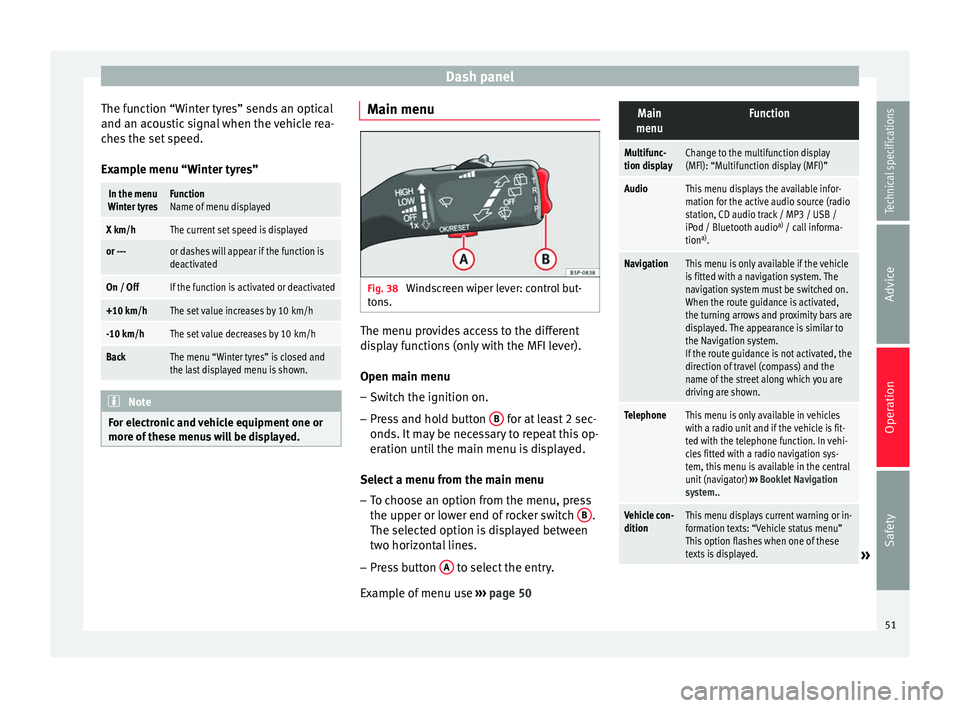
Windscreen wiper lever: control but-
tons. The menu provides access to the different
display functions (only with the MFI lever).
Open main menu
– Switch the ignition on.
– Press and hold button B for at least 2 sec-
onds. It may be necessary to repeat this op-
eration until the main menu is displayed.
Select a menu from the main menu
– To choose an option from the menu, press
the upper or lower end of rocker switch B .
The selected option is displayed between
two horizontal lines.
– Press button A to select the entry.
Example of menu use ››› page 50
Main
menuFunction
Multifunc-
tion displayChange to the multifunction display
(MFI): “Multifunction display (MFI)”
AudioThis menu displays the available infor-
mation for the active audio source (radio
station, CD audio track / MP3 / USB /
iPod / Bluetooth audio a)
/ call informa-
tion a)
.
NavigationThis menu is only available if the vehicle
is fitted with a navigation system. The
navigation system must be switched on.
When the route guidance is activated,
the turning arrows and proximity bars are
displayed. The appearance is similar to
the Navigation system.
If the route guidance is not activated, the
direction of travel (compass) and the
name of the street along which you are
driving are shown.
TelephoneThis menu is only available in vehicles
with a radio unit and if the vehicle is fit-
ted with the telephone function. In vehi-
cles fitted with a radio navigation sys-
tem, this menu is available in the central
unit (navigator) ››› Booklet Navigation
system..
Vehicle con-
ditionThis menu displays current warning or in-
formation texts: “Vehicle status menu”
This option flashes when one of these
texts is displayed.
» 51
Technical specifications
Advice
Operation
Safety
Page 59 of 236
Steering wheel controls*
Steering wheel controls* General information The steering wheel includes a multifunction
module from where it is possible to control
the audio, telephone and radio navigation
functions, and the automatic gearbox*, with-
out requiring the driver to be distracted from
driving.
There are three versions of the multifunction
module:
● Audio version, to control the available au-
dio functions from the steering wheel.
● Audio + Telephone version, to control the
available audio functions and the telephone
system from the steering wheel. Both versions may be used to control the au-
dio system (radio, Audio CD, mp3 CD,
iPod
1)
/USB 1)
/SD 1)
) and the radio navigation
system, in which case they also control the
navigation system.
● Version for automatic gearbox*
››› page 129
.
Audio sy s
tem
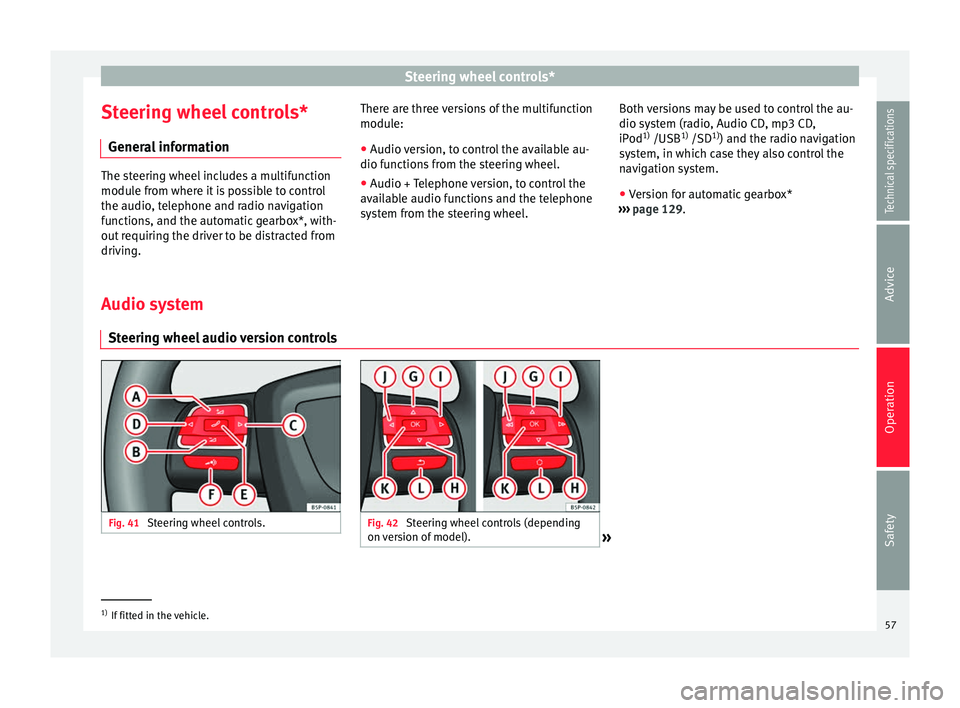
Steering wheel audio version controls Fig. 41
Steering wheel controls. Fig. 42
Steering wheel controls (depending
on version of model). »1)
If fitted in the vehicle.
57Technical specifications
Advice
Operation
Safety
Page 61 of 236
Steering wheel controls*
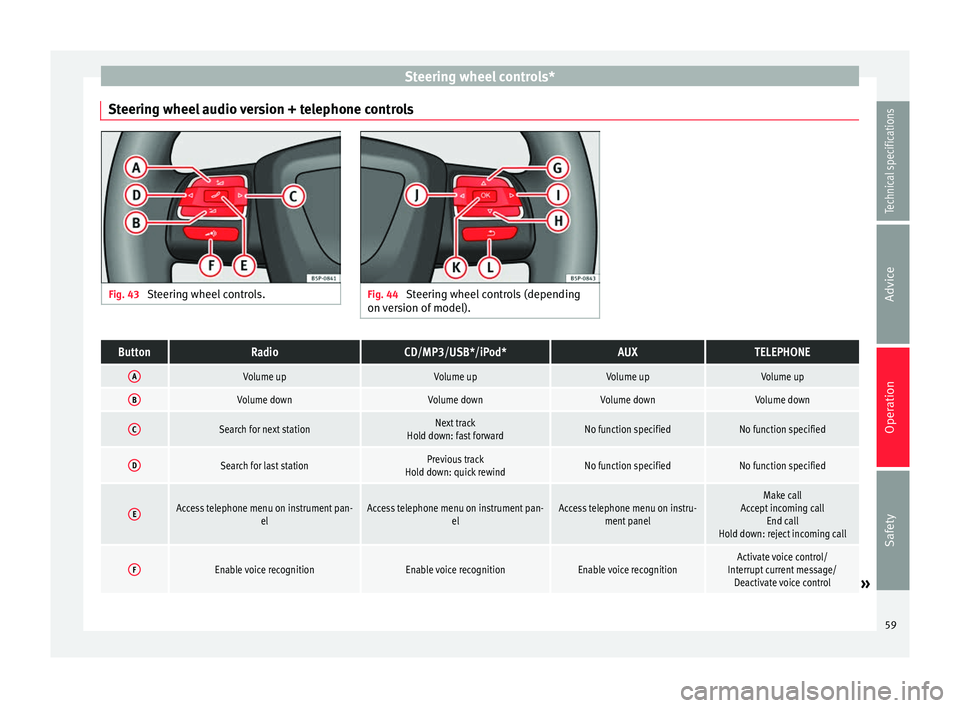
Steering wheel audio version + telephone controls Fig. 43
Steering wheel controls. Fig. 44
Steering wheel controls (depending
on version of model).ButtonRadioCD/MP3/USB*/iPod*AUXTELEPHONE
AVolume upVolume upVolume upVolume up
BVolume downVolume downVolume downVolume down
CSearch for next stationNext track
Hold down: fast forwardNo function specifiedNo function specified
DSearch for last stationPrevious track
Hold down: quick rewindNo function specifiedNo function specified
EAccess telephone menu on instrument pan- elAccess telephone menu on instrument pan-elAccess telephone menu on instru-ment panelMake call
Accept incoming call End call
Hold down: reject incoming call
FEnable voice recognitionEnable voice recognitionEnable voice recognitionActivate voice control/
Interrupt current message/ Deactivate voice control
» 59
Technical specifications
Advice
Operation
Safety
Page 62 of 236
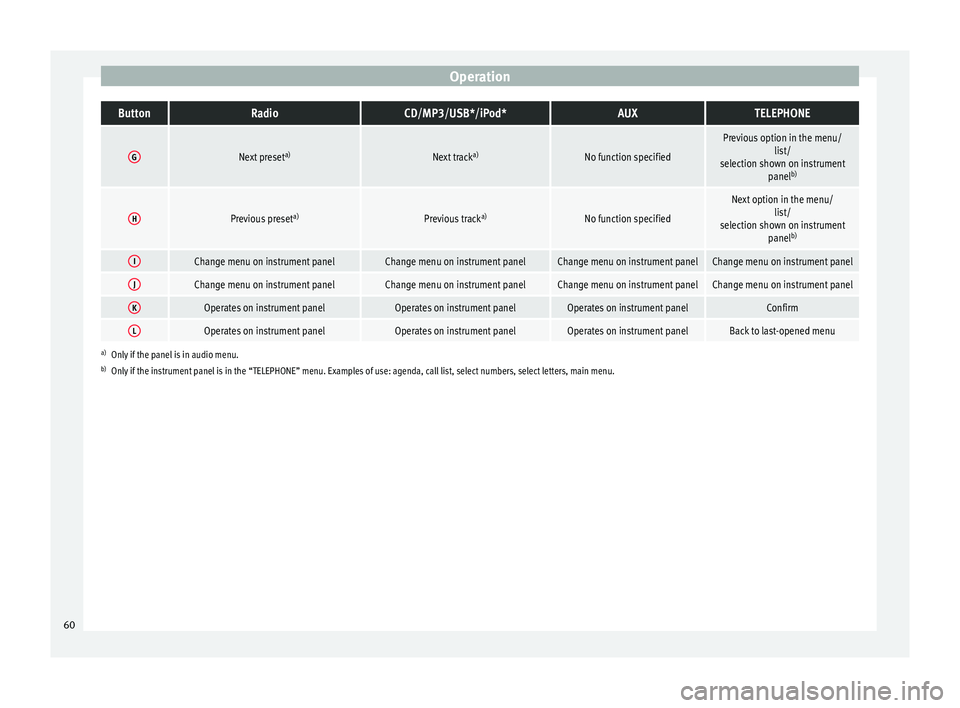
OperationButtonRadioCD/MP3/USB*/iPod*AUXTELEPHONE
GNext preset
a)Next tracka)No function specified
Previous option in the menu/
list/
selection shown on instrument panelb)
HPrevious preset a)Previous tracka)No function specified
Next option in the menu/
list/
selection shown on instrument panelb)
IChange menu on instrument panelChange menu on instrument panelChange menu on instrument panelChange menu on instrument panel
JChange menu on instrument panelChange menu on instrument panelChange menu on instrument panelChange menu on instrument panel
KOperates on instrument panelOperates on instrument panelOperates on instrument panelConfirm
LOperates on instrument panelOperates on instrument panelOperates on instrument panelBack to last-opened menu
a)
Only if the panel is in audio menu.
b) Only if the instrument panel is in the “TELEPHONE” menu. Examples of use: agenda, call list, select numbers, select letters, main menu.
60
Page 63 of 236
Steering wheel controls*
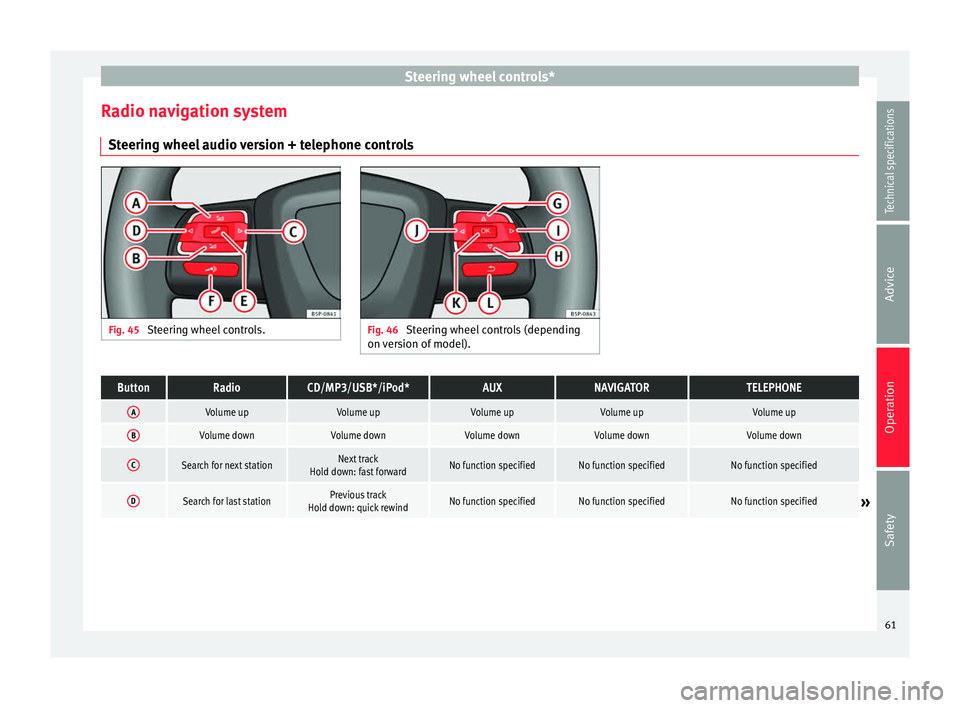
Radio navigation system Steering wheel audio version + telephone controls Fig. 45
Steering wheel controls. Fig. 46
Steering wheel controls (depending
on version of model).ButtonRadioCD/MP3/USB*/iPod*AUXNAVIGATORTELEPHONE
AVolume upVolume upVolume upVolume upVolume up
BVolume downVolume downVolume downVolume downVolume down
CSearch for next stationNext track
Hold down: fast forwardNo function specifiedNo function specifiedNo function specified
DSearch for last stationPrevious track
Hold down: quick rewindNo function specifiedNo function specifiedNo function specified» 61
Technical specifications
Advice
Operation
Safety
Page 64 of 236
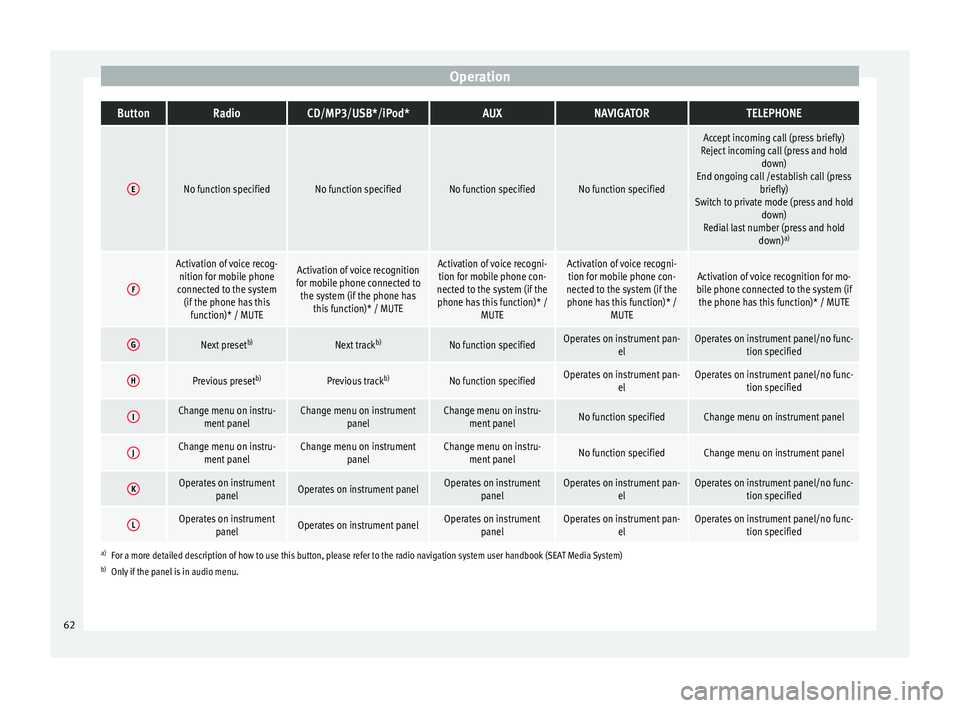
OperationButtonRadioCD/MP3/USB*/iPod*AUXNAVIGATORTELEPHONE
ENo function specifiedNo function specifiedNo function specifiedNo function specified
Accept incoming call (press briefly)
Reject incoming call (press and hold down)
End ongoing call /establish call (press briefly)
Switch to private mode (press and hold down)
Redial last number (press and hold down)a)
F
Activation of voice recog-
nition for mobile phone
connected to the system (if the phone has this function)* / MUTEActivation of voice recognition
for mobile phone connected to the system (if the phone has this function)* / MUTEActivation of voice recogni-tion for mobile phone con-
nected to the system (if the phone has this function)* / MUTEActivation of voice recogni-tion for mobile phone con-
nected to the system (if the phone has this function)* / MUTEActivation of voice recognition for mo-
bile phone connected to the system (if the phone has this function)* / MUTE
GNext preset b)Next trackb)No function specifiedOperates on instrument pan-
elOperates on instrument panel/no func-tion specified
HPrevious preset b)Previous trackb)No function specifiedOperates on instrument pan-
elOperates on instrument panel/no func-tion specified
IChange menu on instru-ment panelChange menu on instrument panelChange menu on instru-ment panelNo function specifiedChange menu on instrument panel
JChange menu on instru-ment panelChange menu on instrument panelChange menu on instru-ment panelNo function specifiedChange menu on instrument panel
KOperates on instrument panelOperates on instrument panelOperates on instrumentpanelOperates on instrument pan- elOperates on instrument panel/no func-tion specified
LOperates on instrumentpanelOperates on instrument panelOperates on instrumentpanelOperates on instrument pan- elOperates on instrument panel/no func-tion specified
a)For a more detailed description of how to use this button, please refer to the radio navigation system user handbook (SEAT Media System)
b) Only if the panel is in audio menu. 62
Page 149 of 236
Care and maintenance
Advice
Care and maintenance
Accessories and technical
modifications Accessories, modifications and spare
parts Your vehicle is designed to offer a high
standard of active and passive safety.
Before purchasing accessories and parts,
and before making technical changes to your
vehicle, we recommend that you consult your
Technical Service.
SEAT dealerships will be happy to provide
you with the latest information about the
use, legal requirements and recommenda-
tions from the manufacturer regarding acces-
sories and spare parts.
We recommend you use only
SEAT Approved
Accessories ®
and SEAT Approved Spare
P ar
ts ®
. This way, SEAT can guarantee that
the product in question is suitable, reliable
and safe. SEAT Technical Services have the
necessary experience and facilities to ensure
that parts are correctly and professionally in-
stalled. Despite a continuous observation of the mar-
ket, SEAT is not able to assess the reliability,
safety and suitability of parts that
SEAT has
not approved . For this reason, SEAT cannot
assume responsibility for any non-genuine
parts used, even if these parts have been ap-
proved by an official testing agency or are
covered by an official approval certificate.
Any retro-fitted equipment which has a direct
effect
on the vehicle and/or the way it is driv-
en, such as a cruise control system or elec-
tronically-controlled suspension), must be
SEAT-approved for use in your vehicle and
bear the
e mark (the European Union's au-
thorisation symbol).
If any additional electrical devices are fitted
which do not serve to control the vehicle it-
self (e.g. refrigerator box, laptop or ventilator
fan), these must bear the CE mark (European
Union manufacturer conformity declaration). WARNING
Accessories, for example telephone holders
or cup holders, should never be fitted on the
covers or within the working range of the air-
bags. Otherwise, there is a danger of injury if
the airbag is triggered in an accident. Technical modifications
Modifications must always be carried out ac-
cording to our specifications.Unauthorised modifications to the electronic
components or software in the vehicle may
cause malfunctions. Due to the way the elec-
tronic components are linked together in net-
works, other indirect systems may be affec-
ted by the faults. This can seriously impair
safety, lead to excessive wear of compo-
nents, and also invalidate your vehicle regis-
tration documents.
SEAT Technical Services cannot be held liable
for any damage caused by modifications
and/or work incorrectly performed.
For this reason, we recommend having all
work performed by a SEAT Technical Service
using
SEAT®
O riginal Spare Parts. WARNING
Any type of work or modification performed
incorrectly on your vehicle can lead to mal-
functions and can cause accidents. Roof aerial*
The vehicle may be fitted with a foldable*
and anti-theft* aerial that may be positioned
parallel to the roof.
To fold down
Unscrew the rod, position parallel to the roof
and tighten once again.
»
147
Technical specifications
Advice
Operation
Safety
Page 150 of 236
Advice
To return to working position
Continue in the reverse order to the previous
instruction. CAUTION
If an automatic car wash tunnel is used, be-
fore entering the tunnel, put the aerial down
parallel to the roof and do not tighten to
avoid damage. Mobile phones and two-way radios
First consult your Technical Service if you
wish to use a mobile telephone or a two-way
radio with a transmitting power output in ex-
cess of 10 watts. Here you will receive infor-
mation concerning the technical possibilities
for retrofitting this equipment.
Mobile telephones and two-way radios
should be only fitted by a specialised work-
shop, for example a SEAT dealership.
WARNING
● Always concentrate primarily on driving. If
you are distracted while driving you could
have an accident.
● Never attach the telephone mountings to
the surfaces covering the airbag units or
within the range of the airbags. There is a
high danger of injury if the airbag is trig-
gered. Note
Please observe the operating instructions of
your mobile telephone/two-way radio. Care and cleaning
General information Vehicle maintenance
Regular care and washing help to maintain
the value
of the vehicle. This may also be one
of the requirements for acknowledging war-
ranty claims in the event of bodywork corro-
sion or paint defects.
The best way to protect your vehicle against
the harmful effects of the environment is
through correct maintenance and frequent
washing. The longer substances such as in-
sect remains, bird droppings, resinous tree
sap, road dirt, industrial deposits, tar, soot or
road salt and other aggressive materials re-
main on the vehicle, the more damage they
do to the paintwork. High temperatures, for
instance in strong sunlight, further intensify
the corrosive effect.
After winter, a period when salt is put on the
roads, it is important to have the underside
of the vehicle washed thoroughly. Products for vehicle maintenance
Car-care products are available in your Tech-
nical Services. Keep the product instructions
until you have used them up. WARNING
● Car-care products can be toxic. Because of
this, they must always be kept closed in their
original container. Keep them out of the reach
of children. Failure to comply could result in
poisoning.
● Always read and observe the instructions
and warnings on the package before using
car-care products. Improper use could cause
health problems or damage the vehicle. The
use of certain products may produce noxious
vapours; they should be used in well ventila-
ted areas.
● Never use fuel, turpentine, engine oil, nail
varnish remover or other volatile fluids.
These are toxic and highly flammable. Risk of
fire and explosion.
● Before washing your vehicle, or carrying
out any maintenance, switch the engine off,
apply the handbrake firmly and remove the
key from the ignition. CAUTION
Never attempt to remove dirt, mud or dust if
the surface of the vehicle is dry. Never use a
dry cloth or sponge for cleaning purposes.
This could damage the paintwork or the win-
dows of your vehicle. Soak dirt, mud or dust
with plenty of water. 148