brakes Seat Arona 2017 User Guide
[x] Cancel search | Manufacturer: SEAT, Model Year: 2017, Model line: Arona, Model: Seat Arona 2017Pages: 308, PDF Size: 6.66 MB
Page 210 of 308
Operation
If the system detects a possible collision with
a v
ehic
le in front of it, the vehicle prepares
for a possible emergency braking ››› .
If the driv
er f
ails to react to a possible colli-
sion, the system may brake the vehicle auto-
matically, by progressively increasing braking
effect driving to reduce speed in the event of
a collision. The system can thus help to re-
duce the consequences of an accident.
Status display
Automatic deceleration by means of the City
Emergency braking function is displayed on
the instrument panel by means of the ad-
vance warning ››› Fig. 190 1)
. WARNING
The smart technology included in the City
Emerg ency
braking function cannot defy the
laws of physics. The driver is always respon-
sible for braking in time.
● Adapt your speed and safe distance to the
vehicl
e in front of you at all times to suit visi-
bility, weather, road and traffic conditions.
● The City Emergency braking function alone
cannot pr
event accidents or serious injury. ●
In comp l
ex driving situations, the City
Emergency braking function may issue unnec-
essary warnings and intervene inopportunely
in braking, such as in work areas or if there
are metal rails.
● If the operation of the City Emergency brak-
ing fu
nction is impaired, for example, by dirt
or because the radar sensor has lost its set-
tings, the system may issue unnecessary
warnings and intervene inopportunely in the
braking.
● During driving, the City Emergency braking
function doe
s not react to people or animals
or vehicles crossing your path or which ap-
proach you head-on in the same lane. Note
● When the City Emer
gency braking function
causes a braking, the brake pedal is “hard-
er”.
● Automatic interventions on the brakes by
the City Emer
gency braking function may be
interrupted by pressing the clutch, accelera-
tor or moving the wheel.
● The City Emergency braking function can
brake the
vehicle until it stops completely.
However, the brake system does not halt the
vehicle permanently. Use the foot brake! ●
If sev er
al inopportune intervenes occur,
switch off the Front Assist and with it the City
Emergency braking function. Take it to a spe-
cialised workshop, SEAT recommends visiting
a SEAT dealership.
● If numerous unnecessary interventions oc-
cur, the C
ity Emergency braking function may
switch off automatically. Pedestrian Monitoring*
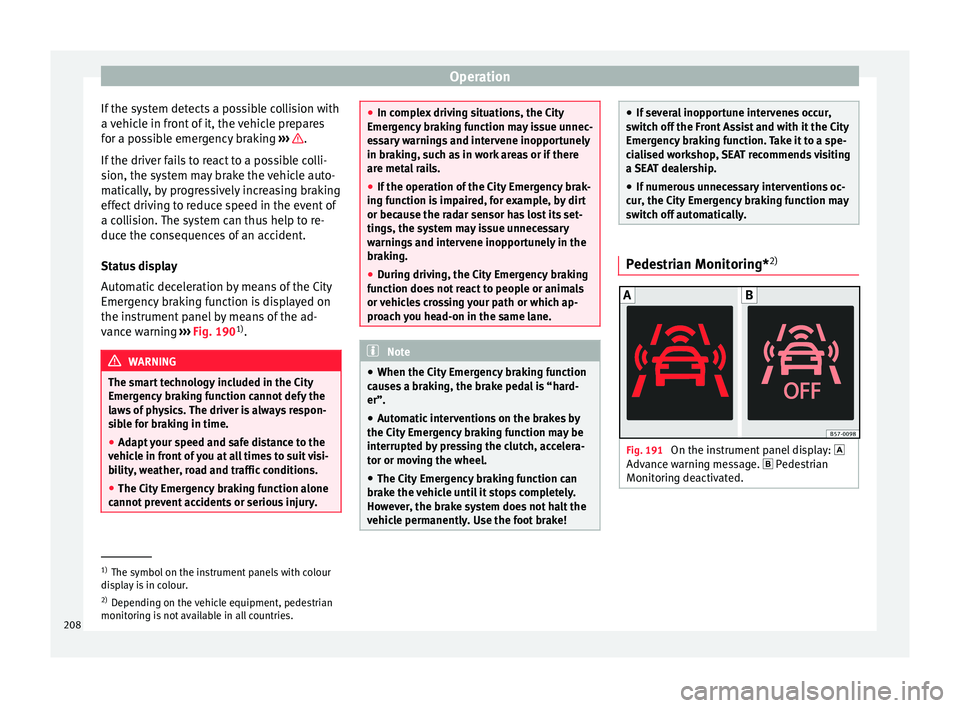
2) Fig. 191
On the instrument panel display:
Adv anc
e w
arning message. Pedestrian
Monitoring deactivated. 1)
The symbol on the instrument panels with colour
dis p
lay is in colour.
2) Depending on the vehicle equipment, pedestrian
monitoring i
s not available in all countries.
208
Page 211 of 308
Driver assistance systems
The pedestrian monitoring function can help
pr ev
ent
accidents involving pedestrians or
mitigate the consequences of an accident.
The function warns of danger of collision,
prepares the vehicle for emergency braking,
assists in the braking and brakes automati-
cally.
If the function detects a possible collision
with a pedestrian, it warns the driver with an
acoustic signal and a message on the instru-
ment panel display ››› Fig. 191.
The pedestrian monitoring system, including
the advance warning, turns on automatically
when the ignition is switched on ››› page 168.
SEAT recommends always having the pedes-
trian monitoring function turned on. The ex-
ceptions set out for the Front Assist system
are equally valid for the pedestrian monitor-
ing system ››› page 207.
Switching the pedestrian monitoring system
on and off
With the ignition on, the pedestrian monitor-
ing function can be switched on and off as
follows: ● Switch the system on and off by deactivat-
ing the Front
Assist function in the Easy Con-
nect system using the button and the
S ET
TINGS and
Driv
er a
s
sistance function but-
t on
s
›››
page 33. When the pedestrian protection system is
switc
hed off, the instrument panel display in-
dicates this ››› Fig. 191 . WARNING
The technology in the pedestrian monitoring
sys t
em cannot defy the laws of physics and
only works within the system's limits. The
driver is always responsible for braking in
time. If the pedestrian monitoring system is-
sues a warning, brake the vehicle immediate-
ly with the brake pedal or swerve to avoid the
pedestrian, depending on traffic conditions.
● The pedestrian monitoring system alone
cannot av
oid accidents or serious injury.
● In complex driving situations, the pedes-
trian monitorin
g system may issue unneces-
sary warnings and intervene unnecessarily in
braking, such as in main roads with turnings.
● If the operation of the system is impaired,
for ex
ample, because the radar sensor and
camera are covered or have lost their set-
tings, the system may issue unnecessary
warnings and intervene inopportunely in the
braking.
● The driver must always be ready to take
over the c
ontrol of the vehicle. Note
● When the v ehic
le is braked via the pedes-
trian monitoring system, the brake pedal be-
comes stiffer. ●
Autom atic
interventions by the pedestrian
monitoring system on the brakes may be in-
terrupted by pressing the accelerator or mov-
ing the wheel.
● If the pedestrian monitoring system does
not work
as described in this chapter (e.g. if
it intervening unnecessarily several times),
switch if off, contact a specialist workshop
immediately and request to have the system
checked. SEAT recommends visiting a SEAT
dealership for this. Adaptive Cruise Control ACC*
R el
at
ed video Fig. 192
Safety 209
Technical data
Advice
Operation
Emergencies
Safety
Page 217 of 308
Driver assistance systems
●
The AC C
may not be able to detect all situa-
tions properly.
● “Stepping” on the accelerator may cause
the ACC
not to intervene in braking. Driver
braking will have priority over intervention by
the speed control or adaptive cruise control.
● Always be ready to use the brakes!
● Observe country-specific provisions gov-
erning ob
ligatory minimum distances be-
tween vehicles.
● It is dangerous to activate control and re-
sume the progr
ammed speed if the road, traf-
fic or weather conditions do not permit this.
Risk of accident! Note
● The progr ammed s
peed is erased once the
ignition or the ACC are switched off.
● When the traction control system (ASR) is
deactivat
ed during acceleration or else the
ESC is activated in Sport* Mode
( ››› page 118), the ACC switches off automati-
cally.
● In vehicles with the Start-Stop system, the
engine swit
ches off automatically during the
ACC stopping phase and restarts automatical-
ly to begin driving. Driver messages
ACC not available
The sy s
tem can no longer continue to guar-
antee safe vehicle detection and will be de-
activated. The sensor has lost its setting or is
damaged. Take the vehicle to a specialised
workshop and have the fault repaired.
ACC and Front Assist: currently not availa-
ble. No sensor vision
This message will be displayed to the driver if
the radar sensor's vision is impaired due, for
example, to leaves, snow, heavy fog or dirt.
Clean the sensor.
ACC: currently not available. Gradient too
steep
The maximum road slope has been excee-
ded, hence safe ACC operation cannot be
guaranteed. The ACC cannot be switched on.
ACC: only available in D, S or M
Select the D/S or M position on the selector
lever.
ACC: parking brake applied
The ACC is deactivated if the parking brake is
applied. The ACC is available once again after
the parking brake is released. ACC: currently not available. Intervention
of
s
tability control
The message for the driver is displayed when
the electronic stability control (ESC) inter-
venes. In this case, the ACC is automatically
switched off.
ACC: Take action!
The message for the driver is displayed if,
when the vehicle starts up on a hill with a
mild slope, the vehicle rolls back even al-
though the ACC is activated. Apply the brake
to stop the vehicle from moving/colliding
with another vehicle.
ACC: speed limit
The message for the driver is displayed if, in
vehicles with manual gearbox, the current
speed is too low for the ACC mode.
The speed to be stored must be at least
30 km/h (18 mph). The speed limiter
switches off if the speed falls below 20 km/h
(12 mph).
ACC: available as of the 2nd gear
The ACC is operational as of the 2nd gear
(manual gearbox).
ACC: engine speed
The message for the driver is displayed if,
when the ACC accelerates or brakes, the driv-
er does not shift up or down a gear in time, »
215
Technical data
Advice
Operation
Emergencies
Safety
Page 220 of 308
Operation
Driving through a bend
On ent erin
g or e
xiting bends, the radar sen-
sor may no longer determine the vehicle in
front or react to a vehicle in the adjacent lane
››› Fig. 199 A. In these situations the vehicle
may brake unnecessarily or fail to react to re-
act to the vehicle in front. In this case, the
driver has to intervene by accelerating or in-
terrupting the braking process by applying
the brake or pushing the third lever back-
wards ››› page 213.
Driving in tunnels
When driving through tunnels the radar sen-
sor may be limited. Switch off the ACC in tun-
nels.
Narrow or misaligned vehicles
The radar sensor can only detect narrow or
misaligned vehicles when they are within
range ››› Fig. 199 B. This applies particularly
to narrow vehicles such as motorbikes. In
these cases, you should brake as necessary.
Vehicles with special loads and accessories
Special loads and accessories of other vehi-
cles that jut out over the sides, backwards or
over the top may be out of the ACC's range.
Switch off the ACC when driving behind vehi-
cles with special loads and accessories or
when overtaking them. In these cases, you
should brake as necessary. Other vehicles changing lanes
Vehicl
es changing lanes a short distance
away from your own can only be detected
when they are within range of the sensors.
Consequently, the ACC will take longer to re-
act ››› Fig. 200 C. In these cases, you should
brake as necessary.
Stationary vehicles
The ACC does not detect stationary objects
while driving, such as traffic tails or damaged
vehicles.
If a vehicle detected by the ACC turns or
moves over and there is a stationary vehicle
in front of it, the ACC will not react to it
››› Fig. 200 D. In these cases, you should
brake as necessary.
Vehicles driving in the opposite direction
and vehicles crossing your path
The ACC does not react to vehicles approach-
ing from the opposite direction or vehicles
crossing your path.
Metal objects
Metal objects, e.g. rails on the road or sheets
used in road works, can confuse the radar
sensor and cause the ACC to react wrongly. Factors that may affect how the radar sensor
operate
s
If laser sensor operation is impaired, due to
heavy rain, spray, snow or mud, the ACC is
deactivated temporarily. The relevant text
message will appear in the dash panel dis-
play. If necessary, clean the radar sensor.
When the radar sensor begins to operate
properly again, the ACC will automatically be
available again. The message on the instru-
ment panel screen will switch off and the ACC
will be reactivated again.
ACC operation may be affected by a strong ra-
dar reverse reflection, for example in a closed
car park.
Trailer mode
When driving with trailer the ACC controls
less dynamically.
Overheated brakes
If the brakes overheat, for example after
abrupt braking or in long and steep slopes,
the ACC may be deactivated temporarily. The
relevant text message will appear in the dash
panel display. In this case, adaptive cruise
control cannot be activated.
Adaptive cruise control can be reactivated
once brake temperature has cooled suffi-
ciently. The message will disappear from the
instrument panel display. If the message ACC
not available remains on for quite a long
218
Page 226 of 308
Operation
● in the c a
se of
special constructions to the
side of the vehicle, e.g., high or irregular di-
viders.
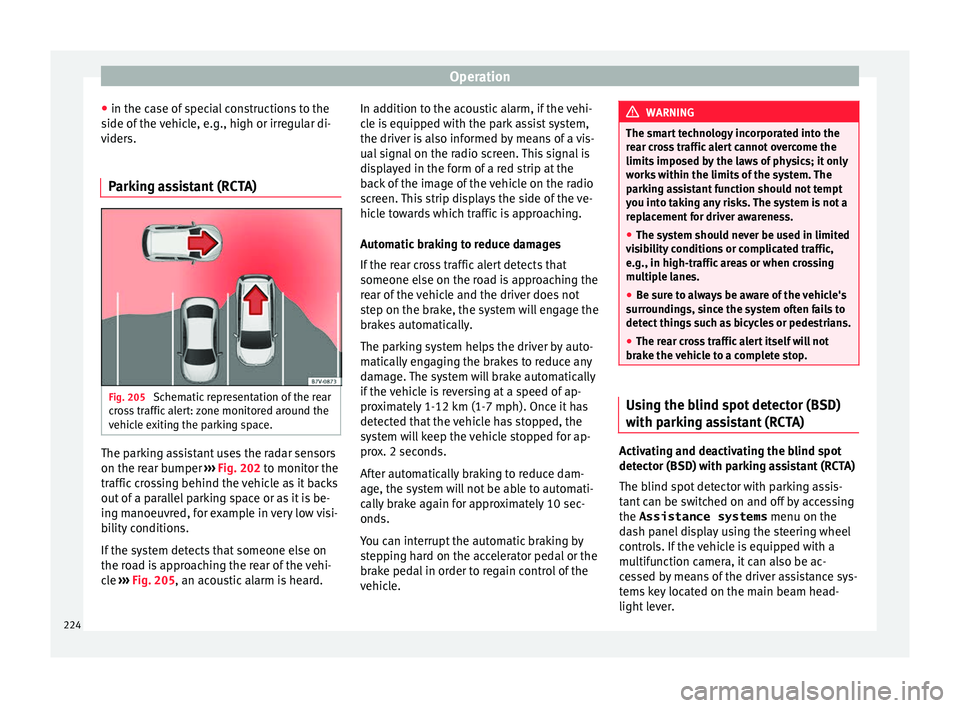
Parking assistant (RCTA) Fig. 205
Schematic representation of the rear
c r
o
ss traffic alert: zone monitored around the
vehicle exiting the parking space. The parking assistant uses the radar sensors
on the r
e
ar b
umper ››› Fig. 202 to monitor the
traffic crossing behind the vehicle as it backs
out of a parallel parking space or as it is be-
ing manoeuvred, for example in very low visi-
bility conditions.
If the system detects that someone else on
the road is approaching the rear of the vehi-
cle ››› Fig. 205, an acoustic alarm is heard. In addition to the acoustic alarm, if the vehi-
cle i
s equipped with the park assist system,
the driver is also informed by means of a vis-
ual signal on the radio screen. This signal is
displayed in the form of a red strip at the
back of the image of the vehicle on the radio
screen. This strip displays the side of the ve-
hicle towards which traffic is approaching.
Automatic braking to reduce damages
If the rear cross traffic alert detects that
someone else on the road is approaching the
rear of the vehicle and the driver does not
step on the brake, the system will engage the
brakes automatically.
The parking system helps the driver by auto-
matically engaging the brakes to reduce any
damage. The system will brake automatically
if the vehicle is reversing at a speed of ap-
proximately 1-12 km (1-7 mph). Once it has
detected that the vehicle has stopped, the
system will keep the vehicle stopped for ap-
prox. 2 seconds.
After automatically braking to reduce dam-
age, the system will not be able to automati-
cally brake again for approximately 10 sec-
onds.
You can interrupt the automatic braking by
stepping hard on the accelerator pedal or the
brake pedal in order to regain control of the
vehicle. WARNING
The smart technology incorporated into the
re ar c
ross traffic alert cannot overcome the
limits imposed by the laws of physics; it only
works within the limits of the system. The
parking assistant function should not tempt
you into taking any risks. The system is not a
replacement for driver awareness.
● The system should never be used in limited
vis
ibility conditions or complicated traffic,
e.g., in high-traffic areas or when crossing
multiple lanes.
● Be sure to always be aware of the vehicle's
surrou
ndings, since the system often fails to
detect things such as bicycles or pedestrians.
● The rear cross traffic alert itself will not
brake the
vehicle to a complete stop. Using the blind spot detector (BSD)
w
ith p
ark
ing assistant (RCTA) Activating and deactivating the blind spot
det
ect
or (BSD) w
ith parking assistant (RCTA)
The blind spot detector with parking assis-
tant can be switched on and off by accessing
the Assistance systems menu on the
dash panel display using the steering wheel
controls. If the vehicle is equipped with a
multifunction camera, it can also be ac-
cessed by means of the driver assistance sys-
tems key located on the main beam head-
light lever.
224
Page 238 of 308

Operation
Automatic braking intervention by
P ark
As
sist Park Assist helps the driver by automatically
brak
in
g in certain situations.
The driver is always responsible for braking
in time ››› .
Autom atic
braking intervention to avoid ex-
ceeding the speed limit
To avoid exceeding the speed limit of approx-
imately 7 km/h (4 mph) when entering or
leaving a parking space, the brakes may acti-
vate automatically. After automatically acti-
vating the brakes, the manoeuvres to enter or
exit a parking space may continue.
The brakes are only automatically activated
once for each attempt to enter or exit a park-
ing space. If the speed of approximately
7 km/h (4 mph) is exceeded again, the corre-
sponding operation is halted.
Automatic braking to reduce damages
Depending on certain conditions, the Park
Assist system can automatically brake the ve-
hicle when faced with an obstacle, briefly ac-
tioning and holding down the brake ped-
al ››› . Following this the driver must press
the br ak
e ped
al.
Automatic braking intervention to reduce
damage leads to the parking manoeuvre fin-
ishing. WARNING
The automatic braking intervention by Park
Ass i
st should never tempt you to take any
risk that may compromise safety. The system
is not a replacement for driver awareness.
● The Park Assist system is subject to certain
limitations
inherent to the system. In certain
situations, the automatic braking interven-
tion may only work in a limited way or not
work at all.
● Always be ready to use the brakes yourself!
● The automatic braking intervention will end
after ap
proximately 1.5 seconds. Following
this, brake the vehicle yourself. Parking aid
Gener a
l
information Assorted assistance systems – which vary
dependin
g on the equipment
fitt
ed in the car
– will help you when parking or manoeu-
vring.
The rear parking aid is an audible assistant
that warns about obstacles located behind
the vehicle ›››
page 237.
During parking, Parking System Plus assists
the driver by visually and audibly warning
them about obstacles detected in front and
behind the vehicle ›››
page 238. WARNING
● Alw a
ys pay attention, also when looking
straight ahead, to traffic and the vehicle sur-
roundings. The assistance systems are not a
replacement for driver awareness. When in-
serting or removing the vehicle from a park-
ing space, or when performing similar ma-
noeuvres the driver always assumes the re-
sponsibility.
● Adapt your speed and driving style at all
times t
o suit visibility, weather, road and traf-
fic conditions.
● The ultrasound sensors have blind spots in
which ob
stacles and people are not regis-
tered. Pay special attention to children and
animals.
● Always keep visual control of the vehicle
surrou
ndings: use the mirrors for additional
help. CAUTION
Parking Aid functions may be negatively af-
fect ed b
y different factors that may lead to
damage to the vehicle or its immediate sur-
rounds:
● Under certain circumstances, the system
does not
detect or display certain objects:
– Objects such as chains, trailer draw bars,
fences, posts and thin trees.
– Objects that are located above the sen-
sors, such as protrusions in a wall. 236
Page 255 of 308
Towing bracket device
Anti-theft alarm system When the vehicle is locked, the alarm is trig-
ger
ed when the el
ectrical connection be-
tween vehicle and trailer is interrupted.
Always turn off the anti-theft alarm system
before connecting or disconnecting a trailer
››› page 132.
Conditions for the integration of a trailer in
the anti-theft alarm system.
● The vehicle is factory-equipped with an an-
ti-theft al
arm system and a towing bracket
device.
● The trailer is connected electrically to the
tow
ing vehicle by the trailer connector.
● The electrical system of the vehicle and the
trail
er are prepared for operation.
● The vehicle is locked with the ignition key
and the anti-theft al
arm system is activated.CAUTION
For technical reasons, trailers fitted with rear
LED lights ar
e not integrated in the anti-theft
alarm system. Driving tips
Driving with a trailer always requires extra
c
ar e. W
eight distribution
The weight di
stribution of a loaded trailer
with an unladen vehicle is very unfavourable.
However, if this cannot be avoided, drive ex-
tra slowly to allow for the unbalanced weight
distribution.
Speed
The stability of the vehicle and trailer is re-
duced with increasing speed. For this reason,
it is advisable not to drive at the maximum
permissible speed in an unfavourable road,
weather or wind conditions. This applies es-
pecially when driving downhill.
You should always reduce speed immediately
if the trailer shows the slightest sign of snak-
ing. Never try to stop the “snaking” by in-
creasing speed.
Always brake in due course. If the trailer has
an overrun brake, apply the brakes gently at
first and then, firmly. This will prevent the
jerking that can be caused by locking of trail-
er wheels. Select a low gear in due course
before going down a steep downhill. This en-
ables you to use the engine braking to slow
down the vehicle.
Reheating
At very high temperatures and during pro-
longed slopes, driving in a low gear and high
engine speed, always monitor the coolant
temperature gauge ››› page 116. Electronic stability control*
The ESC* sys
tem helps to stabilise the trailer
in case of skidding or rocking.
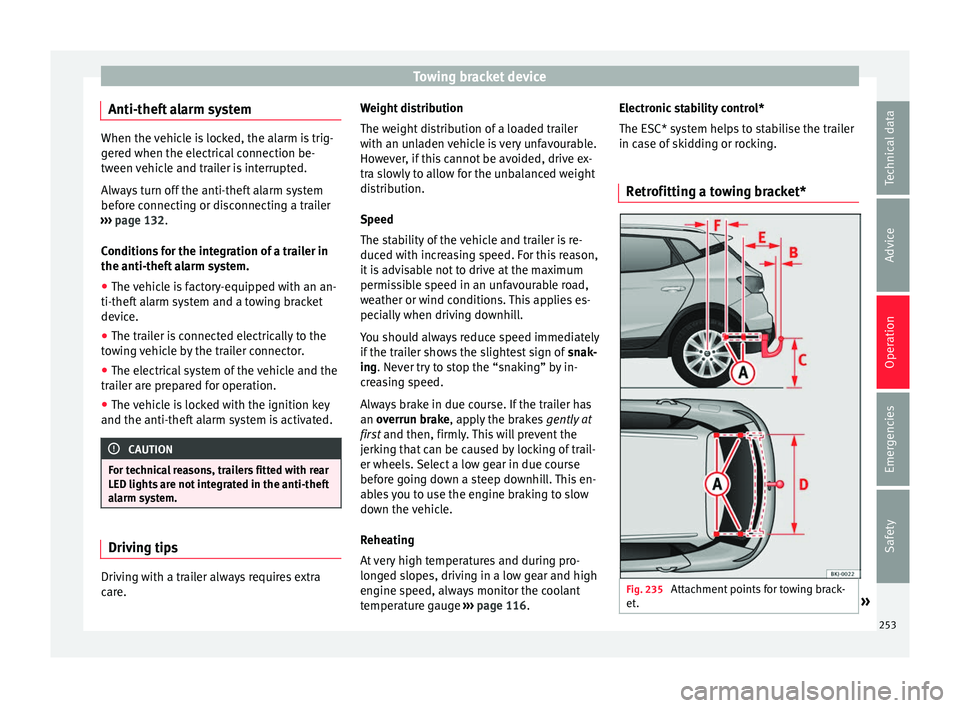
Retrofitting a towing bracket* Fig. 235
Attachment points for towing brack-
et . » 253
Technical data
Advice
Operation
Emergencies
Safety
Page 259 of 308
Care and maintenance
WARNING
● Car -c
are products can be toxic. Because of
this, they must always be kept closed in their
original container. Keep them out of the reach
of children. Failure to comply could result in
poisoning.
● Always read and observe the instructions
and warning
s on the package before using
car-care products. Improper use could cause
health problems or damage the vehicle. The
use of certain products may produce noxious
vapours; they should be used in well ventila-
ted areas.
● Never use fuel, turpentine, engine oil, nail
varnish r
emover or other volatile fluids.
These are toxic and highly flammable. Risk of
fire and explosion.
● Before washing your vehicle, or carrying
out any
maintenance, switch the engine off,
apply the handbrake firmly and remove the
key from the ignition. CAUTION
Never attempt to remove dirt, mud or dust if
the sur f
ace of the vehicle is dry. Never use a
dry cloth or sponge for cleaning purposes.
This could damage the paintwork or the win-
dows of your vehicle. Soak dirt, mud or dust
with plenty of water. For the sake of the environment
● When pur c
hasing car care products, try to
select ones that are not harmful to the envi-
ronment.
● The waste from car-care products should
not be dis
posed of with ordinary household
waste. Observe the disposal information on
the package. Care of the vehicle exterior
Autom atic
car wash tunnel The vehicle paintwork is so durable that the
v
ehic
l
e can normally be washed without
problems in an automatic car wash tunnel.
However, the paintwork wear depends to a
large extent on the kind of the car wash tun-
nel, the brushes used, its water filtering and
the type of cleaning and preservative prod-
ucts.
Before going through a car wash, be sure to
take the usual precautions such as closing
the windows. There is nothing to note apart
from that.
If the vehicle has special accessories such as
spoilers or a roof rack or two-way radio aerial,
etc., it is advisable to consult the car wash
tunnel operator first. After washing, the brake
s could take some
time to respond as the brake discs and pads
could be wet, or even frozen in winter. “Dry”
the brakes by braking several times. WARNING
Water, ice and salt on the brake system can
reduc e br
aking effectiveness. Risk of acci-
dent. Hand-washing
Vehicle washing
– First soften the dirt and rinse it off with wa-
ter
.
– C
lean your vehicle from top to bottom with
a soft s
ponge, a glove or a brush. Use very
light pressure.
– Rinse the sponge or glove often with clean
water
.
– Special car shampoo should only be used
for v
ery stubborn dirt.
– Leave the wheels, sill panels etc. until last,
usin
g a different sponge or glove.
– Rinse the vehicle thoroughly with water.
– Dry the vehicle surface gently with a cha-
mois l
eather.
– In cold temperature, dry the rubber seals
and their sur
faces to prevent them from »
257
Technical data
Advice
Operation
Emergencies
Safety
Page 260 of 308
Advice
freezing. Apply silicone spray to the rubber
se al
s.
Af
ter washing the vehicle
– After washing, avoid sudden and sharp
brakin
g. “Dry” the brakes by braking sever-
al times. WARNING
● Wa sh
your vehicle with the ignition switch-
ed off.
● Protect your hands and arms from cuts on
sharp meta
l edges when cleaning the under-
body, the inside of the wheel housings etc.
Risk of injury.
● Water, ice and salt on the brake system can
reduce br
aking effectiveness. Risk of acci-
dent. CAUTION
● Never r emo
ve dirt, mud or dust if the vehi-
cle surface is dry. Never use a dry cloth or
sponge for cleaning purposes. This could
scratch the paintwork or glass on your vehi-
cle.
● Washing the vehicle in low temperatures:
when washin
g the vehicle with a hose, do not
direct water into the lock cylinders or the
gaps around the doors. Risk of freezing. For the sake of the environment
To protect the environment, the vehicle
shoul d be w
ashed only in specially provided
wash bays, to prevent toxic, oil-laden waste
water from entering the sewer system. In
some places, washing vehicles outside wash
bays is prohibited. Note
Do not wash the vehicle in direct sunlight. Washing the vehicle with a high pres-
s
ur
e c
leaner Be particularly careful when using a high
pr
e
s
sure cleaner!
– Always observe the instructions for the
high-pres
sure cleaner, particularly those
concerning the pressure and the spraying
distance.
– Increase the spraying distance for soft ma-
terial
s and painted bumpers.
– Do not use a high pressure cleaner to re-
move ic
e or snow from windows
››› page 259.
– Never use concentrated jet nozzles (“rotat-
ing jets”) ›
›› .–
Af t
er w
ashing, avoid sudden and sharp
braking. “Dry” the brakes by braking sever-
al times ››› page 174. WARNING
● Never w a
sh tyres with a concentrated jet
(“rotating nozzle”). Even at large spraying
distances and short cleaning times, damage
can occur to the tyres. This may cause an ac-
cident.
● Water, ice and salt on the brake system can
reduce br
aking effectiveness. Risk of acci-
dent. CAUTION
● Do not u se w
ater hotter than +60°C
(+140°F). This could damage the vehicle.
● To avoid damage to the vehicle, keep a suf-
ficient di
stance from sensitive materials such
as flexible hoses, plastic, soundproofing ma-
terial, etc. This also applies to bumpers pain-
ted in the colour of the bodywork. The closer
the nozzle is to the surface, the greater the
wear on the material. Factory-fitted adhesive sheets
The following indications should be taken in-
t
o ac
c
ount to avoid damaging adhesive
sheets:
● Do not use high pressure cleaners.
258
Page 263 of 308
Care and maintenance
Steel wheel rims –
Clean steel wheel rims regularly using a
separ at
e sponge.
Use an industrial cleaner to remove brake
dust. Any damage to the paint on steel wheel
rims should be repaired before starting to
rust. WARNING
● Never w a
sh tyres with a cylindrical jet. Even
at large spraying distances and short clean-
ing times, damage can occur to the tyres.
This may cause an accident.
● Water, ice and salt on the brake system can
reduce br
aking effectiveness. Risk of acci-
dent. Directly after washing, avoid sudden
and sharp braking. “Dry” the brakes by brak-
ing several times ››› page 174, Braking ca-
pacity and braking distance .Alloy wheel rims
Every two weeks
– Wash salt and brake dust from alloy
wheel s.
– Use an ac
id free detergent to clean the
wheel rims.
Ev
ery 3 months
– Apply a hard wax compound to the wheels. Alloy wheels require regular attention to pre-
serve their ap
pearance. If road salt and brake
dust are not often removed, the aluminium
finish will be impaired.
Always use an acid-free detergent for alloy
wheel rims.
Car polish or other abrasive agents should
not be used for maintaining the rims. If the
protective coating is damaged, e.g. by flying
stones, the damaged area should be re-
paired immediately. WARNING
Observe the safety warnings ›››
in Steel
wheel rims on p
age 261. Vehicle underbody protection
The vehicle underbody is coated to protect it
fr
om c
hemic
al and mechanical damage.
The protective coating can be damaged when
driving. We recommend that you check the
protective coating under the body and on the
running gear, and retouch it if necessary, be-
fore and after the winter season.
We recommend that you go to your Technical
Service to carry out repair work and addition-
al anti-corrosion work. WARNING
Do not apply underseal or anti-corrosion
co atin
gs to the exhaust pipes, catalytic con-
verter or the heat shields on the exhaust sys-
tem. The heat of the exhaust system or the
engine could cause them to ignite. Risk of
fire. Cleaning engine compartment
Take special care when cleaning the engine
comp
ar
tment.
Anti-corrosion treatment
The engine compartment and the surface of
the power unit are given anti-corrosion treat-
ment at the factory.
Good corrosion protection is particularly im-
portant in winter when the vehicle is fre-
quently driven on salted roads. To prevent
the salt corroding the vehicle, the entire en-
gine compartment should be thoroughly
cleaned before and after winter.
Technical Services have the proper products
for cleaning and preservation as well as the
necessary workshop equipment. For this rea-
son, we recommend having this work per-
formed by them.
The anti-corrosion protection is usually re-
moved if the engine compartment is cleaned
with grease removing solutions, or if you »
261
Technical data
Advice
Operation
Emergencies
Safety