steering wheel Seat Arona 2017 User Guide
[x] Cancel search | Manufacturer: SEAT, Model Year: 2017, Model line: Arona, Model: Seat Arona 2017Pages: 308, PDF Size: 6.66 MB
Page 74 of 308
Safety
risk of injury. The following list includes most
of the s
af
ety equipment in your SEAT:
● three-point seat belts,
● Belt tension limiter for the front and rear
side seats
● B
elt tensioners for the front seats,
● front airbags,
● Side airbags in the front seat backrests,
with che
st and head protection
● “ISOFIX” anchor points for “ISOFIX” rear
chil
d seat system
● height-adjustable front head restraints,
● Rear-centre head restraints with in-use po-
sition and non-use po
sition
● adjustable steering column.
The safety
equipment mentioned above
works together to provide you and your pas-
sengers with the best possible protection in
the event of an accident. However, these
safety systems can only be effective if you
and your passengers are sitting in a correct
position and use this equipment properly.
Safety is everyone's business! Correct position for passengers
Correct
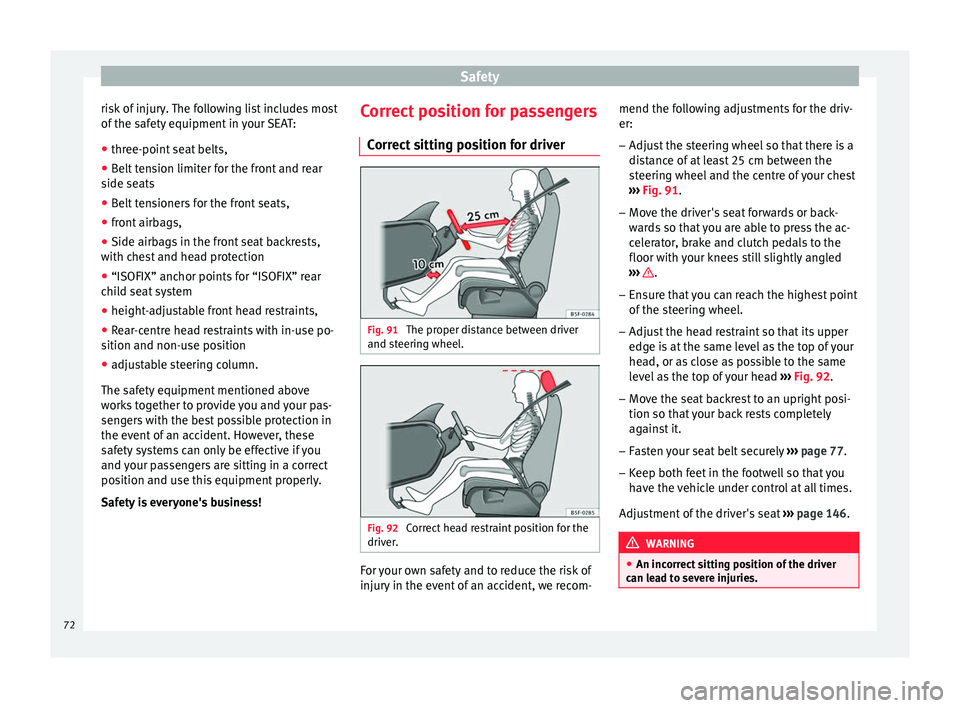
sitting position for driver Fig. 91
The proper distance between driver
and s t
eerin
g wheel. Fig. 92
Correct head restraint position for the
driv er
. For your own safety and to reduce the risk of
injur
y
in the ev
ent of an accident, we recom- mend the following adjustments for the driv-
er:
– Adjust the steering wheel so that there is a
dist
ance of at least 25 cm between the
steering wheel and the centre of your chest
››› Fig. 91.
– Move the driver's seat forwards or back-
ward
s so that you are able to press the ac-
celerator, brake and clutch pedals to the
floor with your knees still slightly angled
››› .
– Ensure that you can reach the highest point
of the s
t
eering wheel.
– Adjust the head restraint so that its upper
edge is
at the same level as the top of your
head, or as close as possible to the same
level as the top of your head ››› Fig. 92.
– Move the seat backrest to an upright posi-
tion so that
your back rests completely
against it.
– Fasten your seat belt securely ›››
page 77.
– Keep both feet in the footwell so that you
have the
vehicle under control at all times.
Adjustment of the driver's seat ››› page 146. WARNING
● An incorr ect
sitting position of the driver
can lead to severe injuries. 72
Page 75 of 308
Safe driving
●
Adjus t
the driver's seat so that there is at
least 25 cm distance between the centre of
the chest and the centre of the steering
wheel ››› Fig. 91. If distance is less than 25
cm, the airbag system may not protect you
properly.
● If your physical constitution prevents you
from maint
aining the minimum distance of 25
cm, contact a specialised workshop. The
workshop will help you decide if special spe-
cific modifications are necessary.
● When driving, always hold the steering
wheel with both h
ands on the outside of the
ring at the 9 o'clock and 3 o'clock positions.
This reduces the risk of injury when the driver
airbag is triggered.
● Never hold the steering wheel at the 12
o'clock
position, or in any other manner (e.g.
in the centre of the steering wheel). In such
cases, if the airbag is triggered, you may sus-
tain injuries to the arms, hands and head.
● To reduce the risk of injury to the driver
during sud
den braking manoeuvres or an ac-
cident, never drive with the backrest tilted far
back! The airbag system and seat belts can
only provide optimal protection when the
backrest is in an upright position and the
driver is wearing his or her seat belt correct-
ly.
● Adjust the head restraint properly to ach-
ieve optima
l protection. Adjusting the steering wheel position
Read the additional information carefully
›› ›
page 20 WARNING
● Never a dju
st the position of the steering
wheel when the vehicle is moving, as this
could cause an accident.
● Move the lever up firmly so the steering
wheel pos
ition does not accidentally change
during driving. risk of accident!
● Make sure you are capable of reaching and
firmly ho
lding the upper part of the steering
wheel: risk of accident!
● If you adjust the steering wheel so that it
points t
owards your face, the driver airbag
will not protect you properly in the event of
an accident. Make sure that the steering
wheel points towards your chest. Correct sitting position for front pas-
sen
g
er For your own safety and to reduce the risk of
injur
y
in the ev
ent of an accident, we recom-
mend the following adjustments for the front
passenger:
– Move the front passenger seat back as far
as po
ssible ››› .–
Mo v
e the se
at backrest to an upright posi-
tion so that your back rests completely
against it.
– Adjust the head restraint so that its upper
edge is
at the same level as the top of your
head, or as close as possible to the same
level as the top of your head ››› page 75.
– Always keep both feet in the footwell in
front of
the front passenger seat.
– Fasten your seat belt securely ›››
page 77.
It is possible to deactivate the front passen-
ger airbag in exceptional circumstances
››› page 86.
Adjusting the front passenger seat
››› page 18. WARNING
● An incorr ect
sitting position of the front
passenger can lead to severe injuries.
● Adjust the front passenger seat so that
there is
at least 25 cm between your chest
and the dash panel. If distance is less than
25 cm, the airbag system may not protect you
properly.
● If your physical constitution prevents you
from maint
aining the minimum distance of 25
cm, contact a specialised workshop. The
workshop will help you decide if special spe-
cific modifications are necessary. » 73
Technical data
Advice
Operation
Emergencies
Safety
Page 82 of 308
Safety
Even at low speeds the forces acting on the
body in a c
o
llision are so great that it is not
possible to brace oneself with one's hands.
In a frontal collision, unbelted passengers
are thrown forward and will make violent con-
tact with the steering wheel, dash panel,
windscreen or whatever else is in the way
››› Fig. 98.
It is also important for rear passengers to
wear seat belts properly, as they could other-
wise be thrown forward violently through the
vehicle interior in an accident. Passengers in
the rear seats who do not use seat belts en-
danger not only themselves but also the front
occupants ››› Fig. 99. How to properly adjust your
seatbelt
F
astening and unfastening the seat
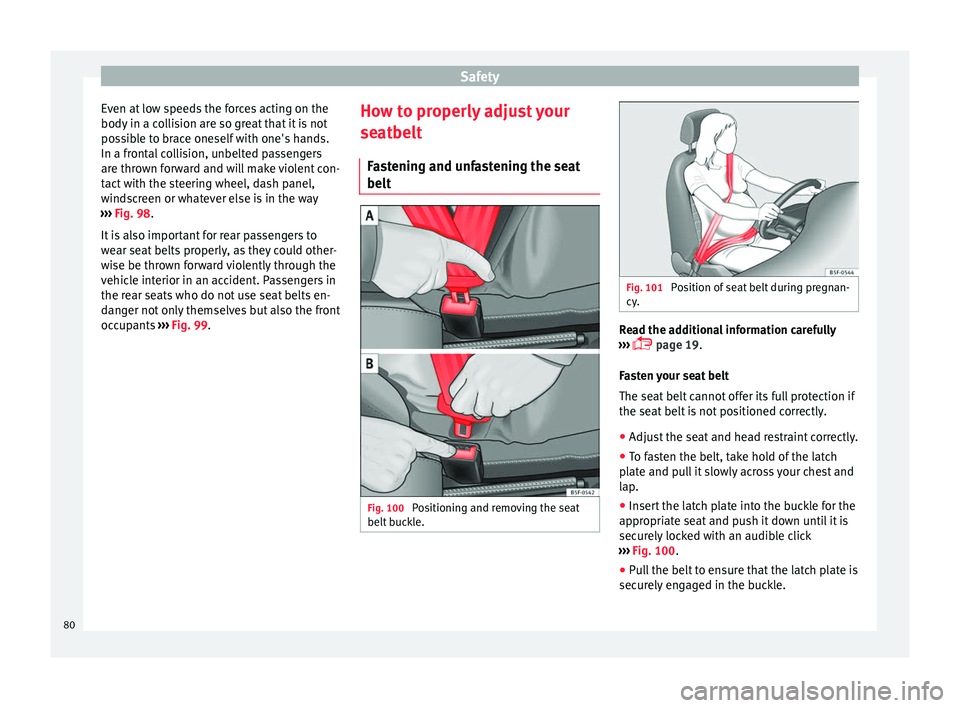
belt Fig. 100
Positioning and removing the seat
belt b
uc
kle. Fig. 101
Position of seat belt during pregnan-
cy . Read the additional information carefully
› ›
›
page 19.
Fasten your seat belt
The seat belt cannot offer its full protection if
the seat belt is not positioned correctly.
● Adjust the seat and head restraint correctly.
● To fasten the belt, take hold of the latch
plat
e and pull it slowly across your chest and
lap.
● Insert the latch plate into the buckle for the
appropri
ate seat and push it down until it is
securely locked with an audible click
››› Fig. 100.
● Pull the belt to ensure that the latch plate is
securely
engaged in the buckle.
80
Page 98 of 308
Emergencies
Changing the windscreen wiper
b l
a
des
Changing the windscreen and rear
window wiper blades Read the additional information carefully
›› ›
page 69.
Perfect wiper blade condition is essential for
clear vision. Damaged wiper blades should
be replaced immediately.
The windscreen wiper blades are supplied as
standard with a layer of graphite. This layer is
responsible for ensuring that the wipe is si-
lent. If the graphite layer is damaged, the
noise of the water as it is wiped across the
windscreen will be louder.
Check the condition of the wiper blades regu-
larly. If the wipers scrape across the glass ,
they should be changed if they are damaged,
or cleaned if they are dirty ››› .
If thi
s
does not produce the desired results,
the setting angle of the windscreen wiper
arms might be incorrect. They should be
checked by a specialised workshop and cor-
rected if necessary. WARNING
Do not drive unless you have good visibility
through a l
l windows! ●
Cle
an the windscreen wiper blades and all
windows regularly.
● The wiper blades should be changed once
or twice a
year. CAUTION
● Dam aged or dir
ty windscreen wipers could
scratch the glass.
● Never use fuel, nail varnish remover, paint
thinner or simil
ar products to clean the win-
dows. This could damage the windscreen
wiper blades.
● Never move any windscreen wiper by hand.
This c
ould cause damage.
● To prevent damage to the bonnet and the
winds
creen wiper arms, the latter should only
be lifted off the windscreen when in service
position. Note
● The wind s
creen wiper arms can be moved
to the service position only when the bonnet
is properly closed.
● You can also use the service position, for
examp
le, if you want to fix a cover over the
windscreen in the winter to keep it clear of
ice. Towing or tow-starting
Gener a
l
information Read the additional information carefully
›› ›
page 66.
Tow-starting means starting the engine of
the vehicle while another pulls it.
Towing means one vehicle pulling another
that is not roadworthy.
If the vehicle comes with the Keyless Access
system, towing is only allowed with the igni-
tion on!
The vehicle battery drains if the vehicle is
towed with the engine switched off and the
ignition connected. Depending on the battery
charge status, the drop in voltage may be so
large, even after just a few minutes, that no
electrical device in the vehicle may work e.g.
the hazard warning lights. In vehicles with
the Keyless Access system, the steering
wheel could lock up. WARNING
If the vehicle has no electrical power, the
brak e light
s, turn signals and all other lights
will no longer function. Do not have the vehi-
cle towed away. Failure to follow this instruc-
tion could result in an accident. 96
Page 99 of 308
Self-help
WARNING
The risk of accidents is high when tow-start-
ing, f or e
xample, the towed vehicle can easily
be driven into the towing vehicle. CAUTION
If there is no oil in the gearbox or no lubricant
in the autom atic
transmission the car may
only be towed with the driven wheels lifted
clear of the road, or transported on a special
car transporter or trailer. CAUTION
Do not tow a vehicle for more than 50 m in at-
tempt t
o start it. There is risk of damage to
the catalytic converter. Note
● Ple a
se observe related legal requirements.
● Switch on the hazard warning lights of both
vehicl
es. However, observe any regulations
to the contrary.
● The tow rope must not be twisted. Other-
wise the fr
ont tow line anchorage could be
pulled off the vehicle. Indications for tow-starting
Vehicle's should not generally be tow-star-
t
ed.
The jump s
tart should be used instead
››› page 67. For technical reasons, towing the following
vehicl
es is not allowed:
● Vehicles with an automatic gearbox.
● If the vehicle battery is discharged, be-
cause in
vehicles with the Keyless Access
locking and ignition system the steering re-
mains locked and the electronic parking
brake cannot be deactivated nor can the elec-
tronic lock of the steering column be re-
leased if they are activated.
● If the battery is flat, it is possible that the
engine contr
ol units may not operate correct-
ly.
However, if the vehicle must absolutely be
tow-started (in the case of manual gearbox-
es):
● Engage the 2nd or 3rd gear.
● Keep the clutch pressed down.
● Switch on the ignition and the hazard warn-
ing lights.
● Once both
vehicles are moving, release the
clutc
h.
● Once the engine starts, press the clutch
and diseng
age the gear to avoid colliding
with the towing vehicle. Note
The vehicle can only be tow-started if the
electr onic
parking brake and, if appropriate,
the electronic lock of the steering column are deactivated. If the vehicle has no power sup-
ply
or ther
e is an electric system fault, the
engine must be tow-started to deactivate the
electronic parking brake and the electronic
lock of the steering column. 97
Technical data
Advice
Operation
Emergencies
Safety
Page 113 of 308
Controls and displays
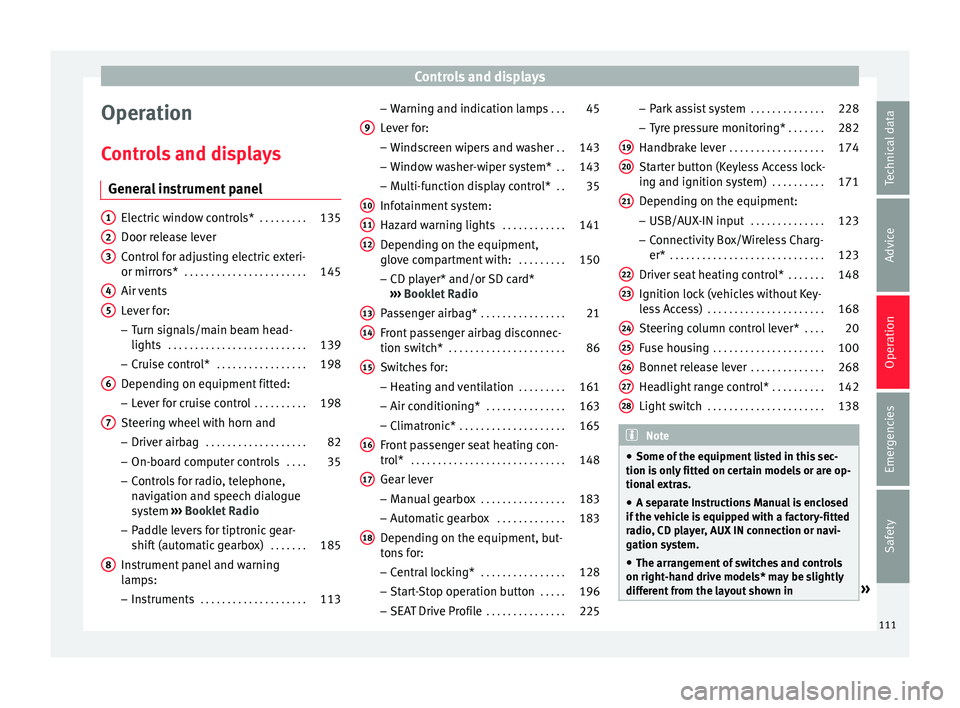
Operation
C ontr
o
ls and displays
General instrument panel Electric window controls*
. . . . . . . . .135
Door release lever
Contr o
l for adjusting electric exteri-
or mirrors* . . . . . . . . . . . . . . . . . . . . . . . 145
Air vents
Lev er f
or:
– Turn signals/main beam head-
lights . . . . . . . . . . . . . . . . . . . . . . . . . . 139
– Crui se c
ontrol* . . . . . . . . . . . . . . . . . 198
Depending on equipment fitted:
– Lev er f
or cruise control . . . . . . . . . .198
Steering wheel with horn and – Driver airbag . . . . . . . . . . . . . . . . . . . 82
– On-boar d c
omputer controls . . . .35
– Contro
ls for radio, telephone,
navigation and speech dialogue
system ›››
Booklet Radio
– Paddle levers for tiptronic gear-
shift (automatic gearbox) . . . . . . .185
Instrument panel and warning
lamp s:
– In
struments . . . . . . . . . . . . . . . . . . . . 113
1 2
3
4
5
6
7
8 –
Warnin
g and indic
ation lamps . . .45
Lever for:
– Winds
creen wipers and washer . .143
– Window w
asher-wiper system* . .143
– Multi-f
unction display control* . .35
Infotainment system:
Hazard w
arning lights . . . . . . . . . . . . 141
Depending on the equipment,
glove c
ompartment with: . . . . . . . . .150
– CD pla
yer* and/or SD card*
››› Booklet Radio
Passenger airbag* . . . . . . . . . . . . . . . . 21
Front passenger airbag disconnec-
tion switc
h* . . . . . . . . . . . . . . . . . . . . . . 86
Switches for:
– Heating and
ventilation . . . . . . . . . 161
– Air conditionin g* . . . . . . . . . . . . . . . 163
– C
limatr
onic* . . . . . . . . . . . . . . . . . . . . 165
Front passenger seat heating con-
tro l* . . . . . . . . . . . . . . . . . . . . . . . . . . . . . 148
Ge
ar lever
– Manual g
earbox . . . . . . . . . . . . . . . . 183
– Autom atic
gearbox . . . . . . . . . . . . . 183
Depending on the equipment, but-
ton s
for:
– Central locking* . . . . . . . . . . . . . . . . 128
– Star t
-Stop operation button . . . . .196
– SEAT Driv
e Profile . . . . . . . . . . . . . . . 225
9
10
11
12
13
14
15
16
17
18 –
Park
a
ssist system . . . . . . . . . . . . . . 228
– Tyr
e pressure monitoring* . . . . . . .282
Handbrake lever . . . . . . . . . . . . . . . . . . 174
Starter button (Keyless Access lock-
ing and ignition sys
tem) . . . . . . . . . . 171
Depending on the equipment:
– USB/AUX-IN inp
ut . . . . . . . . . . . . . . 123
– Connectivity
Box/Wireless Charg-
er* . . . . . . . . . . . . . . . . . . . . . . . . . . . . . 123
Driver seat heating control* . . . . . . .148
Ignition lock (vehicles without Key-
les
s Access) . . . . . . . . . . . . . . . . . . . . . . 168
Steering column control lever* . . . .20
Fuse housing . . . . . . . . . . . . . . . . . . . . . 100
Bonnet release lever . . . . . . . . . . . . . .268
Headlight range control* . . . . . . . . . .142
Light switch . . . . . . . . . . . . . . . . . . . . . . 138 Note
● Some of the equipment li
sted in this sec-
tion is only fitted on certain models or are op-
tional extras.
● A separate Instructions Manual is enclosed
if the v
ehicle is equipped with a factory-fitted
radio, CD player, AUX IN connection or navi-
gation system.
● The arrangement of switches and controls
on right-hand driv
e models* may be slightly
different from the layout shown in » 19
20
21
22
23
24
25
26
27
28
111
Technical data
Advice
Operation
Emergencies
Safety
Page 121 of 308
Communications and multimedia
Communications and multi-
medi a
St eerin
g wheel controls*
General information The steering wheel includes a multifunction
modul
e fr
om where it is possible to control
the audio, telephone and radio/navigation
functions without needing to distract the
driver.
There are two versions of the multifunction
module:
● Audio system + telephone without voice
contr o
l version (MID) : for controlling the au-
dio functions available (radio, audio CD,
MP3, iPod ®1)
, USB 1)
, SD 1)
) and Bluetooth sys-
tem from the steering wheel.
● Audio system + telephone with voice con-
trol
version (HIGH) : for controlling the audio
functions available (radio, audio CD, MP3,
iPod ®1)
, USB 1)
, SD 1)
) and Bluetooth system
from the steering wheel. 1)
Depending on the vehicle equipment.
119
Technical data
Advice
Operation
Emergencies
Safety
Page 122 of 308
Operation
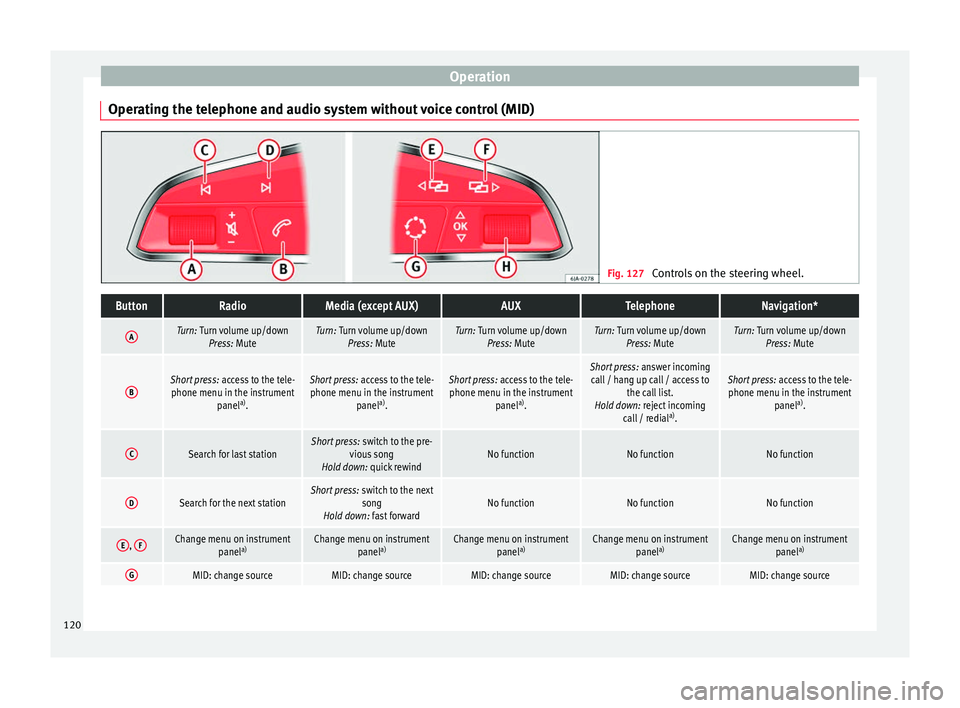
Operating the telephone and audio system without voice control (MID) Fig. 127
Controls on the steering wheel.ButtonRadioMedia (except AUX)AUXTelephoneNavigation*
ATurn: Turn volume up/down
Press: MuteTurn: Turn volume up/downPress: MuteTurn: Turn volume up/downPress: MuteTurn: Turn volume up/downPress: MuteTurn: Turn volume up/downPress: Mute
BShort press: access to the tele-
phone menu in the instrument panela)
.Short press: access to the tele-
phone menu in the instrument panela)
.Short press: access to the tele-
phone menu in the instrument panela)
.Short press: answer incoming
call / hang up call / access to the call list.
Hold down: reject incoming call / redial a)
.Short press: access to the tele-
phone menu in the instrument panela)
.
CSearch for last stationShort press: switch to the pre-
vious song
Hold down: quick rewindNo functionNo functionNo function
DSearch for the next stationShort press: switch to the next
song
Hold down: fast forwardNo functionNo functionNo function
E, FChange menu on instrument
panela)Change menu on instrument
panela)Change menu on instrument
panela)Change menu on instrument
panela)Change menu on instrument
panela)
GMID: change sourceMID: change sourceMID: change sourceMID: change sourceMID: change source120
Page 123 of 308
Communications and multimediaButtonRadioMedia (except AUX)AUXTelephoneNavigation*
HTurn: Next/previous preset
b)
Press: Acts on the MFDTurn: Next/previous song b)
Press: Acts on the MFDTurn: No function
Press: Acts on the MFD
Turn: Access to call list / selec- tion of action on incoming call or active call (answer/hang-
up/ignore/hold/mute/switch to private mode).
Press: Confirm the selected ac- tion by turning.
Turn: Changes menu or memo-ry on instrument panel
Press: Operates on instrument panel
a)According to the vehicle's equipment package.
b) Only if the dash panel is in audio menu.
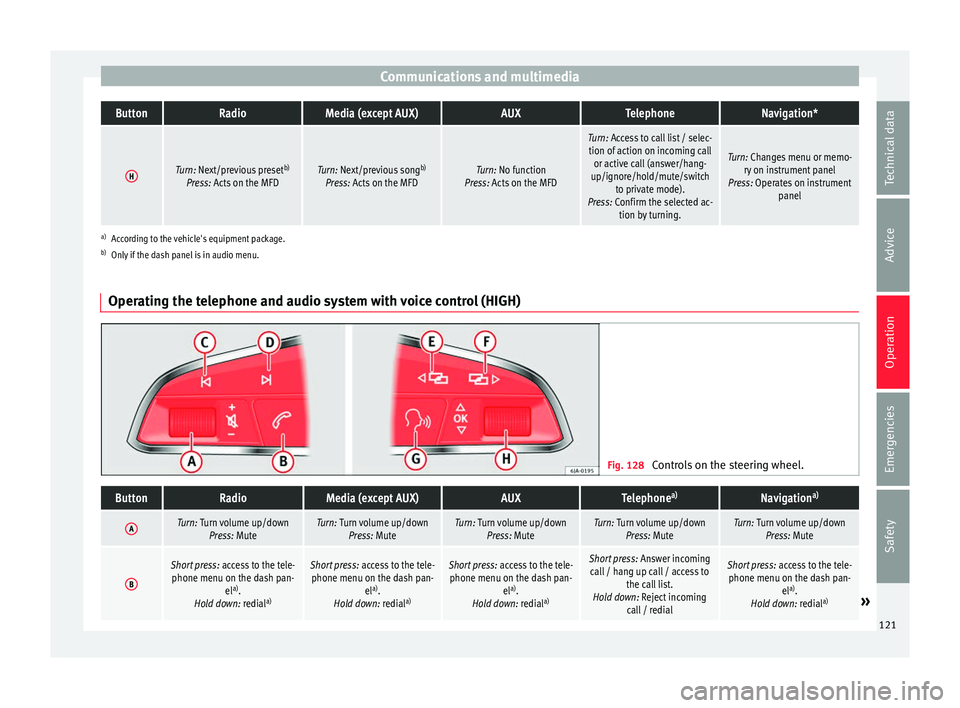
Operating the telephone and audio system with voice control (HIGH) Fig. 128
Controls on the steering wheel.
ButtonRadioMedia (except AUX)AUXTelephone a)Navigation a)
ATurn: Turn volume up/down
Press: MuteTurn: Turn volume up/downPress: MuteTurn: Turn volume up/downPress: MuteTurn: Turn volume up/downPress: MuteTurn: Turn volume up/downPress: Mute
B
Short press: access to the tele-
phone menu on the dash pan- ela)
.
Hold down: redial a)Short press:
access to the tele-
phone menu on the dash pan- ela)
.
Hold down: redial a)Short press:
access to the tele-
phone menu on the dash pan- ela)
.
Hold down: redial a)Short press:
Answer incoming
call / hang up call / access to the call list.
Hold down: Reject incoming call / redialShort press: access to the tele-
phone menu on the dash pan- ela)
.
Hold down: redial a)
» 121
Technical data
Advice
Operation
Emergencies
Safety
Page 142 of 308
Operation
are already on. The warning lamp
then
come s
on in the instrument panel.
● The headlight flasher come
s on for as long
as you pull the lever – even if no other lights
are switched on. The warning lamp then
comes on in the instrument panel.
● When the parking ligh
ts are switched on,
the headlight and the tail light on the corre-
sponding side of the vehicle light up. The
parking lights will only work with the ignition
off. If said light is on, an audible warning will
be emitted while the driver door is open.
● If the turn signal lever is left on after the
key h
as been taken out of the ignition lock,
an acoustic signal sounds when the driver
door is opened. This is intended as a remind-
er to switch off the turn signal, unless you
wish to leave the parking light on. Coming Home/Leaving Home Func-
tion*
Fig. 145
Related video The Leaving Home function is controlled with
a phot
o
sen
sor. If the Coming Home or Leaving Home func-
tion is c
onnected, the front side and dipped
lights, the tail lights and the number plate
light will light up to provide assistance.
Coming home function
The Coming Home function is activated by
switching off the ignition. When the driver
door is opened, the Coming Home lighting
comes on.
The Coming Home lighting switches off in the
following cases:
● If, 30 seconds after being connected, any
doors or the r
ear lid remain open.
● If the light switch is turned to position .
● If the ignition is switched on.
Automatic
Leaving Home function
The Leaving Home function is activated when
the vehicle is unlocked if:
● the light control is in position and
● the photo
sensor detects “darkness”.
The Leav
ing Home lighting switches off in the
following cases:
● If the time period for the delay in switching
off the hea
dlights has ended
● If the vehicle is locked again.
● If the light switch is turned to position .●
If the ignition is
switched on. Note
● To activ at
e the Coming/Leaving home func-
tion, the rotary light switch must be in posi-
tion and the light sensor must detect
darkness. Fog lights with cornering function*
This is an additional light source to dipped
beam he
a
dlights to light up the road as a
bend is taken.
The cornering light operates with the lights
switched on and when driving at less than
40 Km/h (25 mph). Ignition occurs by turning
the steering or connecting the turn signal.
Forward gear
● If the steering wheel is turned to the right,
or the right-h and t
urn signal operated, the
right-hand fog light turns on.
● If the steering wheel is turned to the left, or
the left
-hand turn signal operated, the left-
hand fog light turns on.
In reverse, both fog lights turn on. Note
When the fog lamps are on, the cornering
fu nction i
s activated and both headlights are
continuously on. 140