ignition Seat Arona 2017 Owner's Guide
[x] Cancel search | Manufacturer: SEAT, Model Year: 2017, Model line: Arona, Model: Seat Arona 2017Pages: 308, PDF Size: 6.66 MB
Page 86 of 308
Safety
such as the properties of the object the vehi-
c l
e hits
(hard/soft), angle of impact, vehicle
speed, etc.
Deceleration trajectory is key for airbag acti-
vation.
The control unit analyses the collision trajec-
tory and activates the respective restraint
system.
If the deceleration rate is below the prede-
fined reference value in the control unit the
airbags will not be triggered, even though
the accident may cause extensive damage to
the car.
The following airbags are triggered in seri-
ous head-on collisions
● Driver airbag.
● Front passenger front airbag
The fol
lowing airbags are triggered in seri-
ous side-on collisions
● Front side airbag on the side of the acci-
dent.
● Re
ar side airbag on the side of the acci-
dent.
● Cur
tain (head) airbag on the side of the ac-
cident.
In an ac
cident with airbag activation:
● the interior lights switch on (if the interior
light swit
ch is in the courtesy light position); ●
the hazar
d warning lights switch on;
● all doors are unlocked;
● the fuel supply to the engine is cut.
Airbag control lamp and seat belt ten-
sioner The control lamp monitors all airbags and
seat
belt
tensioners in the vehicle, including
control units and wiring connections.
Monitoring of airbag and belt tensioner sys-
tem
Both the airbag and belt tensioner systems
operation is constantly monitored electroni-
cally. The control lamp will light up for a
few seconds every time the ignition is switch-
ed on (self-diagnosis).
The system must be checked when the con-
trol lamp :
● does not light up when the ignition is
swit c
hed on,
● turns off after 4 seconds after the ignition
is sw
itched on,
● turns off and then lights up again after the
ignition is sw
itched on,
● illuminates or flashes while the vehicle is
movin
g. In the event of a malfunction, the warning
lamp rem
ains on continuously. Have the air-
bag system inspected immediately by a spe-
cialised workshop.
If any of the airbags are disabled by a Techni-
cal Service, the warning lamp flashes for sev-
eral more seconds after verification and will
turn off if there is no fault. WARNING
● If ther e i
s a malfunction, the airbag and
belt tensioner system cannot properly per-
form its protective function.
● If a malfunction occurs, have the system
check
ed immediately by a specialised work-
shop. Otherwise, in the event of an accident,
the airbag system and belt tensioners may
not be triggered, or may not be triggered cor-
rectly. Airbag safety instructions
Fr ont
airb
ags Read the additional information carefully
› ›
›
page 21. WARNING
● The seat belt
s and airbags can only provide
maximum protection if the occupants are 84
Page 89 of 308
Airbag system
Read the additional information carefully
› ›
›
page 21
If you fit a rear-facing child seat to the front
passenger seat, the front passenger front air-
bag must be de-activated.
When the front passenger airbag is deactiva-
ted, this means that only the front passenger
front airbag is deactivated. All the other air-
bags in the vehicle remain activated.
The and control lamps light up for
a few seconds when the ignition is switched
on ››› Fig. 103. After a few seconds, only the
applicable one stays lit. If the airbag is disa-
bled, stays lit permanently. If the air-
bag is enabled, lights up for approxi-
mately 60 seconds and then goes off.
Activating the front passenger front airbag
– Switch the ignition off.
– Open the door on the front passenger side.
– Insert the key into the slot of the switch for
deactivatin
g the front passenger airbag
››› Fig. 102. About 3/4 of the key should en-
ter, as far as it will go.
– Then turn the key gently to the position.
Do not
force it if you feel resistance, and
make sure you have inserted the key fully.
– When the ignition is switched on, check
whether the contro
l lamp on the dash p
anel does ››› Fig. 103
not light up ››› .
– The warning lamp i s
i
lluminated for
60 seconds in the centre part of the dash
panel. WARNING
● It i s
the driver's responsibility to ensure
that the key-operated switch is set to the cor-
rect position.
● You should deactivate the front passenger
front airb
ag only if you have to use a rear-fac-
ing child seat in exceptional cases
››› page 88, Safety for children .
● Never install a child seat facing backwards
on the front p
assenger seat unless the front
passenger front airbag has been disabled.
Otherwise, there is a risk of death.
● As soon as the child seat is no longer nee-
ded on the front p
assenger seat, enable the
front passenger front airbag again.
● Only deactivate the front passenger front
airbag when the ignition is
off, otherwise a
fault may occur in the airbag system, which
could cause the airbag to not deploy properly
or not deploy at all in case of an accident.
● Never leave the key in the airbag disabling
switc
h as it could get damaged or enable or
disable the airbag during driving.
● When the passenger airbag is deactivated,
if the contr
ol lamp is not
continuously lit up when the front passenger airbag is disabled, there may be a fault in the
airbag sy
s
tem:
– Have the airbag system inspected imme-
diately by a specialised workshop.
– Do not use a child seat on the front pas-
senger seat! The front passenger front
airbag could be triggered in the event of
an accident, even if there is a fault in the
system and, as a result, a child could sus-
tain serious or fatal injuries.
– It is unpredictable whether the front pas-
senger airbag will deploy in the event of
an accident. Warn all your passengers of
this. 87
Technical data
Advice
Operation
Emergencies
Safety
Page 98 of 308
Emergencies
Changing the windscreen wiper
b l
a
des
Changing the windscreen and rear
window wiper blades Read the additional information carefully
›› ›
page 69.
Perfect wiper blade condition is essential for
clear vision. Damaged wiper blades should
be replaced immediately.
The windscreen wiper blades are supplied as
standard with a layer of graphite. This layer is
responsible for ensuring that the wipe is si-
lent. If the graphite layer is damaged, the
noise of the water as it is wiped across the
windscreen will be louder.
Check the condition of the wiper blades regu-
larly. If the wipers scrape across the glass ,
they should be changed if they are damaged,
or cleaned if they are dirty ››› .
If thi
s
does not produce the desired results,
the setting angle of the windscreen wiper
arms might be incorrect. They should be
checked by a specialised workshop and cor-
rected if necessary. WARNING
Do not drive unless you have good visibility
through a l
l windows! ●
Cle
an the windscreen wiper blades and all
windows regularly.
● The wiper blades should be changed once
or twice a
year. CAUTION
● Dam aged or dir
ty windscreen wipers could
scratch the glass.
● Never use fuel, nail varnish remover, paint
thinner or simil
ar products to clean the win-
dows. This could damage the windscreen
wiper blades.
● Never move any windscreen wiper by hand.
This c
ould cause damage.
● To prevent damage to the bonnet and the
winds
creen wiper arms, the latter should only
be lifted off the windscreen when in service
position. Note
● The wind s
creen wiper arms can be moved
to the service position only when the bonnet
is properly closed.
● You can also use the service position, for
examp
le, if you want to fix a cover over the
windscreen in the winter to keep it clear of
ice. Towing or tow-starting
Gener a
l
information Read the additional information carefully
›› ›
page 66.
Tow-starting means starting the engine of
the vehicle while another pulls it.
Towing means one vehicle pulling another
that is not roadworthy.
If the vehicle comes with the Keyless Access
system, towing is only allowed with the igni-
tion on!
The vehicle battery drains if the vehicle is
towed with the engine switched off and the
ignition connected. Depending on the battery
charge status, the drop in voltage may be so
large, even after just a few minutes, that no
electrical device in the vehicle may work e.g.
the hazard warning lights. In vehicles with
the Keyless Access system, the steering
wheel could lock up. WARNING
If the vehicle has no electrical power, the
brak e light
s, turn signals and all other lights
will no longer function. Do not have the vehi-
cle towed away. Failure to follow this instruc-
tion could result in an accident. 96
Page 99 of 308
Self-help
WARNING
The risk of accidents is high when tow-start-
ing, f or e
xample, the towed vehicle can easily
be driven into the towing vehicle. CAUTION
If there is no oil in the gearbox or no lubricant
in the autom atic
transmission the car may
only be towed with the driven wheels lifted
clear of the road, or transported on a special
car transporter or trailer. CAUTION
Do not tow a vehicle for more than 50 m in at-
tempt t
o start it. There is risk of damage to
the catalytic converter. Note
● Ple a
se observe related legal requirements.
● Switch on the hazard warning lights of both
vehicl
es. However, observe any regulations
to the contrary.
● The tow rope must not be twisted. Other-
wise the fr
ont tow line anchorage could be
pulled off the vehicle. Indications for tow-starting
Vehicle's should not generally be tow-star-
t
ed.
The jump s
tart should be used instead
››› page 67. For technical reasons, towing the following
vehicl
es is not allowed:
● Vehicles with an automatic gearbox.
● If the vehicle battery is discharged, be-
cause in
vehicles with the Keyless Access
locking and ignition system the steering re-
mains locked and the electronic parking
brake cannot be deactivated nor can the elec-
tronic lock of the steering column be re-
leased if they are activated.
● If the battery is flat, it is possible that the
engine contr
ol units may not operate correct-
ly.
However, if the vehicle must absolutely be
tow-started (in the case of manual gearbox-
es):
● Engage the 2nd or 3rd gear.
● Keep the clutch pressed down.
● Switch on the ignition and the hazard warn-
ing lights.
● Once both
vehicles are moving, release the
clutc
h.
● Once the engine starts, press the clutch
and diseng
age the gear to avoid colliding
with the towing vehicle. Note
The vehicle can only be tow-started if the
electr onic
parking brake and, if appropriate,
the electronic lock of the steering column are deactivated. If the vehicle has no power sup-
ply
or ther
e is an electric system fault, the
engine must be tow-started to deactivate the
electronic parking brake and the electronic
lock of the steering column. 97
Technical data
Advice
Operation
Emergencies
Safety
Page 102 of 308
Emergencies
Fuses and bulbs F u
se
s
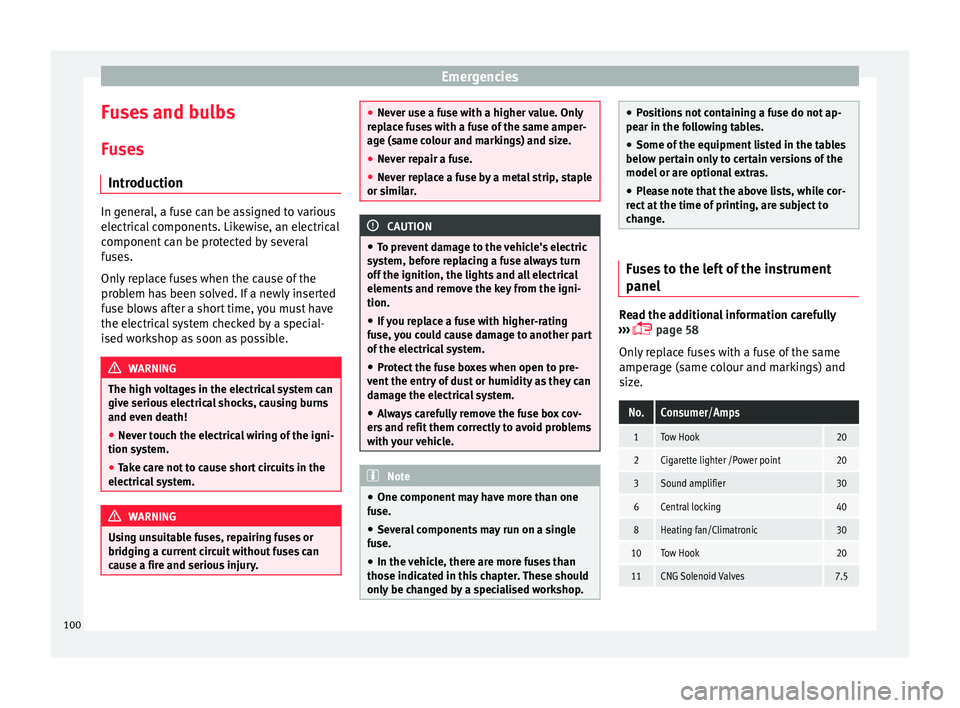
Introduction In general, a fuse can be assigned to various
electric
al
components. Likewise, an electrical
component can be protected by several
fuses.
Only replace fuses when the cause of the
problem has been solved. If a newly inserted
fuse blows after a short time, you must have
the electrical system checked by a special-
ised workshop as soon as possible. WARNING
The high voltages in the electrical system can
give seriou s
electrical shocks, causing burns
and even death!
● Never touch the electrical wiring of the igni-
tion syst
em.
● Take care not to cause short circuits in the
electrica
l system. WARNING
Using unsuitable fuses, repairing fuses or
bridging a c urr
ent circuit without fuses can
cause a fire and serious injury. ●
Never u se a f
use with a higher value. Only
replace fuses with a fuse of the same amper-
age (same colour and markings) and size.
● Never repair a fuse.
● Never replace a fuse by a metal strip, staple
or simil
ar. CAUTION
● To pr ev
ent damage to the vehicle's electric
system, before replacing a fuse always turn
off the ignition, the lights and all electrical
elements and remove the key from the igni-
tion.
● If you replace a fuse with higher-rating
fuse,
you could cause damage to another part
of the electrical system.
● Protect the fuse boxes when open to pre-
vent the entr
y of dust or humidity as they can
damage the electrical system.
● Always carefully remove the fuse box cov-
ers and r
efit them correctly to avoid problems
with your vehicle. Note
● One component m
ay have more than one
fuse.
● Several components may run on a single
fuse.
● In the
vehicle, there are more fuses than
those indicat
ed in this chapter. These should
only be changed by a specialised workshop. ●
Po s
itions not containing a fuse do not ap-
pear in the following tables.
● Some of the equipment listed in the tables
below pert
ain only to certain versions of the
model or are optional extras.
● Please note that the above lists, while cor-
rect at
the time of printing, are subject to
change. Fuses to the left of the instrument
panel
Read the additional information carefully
› ›
›
page 58
Only replace fuses with a fuse of the same
amperage (same colour and markings) and
size.
No.Consumer/Amps
1Tow Hook20
2Cigarette lighter /Power point20
3Sound amplifier30
6Central locking40
8Heating fan/Climatronic30
10Tow Hook20
11CNG Solenoid Valves7.5 100
Page 103 of 308
Fuses and bulbsNo.Consumer/Amps
13Lights switch, steering column LSS
and SMLS, diagnostic port, rain/light
sensor7.5
14steering column LSS: wiper controls10
15Instrument panel7.5
16Right Lights Power Supply40
17Right Door Window Control30
18Windscreen wipers30
19Radio, Multimedia System25
20Heated Rear Window30
21SCR Control Unit30
23Rear View Camera7.5
24Connectivity Box, external audio
source wiring (Double USB-Aux IN),
telephone amplifier, MIB display5
25Steering Column Electronics (MFL)7.5
26Gateway7.5
27Active Suspension Control Unit7.5
28DWA Sensor7.5
29DWA Horn7.5
319AA/9AB climate control unit7.5
9AK Climatronic control unit15
32Steering Column LSS, without Kessy7.5
No.Consumer/Amps
33Left Door Window Control30
35Left Lights Power Supply40
36Signal Horn20
37Heated seats control unit30
38BCM Power C6330
39BSD, PDC, MRR10
40
Lights switch, diagnostic port, head-
light range control, steering column
LSS: Lights, halogen headlights, re-
verse light switch
7.5
41Electrochromic mirror, regulation of
unfolded rear view mirrors, RKA with-
out radio7.5
42Clutch pedal, ignition relays, CNG re-
lay coil7.5
43DWP relay coil, rear window wiper mo-
tor15
44Airbag7.5
45Leimo Plus left headlight7.5
46Leimo Plus right headlight7.5
48Steering Column Lock, Kessy Control
Unit7.5
49SCR Relay Coil7.5
51AA Pressure Sensor, heated jets7.5
No.Consumer/Amps
53Automatic gearbox lever, ZSS7.5
58Double Water Pump7.5
59Heated rear view mirrors10
60Tow Hook30
61Tow Hook30
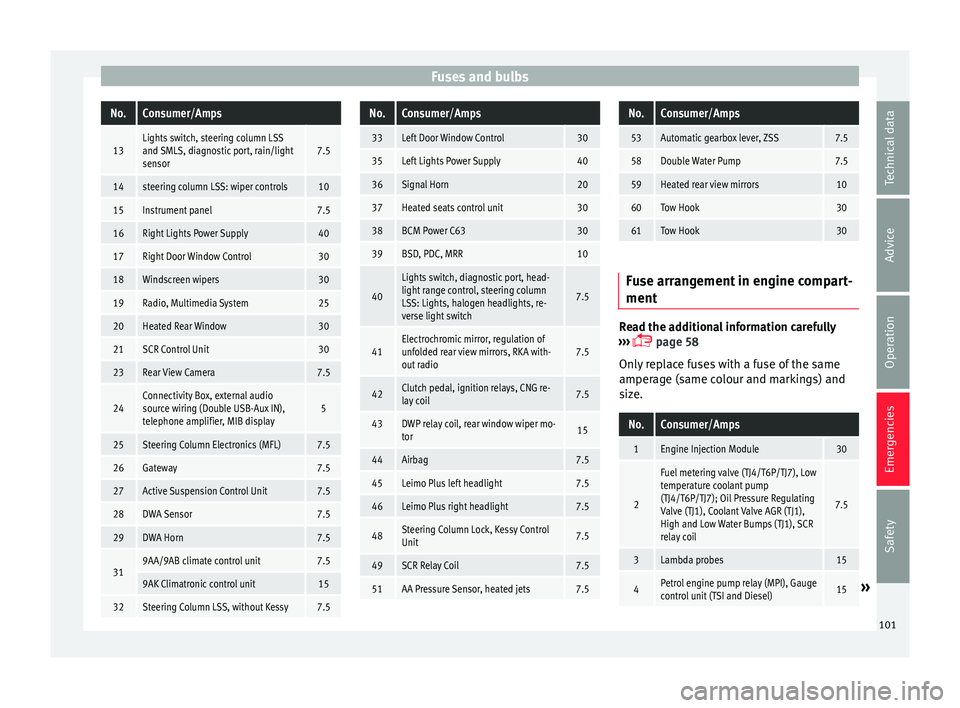
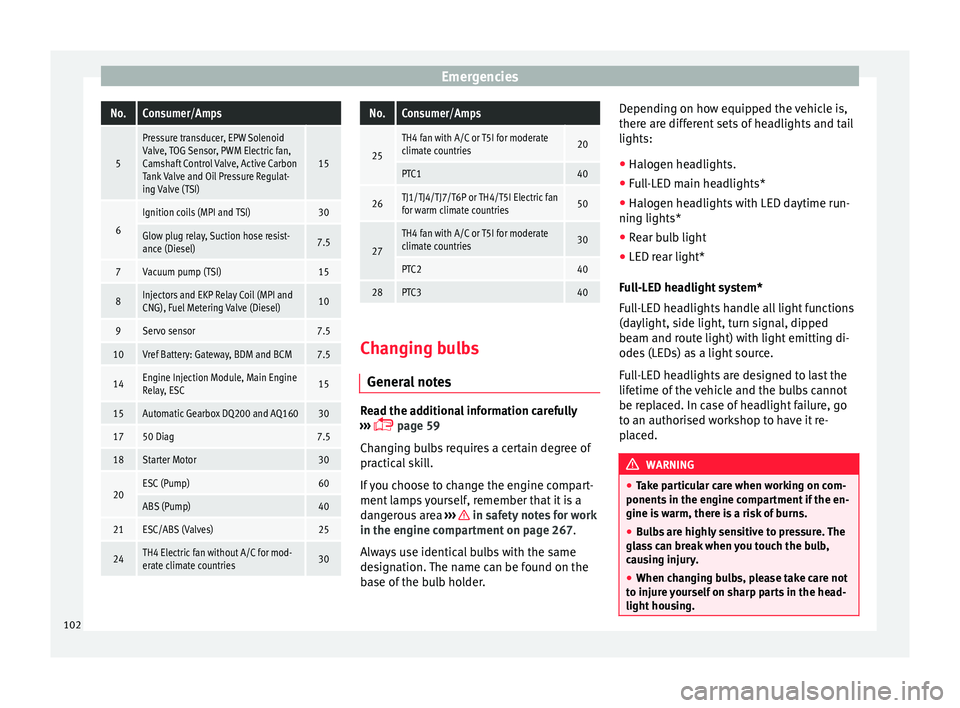
Fuse arrangement in engine compart-
ment
Read the additional information carefully
› ›
›
page 58
Only replace fuses with a fuse of the same
amperage (same colour and markings) and
size.
No.Consumer/Amps
1Engine Injection Module30
2
Fuel metering valve (TJ4/T6P/TJ7), Low
temperature coolant pump
(TJ4/T6P/TJ7); Oil Pressure Regulating
Valve (TJ1), Coolant Valve AGR (TJ1),
High and Low Water Bumps (TJ1), SCR
relay coil
7.5
3Lambda probes15
4Petrol engine pump relay (MPI), Gauge
control unit (TSI and Diesel)15» 101
Technical data
Advice
Operation
Emergencies
Safety
Page 104 of 308
EmergenciesNo.Consumer/Amps
5
Pressure transducer, EPW Solenoid
Valve, TOG Sensor, PWM Electric fan,
Camshaft Control Valve, Active Carbon
Tank Valve and Oil Pressure Regulat-
ing Valve (TSI)
15
6
Ignition coils (MPI and TSI)30
Glow plug relay, Suction hose resist-
ance (Diesel)7.5
7Vacuum pump (TSI)15
8Injectors and EKP Relay Coil (MPI and
CNG), Fuel Metering Valve (Diesel)10
9Servo sensor7.5
10Vref Battery: Gateway, BDM and BCM7.5
14Engine Injection Module, Main Engine
Relay, ESC15
15Automatic Gearbox DQ200 and AQ16030
1750 Diag7.5
18Starter Motor30
20ESC (Pump)60
ABS (Pump)40
21ESC/ABS (Valves)25
24TH4 Electric fan without A/C for mod-
erate climate countries30
No.Consumer/Amps
25
TH4 fan with A/C or T5I for moderate
climate countries20
PTC140
26TJ1/TJ4/TJ7/T6P or TH4/T5I Electric fan
for warm climate countries50
27
TH4 fan with A/C or T5I for moderate
climate countries30
PTC240
28PTC340
Changing bulbs
Gener a
l
notes Read the additional information carefully
› ›
›
page 59
Changing bulbs requires a certain degree of
practical skill.
If you choose to change the engine compart-
ment lamps yourself, remember that it is a
dangerous area ››› in safety notes for work
in the en gine c
omp
artment on page 267.
Always use identical bulbs with the same
designation. The name can be found on the
base of the bulb holder. Depending on how equipped the vehicle is,
there are diff
erent sets of headlights and tail
lights:
● Halogen headlights.
● Full-LED main headlights*
● Halogen headlights with LED daytime run-
ning lights*
● Re
ar bulb light
● LED rear light*
Ful
l-LED headlight system*
Full-LED headlights handle all light functions
(daylight, side light, turn signal, dipped
beam and route light) with light emitting di-
odes (LEDs) as a light source.
Full-LED headlights are designed to last the
lifetime of the vehicle and the bulbs cannot
be replaced. In case of headlight failure, go
to an authorised workshop to have it re-
placed. WARNING
● Tak e p
articular care when working on com-
ponents in the engine compartment if the en-
gine is warm, there is a risk of burns.
● Bulbs are highly sensitive to pressure. The
glas
s can break when you touch the bulb,
causing injury.
● When changing bulbs, please take care not
to injure
yourself on sharp parts in the head-
light housing. 102
Page 105 of 308
Fuses and bulbs
CAUTION
● Remo v
e the ignition key before working on
the electric system. Otherwise, a short circuit
could occur.
● Switch off the lights or parking lights be-
fore
you change a bulb. For the sake of the environment
Please ask your specialist retailer how to dis-
pose of u
sed bulbs in the proper manner. Note
● Dependin g on w
eather conditions (cold or
wet), the front lights, the fog lights, the tail
lights and the turn signals may be temporari-
ly misted. This has no influence on the useful
life of the lighting system. By switching on
the lights, the area through which the beam
of light is projected will quickly be demisted.
However, the edges may continue to be mis-
ted.
● Please check at regular intervals that all
lighting (es
pecially the exterior lighting) on
your vehicle is functioning properly. This is
not only in the interest of your own safety,
but also that of all other road users.
● Before changing a bulb, make sure you
have the c
orrect new bulb.
● Do not touch the glass part of the bulb with
your bar
e hands, use a cloth or paper towel
instead. The residue left by the fingerprints
would vaporise as a result of the heat gener- ated by the bulb, they will be deposited on
the refl
ect
or and will impair its surface.
● Depending on the level of equipment fitted
in the vehic
le, LEDs may be used for part or
all of the interior and/or exterior lighting.
LEDs have an estimated life that exceeds that
of the vehicle. If an LED light fails, go to an
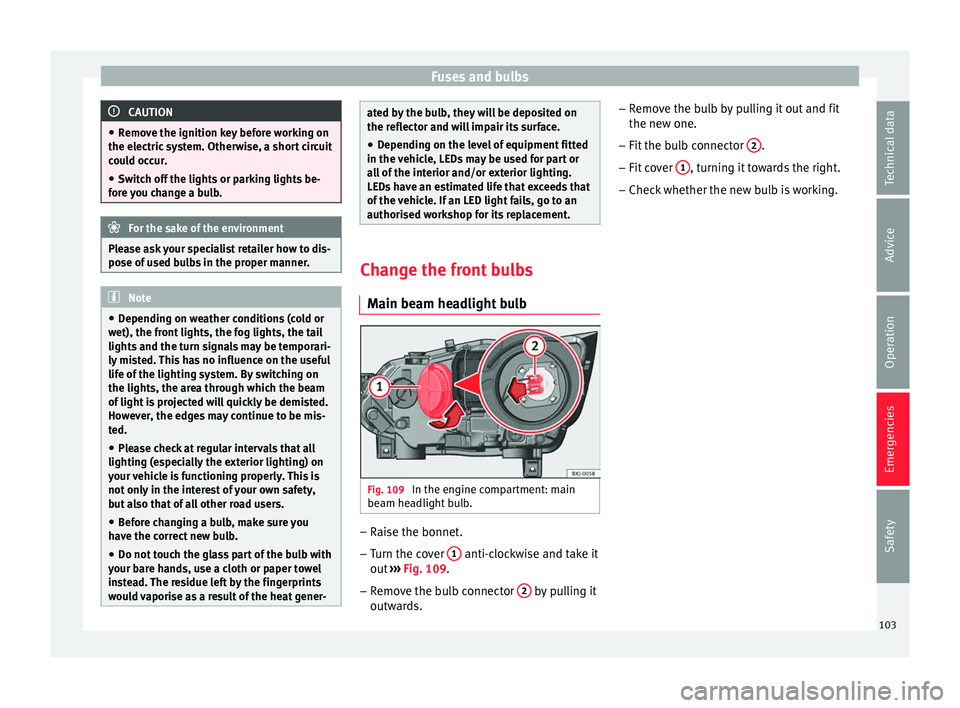
authorised workshop for its replacement. Change the front bulbs
Main be am he
adlight bulb Fig. 109
In the engine compartment: main
be am he
a
dlight bulb. –
Raise the bonnet.
– Turn the cover 1 anti-clockwise and take it
out
›
›
› Fig. 109.
– Remove the bulb connector 2 by pulling it
outw ar
d
s. –
Remov
e the bulb by pulling it out and fit
the new one.
– Fit the bulb connector 2 .
– Fit cover 1 , turning it towards the right.
– Check whether the new bulb is working.
103
Technical data
Advice
Operation
Emergencies
Safety
Page 113 of 308
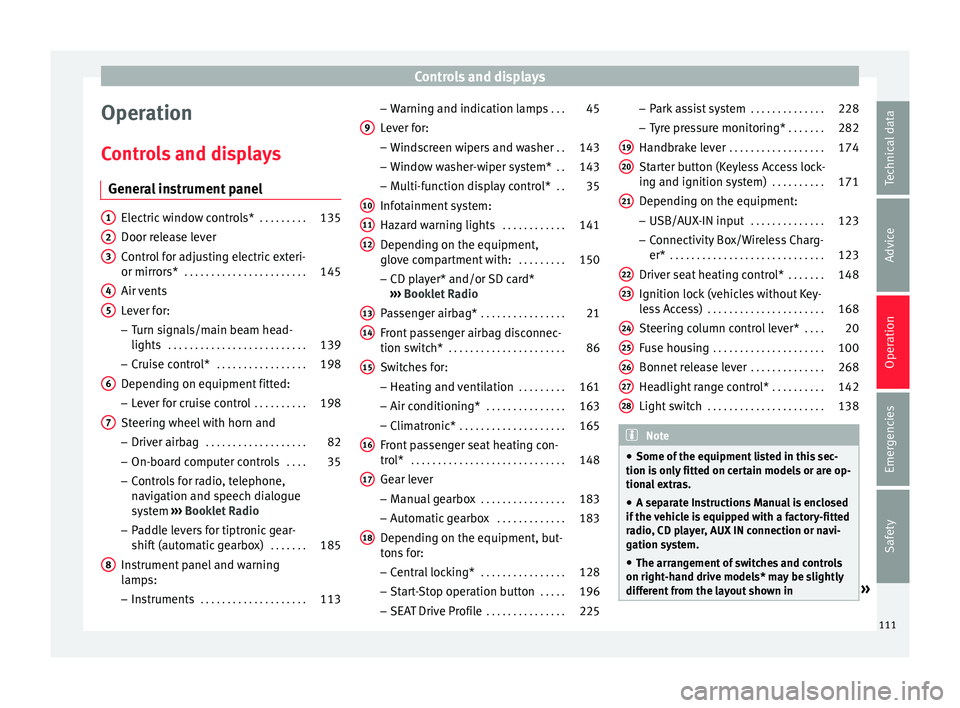
Controls and displays
Operation
C ontr
o
ls and displays
General instrument panel Electric window controls*
. . . . . . . . .135
Door release lever
Contr o
l for adjusting electric exteri-
or mirrors* . . . . . . . . . . . . . . . . . . . . . . . 145
Air vents
Lev er f
or:
– Turn signals/main beam head-
lights . . . . . . . . . . . . . . . . . . . . . . . . . . 139
– Crui se c
ontrol* . . . . . . . . . . . . . . . . . 198
Depending on equipment fitted:
– Lev er f
or cruise control . . . . . . . . . .198
Steering wheel with horn and – Driver airbag . . . . . . . . . . . . . . . . . . . 82
– On-boar d c
omputer controls . . . .35
– Contro
ls for radio, telephone,
navigation and speech dialogue
system ›››
Booklet Radio
– Paddle levers for tiptronic gear-
shift (automatic gearbox) . . . . . . .185
Instrument panel and warning
lamp s:
– In
struments . . . . . . . . . . . . . . . . . . . . 113
1 2
3
4
5
6
7
8 –
Warnin
g and indic
ation lamps . . .45
Lever for:
– Winds
creen wipers and washer . .143
– Window w
asher-wiper system* . .143
– Multi-f
unction display control* . .35
Infotainment system:
Hazard w
arning lights . . . . . . . . . . . . 141
Depending on the equipment,
glove c
ompartment with: . . . . . . . . .150
– CD pla
yer* and/or SD card*
››› Booklet Radio
Passenger airbag* . . . . . . . . . . . . . . . . 21
Front passenger airbag disconnec-
tion switc
h* . . . . . . . . . . . . . . . . . . . . . . 86
Switches for:
– Heating and
ventilation . . . . . . . . . 161
– Air conditionin g* . . . . . . . . . . . . . . . 163
– C
limatr
onic* . . . . . . . . . . . . . . . . . . . . 165
Front passenger seat heating con-
tro l* . . . . . . . . . . . . . . . . . . . . . . . . . . . . . 148
Ge
ar lever
– Manual g
earbox . . . . . . . . . . . . . . . . 183
– Autom atic
gearbox . . . . . . . . . . . . . 183
Depending on the equipment, but-
ton s
for:
– Central locking* . . . . . . . . . . . . . . . . 128
– Star t
-Stop operation button . . . . .196
– SEAT Driv
e Profile . . . . . . . . . . . . . . . 225
9
10
11
12
13
14
15
16
17
18 –
Park
a
ssist system . . . . . . . . . . . . . . 228
– Tyr
e pressure monitoring* . . . . . . .282
Handbrake lever . . . . . . . . . . . . . . . . . . 174
Starter button (Keyless Access lock-
ing and ignition sys
tem) . . . . . . . . . . 171
Depending on the equipment:
– USB/AUX-IN inp
ut . . . . . . . . . . . . . . 123
– Connectivity
Box/Wireless Charg-
er* . . . . . . . . . . . . . . . . . . . . . . . . . . . . . 123
Driver seat heating control* . . . . . . .148
Ignition lock (vehicles without Key-
les
s Access) . . . . . . . . . . . . . . . . . . . . . . 168
Steering column control lever* . . . .20
Fuse housing . . . . . . . . . . . . . . . . . . . . . 100
Bonnet release lever . . . . . . . . . . . . . .268
Headlight range control* . . . . . . . . . .142
Light switch . . . . . . . . . . . . . . . . . . . . . . 138 Note
● Some of the equipment li
sted in this sec-
tion is only fitted on certain models or are op-
tional extras.
● A separate Instructions Manual is enclosed
if the v
ehicle is equipped with a factory-fitted
radio, CD player, AUX IN connection or navi-
gation system.
● The arrangement of switches and controls
on right-hand driv
e models* may be slightly
different from the layout shown in » 19
20
21
22
23
24
25
26
27
28
111
Technical data
Advice
Operation
Emergencies
Safety
Page 116 of 308
Operation
CAUTION
● When the engine i s
cold, avoid high revs
and heavy acceleration and do not make the
engine work hard. Indications on the display
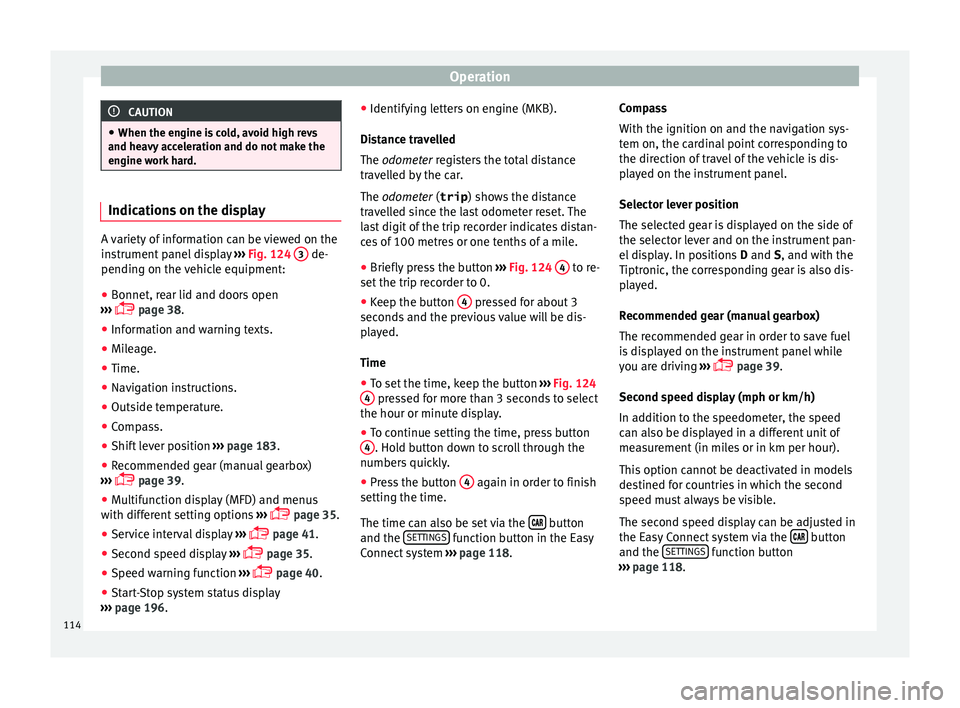
A variety of information can be viewed on the
ins
trument
panel display ››› Fig. 124 3 de-
pending on the v
ehicle equipment:
● Bonnet, rear lid and doors open
›› ›
page 38.
● Information and warning texts.
● Mileage.
● Time.
● Navigation instructions.
● Outside temperature.
● Compass.
● Shift lever position ›››
page 183.
● Recommended gear (manual gearbox)
›››
page 39.
● Multifunction display (MFD) and menus
with differ
ent setting options ›››
page 35.
● Service interval display ›››
page 41.
● Second speed display ›››
page 35.
● Speed warning function ›››
page 40.
● Start-Stop system status display
›››
page 196. ●
Identifyin
g letters on engine (MKB).
Distance travelled
The odometer registers the total distance
travelled by the car.
The odometer (trip ) shows the distance
travelled since the last odometer reset. The
last digit of the trip recorder indicates distan-
ces of 100 metres or one tenths of a mile.
● Briefly press the button ›››
Fig. 124 4 to re-
set the trip r
ec
order to 0.
● Keep the button 4 pressed for about 3
sec ond
s
and the previous value will be dis-
played.
Time
● To set the time, keep the button ›››
Fig. 124
4 pressed for more than 3 seconds to select
the hour or minut e di
s
play.
● To continue setting the time, press button
4 . Hold button down to scroll through the
number s
quic
kly.
● Press the button 4 again in order to finish
settin g the time.
The time c an al
so be set via the button
and the S
ET
TINGS function button in the Easy
C onnect
sy
stem ››› page 118. Compass
With the ignition on and the nav
igation sys-
tem on, the cardinal point corresponding to
the direction of travel of the vehicle is dis-
played on the instrument panel.
Selector lever position
The selected gear is displayed on the side of
the selector lever and on the instrument pan-
el display. In positions D and S, and with the
Tiptronic, the corresponding gear is also dis-
played.
Recommended gear (manual gearbox)
The recommended gear in order to save fuel
is displayed on the instrument panel while
you are driving ›››
page 39.
Second speed display (mph or km/h)
In addition to the speedometer, the speed
can also be displayed in a different unit of
measurement (in miles or in km per hour).
This option cannot be deactivated in models
destined for countries in which the second
speed must always be visible.
The second speed display can be adjusted in
the Easy Connect system via the button
and the S
ET
TINGS function button
› ›
›
page 118.
114