engine Seat Arona 2017 Service Manual
[x] Cancel search | Manufacturer: SEAT, Model Year: 2017, Model line: Arona, Model: Seat Arona 2017Pages: 308, PDF Size: 6.66 MB
Page 154 of 308
Operation
Note
● The use of el
ectrical appliances with the
engine switched off will cause a battery dis-
charge.
● Before using any electrical accessories, see
the instruction
s in ››› page 255. Cigarette lighter*
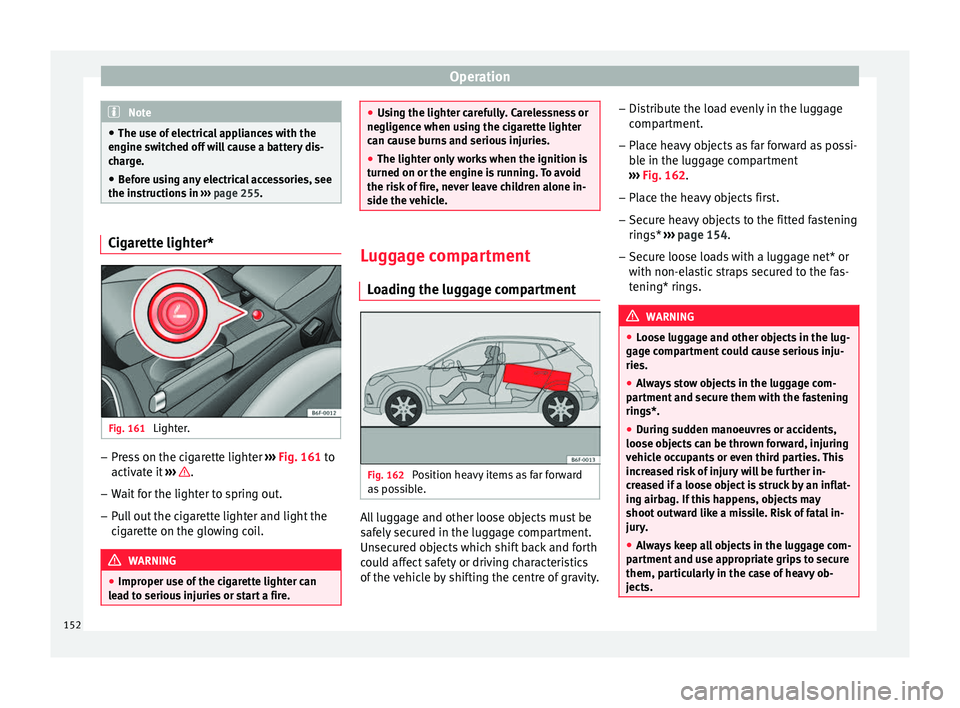
Fig. 161
Lighter. –
Press on the cigarette lighter ››
›
Fig. 161 to
activate it ››› .
– Wait for the lighter to spring out.
– Pull out the cigarette lighter and light the
cig
ar
ette on the glowing coil. WARNING
● Improper u se of
the cigarette lighter can
lead to serious injuries or start a fire. ●
Us in
g the lighter carefully. Carelessness or
negligence when using the cigarette lighter
can cause burns and serious injuries.
● The lighter only works when the ignition is
turned on or the engine i
s running. To avoid
the risk of fire, never leave children alone in-
side the vehicle. Luggage compartment
Lo a
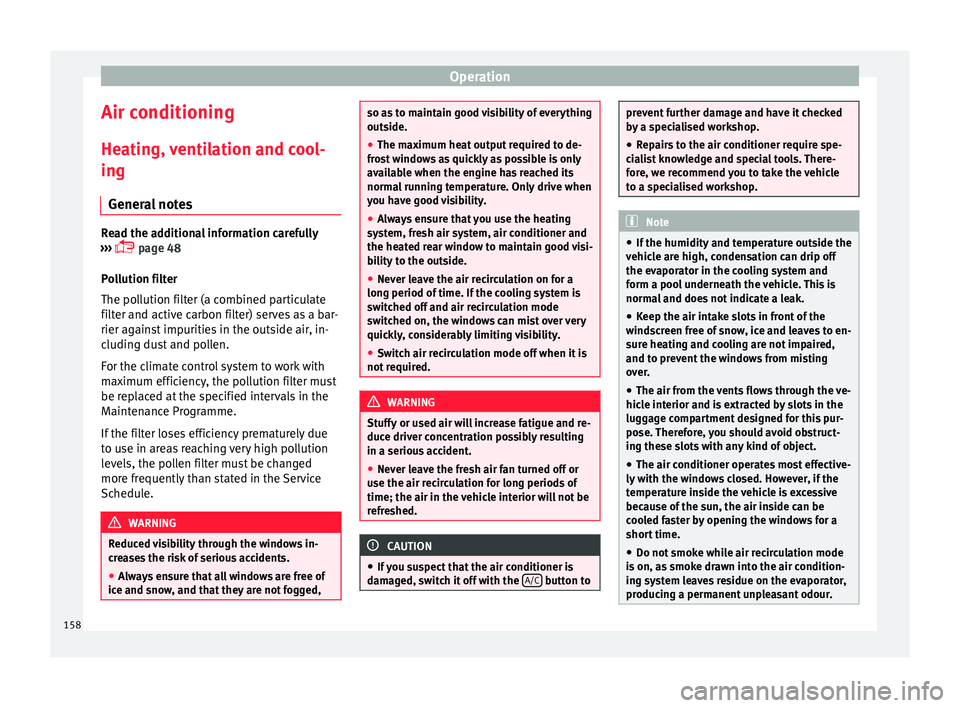
ding the luggage compartment Fig. 162
Position heavy items as far forward
a s
po
ssible. All luggage and other loose objects must be
s
af
ely
secured in the luggage compartment.
Unsecured objects which shift back and forth
could affect safety or driving characteristics
of the vehicle by shifting the centre of gravity. –
Distrib
ute the load evenly in the luggage
compartment.
– Place heavy objects as far forward as possi-
ble in the lug
gage compartment
››› Fig. 162.
– Place the heavy objects first.
– Secure heavy objects to the fitted fastening
rings* ›
›› page 154.
– Secure loose loads with a luggage net* or
with non-ela
stic straps secured to the fas-
tening* rings. WARNING
● Loo se lug
gage and other objects in the lug-
gage compartment could cause serious inju-
ries.
● Always stow objects in the luggage com-
partment
and secure them with the fastening
rings*.
● During sudden manoeuvres or accidents,
loose ob
jects can be thrown forward, injuring
vehicle occupants or even third parties. This
increased risk of injury will be further in-
creased if a loose object is struck by an inflat-
ing airbag. If this happens, objects may
shoot outward like a missile. Risk of fatal in-
jury.
● Always keep all objects in the luggage com-
partment
and use appropriate grips to secure
them, particularly in the case of heavy ob-
jects. 152
Page 160 of 308
Operation
Air conditioning
He atin
g,
ventilation and cool-
ing
General notes Read the additional information carefully
›› ›
page 48
Pollution filter
The pollution filter (a combined particulate
filter and active carbon filter) serves as a bar-
rier against impurities in the outside air, in-
cluding dust and pollen.
For the climate control system to work with
maximum efficiency, the pollution filter must
be replaced at the specified intervals in the
Maintenance Programme.
If the filter loses efficiency prematurely due
to use in areas reaching very high pollution
levels, the pollen filter must be changed
more frequently than stated in the Service
Schedule. WARNING
Reduced visibility through the windows in-
cr e
ases the risk of serious accidents.
● Always ensure that all windows are free of
ice and sno
w, and that they are not fogged, so as to maintain good visibility of everything
outs
ide.
● The m
aximum heat output required to de-
fros
t windows as quickly as possible is only
available when the engine has reached its
normal running temperature. Only drive when
you have good visibility.
● Always ensure that you use the heating
syst
em, fresh air system, air conditioner and
the heated rear window to maintain good visi-
bility to the outside.
● Never leave the air recirculation on for a
long period of time. If
the cooling system is
switched off and air recirculation mode
switched on, the windows can mist over very
quickly, considerably limiting visibility.
● Switch air recirculation mode off when it is
not requir
ed. WARNING
Stuffy or used air will increase fatigue and re-
duce driv er c
oncentration possibly resulting
in a serious accident.
● Never leave the fresh air fan turned off or
use the air rec
irculation for long periods of
time; the air in the vehicle interior will not be
refreshed. CAUTION
● If y
ou suspect that the air conditioner is
damaged, switch it off with the A/C button to prevent further damage and have it checked
by
a s
pecialised workshop.
● Repairs to the air conditioner require spe-
cia
list knowledge and special tools. There-
fore, we recommend you to take the vehicle
to a specialised workshop. Note
● If the humidity and t
emperature outside the
vehicle are high, condensation can drip off
the evaporator in the cooling system and
form a pool underneath the vehicle. This is
normal and does not indicate a leak.
● Keep the air intake slots in front of the
winds
creen free of snow, ice and leaves to en-
sure heating and cooling are not impaired,
and to prevent the windows from misting
over.
● The air from the vents flows through the ve-
hicle int
erior and is extracted by slots in the
luggage compartment designed for this pur-
pose. Therefore, you should avoid obstruct-
ing these slots with any kind of object.
● The air conditioner operates most effective-
ly with the w
indows closed. However, if the
temperature inside the vehicle is excessive
because of the sun, the air inside can be
cooled faster by opening the windows for a
short time.
● Do not smoke while air recirculation mode
is on, a
s smoke drawn into the air condition-
ing system leaves residue on the evaporator,
producing a permanent unpleasant odour. 158
Page 161 of 308
Air conditioning
●
At lo w out
side temperatures, the compres-
sor switches off automatically and cannot be
switched on even with the AUTO button.
● It is advisable to turn on the air condition-
ing at l
east once a month, to lubricate the
system gaskets and prevent leaks. If a de-
crease in the cooling capacity is detected, a
Technical Service should be consulted to
check the system.
● To ensure correct operation, the grilles on
both sides
of the screen must not be obstruc-
ted. ●
When the engine i s
under extreme strain,
switch off the compressor for a moment. Economic use of the air conditioning
When the air conditioning is switched on, the
compr
e
ssor consumes engine power and has
influence on fuel consumption. Consider the
following points in order to have the system
operating in the minimum possible time. ●
If the v
ehicle interior has overheated due to
an excessive solar radiation, it is best to
open the windows or doors to allow the hot
air to escape.
● While in motion, the air conditioning
should not
be switched on if the windows are
open.
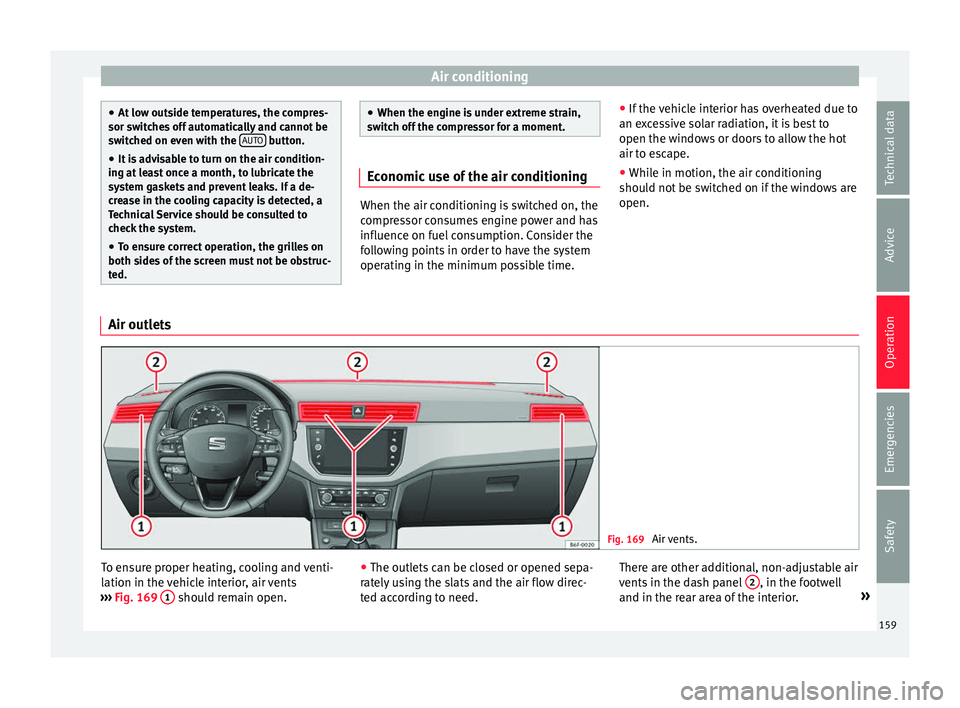
Air outlets Fig. 169
Air vents. To ensure proper heating, cooling and venti-
l
ation in the
v
ehicle interior, air vents
››› Fig. 169 1 should remain open.
●
The outl ets
c
an be closed or opened sepa-
rately using the slats and the air flow direc-
ted according to need. There are other additional, non-adjustable air
vents in the d
ash panel 2 , in the footwell
and in the r e
ar ar
ea of the interior. »
159
Technical data
Advice
Operation
Emergencies
Safety
Page 164 of 308
Operation
Functions Ventilating the vehicle interior
The des
ir
ed temperature inside the vehicle
cannot be lower than the ambient tempera-
ture.
● Turn the temperature selector
›››
Fig. 170 1 anti-clockwise.
● Turn blower switch 2 to any of the levels
1-4.
● Set the airflow to the desired direction us-
ing air di s
tribution control 3 .
● Open the relevant air outlets.
Int erior he
atin
g
Maximum heat output, which is needed to
defrost the windows quickly, is only available
when the engine has reached its operating
temperature.
● Turn the temperature selector
›››
Fig. 170 1 clockwise to select the re-
quir ed t
emper
ature. ●
Turn blo
wer switch 2 to any of the levels
1-4.
● Set the airflow to the desired direction us-
in g air di
s
tribution control 3 .
● Open the relevant air outlets.
D efr
o
sting the windscreen
● Turn the temperature regulator
›››
Fig. 170 1 clockwise to reach the maxi-
mum t emper
at
ure.
● Turn the blower switch 2 to level 4.
● Turn air distribution control to .
● Close the central outlets.
● Open and turn the side outlets towards the
w indo
w
s.
Keeping the windscreen and the side win-
dows demisted
● Turn the temperature regulator
›››
Fig. 170 1 to the heating zone.
● Turn blower switch 2 to any of the levels
2-3. ●
Turn air di
s
tribution control to .
● Close the central outlets.
● Open and turn the side outlets towards the
window
s.
Once the windows are demisted and as a pre-
ventive measure, the control 3 can be set in
po s
ition
greater comfort while preventing
the windows from misting again. Note
Remember that the temperature of the engine
coo l
ant should be optimum to ensure that the
heating system functions correctly (except in
vehicles fitted with additional heating*). 162
Page 165 of 308
Air conditioning
Manual air conditioning* C ontr
o
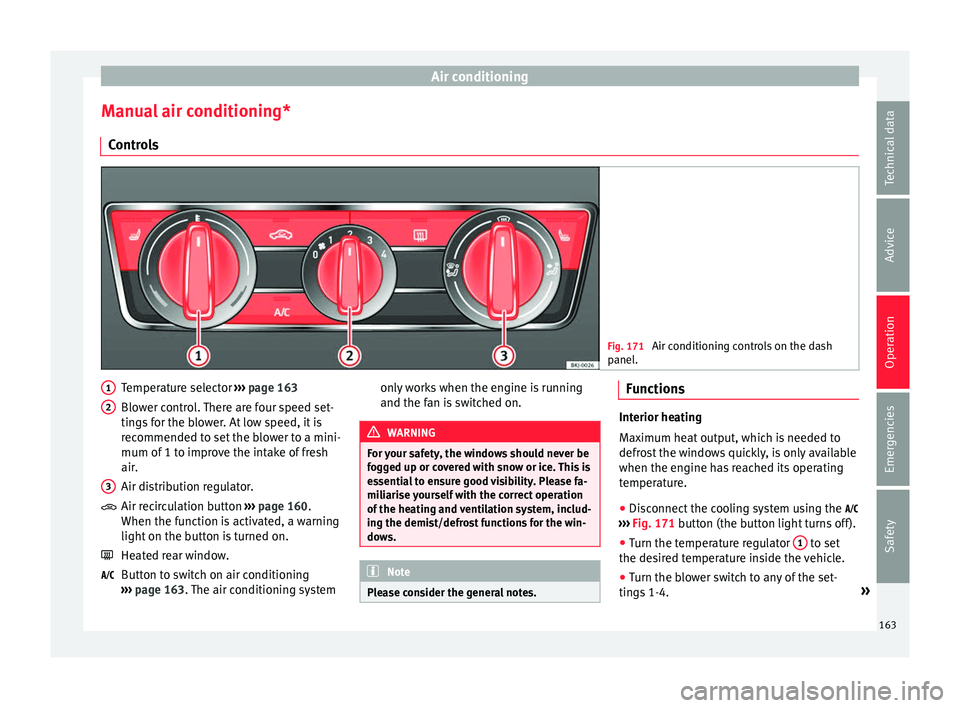
ls Fig. 171
Air conditioning controls on the dash
panel . Temperature selector
››
›
page 163
Blower control. There are four speed set-
tings for the blower. At low speed, it is
recommended to set the blower to a mini-
mum of 1 to improve the intake of fresh
air.
Air distribution regulator.
Air recirculation button ››› page 160.
When the function is activated, a warning
light on the button is turned on.
Heated rear window.
Button to switch on air conditioning
››› page 163. The air conditioning system
1 2
3
only works when the engine is running
and the f
an is
switched on. WARNING
For your safety, the windows should never be
fog g
ed up or covered with snow or ice. This is
essential to ensure good visibility. Please fa-
miliarise yourself with the correct operation
of the heating and ventilation system, includ-
ing the demist/defrost functions for the win-
dows. Note
Please consider the general notes. Functions
Interior heating
Max
imum he
at output, which is needed to
defrost the windows quickly, is only available
when the engine has reached its operating
temperature.
● Disconnect the cooling system using the
›››
Fig. 171 button (the button light turns off).
● Turn the temperature regulator 1 to set
the des ir
ed temperature inside the vehicle.
● Turn the blower switch to any of the set-
ting s
1-4. »
163
Technical data
Advice
Operation
Emergencies
Safety
Page 166 of 308
Operation
● Set the air di
s
tribution regulator 3 to the
air flo w c
onfigur
ation desired: (towards
the windscreen), (towards the chest),
(towards the footwell) and (towards the
windscreen and footwell areas).
Interior cooling
When the air conditioning is switched on, the
temperature and the air humidity go down.
This way, if the outside humidity is extreme,
the air conditioning prevents the misting of
the windows and therefore, comfort is im-
proved.
● Turn on the cooling system using the
button (the b
utton light turns on).
● Turn the temperature control switch until
the desir
ed interior temperature is reached. ●
Turn the blo
wer switch to any of the set-
tings 1-4.
● Set the air distribution control to the air
flow configur
ation desired: (towards the
windscreen), (towards the chest), (to-
wards the footwell) and (towards the wind-
screen and footwell areas).
Demisting the windscreen
● Turn air distribution to .
● Turn the fan control to one of the two levels
depending on the speed r
equired.
● Rotate the temperature control to the de-
sired l
evel of comfort.
● Close the central outlets. ●
Open and turn the side outl
ets towards the
windows.
If the air conditioning does not work, this
may be due to the following reasons:
● The engine is stationary.
● The fan blower is switched off.
● The outside temperature is lower than ap-
prox
imately +3°C (+37°F).
● The air conditioning system compressor
has
been temporarily switched off because of
an increased engine coolant temperature.
● The air conditioner fuse is faulty.
● Another fault in the vehicle. Have the air
conditioning c
hecked by a specialised work-
shop.
164
Page 167 of 308
Air conditioning
Climatronic* Gener a
l
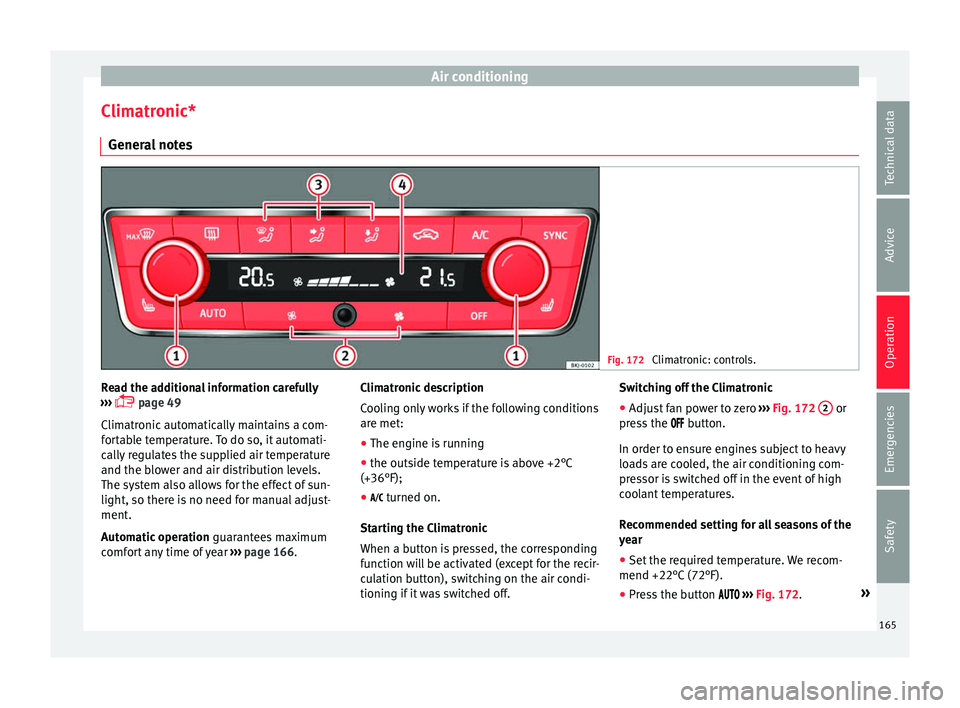
notes Fig. 172
Climatronic: controls. Read the additional information carefully
› ›
›
page 49
Climatronic automatically maintains a com-
fortable temperature. To do so, it automati-
cally regulates the supplied air temperature
and the blower and air distribution levels.
The system also allows for the effect of sun-
light, so there is no need for manual adjust-
ment.
Automatic operation guarantees maximum
comfort any time of year ››› page 166. Climatronic description
Coolin
g only works if the following conditions
are met:
● The engine is running
● the outside temperature is above +2°C
(+36°F);
● turned on.
Star
ting the Climatronic
When a button is pressed, the corresponding
function will be activated (except for the recir-
culation button), switching on the air condi-
tioning if it was switched off. Switching off the Climatronic
●
Adjust fan power to zero ›››
Fig. 172 2 or
pr e
s
s the button.
In order to ensure engines subject to heavy
loads are cooled, the air conditioning com-
pressor is switched off in the event of high
coolant temperatures.
Recommended setting for all seasons of the
year
● Set the required temperature. We recom-
mend +22°C (72°F).
● Pre
ss the button ››
› Fig. 172. »
165
Technical data
Advice
Operation
Emergencies
Safety
Page 169 of 308
Driving
Driving Ad dr
e
ss
Introduction The power steering is not hydraulic but elec-
tromec
h
anical. The advantage of this steer-
ing is that it foes not need flexible hydraulic
pipes, hydraulic oil, pump, filter or other
parts. The electromechanical system saves
fuel. Whereas a hydraulic system needs con-
tinuous oil pressure, electromechanical
steering only needs power when it is used.
In vehicles with electromechanical steering,
the assisted steering function automatically
adjusts according to vehicle speed, steering
wheel torque and wheel orientation. The
power steering only works when the engine
is running. WARNING
If the power steering does not work, you will
need much mor e s
trength to turn the wheel.
This has a considerable effect on vehicle
safety.
● The power steering only works when the
engine is
running.
● Never allow the vehicle to move when the
engine is
switched off.
● Never remove the key from the ignition
while the
vehicle is moving. The steering lock could be engaged and vehicle steering would
not w
ork. Note
The ignition of the vehicle being towed must
be sw itc
hed on to prevent the steering wheel
from locking and also to allow the use of the
turn signals, horn, windscreen wipers and
washers. Control lamp
The control lamp should light up for a few
sec
ond
s
when the ignition is switched on. It
should go out once the engine is started.
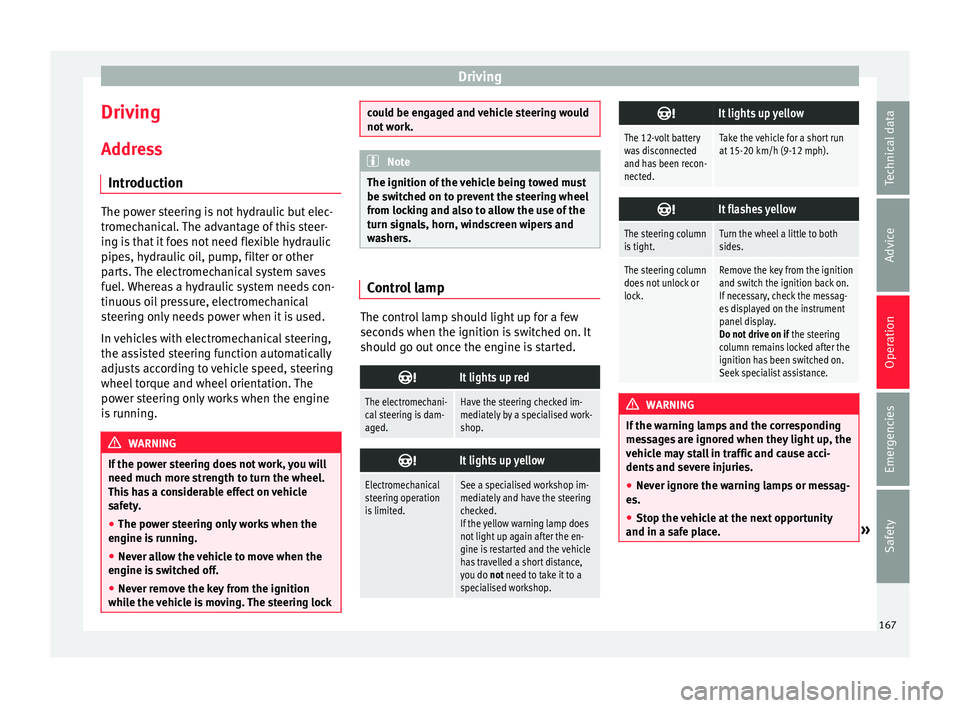
It lights up red
The electromechani-
cal steering is dam-
aged.Have the steering checked im-
mediately by a specialised work-
shop.
It lights up yellow
Electromechanical
steering operation
is limited.See a specialised workshop im-
mediately and have the steering
checked.
If the yellow warning lamp does
not light up again after the en-
gine is restarted and the vehicle
has travelled a short distance,
you do not need to take it to a
specialised workshop.
It lights up yellow
The 12-volt battery
was disconnected
and has been recon-
nected.Take the vehicle for a short run
at 15-20 km/h (9-12 mph).
It flashes yellow
The steering column
is tight.Turn the wheel a little to both
sides.
The steering column
does not unlock or
lock.Remove the key from the ignition
and switch the ignition back on.
If necessary, check the messag-
es displayed on the instrument
panel display.
Do not drive on if
the steering
column remains locked after the
ignition has been switched on.
Seek specialist assistance. WARNING
If the warning lamps and the corresponding
mes s
ages are ignored when they light up, the
vehicle may stall in traffic and cause acci-
dents and severe injuries.
● Never ignore the warning lamps or messag-
es.
● Stop the
vehicle at the next opportunity
and in a safe p
lace. » 167
Technical data
Advice
Operation
Emergencies
Safety
Page 170 of 308
Operation
Note
Failure to heed the control lamps and corre-
spondin g t
ext messages when they light up
may result in damage to the vehicle. Information relating to different vehi-
cl
e pr
ocesses. In order to make the vehicle more difficult to
st
e
al, you should always lock the steering be-
fore leaving the vehicle.
Mechanical steering lock
The steering column is locked when the key
is removed from the ignition lock and the ve-
hicle is stationary.
Activating the steering lock
● Park the vehicle ››
›
page 174.
● Remove the ignition key.
● Turn the steering wheel slightly until the
steerin
g lock has engaged.
Deactivating the steering lock
● Turn the steering wheel slightly to release
the lock.
● Inser
t the key in the ignition lock.
● Hold the steering wheel in this position
and switc
h on the ignition. Electromechanical steering
In vehic
les with electromechanical steering,
the assisted steering function automatically
adjusts according to vehicle speed, steering
wheel torque and wheel orientation. The
power steering only works when the engine
is running.
You should take into account that you will
need considerably more power than normal
to steer the vehicle if the power steering is
not working correctly or at all.
Power-assisted steering
Power-assisted steering helps the driver in
critical situations. In counter-steering, it as-
sists by applying additional torque ››› .
WARNING
Power-assisted steering, together with the
ESC, help s
the driver to control vehicle steer-
ing in critical situations. However, the driver
is ultimately responsible for steering the ve-
hicle at all times. Power-assisted steering
does not remove this responsibility. Starting and stopping the en-
gine
Ignition k ey
po
sitions Fig. 173
Ignition key positions. Read the additional information carefully
› ›
›
page 30
Ignition switched off, steering lock 1 In this position
››
›
Fig. 173, the ignition and
the engine are OFF and the steering may be
locked.
For the Steering lock to operate without the
ignition key, turn the steering wheel until it
locks with an audible sound. You should al-
ways lock the steering wheel when you leave
your vehicle. This will help prevent vehicle
theft ››› .
168
Page 171 of 308
Driving
Switching the ignition or the glow plug sys-
t em on 2 Turn the ignition key to this position and re-
l
e
a
se it. If the key cannot be turned or it is
difficult to turn from position 1 to position
2 , move the steering wheel from one side to
the other; thi s
w
ill release it.
Starting 3The engine is started when the key is in this
po
s
ition. El
ectrical devices with high power
consumption are switched off temporarily at
the same time.
Each time that the vehicle is restarted, the ig-
nition key must be turned to position 1 . The
r epetitiv
e s
tart prevention lock of the igni-
tion prevents possible damage to the starter
motor if the engine is already running. WARNING
● The ignition key mu
st NOT be removed from
the lock until the vehicle comes to a stand-
still. Otherwise, the steering could be imme-
diately blocked- Risk of accident!
● Always remove the key from the ignition
when leav
ing the vehicle, even if only for a
short period. This is especially important if
children or disabled people are left alone in
the vehicle. They could accidentally start the
engine or work electrical equipment such as
the electric windows, resulting in an acci-
dent. ●
Uns uper
vised use of the key could start the
engine or any electrical system, such as the
electric windows. This could result in serious
injury. CAUTION
The starter motor will only work when the en-
gine i s s
topped (ignition key position 3 ).
Electronic immobiliser “SAFE”
The electronic immobiliser prevents unau-
thori
sed per
son
s from driving the vehicle.
Inside the key there is a chip that deactivates
the electronic immobiliser automatically
when the key is inserted into the ignition.
The electronic immobiliser will be activated
again automatically as soon as you pull the
key out of the ignition lock.
The engine can only be started using a genu-
ine SEAT key with its correct code.
If the following message* is shown on the in-
strument panel display: SAFE, the vehicle
cannot be started.
The engine can, however, be started if the
appropriate coded SEAT genuine key is used. Note
A perfect operation of the vehicle is ensured
if g enuine
SEAT keys are used. Starting petrol engines
The engine can only be started using a genu-
ine S
EA
T key with its correct code.
– Move the gearbox lever to the neutral posi-
tion and depres
s the clutch pedal thor-
oughly and hold it in this position for the
starter to turn the engine on.
– Turn the ignition key to the starting posi-
tion ››
›
page 168.
– Let go of the ignition key as soon as the en-
gine star
ts; the starter motor must not run
on with the engine.
After starting a very hot engine, you may
need to slightly press down the accelerator.
When starting a cold engine, it may be a little
noisy for the first few seconds until oil pres-
sure has built up in the hydraulic valve com-
pensators. This is quite normal, and no cause
for concern.
If the engine does not start immediately,
switch the starter off after 10 seconds and try
again after half a minute. If the engine still
does not start, the fuel pump fuse should be
checked ›››
page 100, Fuses. »
169
Technical data
Advice
Operation
Emergencies
Safety