bonnet Seat Arona 2017 Owner's Manual
[x] Cancel search | Manufacturer: SEAT, Model Year: 2017, Model line: Arona, Model: Seat Arona 2017Pages: 308, PDF Size: 6.66 MB
Page 4 of 308
Related videos
The essentials: Opening and clos-
ing››› page 15The essentials: Vehicle interior››› page 18
››› page 20
››› page 23
The essentials: Bonnet››› page 17The essentials: Wheels››› page 60
››› page 61
The essentials: Air conditioning››› page 48The essentials: Dash panel››› page 30
››› page 42
››› page 44
Page 19 of 308
The essentials
● Openin g the r
e
ar lid: exert slight pressure
on the handle ››› Fig. 6. The rear lid opens au-
tomatically.
● Closing the rear lid: hold it by one of the
handle
s on the interior lining and close it by
pushing gently.
››› in Opening and closing on
page 135
››› page 17 Unlocking the rear lid manually
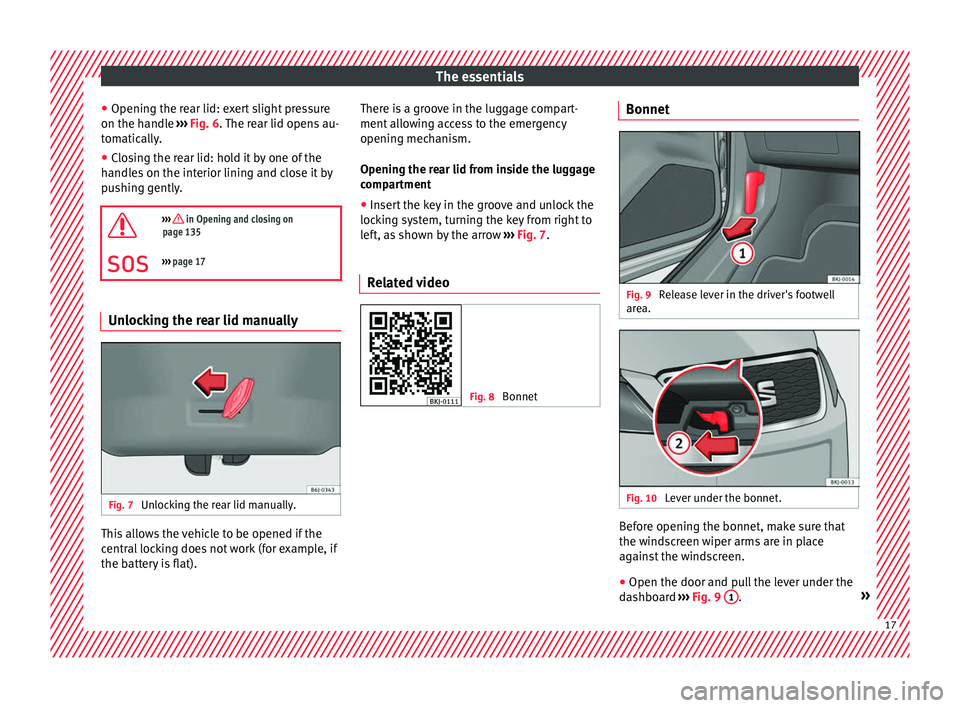
Fig. 7
Unlocking the rear lid manually. This allows the vehicle to be opened if the
c
entr
al
locking does not work (for example, if
the battery is flat). There is a groove in the luggage compart-
ment allo
wing access to the emergency
opening mechanism.
Opening the rear lid from inside the luggage
compartment
● Insert the key in the groove and unlock the
lockin
g system, turning the key from right to
left, as shown by the arrow ››› Fig. 7.
Related video Fig. 8
Bonnet Bonnet
Fig. 9
Release lever in the driver's footwell
ar e
a. Fig. 10
Lever under the bonnet. Before opening the bonnet, make sure that
the w
ind
s
creen wiper arms are in place
against the windscreen.
● Open the door and pull the lever under the
dashbo
ard ››› Fig. 9 1 .
» 17
Page 20 of 308
The essentials
● To lif
t
the bonnet, press towards the left on
the lever located under the bonnet, in the
centre ››› Fig. 10 2 . The arrester hooks are
r el
e
ased.
● Release the bonnet stay and secure it in
the fixtur
e designed for this in the bonnet.
››› in safety notes for work in the en-
gine compartment on page 267
››› page 267 Electric windows*
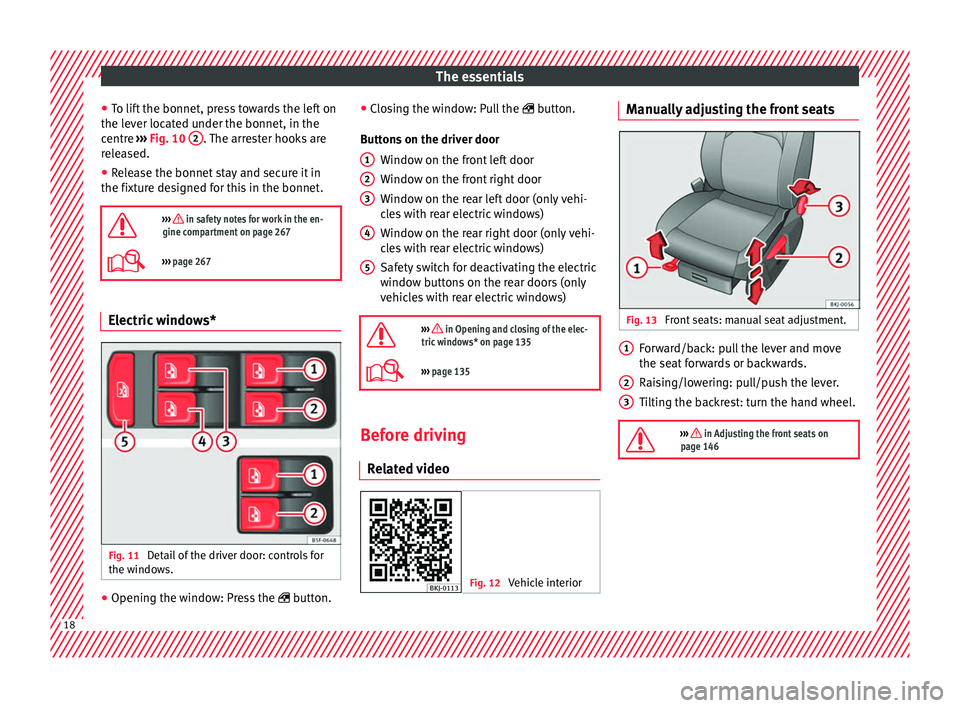
Fig. 11
Detail of the driver door: controls for
the w indo
w
s. ●
Opening the window: Press the butt
on. ●
C
los
ing the window: Pull the button.
Buttons on the driver door Window on the front left door
Window on the front right door
Window on the rear left door (only vehi-
cles with rear electric windows)
Window on the rear right door (only vehi-
cles with rear electric windows)
Safety switch for deactivating the electric
window buttons on the rear doors (only
vehicles with rear electric windows)
››› in Opening and closing of the elec-
tric windows* on page 135
››› page 135 Before driving
R el
at
ed video Fig. 12
Vehicle interior 1
2
3
4
5 Manually adjusting the front seats
Fig. 13
Front seats: manual seat adjustment. Forward/back: pull the lever and move
the se
at
f
orwards or backwards.
Raising/lowering: pull/push the lever.
Tilting the backrest: turn the hand wheel.
››› in Adjusting the front seats on
page 146 1
2
3
18
Page 40 of 308
The essentialsMenuFunction
Digital dis-
play of speedCurrent speed displayed in digital
format.
Speed warning
at --- km/h or
Speed warning
at --- mphIf the stored speed is exceeded
(between 30 - 250 km/h, or 19 -
155 mph), an audible warning is
given together with a visual warn-
ing.
Oil tempera-
tureUpdated engine oil temperature
digital display
Coolant tem-
perature gaugeDigital display of the current tem-
perature of the liquid coolant. Storing a speed with the speed warning
● Select the display Speed warning at
--- km/h (---
mph)
● Press the button
on the windscreen
w iper l
ev
er or the button on the multifunc-
tion s t
eerin
g wheel to store the current speed
and activate the warning.
● To switch system on: adjust to the desired
speed within 5 sec
onds using the rocker
switch on the windscreen wiper lever or
b y
t
urning the thumbwheel on the multifunc-
tion steering wheel. Next, press the button or
again or wait several seconds.
The s peed i
s
stored and the warning activa-
ted.
● To switch system off: press the but-
ton or
. The stored speed is de-
l et
ed. Assist systems menu
MenuFunction
ACCDisplay of Adaptive Cruise Control
(ACC)
››› page 209.
Front AssistSwitching the monitoring system
on and off ››› page 203.
Fatigue detec-
tion *Switching the fatigue detection
on or off (pause recommenda-
tion) ››› page 227. Status display
Bonnet, r e
ar lid and door
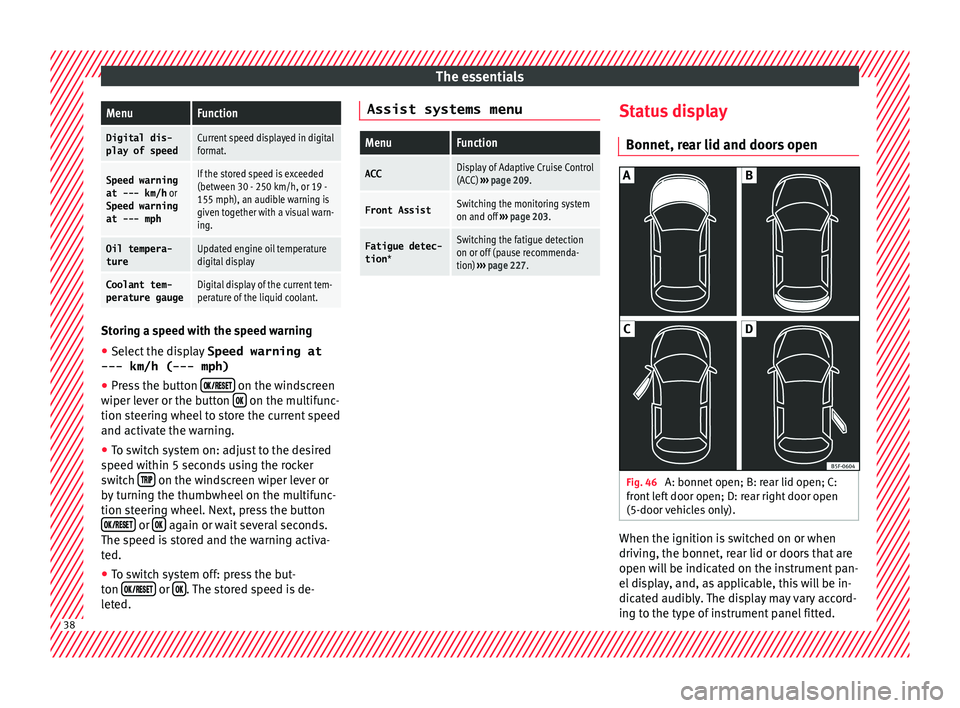
s open Fig. 46
A: bonnet open; B: rear lid open; C:
fr ont
l
eft door open; D: rear right door open
(5-door vehicles only). When the ignition is switched on or when
driv
in
g, the bonnet, r
ear lid or doors that are
open will be indicated on the instrument pan-
el display, and, as applicable, this will be in-
dicated audibly. The display may vary accord-
ing to the type of instrument panel fitted. 38
Page 41 of 308
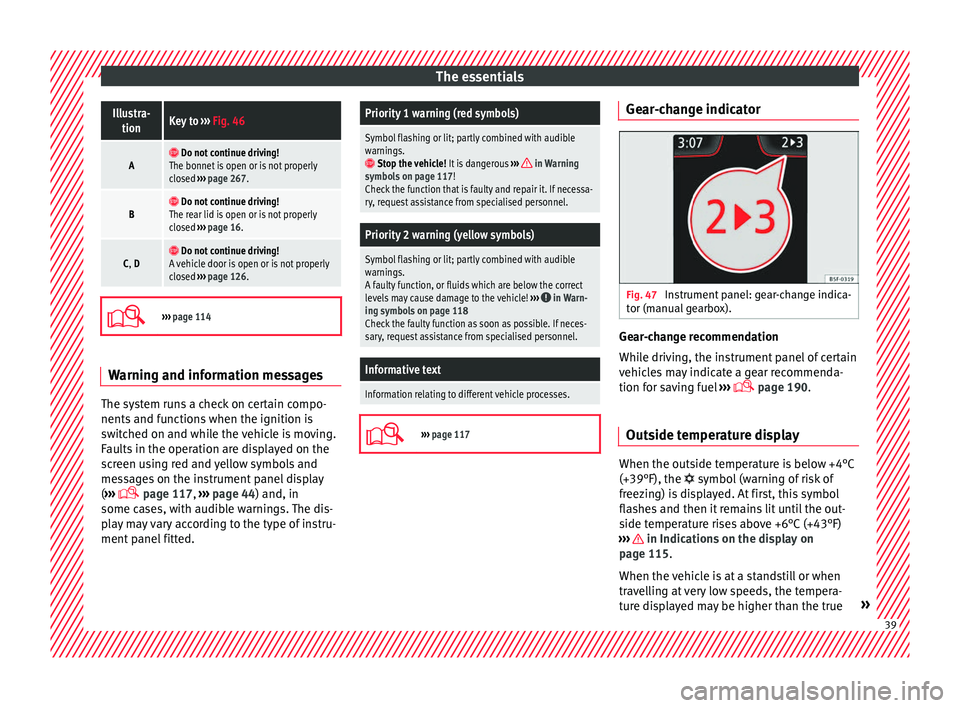
The essentialsIllustra-
tionKey to ››› Fig. 46
A Do not continue driving!
The bonnet is open or is not properly
closed ››› page 267.
B Do not continue driving!
The rear lid is open or is not properly
closed ››› page 16.
C, D Do not continue driving!
A vehicle door is open or is not properly
closed ››› page 126.
›››
page 114 Warning and information messages
The system runs a check on certain compo-
nents
and f
u
nctions when the ignition is
switched on and while the vehicle is moving.
Faults in the operation are displayed on the
screen using red and yellow symbols and
messages on the instrument panel display
( ›››
page 117,
››› page 44) and, in
some cases, with audible warnings. The dis-
play may vary according to the type of instru-
ment panel fitted.
Priority 1 warning (red symbols)
Symbol flashing or lit; partly combined with audible
warnings.
Stop the vehicle! It is dangerous ››› in Warning
symbols on page 117!
Check the function that is faulty and repair it. If necessa-
ry, request assistance from specialised personnel.
Priority 2 warning (yellow symbols)
Symbol flashing or lit; partly combined with audible
warnings.
A faulty function, or fluids which are below the correct
levels may cause damage to the vehicle! ›››
in Warn-
ing symbols on page 118
Check the faulty function as soon as possible. If neces-
sary, request assistance from specialised personnel.
Informative text
Information relating to different vehicle processes.
›››
page 117 Gear-change indicator
Fig. 47
Instrument panel: gear-change indica-
t or (m
anual
gearbox). Gear-change recommendation
Whi
l
e driv
ing, the instrument panel of certain
vehicles may indicate a gear recommenda-
tion for saving fuel ›››
page 190.
Outside temperature display When the outside temperature is below +4°C
(+39°F), the
symbol
(w
arning of risk of
freezing) is displayed. At first, this symbol
flashes and then it remains lit until the out-
side temperature rises above +6°C (+43°F)
››› in Indications on the display on
p ag
e 115
.
When the vehicle is at a standstill or when
travelling at very low speeds, the tempera-
ture displayed may be higher than the true » 39
Page 48 of 308
The essentials
Fuel tank almost empty.›››
page
117
Fault in airbag system and seat
belt tensioners.›››
page
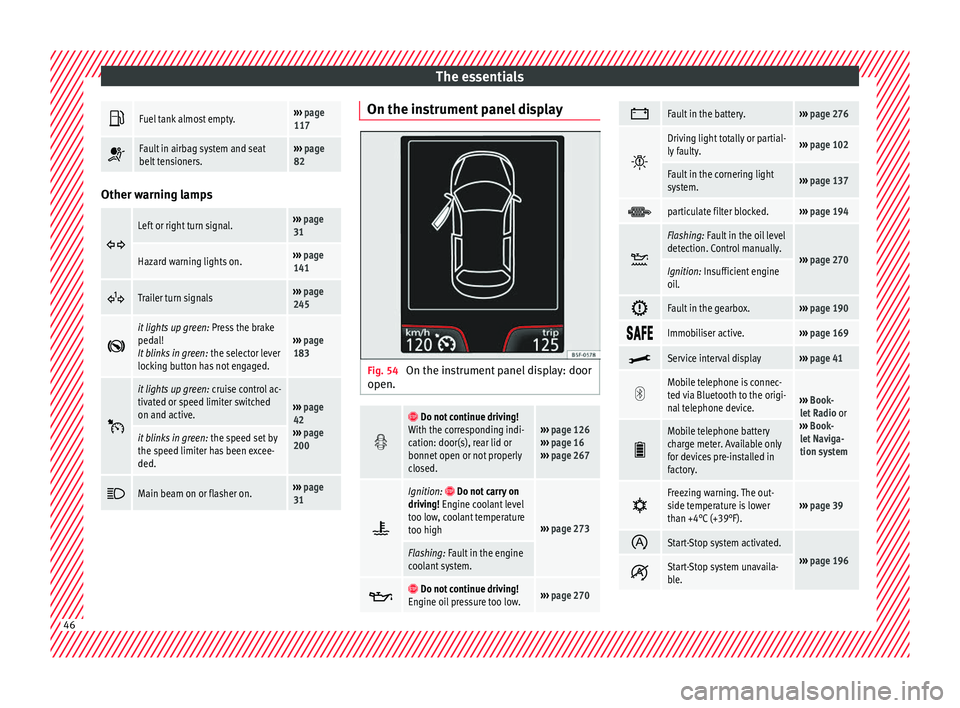
82 Other warning lamps
Left or right turn signal.›››
page
31
Hazard warning lights on.››› page
141
Trailer turn signals›››
page
245
it lights up green:
Press the brake
pedal!
It blinks in green: the selector lever
locking button has not engaged.››› page
183
it lights up green:
cruise control ac-
tivated or speed limiter switched
on and active.
››› page
42
››› page
200
it blinks in green: the speed set by
the speed limiter has been excee-
ded.
Main beam on or flasher on.›››
page
31 On the instrument panel display
Fig. 54
On the instrument panel display: door
open.
Do not continue driving!
With the corresponding indi-
cation: door(s), rear lid or
bonnet open or not properly
closed.››› page 126
››› page 16
››› page 267
Ignition: Do not carry on
driving! Engine coolant level
too low, coolant temperature
too high
››› page 273
Flashing: Fault in the engine
coolant system.
Do not continue driving!
Engine oil pressure too low.››› page 270
Fault in the battery.›››
page 276
Driving light totally or partial-
ly faulty.›››
page 102
Fault in the cornering light
system.››› page 137
particulate filter blocked.›››
page 194
Flashing: Fault in the oil level
detection. Control manually.
›››
page 270Ignition: Insufficient engine
oil.
Fault in the gearbox.›››
page 190
Immobiliser active.›››
page 169
Service interval display›››
page 41
Mobile telephone is connec-
ted via Bluetooth to the origi-
nal telephone device.
›››
Book-
let Radio or
››› Book-
let Naviga-
tion system
Mobile telephone battery
charge meter. Available only
for devices pre-installed in
factory.
Freezing warning. The out-
side temperature is lower
than +4°C (+39°F).›››
page 39
Start-Stop system activated.
›››
page 196 Start-Stop system unavaila-
ble.
46
Page 60 of 308
The essentials
Emergencies F u
se
s
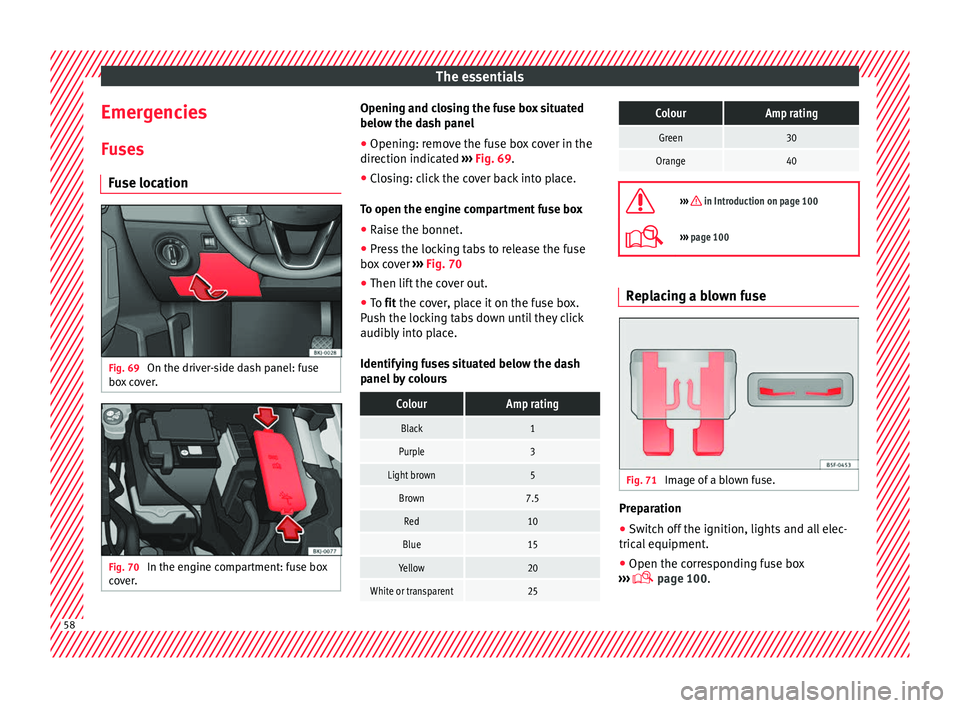
Fuse location Fig. 69
On the driver-side dash panel: fuse
bo x
c
over. Fig. 70
In the engine compartment: fuse box
c o
v
er. Opening and closing the fuse box situated
belo
w the d a
sh panel
● Opening: remove the fuse box cover in the
direction indicat
ed ››› Fig. 69.
● Closing: click the cover back into place.
To open the engine c
ompartment fuse box
● Raise the bonnet.
● Press the locking tabs to release the fuse
box c
over ››› Fig. 70
● Then lift the cover out.
● To fit the cover, place it on the fuse box.
Pu
sh the locking tabs down until they click
audibly into place.
Identifying fuses situated below the dash
panel by colours
ColourAmp rating
Black1
Purple3
Light brown5
Brown7.5
Red10
Blue15
Yellow20
White or transparent25
ColourAmp rating
Green30
Orange40
››› in Introduction on page 100
›››
page 100 Replacing a blown fuse
Fig. 71
Image of a blown fuse. Preparation
●
Switch off the ignition, lights and all elec-
tric al
equipment
.
● Open the corresponding fuse box
›››
page 100.58
Page 72 of 308
The essentials
Do not change the windscreen wipers when
out of
the ser
vice position, as it could cause
paint to flake off the bonnet due to friction
with the windscreen wiper arm.
Service position (for changing wiper blades)
● Ensure that the wiper blades are not frozen.
● Turn the ignition on and off and then (with-
in appro
ximately 9 seconds) push the wind-
screen wiper lever down (short wipe). The
windscreen wipers will move to the service
position ››› Fig. 88.
Removing the wiper blade
● Lift the windscreen wiper arm.
● Press the securing tab down 1
› ›
› Fig. 89
.
● Extract the wiper blade from the wiper arm.
Fitting the wiper b
lade
● Insert the wiper blade onto the windscreen
wiper arm unti
l it clicks into place.
● Place the windscreen wiper arms to their in-
itial po
sition.
››› in Changing the windscreen and
rear window wiper blades on page 96
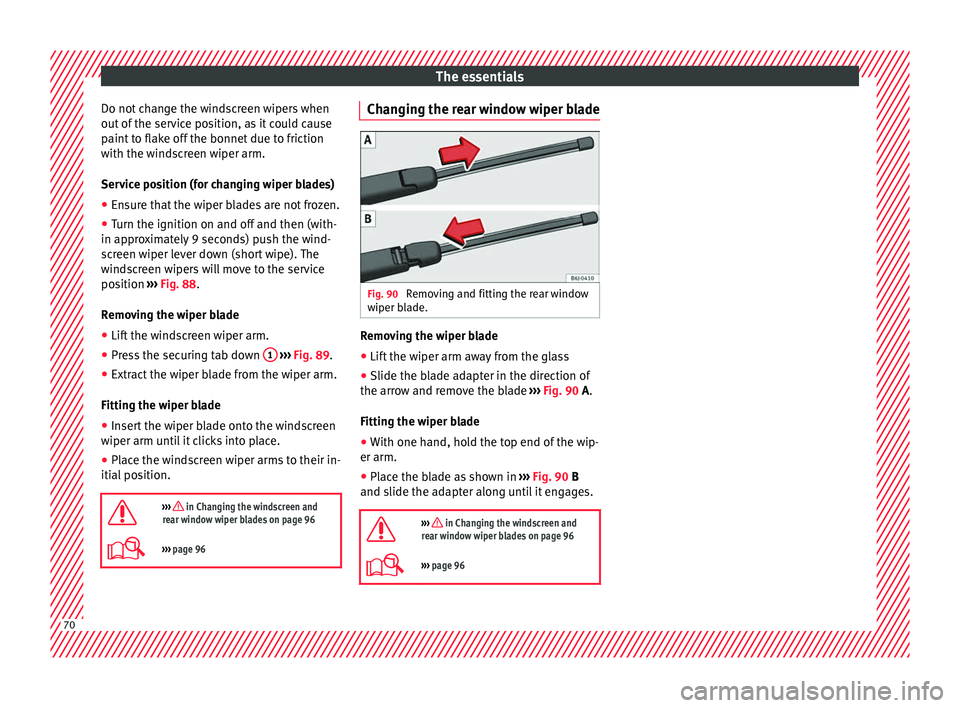
››› page 96 Changing the rear window wiper blade
Fig. 90
Removing and fitting the rear window
w iper b
l
ade. Removing the wiper blade
● Lift the wiper arm away from the glass
● Slide the blade adapter in the direction of
the arr o
w and r
emove the blade ››› Fig. 90 A.
Fitting the wiper blade
● With one hand, hold the top end of the wip-
er arm.
● Place the blade as shown in ›››
Fig. 90 B
and slide the adapter along until it engages.
››› in Changing the windscreen and
rear window wiper blades on page 96
››› page 96 70
Page 98 of 308
Emergencies
Changing the windscreen wiper
b l
a
des
Changing the windscreen and rear
window wiper blades Read the additional information carefully
›› ›
page 69.
Perfect wiper blade condition is essential for
clear vision. Damaged wiper blades should
be replaced immediately.
The windscreen wiper blades are supplied as
standard with a layer of graphite. This layer is
responsible for ensuring that the wipe is si-
lent. If the graphite layer is damaged, the
noise of the water as it is wiped across the
windscreen will be louder.
Check the condition of the wiper blades regu-
larly. If the wipers scrape across the glass ,
they should be changed if they are damaged,
or cleaned if they are dirty ››› .
If thi
s
does not produce the desired results,
the setting angle of the windscreen wiper
arms might be incorrect. They should be
checked by a specialised workshop and cor-
rected if necessary. WARNING
Do not drive unless you have good visibility
through a l
l windows! ●
Cle
an the windscreen wiper blades and all
windows regularly.
● The wiper blades should be changed once
or twice a
year. CAUTION
● Dam aged or dir
ty windscreen wipers could
scratch the glass.
● Never use fuel, nail varnish remover, paint
thinner or simil
ar products to clean the win-
dows. This could damage the windscreen
wiper blades.
● Never move any windscreen wiper by hand.
This c
ould cause damage.
● To prevent damage to the bonnet and the
winds
creen wiper arms, the latter should only
be lifted off the windscreen when in service
position. Note
● The wind s
creen wiper arms can be moved
to the service position only when the bonnet
is properly closed.
● You can also use the service position, for
examp
le, if you want to fix a cover over the
windscreen in the winter to keep it clear of
ice. Towing or tow-starting
Gener a
l
information Read the additional information carefully
›› ›
page 66.
Tow-starting means starting the engine of
the vehicle while another pulls it.
Towing means one vehicle pulling another
that is not roadworthy.
If the vehicle comes with the Keyless Access
system, towing is only allowed with the igni-
tion on!
The vehicle battery drains if the vehicle is
towed with the engine switched off and the
ignition connected. Depending on the battery
charge status, the drop in voltage may be so
large, even after just a few minutes, that no
electrical device in the vehicle may work e.g.
the hazard warning lights. In vehicles with
the Keyless Access system, the steering
wheel could lock up. WARNING
If the vehicle has no electrical power, the
brak e light
s, turn signals and all other lights
will no longer function. Do not have the vehi-
cle towed away. Failure to follow this instruc-
tion could result in an accident. 96
Page 105 of 308
Fuses and bulbs
CAUTION
● Remo v
e the ignition key before working on
the electric system. Otherwise, a short circuit
could occur.
● Switch off the lights or parking lights be-
fore
you change a bulb. For the sake of the environment
Please ask your specialist retailer how to dis-
pose of u
sed bulbs in the proper manner. Note
● Dependin g on w
eather conditions (cold or
wet), the front lights, the fog lights, the tail
lights and the turn signals may be temporari-
ly misted. This has no influence on the useful
life of the lighting system. By switching on
the lights, the area through which the beam
of light is projected will quickly be demisted.
However, the edges may continue to be mis-
ted.
● Please check at regular intervals that all
lighting (es
pecially the exterior lighting) on
your vehicle is functioning properly. This is
not only in the interest of your own safety,
but also that of all other road users.
● Before changing a bulb, make sure you
have the c
orrect new bulb.
● Do not touch the glass part of the bulb with
your bar
e hands, use a cloth or paper towel
instead. The residue left by the fingerprints
would vaporise as a result of the heat gener- ated by the bulb, they will be deposited on
the refl
ect
or and will impair its surface.
● Depending on the level of equipment fitted
in the vehic
le, LEDs may be used for part or
all of the interior and/or exterior lighting.
LEDs have an estimated life that exceeds that
of the vehicle. If an LED light fails, go to an
authorised workshop for its replacement. Change the front bulbs
Main be am he
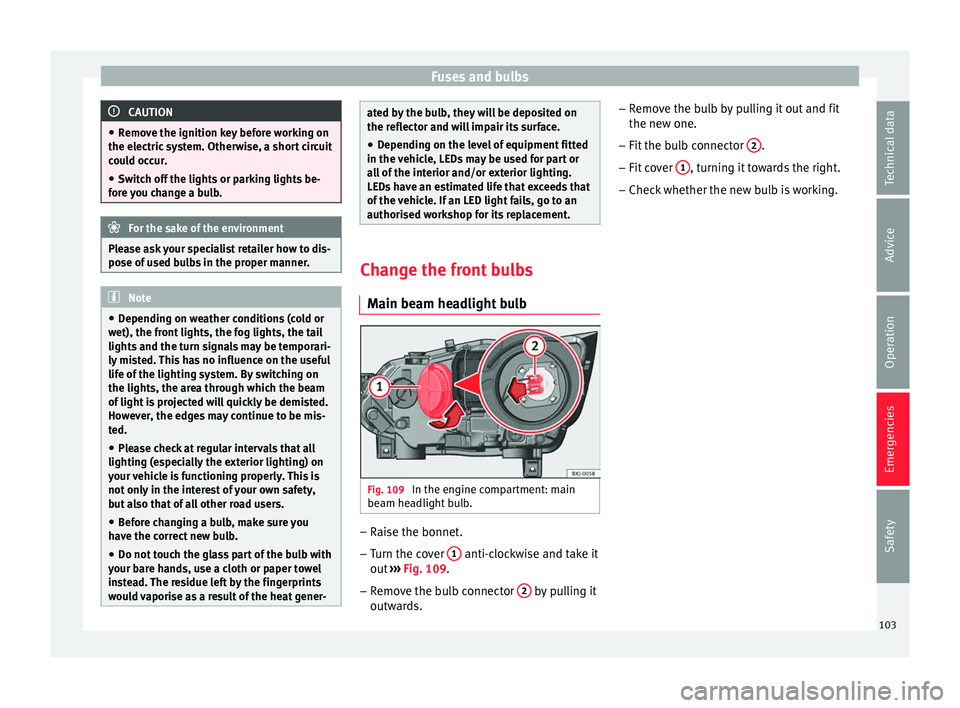
adlight bulb Fig. 109
In the engine compartment: main
be am he
a
dlight bulb. –
Raise the bonnet.
– Turn the cover 1 anti-clockwise and take it
out
›
›
› Fig. 109.
– Remove the bulb connector 2 by pulling it
outw ar
d
s. –
Remov
e the bulb by pulling it out and fit
the new one.
– Fit the bulb connector 2 .
– Fit cover 1 , turning it towards the right.
– Check whether the new bulb is working.
103
Technical data
Advice
Operation
Emergencies
Safety