boot Seat Arona 2017 Owner's Manual
[x] Cancel search | Manufacturer: SEAT, Model Year: 2017, Model line: Arona, Model: Seat Arona 2017Pages: 308, PDF Size: 6.66 MB
Page 7 of 308
Table of Contents
Table of Contents
The e s
senti
als . . . . . . . . . . . . . . . . . . . . . . . . 7
Exterior view . . . . . . . . . . . . . . . . . . . . . . . . . . . . 7
Exterior view . . . . . . . . . . . . . . . . . . . . . . . . . . . . 8
Driver-side general instrument panel (left-
hand drive) . . . . . . . . . . . . . . . . . . . . . . . . . . . . .
9
Driver-side general instrument panel (right-
hand drive) . . . . . . . . . . . . . . . . . . . . . . . . . . . . .
10
Centre console . . . . . . . . . . . . . . . . . . . . . . . . . . 11
Passenger-side general instrument panel (left-
hand drive) . . . . . . . . . . . . . . . . . . . . . . . . . . . . .
12
Passenger-side general instrument panel
(right-hand driv
e) . . . . . . . . . . . . . . . . . . . . . . . . 13
Interior view . . . . . . . . . . . . . . . . . . . . . . . . . . . . 14
How it works . . . . . . . . . . . . . . . . . . . . . . . . . . . . 15
Opening and closing . . . . . . . . . . . . . . . . . . . . . 15
Before driving . . . . . . . . . . . . . . . . . . . . . . . . . . . 18
Airbags . . . . . . . . . . . . . . . . . . . . . . . . . . . . . . . . 20
Child seats . . . . . . . . . . . . . . . . . . . . . . . . . . . . . 23
Starting the vehicle . . . . . . . . . . . . . . . . . . . . . . 30
Lights and visibility . . . . . . . . . . . . . . . . . . . . . . 30
Easy Connect . . . . . . . . . . . . . . . . . . . . . . . . . . . 33
Driver information system . . . . . . . . . . . . . . . . . 35
Status display . . . . . . . . . . . . . . . . . . . . . . . . . . . 38
Cruise control . . . . . . . . . . . . . . . . . . . . . . . . . . . 42
Warning lamps . . . . . . . . . . . . . . . . . . . . . . . . . . 44
Gearbox lever . . . . . . . . . . . . . . . . . . . . . . . . . . . 47
Air conditioning . . . . . . . . . . . . . . . . . . . . . . . . . 48
Fluid Level control . . . . . . . . . . . . . . . . . . . . . . . 54
Emergencies . . . . . . . . . . . . . . . . . . . . . . . . . . . . 58
Fuses . . . . . . . . . . . . . . . . . . . . . . . . . . . . . . . . . . 58
Bulbs . . . . . . . . . . . . . . . . . . . . . . . . . . . . . . . . . . 59
Action in the event of a puncture . . . . . . . . . . . 60
Changing a wheel . . . . . . . . . . . . . . . . . . . . . . . 61
Snow chains . . . . . . . . . . . . . . . . . . . . . . . . . . . . 66
Emergency towing of the vehicle . . . . . . . . . . . 66 How to jump start . . . . . . . . . . . . . . . . . . . . . . . . 67
Changing the windscreen wiper blades . . . . . . 69
Safety . . . . . . . . . . . . . . . . . . . . . . . . . . . . . . . . 71
Safe driving . . . . . . . . . . . . . . . . . . . . . . . . . . . . 71
Safety first! . . . . . . . . . . . . . . . . . . . . . . . . . . . . . 71
Advice about driving . . . . . . . . . . . . . . . . . . . . . 71
Correct position for passengers . . . . . . . . . . . . 72
Pedal area . . . . . . . . . . . . . . . . . . . . . . . . . . . . . . 76
Seat belts . . . . . . . . . . . . . . . . . . . . . . . . . . . . . . 77
Why wear a seat belt? . . . . . . . . . . . . . . . . . . . . 77
How to properly adjust your seatbelt . . . . . . . . 80
Belt pretensioners* . . . . . . . . . . . . . . . . . . . . . . 81
Airbag system . . . . . . . . . . . . . . . . . . . . . . . . . . 82
Brief introduction . . . . . . . . . . . . . . . . . . . . . . . . 82
Airbag safety instructions . . . . . . . . . . . . . . . . . 84
Deactivating airbags . . . . . . . . . . . . . . . . . . . . . 86
Transporting children safely . . . . . . . . . . . . . . . 88
Safety for children . . . . . . . . . . . . . . . . . . . . . . . 88
Child seats . . . . . . . . . . . . . . . . . . . . . . . . . . . . . 89
Event Data Recorder . . . . . . . . . . . . . . . . . . . . . . 92
Description and operation . . . . . . . . . . . . . . . . . 92
Emergencies . . . . . . . . . . . . . . . . . . . . . . . . . . 93
Self-help . . . . . . . . . . . . . . . . . . . . . . . . . . . . . . . 93
Emergency equipment . . . . . . . . . . . . . . . . . . . . 93
Tyre repair . . . . . . . . . . . . . . . . . . . . . . . . . . . . . . 94
Changing the windscreen wiper blades . . . . . . 96
Towing or tow-starting . . . . . . . . . . . . . . . . . . . . 96
Fuses and bulbs . . . . . . . . . . . . . . . . . . . . . . . . . 100
Fuses . . . . . . . . . . . . . . . . . . . . . . . . . . . . . . . . . . 100
Changing bulbs . . . . . . . . . . . . . . . . . . . . . . . . . 102
Change the front bulbs . . . . . . . . . . . . . . . . . . . 103
Change the rear bulbs . . . . . . . . . . . . . . . . . . . . 105
Changing the interior bulbs . . . . . . . . . . . . . . . . 107
Operation . . . . . . . . . . . . . . . . . . . . . . . . . . . . . 111
Controls and displays . . . . . . . . . . . . . . . . . . . . 111
General instrument panel . . . . . . . . . . . . . . . . . 110 Instruments and warning/control lamps
. . . . . 113
Instruments . . . . . . . . . . . . . . . . . . . . . . . . . . . . 113
Warning and control lamps . . . . . . . . . . . . . . . . 117
Introduction to the Easy Connect system* . . . . 118
System settings (CAR)* . . . . . . . . . . . . . . . . . . . 118
Communications and multimedia . . . . . . . . . . . 119
Steering wheel controls* . . . . . . . . . . . . . . . . . . 119
Multimedia . . . . . . . . . . . . . . . . . . . . . . . . . . . . . 123
Opening and closing . . . . . . . . . . . . . . . . . . . . . 124
Keys . . . . . . . . . . . . . . . . . . . . . . . . . . . . . . . . . . . 124
Central locking system . . . . . . . . . . . . . . . . . . . . 126
Anti-theft alarm* . . . . . . . . . . . . . . . . . . . . . . . . 132
Boot hatch . . . . . . . . . . . . . . . . . . . . . . . . . . . . . 135
Electric windows . . . . . . . . . . . . . . . . . . . . . . . . . 135
Lights and visibility . . . . . . . . . . . . . . . . . . . . . . 137
Lights . . . . . . . . . . . . . . . . . . . . . . . . . . . . . . . . . 137
Interior lights . . . . . . . . . . . . . . . . . . . . . . . . . . . 142
Visibility . . . . . . . . . . . . . . . . . . . . . . . . . . . . . . . 143
Windscreen wiper and rear window wiper sys-
tems . . . . . . . . . . . . . . . . . . . . . . . . . . . . . . . . . . 143 R
ear view mirrors . . . . . . . . . . . . . . . . . . . . . . . . 144
Seats and head restraints . . . . . . . . . . . . . . . . . 146
Adjusting the seat and head restraints . . . . . . 146
Seat functions . . . . . . . . . . . . . . . . . . . . . . . . . . 147
Transport and practical equipment . . . . . . . . . 150
Practical equipment . . . . . . . . . . . . . . . . . . . . . . 150
Luggage compartment . . . . . . . . . . . . . . . . . . . . 152
Roof carrier* . . . . . . . . . . . . . . . . . . . . . . . . . . . . 156
Air conditioning . . . . . . . . . . . . . . . . . . . . . . . . . 158
Heating, ventilation and cooling . . . . . . . . . . . . 158
Heating and fresh air . . . . . . . . . . . . . . . . . . . . . 161
Manual air conditioning* . . . . . . . . . . . . . . . . . . 163
Climatronic* . . . . . . . . . . . . . . . . . . . . . . . . . . . . 165
Driving . . . . . . . . . . . . . . . . . . . . . . . . . . . . . . . . 167
Address . . . . . . . . . . . . . . . . . . . . . . . . . . . . . . . . 167
Starting and stopping the engine . . . . . . . . . . . 168
Braking and parking . . . . . . . . . . . . . . . . . . . . . 174
Braking and stability systems . . . . . . . . . . . . . . 177 5
Page 18 of 308
The essentials
● Inser
t
the key shaft into the lower opening
in the cover on the driver door handle
››› Fig. 4 (arrow) then remove the cover up-
wards.
● Insert the key blade into the lock cylinder
to un
lock or lock the vehicle.
Special Characteristics
● The anti-theft alarm will remain active when
vehicl
es are unlocked. However, the alarm
will not be triggered ›››
page 132.
● After the driver door is opened, you have
15 seconds
to switch on the ignition. Once
this time has elapsed, the alarm is triggered.
● Switch the ignition on. The electronic im-
mobi
lizer recognises a valid vehicle key and
deactivates the anti-theft alarm system. Note
The anti-theft alarm is not activated when the
vehic l
e is locked manually using the key
shaft ›››
page 132. Emergency locking of doors without
door cylinder
Fig. 5
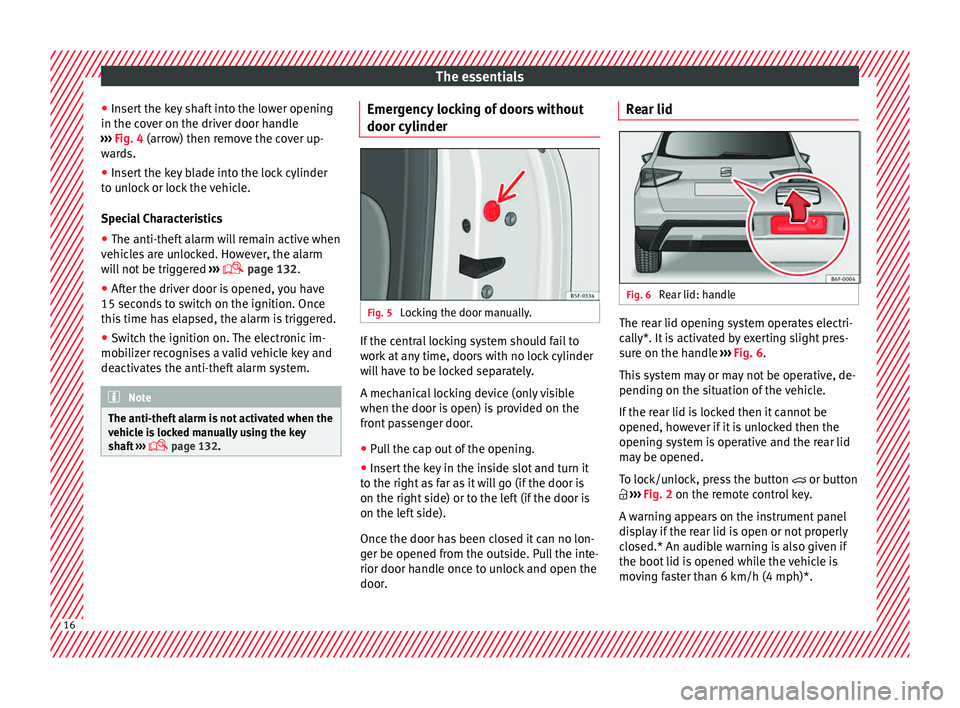
Locking the door manually. If the central locking system should fail to
w
ork
at
any time, doors with no lock cylinder
will have to be locked separately.
A mechanical locking device (only visible
when the door is open) is provided on the
front passenger door.
● Pull the cap out of the opening.
● Insert the key in the inside slot and turn it
to the right a
s far as it will go (if the door is
on the right side) or to the left (if the door is
on the left side).
Once the door has been closed it can no lon-
ger be opened from the outside. Pull the inte-
rior door handle once to unlock and open the
door. Rear lid
Fig. 6
Rear lid: handle The rear lid opening system operates electri-
c
al
ly*. It
is activated by exerting slight pres-
sure on the handle ››› Fig. 6.
This system may or may not be operative, de-
pending on the situation of the vehicle.
If the rear lid is locked then it cannot be
opened, however if it is unlocked then the
opening system is operative and the rear lid
may be opened.
To lock/unlock, press the button or button
››› Fig. 2 on the remote control key.
A warning appears on the instrument panel
display if the rear lid is open or not properly
closed.* An audible warning is also given if
the boot lid is opened while the vehicle is
moving faster than 6 km/h (4 mph)*. 16
Page 28 of 308
The essentials
Securing child seats with the ISOFIX/iSize and Top Tether system* Fig. 30
ISOFIX/iSize securing rings. Fig. 31
Position of the Top Tether rings on the
bac k
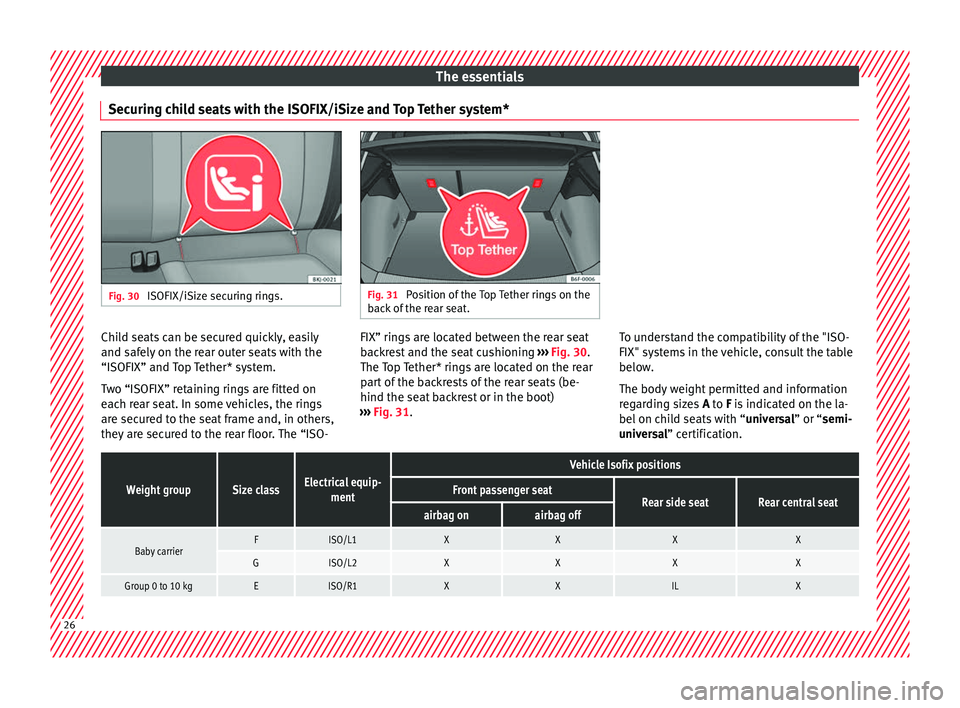
of the rear seat. Child seats can be secured quickly, easily
and s
af
ely
on the rear outer seats with the
“ISOFIX” and Top Tether* system.
Two “ISOFIX” retaining rings are fitted on
each rear seat. In some vehicles, the rings are secured to the seat frame and, in others,
they are secured to the rear floor. The “ISO- FIX” rings are located between the rear seat
back
rest and the seat cushioning ››› Fig. 30.
The Top Tether* rings are located on the rear
part of the backrests of the rear seats (be-
hind the seat backrest or in the boot)
››› Fig. 31. To understand the compatibility of the "ISO-
FIX" syst
ems in the vehicle, consult the table
below.
The body weight permitted and information
regarding sizes A to F is indicated on the la-
bel on child seats with “ universal” or “semi-
universal” certification.
Weight groupSize classElectrical equip- ment
Vehicle Isofix positions
Front passenger seatRear side seatRear central seatairbag onairbag off
Baby carrierFISO/L1XXXX
GISO/L2XXXX
Group 0 to 10 kgEISO/R1XXILX26
Page 50 of 308
The essentials
››› in Selector lever positions on
page 184
››› page 183
››› page 48 Manual release of the selector lever
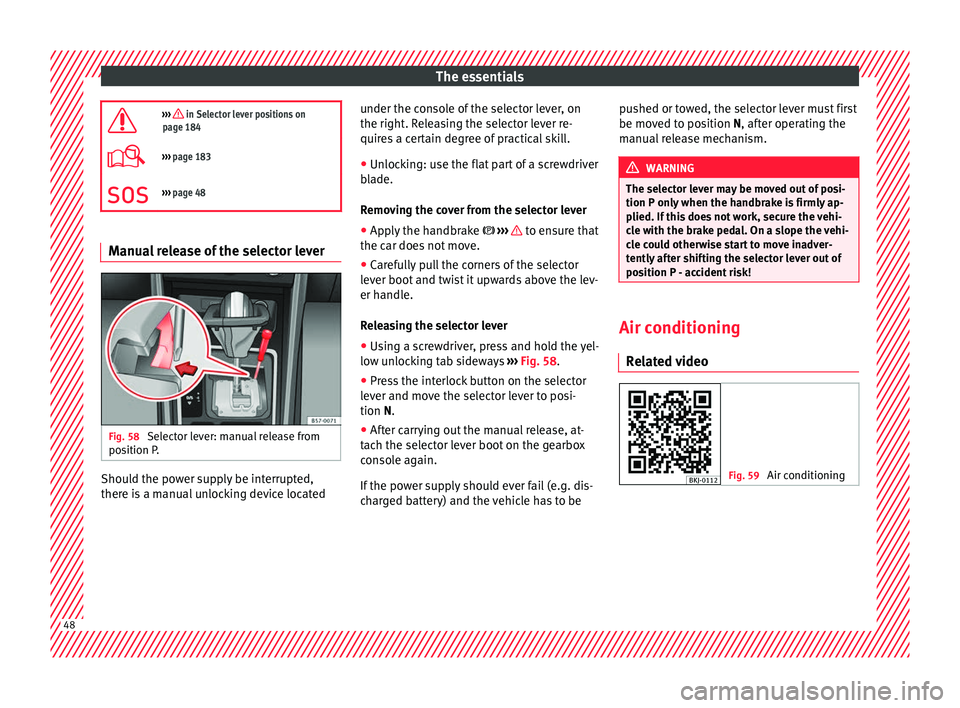
Fig. 58
Selector lever: manual release from
po s
ition P
. Should the power supply be interrupted,
ther
e i
s
a manual unlocking device located under the console of the selector lever, on
the right. Rel
easing the selector lever re-
quires a certain degree of practical skill.
● Unlocking: use the flat part of a screwdriver
bla
de.
Removing the cover from the selector lever
● Apply the handbrake ›››
to ensure that
the c ar doe
s
not move.
● Carefully pull the corners of the selector
lever boot
and twist it upwards above the lev-
er handle.
Releasing the selector lever
● Using a screwdriver, press and hold the yel-
low un
locking tab sideways ››› Fig. 58.
● Press the interlock button on the selector
lever and mo
ve the selector lever to posi-
tion N.
● After carrying out the manual release, at-
tach the sel
ector lever boot on the gearbox
console again.
If the power supply should ever fail (e.g. dis-
charged battery) and the vehicle has to be pushed or towed, the selector lever must first
be moved t
o position N, after operating the
manual release mechanism. WARNING
The selector lever may be moved out of posi-
tion P only when the h
andbrake is firmly ap-
plied. If this does not work, secure the vehi-
cle with the brake pedal. On a slope the vehi-
cle could otherwise start to move inadver-
tently after shifting the selector lever out of
position P - accident risk! Air conditioning
R el
at
ed video Fig. 59
Air conditioning48
Page 93 of 308
Transporting children safely
● Aut om
atic
three-point seat belt . Whenever
possible, it is preferable to attach the child
seats with the ISOFIX system rather than at-
taching them with an automatic three-point
seat belt ›››
page 24.
Additional attachment:
● Top Tether : The Top Tether belt is guided
ov
er the back of the rear seat and attached to
an anchor point with a hook. Anchor points
are located at the back of the rear seat back-
rest on the boot side ›››
page 29
. The
rings for retaining the Top Tether belt are
marked with an anchor symbol.
● Support bracket : Some chi
ld seats rest on
the floor of the vehicle with a support brack-
et. The support bracket prevents the child
seat from tipping forward in the event of im-
pact. Child seats fitted with a support bracket
should only be used in the passenger seat
and side rear seats ››› . For the assembly of
thi s
type of
seat you should also consult the
list of approved vehicles for this assembly,
available in the instructions for child restraint
systems.
Recommended systems for attaching child
seats
SEAT recommends attaching child seats as
follows: ●
Baby
carriers or child seats in the opposite
direction of travel: ISOFIX and support brack-
et or iSize.
● Child seats in the direction of travel: ISO-
FIX and T
op Tether. WARNING
Incorrect use of the support bracket can
cau se seriou
s or fatal injury.
● Make sure the support bracket is correctly
and safely
installed. 91
Technical data
Advice
Operation
Emergencies
Safety
Page 110 of 308
Emergencies
Luggage compartment light* Fig. 121
Boot light. Fig. 122
Boot light. –
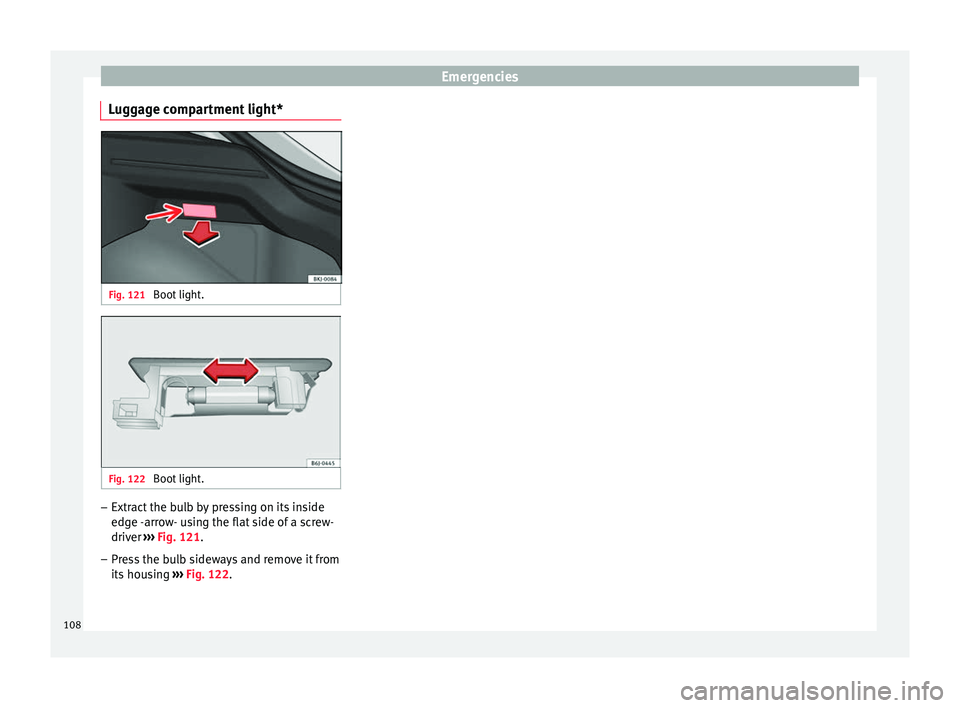
Extract the bulb by pressing on its inside
edg e -
arr
ow- using the flat side of a screw-
driver ››› Fig. 121.
– Press the bulb sideways and remove it from
its hous
ing ››› Fig. 122.
108
Page 129 of 308
Opening and closing
Note
For anti-theft security, only the driver door is
fitted w ith a loc
k cylinder.“Safe” security system*
This is an anti-theft device which consists of
a doubl
e loc
k for the door locks and a deacti-
vation function for the boot in order to pre-
vent forced entry.
Activation
The “safe” system is activated when the vehi-
cle is locked using the key or the remote con-
trol.
To activate it with the key, rotate once it is in-
serted in the door lock cylinder in the locking
direction.
To activate the system using the remote con-
trol, press the lock button once on the re-
mote.
Once this system is activated, opening doors
from the outside and the inside is not possi-
ble. The rear lid can not be opened. The cen-
tral lock button does not work.
When the ignition is switched off, the instru-
ment panel display indicates that the “Safe”
system is on. Deactivation
Rot
at
e the key inserted in the lock cylinder
twice towards the locking direction.
To activate the system using the remote con-
trol, press the lock button on the remote
twice in less than five seconds.
On deactivating the “Safe” system, the alarm
volumetric sensor is also deactivated.
With the “Safe” switched off, doors can be
opened from the interior but not from the ex-
terior.
See “Selective unlocking system*”
“Safe” status
On the driver door, there is warning lamp visi-
ble from outside the vehicle through the win-
dow which shows the “Safe” system status.
We will know that “Safe” system is activated
by the flashing warning lamp. The indicator
will flash on all vehicles, fitted and nor fitted
with an alarm, until they unlock.
Remember:
Safe activated with or without an alarm:
warning lamp flashes continuously.
Safe deactivated without an alarm: the warn-
ing lamp stays off.
Safe deactivated with an alarm: the warning
lamp stays off. WARNING
No one should remain inside the vehicle if the
“Safe” sy s
tem is activated because opening
the doors will not be possible in the event of
an emergency neither from the inside nor the
outside and help from the outside is made
difficult. Danger of death. Passengers could
become trapped inside in case of emergency. Selective unlocking system*
This system allows to unlock either just the
driv
er door or al
l
the vehicle.
Driver door unlock button
Unlock once. Use either the key or the remote
control.
Once the key is inserted in the lock cylinder,
rotate once in the unlock direction. The driver
door will remain without “Safe” and un-
locked. In vehicles fitted with an alarm, see
the Anti-theft Alarm section ›››
page 132.
Using the remote control, press the unlock
button on the remote once. The “Safe” sys-
tem for all the vehicle is deactivated, only the
driver door is unlocked and both the alarm
and the warning lamp are also turned off. »
127
Technical data
Advice
Operation
Emergencies
Safety
Page 130 of 308
Operation
Unlocking all doors and the luggage com-
p ar
tment
The u
nlock button on the remote control
must be pressed twice so that all doors
and the luggage compartment can be
opened.
Press twice within 5 seconds to deactivate
the “Safe” system for all vehicle, to unlock all
doors and to use the luggage compartment.
The warning lamp and the alarm (only vehi-
cles fitted with one) are turned off.
Unlocking the luggage compartment
See ›››
page 16.
Self-locking system to prevent invol-
untar
y unlocking It is an anti-theft system and prevents the un-
int
ention
al
unlocking of the vehicle.
If the vehicle is unlocked and none of the
doors (including the boot) are opened within
30 seconds, it re-locks automatically.
Automatic speed-dependent locking
and unloc
king system*This is a safety system which prevents access
t
o the
v
ehicle from the outside when it is run-
ning (e.g. when stopped at a traffic light). Locking
The doors w
ill lock automatically if the speed
of 15 km/h (9 mph) is exceeded. The rear lid
will lock automatically if the speed of 6 km/h
(4 mph) is exceeded.
If the vehicle is stopped and any of its doors
open, when starting again and exceeding the
mentioned speed, all doors will lock again.
Unlocking
On withdrawing the ignition key, the vehicle
will returns to its status prior to self-locking.
Each door can be unlocked and opened inde-
pendently from the inside (for example, when
a passenger gets out). To do it, simply oper-
ate the lever inside the door. WARNING
The door handles must not be operated when
the v ehic
le is running: the door would open. Note
If the airbags are triggered during an acci-
dent, the v ehic
le is unlocked, except for the
luggage compartment. It is possible to lock
the vehicle from inside with the central lock-
ing, after turning the ignition off and back on
again. Central lock button*
Fig. 137
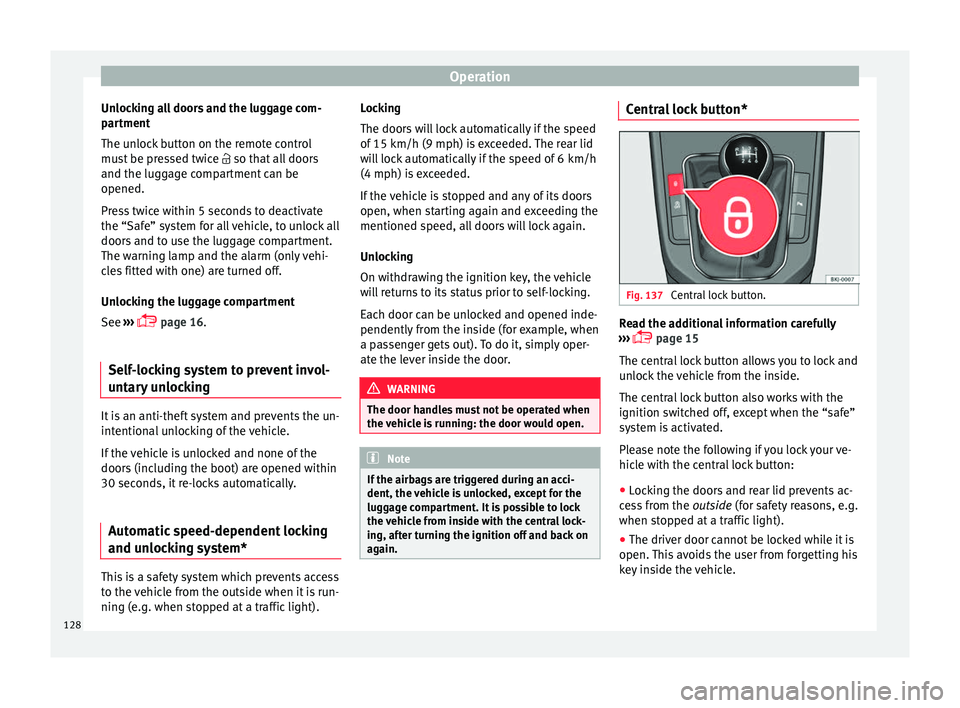
Central lock button. Read the additional information carefully
› ›
›
page 15
The central lock button allows you to lock and
unlock the vehicle from the inside.
The central lock button also works with the
ignition switched off, except when the “safe”
system is activated.
Please note the following if you lock your ve-
hicle with the central lock button:
● Locking the doors and rear lid prevents ac-
ces
s from the outside (for safety reasons, e.g.
when stopped at a traffic light).
● The driver door cannot be locked while it is
open. This
avoids the user from forgetting his
key inside the vehicle.
128
Page 137 of 308
Opening and closing
WARNING
Observe the safety warnings ››› in Descrip-
tion on pag e 126
. Boot hatch
Opening and c lo
singRead the additional information carefully
›› ›
page 16 WARNING
● Alw a
ys close the rear lid properly. Risk of
accident or injury.
● The rear lid must not be opened when the
rever
se or rear fog lights are lit. This may
damage the tail lights.
● Do not close the rear lid by pushing it down
with y
our hand on the rear window. The glass
could smash. Risk of injury!
● Ensure the rear lid is locked after closing it.
If not, it m
ay open unexpectedly while driv-
ing.
● Never allow children to play in or around
the vehic
le. A locked vehicle can be subjected
to extremely high and low temperatures, de-
pending on the time of year, thus causing se-
rious injuries/illness. It could even have fatal
consequences. Close and lock both the rear
lid and all the other doors when you are not
using the vehicle. ●
Clo s
ing the rear lid without observing and
ensuring it is clear could cause serious injury
to you and to third parties. Make sure that no
one is in the path of the rear lid.
● Never drive with the rear lid open or half-
closed, e
xhaust gases may enter into the in-
terior of the vehicle. Danger of poisoning!
● If you only open the rear lid, do not leave
the key in
side. The vehicle cannot be opened
if the key is left inside. Electric windows
Openin g and c
lo
sing of the electric
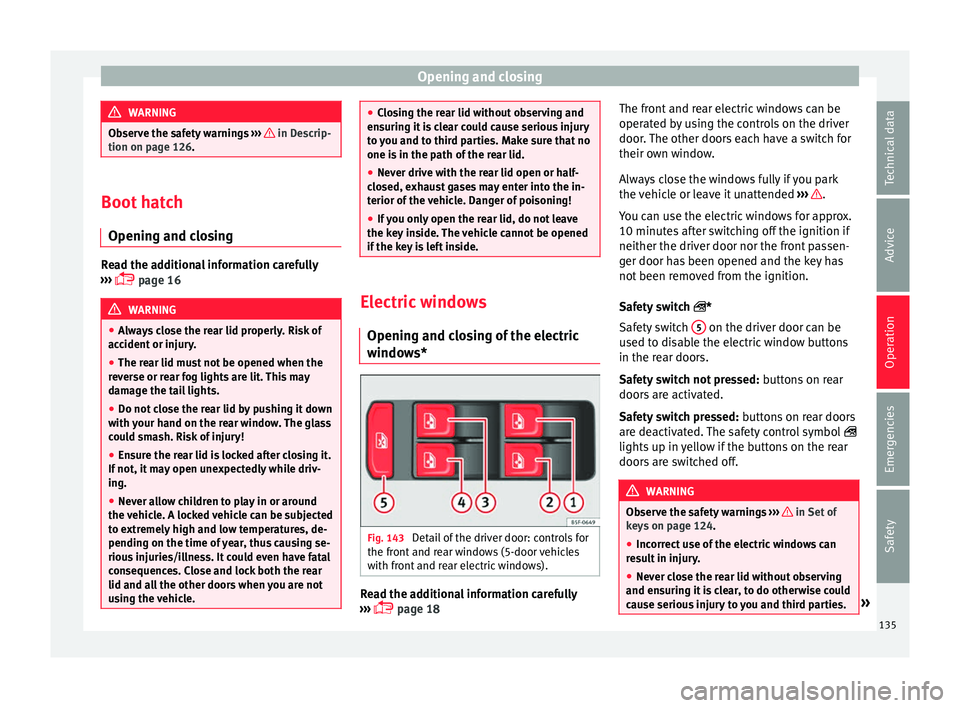
windows* Fig. 143
Detail of the driver door: controls for
the fr ont
and r
ear windows (5-door vehicles
with front and rear electric windows). Read the additional information carefully
› ›
›
page 18 The front and rear electric windows can be
operated b
y using the controls on the driver
door. The other doors each have a switch for
their own window.
Always close the windows fully if you park
the vehicle or leave it unattended ››› .
Y ou c
an u
se the electric windows for approx.
10 minutes after switching off the ignition if
neither the driver door nor the front passen-
ger door has been opened and the key has
not been removed from the ignition.
Safety switch *
Safety switch 5 on the driver door can be
u sed t
o di
sable the electric window buttons
in the rear doors.
Safety switch not pressed: buttons on rear
doors are activated.
Safety switch pressed: buttons on rear doors
are deactivated. The safety control symbol
lights up in yellow if the buttons on the rear
doors are switched off. WARNING
Observe the safety warnings ›››
in Set of
key s on p
age 124.
● Incorrect use of the electric windows can
res
ult in injury.
● Never close the rear lid without observing
and ensurin
g it is clear, to do otherwise could
cause serious injury to you and third parties. » 135
Technical data
Advice
Operation
Emergencies
Safety
Page 288 of 308
Technical data
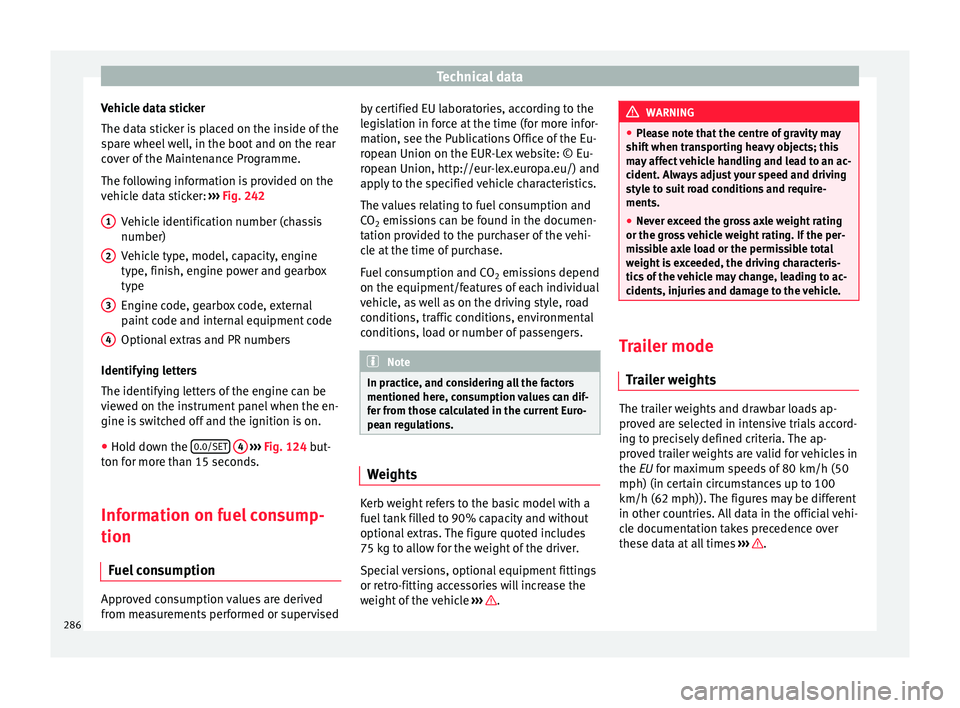
Vehicle data sticker
The d at
a s
ticker is placed on the inside of the
spare wheel well, in the boot and on the rear
cover of the Maintenance Programme.
The following information is provided on the
vehicle data sticker: ››› Fig. 242
Vehicle identification number (chassis
number)
Vehicle type, model, capacity, engine
type, finish, engine power and gearbox
type
Engine code, gearbox code, external
paint code and internal equipment code
Optional extras and PR numbers
Identifying letters
The identifying letters of the engine can be
viewed on the instrument panel when the en-
gine is switched off and the ignition is on.
● Hold down the 0.0/SET
4
› ›
› Fig. 124
but-
ton for more than 15 seconds.
Information on fuel consump-
tion
Fuel c
onsumption Approved consumption values are derived
fr
om me
a
surements performed or supervised
1 2
3
4 by certified EU laboratories, according to the
l
e
gi
slation in force at the time (for more infor-
mation, see the Publications Office of the Eu-
ropean Union on the EUR-Lex website: © Eu-
ropean Union, http://eur-lex.europa.eu/) and
apply to the specified vehicle characteristics.
The values relating to fuel consumption and
CO 2 emissions can be found in the documen-
tation provided to the purchaser of the vehi-
cle at the time of purchase.
Fuel consumption and CO 2 emissions depend
on the equipment/features of each individual
vehicle, as well as on the driving style, road
conditions, traffic conditions, environmental
conditions, load or number of passengers. Note
In practice, and considering all the factors
mentioned here, c on
sumption values can dif-
fer from those calculated in the current Euro-
pean regulations. Weights
Kerb weight refers to the basic model with a
f
uel
t
ank filled to 90% capacity and without
optional extras. The figure quoted includes
75 kg to allow for the weight of the driver.
Special versions, optional equipment fittings
or retro-fitting accessories will increase the
weight of the vehicle ››› . WARNING
● Ple a
se note that the centre of gravity may
shift when transporting heavy objects; this
may affect vehicle handling and lead to an ac-
cident. Always adjust your speed and driving
style to suit road conditions and require-
ments.
● Never exceed the gross axle weight rating
or the gros
s vehicle weight rating. If the per-
missible axle load or the permissible total
weight is exceeded, the driving characteris-
tics of the vehicle may change, leading to ac-
cidents, injuries and damage to the vehicle. Trailer mode
Tr
ai
ler weights The trailer weights and drawbar loads ap-
pr
o
v
ed are selected in intensive trials accord-
ing to precisely defined criteria. The ap-
proved trailer weights are valid for vehicles in
the EU for maximum speeds of 80 km/h (50
mph) (in certain circumstances up to 100
km/h (62 mph)). The figures may be different
in other countries. All data in the official vehi-
cle documentation takes precedence over
these data at all times ››› .
286