low beam Seat Arona 2017 Owner's Manual
[x] Cancel search | Manufacturer: SEAT, Model Year: 2017, Model line: Arona, Model: Seat Arona 2017Pages: 308, PDF Size: 6.66 MB
Page 48 of 308
The essentials
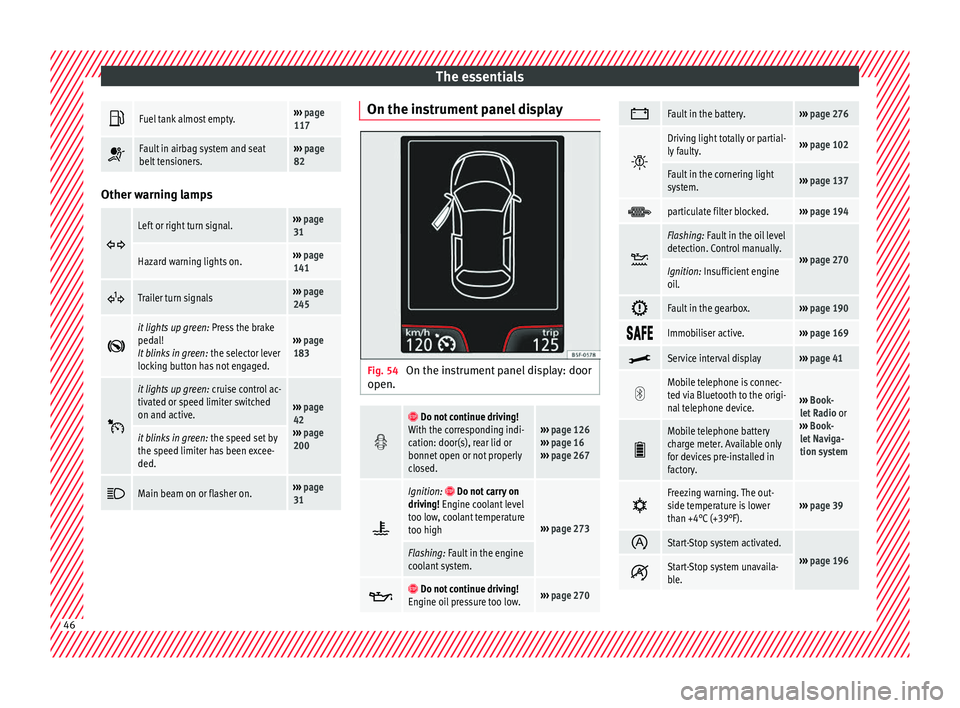
Fuel tank almost empty.›››
page
117
Fault in airbag system and seat
belt tensioners.›››
page
82 Other warning lamps
Left or right turn signal.›››
page
31
Hazard warning lights on.››› page
141
Trailer turn signals›››
page
245
it lights up green:
Press the brake
pedal!
It blinks in green: the selector lever
locking button has not engaged.››› page
183
it lights up green:
cruise control ac-
tivated or speed limiter switched
on and active.
››› page
42
››› page
200
it blinks in green: the speed set by
the speed limiter has been excee-
ded.
Main beam on or flasher on.›››
page
31 On the instrument panel display
Fig. 54
On the instrument panel display: door
open.
Do not continue driving!
With the corresponding indi-
cation: door(s), rear lid or
bonnet open or not properly
closed.››› page 126
››› page 16
››› page 267
Ignition: Do not carry on
driving! Engine coolant level
too low, coolant temperature
too high
››› page 273
Flashing: Fault in the engine
coolant system.
Do not continue driving!
Engine oil pressure too low.››› page 270
Fault in the battery.›››
page 276
Driving light totally or partial-
ly faulty.›››
page 102
Fault in the cornering light
system.››› page 137
particulate filter blocked.›››
page 194
Flashing: Fault in the oil level
detection. Control manually.
›››
page 270Ignition: Insufficient engine
oil.
Fault in the gearbox.›››
page 190
Immobiliser active.›››
page 169
Service interval display›››
page 41
Mobile telephone is connec-
ted via Bluetooth to the origi-
nal telephone device.
›››
Book-
let Radio or
››› Book-
let Naviga-
tion system
Mobile telephone battery
charge meter. Available only
for devices pre-installed in
factory.
Freezing warning. The out-
side temperature is lower
than +4°C (+39°F).›››
page 39
Start-Stop system activated.
›››
page 196 Start-Stop system unavaila-
ble.
46
Page 61 of 308
The essentials
Identifying a blown fuse
A f u
se i
s blown if its metal strip is ruptured
››› Fig. 71.
● Point a lamp at the fuse to see if it has
blown.
T
o replace a fuse
● Remove the fuse.
● Replace the blown fuse by one with an
identica
l amperage rating (same colour and
markings) and identical size.
● Replace the cover again or close the fuse
box lid.
B
ulbs
Bul
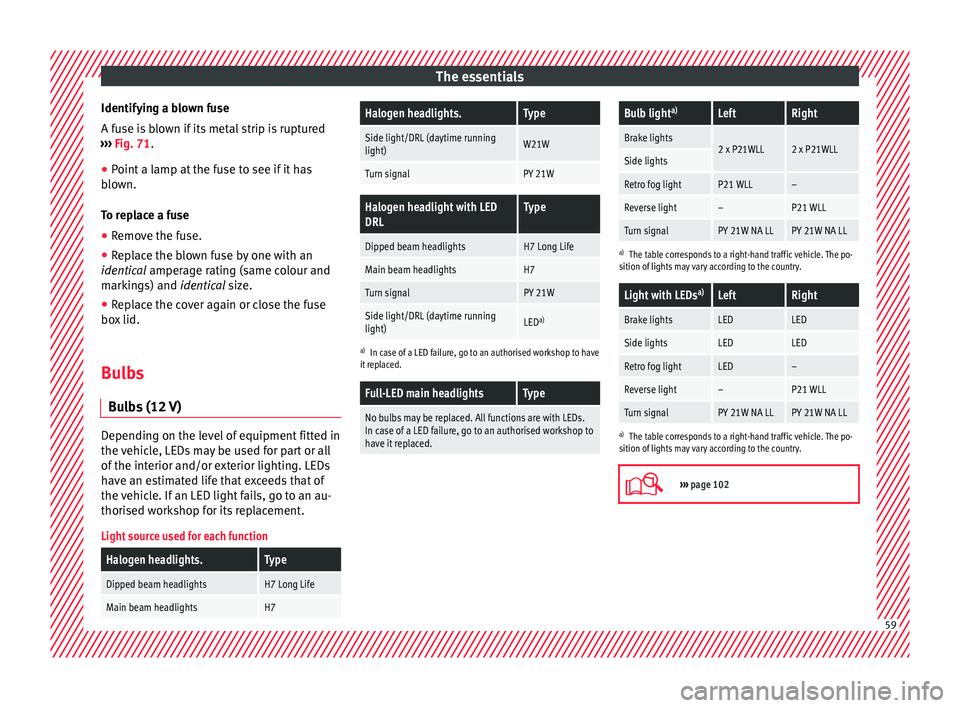
bs (12 V) Depending on the level of equipment fitted in
the
v
ehic
le, LEDs may be used for part or all
of the interior and/or exterior lighting. LEDs
have an estimated life that exceeds that of
the vehicle. If an LED light fails, go to an au-
thorised workshop for its replacement.
Light source used for each function
Halogen headlights.Type
Dipped beam headlightsH7 Long Life
Main beam headlightsH7
Halogen headlights.Type
Side light/DRL (daytime running
light)W21W
Turn signalPY 21W
Halogen headlight with LED
DRLType
Dipped beam headlightsH7 Long Life
Main beam headlightsH7
Turn signalPY 21W
Side light/DRL (daytime running
light)LED a)
a)
In case of a LED failure, go to an authorised workshop to have
it replaced.
Full-LED main headlightsType
No bulbs may be replaced. All functions are with LEDs.
In case of a LED failure, go to an authorised workshop to
have it replaced.
Bulb light a)LeftRight
Brake lights2 x P21WLL2 x P21WLLSide lights
Retro fog lightP21 WLL–
Reverse light–P21 WLL
Turn signalPY 21W NA LLPY 21W NA LL
a)
The table corresponds to a right-hand traffic vehicle. The po-
sition of lights may vary according to the country.
Light with LEDs a)LeftRight
Brake lightsLEDLED
Side lightsLEDLED
Retro fog lightLED–
Reverse light–P21 WLL
Turn signalPY 21W NA LLPY 21W NA LL
a)
The table corresponds to a right-hand traffic vehicle. The po-
sition of lights may vary according to the country.
››› page 102 59
Page 104 of 308
EmergenciesNo.Consumer/Amps
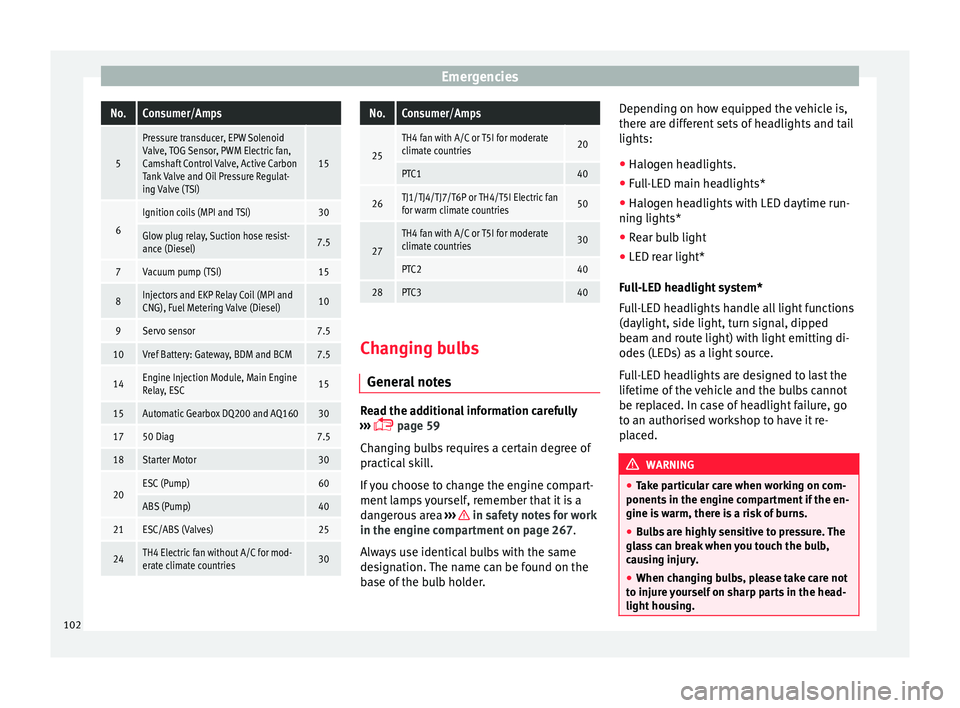
5
Pressure transducer, EPW Solenoid
Valve, TOG Sensor, PWM Electric fan,
Camshaft Control Valve, Active Carbon
Tank Valve and Oil Pressure Regulat-
ing Valve (TSI)
15
6
Ignition coils (MPI and TSI)30
Glow plug relay, Suction hose resist-
ance (Diesel)7.5
7Vacuum pump (TSI)15
8Injectors and EKP Relay Coil (MPI and
CNG), Fuel Metering Valve (Diesel)10
9Servo sensor7.5
10Vref Battery: Gateway, BDM and BCM7.5
14Engine Injection Module, Main Engine
Relay, ESC15
15Automatic Gearbox DQ200 and AQ16030
1750 Diag7.5
18Starter Motor30
20ESC (Pump)60
ABS (Pump)40
21ESC/ABS (Valves)25
24TH4 Electric fan without A/C for mod-
erate climate countries30
No.Consumer/Amps
25
TH4 fan with A/C or T5I for moderate
climate countries20
PTC140
26TJ1/TJ4/TJ7/T6P or TH4/T5I Electric fan
for warm climate countries50
27
TH4 fan with A/C or T5I for moderate
climate countries30
PTC240
28PTC340
Changing bulbs
Gener a
l
notes Read the additional information carefully
› ›
›
page 59
Changing bulbs requires a certain degree of
practical skill.
If you choose to change the engine compart-
ment lamps yourself, remember that it is a
dangerous area ››› in safety notes for work
in the en gine c
omp
artment on page 267.
Always use identical bulbs with the same
designation. The name can be found on the
base of the bulb holder. Depending on how equipped the vehicle is,
there are diff
erent sets of headlights and tail
lights:
● Halogen headlights.
● Full-LED main headlights*
● Halogen headlights with LED daytime run-
ning lights*
● Re
ar bulb light
● LED rear light*
Ful
l-LED headlight system*
Full-LED headlights handle all light functions
(daylight, side light, turn signal, dipped
beam and route light) with light emitting di-
odes (LEDs) as a light source.
Full-LED headlights are designed to last the
lifetime of the vehicle and the bulbs cannot
be replaced. In case of headlight failure, go
to an authorised workshop to have it re-
placed. WARNING
● Tak e p
articular care when working on com-
ponents in the engine compartment if the en-
gine is warm, there is a risk of burns.
● Bulbs are highly sensitive to pressure. The
glas
s can break when you touch the bulb,
causing injury.
● When changing bulbs, please take care not
to injure
yourself on sharp parts in the head-
light housing. 102
Page 139 of 308
Lights and visibility
– Loc
k
the driver's door with the key and hold
the key in the
Programming convenience opening in the
Easy Connect*
– Select: button > SETTINGS
fu
nction
b
utton > Opening and closing > Elec-
tric windows > Convenience open-
ing , to choose between all the windows
(All ), only the driver’s window ( Driver)
or none (Deactivated ).WARNING
● Never c lo
se the windows without due care
or proper control. There is a risk of suffering
injury.
● For safety reasons, you should only use the
remote c
ontrol open and close functions with-
in about 2 metres of the vehicle. To avoid in-
juries, always keep an eye on the windows
when pressing the button to close them. The
windows stop moving as soon as the button
is released. One-touch opening and closing*
One-touch opening and closing means you
do not
h
av
e to hold down the button.
Buttons ›››
Fig. 143 1 ,
2 ,
3 and
4 have
tw o po
s
itions for opening windows and two for closing them. This makes it easier to open
and close w
indows to the desired position.
One-touch closing
– Pull up the window button briefly up to the
second pos
ition. The window closes fully.
One-touch opening
– Push down the window button briefly up to
the second pos
ition. The window opens
fully.
Resetting one-touch opening and closing
– The automatic open and close function will
not work
if the battery has been temporari-
ly disconnected. The function can be re-
stored as follows:
– Close the window as far as it will go by lift-
ing and hol
ding the electric window switch.
– Release the switch and then lift it again for
1 second. Thi
s will re-enable the automatic
function.
If you push (or pull) a button to the first
stage, the window will open (or close) until
you release the button. If you push or lift the
button briefly to the second stage, the win-
dow will open (one-touch opening) or close
(one-touch closing) automatically. If you op-
erate the button while the window is opening
or closing, it stops at this position. Lights and visibility
Light s
C ontr
ol lamps
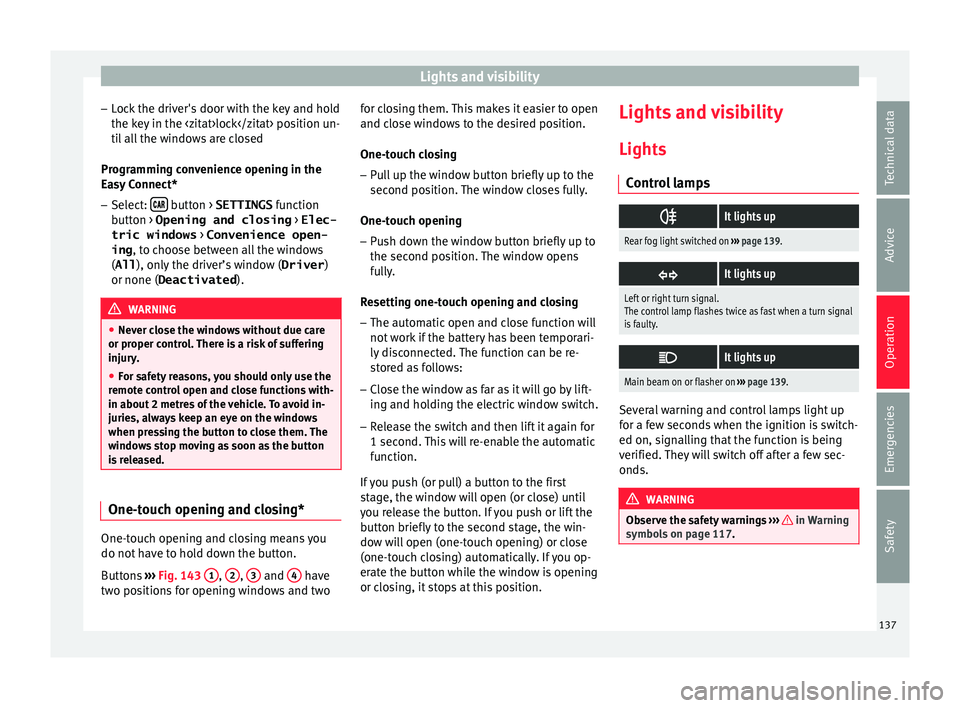
It lights up
Rear fog light switched on
››› page 139.
It lights up
Left or right turn signal.
The control lamp flashes twice as fast when a turn signal
is faulty.
It lights up
Main beam on or flasher on
››› page 139. Several warning and control lamps light up
f
or a f
ew sec
onds when the ignition is switch-
ed on, signalling that the function is being
verified. They will switch off after a few sec-
onds. WARNING
Observe the safety warnings ›››
in Warning
symbol s on p
age 117. 137
Technical data
Advice
Operation
Emergencies
Safety
Page 140 of 308
Operation
Switching lights on and off Read the additional information carefully
›› ›
page 30
The driver is personally responsible for the
correct use and adjustment of the lights in all
situations. Note
● The le g
al requirements regarding the use of
vehicle lights in each country must be ob-
served.
● The dipped beam headlights will only work
with the ignition on. The s
ide lights come on
automatically when the ignition is turned off.
● If the lights are left on after the key has
been taken out
of the ignition lock, an audi-
ble warning sounds while the driver door re-
mains open. This is a reminder to switch the
lights off.
● The rear fog light can dazzle drivers behind
you. Y
ou should use the rear fog light only
when visibility is very poor. For this reason, if
you exceed approximately 60 km/h (38 mph),
the instrument panel will display the follow-
ing warming: Switch off the fog light!
● The use of the lighting described here is
subj
ect to the relevant statutory require-
ments. Automatic lighting*
Activation
– Rotate the switch to the po
sition, this
indication will light up.
Deactivation
– Turn the light switch to .
Automatic
lighting
If automatic headlight control is switched on,
dipped beam headlights are automatically
switched on by a photosensor if you drive in-
to a tunnel, for example. WARNING
● Ev en if
the automatic headlight control is
switched on, the dipped beam headlights will
not be switched on with fog. Therefore, the
dipped beam must be switched on manually. Note
● For v
ehicles with the automatic headlight
system, when the key is removed from the ig-
nition, the audible warning will only sound if
the light knob is in position .
● The use of the lighting described here is
subj
ect to the relevant statutory require-
ments. ●
Do not p ut
stickers on the windscreen in
front of the sensor. This may cause disrup-
tions or faults in the automatic lighting sys-
tem.
● The rain sensor switches on the dipped
beam hea
dlights when the windscreen wipers
have been operating continuously for a few
seconds and it switches the lights off when
the continuous or interval wipe is switched
off for some minutes. Daytime running lights
The daytime running lights consist of individ-
ual
lights, int
e
grated in the front headlights.
By connecting the daytime running lights,
these lights are switched on 1)
››› .
The d a
ytime ru
nning lights switch on every
time the ignition is switched on, if the switch
is in positions or , according to the level
of exterior lighting.
When the light switch is in position , a
light sensor automatically switches dipped
beam on and off (including the control and
instrument lighting) or the daytime running
lights depending on the level of exterior
lighting. 1)
On vehicles equipped with rear LED lights, the rear
side light i
s switched on as well.
138
Page 142 of 308
Operation
are already on. The warning lamp
then
come s
on in the instrument panel.
● The headlight flasher come
s on for as long
as you pull the lever – even if no other lights
are switched on. The warning lamp then
comes on in the instrument panel.
● When the parking ligh
ts are switched on,
the headlight and the tail light on the corre-
sponding side of the vehicle light up. The
parking lights will only work with the ignition
off. If said light is on, an audible warning will
be emitted while the driver door is open.
● If the turn signal lever is left on after the
key h
as been taken out of the ignition lock,
an acoustic signal sounds when the driver
door is opened. This is intended as a remind-
er to switch off the turn signal, unless you
wish to leave the parking light on. Coming Home/Leaving Home Func-
tion*
Fig. 145
Related video The Leaving Home function is controlled with
a phot
o
sen
sor. If the Coming Home or Leaving Home func-
tion is c
onnected, the front side and dipped
lights, the tail lights and the number plate
light will light up to provide assistance.
Coming home function
The Coming Home function is activated by
switching off the ignition. When the driver
door is opened, the Coming Home lighting
comes on.
The Coming Home lighting switches off in the
following cases:
● If, 30 seconds after being connected, any
doors or the r
ear lid remain open.
● If the light switch is turned to position .
● If the ignition is switched on.
Automatic
Leaving Home function
The Leaving Home function is activated when
the vehicle is unlocked if:
● the light control is in position and
● the photo
sensor detects “darkness”.
The Leav
ing Home lighting switches off in the
following cases:
● If the time period for the delay in switching
off the hea
dlights has ended
● If the vehicle is locked again.
● If the light switch is turned to position .●
If the ignition is
switched on. Note
● To activ at
e the Coming/Leaving home func-
tion, the rotary light switch must be in posi-
tion and the light sensor must detect
darkness. Fog lights with cornering function*
This is an additional light source to dipped
beam he
a
dlights to light up the road as a
bend is taken.
The cornering light operates with the lights
switched on and when driving at less than
40 Km/h (25 mph). Ignition occurs by turning
the steering or connecting the turn signal.
Forward gear
● If the steering wheel is turned to the right,
or the right-h and t
urn signal operated, the
right-hand fog light turns on.
● If the steering wheel is turned to the left, or
the left
-hand turn signal operated, the left-
hand fog light turns on.
In reverse, both fog lights turn on. Note
When the fog lamps are on, the cornering
fu nction i
s activated and both headlights are
continuously on. 140
Page 143 of 308
Lights and visibility
Motorway light* The motorway light is available on vehicles
equipped w
ith f
ull-LED lights.
The function is connected/disconnected via
the corresponding Easy Connect system
menu.
● Activation: when going abo
ve 110 km/h
(68 mph) for more than 10 seconds, the dip-
ped beam raises slightly to increase the driv-
er's visibility distance.
● Deactivation: when reduc in
g the speed of
the car below 100 km/h (62 mph), the dip-
ped beam returns to its normal position.
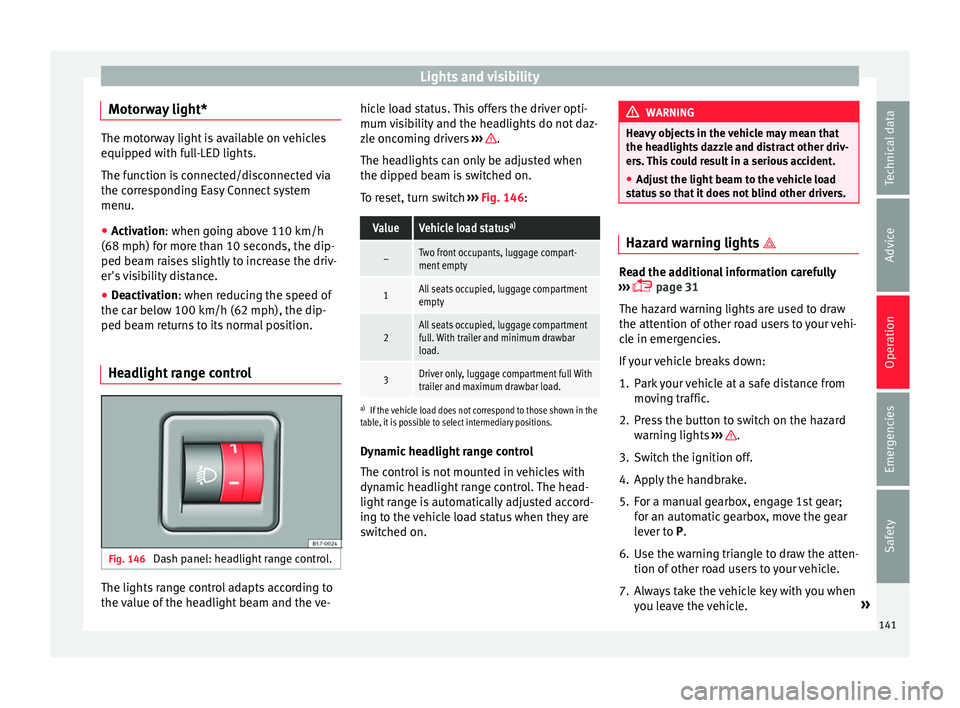
Headlight range control Fig. 146
Dash panel: headlight range control. The lights range control adapts according to
the
v
alue of
the headlight beam and the ve- hicle load status. This offers the driver opti-
mum vi
sibility and the headlights do not daz-
zle oncoming drivers ››› .
The he a
dlights
can only be adjusted when
the dipped beam is switched on.
To reset, turn switch ››› Fig. 146:
ValueVehicle load status a)
–Two front occupants, luggage compart-
ment empty
1All seats occupied, luggage compartment
empty
2All seats occupied, luggage compartment
full. With trailer and minimum drawbar
load.
3Driver only, luggage compartment full With
trailer and maximum drawbar load.
a)
If the vehicle load does not correspond to those shown in the
table, it is possible to select intermediary positions.
Dynamic headlight range control
The control is not mounted in vehicles with
dynamic headlight range control. The head-
light range is automatically adjusted accord-
ing to the vehicle load status when they are
switched on. WARNING
Heavy objects in the vehicle may mean that
the hea dlight
s dazzle and distract other driv-
ers. This could result in a serious accident.
● Adjust the light beam to the vehicle load
stat
us so that it does not blind other drivers. Hazard warning lights
Read the additional information carefully
›› ›
page 31
The hazard warning lights are used to draw
the attention of other road users to your vehi-
cle in emergencies.
If your vehicle breaks down:
1. Park your vehicle at a safe distance from mov in
g traffic.
2. Press the button to switch on the hazard warning lights
››› .
3. Switch the ignition off.
4. Apply the handbrake.
5. For a manual gearbox, engage 1st gear; for an aut
om
atic gearbox, move the gear
lever to P.
6. Use the warning triangle to draw the atten- tion of other ro
ad users to your vehicle.
7. Always take the vehicle key with you when you le
ave the vehicle. »
141
Technical data
Advice
Operation
Emergencies
Safety
Page 144 of 308
Operation
All turn signals flash simultaneously when
the h az
ar
d warning lights are switched on.
The two turn signal turn signal lamps
and the turn signal lamp in the switch will
flash at the same time. The simultaneous
hazard warning lights also work when the ig-
nition is switched off. WARNING
● The risk of
an accident increases if your ve-
hicle breaks down. Always use the hazard
warning lights and a warning triangle to draw
the attention of other road users to your sta-
tionary vehicle.
● Due to the high temperatures that the cata-
lytic con
verter can reach, never park in an
area where the catalytic converter could come
into contact with highly inflammable materi-
als, for example dry grass or spilt petrol. This
could start a fire. Note
● The batt er
y will run down if the hazard
warning lights are left on for a long time,
even if the ignition is switched off.
● The use of the hazard warning lights de-
scribed her
e is subject to the relevant statu-
tory requirements. Interior lights
R el
at
ed video Fig. 147
Convenience Lighting of instruments and controls
The lighting level of instruments, controls
and di
s
p
lays can be adjusted through the
Easy Connect system using the button
and the S
ET
TINGS function button
› ›
›
page 33.
The instrument lighting (some dials and nee-
dles), the centre console lighting and the
lighting of the displays are regulated by a
photodiode incorporated in the instrument
panel.
The instrument lighting (needles) is switched
on when the ignition is on and the light is
off. The instrument lighting is dimmed auto-
matically as the daylight starts to fade. It
goes out completely when ambient light is
very low. This function is intended to remind
the driver to switch on the dipped beam headlights in good time when light condi-
tions bec
ome poor.
Interior and reading lights Read the additional information carefully
›› ›
page 32
Luggage compartment lighting
The light is activated when the rear lid is
open, even when the ignition and lights are
turned off. For this reason, ensure that the
rear lid is always closed.
Ambient light*
The ambient light lights up the area of the
centre console and the footwell area and, de-
pending on the version, the front door panels
as well.
It will be switched on at full brightness when
the doors are opened and the lights will be
dimmed during driving, when the light selec-
tor is in the , or position.
The brightness of the ambient light* can be
adjusted through the Easy Connect menu, as
can colour, in versions with lighting on the
front door panel (see Adjusting Lights >
Interior lighting ›››
page 33).
142
Page 174 of 308
Operation
Opening the driver's door when ex
itin g the
vehicle activates the electronic lock on the
steering column if the ignition is disabled.
Switching the ignition on/off manually
Briefly push the starter button without touch-
ing the brake or clutch pedal ››› .
F or
v
ehicles with both manual and automatic
transmission, the starter button text START ENGINE STOP flashes like a heartbeat
when the sy s
t
em is preset for switching the
ignition on and off.
Automatic ignition switch-off
If the driver leaves the vehicle, taking the ve-
hicle key with them but leaving the ignition
on, the ignition is not switched off automati-
cally. The ignition is switched off automati-
cally by pressing the lock button on the re-
mote control or manually by pressing the
sensor surface on the door lever ››› Fig. 141
Emergency starting function
If no valid key is detected inside the vehicle,
an emergency start-up will be required. The
relevant message will appear in the dash
panel display. This may happen when, for ex-
ample, the battery of the vehicle key button
is very low or flat:
● Immediately after pushing the starter but-
ton, k eep the
vehicle key next to the right trim of the steering column
›››
Fig. 175, as
close as possible to the Kessy logo.
● The ignition connects and the engine starts
automatic
ally.
Emergency disconnection
If the engine does not switch off after briefly
pressing the starter button, an emergency
disconnect will be required:
● Press the starter button twice within 3 sec-
onds or pr
ess it once for more than 1 sec-
ond ››› .
● The engine turns off automatically.
En gine r
e
start feature
If no valid key is detected inside the vehicle
after the engine stops, you will only have 5
seconds to restart it. A warning will display
on the dash panel screen.
After this interval, it will not be possible to
start the engine without a valid key inside
the vehicle.
Automatic deactivation of the ignition on ve-
hicles with the Start-Stop system
The ignition is switched off automatically
when the vehicle is stopped and the auto-
matic engine shutdown is active, if:
● The driver's seat belt is not fastened,
● the driver does not step on any pedal, ●
the driver door is
opened.
After automatically turning off the ignition, if
the dipped beam is on, the side light re-
mains on for approx. 30 minutes (if the bat-
tery is sufficiently charged). If the driver locks
the vehicle or manually turns off the light, the
side light goes out. WARNING
Any accidental movement of the vehicle could
re s
ult in serious injury.
● When switching on the ignition, do not
pre
ss the brake or clutch pedal, otherwise
the engine could start immediately. WARNING
If vehicle keys are used negligently or with-
out due c ar
e, this may cause accidents and
serious injury.
● Never leave any key inside the vehicle
when exitin
g. Otherwise, a child or unauthor-
ised person could lock the vehicle, start the
engine or connect the ignition and, in this
way, operate electronic equipment (e.g. the
windows). Note
● Bef or
e leaving the vehicle, always discon-
nect the ignition manually and, if appropri-
ate, take into account the instructions on the
screen of the dash panel. 172
Page 197 of 308
Driving
Engine pre-heating/fault system* The warning lamp lights up to show that the
glow p
lug
s are preheating the diesel engine.
The control lamp lights up
If the control lamp lights up when the en-
gine is started it means that the glow plugs
are preheating. The engine can be started
straight away when the lamp switches off.
Control lamp flashes
If a fault develops in the engine management
system while you are driving, the glow plug
system lamp will flash . Take the vehicle to
a specialised workshop as soon as possible
and have the engine checked.
Driving tips Drivin g abr
oadTo drive abroad, the following must be taken
int
o c
on
sideration:
● For vehicles fitted with a catalytic converter
ensur
e that unleaded petrol is available for
the journey. See the chapter “Refuelling”. Au-
tomobile organisations will have information
about service station networks selling unlea-
ded fuel. ●
In some countrie
s, it is possible that your
car model is not sold, and therefore some
spare parts are not available or the technical
services may only be able to carry out limited
repairs.
SEAT importers and distributors will gladly
provide information about the technical prep-
aration that your vehicle requires and also
about necessary maintenance and repair
possibilities.
Adhesive strips for headlights
In countries where vehicles drive on the other
side of the road to your home country, the
asymmetric dipped beam may dazzle drivers
of oncoming vehicles.
To prevent dazzling, you must apply stickers
to certain parts of the headlight lenses. Fur-
ther information is available at any Technical
Service.
Driving on flooded roads To prevent damage to the vehicle when driv-
in
g thr
ough w
ater, for example, along a floo-
ded road, please observe the following:
● The water should never come above the
lower edg
e of the bodywork.
● Drive at pedestrian speed. WARNING
After driving through water, mud, sludge,
etc ., the br
aking effect can be delayed slight-
ly due to moisture build-up on the discs and
brake pads. Applying the brakes carefully
several times will remove the moisture and
restore the full braking effect. CAUTION
● Drivin g thr
ough flooded areas may severely
damage vehicle components such as the en-
gine, transmission, running gear or electrical
system.
● Whenever driving through water, the Start-
Stop sys
tem* must be switched off
››› page 196. Note
● Check the depth of
the water before enter-
ing the flooded zone.
● Do not stop in the water, drive in reverse, or
stop the en
gine in any situation.
● Note that vehicles travelling in the opposite
direction ma
y splash water that could exceed
the maximum permitted water height for your
vehicle.
● Avoid driving through salt water (corro-
sion). 195
Technical data
Advice
Operation
Emergencies
Safety